
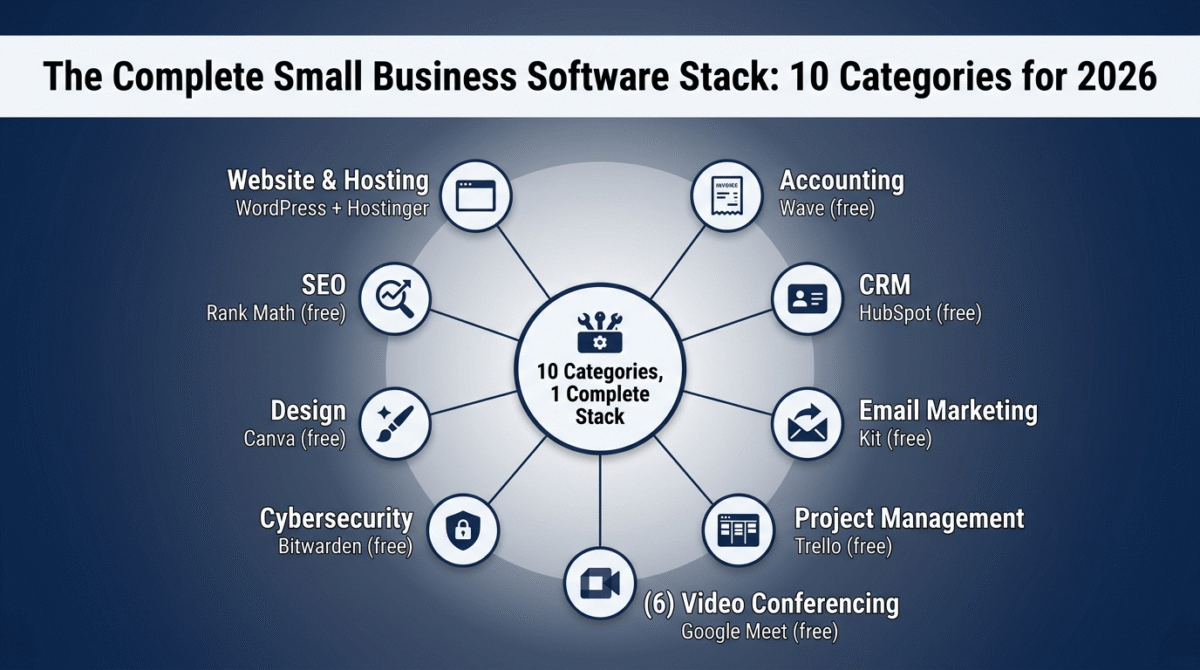
The average small business in 2026 runs between five and twelve software subscriptions simultaneously. Many of them are the wrong tools, either enterprise platforms bought because of a persuasive sales call and used at 10% of their capability, or legacy subscriptions nobody has cancelled because switching costs feel higher than the monthly fee.
The result is a stack that costs too much, integrates poorly, and slows down the people who are supposed to be using it to move faster.
This guide does something different. Rather than listing every tool that exists in each category, it identifies the single best recommendation for each function, from free tiers that cover the first stage of Best Tools for Small Business growth to paid options that justify their cost through measurable time savings and revenue impact. Every tool in this guide has been reviewed in detail elsewhere on RateTheTool.com and tested across real workflows.
The stack is organised by the ten core software categories that every small business needs to get right, in the order you should think about them.
Table of Contents
How We Evaluated Tools for This Guide
Every tool recommendation in this guide meets four criteria:
- It solves a real problem for businesses with 1–50 employees, not enterprise teams with dedicated IT departments
- The free tier is honestly assessed, we note when a free plan is genuinely useful and when it is a crippled lead magnet designed to force an upgrade
- Pricing traps are called out, promotional rates that double at renewal, per-seat costs that explode with team growth, and feature gates that push entry-plan buyers toward higher tiers faster than expected
- Free alternatives are included where they are genuinely competitive, we recommend Wave over QuickBooks for solo businesses earning under $50K annually not because Wave pays a commission, but because it is the right tool for that use case
Why Getting Your Software Stack Right Matters
Small businesses that build a coherent, well-integrated software stack save an estimated 10–15 hours per week compared to teams managing the same functions manually or across disconnected tools. That time compounds directly into revenue: a freelancer recovering 10 hours per week at a $75 billing rate gains $3,000/month in additional billable capacity from better tooling alone.
Beyond time, the right stack reduces errors (manual data entry between disconnected systems is the primary source of business data errors), improves customer experience (faster response, better tracking, fewer dropped balls), and creates the operational foundation that makes growth scalable rather than chaotic.
The wrong stack creates the opposite: subscription creep where you pay for tools you barely use, integration friction where information lives in five places and is current in none of them, and onboarding complexity where every new team member takes weeks to learn a system that should take hours.
Category 1: Website and Hosting
The foundation of every small business’s digital presence.
Best overall: WordPress + Hostinger
WordPress powers 43% of all websites on the internet. It is free, open-source, and has an ecosystem of themes, plugins, and developer support that no proprietary website builder matches. Pair it with Hostinger Premium hosting (LiteSpeed servers, performance-optimised for WordPress, pricing starting at approximately $3/month with annual billing) and you have a professional website foundation that scales from a one-person freelance business to a 50-person company without switching platforms.
The essential WordPress plugin stack for a business website: Rank Math SEO (free, handles all on-page SEO), Wordfence (free security tier), LiteSpeed Cache (free, dramatically improves page speed), and WPForms Lite (free contact forms).
Free alternative: WordPress.com (free plan available, but limited customisation and no plugin access, the self-hosted WordPress.org on Hostinger is strongly preferable for any serious business use).
Budget builder alternative: Wix or Squarespace for businesses that want a visual drag-and-drop builder and are not concerned about long-term scalability. Wix starts at $17/month; Squarespace at $16/month. Both are reviewed in detail in the Best Website Builder comparison on this site.
Full review: Best Web Hosting in 2026 | Best Website Builder in 2026
Category 2: Accounting and Invoicing
How you track money coming in, money going out, and what the business actually owes.
Best free option: Wave
Wave is a completely free accounting platform, unlimited invoicing, expense tracking, bank and credit card connections, and financial reporting at zero cost. For freelancers, solo business owners, and service businesses earning under $100K annually, Wave covers every accounting need without a paid upgrade. Payroll is a paid add-on ($20–40/month depending on state/region) if needed, but the core accounting functions are permanently free.
Best paid option: FreshBooks ($19/month Lite, annual billing)
FreshBooks is the most polished invoicing and accounting platform for service businesses and freelancers who bill by the hour or project. Time tracking, project profitability reporting, automatic payment reminders, and client retainer management are built in. For businesses where client invoicing is the core revenue activity, FreshBooks’ purpose-built workflows save more time than Wave’s more general-purpose interface.
Best for growing businesses: QuickBooks ($30/month Simple Start)
QuickBooks handles the accounting complexity that Wave and FreshBooks cannot: payroll, inventory, multiple sales channels, and multi-user accounting access. For businesses with employees, physical inventory, or complex tax situations, QuickBooks remains the accountant-compatible standard.
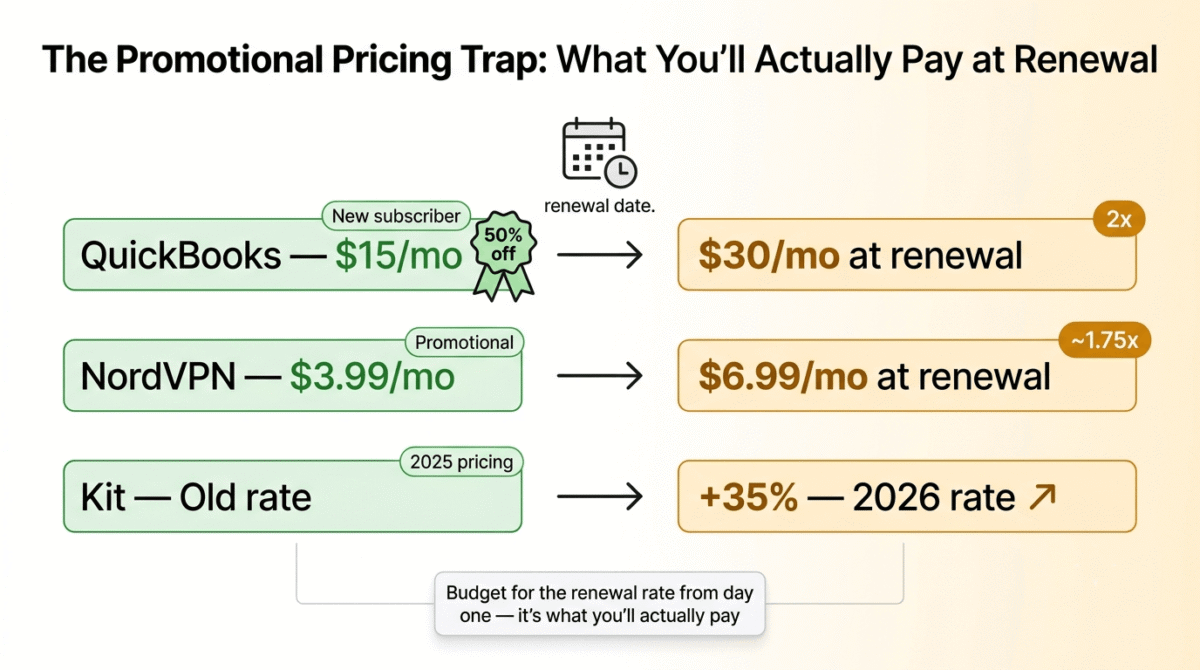
Pricing trap warning: QuickBooks promotional pricing for new subscribers is typically 50% off for the first three months. The renewal rate for Simple Start is $30/month, budget for that figure, not the introductory rate.
Full review: Best Accounting Software in 2026 | Best Invoicing Software for Freelancers in 2026
Category 3: CRM and Customer Management
How you track leads, manage relationships, and prevent opportunities from falling through the cracks.
Best free option: HubSpot CRM (free forever)
HubSpot’s free CRM is the most capable permanently free CRM in the market, unlimited contacts, deal pipeline management, email tracking, meeting scheduling, live chat, and basic reporting at zero cost. For a small business managing under 200 active contacts with a single sales pipeline, the free CRM covers everything without requiring an upgrade.
The catch: HubSpot’s marketing, sales, and service hubs, the tools that add email automation, advanced reporting, and team management, are paid products that start at $20/month per seat and scale aggressively. The free CRM is genuinely useful on its own; the paid hubs are enterprise-level investments.
Best value paid option: Zoho CRM ($20/user/month Standard)
Zoho CRM offers AI-powered lead scoring, workflow automation, email integration, and sales forecasting at a price point that HubSpot cannot match without a significant upgrade. For small sales teams of 2–10 people who need automation and pipeline visibility beyond what HubSpot’s free tier provides, Zoho Standard is the best value option in the category.
Best for sales-led businesses: Pipedrive ($14.90/user/month Essential, annual)
Pipedrive is purpose-built for sales pipeline management, visual deal tracking, activity reminders, and email integration that keeps sales reps focused on moving deals forward rather than maintaining a database. Less comprehensive than HubSpot or Zoho across marketing and support, but the most focused and easiest-to-adopt CRM for teams whose primary need is pipeline visibility.
Full review: Best CRM Software for Small Business in 2026 | Best CRM for Small Business in 2026
Category 4: Email Marketing and Automation
How you stay in contact with prospects and customers, nurture leads, and drive repeat revenue.
Best free option: Kit (formerly ConvertKit), free up to 10,000 subscribers
Kit’s free Newsletter plan covers 10,000 subscribers with unlimited email sends, unlimited landing pages, and one automation sequence at zero cost. For a small business building an email list from scratch, this is the most generous free tier in the market, legitimately useful rather than a restricted trial.
Best for growing businesses: ActiveCampaign Plus ($49/month, 1,000 contacts)
When your email marketing needs evolve beyond basic newsletters into behaviour-triggered automation, lead scoring, and CRM integration, ActiveCampaign Plus is the most capable tool at the small business price point. The automation depth, nested conditional logic, site tracking, goal steps, is genuinely ahead of every competitor at comparable pricing.
Best all-in-one option: GetResponse Marketer ($59/month)
For small businesses that also run webinars, sell online courses, or need a conversion funnel builder alongside email marketing, GetResponse bundles more infrastructure into one subscription than any alternative, landing pages, email automation, webinar hosting, and an AI course builder.
Pricing trap warning: Kit raised prices approximately 35% in September 2025. Older reviews still show the previous pricing. Verify current rates at kit.com before committing. GetResponse and ActiveCampaign both advertise entry prices that exclude key automation features, read the plan feature comparison carefully before selecting a tier.
Full review: Best Email Marketing Software in 2026 | Best Email Automation Tools in 2026 | Best Email Marketing Tools for Small Business in 2026
Category 5: Project Management and Team Collaboration
How you track what needs doing, who is doing it, and whether it is on schedule.
Best free option: Trello (free, unlimited cards)
Trello’s free plan offers unlimited cards across 10 boards, more than sufficient for a small team managing straightforward project workflows. The kanban board interface requires no training and gets new team members productive within minutes of first use.
Best value paid option: ClickUp ($7/user/month Unlimited, annual)
ClickUp covers project management, task management, docs, goals, time tracking, and workload management in a single subscription that costs less than most competitors charge for project management alone. For teams that previously used separate tools for task tracking, documentation, and time reporting, ClickUp consolidates the stack at a price that easily justifies the consolidation.
Best for remote teams: Monday.com ($9/user/month Basic, annual, 3-seat minimum)
Monday.com’s visual interface, automation rules, and integration depth make it the strongest choice for remote teams that need flexible workflow customisation without a developer. The 3-seat minimum means the effective entry price is $27/month rather than the advertised $9/user/month, relevant for solo operators who would otherwise default to the individual tier.
Full review: Best Project Management Software in 2026 | Best Project Management Tools for Remote Teams in 2026 | Best Project Management for Freelancers in 2026
Category 6: Communication and Video Conferencing
How your team communicates internally and how you meet with clients and partners.
Best free option: Google Meet (free, up to 60-minute meetings)
Google Meet is free for Google account holders with no meeting duration limit for 1-on-1 calls and 60-minute limits for group meetings. For small businesses that primarily hold internal meetings and occasional client calls, the free tier is sufficient.
Best paid option: Zoom (Pro, $13.32/user/month annual)
Zoom remains the most universally recognised and most reliable video conferencing platform for external client-facing meetings. The Pro plan removes the 40-minute group meeting limit and adds cloud recording, making it the minimum functional tier for businesses using video calls professionally.
Best for team messaging: Slack (free tier, then $7.25/user/month Pro)
Slack’s free plan limits message history to 90 days and allows only one integration per app, sufficient for testing but restrictive for active daily use. Pro at $7.25/user/month unlocks full message history and unlimited integrations. For teams communicating primarily internally via text and quick voice messages, Slack Pro is the most adopted team messaging platform in the small business category.
Full review: Best Video Conferencing Software in 2026 | Best Zoom Alternatives in 2026
Category 7: Cybersecurity
How you protect your business data, accounts, and network from threats that have become significantly more sophisticated in 2026.
Highest priority: Password manager
Every employee in your business should use a password manager. Credential theft from weak or reused passwords is the leading cause of small business data breaches. The best option for business use is 1Password Teams ($19.95/month for up to 10 users), centrally managed, IT-auditable, and deployable across the entire team. For solo operators, Bitwarden remains a fully capable free option.
Second priority: VPN for remote work
Any team member working from public Wi-Fi, co-working spaces, or home networks without a business VPN is operating with unnecessary security exposure. NordVPN Teams ($7/user/month) covers the remote workforce. For individual users, NordVPN’s personal plan at $3.99/month (promotional, renewal approximately $6.99/month) is the best value consumer VPN.
Third priority: Antivirus and endpoint protection
For Windows-based teams, Bitdefender GravityZone Business Security ($77.69/year for 5 devices) is the most capable small business endpoint protection platform. For Mac-heavy teams, macOS’s built-in security combined with Malwarebytes Premium ($3.33/month) covers most threat scenarios without a dedicated enterprise endpoint solution.
Pricing trap warning: NordVPN’s promotional entry price is typically 60–70% off for new subscribers. The renewal rate after the initial term is approximately $6.99–8.29/month depending on the plan. Budget for the renewal rate, not the promotional rate.
Full review: Best Password Managers in 2026 | Best Business Password Managers in 2026 | Best VPN for Beginners in 2026 | Best Antivirus Software in 2026 | Best Cybersecurity Tools in 2026
Category 8: Design and Content Creation
How you create visual assets, social media graphics, presentations, marketing materials, and brand imagery.
Best free option: Canva (free tier)
Canva’s free plan covers more than 90% of small business design needs: social media graphics, presentations, flyers, email headers, and basic video content from pre-built templates. The drag-and-drop interface requires no design training and produces professional-looking output from brand-consistent templates in under 30 minutes.
Best paid upgrade: Canva Pro ($15/month)
Canva Pro unlocks background removal, a brand kit with consistent fonts and colours across all designs, 100+ million premium assets, and the ability to resize designs instantly across multiple format specifications. For businesses creating content consistently across Instagram, LinkedIn, email, and print, the brand kit and resize functionality alone justify the cost.
Best for professional design: Figma ($12/user/month, Starter plan)
Figma is the industry standard for UI/UX design, wireframing, and collaborative brand asset creation. For small businesses with a design function, agencies, product companies, marketing teams, Figma’s collaboration features and component system are significantly more capable than Canva for professional-grade design workflows.
Full review: Best Design Tools in 2026 | Canva Pro vs Adobe Express in 2026 | Best Stock Photo Sites in 2026
Category 9: SEO and Online Visibility
How customers find your business through search engines, the single highest-ROI marketing channel for most small businesses in 2026.
Best free starting point: Google Search Console + Rank Math SEO
Google Search Console is free and shows exactly which keywords your website ranks for, which pages receive the most clicks, and which technical issues affect your search performance. It is the most important SEO tool available and costs nothing. Rank Math SEO (free WordPress plugin) handles on-page optimisation, schema markup, and sitemap generation, the complete technical SEO setup for a WordPress business site.
Best keyword research tool: Semrush Pro ($117.33/month annual)
For small businesses investing in SEO as a primary growth channel, Semrush Pro is the most complete tool in the market, keyword research, competitor analysis, site auditing, rank tracking, and a content marketing toolkit in one subscription. The 7-day free trial gives you full access before committing.
Best budget option: Ubersuggest ($29/month or $290 lifetime)
For businesses with smaller SEO budgets that need keyword research, site auditing, and rank tracking without a $100+/month subscription, Ubersuggest covers the core workflow at a fraction of the cost. The lifetime deal at $290 eliminates the monthly subscription entirely after ten months.
Full review: Best SEO Tools in 2026 | Best Keyword Research Tools in 2026 | Best Website Analytics Tools in 2026
Category 10: E-Commerce and Online Payments
How you sell products or services online and process payments from customers.
Best for selling physical products: Shopify ($39/month Basic)
Shopify is the most complete e-commerce platform for small businesses selling physical products online, product management, checkout, payment processing, shipping integrations, and an app ecosystem that extends to every function a retail business needs. The 2.9% + 30¢ transaction fee on Basic covers card processing without requiring a separate payment gateway.
Best for services and digital products: Stripe (no monthly fee, 2.9% + 30¢ per transaction)
For service businesses and digital product sellers, Stripe’s pay-per-transaction model eliminates the monthly subscription cost. Connect it to your WordPress site via WooCommerce (free) or a direct Stripe checkout integration, and you process payments professionally without committing to a monthly platform fee until transaction volume justifies it.
Best for online courses and memberships: Teachable ($39/month Basic)
Teachable handles course hosting, student management, payment processing, and affiliate program management in one platform built specifically for knowledge businesses. For small businesses whose primary product is education, courses, workshops, coaching programs, memberships, Teachable’s purpose-built workflows outperform the general-purpose e-commerce platforms for this use case.
Full review: Best E-Commerce Platform in 2026 | Best Online Course Platforms in 2026
The Complete Recommended Stack by Business Type
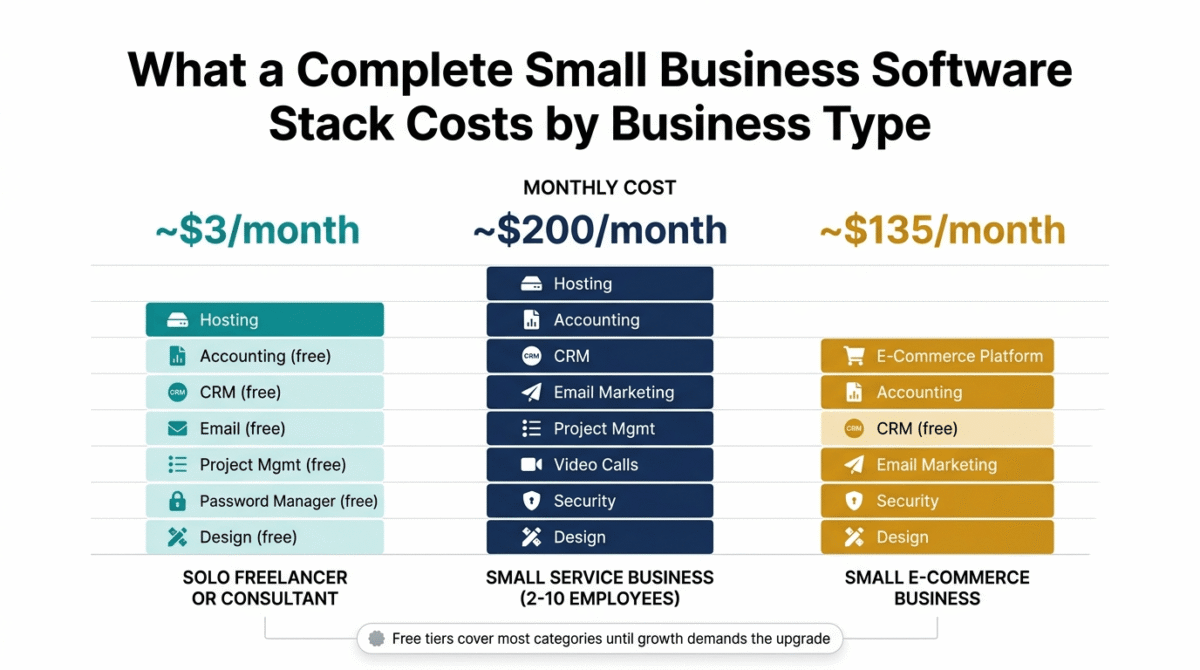
Not every small business needs every category. Here is the recommended starting stack for the three most common business profiles:
Solo freelancer or consultant:
- Website: WordPress + Hostinger ($3/month)
- Accounting: Wave (free)
- CRM: HubSpot free CRM (free)
- Email marketing: Kit free plan (free)
- Project management: Trello free (free)
- Password manager: Bitwarden free (free)
- Design: Canva free (free)
- Total monthly cost: ~$3/month
Small service business (2–10 employees):
- Website: WordPress + Hostinger ($10/month)
- Accounting: FreshBooks Lite ($19/month)
- CRM: Zoho CRM Standard ($20/user/month)
- Email marketing: ActiveCampaign Plus ($49/month, 1,000 contacts)
- Project management: ClickUp Unlimited ($7/user/month)
- Video conferencing: Zoom Pro ($13.32/user/month)
- Security: 1Password Teams + NordVPN ($27/month for 5 users)
- Design: Canva Pro ($15/month)
- Total monthly cost: ~$200/month for a 5-person team
Small e-commerce business:
- Website: Shopify Basic ($39/month, includes hosting)
- Accounting: QuickBooks Simple Start ($30/month)
- CRM: HubSpot CRM free + Shopify integration (free)
- Email marketing: Klaviyo ($45/month, Shopify-integrated)
- Security: Bitdefender GravityZone ($6.50/user/month)
- Design: Canva Pro ($15/month)
- Total monthly cost: ~$135/month
The Five Most Common Small Business Software Mistakes
Understanding what not to do is as valuable as knowing what to buy.
Buying enterprise tools at small business stage. Salesforce, Microsoft Dynamics, and SAP are built for companies with dedicated IT departments and implementation budgets. HubSpot CRM free, Zoho, and Pipedrive cover every CRM need a sub-50-person business has at a fraction of the cost and complexity.
Paying for features you never use. The average small business uses 42% of the features in their most-used software. Audit your current subscriptions quarterly: what did you actually use in the last 30 days? What can be replaced by a free tier that covers 80% of your usage?
Ignoring renewal rates. Promotional pricing for new subscribers is standard across the software industry. Mailchimp, Bluehost, and QuickBooks all offer introductory discounts that double or triple at renewal. Budget for the renewal rate from day one, it is the rate you will pay for every year after the first.
Building a disconnected stack. Five tools that don’t talk to each other create manual data transfer work that eliminates the time savings those tools were supposed to create. Prioritise tools with native integrations to your other core platforms, Zapier and Make can bridge gaps, but native integrations are always preferable.
Underinvesting in security. Cybersecurity tools are the most commonly skipped category for small businesses, and the most expensive to need retroactively. A single ransomware attack or credential breach costs a small business an average of $25,000 in recovery costs. A password manager, VPN, and antivirus combined cost less than $50/month for a 5-person team.
How Bloggers and Content Creators Should Build Their Stack
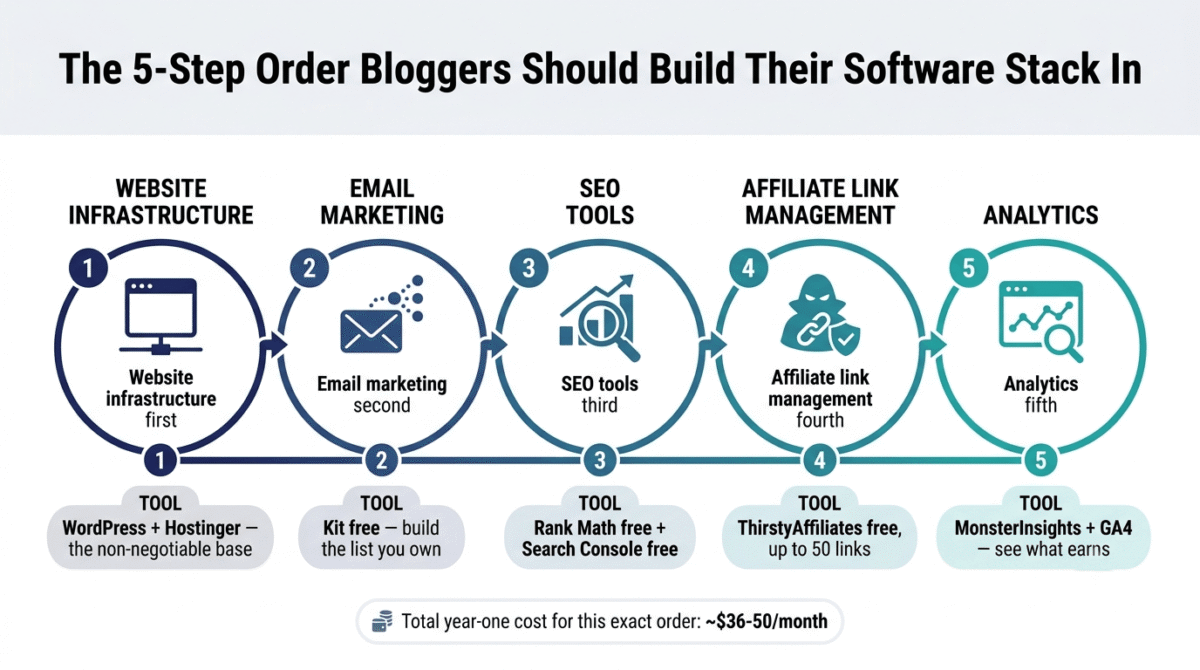
For bloggers specifically, the software stack priorities look slightly different from a traditional service business. The categories that matter most in order:
Website infrastructure first. WordPress + Hostinger is the non-negotiable foundation. Every other tool in your stack serves your website, without a fast, secure, well-optimised site, nothing else delivers its intended ROI.
Email marketing second. Your email list is the only audience you fully own. Start building it from day one with Kit’s free plan. Install the Kit WordPress plugin and create your first lead magnet landing page before publishing your second blog post.
SEO tools third. Rank Math SEO (free) handles on-page optimisation. Google Search Console (free) tracks ranking performance. Ubersuggest ($29/month or $290 lifetime) adds keyword research and competitor analysis. Upgrade to Semrush when monthly SEO revenue justifies the $117/month investment.
Affiliate link management fourth. ThirstyAffiliates free plugin manages link cloaking, tracking, and compliance for up to 50 affiliate links. Upgrade to ThirstyAffiliates Pro ($99.60/year) when automatic keyword linking and link health monitoring become priorities.
Analytics fifth. MonsterInsights (free tier) connects WordPress to GA4 without code. Google Analytics 4 (free) tracks every traffic source, page performance, and conversion event. These two tools together give you the full picture of what your content earns.
The total cost of a properly built blogger software stack in year one: approximately $36–$50/month, primarily hosting and one SEO or email tool. This is a remarkably low overhead for a publishing business with passive income potential that compounds over years.
Final Verdict
The best small business software stack in 2026 is not the most expensive one, it is the one that matches your current stage, integrates cleanly, and leaves room to upgrade as your business grows.
Start with the free tiers in each category and upgrade only when a specific limitation consistently costs you time or money. Most small businesses at the 1–10 employee stage can run a complete, professional software stack for under $200/month across all categories. That budget covers hosting, accounting, CRM, email marketing, project management, video conferencing, security, and design, every function covered, nothing duplicated.
The tools recommended in this guide are the result of 30+ days of testing across each category reviewed in detail throughout this site. Every recommendation reflects genuine use, not commission rates, several of the highest-rated tools (Wave, Bitwarden, Google Meet, Canva free, Trello) pay no affiliate commission at all.
Frequently Asked Questions
What software does a small business actually need in 2026?
The core categories every small business needs: a website (WordPress + Hostinger), accounting (Wave free or FreshBooks paid), a CRM (HubSpot free), email marketing (Kit free up to 10,000 subscribers), project management (Trello free or ClickUp paid), video conferencing (Google Meet free or Zoom Pro), a password manager (Bitwarden free or 1Password paid), and design tools (Canva free). Start with the free tiers and upgrade when specific limitations cost you time or revenue.
What is the best free CRM for small business in 2026?
HubSpot CRM is the best permanently free option, unlimited contacts, deal pipeline, email tracking, meeting scheduling, and live chat at zero cost with no time limit. Zoho CRM has a free tier for up to 3 users. Both are reviewed in detail in the Best CRM Software comparison on this site.
How much should a small business spend on software per month?
A 1–5 person business can run a complete professional software stack for $50–$150/month by choosing free tiers in most categories and paying only for tools where the paid upgrade directly saves time or generates revenue. A 5–15 person business typically spends $200–$500/month on software across all categories. Per-seat pricing models (Zoom, Slack, 1Password, Monday.com) drive the largest cost increases as teams grow, factor this into your budget before committing to per-seat tools.
What is the best accounting software for small business in 2026?
Wave is the best free accounting software, unlimited invoicing, expense tracking, and financial reporting at zero cost, making it the right choice for freelancers and solo businesses. FreshBooks is the best paid option for service businesses who invoice clients hourly or by project. QuickBooks is the best choice for businesses with employees, inventory, or complex tax requirements. All three are reviewed in detail in the Best Accounting Software comparison on this site.
Should small businesses use AI tools in 2026?
Yes, AI tools have crossed a threshold in 2026 where they deliver measurable time savings for small business owners handling tasks across content creation, customer communication, and research. The most practical AI tools for small businesses: ChatGPT or Claude for drafting emails, proposals, and content; Notion AI or Taskade for knowledge management and workflow automation; Canva’s AI image generation for design assets; and Semrush’s AI content writing assistant for SEO content. Start with tools that include AI features within subscriptions you already pay for before adding standalone AI subscriptions.
What is the best project management tool for small teams in 2026?
For teams of 1–3 people, Trello’s free plan covers basic project tracking without complexity. For teams of 3–10 people who need task assignment, time tracking, and reporting, ClickUp Unlimited at $7/user/month is the best value in the category. For teams that prioritise visual workflow customisation and automation, Monday.com at $9/user/month Basic (minimum 3 seats) is the most flexible option. All three are reviewed in the Best Project Management comparison on this site.
How do I avoid overspending on software as a small business?
Audit your software stack every quarter, list every active subscription, the monthly cost, and the last time you actively used the tool’s paid features. Cancel any subscription where you have used less than 30% of the paid features in the last 30 days. Prioritise tools with free tiers that cover your actual usage and only upgrade when a specific paid feature would save you more than one hour per week at your hourly rate. Avoid annual billing commitments in the first month of using any new tool, test on monthly billing first and switch to annual only after 60 days of active use confirms the tool earns its place in your stack.
What security tools does a small business need in 2026?
Three tools cover the majority of small business cybersecurity risk: a password manager (1Password Teams for businesses, Bitwarden for solo operators), a VPN for remote work (NordVPN Teams), and antivirus/endpoint protection (Bitdefender GravityZone for Windows teams). Add two-factor authentication on every business account and regular automated backups (Backblaze Business for off-site backup) and you have a security posture that protects against the threats that account for over 80% of small business security incidents. Full reviews of all these tools are available in the Security category of this site.








