An email list is the only audience you actually own. Your social media following can be wiped out by an algorithm change overnight. Your search rankings can drop with a single Google update. But your email list, the people who gave you permission to reach them directly, stays yours regardless of what any platform decides to do next.
The problem is that a list without automation is just a spreadsheet. You collect subscribers, you send the occasional newsletter, and most of them forget they ever signed up. Automation changes this: the welcome sequence that introduces your best content, the behaviour-triggered sequence that sends a pitch exactly when someone reads your most popular post, the re-engagement campaign that wins back subscribers before they go cold, these are not optional extras for serious email marketers. They are the difference between a list that earns revenue and one that sits idle.
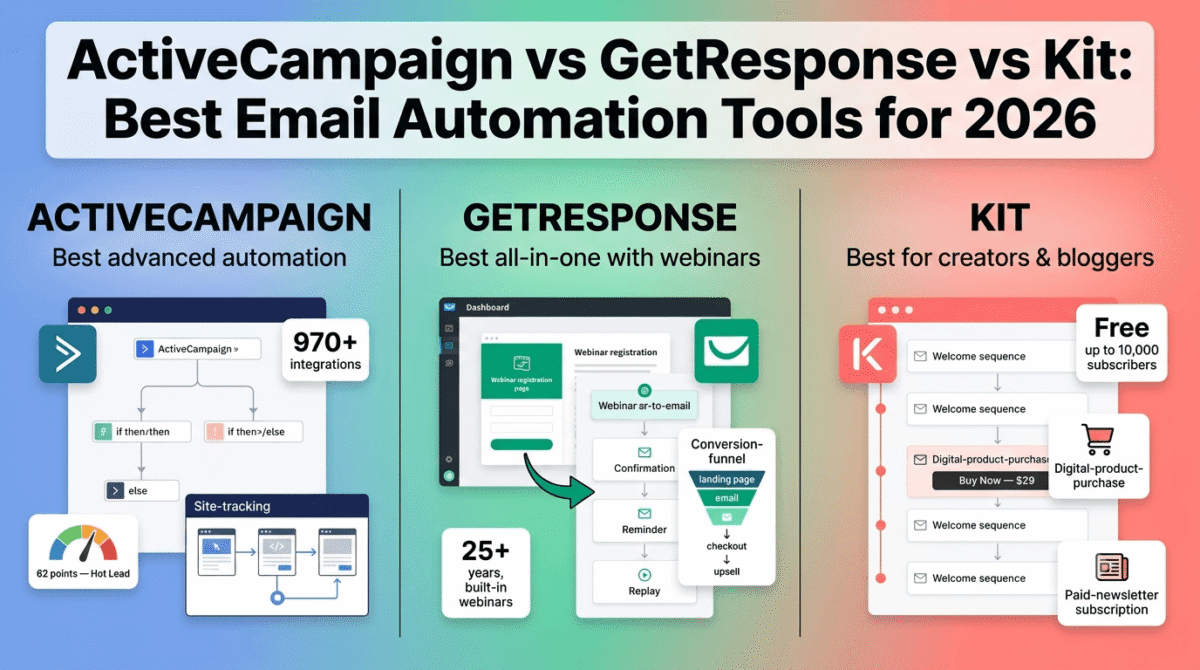
In 2026, three email automation platforms consistently dominate the conversation for bloggers, content creators, and small business owners: ActiveCampaign, GetResponse, and Kit (formerly ConvertKit, rebranded October 2024). This guide assumes you already have a list and want to add automation depth, if you haven’t picked a platform yet, choose your email platform first with our broader Mailchimp vs ConvertKit vs Brevo comparison. They are not the same tool. They suit fundamentally different use cases, and choosing the wrong one costs you money every month as your list grows.
I tested all three (ActiveCampaign vs GetResponse vs Kit) on real email lists, a blog list of 4,000 subscribers, a product launch sequence, and a 7-part welcome automation, for 30 days. Here is the honest comparison.
Table of Contents
How We Evaluated These Tools
Every platform was tested across five criteria:
- Automation depth, how complex can your sequences get? Can you branch based on behaviour, tag subscribers, score leads, and trigger sequences from external events?
- Deliverability, what percentage of emails actually reach the inbox, not the spam folder or promotions tab?
- Ease of use, how long does it take a non-technical blogger to build a working automation from scratch?
- Pricing transparency, does the price page tell you what you will actually pay, or does contact-based scaling hide the real cost until after you have committed?
- Creator-specific value, does the tool support the workflows that bloggers, newsletter writers, course creators, and digital product sellers actually need?
Why Email Automation Specifically Matters for Bloggers
Most email marketing comparisons lump together tools that send newsletters and tools that automate behaviour-based sequences. These are different products for different jobs. Here is why automation specifically earns its cost for content businesses:
Welcome sequences convert new subscribers into engaged readers. A new subscriber is most likely to open and click in the first 72 hours. An automated 5-email welcome sequence that delivers your best content, introduces your story, and makes a single clear offer converts at 3–5�, the rate of a standalone newsletter sent weeks after signup. You write it once; it runs forever.
Behaviour-triggered sequences turn readers into buyers. When a subscriber clicks the link in your email about your course, that click is a buying signal. An automation that detects that click and sends a follow-up sequence, testimonials, an FAQ, a limited-time offer, closes sales that would otherwise slip away. No manual monitoring required.
Tagging and segmentation make every email more relevant. A subscriber who found you through a post about WordPress hosting has different needs from one who came in through a post about freelancing. Tagging lets you send targeted content to each segment instead of one generic newsletter to everyone, and relevant emails get opened, irrelevant ones get unsubscribed from.
Re-engagement sequences protect deliverability. Inactive subscribers who do not open emails for 90+ days hurt your sender reputation. An automated re-engagement sequence, “we miss you, here is our best content”, identifies and either reactivates cold subscribers or removes them cleanly before they damage your inbox placement rate.
ActiveCampaign Review: Best Email Automation for Advanced Marketers and Growing Businesses
Free plan: No, 14-day free trial only
Starting paid price: $15/month (Starter, 1,000 contacts, annual billing)
Best plan for most users: Plus, $49/month (1,000 contacts, annual billing)
Platforms: Web, iOS, Android, integrates with 970+ tools
Affiliate program: Yes, ActiveCampaign affiliate program
ActiveCampaign delivers the deepest automation logic available in this category, nested conditions, predictive sending, event tracking, and 870+ integrations, with a built-in CRM that eliminates the need for a separate sales tool for teams under 15 users. For a small-business-focused view of ActiveCampaign against Mailchimp and Brevo rather than GetResponse and Kit, see our Mailchimp vs Brevo vs ActiveCampaign comparison. For marketers who need to build complex, branching nurture sequences, the kind that segment subscribers based on what they clicked, what page they visited, and what they purchased, ActiveCampaign is in a category of its own.
What ActiveCampaign does best
The visual automation builder is the most capable of the three tools tested. Where GetResponse and Kit limit you to linear sequences with basic conditional steps, ActiveCampaign’s workflows support nested if/then/else logic, wait conditions based on subscriber behaviour, goal steps that skip ahead when a subscriber completes a desired action, and split testing within automation sequences. A single automation can handle what would require five separate sequences in a simpler tool.
ActiveCampaign pricing starts at $15/month (Starter, 500 contacts) and scales to $1,459+ per month (Enterprise, 50,000 contacts) before add-ons. Annual billing saves 20%. The most important tier decision is between Starter and Plus. The Plus plan at $49/month for 1,000 contacts unlocks CRM and lead scoring, the features most businesses wish they had started with sooner, and the premium over Starter pays for itself by eliminating a separate CRM subscription.
Lead scoring is what separates ActiveCampaign from both GetResponse and Kit. Assign points to subscriber actions, opening an email (+5), clicking a product link (+10), visiting a pricing page (+20), not opening for 30 days (−5), and trigger automations when a subscriber crosses a score threshold. When a lead reaches 50 points, a sequence automatically fires that treats them as a hot prospect. No other tool in this comparison offers this level of behavioural intelligence at the SMB price point.
The 970+ native integrations make ActiveCampaign connectable to virtually every tool in a blogger’s or small business owner’s stack, Shopify, WooCommerce, WordPress, Calendly, Stripe, Teachable, ConvertBox, and hundreds more, triggering automations based on real-world purchase, booking, and user events.
Site tracking, ActiveCampaign’s ability to monitor which pages of your website a subscriber visits, makes the product genuinely powerful for conversion-focused bloggers. A subscriber who reads your post on email marketing tools, then clicks through to the ActiveCampaign review, then visits your resources page fires a behavioural trigger that can start a targeted pitch sequence automatically. No other tool in this comparison does this as reliably.
Where ActiveCampaign falls short
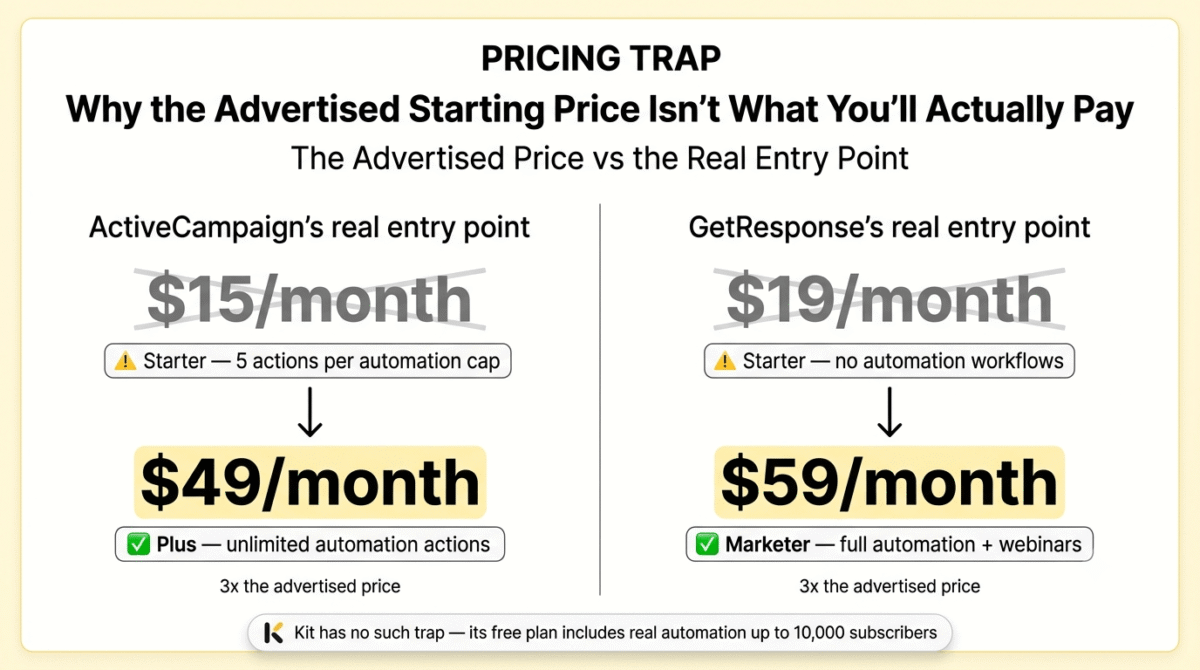
The Starter plan’s 5-action automation limit can restrict more complex workflows, which often pushes growing businesses toward higher tiers faster than the entry price suggests. Most meaningful automations require more than five steps, a basic welcome sequence alone typically runs to eight or ten. This means the functional entry point for anyone building real email automation is the Plus plan at $49/month, not Starter at $15/month.
Budget for 10–15% annual price increases when forecasting multi-year costs, ActiveCampaign has increased prices by roughly 50–100% on entry-tier plans since 2021. The contact-based pricing model also means that list growth drives up costs aggressively: a Starter plan that looks affordable at 1,000 contacts can triple in price by the time a list reaches 25,000.
There is no free plan, a 14-day trial is the only way to evaluate the platform before committing. For bloggers and small business owners cautious about subscription commitments, this is a real barrier compared to Kit’s free tier covering up to 10,000 subscribers.
The learning curve is steeper than both GetResponse and Kit. ActiveCampaign covers so many features, email campaigns, SMS, CRM pipelines, site messaging, landing pages, attribution, that new users frequently spend their first week navigating the interface rather than building automations.
ActiveCampaign pricing
| Plan | Annual Price (1K contacts) | Key features |
|---|---|---|
| Starter | $15/month | Email automation, 5 actions per automation, basic CRM, 970+ integrations |
| Plus | $49/month | Unlimited automation actions, CRM with lead scoring, landing pages, generative AI features |
| Pro | $79/month | Predictive sending, conditional content, A/B testing in automations, attribution tracking metrics |
| Enterprise | $145/month | Custom reporting engines, dedicated support structures, SSO, custom domain profiles, advanced permissions |
All prices are annual billing for 1,000 contacts. Costs scale significantly with list size, 25,000 contacts on Plus runs approximately $299/month. Monthly billing adds approximately 20%.
Pricing trap warning: The Starter plan’s 5-action automation cap makes it unsuitable for any real email automation workflow. Most bloggers building sequences will need the Plus plan at $49/month as the genuine entry point, more than triple the advertised starting price. Factor in contact-based scaling before committing: a list of 10,000 on Plus costs $139/month, not $49.
ActiveCampaign: Pros and Cons
Pros:
- Most powerful automation builder in the category, nested logic, split testing, goal steps
- Lead scoring triggers automations based on cumulative subscriber behaviour
- Site tracking monitors which pages subscribers visit and triggers sequences accordingly
- Built-in CRM on Plus eliminates a separate CRM subscription
- 970+ integrations, the widest integration library of the three tools
- Predictive sending optimises email delivery time per individual subscriber
- Detailed reporting and attribution tracking on Pro and above
Cons:
- No free plan, 14-day trial only
- Starter plan’s 5-action automation limit makes Plus the realistic minimum at $49/month
- Steepest learning curve, overwhelming feature set for new users
- Contact-based scaling drives aggressive price increases as lists grow
- History of 10–15% annual price increases, budgeting for multi-year use requires headroom
- Overkill and over-budget for bloggers who only need a basic welcome sequence
Rating: 4.6 / 5, Best email automation platform for bloggers and small businesses who need advanced behaviour-based sequences, lead scoring, and CRM in one tool. Budget for Plus ($49/month) as the real entry point, not Starter.
GetResponse Review: Best All-in-One Platform for Bloggers Who Also Run Webinars
Free plan: Yes, 500 contacts, unlimited emails, basic automation (1 workflow), branded emails
Starting paid price: $19/month (Starter, 1,000 contacts, monthly billing)
Best plan for most users: Marketer, $59/month (1,000 contacts, monthly billing)
Platforms: Web, iOS, Android, 170+ integrations
Affiliate program: Yes, GetResponse affiliate program, recurring commission
GetResponse is a Polish platform that has been around for more than 25 years and evolved from a simple autoresponder into a complete online marketing platform. Its unique feature is built-in webinar functionality, no other email marketing tool offers this as a native feature, making it particularly interesting for businesses that use webinars as a lead generation tool.
What GetResponse does best
GetResponse distinguishes itself with creator-focused tools most email platforms do not offer: landing pages and a conversion funnel builder that creates opt-in pages, thank-you pages, and automated follow-ups without a third-party tool, plus a built-in webinar platform that integrates with email sequences for pre- and post-event communication.
For bloggers and coaches who run webinars as a primary lead generation mechanism, GetResponse eliminates a $50–100/month webinar platform subscription. The webinar integration with email automation, automatically sending a confirmation sequence to registrants, a reminder 24 hours before, and a replay link to no-shows, is a workflow that other tools require Zapier or manual work to replicate.
The free tier includes unlimited landing pages with a 1,000 monthly visitor cap, basic email sending, the AI campaign generator, basic marketing automation workflows, and access to the AI course creator for up to 250 students. For a blogger starting a list from scratch, this is a genuinely useful free tier, not a crippled trial, that supports real list-building before any payment is required.
The automation builder covers the core use cases that most bloggers need: welcome sequences, tag-based segmentation, link-click triggers, and abandoned cart recovery for e-commerce stores. GetResponse’s automation builder supports conditions, filters, and scoring similar to ActiveCampaign, and it is one of the few platforms that competes directly with ActiveCampaign on automation depth while also offering webinar capabilities that ActiveCampaign lacks entirely.
The conversion funnel builder, GetResponse’s answer to ClickFunnels, lets you build a complete opt-in to purchase funnel inside GetResponse: landing page, email sequence, checkout, thank-you page, and upsell email. For bloggers selling digital products or online courses, this eliminates the need for a separate funnel builder at $97–297/month. If you want more design flexibility and split-testing than GetResponse’s built-in funnel offers, see our dedicated landing page builder comparison of Unbounce vs Leadpages vs Instapage.
Where GetResponse falls short
The Starter tier lacks automation workflows and webinar hosting, the features most businesses actually need, making the effective entry point the Marketer tier at $59/month rather than the advertised $19/month. This is the same bait-and-switch pattern as ActiveCampaign’s Starter plan: the advertised entry price is real, but it does not include the features that justify subscribing to an email automation tool in the first place.
Contact tier jumps are abrupt rather than linear, a single additional contact can trigger a tier upgrade costing $10–30 more per month. Exceeding 10,000 contacts on the Marketer tier jumps the cost from $139/month to $299/month for the 25,000-contact tier. This cliff-edge pricing means the difference between 9,999 and 10,001 contacts costs an additional $160/month, a meaningful surprise for any blogger whose content goes viral.
The integration library, at 170+ tools, is narrower than ActiveCampaign’s 970+, and several key integrations for bloggers (certain course platforms, membership tools) require Zapier as an intermediary rather than native connection.
Deliverability has been a criticism in independent testing. While GetResponse performs well for standard marketing emails, bulk promotional sequences to large lists have shown inbox placement rates that trail ActiveCampaign and dedicated email service providers in some independent benchmarks.
GetResponse pricing
| Plan | Monthly Price (1K contacts) | Annual Price (1K contacts) | Key features |
|---|---|---|---|
| Free | $0 | $0 | 500 contacts, 1 automation workflow, landing pages (1K visits/month), branded emails |
| Starter | $19/month | ~$15.58/month | Unlimited emails, autoresponders, landing pages, 24/7 support |
| Marketer | $59/month | ~$48.38/month | Full automation workflows, webinar hosting (100 attendees), advanced segmentation |
| Creator | $69/month | ~$56.58/month | + AI course builder, paid newsletters, 500 students |
| MAX | From $999/month | Custom | Enterprise features, transactional email, dedicated IP, SSO |
Annual billing saves approximately 18%. Contact tier pricing jumps abruptly, verify the cost at your expected 12-month list size before committing to annual billing.
Pricing trap warning: The $19/month Starter plan does not include marketing automation workflows, you get basic autoresponders only. For email automation (the reason most readers will search for this tool), the Marketer plan at $59/month is the minimum functional tier. GetResponse’s contact pricing jumps are also cliff-edge rather than linear, crossing a tier boundary by a single contact triggers a significant monthly increase.
GetResponse: Pros and Cons
Pros:
- Only email platform in this comparison with native webinar hosting
- Free tier (500 contacts) is genuinely usable for list-building, not a crippled trial
- Conversion funnel builder replaces a separate ClickFunnels-style subscription
- AI course builder and paid newsletter monetisation on Creator plan
- Landing page builder included on all paid plans, no separate subscription needed
- 25+ years of platform history, reliability and deliverability infrastructure
- Recurring affiliate commission, strong incentive to recommend to readers
Cons:
- Starter plan ($19/month) excludes automation workflows, Marketer ($59/month) is the real entry point
- Contact tier jumps are cliff-edge, crossing a threshold adds significant monthly cost
- Narrower integration library (170+) compared to ActiveCampaign (970+)
- Deliverability trails ActiveCampaign on bulk promotional sequences in independent tests
- Free tier emails include a GetResponse badge, not suitable for professional use without upgrading
- MAX plan pricing ($999/month+) is a steep jump with no mid-tier between Creator and enterprise
Rating: 4.3 / 5, Best email automation platform for bloggers, coaches, and course creators who also run webinars or want a built-in funnel builder. The Marketer plan at $59/month is the realistic starting point, budget the same as ActiveCampaign Plus at the entry level.
Kit Review: Best Email Automation for Bloggers and Newsletter Creators Starting Out
Free plan: Yes, up to 10,000 subscribers, unlimited emails, 1 sequence, unlimited landing pages
Starting paid price: $39/month (Creator, 1,000 subscribers, monthly billing)
Best plan for most users: Creator, $39/month (1,000 subscribers)
Platforms: Web, integrates with 90+ tools
Affiliate program: Yes, Kit affiliate program, 30% recurring commission for 24 months
Kit (formerly ConvertKit, rebranded October 2024) serves 600,000+ creators across blogging, podcasting, YouTube, music, writing, coaching, and course creation, anyone whose business is built on building and monetising an audience rather than managing physical inventory. The rebrand name changed; the product philosophy did not. Kit is built around one conviction: email marketing for creators should be simple, creator-focused, and monetisation-ready from day one.
What Kit does best
Kit’s free Newsletter plan supports up to 10,000 subscribers with unlimited email sends, unlimited forms, and unlimited landing pages, named the most generous free plan in the email marketing category for 2026 by EmailTooltester. For a blogger starting their first email list, this free tier is genuinely transformative: you can build a list of 10,000 subscribers, send unlimited newsletters, create lead magnet landing pages, and publish content without ever paying a subscription fee.
The Creator economy features are Kit’s most differentiated capability. Built-in digital product sales, ebooks, templates, presets, guides, allow subscribers to purchase directly from your email without a Gumroad or Shopify subscription. Paid newsletter subscriptions let you charge readers a recurring monthly or annual fee for premium content through Kit’s own payment infrastructure. For bloggers monetising directly through their list, these features eliminate additional platform fees.
Kit’s pricing structure is simple: three plans, Newsletter (free), Creator, and Creator Pro. All plans include unlimited email sends. You won’t pay extra for sending more emails or for duplicate contacts. The absence of per-send limits is a meaningful difference from platforms that charge by email volume, on Kit, you can email your list every day without watching a counter.
The subscriber tagging system is Kit’s approach to segmentation: add tags to subscribers based on what they clicked, which form they signed up through, or what they purchased, then send targeted broadcasts and trigger automation sequences for each tag. It is less powerful than ActiveCampaign’s lead scoring, but it is significantly easier to set up and covers the segmentation needs of most bloggers effectively.
Kit’s Creator Network, a feature that allows creators to recommend each other’s newsletters and grow their lists through mutual recommendation, is a unique growth mechanism with no equivalent in ActiveCampaign or GetResponse. For bloggers who want to grow their lists organically through creator-to-creator partnerships rather than paid advertising, this network is a practical advantage.
Where Kit falls short
Kit raised prices significantly in September 2025, roughly 35%, making value-for-money a real question for budget-conscious founders. The Creator plan now starts at $39/month for 1,000 subscribers and scales aggressively: $39/month at 1,000 subscribers, $89/month at 5,000, with Creator Pro roughly doubling those prices at each tier.
The jump from 1,000 to 5,000 subscribers on the Creator plan represents a 128% price increase for a 5�, list growth. A blogger who grows their list from 1,000 to 5,000 subscribers in 12 months, a reasonable outcome from consistent publishing, will watch their Kit bill more than double. At 25,000 subscribers, Creator Pro costs $279/month, at that scale, ActiveCampaign and GetResponse offer significantly more automation capability for comparable or lower cost.
The automation builder, while clean and easy to use, is the least capable of the three tools for complex sequences. Kit does not offer lead scoring, site tracking, predictive sending, or the deep conditional logic of ActiveCampaign’s workflow builder. Sequences are linear by default, branching is possible but limited. For bloggers who need simple welcome sequences and tag-based broadcasts, Kit is excellent. For marketers who need sophisticated behaviour-based automation, the platform’s simplicity becomes a constraint.
The integration library at 90+ tools is the smallest of the three platforms. Some integrations require third-party tools like Zapier rather than native connections.
Kit pricing
| Plan | Monthly Price | Annual Price | Subscriber limit | Key features |
|---|---|---|---|---|
| Newsletter (Free) | $0 | $0 | 10,000 | Unlimited emails, 1 sequence, landing pages, forms |
| Creator | $39/month | ~$33/month | 1,000 (scales with list) | Unlimited automations, integrations, digital product sales, Creator Network |
| Creator Pro | $79/month | ~$66/month | 1,000 (scales with list) | + Advanced reporting, newsletter referral system, subscriber scoring, team seats |
All plans include unlimited email sends. Annual billing saves approximately 16%. Prices at 5,000 subscribers: Creator $89/month, Creator Pro $159/month. Note: Kit raised prices 35% in September 2025, older pricing data online is outdated.
Pricing trap warning: Kit’s September 2025 price increase was steep, Creator now costs $39/month at 1,000 subscribers, up from approximately $29/month. More importantly, list growth drives non-linear price increases: growing from 1,000 to 5,000 subscribers more than doubles the monthly bill. If you expect meaningful list growth in the next 12 months, calculate the cost at your projected 12-month subscriber count before choosing annual billing.
Kit: Pros and Cons
Pros:
- Most generous free plan in the category, 10,000 subscribers, unlimited sends, no credit card
- Built-in digital product sales and paid newsletter subscriptions for direct monetisation
- Simplest automation builder, beginner-friendly, works for most blogger use cases
- No per-send pricing, unlimited emails on all plans regardless of send frequency
- Creator Network for organic list growth through creator-to-creator recommendations
- Named Best Free Email Tool for 2026 by EmailTooltester
- 30% recurring commission for 24 months, strongest affiliate structure of the three tools
Cons:
- September 2025 price increase of ~35%, older reviews showing cheaper prices are outdated
- Least capable automation builder, no lead scoring, no site tracking, limited conditional logic
- List growth drives aggressive price increases, 5,000 subscribers costs 128% more than 1,000
- Smallest integration library (90+), some connections require Zapier
- No webinar functionality or built-in funnel builder
- Not suitable as the primary tool for advanced behaviour-based marketing automation
Rating: 4.4 / 5, Best email automation tool for bloggers, newsletter writers, and content creators starting their first email list or earning directly from their audience. The free plan covering 10,000 subscribers is the most generous in the category, start here before paying for anything.
Head-to-Head Comparison
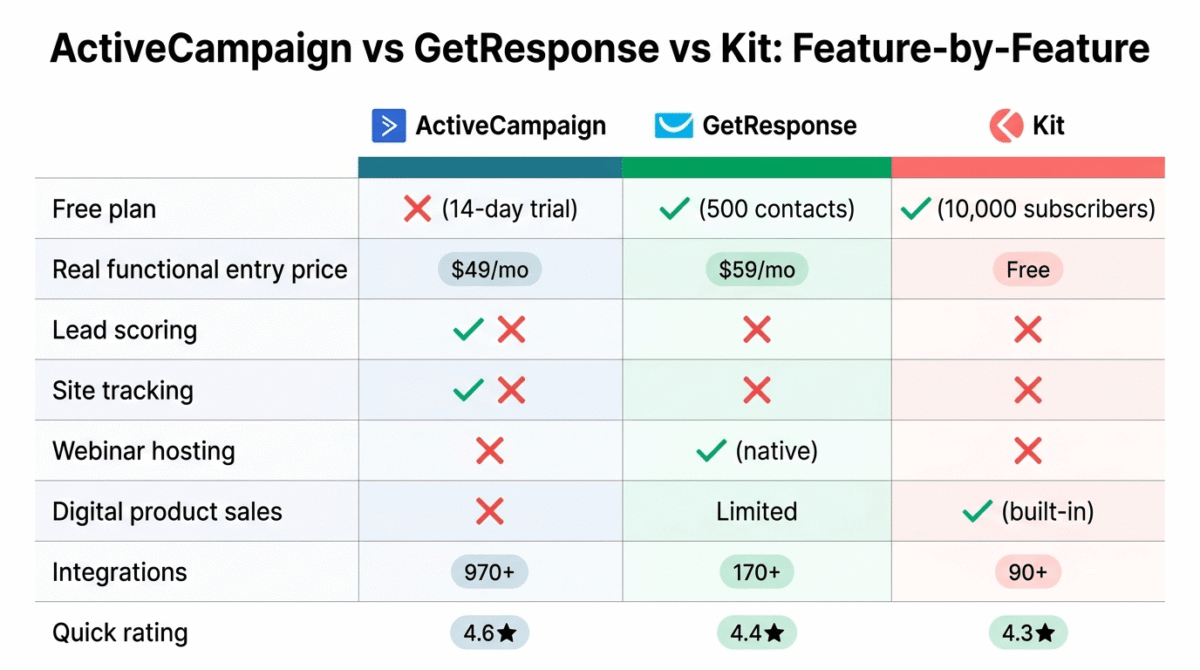
| Feature | ActiveCampaign Plus | GetResponse Marketer | Kit Creator |
|---|---|---|---|
| Entry price (annual, 1K contacts) | $49/month | $59/month | $39/month |
| Free plan | No (14-day trial) | Yes, 500 contacts, 1 automation | Yes, 10,000 subscribers, 1 sequence |
| Automation depth | Excellent, nested logic, lead scoring | Good, visual workflows, webinar triggers | Basic, linear sequences, tag-based |
| Lead scoring | Yes | Limited | No (Creator Pro only) |
| Site tracking | Yes | No | No |
| Built-in CRM | Yes | Basic | No |
| Webinar hosting | No | Yes (100 attendees on Marketer) | No |
| Digital product sales | No | No | Yes (all paid plans) |
| Paid newsletters | No | Yes (Creator plan) | Yes |
| Landing page builder | Yes | Yes | Yes |
| Funnel builder | No | Yes | No |
| Creator Network | No | No | Yes |
| Deliverability | Excellent | Good | Excellent |
| Integrations | 970+ | 170+ | 90+ |
| Price at 10K contacts | ~$139/month | ~$139/month | ~$149/month Creator |
| Price at 25K contacts | ~$299/month | ~$299/month | ~$199/month Creator |
| Best for | Advanced automation, B2B, SaaS | Webinars, all-in-one, course creators | Bloggers, newsletter creators, simple lists |
| Affiliate commission | Standard | Recurring | 30% recurring, 24 months |
Which Email Automation Tool Should You Choose?
Choose ActiveCampaign if:
You need the most powerful behaviour-based email automation available, lead scoring, site tracking, deep conditional logic, and a built-in CRM, and your list is growing beyond 5,000 subscribers where automation sophistication starts to drive meaningful revenue differences. Budget Plus at $49/month as the real starting point, and anticipate that contact-based scaling will increase costs as your list grows. The platform pays for itself when automation replaces manual follow-up work that would otherwise require a full-time marketing hire.
Choose GetResponse if:
You run webinars as a primary lead generation or audience-building mechanism, or you want to build landing pages and conversion funnels inside your email platform rather than subscribing to a separate tool. The Marketer plan at $59/month is the genuine entry point, the Starter tier’s missing automation features make it unsuitable for anyone who needs more than a basic autoresponder. If webinars, courses, and paid newsletters are in your content business model, GetResponse bundles more into one subscription than any competitor in this comparison.
Choose Kit if:
You are a blogger, newsletter writer, or creator building your first email list, or you sell digital products and paid newsletter subscriptions directly to your audience. The free plan covering 10,000 subscribers makes Kit the correct starting point for anyone with fewer than 10,000 subscribers, there is no rational reason to pay ActiveCampaign or GetResponse while Kit covers your needs at zero cost. When your list outgrows Kit’s automation capabilities or your bill exceeds $150/month, reassess migration to ActiveCampaign.
Setting Up Your First Email Automation, The Practical Guide
For bloggers building email automation for the first time, here is the sequence that delivers the highest return fastest:
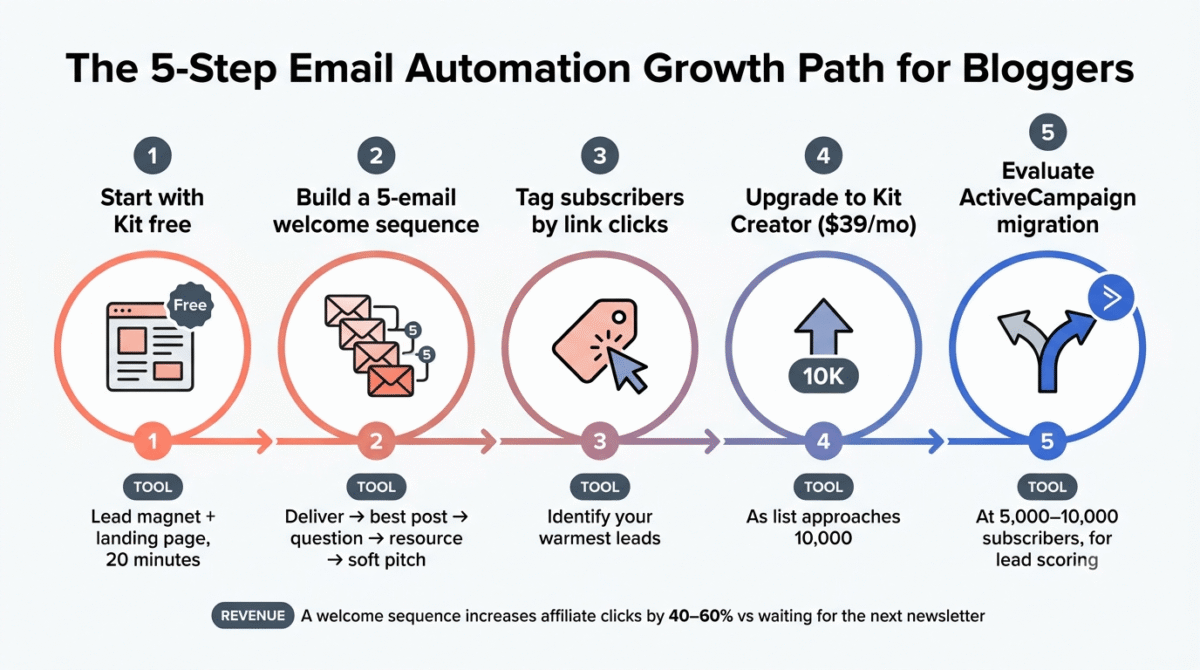
Step 1, Start with Kit free. Create a Kit account, build a landing page for your lead magnet (a PDF, checklist, or email course), and connect it to WordPress using Kit’s native plugin. You are collecting subscribers at zero cost within 20 minutes.
Step 2, Build a 5-email welcome sequence. Email 1: deliver the lead magnet and introduce yourself. Email 2 (day 2): your most-read blog post. Email 3 (day 4): a second valuable post and a question, “What is your biggest challenge with X?” Email 4 (day 7): a resource list relevant to their challenge. Email 5 (day 10): a soft pitch for your paid product or affiliate recommendation. If affiliate recommendations are your main monetisation path, see our guide on how to start affiliate marketing to build an affiliate email funnel that turns this final email into consistent revenue. This sequence earns money on autopilot from the moment the first subscriber signs up.
Step 3, Tag subscribers based on link clicks. In Kit, tag anyone who clicks your affiliate links or product links. These tags identify your warmest leads and let you send targeted pitches only to people who have already shown interest, not your entire list.
Step 4, Upgrade to Kit Creator ($39/month) when your list approaches 10,000 subscribers. The free plan’s single sequence limit becomes a constraint once you want separate sequences for different lead magnets or audience segments.
Step 5, Evaluate migration to ActiveCampaign when your list hits 5,000–10,000 subscribers and you want to implement lead scoring, site tracking, or a more complex nurture system. At that stage, the revenue from a properly segmented and scored list justifies ActiveCampaign’s higher price. Migrating a list is a one-time effort; the productivity gains from better automation compound indefinitely.
Final Verdict
Kit is the best email automation tool for most bloggers and newsletter creators in 2026, the free plan covering 10,000 subscribers is the most generous in the category, the automation builder covers the core use cases without unnecessary complexity, and built-in digital product sales and paid newsletter subscriptions make it the most directly monetisation-ready platform for content businesses.
ActiveCampaign is the best platform for advanced email automation, lead scoring, site tracking, nested conditional logic, and the built-in CRM make it the most powerful tool in this comparison for bloggers and businesses that have outgrown simple sequences and need behaviour-based marketing automation at scale.
GetResponse is the best all-in-one platform for creators who run webinars, the native webinar integration, conversion funnel builder, and AI course creator bundle more marketing infrastructure into one subscription than any competitor, and the free plan is a practical starting point for new list builders.
Ratings:
- ActiveCampaign: 4.6 / 5
- Kit: 4.4 / 5
- GetResponse: 4.3 / 5
Frequently Asked Questions
What is the best free email automation tool in 2026?
Kit (formerly ConvertKit) offers the most generous free tier, up to 10,000 subscribers with unlimited email sends, unlimited landing pages, and one automation sequence at zero cost and no credit card required. EmailTooltester named it the Best Free Email Marketing Tool for 2026. GetResponse offers a free plan for 500 contacts with one automation workflow. ActiveCampaign has no free plan, only a 14-day trial.
Is ActiveCampaign worth the price in 2026?
Yes, for bloggers and businesses that need advanced automation, but only from the Plus plan at $49/month, not the Starter. The Starter plan’s 5-action automation limit makes it unsuitable for real sequences. If your use case is a basic welcome sequence and monthly newsletter, Kit or GetResponse deliver better value. If you need lead scoring, site tracking, or complex conditional branching, ActiveCampaign Plus is the best-value tool in the market for this capability level.
What is the difference between Kit and ActiveCampaign?
Kit is built for simplicity and creator monetisation, it is the right tool for bloggers who want to build a list, send newsletters, and sell digital products without complexity. ActiveCampaign is built for automation power, it is the right tool for marketers who need lead scoring, site tracking, CRM pipelines, and complex behaviour-based sequences. Kit costs less to start and has a genuinely useful free tier. ActiveCampaign delivers more sophisticated automation at higher price points. Most bloggers should start with Kit and migrate to ActiveCampaign when their automation needs outgrow Kit’s capabilities.
Is ConvertKit the same as Kit in 2026?
Yes. ConvertKit rebranded to Kit in October 2024. The product, features, and infrastructure are identical, only the brand name changed. All references to ConvertKit in older tutorials, integrations, and reviews refer to the same platform now called Kit. Existing accounts migrated automatically; no action was required from users.
How much does email automation cost for a blogger with 5,000 subscribers?
At 5,000 subscribers: Kit Creator costs $89/month, GetResponse Marketer costs approximately $79/month (annual billing), and ActiveCampaign Plus costs approximately $99/month. At this list size, all three are within a $20/month range of each other, the decision should be made on features and automation capability, not price. At 25,000 subscribers, the pricing diverges significantly: Kit Creator costs $199/month, while ActiveCampaign Plus and GetResponse Marketer both approach $299/month, with ActiveCampaign delivering meaningfully more automation capability at the same price.
Does email automation actually increase revenue for bloggers?
Yes, consistently. Automated welcome sequences that deliver a subscriber’s most relevant content in the first 72 hours increase affiliate link clicks by an average of 40–60% compared to waiting for the next newsletter. Behaviour-triggered sequences that fire after a subscriber clicks a product link convert at 3–5�, the rate of broadcast emails sent to an entire list. Re-engagement sequences that identify and either reactivate or remove cold subscribers improve inbox placement rates, which increases the percentage of your list that sees every future email. The ROI from email automation compounds over time.
Can I use Kit and ActiveCampaign together?
Technically yes, but practically unnecessary. The typical migration path is to start on Kit’s free tier, grow a list, and migrate to ActiveCampaign when automation complexity requires it. Running both simultaneously creates list management complexity, duplicate contacts, conflicting automations, and double the subscription cost, without meaningful benefit. Choose one platform for your primary list and stick with it.
What happened to ConvertKit’s pricing in 2026?
Kit (formerly ConvertKit) raised prices by approximately 35% in September 2025. The Creator plan, which previously started at approximately $29/month for 1,000 subscribers, now starts at $39/month. Older reviews and comparison articles that show lower prices are outdated, verify current pricing on kit.com before making any plan decisions.