
Freelancing without a project management system is like building a house without blueprints. You might finish the project, but it takes longer, costs more in revision time, and produces results that do not match what the client imagined.
Project management for freelancers is different from project management for teams. You are not coordinating multiple people, you are managing the relationship between your time, your clients’ expectations, and your deliverables. The right tool organises all three without adding administrative overhead that consumes the billable hours it is supposed to protect.
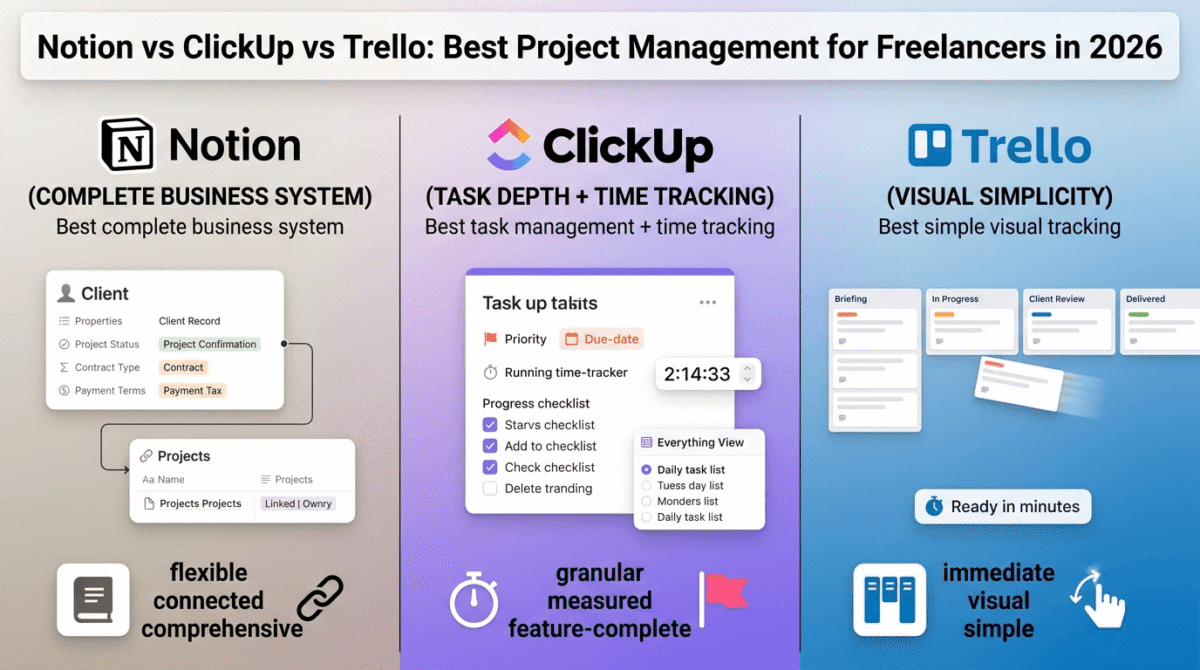
In 2026, three tools dominate freelance project management: Notion vs ClickUp vs Trello. Each represents a fundamentally different philosophy about how projects should be organised. Choosing correctly depends on understanding your specific freelance workflow rather than picking the most feature-rich or most popular option. For a broader look at team-focused tools, check out our comparison of Notion vs Trello vs Asana.
I tested all three as my primary project management system for 30 days each, managing real client projects across WordPress development, blog content production, and consulting work. Here is the honest comparison. If you are a content creator, you might also benefit from our guide to the best AI tools for bloggers.
Table of Contents
How We Evaluated These Tools
Every tool was tested across five criteria:
- Client project organisation, how clearly does the tool structure multiple simultaneous client projects?
- Task and deadline management, how well does it track what needs doing and when?
- Client collaboration, how effectively can clients view progress, leave feedback, and stay informed?
- Documentation and knowledge management, how well does it capture project notes, briefs, and reference material?
- Value, free plan quality and paid plan pricing versus features offered
Why Freelancers Need Different Project Management Than Teams
Before comparing the tools, understanding what makes freelance project management distinct from team project management shapes the right choice.
You are the only executor. Team project management tools focus on assigning tasks to different people, tracking who is responsible for what, and coordinating parallel work streams. Freelancers need to track what they personally need to do, the assignment and coordination features are largely irrelevant.
Client relationship management matters as much as task tracking. Freelancers do not just manage tasks, they manage client expectations, communication history, and deliverable approval workflows. A project management tool that tracks tasks but not client context misses half the job.
Context switching between clients is the primary cognitive cost. Moving from one client project to another requires re-establishing context, what stage is this project at, what did the client last say, what is the next deliverable? Tools that surface this context quickly reduce the mental overhead of managing multiple clients simultaneously.
Documentation is personal knowledge management. Freelancers accumulate knowledge about each client’s preferences, technical requirements, and communication style. Capturing this knowledge in the project management system rather than in scattered notes makes each subsequent project for the same client faster and better.
Notion Review: Best Project Management for Freelancers Who Want a Complete Business System
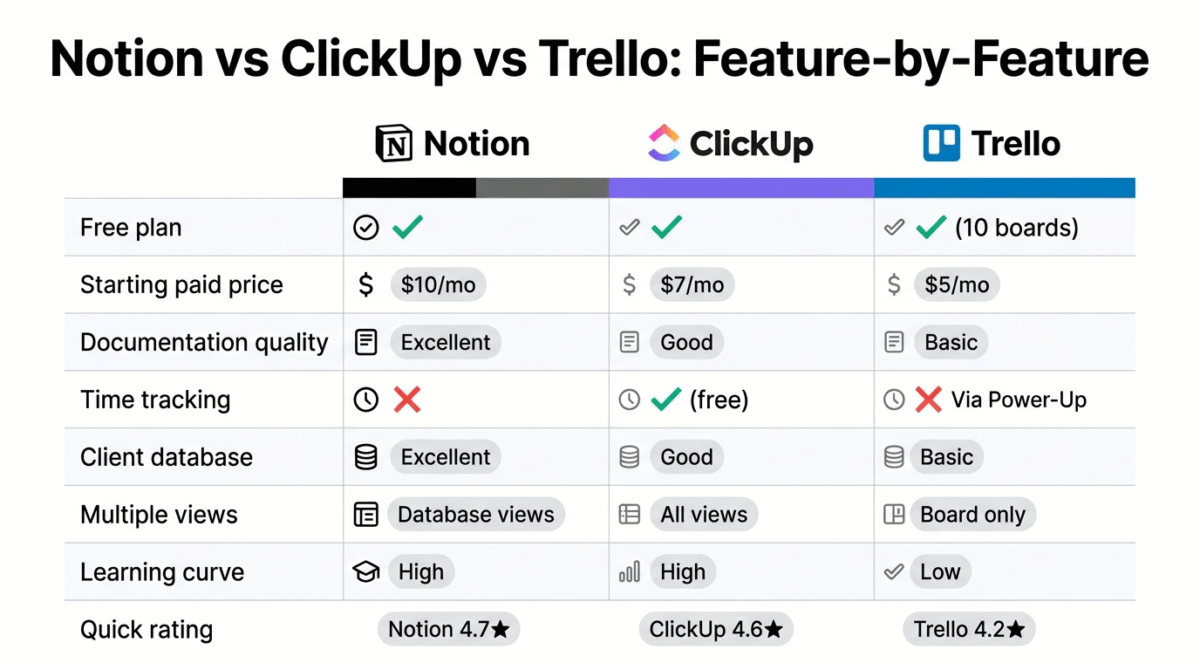
Free plan: Yes, unlimited pages and blocks, 7-day history, limited guests
Starting price: $10/month (Plus, billed annually)
Best plan for most freelancers: Free plan or Plus, $10/month
Platforms: Web, Windows, Mac, iOS, Android
Affiliate: Notion affiliate
Full review: Best Note-Taking Apps →
Notion is the most versatile tool for freelancers who want a single system that handles project management, client documentation, personal knowledge base, and business operations simultaneously. Rather than a dedicated project management tool, Notion is a flexible workspace that you configure into whatever system your freelance business needs.
What Notion does best for freelancers
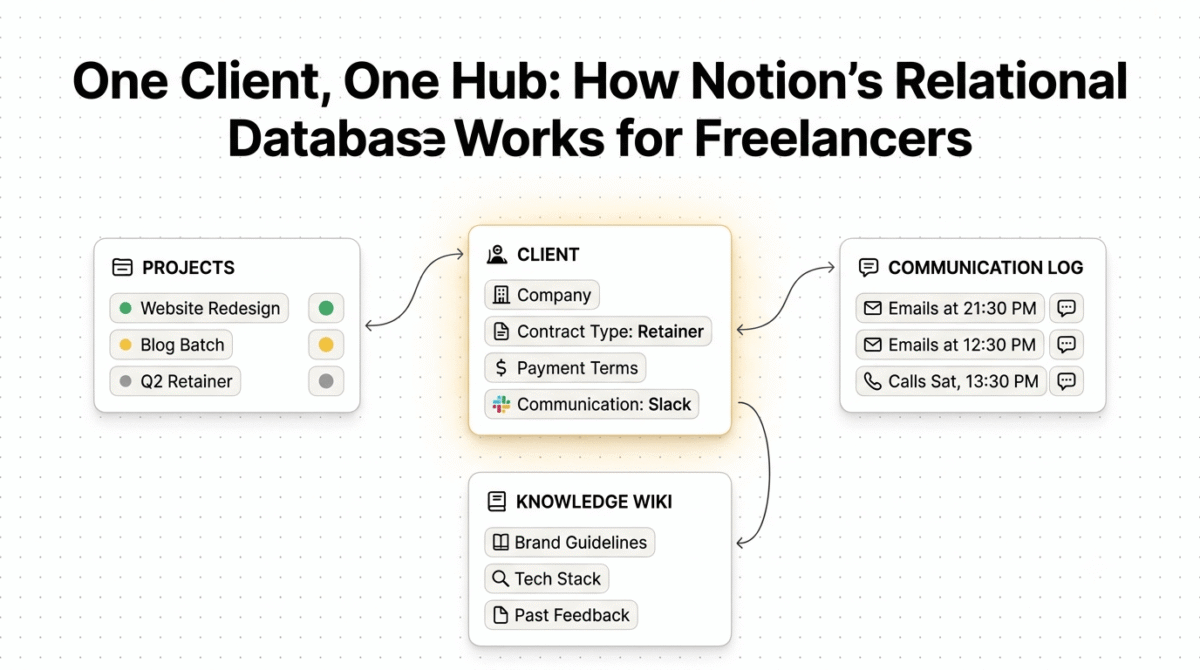
Notion’s database feature transforms it from a note-taking app into a genuine business management system. The client database, the most valuable Notion structure for freelancers, stores every client’s contact information, project history, contract details, and communication notes in one searchable, filterable view:
Client database properties:
- Client name, company, and contact details
- Project status (Active, Completed, Paused, Prospect)
- Hourly rate or project value
- Start date and end date
- Contract type (hourly, fixed, retainer)
- Communication preference (email, Slack, WhatsApp)
- Payment terms and outstanding invoices
- Tags (industry, project type, referral source)
Linked to this client database: a projects database where each project record connects to its client, contains all task lists, stores all project documents, and logs all client communications. The relational database structure means clicking any client shows their entire history with you, every project, every communication, every deliverable.
The wiki capability, building a knowledge base of client preferences, technical specifications, and reference material, is Notion’s most underutilised freelance feature. A page for each client capturing their brand guidelines, technical stack, preferred communication style, and past feedback accumulates into a personalised client knowledge base that makes every subsequent project faster.
The content calendar view, a database filtered to show only current projects, sorted by deadline, displayed in a calendar, gives the weekly overview of what is due when across all clients simultaneously. Switching from the calendar to a board view shows the same projects in Kanban stages (Briefing → In Progress → Review → Delivered → Invoiced).
The template system, saving a project setup template that creates the standard structure for every new project automatically, reduces project initiation from 30 minutes of setup to under 5 minutes. A new WordPress development project template creates: a client briefing page, a technical requirements page, a task list with standard development stages, a timeline view, and a communication log, all pre-populated and ready to fill.
Notion for client collaboration
Notion’s guest sharing, sharing specific pages with clients at no extra cost on the free plan, enables lightweight client portals. Share a project status page with the client’s login and they see the current stage, upcoming deliverables, and a place to leave feedback comments, without seeing your internal notes or other clients’ information.
Where Notion falls short for freelancers
Notion’s flexibility is also its primary limitation, the blank canvas approach requires significant upfront setup to build a project management system that matches your workflow. Freelancers who want a structured system out of the box find Notion’s starting point overwhelming.
The reminder and notification system is less robust than ClickUp’s, Notion can notify you about upcoming deadlines, but the granular task reminders, priority flags, and urgency indicators that ClickUp provides natively require manual workarounds in Notion.
Time tracking is not built into Notion, freelancers who bill hourly need a separate tool (Toggl) for time capture, then manually transfer hours to Notion’s project records.
Notion pricing
| Plan | Price/month (annual) | Key features |
|---|---|---|
| Free | $0 | Unlimited pages, 7-day history, limited guests |
| Plus | $10 | Unlimited history, unlimited guests, Notion AI |
| Business | $15 | + Advanced permissions, private teamspaces |
Notion: Pros and Cons
Pros:
- Most flexible, builds into any system your workflow requires
- Best documentation and knowledge management
- Client database with relationship linking to projects
- Wiki capability for client knowledge bases
- Free guest sharing for client portals
- Template system reduces new project setup time
- Most comprehensive free plan for solo freelancers
- Notion AI for document summarisation and drafting
Cons:
- Requires significant setup, not ready to use out of the box
- Reminder system less robust than ClickUp
- No built-in time tracking
- Initial learning curve for database and relation concepts
- Mobile app slower than desktop for complex database queries
- Notifications less actionable than ClickUp
Rating: 4.7 / 5, Best project management for freelancers who want a complete business system. Requires setup investment; rewards it with the most comprehensive freelance operations hub available.
ClickUp Review: Best Project Management for Task-Heavy Freelance Workflows
Free plan: Yes, unlimited tasks, unlimited members, 100MB storage
Starting price: $7/user/month (Unlimited, billed annually)
Best plan for most freelancers: Free plan, covers everything most solo freelancers need
Platforms: Web, Windows, Mac, Linux, iOS, Android
Affiliate: ClickUp affiliate, 20% recurring commission
Full review: Best Project Management Tools →
ClickUp is the most feature-complete project management tool, combining task management, docs, goals, time tracking, dashboards, and whiteboards in one platform. For freelancers whose primary need is structured task management with deadlines, priorities, and dependencies across multiple client projects, ClickUp’s free plan is the most capable free project management tool available.
What ClickUp does best for freelancers
ClickUp’s task management is the most granular of the three tools, every task can have a due date, time estimate, actual time tracked, priority level (urgent, high, normal, low), status (customisable per project), assignee, subtasks, checklists, attachments, and comments. This depth of task metadata creates a complete record of each piece of work, useful for estimating future projects based on actual historical time data.
The multiple view types, List, Board, Calendar, Gantt, Timeline, Table, and Workload, show the same tasks in different formats depending on what information is most useful at any moment. The Workload view is particularly valuable for freelancers managing multiple concurrent projects, showing your total task load across all clients in a single view that highlights when you are overcommitted in a given week.
ClickUp’s Everything view, a single list of all tasks across all projects and clients, is the daily work inbox for ClickUp users. Filtered to show only today’s due tasks and overdue items, the Everything view with a “Due Today” filter creates a clear, prioritised daily task list without navigating between individual project spaces.
The built-in time tracking, starting a timer directly from any task, recording the actual time spent, and comparing against estimated time, eliminates the need for a separate time tracking tool for freelancers who bill hourly or want to understand their project economics. The time report shows total hours per project, per client, and per time period, exactly the data needed for accurate project estimation and invoicing.
The Goals feature, setting measurable quarterly or monthly targets and linking tasks to those goals, enables the goal-tracking that freelancers who set income or output targets find motivating. A goal of “deliver 8 client projects this quarter” linked to project completion tasks updates automatically as work is completed.
ClickUp Docs, a built-in document editor, stores project briefs, SOPs, meeting notes, and reference material alongside tasks in the same project space. Less flexible than Notion’s wiki but more integrated with task management, documents and tasks live in the same context rather than in separate databases.
ClickUp for client collaboration
ClickUp’s guest access (free for unlimited guests on paid plans) enables sharing specific lists or folders with clients, clients see task status, can leave comments, and can view progress without accessing your internal workspaces. The client-facing view is less customisable than a dedicated client portal but functional for project transparency.
Where ClickUp falls short for freelancers
ClickUp’s feature density is its most consistent criticism, the sheer number of views, settings, and options creates decision fatigue for new users. The initial setup requires deliberate decisions about folder structure, task statuses, and view configurations that overwhelm freelancers who want to start managing work immediately.
The documentation and knowledge management capabilities, while present via ClickUp Docs, are significantly less flexible than Notion’s database-driven approach for complex knowledge management requirements.
ClickUp’s mobile app, while improved, is less polished than the desktop experience, complex projects with many tasks are harder to navigate on a phone screen.
ClickUp pricing
| Plan | Price/user/month (annual) | Key features |
|---|---|---|
| Free | $0 | Unlimited tasks, 100MB storage, basic views |
| Unlimited | $7 | + Unlimited storage, all views, time tracking, goals |
| Business | $12 | + Advanced time tracking, workload management |
ClickUp: Pros and Cons
Pros:
- Best task management depth, most metadata per task of the three tools
- Built-in time tracking eliminates need for separate tool
- Everything view for cross-project daily task visibility
- Workload view shows capacity across all client projects
- Most customisable views, List, Board, Calendar, Gantt, Timeline
- Goals feature for freelancer target tracking
- Free plan covers most solo freelancer needs
- 20% recurring affiliate commission
Cons:
- Most complex setup, feature density overwhelms new users
- Documentation less flexible than Notion for knowledge management
- Mobile app less polished than desktop
- Client collaboration less customisable than Notion guest pages
- Multiple views create decision paralysis for simple projects
- Overkill for freelancers with simple task management needs
Rating: 4.6 / 5, Best project management for task-heavy freelancers who bill hourly and need built-in time tracking. The free plan is the most capable free project management option available.
Trello Review: Best Simple Project Management for Visual Freelancers
Free plan: Yes, unlimited cards, 10 boards, unlimited members
Starting price: $5/user/month (Standard, billed annually)
Best plan for most freelancers: Free plan, sufficient for simple project tracking
Platforms: Web, Windows, Mac, iOS, Android
Affiliate: No standard affiliate program
Full review: Best Project Management Tools →
Trello is the simplest and most immediately intuitive project management tool, a visual Kanban board where cards (tasks) move through columns (stages) as work progresses. For freelancers who think visually and want to see their project pipeline at a glance without learning complex software, Trello provides immediate value with minimal setup.
What Trello does best for freelancers
Trello’s Kanban board is the most intuitive visual project tracking interface available, the card-based pipeline gives an immediate overview of where every project stands. A typical freelance board structure:
Columns: Prospect → Briefing → In Progress → Client Review → Revisions → Delivered → Invoiced → Completed
Each card represents one client project. Moving a card from “In Progress” to “Client Review” takes one drag, the visual pipeline updates instantly. Opening the card shows all project details: deadline, checklist of deliverables, attached files, and the complete comment history with the client.
The board-per-client alternative, creating a separate board for each active client with columns representing deliverable stages, provides project-level visibility when multiple simultaneous deliverables for one client need tracking separately.
Trello’s card anatomy provides more context than it initially appears: due dates trigger deadline reminders, checklists track subtasks within a deliverable, labels colour-code by project type or priority, and attachments store relevant files directly on the card. Power-Ups (Trello’s integration system) add calendar view, time tracking (Harvest integration), and dozens of other capabilities to the base Kanban functionality.
The simplicity is genuinely valuable for freelancers who have tried more complex tools and spent more time managing the tool than managing their work. Trello’s limited feature set is a feature, the constrained options prevent the over-engineering that makes complex tools productivity obstacles rather than aids.
Trello for client collaboration
Trello’s guest board member feature enables sharing a board with a client, they see the project pipeline, can add comments to cards, and can view (and optionally edit) deliverable checklists. This lightweight transparency reduces the status update emails that consume freelancer time: clients check the board for status rather than emailing to ask.
Where Trello falls short for freelancers
Trello’s single view type, the Kanban board, is its most significant limitation. There is no list view for prioritised daily task planning, no calendar view for deadline management across multiple boards, and no timeline view for project scheduling. Power-Ups add some views but require paid plans and do not fully match Notion’s or ClickUp’s native view flexibility.
The documentation capability, card descriptions and attachments are the primary document storage, is the most limited of the three tools. For freelancers who need to maintain detailed client knowledge bases, technical documentation, or SOPs, Trello’s card-based storage is insufficient.
Trello lacks native time tracking, goals, and the task metadata depth that ClickUp provides, making it less suitable for freelancers who want data-driven project management beyond visual pipeline tracking.
Trello pricing
| Plan | Price/user/month (annual) | Key features |
|---|---|---|
| Free | $0 | Unlimited cards, 10 boards, 1 Power-Up per board |
| Standard | $5 | Unlimited boards, unlimited Power-Ups, custom fields |
| Premium | $10 | + Calendar, timeline, dashboard, map views |
| Enterprise | $17.50 | + Admin controls, SSO |
Trello: Pros and Cons
Pros:
- Most intuitive, usable within minutes of first opening
- Visual pipeline perfect for tracking project stages
- Minimal setup, boards work immediately without configuration
- Best for visual thinkers and simple project tracking
- Client board sharing for transparent project status
- Lowest learning curve of the three tools
- Sufficient for straightforward freelance workflows
Cons:
- Single view type limits flexibility, Kanban only on free plan
- No built-in time tracking
- Documentation limited to card descriptions and attachments
- No task metadata depth (priorities, time estimates) without Power-Ups
- 10 board limit on free plan restricts multi-client use
- No native list or calendar view without paid plan
- Less suitable for complex, multi-deliverable client projects
Rating: 4.2 / 5, Best simple project management for visual freelancers. Perfect starting point for freelancers new to project management; most will outgrow it as client complexity increases.
Head-to-Head Comparison
| Notion Free | Notion Plus | ClickUp Free | Trello Free | Trello Standard | |
|---|---|---|---|---|---|
| Price/month | $0 | $10 | $0 | $0 | $5 |
| Project limit | Unlimited | Unlimited | Unlimited | 10 boards | Unlimited |
| Task management | Good | Good | Excellent | Good | Good |
| Documentation | Excellent | Excellent | Good | Basic | Basic |
| Client database | Excellent | Excellent | Good | Basic | Basic |
| Time tracking | No | No | Yes (free) | No | Via Power-Up |
| Multiple views | Database views | Database views | All views | Board only | + Calendar/Timeline |
| Guest/client sharing | Limited | Unlimited | Unlimited (paid) | Yes | Yes |
| Templates | Excellent | Excellent | Good | Good | Good |
| Mobile experience | Good | Good | Good | Excellent | Excellent |
| Learning curve | High | High | High | Low | Low |
| Best for | Complete system | Complete system | Task management | Visual tracking | Visual + views |
| Affiliate | Yes | Yes | 20% recurring | No | No |
Which Project Management Tool Should You Choose?
Choose Notion if:
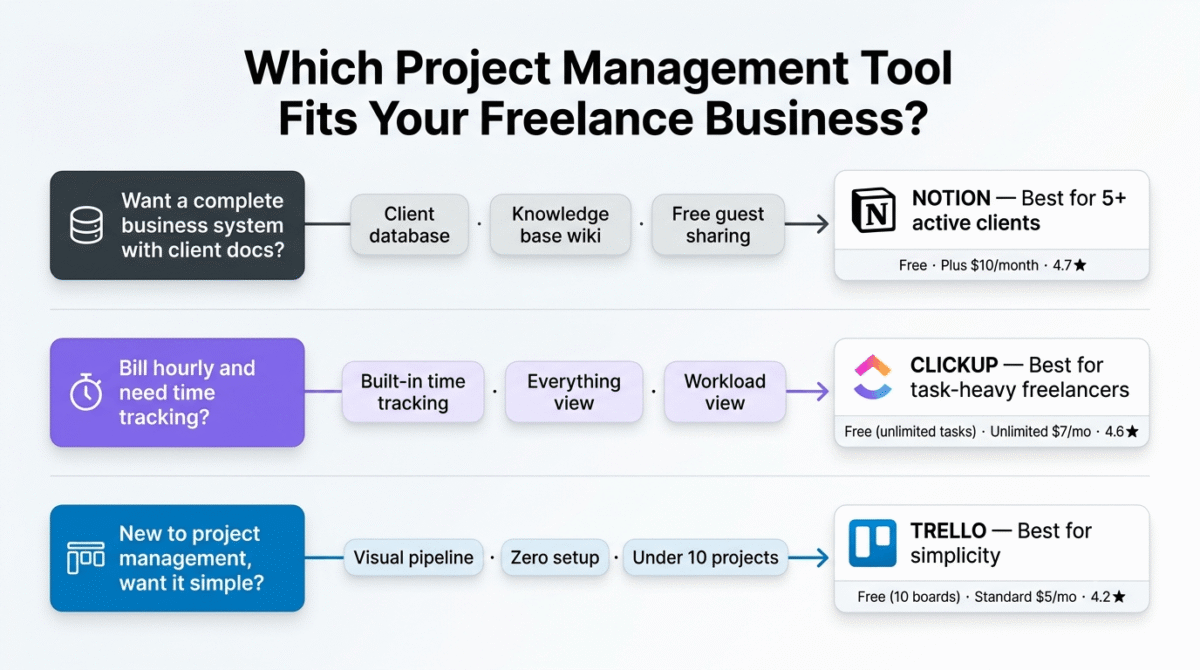
You want a complete freelance business system, client database, project tracking, knowledge base, and documentation all in one place. Invest the time to set it up correctly (or use a freelance Notion template from the template gallery) and Notion becomes the single tool that replaces multiple separate systems. Best for freelancers managing 5+ active clients with complex documentation needs.
Choose ClickUp if:
You bill hourly and need built-in time tracking, manage many simultaneous tasks across multiple clients, or want the most feature-complete free project management tool without paying for software. The free plan’s unlimited tasks, multiple views, and built-in time tracking make it the best value free option. Best for task-heavy freelancers (developers, designers, writers with many concurrent deliverables).
Choose Trello if:
You are new to project management tools, manage a small number of active projects (under 10 simultaneously), prefer visual pipeline tracking over detailed task metadata, or have been overwhelmed by more complex tools and want something that works immediately without configuration. Best for freelancers who want simplicity over features.
The Freelancer Project Management System That Works
Regardless of which tool you choose, the system that produces consistent results for freelancers follows these principles:
1. One place for everything. Every client project, every task, every deadline lives in one tool, not split between your email, a to-do app, and a spreadsheet. The cognitive relief of knowing that if it is not in your system, it does not exist is the primary value of any project management tool.
2. Weekly review, not daily firefighting. Spend 20 minutes every Monday reviewing all active projects: what is due this week, what is behind, what needs client input, what can be completed in advance. This weekly review prevents the Friday panic of discovering a Tuesday deadline.
3. Capture client communications in the project. Every significant client email, Slack message, or call outcome should be logged in the relevant project record, not left in your email inbox. When a client says “let’s make the logo bigger” in week 1 and then disputes the change in week 4, the project log is your evidence.
4. Project templates for repeatability. Every project type you deliver repeatedly (WordPress website, blog post batch, monthly retainer) should have a project template in your system. Templates create consistency, reduce setup time, and ensure nothing is forgotten between projects.
5. Status as a communication tool. Update project status when milestones are reached, not just for your own tracking but as a communication record. “Delivered first draft” timestamped in the project system protects you in scope disputes and creates a professional delivery audit trail.
Frequently Asked Questions
What is the best project management tool for freelancers in 2026?
Notion is the best project management tool for freelancers who want a complete business system, the database flexibility, documentation capability, and client knowledge management create the most comprehensive freelance operations hub. ClickUp is the best for task-heavy freelancers who need built-in time tracking and want the most capable free plan. Trello is the best for visual freelancers who want immediate simplicity without setup investment.u003cbru003e
Is Trello good for freelancers?
Yes, for freelancers managing a small number of straightforward projects, Trello’s visual Kanban simplicity is genuinely effective and immediately usable. Trello becomes limiting when freelancers need detailed task metadata, documentation beyond card descriptions, or views beyond Kanban. Most freelancers outgrow Trello as their client complexity increases, Notion or ClickUp are better long-term investments for growing freelance businesses.u003cbru003e
Is ClickUp free plan good enough for freelancers?
Yes, ClickUp’s free plan provides unlimited tasks, unlimited projects, multiple views, and built-in time tracking, covering everything most solo freelancers need without paying. The main free plan limitation is storage (100MB), freelancers storing large client files in ClickUp may need the Unlimited plan ($7/month). For task management without file storage needs, the free plan is entirely sufficient.u003cbru003e
Can I use Notion as a CRM for freelancers?
Yes, Notion’s database feature creates a functional freelance CRM. A client database with properties for contact information, project history, contract type, communication preference, and pipeline stage covers the essential CRM functions a freelancer needs. The relational database structure, linking client records to project records to communication logs, provides CRM-level organisation without a dedicated CRM subscription.u003cbru003e
How do freelancers manage multiple client projects?
Effective multi-client project management requires: (1) a project management tool with cross-project visibility (Notion’s client database, ClickUp’s Everything view, or multiple Trello boards); (2) a weekly review ritual identifying what is due across all clients this week; (3) a project status system that tracks where each deliverable stands; and (4) clear project records that capture client communications alongside task progress so context is immediately available when switching between clients.u003cbru003e
What is the difference between Notion and ClickUp for freelancers?
Notion excels at documentation, knowledge management, and creating a complete business system from scratch, better for freelancers who want client databases, knowledge bases, and project management in one flexible tool. ClickUp excels at structured task management, time tracking, and granular task organisation, better for freelancers who bill hourly, manage many tasks simultaneously, and want built-in time tracking. Notion requires more setup; ClickUp has more built-in structure. Both have excellent free plans.u003cbru003e








