
Every blogger with a contact page, every freelancer collecting client briefs, every small business gathering customer feedback has a form problem. Usually two of them: the form tool is either too limited to do what they need, or too expensive to justify for what they actually use it for.
Forms are the quiet workhorses of every online business. Lead capture forms feed email lists. Contact forms route enquiries. Client intake forms collect project briefs. Customer surveys measure satisfaction. Payment forms process deposits. Quiz forms qualify prospects. Forms are one small but essential piece of that stack, see our roundup of the best tools for small business for the rest of what a lean operation typically runs. Every one of these tasks runs through a form builder, and the tool you choose determines whether that form converts or frustrates.
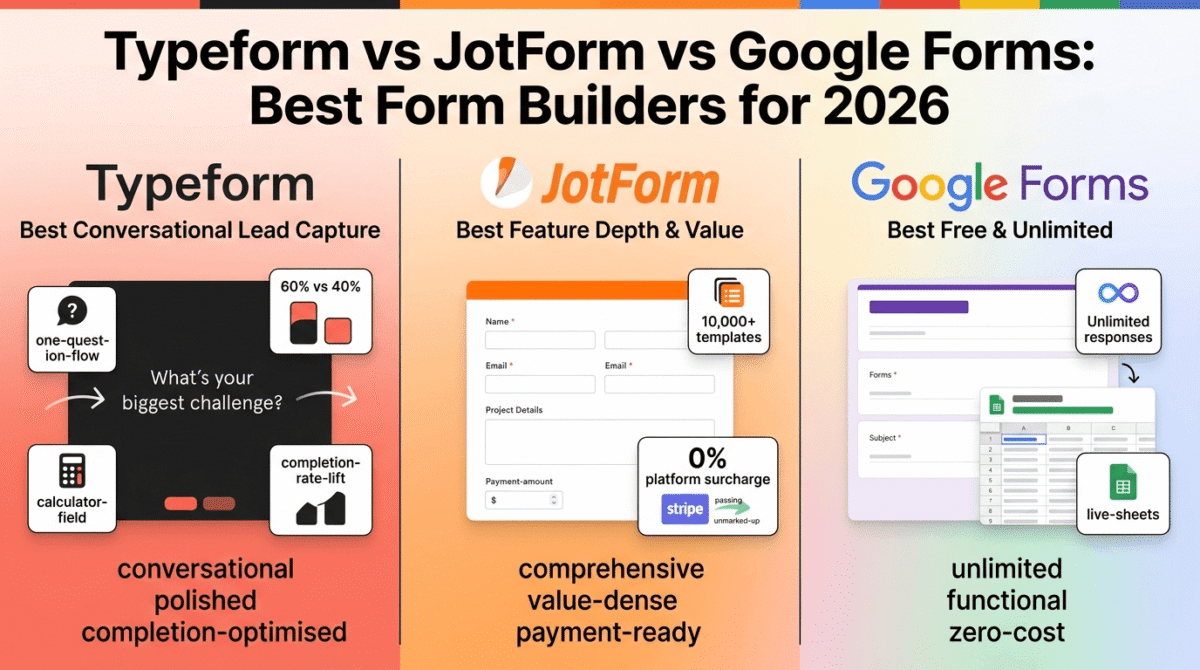
In 2026, three names dominate every form builder conversation: Typeform, JotForm, and Google Forms. They are not interchangeable. Typeform builds conversational forms that ask one question at a time and genuinely improve completion rates. JotForm builds traditional multi-field forms with the deepest feature set in the market at a lower cost per response. Google Forms builds functional, unlimited forms at zero cost for anyone willing to accept the Google aesthetic and feature ceiling.
I tested all three (Typeform vs JotForm vs Google Forms) across real workflows, lead capture, client intake, customer surveys, event registration, and payment collection, over 30 days. Here is the honest comparison.
Table of Contents
How We Evaluated These Tools
Every platform was tested across five criteria:
- Form completion rates, does the form design and UX actually get submitted, or does it lose respondents before they finish?
- Feature depth, conditional logic, payment collection, file uploads, calculations, integrations, what is available at each price tier?
- Response and submission limits, how many form responses can you collect per month, and what happens when you hit the cap?
- Pricing transparency, are the real monthly costs and limits clear before committing, or do response caps and feature gates create unexpected costs?
- Value for bloggers and small businesses, at the core audience’s usage level, which tool delivers the right features at a justifiable cost?
Why Form Builders Matter for Bloggers and Content Creators
Form builders are not just a business tool. For bloggers and content creators, they power several high-value workflows.
Lead capture and email list building. A multi-step lead capture form, asking for name, email, and their biggest challenge, qualifies subscribers before they join your list. Higher-quality subscribers open more emails, click more affiliate links, and convert at higher rates than generic “enter your email” opt-ins. Typeform’s conversational format is particularly effective for this qualification workflow.
Client intake and project brief collection. Freelancers who collect project briefs through email back-and-forth lose hours per client to clarification requests. A well-designed intake form collects scope, budget, timeline, references, and goals in one structured submission, giving you everything you need to scope a project accurately before the first call. Pair that with a scheduling tool so you can use forms for appointment intake and book the first call in the same workflow, see our Calendly vs Acuity vs Cal.com comparison.
Reader surveys for content strategy. Understanding what your audience wants to read is more valuable than guessing. A quarterly reader survey, distributed to your email list and embedded in high-traffic posts, generates direct intelligence about content gaps, tool interests, and pain points. This data informs editorial strategy more accurately than any analytics tool.
Course and webinar registration. Bloggers running cohort courses, live workshops, or webinars need registration forms that collect attendee information, dietary restrictions, time zone preferences, and payment. JotForm’s payment integration handles registration and payment in a single form submission.
Product feedback and NPS. After publishing a course, launching a digital product, or completing a client project, a structured feedback form captures testimonials, identifies improvement areas, and builds the social proof library that drives future sales. If feedback volume grows beyond what a spreadsheet can track, you can route feedback into a helpdesk tool for proper follow-up, see our Zendesk vs Freshdesk vs Help Scout comparison.
Typeform Review: Best Form Builder for Conversational Lead Capture and Surveys
Free plan: Yes, 10 responses/month, 10 questions per form, Typeform branding
Starting paid price: $29/month (Basic, monthly) / $24.17/month (annual)
Best plan for most users: Plus, $50/month annual ($59/month monthly)
Platforms: Web, iOS, Android, integrates with HubSpot, Mailchimp, Slack, Zapier, Stripe, Google Sheets, Salesforce (Business+)
Affiliate program: Yes, Typeform affiliate program
Typeform pioneered the conversational form, one question at a time, smooth transitions between questions, a chat-like experience that feels personal rather than bureaucratic. In 2026, that design philosophy still produces meaningfully higher completion rates than traditional multi-field forms. Typeform’s own data shows 30–40% higher completion rates compared to equivalent multi-field forms, and independent testing consistently confirms the directional finding even if the exact percentage varies by use case.
What Typeform does best
The conversational form experience is Typeform’s defining capability and the reason it has 150,000+ customers despite being one of the more expensive tools in this comparison. Showing one question at a time reduces the intimidation of a long form, respondents answer each question in sequence without being overwhelmed by the full form length at once. The smooth animated transitions between questions create a flow state that encourages completion rather than abandonment.
For lead capture specifically, this UX improvement has direct revenue implications. A lead capture form with a 60% completion rate generates 50% more leads than an equivalent form with a 40% completion rate, with no additional traffic required. For bloggers investing in SEO and content to drive traffic, the marginal cost of improving form completion rates is zero, better form design converts the same traffic more effectively.
The logic jump system allows branching based on responses, a respondent who selects “I’m a freelancer” sees different follow-up questions than one who selects “I run a team.” This conditional logic makes a single form function as multiple targeted forms simultaneously, delivering a personalised experience without requiring separate form versions for each audience segment.
Video and image question embeds, available from the Plus plan, allow Typeform to build interactive product demos, onboarding flows, and visual surveys where multimedia content is part of the form experience rather than separate from it. For bloggers building quiz-style lead magnets, this capability produces engagement that static text-and-field forms cannot.
The calculator field, available from Plus, enables pricing calculators, ROI estimators, and scoring quizzes that calculate and display a result based on form inputs. A “What’s your freelance rate?” calculator or a “Which software plan do you need?” recommendation quiz can be built in Typeform and embedded on any blog post, combining utility content with lead capture in one tool.
HubSpot, Mailchimp, and ConvertKit (Kit) integrations on paid plans automatically push form submissions to email marketing lists, eliminating the manual export-import step that wastes time when using non-integrated form tools.
Where Typeform falls short
The response-based pricing model is the most critical limitation to understand before purchasing and the source of the most common pricing complaints in 2026.
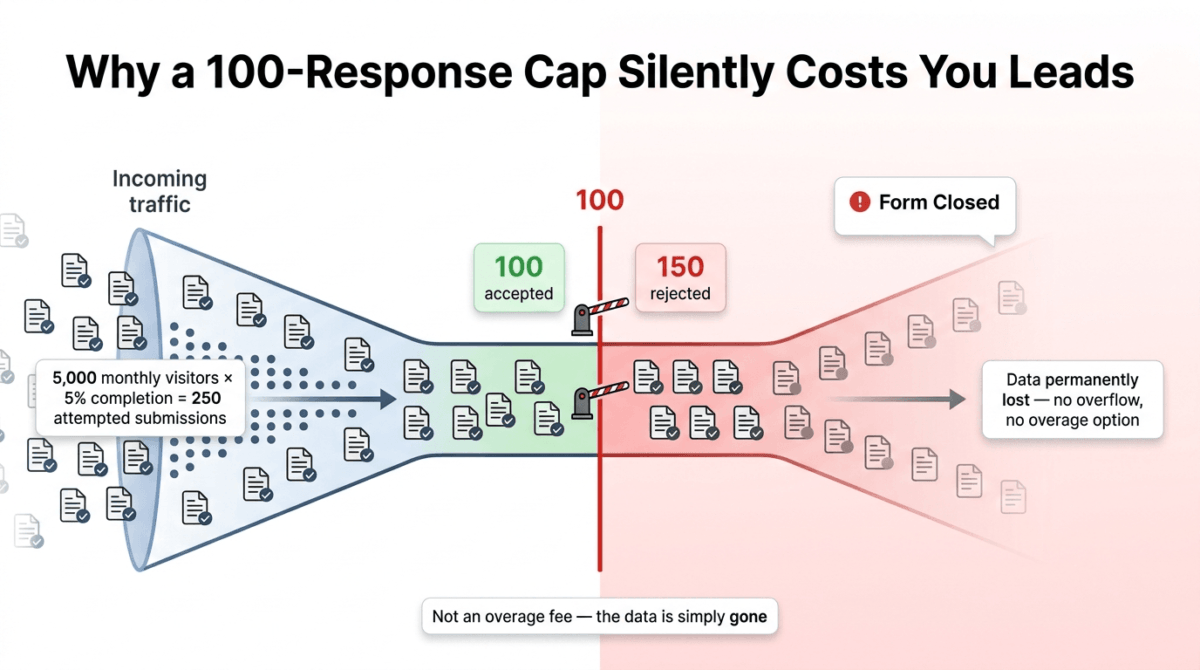
Typeform’s plans cap monthly responses, not forms, not questions, not users, responses. Basic at $29/month (monthly) limits you to 100 responses per month. When response 101 arrives, the form closes. The respondent sees a “this form is currently closed” message. The data is gone permanently. This is not an overage fee situation, it is a hard stop with no data recovery.
For a blogger whose lead capture form sits on a post that ranks and drives consistent daily traffic, 100 responses per month means 100 leads per month regardless of how much traffic the page receives. A post driving 5,000 monthly visitors with a 5% form completion rate generates 250 attempted submissions, 150 of which Typeform discards silently on the Basic plan.
The jump from Basic (100 responses, $29/month monthly) to Plus (1,000 responses, $59/month monthly) is a $30/month price increase for 900 additional responses. For any blogger or marketer whose forms receive meaningful traffic, Plus at $50/month annual is the functional entry point, Basic’s 100-response cap is exhausted within the first week on any reasonably trafficked form.
CAPTCHA and bot protection, critical for any form used in lead generation or paid advertising campaigns, are only available on Growth plans starting at $199/month. G2 reviewers explicitly flag this as a critical gap: without bot protection, lead capture forms on paid advertising campaigns accumulate bot submissions that inflate response counts, exhaust the monthly cap, and fill CRM systems with unusable data.
Salesforce and HubSpot native integrations require Business at $83/month (annual). Plus plan’s HubSpot integration covers basic contact creation but not deal creation, custom properties, or workflow triggers, the integrations that make form-to-CRM automation genuinely powerful require Business.
Typeform pricing
| Plan | Annual Price | Monthly Price | Responses/Month | Key features |
|---|---|---|---|---|
| Free | $0 | $0 | 10 | 10 questions/form, 1 user, Typeform branding |
| Basic | $24.17/month | $29/month | 100 | Unlimited forms, logic jumps, 1 user, basic integrations |
| Plus | $50/month | $59/month | 1,000 | + 3 users, branding removal, custom subdomain, calculator, API, priority support |
| Business | $83/month | $99/month | 10,000 | + Drop-off analytics, Salesforce integration, 5 users, video questions, CAPTCHA (via add-on) |
| Growth Essentials | $199/month | — | 10,000+ | + Bot protection, advanced analytics, webhooks, 10 users |
| Growth Pro | $349/month | — | Custom | Full marketing suite, highest limits |
Annual billing saves approximately 17% vs monthly. Response hard cap, forms close when limit is reached, no overflow or overage option on standard plans. CAPTCHA requires Growth Essentials ($199/month).
Pricing trap warning: Typeform’s Basic plan at $29/month caps at 100 responses, not 100 daily or 100 per form, but 100 total for the entire month. Any form receiving meaningful traffic exhausts this within days. Plus at $50/month (annual) is the realistic minimum for any active lead capture or survey workflow. More critically: forms do not collect overflow responses or charge overages, they simply close and reject submissions once the monthly cap is hit. Data from those rejected submissions is permanently lost. Monitor response counts weekly and upgrade before hitting the cap, not after.
Typeform: Pros and Cons
Pros:
- Best conversational form experience, 30–40% higher completion rates than multi-field forms
- Logic jumps enable personalised branching based on respondent answers
- Calculator fields build pricing estimators and scoring quizzes
- Video and image embeds create multimedia form experiences
- Clean, visually polished design that matches professional brand aesthetics
- HubSpot, Kit (ConvertKit), and Mailchimp integrations on Plus and above
- 14-day free trial on paid plans
Cons:
- Hard response cap, forms close and reject submissions when monthly limit is hit
- Basic plan’s 100 responses/month exhausted within days on any trafficked form
- CAPTCHA/bot protection only on Growth Essentials ($199/month), critical gap for paid advertising
- Salesforce native integration requires Business ($83/month annual)
- Monthly billing adds 17–20% vs annual, commit carefully before paying month-to-month
- Most expensive cost-per-response in this comparison at Basic/Plus tiers
- Free plan (10 responses/month) is effectively unusable for any real workflow
Rating: 4.4 / 5, Best form builder for lead capture, survey, and quiz workflows where conversational UX and completion rate improvement justify the higher cost per response. The Plus plan at $50/month (annual) is the realistic minimum for active use. Not suitable for high-volume form collection where cost per response is the primary constraint.
JotForm Review: Best Form Builder for Feature Depth, Templates, and Value
Free plan: Yes, 5 forms, 100 submissions/month, 100MB storage, JotForm branding
Starting paid price: $34/month (Bronze, annual billing) / $39/month (monthly)
Best plan for most users: Silver, $39/month (annual billing)
Platforms: Web, iOS, Android, 150+ integrations including Stripe, PayPal, HubSpot, Salesforce, Zapier, Google Sheets
Affiliate program: Yes, JotForm affiliate program
JotForm has been building online forms since 2006, nearly two decades of development that shows in the breadth and depth of its feature set. With 10,000+ templates, 150+ integrations, native payment processing across multiple gateways, PDF generation, eSignature collection, and HIPAA compliance at the Gold tier, JotForm is the most feature-complete traditional form builder in the market. In 2026, it serves over 25 million users, a scale that funds continuous development across more use cases than any single competitor covers.
What JotForm does best
The template library of 10,000+ pre-built forms is the largest in this comparison and likely the largest in the entire form builder category. Every conceivable use case is covered, lead capture, event registration, client intake, medical history, job application, order form, feedback survey, quiz, payment form, waiver, and hundreds of industry-specific variants. For a user who needs a functional form in under 10 minutes without building from scratch, JotForm’s template library is unmatched.
The submission-to-price ratio is the strongest in this comparison. Bronze at $34/month (annual) provides 1,000 monthly submissions compared to Typeform’s Basic at $29/month (annual) which provides only 100 responses. JotForm delivers 10�, the submission volume for a $5/month premium over Typeform Basic, which fundamentally changes the economics for any form receiving moderate traffic.
Payment processing is natively built into JotForm across Stripe, PayPal, Square, and 30+ additional payment gateways with zero platform surcharge, you pay only the gateway’s standard processing fee. A freelancer collecting project deposits through a JotForm intake form pays Stripe’s standard 2.9% + $0.30 per transaction with no JotForm markup. This compares favourably to platforms that charge a platform fee on top of gateway fees.
HIPAA compliance is available at the Gold tier ($99/month annual) with no separate add-on purchase, encrypted submissions, data agreements, and audit trails required for healthcare data collection are included in the plan price. This is significantly more accessible than Typeform’s HIPAA compliance, which requires enterprise-level negotiation.
The 50% nonprofit and education discount is a genuine differentiator. JotForm is the only major form builder that offers a verified 50% plan discount for qualifying nonprofits and educational institutions, covering Bronze, Silver, Gold, and Enterprise plans on both monthly and annual billing. For schools, charities, and educational content creators, this discount makes JotForm the most cost-effective option in the category.
The JotForm Approvals workflow, available across all paid plans, routes form submissions through a defined approval chain, notifying reviewers, collecting decisions, and triggering downstream actions based on approvals or rejections. For freelancers managing client proposal approvals or small businesses routing purchase requests, this built-in workflow automation eliminates the need for a separate approval tool.
All 150+ integrations are included at every paid tier, not gated behind higher plans. A Bronze subscriber at $34/month has access to the same Stripe, HubSpot, Salesforce, Mailchimp, and Zapier integrations as a Gold subscriber at $99/month. Only submission volume and storage limits differentiate the tiers.
Where JotForm falls short
All standard plans are single-user, Bronze, Silver, and Gold are all 1-seat accounts. Multi-user access, user permissions management, and team collaboration features require Enterprise pricing, which is negotiated custom. For small teams where multiple people need to manage, edit, and review forms, JotForm’s standard plans create a significant collaboration barrier that Typeform’s Plus plan (3 users) and Business plan (5 users) do not share.
The user interface is dated compared to Typeform. JotForm’s design language reflects its 2006 founding era, functional but not aesthetically modern. The form creation interface, while comprehensive, lacks the clean visual experience that Typeform and newer entrants provide. For creators building forms that are customer-facing and brand-reflective, JotForm’s default aesthetic is less polished.
The free plan’s 5-form limit is restrictive for users who want to test multiple form types before purchasing. Typeform’s free plan allows unlimited forms (with a 10 response cap). JotForm’s 5-form limit means a new user evaluating the platform for multiple use cases hits the form limit before getting a complete picture of the product.
Submissions that exceed the monthly cap, unlike Typeform’s hard close, trigger a different behaviour: JotForm shows an upgrade prompt to the form submitter, which creates a broken experience for respondents who encounter it mid-submission. Neither the hard close (Typeform) nor the public upgrade prompt (JotForm) is an ideal outcome, both signal that response limits are a genuine operational risk at each pricing tier.
JotForm pricing
| Plan | Annual Price | Monthly Price | Submissions/Month | Forms | Storage | Key features |
|---|---|---|---|---|---|---|
| Starter (Free) | $0 | $0 | 100 | 5 | 100MB | JotForm branding, basic features |
| Bronze | $34/month | $39/month | 1,000 | 25 | 1GB | No branding, payments, all integrations, approvals |
| Silver | $39/month | $49/month | 2,500 | 50 | 10GB | 2.5x submissions, 10x storage vs Bronze |
| Gold | $99/month | $129/month | 10,000 | 100 | 100GB | + HIPAA compliance, priority support |
| Enterprise | Custom | Custom | Custom | Unlimited | 1TB+ | Multi-user, SSO, white-label, SLA |
Annual billing saves approximately 14–25% vs monthly. All 150+ integrations included on all paid plans. HIPAA available at Gold+ only. 50% discount for verified nonprofits and educational institutions. Single-user on all standard plans.
Pricing trap warning: JotForm’s Silver plan at $39/month (annual) offers 2,500 submissions and 10GB storage for only $5/month more than Bronze ($34/month, 1,000 submissions, 1GB storage). The Bronze-to-Silver upgrade is the strongest value jump in JotForm’s pricing structure and almost always worth the extra $5. More importantly: all standard plans are single-user, multi-person team access requires Enterprise pricing with custom negotiation. Budget for this if team collaboration is a requirement before committing to any standard JotForm plan.
JotForm: Pros and Cons
Pros:
- 10,000+ templates, largest template library in this comparison
- Best submission-to-price ratio, Bronze provides 1,000 submissions for $34/month vs Typeform Basic’s 100 for $29/month
- Zero platform payment surcharge, pay gateway fees only (Stripe, PayPal, Square, 30+ others)
- All 150+ integrations available on all paid tiers, no integration gating
- HIPAA compliance available at Gold ($99/month), no enterprise negotiation required
- 50% discount for nonprofits and educational institutions
- JotForm Approvals workflow for built-in approval chain routing
- PDF generation from form submissions, automatic document creation
Cons:
- All standard plans are single-user, multi-user requires Enterprise
- Interface is the most dated of the three tools, less visually polished
- Free plan limited to 5 forms, restricted evaluation window
- Submissions exceeding monthly cap show public upgrade prompt to respondents
- Gold to Enterprise pricing jump is steep, no mid-tier between $99/month and custom
- Form building experience less intuitive than Typeform for first-time users
- No conversational one-question-at-a-time format like Typeform
Rating: 4.5 / 5, Best form builder for freelancers and small businesses who need maximum features, the largest template library, and the best submission-to-price ratio. Silver at $39/month (annual) is the best-value plan in this comparison, 2,500 submissions, 50 forms, and all integrations for less than most competitors charge for basic plans. The single-user limitation on standard plans is the primary caveat.
Google Forms Review: Best Free Form Builder for Unlimited Submissions
Free plan: Yes, unlimited forms, unlimited responses, unlimited storage (Google Drive)
Starting paid price: Included with Google Workspace ($6/user/month Business Starter)
Best plan for most users: Free (Google account), sufficient for most individual use cases
Platforms: Web, iOS, Android, integrates natively with Google Sheets, Google Drive, Gmail
Affiliate program: No, Google does not offer an affiliate program for Google Forms
Google Forms is the most widely used form builder in the world by active user count, because it is free, unlimited, and available to anyone with a Google account. No response caps. No submission limits. No form limits. No storage limits. No branding restrictions. At zero cost.
For bloggers and small business owners who need functional forms without a monthly subscription, Google Forms is the default first choice, and for a significant portion of use cases, it is sufficient.
What Google Forms does best
Unlimited everything is the defining characteristic. Unlimited forms, unlimited questions per form, unlimited responses, unlimited storage via Google Drive, all at zero cost for any Google account holder. No response cap that closes your form at midnight. No upgrade prompt when a viral post sends 10,000 survey completions overnight. No storage limit that fills before you export your data.
The Google Sheets integration is the most practical data workflow in this comparison for users who live in spreadsheets. Every form response flows automatically into a Google Sheets spreadsheet in real time, sortable, filterable, formula-capable, and shareable with collaborators without any export step. For bloggers who analyse survey data in Sheets, this native integration eliminates every intermediate processing step.
Real-time collaboration is Google’s universal advantage. Multiple team members can edit the same form simultaneously, comment on questions, and view response data together, the same collaborative experience that makes Google Docs the default document tool. No per-seat charge, no role-based access configuration required.
The zero learning curve makes Google Forms the fastest form creation experience in this comparison. The interface is familiar to anyone who has used Google Docs or Slides. A functional survey is live in under five minutes for a first-time user with no tutorial required.
For educators, students, and academic researchers, Google Forms is genuinely best-in-class, quiz auto-grading, point assignment, feedback responses, and grade summaries are built-in at zero cost. Classroom adoption is near-universal for this reason.
Where Google Forms falls short
Design flexibility is severely limited. Google Forms offers approximately six colour themes and basic font selection, no custom CSS, no brand fonts, no logo insertion beyond a header image, no removal of the Google aesthetic. For a professional blogger whose forms are customer-facing and need to match their brand identity, Google Forms looks generic and immediately signals “free tool” to respondents.
Conditional logic is basic. Google Forms supports simple “go to section based on answer” branching, but not the complex logic that Typeform’s logic jumps and JotForm’s conditional rules provide. A quiz that shows different questions based on a combination of previous answers, the kind of personalised experience that improves completion rates, cannot be built in Google Forms without workarounds.
Payment collection is absent entirely. Google Forms cannot collect payments, process deposits, or integrate with Stripe or PayPal natively. Any workflow that involves a form and payment requires a third-party integration (typically Zapier connecting Google Forms to a payment processor) that adds complexity and cost.
Advanced integrations are limited to the Google ecosystem plus Zapier. Natively connecting Google Forms to HubSpot, Salesforce, or Mailchimp requires either Zapier (paid) or manual export. For bloggers and business owners who want form-to-CRM integration without a middleware tool, this gap is a significant practical limitation.
The response analytics are the most basic in this comparison, pie charts and bar graphs showing the distribution of responses per question, with no completion rate data, no drop-off analysis, no response time tracking. Understanding where respondents abandon a form, which questions take longest to answer, and what device they used requires exporting to Google Sheets and building your own analysis, or using a more sophisticated tool. To analyze form submissions in more depth than Sheets allows, drop-off points, device breakdowns, session replays, see our Google Analytics vs Hotjar vs Matomo comparison.
HIPAA compliance is not available. Healthcare organizations and health content creators collecting any protected health information cannot use Google Forms for compliance purposes.
Google Forms pricing
| Plan | Price | Limits | Key features |
|---|---|---|---|
| Free (Google Account) | $0 | Unlimited forms, responses, storage | Basic themes, simple conditional logic, Sheets integration, quiz grading |
| Google Workspace Business Starter | $7.00 – $8.40/user/month | Unlimited | + Custom domain, admin controls, 30GB Drive storage (business) |
| Google Workspace Business Standard | $14.00 – $16.80/user/month | Unlimited | + 2TB Drive, shared drives, enhanced security |
Google Forms functionality is identical across all Google Workspace tiers, the upgrade adds storage, admin controls, and Google Meet features rather than form capabilities. There is no form-specific paid upgrade path.
Pricing note: Google Forms is permanently free with no meaningful functional limitation beyond design flexibility, payment collection, and advanced integrations. For bloggers and freelancers whose form needs are functional rather than visually branded, Google Forms is the correct choice, zero cost, unlimited responses, and Google Sheets integration that exceeds the reporting tools of most paid alternatives. The lack of payment collection, brand design control, and advanced integrations are the trigger points for considering a paid tool.
Google Forms: Pros and Cons
Pros:
- Completely free, unlimited forms, unlimited responses, unlimited storage, no time limit
- Real-time Google Sheets integration, every response flows directly into a spreadsheet
- Multi-user collaboration, multiple editors with no per-seat charge
- Zero learning curve, familiar interface for any Google user
- Quiz grading and auto-scoring built in
- No form closes when a post goes viral, unlimited responses handle any traffic spike
- Works on any device without app installation
Cons:
- No payment collection, cannot process deposits or purchases
- Very limited design customisation, Google aesthetic cannot be removed
- Basic conditional logic, cannot build complex multi-variable branching
- No native CRM integration, HubSpot, Salesforce, Mailchimp require Zapier
- Response analytics are basic, no drop-off rates, completion rates, or time-on-question
- No HIPAA compliance
- No branding removal, always looks like a Google product
- Not suitable for professional client-facing forms where brand identity matters
Rating: 4.2 / 5, Best form builder for unlimited-response use cases, internal data collection, academic and educational workflows, and any situation where budget is zero and brand aesthetics are secondary. Completely free and genuinely unlimited, the right starting point for any blogger or small business before evaluating paid alternatives.
Head-to-Head Comparison
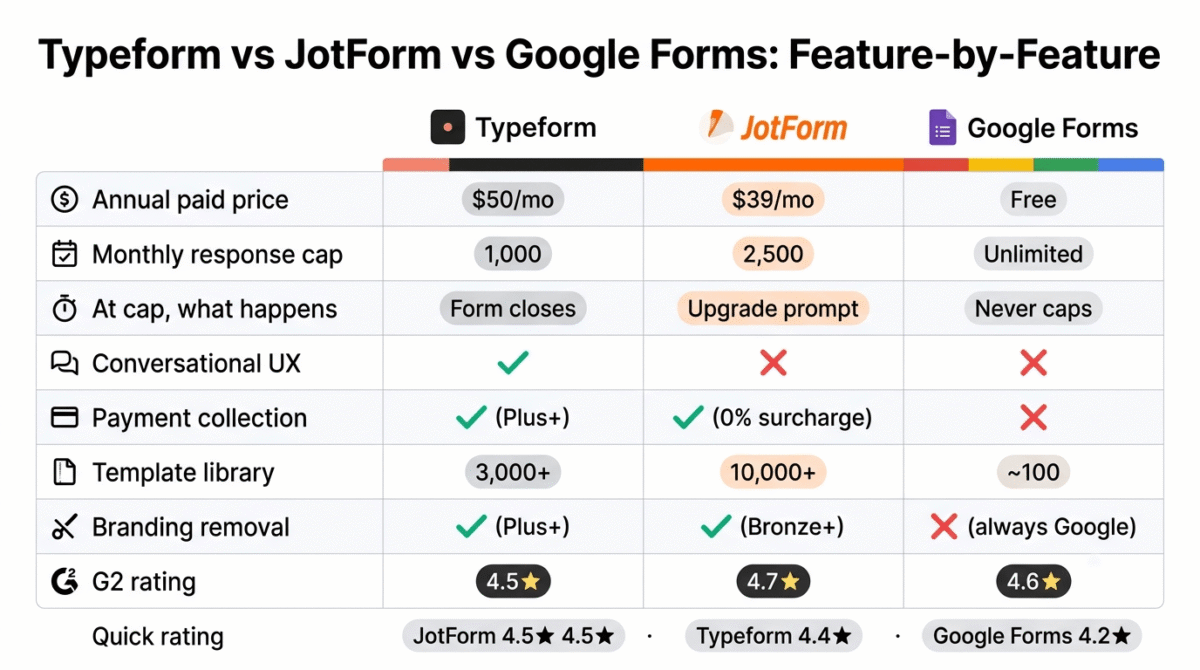
| Features | Typeform Plus | JotForm Silver | Google Forms |
|---|---|---|---|
| Annual price | $50/month | $39/month | Free |
| Free plan | 10 responses/month | 100 submissions/month, 5 forms | Unlimited |
| Monthly response/submission limit | 1,000 | 2,500 | Unlimited |
| What happens at cap | Form closes, data lost | Public upgrade prompt shown | Never caps |
| Conversational UX (1 question at a time) | Yes | No | No |
| Logic/conditional branching | Yes (advanced) | Yes (advanced) | Basic only |
| Payment collection | Plus+ (via Stripe) | All paid plans (30+ gateways, 0% surcharge) | No |
| Template library | 3,000+ | 10,000+ | ~100 |
| HIPAA compliance | Enterprise only | Gold ($99/month) | No |
| Multi-user access | 3 users (Plus) | Single-user (Enterprise for team) | Unlimited collaborators |
| Branding removal | Plus+ | Bronze+ | No (always Google-branded) |
| Native CRM integration | Business+ (HubSpot, Salesforce) | All paid plans (150+ integrations) | Zapier only |
| Response analytics | Basic–Advanced | Basic–Advanced | Basic only |
| CAPTCHA/bot protection | Growth Essentials ($199/month) | All paid plans | Yes (Google reCAPTCHA) |
| Completion rate improvement | 30–40% vs multi-field forms | Standard | Standard |
| 50% nonprofit/education discount | No | Yes | N/A (free) |
| Affiliate program | Yes | Yes | No |
| G2 rating | 4.5/5 | 4.7/5 | 4.6/5 |
Which Form Builder Should You Choose?
Choose Typeform Plus ($50/month, annual) if:
Your primary use case is lead capture, qualification surveys, or interactive quizzes where completion rate improvement has direct revenue impact. The conversational one-question-at-a-time format consistently outperforms multi-field forms for lead capture, and for bloggers monetising through email lists or affiliate offers, the lift in completion rates justifies the cost per lead. Monitor your monthly response count carefully, the 1,000 response Plus cap is a hard limit that closes your form when exhausted.
Choose JotForm Silver ($39/month, annual) if:
You need the most comprehensive feature set at the best submission-to-price ratio, payment collection across 30+ gateways with zero platform surcharge, 10,000+ templates covering every conceivable form type, all 150+ integrations on all paid tiers, and 2,500 monthly submissions at $39/month. Silver is the best overall value paid form builder plan in this comparison. The single-user limitation on standard plans is the key caveat, if your team needs collaborative form management, verify Enterprise pricing before committing.
Choose Google Forms (free) if:
Your response volume is unpredictable or high, your budget is zero, your forms are primarily internal or functional rather than client-facing brand experiences, and you do not need payment collection. Unlimited responses at zero cost makes Google Forms the only rational choice for high-volume data collection, academic research, internal team surveys, and any workflow where JotForm Silver’s 2,500 monthly submission limit would be regularly exceeded. Pair it with Google Sheets for analysis and Zapier if CRM integration is needed.
Setting Up Your First Form, The Practical Guide
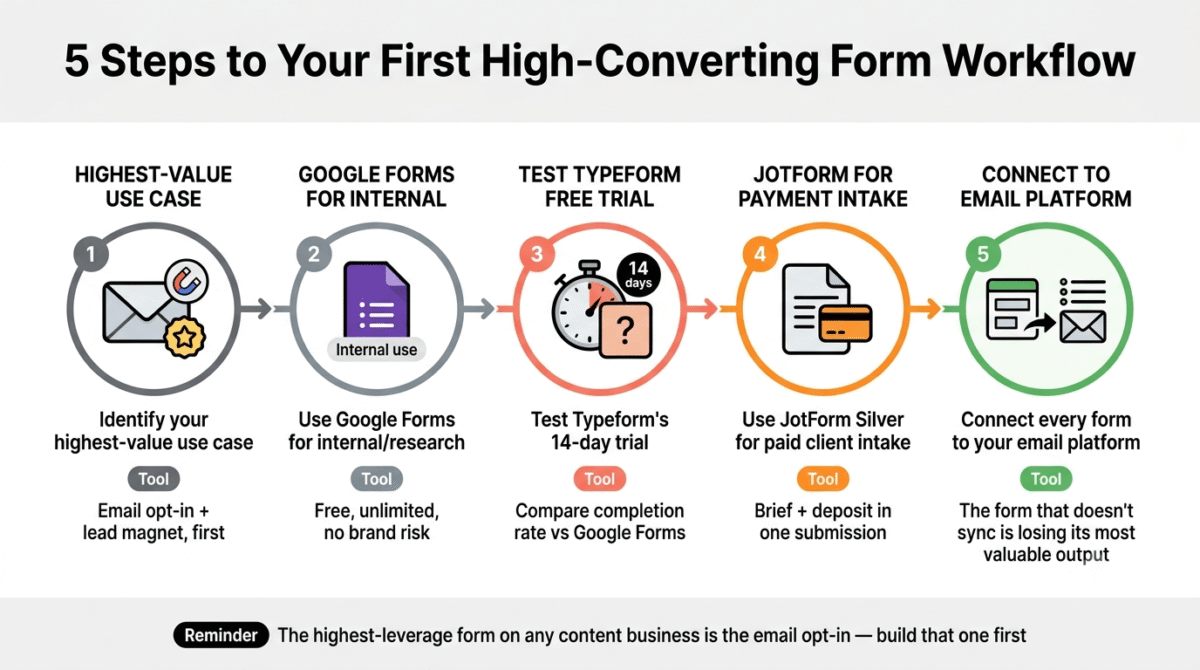
For bloggers and freelancers building their first professional form workflow:
Step 1, Identify your highest-value use case. The form that earns the most ROI for most bloggers is the email list opt-in form paired with a lead magnet. Build this first, before any other form type. A well-designed opt-in form connected to your email platform is the highest-leverage form on any content business.
Step 2, Start with Google Forms for internal and research use. Reader surveys, content research questionnaires, and internal team processes do not require paid form builders. Google Forms handles all of these with unlimited responses at zero cost. Reserve paid form tools for customer-facing, brand-reflective workflows.
Step 3, Test Typeform’s free plan before purchasing. The 10-response monthly limit is barely enough to evaluate the tool, but the 14-day free trial on Basic or Plus gives full access. Use the trial to build your lead capture form, test the completion experience from a respondent’s perspective, and compare completion rates against a Google Forms equivalent over two weeks.
Step 4, Choose JotForm Silver for payment-integrated client intake. Freelancers who collect project briefs and initial deposits in a single workflow should build their intake form in JotForm Silver, the zero-surcharge payment collection and conditional logic handle the brief-and-deposit workflow in one submission. Connect to Stripe, set a required deposit amount, and the form collects both project information and payment simultaneously.
Step 5, Connect your form to your email marketing platform. Every lead capture form should push submissions directly to your email list. Typeform connects to Kit (ConvertKit) on Plus. JotForm connects to Kit on all paid plans. Google Forms connects via Zapier or native Make integration. The form that does not automatically add respondents to your email list is losing the most valuable output of every submission.
Final Verdict
JotForm Silver is the best form builder for most freelancers and small business owners in 2026, the 2,500 monthly submission cap covers the majority of small business form volumes, all 150+ integrations are available on paid tiers, payment collection has zero platform surcharge, and the 10,000+ template library means a functional form for any use case is ready within minutes. The $39/month annual price is the best overall value paid plan in this comparison.
Typeform Plus is the best form builder for lead capture and qualification workflows where higher completion rates have direct revenue impact. The conversational format’s 30–40% completion rate improvement over equivalent multi-field forms is real and documented, for bloggers building email lists where each subscriber has lifetime affiliate revenue potential, this improvement compounds over time. Monitor the 1,000-response monthly limit carefully.
Google Forms is the best form builder for unlimited-volume, zero-cost use cases, internal data collection, reader surveys, academic research, and any workflow where brand aesthetics are secondary to functionality and response volume is unpredictable. The unlimited response ceiling is a genuine structural advantage over every paid alternative for specific use cases.
Ratings:
- JotForm: 4.5 / 5
- Typeform: 4.4 / 5
- Google Forms: 4.2 / 5
Frequently Asked Questions
What is the best free form builder in 2026?
Google Forms is the best permanently free form builder, unlimited forms, unlimited responses, unlimited storage, real-time Google Sheets integration, and quiz auto-grading at zero cost with no time limit. JotForm’s free Starter plan allows 100 monthly submissions across 5 forms. Typeform’s free plan allows 10 responses per month, practical for testing the conversational format only, not for any real data collection workflow.
Is Typeform worth the price in 2026?
Yes, for specific use cases, lead capture, qualification surveys, and interactive quizzes where completion rate improvement has measurable revenue impact. The conversational format’s 30–40% completion rate lift over multi-field forms is the value proposition, and for bloggers where each email subscriber generates affiliate revenue, higher completion rates compound over time. For general data collection, feedback surveys, and internal forms, JotForm or Google Forms deliver comparable functional results at lower or zero cost.
What is the difference between Typeform and JotForm?
Typeform displays one question at a time in a conversational flow, optimised for completion rate and user experience. JotForm displays all questions on a traditional multi-field form page, optimised for feature depth, template variety, and submission-to-cost ratio. Typeform is better for customer-facing lead capture and surveys where experience quality matters. JotForm is better for comprehensive data collection, payment processing, and high-submission-volume workflows where cost per response is the primary constraint.
How many form responses can I collect for free?
Google Forms: unlimited responses, forever, at zero cost. JotForm Starter: 100 submissions per month. Typeform free plan: 10 responses per month. For any use case requiring more than 10 monthly responses from a paid-tier-quality tool, Google Forms is the only zero-cost option, JotForm’s free plan is more generous than Typeform’s but both are restrictive for real workflows.
Can I collect payments through a form builder?
Yes, JotForm on all paid plans (Bronze and above) with zero platform surcharge across Stripe, PayPal, Square, and 30+ other gateways. Typeform on Plus and above via Stripe integration. Google Forms cannot collect payments natively, a Zapier connection to Stripe is the workaround but adds complexity and cost. JotForm’s zero-surcharge payment model is the most commercially attractive option for freelancers collecting deposits through intake forms.
Is Google Forms good enough for professional use in 2026?
For internal workflows, team surveys, academic research, and high-volume data collection, yes. For client-facing forms where brand identity, custom design, and professional aesthetics matter, no. Google Forms always looks like a Google product. If your form represents your brand to a paying client or prospective customer, the absence of branding control is a visible signal of under-investment that Typeform and JotForm avoid. Use Google Forms internally; use Typeform or JotForm externally.
Which form builder is best for lead capture on a blog?
Typeform is the strongest choice for lead capture specifically, the conversational format consistently produces higher completion rates than multi-field equivalents, and completion rate improvement translates directly to email list growth from the same traffic. Monitor the monthly response cap carefully. JotForm is the better choice for high-volume blogs where the Typeform response cap would be a regular operational constraint. Google Forms is the fallback for bloggers who need unlimited responses without a monthly cost, accepting the trade-off in design quality.
Does Typeform have a free plan in 2026?
Yes, Typeform’s free plan allows 10 responses per month with 10 questions per form and Typeform branding on all forms. It is a testing environment, not a viable ongoing tier for any form receiving real traffic. The 14-day free trial on Basic or Plus plans is a more useful evaluation path, it gives full access to paid features at real response volumes for two weeks, which is sufficient to determine whether the platform fits your workflow before committing to annual billing.








