Hiring your first employee is one of the most exciting milestones in a small business owner’s journey. It is also one of the most administratively overwhelming.
Suddenly you are responsible for payroll taxes, benefits administration, onboarding paperwork, time tracking, compliance with employment law, and a dozen other HR tasks that have nothing to do with the reason you started your business in the first place.
HR software exists to handle all of that automatically, so you can focus on running your business instead of drowning in paperwork.
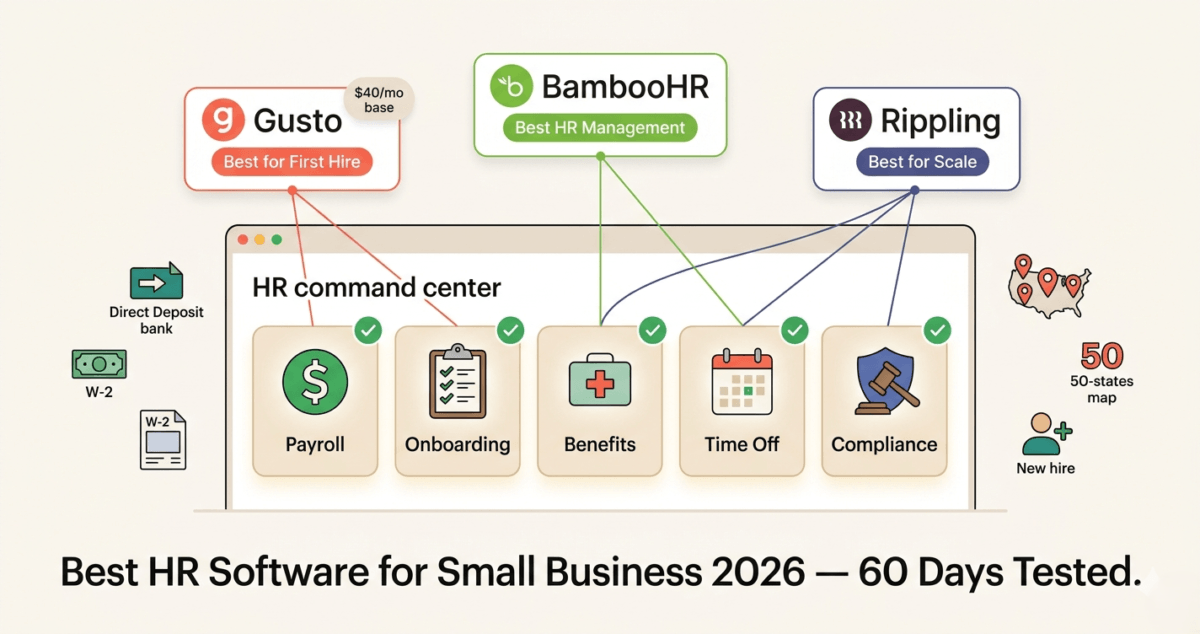
I tested BambooHR vs Gusto vs Rippling for 60 days across real HR workflows, payroll runs, employee onboarding, time-off management, and benefits administration. Here is the honest comparison of which platform is actually worth using in 2026.
Table of Contents
How We Evaluated These HR Platforms
Every platform was tested across five criteria:
– Payroll accuracy, ease of running payroll, tax filing automation
– Onboarding how smoothly can new employees be added and set up?
– Benefits administration health insurance, 401k, and other benefits management
– HR management employee records, time-off tracking, performance reviews
– Value pricing transparency and cost versus features offered
What HR Software Actually Does, and Why Small Businesses Need It
HR software, also called HRIS (Human Resource Information System), centralises everything related to your employees in one platform. At its core it handles:
Payroll: Calculates employee pay, deducts taxes, processes direct deposits, and files federal and state payroll taxes automatically. To avoid manual bookkeeping headaches, ensure your payroll provider seamlessly integrates with your primary accounts, see our review of the best accounting software small business 2026. Getting payroll wrong is not just inconvenient; it results in IRS penalties, unhappy employees, and potential legal liability.
Onboarding: Guides new employees through paperwork (I-9, W-4, direct deposit setup, policy acknowledgements) digitally before their first day. Beyond legal compliance, new hires need training materials and standard operating procedures, which can be elegantly housed in a workspace from our best project management software 2026 guide. Reduces the administrative burden of bringing someone new onto the team.
Benefits: Manages health insurance enrollment, dental and vision plans, 401k contributions, and other employee benefits. Deductions are calculated automatically and reflected in each payroll run.
Time and attendance: Tracks hours worked, manages paid time-off requests and balances, and handles overtime calculations. If your team needs deep, client-facing productivity logs rather than just basic clock-in compliance, check out our guide on the best time tracking software 2026.
Compliance: Keeps you compliant with federal and state employment laws minimum wage changes, ACA reporting, W-2 generation, and more automatically.
For a business with even one employee, the cost of HR software is almost always less than the cost of a single payroll error, a compliance penalty, or the hours spent managing HR manually in spreadsheets.
Gusto Review: Best HR Software for Small Businesses Starting Out
Free plan: No (demo available)
Starting price: $40/month + $6/month per person (Simple plan)
Best plan for most small businesses: Plus $80/month + $12/month per person
Platforms: Web, iOS, Android
Affiliate program: Yes, Gusto affiliate program, up to $500 per referral
Gusto was built specifically for small businesses, companies with 1 to 100 employees who need full-service payroll and HR without an HR department to manage it. It is the most beginner-friendly HR platform on this list and the one most small business owners reach for when hiring their first employee.
What Gusto does best
Gusto’s payroll is the best of the three tools for simplicity and reliability. Running payroll in Gusto takes under five minutes once set up, you review hours and salaries, confirm deductions, and approve. Gusto handles the rest: calculating taxes, processing direct deposits, and filing federal and state payroll taxes automatically in all 50 US states.
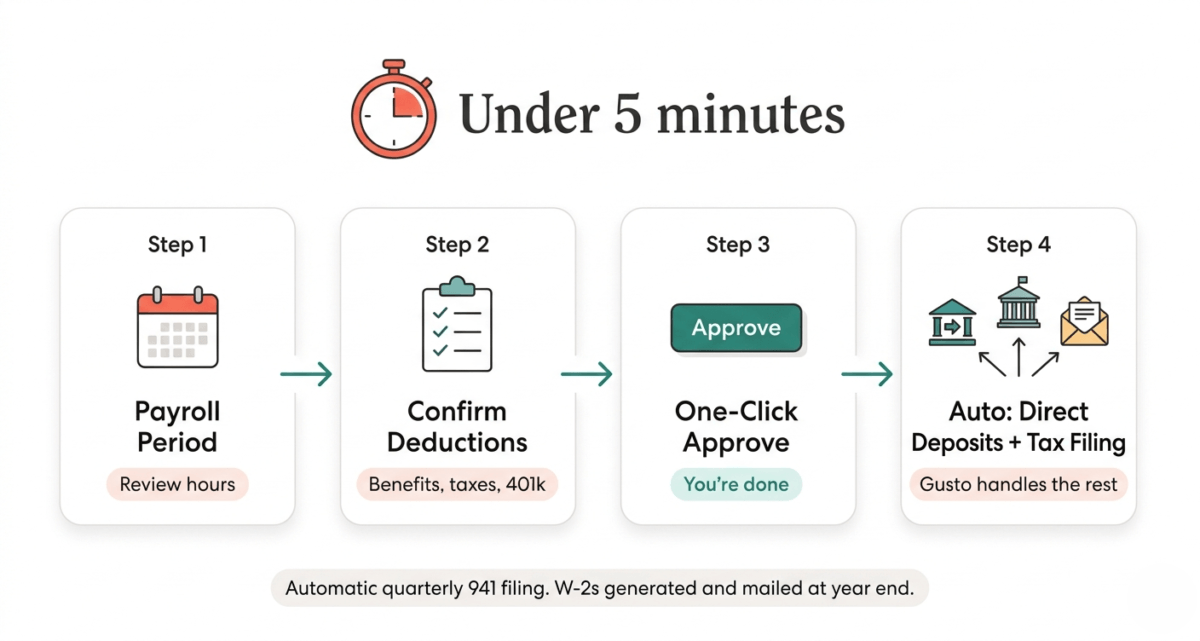
Gusto’s tax filing is particularly valuable for small business owners who have never run payroll before. Every quarter, Gusto files your 941 (federal payroll tax return) automatically. At year end, it generates W-2s for employees and 1099s for contractors, filing directly with the IRS and mailing physical copies to your team. For a new employer, this removes the most anxiety-inducing part of payroll management.
New employee onboarding in Gusto is smooth and genuinely impressive. After you enter a new hire’s basic information, Gusto sends them an onboarding checklist: they complete their W-4, I-9, direct deposit information, and policy acknowledgements entirely online before their first day. You receive a notification when everything is complete. No paper forms, no chasing signatures, no manual data entry.
Benefits administration is comprehensive on higher plans. Gusto partners with health insurance brokers in most states to offer medical, dental, and vision insurance directly through the platform. Employees can compare plans, enroll, and manage their coverage without leaving Gusto. Deductions are calculated and applied to payroll automatically.
The Gusto interface is the most intuitive of the three tools. Clean design, plain English labels, and guided workflows mean business owners can navigate the platform without HR training or a dedicated administrator.
Gusto for contractors
Gusto handles contractor payments particularly well, a valuable feature for bloggers and content businesses that pay freelance writers, designers, or virtual assistants. Contractor payments process quickly, and Gusto automatically generates and files 1099-NEC forms at year end. The Contractor Only plan at $6/month per contractor (no base fee) is the most affordable way to manage contractor payments compliantly.
Where Gusto falls short
Gusto’s pricing is transparent but adds up quickly for larger teams. The Plus plan at $80/month + $12/person means a team of ten costs $200/month, meaningful for a small business watching expenses closely.
HR management features beyond payroll are limited on the Simple plan. Performance reviews, HR document management, and time tracking require the Plus plan or above. The Simple plan is genuinely simple, which is ideal for very small teams but frustrating for businesses that need more comprehensive HR management alongside payroll.
Gusto is US-only. If you have employees or contractors outside the United States, Gusto cannot pay them, you need a separate solution for international team members.
Gusto pricing
Plan | Base fee | Per person/month | Key features |
Simple | $40/mo | $6 | Full-service payroll, employee self-service, onboarding |
Plus | $80/mo | $12 | + Time tracking, PTO management, performance reviews |
Premium | Custom | Custom | + HR advisors, compliance alerts, priority support |
Contractor Only | $0/mo | $6 | Contractor payments and 1099 filing only |
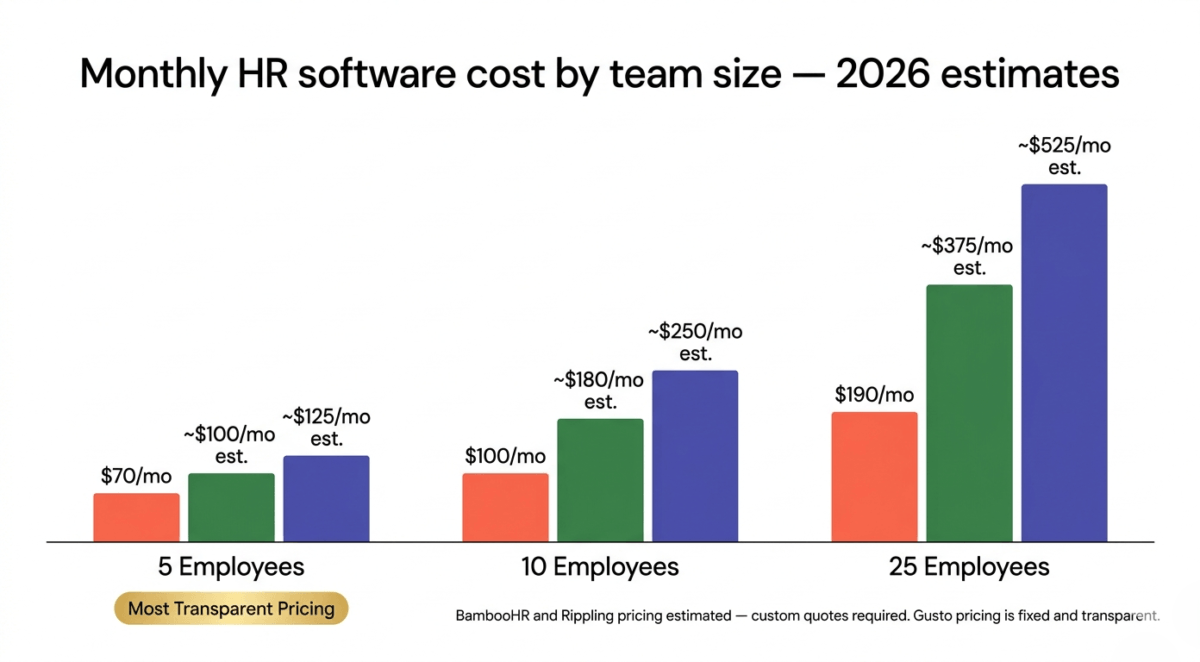
For a team of 5: Simple = $70/month, Plus = $140/month
For a team of 10: Simple = $100/month, Plus = $200/month
Gusto: Pros and Cons
Pros:
– Best payroll simplicity, under five minutes to run payroll once set up
– Automatic tax filing in all 50 US states, federal and state quarterly returns
– Best new employee onboarding experience, entirely digital, pre-first-day
– Contractor payments and 1099 filing on all plans
– Health insurance, dental, vision, and 401k administration built in
– Most beginner-friendly interface, no HR expertise required
– Contractor Only plan at $6/person with no base fee
– Up to $500 per referral on affiliate program
Cons:
– US-only, no international payroll or contractor payments
– Pricing adds up quickly for larger teams
– Simple plan lacks time tracking and performance management
– No free plan, paid from first employee
– Limited HR management depth compared to BambooHR
– Premium plan pricing not transparent, requires custom quote
Rating: 4.7 / 5 Best HR software for small businesses hiring their first employees. Unmatched simplicity and payroll reliability.
BambooHR Review: Best HR Management Platform for Growing Teams
Free plan: No (7-day free trial)
Starting price: Custom pricing (approximately $6–$9/employee/month, minimum ~$100/month)
Best plan for most businesses: Advantage plan (includes all core HR features)
Platforms: Web, iOS, Android
Affiliate program: Yes, BambooHR affiliate program
BambooHR is the most comprehensive HR management platform on this list, focused primarily on the people management side of HR rather than payroll. If Gusto is built around paying employees, BambooHR is built around managing them: tracking performance, managing time off, building company culture, and storing the complete HR record for every person in your organisation.
What BambooHR does best
BambooHR’s employee records system is the best of the three tools. Every employee has a comprehensive profile containing their personal information, employment history, compensation history, performance reviews, training records, time-off balances, documents, and custom fields you define. This centralised record means HR information is never scattered across spreadsheets, email inboxes, and filing cabinets.
The reporting capabilities are significantly stronger than Gusto’s. BambooHR generates headcount reports, turnover analysis, compensation summaries, diversity reports, and custom reports based on any combination of employee data fields. For HR managers and business owners who need data-driven insights into their workforce, BambooHR’s reporting is genuinely valuable.
Time-off management is a standout feature. Employees request time off through the BambooHR app, managers approve or decline with one click, balances update automatically, and the shared team calendar shows who is out on any given day. The entire process, from request to approval to calendar update, takes under two minutes and requires no email back-and-forth.
Performance management in BambooHR is the most mature of the three tools. Custom performance review cycles, 360-degree feedback, goal tracking, and performance improvement plans are all built in. For businesses that take employee development seriously, BambooHR provides the structure to make performance conversations consistent and documented.
Onboarding in BambooHR is excellent, particularly the preboarding experience. New hires receive a welcome message, introduction to the team, and a customised onboarding checklist before their first day. The process can be fully customised by role, a software engineer’s onboarding checklist looks different from a sales representative’s.
BambooHR and payroll
BambooHR offers payroll as an add-on feature, but it is not its primary strength. BambooHR Payroll is available in the US and handles direct deposit, tax filing, and basic payroll management. However, it is less polished and comprehensive than Gusto’s payroll, and many BambooHR users integrate it with a dedicated payroll provider (Gusto, ADP, or QuickBooks Payroll) rather than using BambooHR’s built-in payroll.
If payroll is your primary concern, start with Gusto. If comprehensive HR management is your primary concern and payroll is secondary, BambooHR is the stronger choice.
Where BambooHR falls short
BambooHR’s pricing is the least transparent of the three tools. They do not publish prices publicly, you have to request a quote, which typically comes in at $6–$9 per employee per month with a minimum monthly fee that makes it expensive for very small teams (under ten employees). A team of five may find BambooHR’s minimum fees hard to justify compared to Gusto’s transparent per-person pricing.
BambooHR is also primarily designed for US-based teams, though it does have some international capabilities, particularly for storing employee records for global teams, even if payroll remains US-focused.
The interface, while functional and professional, feels slightly less modern than Gusto’s. Some workflows require more clicks than necessary, and the mobile app, while improved, is less polished than Gusto’s.
BambooHR pricing
BambooHR does not publish pricing publicly. Based on industry research and user reports:
Plan | Approximate cost | Key features |
Essentials | ~$6/employee/mo | Core HR, employee records, time-off management |
Advantage | ~$9/employee/mo | + Onboarding, performance management, reporting |
Payroll add-on | Additional fee | US payroll, direct deposit, tax filing |
Minimum monthly fees apply, BambooHR is most cost-effective for teams of 15+ employees.
Request a custom quote at bamboohr.com for accurate pricing for your team size.
BambooHR: Pros and Cons
Pros:
– Best employee records management, comprehensive HR profiles
– Strongest reporting and workforce analytics
– Best performance management reviews, goals, 360 feedback
– Excellent time-off management with manager approval workflows
– Strong onboarding and preboarding experience
– Applicant tracking system (ATS) built in on Advantage plan
– Most suitable for teams of 15–200 employees
– Good mobile app for employee self-service
Cons:
– Pricing not transparent, requires custom quote
– Minimum fees make it expensive for very small teams (under 10 employees)
– Payroll is an add-on, not a core strength
– Interface less modern than Gusto
– US-focused for payroll despite some international HR capabilities
– No free plan, 7-day trial only
Rating: 4.4 / 5 Best HR management platform for growing teams of 15–200 employees. Less suitable as a first HR tool for businesses with fewer than 10 employees.
Rippling Review: Best All-in-One HR, IT, and Finance Platform
Free plan: No (demo available)
Starting price: $8/user/month (core platform) + modules
Best plan for most businesses: HR Cloud: payroll + benefits + HR management
Platforms: Web, iOS, Android
Affiliate program: Yes, Rippling affiliate program
Rippling is the most ambitious platform on this list. It does not just manage HR, it manages HR, IT, and finance simultaneously, from a single platform. When you hire a new employee in Rippling, it can automatically provision their laptop, create their Google Workspace or Microsoft 365 account, enroll them in benefits, add them to payroll, and assign their security permissions, all from one onboarding workflow.
For fast-growing businesses with complex needs, Rippling is genuinely revolutionary. For small businesses just getting started with HR, it can be overwhelming.
What Rippling does best
Rippling’s unified platform is its defining advantage. Most businesses use separate tools for HR (BambooHR or Gusto), IT management (Jamf or Microsoft Intune), and finance (QuickBooks or Expensify). Rippling combines all three in a single system where data flows automatically between functions.
The practical impact of this integration is significant. When an employee leaves your company, Rippling can automatically terminate their payroll, revoke their access to every software tool they used, wipe their company laptop remotely, and generate their final paycheck, all triggered by a single offboarding action. What takes hours of manual work across multiple systems happens in minutes in Rippling.
Rippling’s international payroll is the strongest of the three tools, it supports payroll in 50+ countries, making it the only platform on this list that can genuinely handle global teams. For businesses with employees in multiple countries, Rippling’s ability to run payroll in local currencies, comply with local tax laws, and manage international benefits is a significant advantage that neither Gusto nor BambooHR can match.
The workflow automation in Rippling is the most powerful of the three tools. You can build custom automations, “when a new employee is hired in the engineering department, automatically provision a MacBook Pro, create a GitHub account, add them to the #engineering Slack channel, and schedule their 30-day check-in meeting.” This level of automation saves meaningful time at scale.
Rippling’s reporting is comprehensive across HR, IT, and finance data, giving business leaders a unified view of workforce costs, software spend, and operational efficiency that no other platform on this list can match.
Where Rippling falls short
Rippling’s modular pricing makes it difficult to predict your total cost. The base platform ($8/user/month) is just the foundation, each module (payroll, benefits, time tracking, IT, expense management) adds additional cost. A fully-loaded Rippling implementation with all modules can cost $20–$35+ per employee per month, making it the most expensive option on this list for small teams.
The complexity that makes Rippling powerful also makes it the steepest learning curve. New users face a platform with dozens of modules, hundreds of settings, and workflows that require careful configuration. Most small businesses benefit from a dedicated implementation session to get Rippling set up correctly.
For businesses with fewer than 25 employees that do not have complex IT management needs, Rippling’s sophistication is largely wasted, and its cost hard to justify compared to Gusto’s simpler, more affordable payroll-first approach.
Rippling pricing
Rippling uses modular pricing, you pay for the core platform plus whichever modules you need:
Component | Approximate cost |
Core platform | $8/user/month |
Payroll (US) | Additional fee per employee |
Benefits administration | Additional fee |
Time & attendance | Additional fee |
IT management | Additional fee |
International payroll | Additional fee per country |
Total cost varies significantly by configuration. Request a custom quote at rippling.com.
Rippling: Pros and Cons
Pros:
– Most powerful all-in-one platform, HR, IT, and finance in one system
– Best international payroll, 50+ countries with local compliance
– Automated device provisioning and IT management alongside HR
– Most advanced workflow automation of the three tools
– Single offboarding action terminates payroll, revokes access, and processes final pay
– Best for fast-growing businesses with complex, multi-country teams
– Comprehensive reporting across HR, IT, and finance data
Cons:
– Most expensive option, modular pricing adds up quickly
– Steepest learning curve, complex setup and configuration
– Overkill for businesses under 25 employees without IT management needs
– Pricing not transparent, requires custom quote for accurate costs
– Modules sold separately, easy to underestimate total cost
– Less intuitive than Gusto for straightforward payroll needs
Rating: 4.3 / 5 Best platform for fast-growing businesses with complex HR and IT needs. Too much for most small businesses just starting out.
Head-to-Head Comparison
Gusto Simple | BambooHR Advantage | Rippling HR Cloud | |
Best for | First-time employers | Growing HR teams | Complex/global teams |
Pricing model | Base + per person | Per employee (custom) | Modular (custom) |
Payroll | Excellent | Add-on | Good |
Tax filing (US) | Automatic, all 50 states | Via add-on | Yes |
International payroll | No | No | 50+ countries |
Onboarding | Excellent | Excellent | Excellent |
Performance management | Basic (Plus plan) | Excellent | Good |
Time-off management | Plus plan | Excellent | Yes |
IT management | No | No | Yes |
Benefits administration | Yes | Yes | Yes |
Reporting | Basic | Excellent | Excellent |
Interface | Most intuitive | Professional | Complex |
Team size sweet spot | 1–50 employees | 15–200 employees | 25–1,000 employees |
Affiliate commission | Up to $500 | Yes | Yes |
Which HR Software Should You Choose?
Choose Gusto if:
You are hiring your first employee or have a small team of under 25 people and want straightforward payroll and HR without complexity. Gusto’s transparent pricing, automatic tax filing, and beginner-friendly interface make it the obvious first choice for new employers. Also the best option for businesses that primarily pay contractors rather than employees.
Choose BambooHR if:
Your team has grown to 15 or more employees and you need serious HR management, performance reviews, workforce analytics, applicant tracking, and comprehensive employee records, alongside payroll. BambooHR is the right tool when managing people becomes a full-time concern rather than an occasional administrative task.
Choose Rippling if:
You have 25 or more employees, operate in multiple countries, or need IT management (device provisioning, software access management) integrated with your HR system. Managing an international team requires excellent async infrastructure; explore the best project management tools remote teams to keep your global workforce synchronized. Rippling’s power justifies its complexity and cost when your business has genuinely complex operational needs.
Our Recommended Path for Small Businesses
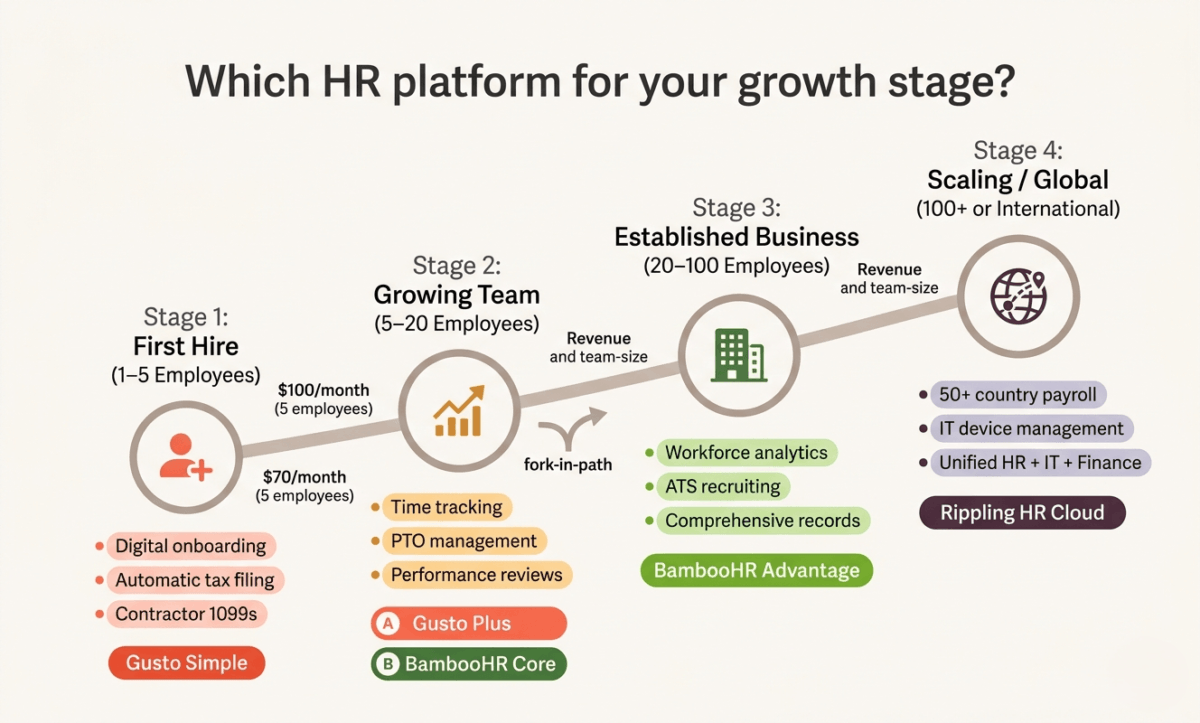
Stage 1 – First hire (1–5 employees): Gusto Simple. Transparent pricing, easy setup, automatic payroll tax filing. Cost: ~$70–$100/month.
Stage 2 – Growing team (5–20 employees): Gusto Plus for time tracking and performance features, or migrate to BambooHR when HR management needs outgrow Gusto’s capabilities.
Stage 3 – Established business (20–100 employees): BambooHR Advantage for comprehensive HR management, paired with Gusto or ADP for payroll if BambooHR’s payroll add-on does not meet your needs.
Stage 4 – Scaling fast or going global (100+ employees or international team): Rippling HR Cloud for unified HR, IT, and international payroll management.
Final Verdict
Gusto is the best HR software for most small businesses in 2026. Its transparent pricing, five-minute payroll runs, automatic tax filing, and intuitive interface make it the right starting point for any business hiring its first employees. The Contractor Only plan at $6/person makes it the most affordable way to manage contractor payments compliantly.
BambooHR is the best HR management platform for businesses that have moved beyond basic payroll and need serious people management tools, performance reviews, workforce analytics, and comprehensive employee records.
Rippling is the most powerful platform for complex, fast-growing businesses with international teams and IT management needs, but its cost and complexity make it the wrong choice for most small businesses under 25 employees.
Ratings:
– Gusto: 4.7 / 5
– BambooHR: 4.4 / 5
– Rippling: 4.3 / 5
Frequently Asked Questions
What is the best HR software for small businesses in 2026?
Gusto is the best HR software for most small businesses in 2026. It offers full-service payroll with automatic tax filing in all 50 US states, digital employee onboarding, benefits administration, and a beginner-friendly interface, starting at $40/month plus $6 per person. It is the most widely used HR platform for businesses with 1–50 employees.
How much does HR software cost for a small business?
HR software costs vary significantly by platform and team size. Gusto’s Simple plan costs $40/month base plus $6/employee, a team of five pays $70/month, a team of ten pays $100/month. BambooHR costs approximately $6–$9 per employee per month with minimum fees that make it more cost-effective for teams of 15 or more. Rippling’s modular pricing typically runs $15–$35 per employee per month depending on which modules you use.
Does a small business need HR software?
The moment you hire your first employee, yes. Payroll tax compliance, calculating, withholding, and filing federal and state payroll taxes, is legally required and carries penalties for errors. HR software automates this process and reduces the risk of costly mistakes. Even a single employee makes the monthly cost of Gusto worth it compared to the time and risk of manual payroll management.
What is the difference between Gusto and BambooHR?
Gusto is primarily a payroll platform that also handles HR basics, onboarding, time off, and benefits. BambooHR is primarily an HR management platform that also handles payroll as an add-on. Choose Gusto if payroll is your primary need. Choose BambooHR if managing and developing your people, performance reviews, workforce analytics, applicant tracking, is your primary need.
Can Gusto handle contractor payments?
Yes. Gusto handles both employee payroll and contractor payments. The Contractor Only plan at $6 per contractor per month (no base fee) allows businesses to pay contractors via direct deposit and automatically generate and file 1099-NEC forms at year end. This is the most affordable way to manage contractor payments compliantly.
Is Rippling good for small businesses?
Rippling is powerful but generally overkill for businesses under 25 employees without complex IT management needs. Its modular pricing, complex setup, and steep learning curve make it better suited for fast-growing businesses or those with international employees. Small businesses just starting with HR are better served by Gusto’s simplicity and transparent pricing.
What HR software is best for international teams?
Rippling is the best HR platform for international teams, it supports payroll in 50+ countries with local tax compliance and currency handling. Neither Gusto nor BambooHR offers meaningful international payroll capabilities. For businesses with employees in multiple countries, Rippling or a dedicated global payroll provider (Deel or Remote) is required.
How long does it take to set up HR software?
Gusto typically takes 1–3 hours to set up for a small team, entering company information, connecting your bank account, adding employees, and running your first payroll. BambooHR takes 4–8 hours to configure properly, including setting up employee records, time-off policies, and custom fields. Rippling typically requires a dedicated implementation session of several hours and ongoing configuration as you add modules.