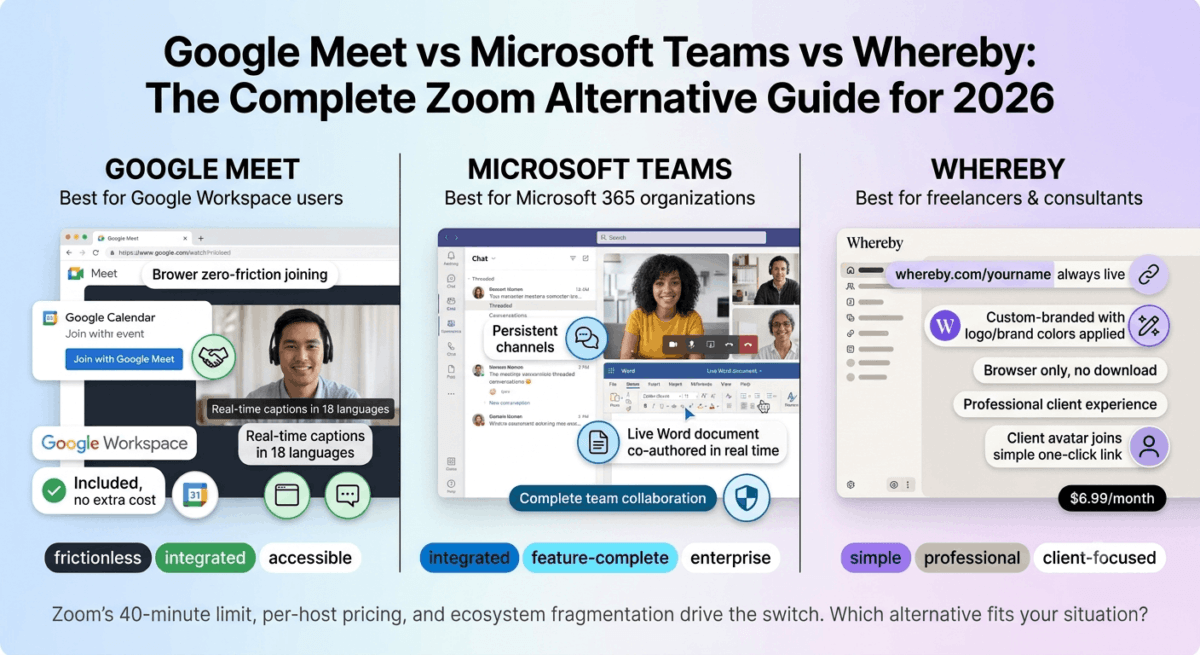
Zoom became the default video conferencing tool almost overnight, and for many users it remains perfectly adequate. But in 2026, the reasons to consider a Zoom alternative have multiplied. The 40-minute group meeting limit on the free plan frustrates users who want genuinely free video calls. The per-host pricing on paid plans adds up quickly for growing teams. And for organisations already paying for Google Workspace or Microsoft 365, paying separately for Zoom feels redundant when equally capable tools are already included.
The three strongest Zoom alternatives in 2026, Google Meet vs Microsoft Teams vs Whereby, each serve different users well. This honest comparison covers what each tool does better than Zoom, where each falls short, and which is the right choice for your specific situation.
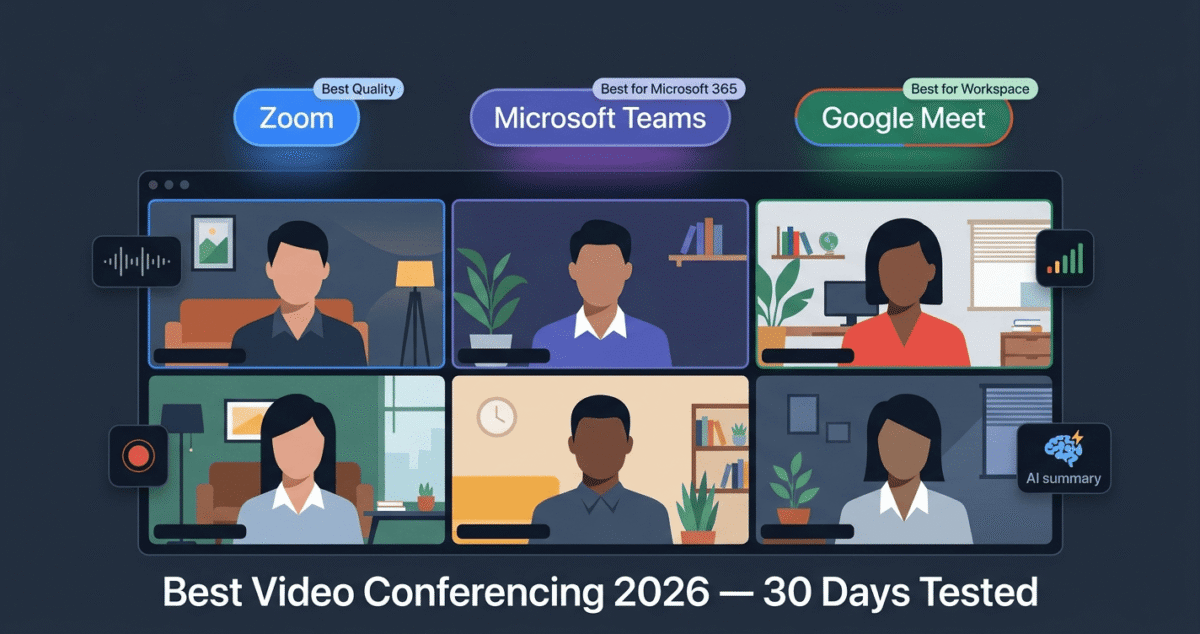
I tested all three for 30 days across solo calls, team meetings, client presentations, and large group sessions. Here is the verdict.
Table of Contents
How We Evaluated These Tools
Every platform was tested across five criteria:
- Video and audio quality, clarity, stability, and reliability on standard home internet
- Ease of joining, how much friction does a guest experience joining a meeting?
- Collaboration features, screen sharing, whiteboarding, breakout rooms, and recording
- Integration, calendar, email, and productivity tool connections
- Value, free plan quality and paid plan pricing versus Zoom equivalents
Why Consider a Zoom Alternative in 2026?
Before comparing alternatives, understanding the specific Zoom limitations that drive users to switch:
The 40-minute cap on free group calls. Zoom free limits group meetings (3+ participants) to 40 minutes, a hard cutoff that ends meetings mid-conversation. Google Meet free offers 60-minute group calls; Whereby free offers 45-minute group calls. Neither Microsoft Teams nor Google Meet imposes as disruptive a limit on their free plans.
Per-host licensing costs. Zoom Pro at $13.33/month per host means a 10-person team where everyone occasionally hosts meetings costs $133.33/month. Microsoft Teams and Google Meet are included in existing Microsoft 365 and Google Workspace subscriptions that most organisations already pay for.
Ecosystem fragmentation. Teams paying for Microsoft 365 Business and separately for Zoom are duplicating costs. Teams using Google Workspace have Google Meet included at no additional cost. The overlap makes the combined cost difficult to justify.
Privacy and security concerns. Zoom’s 2020 security incidents, while largely resolved, left lasting wariness in security-conscious organisations. Microsoft Teams and Google Meet operate under enterprise-grade security frameworks that some organisations trust more readily.
Google Meet Review: Best Free Zoom Alternative for Google Workspace Users
Free plan: Yes, 60-minute group meetings, 100 participants
Starting price: Included with Google Workspace ($6/user/month)
Best plan for most users: Google Workspace Business Starter, $6/user/month
Platforms: Web browser, iOS, Android, desktop apps
Affiliate program: Google Workspace affiliate program
Google Meet is the most seamlessly integrated video conferencing tool for teams already using Google Workspace, Gmail, Google Calendar, Google Drive, and Google Docs all connect with Meet natively, making it the video tool that requires the least additional setup for Google-ecosystem users.
What Google Meet does best
Google Meet’s browser-first approach is its most practically important advantage, joining a Google Meet requires nothing more than clicking a link in any modern browser. No software download, no account creation for guests, no plugin installation. For teams that conduct meetings with external clients, partners, and contacts who should not need to install software to join, Meet’s zero-friction guest experience reduces the pre-meeting technical issues that affect Zoom calls with non-Zoom users.
The Google Calendar integration is the most seamless of the three tools tested. Every Google Calendar event includes a Meet link automatically, one click creates a meeting with a permanent link, adds it to invitees’ calendars, and sends automated reminders. The workflow requires zero manual configuration beyond creating the calendar event. For teams whose meeting scheduling happens in Google Calendar, Meet’s integration is genuinely superior to Zoom’s calendar integration.
Google Meet’s live captions, AI-generated real-time subtitles in 18 languages, available on all plans including free, are the most accurate automatic captioning of the three tools tested. For multilingual teams, remote attendees with audio issues, and hearing-impaired participants, live captions provide accessibility that Zoom reserves for paid plans.
The noise cancellation in Google Meet, powered by Google’s machine learning, performs excellently in real-world home office environments. Background keyboard typing, HVAC systems, street traffic, and household ambient noise are filtered effectively, producing cleaner audio than the default settings of Zoom and Teams.
Google Meet’s integration with Google Docs enables real-time collaborative note-taking during meetings, opening a shared Google Doc that all meeting participants can edit simultaneously, linked directly to the meeting. For teams that take meeting minutes collaboratively, this in-meeting document editing eliminates the separate “share the notes document” workflow. To ensure your shared notes and documents are error-free, consider using one of the best grammar checkers in 2026.
The recording feature, available on Google Workspace Business plans, saves recordings automatically to Google Drive, generating a shareable link and an automatic transcript. The Drive storage integration means recordings are immediately accessible in the same environment as other team documents without manual file management.
Where Google Meet falls short
Google Meet’s free plan, while more generous than Zoom’s 40-minute limit, caps group meetings at 60 minutes. Teams with regular meetings that run longer than an hour need a Google Workspace subscription ($6/user/month) for unlimited meeting duration.
The whiteboarding feature, Jamboard, is less polished than Teams’ Whiteboard or dedicated whiteboard tools like Miro. Google announced Jamboard’s discontinuation in 2024, replacing it with FigJam integration, the transition creates some uncertainty about the long-term whiteboard solution within Meet.
Breakout rooms in Google Meet are available but less flexible than Zoom’s, pre-assignment is not possible before the meeting starts, and the host cannot pop into different rooms as fluidly as in Zoom.
The desktop app is an Electron-based web wrapper rather than a native application, performance on lower-spec machines can be slightly below Zoom and Teams, which have more optimised desktop clients.
Google Meet pricing
Plan | Price/user/month | Meeting duration | Participants | Key features |
Free (Google account) | $0 | 60 minutes | 100 | Basic Meet |
Workspace Starter | $6 | 24 hours | 100 | + Recording, transcripts, Drive |
Workspace Business | $12 | 24 hours | 150 | + Enhanced security, more Drive |
Workspace Plus | $18 | 24 hours | 500 | + Advanced admin, eDiscovery |
Google Meet: Pros and Cons
Pros:
- Best browser-based joining, zero friction for external guests
- Most seamless Google Calendar integration
- Best live captioning, 18 languages, included free
- Excellent noise cancellation
- Included in Google Workspace, no additional cost for existing subscribers
- Real-time collaborative notes via Google Docs integration
- Automatic recording to Google Drive with transcript
- Free plan allows 60-minute group meetings vs Zoom’s 40
Cons:
- Free plan 60-minute limit for group meetings
- Jamboard discontinuation creates whiteboard uncertainty
- Breakout rooms less flexible than Zoom
- Desktop app less optimised than native Zoom client
- Less feature-rich than Teams for complex enterprise workflows
- No persistent team channels or chat threads
Rating: 4.6 / 5, Best Zoom alternative for Google Workspace teams and anyone who wants the lowest-friction guest joining experience. If you are hosting webinars, you can capture leads by pairing Meet with the best landing page builders in 2026.
Microsoft Teams Review: Best Zoom Alternative for Microsoft 365 Users
Free plan: Yes, unlimited group meetings, 60-minute limit
Starting price: Included with Microsoft 365 Business Basic ($6/user/month)
Best plan for most users: Microsoft 365 Business Basic, $6/user/month
Platforms: Windows, Mac, iOS, Android, web browser
Affiliate program: Microsoft affiliate program
Microsoft Teams is the most feature-complete Zoom alternative, combining video conferencing with persistent team chat channels, file sharing, collaborative document editing (Office Online), project management (Planner), and enterprise-grade security in one application. For organisations using Microsoft 365, Teams is not just a Zoom alternative, it is a complete team collaboration platform that makes several other tools redundant.
What Microsoft Teams does best
Teams’ persistent chat channels are its most significant functional advantage over Zoom and Google Meet, and the feature that most clearly demonstrates Teams is a different category of tool, not just a video conferencing application. Organised by team and channel (similar to Slack), Teams provides ongoing threaded conversation with full message history, @mentions, emoji reactions, file sharing, and integration with Microsoft 365 documents, all accessible alongside video meetings in one interface.
For organisations that previously used Slack alongside Zoom, Teams consolidates both tools into one Microsoft 365 subscription, eliminating duplicate costs and keeping meeting context within the same channels where team conversation happens.
The Microsoft 365 document integration is Teams’ most productive feature for collaborative work. Co-authoring Word documents, Excel spreadsheets, and PowerPoint presentations directly within Teams, without leaving the application, keeps collaborative work within the meeting context rather than requiring external file sharing. A team reviewing a presentation in a Teams meeting can edit the slides live during the call, with all participants seeing changes in real time.
Teams’ Whiteboard, powered by Microsoft’s Whiteboard application, is the most capable built-in whiteboarding tool of the three tools tested. Infinite canvas, sticky notes, templates, drawing tools, and the ability to insert images and documents create a collaborative digital workspace that remote teams use for brainstorming, planning, and workshop facilitation.
The enterprise security and compliance features are the most comprehensive of the three tools, end-to-end encryption, eDiscovery, compliance recording, data loss prevention, and information barriers meet the most stringent enterprise and regulated industry requirements. For financial services, healthcare, legal, and government organisations where compliance is mandatory, Teams’ Microsoft compliance certifications (FedRAMP, HIPAA, ISO 27001) carry significant weight.
Microsoft Copilot integration, available in Teams Premium, provides AI meeting summaries, automatically generated action items, real-time translation during meetings, and intelligent recap that identifies key moments in recorded meetings. For organisations investing in Microsoft’s AI ecosystem, Teams is the meeting surface where Copilot creates the most immediate productivity value.
Where Microsoft Teams falls short
Teams’ complexity is its most common criticism, the interface is denser than Zoom or Google Meet, the feature depth that serves enterprise users overwhelms individuals and small teams who want simple video calling. New users frequently report confusion about the relationship between Teams, channels, chats, and meetings.
Guest joining, while improved, still creates more friction than Google Meet’s browser-based joining. External guests receive an email with a join link that works in a browser, but the experience is less seamless than Meet, Teams occasionally prompts downloads and presents more authentication steps than competitors.
The free plan’s 60-minute group meeting limit, while matching Google Meet free, is a recent change from previously unlimited meeting duration on Teams free. The paid plans provide unlimited duration, but the limitation reduces Teams’ free plan advantage over Zoom.
Teams’ performance on lower-spec machines and slower internet connections has improved but still trails Zoom’s optimised client in reliability on marginal network conditions.
Microsoft Teams pricing
Plan | Price/user/month | Meeting duration | Participants | Key features |
Free | $0 | 60 minutes | 100 | Chat, meetings, basic collaboration |
Microsoft 365 Business Basic | $6 | 30 hours | 300 | + Exchange email, SharePoint, 1TB OneDrive |
Microsoft 365 Business Standard | $12.50 | 30 hours | 300 | + Desktop Office apps, webinar hosting |
Teams Premium | $7/user add-on | 30 hours | 1,000 | + AI features, advanced meetings |
Microsoft Teams: Pros and Cons
Pros:
- Most feature-complete, meetings, chat, files, and collaboration in one tool
- Best persistent team channels, replaces Slack for Microsoft users
- Best whiteboarding, Microsoft Whiteboard integrated natively
- Best enterprise security and compliance certifications
- Microsoft 365 document co-authoring during meetings
- Microsoft Copilot AI meeting summaries and action items
- Included in Microsoft 365, no additional cost for existing subscribers
- Best for large organisations with complex compliance requirements
Cons:
- Most complex interface, overwhelming for small teams wanting simple video calls
- Guest joining creates more friction than Google Meet
- Free plan now has 60-minute group meeting limit
- Performance below Zoom on marginal network conditions
- Overkill for individuals and very small teams
- Learning curve significantly higher than Zoom or Google Meet
Rating: 4.5 / 5, Best Zoom alternative for Microsoft 365 organisations. Combines video conferencing with team collaboration in one subscription, eliminates both Zoom and Slack for Microsoft users.
Whereby Review: Best Simple Zoom Alternative for Small Teams and Freelancers
Free plan: Yes, 1 meeting room, unlimited 1-on-1 calls, 45-minute group limit
Starting price: $6.99/month (Pro, 1 host)
Best plan for most users: Pro, $6.99/month
Platforms: Web browser only (no desktop app required)
Affiliate program: Yes, Whereby affiliate program
Whereby is the most elegant and friction-free video conferencing tool for small teams, freelancers, and anyone who conducts regular client calls. Its permanent room URLs, where your meeting room lives at a consistent address (whereby.com/yourname) that never changes, eliminate the link-sharing step that precedes every Zoom meeting. Share your room link once and clients bookmark it forever.
What Whereby does best
Whereby’s permanent room concept is its most distinctive and practically valuable feature. Rather than generating a new meeting link for every call (as Zoom, Meet, and Teams do), Whereby gives each host a permanent room URL that never expires. Your room is always at the same address, clients save it once and join any future meeting by navigating directly to the URL, without waiting for you to send a new link.
For freelancers and consultants who conduct regular recurring client calls, this permanent room eliminates the administrative overhead of link management. Your Calendly booking confirmation includes your permanent Whereby room link, clients know exactly where to go for every future call without any additional communication.
Browser-only joining is Whereby’s second major friction reduction. Guests join by clicking the link in any modern browser, no download, no account, no plugin. The experience is even simpler than Google Meet’s browser joining because Whereby’s interface is more minimal and requires fewer clicks to enter the room.
The room customisation, adding your logo, custom background, and brand colours, creates a more professional branded experience than the generic Zoom or Google Meet interfaces. For client-facing calls where first impressions matter, a Whereby room with your logo and brand colours signals professionalism that standard video tools cannot match.
Whereby’s Breakout Groups feature, while simpler than Zoom’s, works smoothly for small group sessions. The built-in note-taking, reactions, and hand-raising create a lightweight but functional meeting facilitation environment.
The integrations with Miro (visual collaboration), YouTube (sharing videos during calls), and Trello (showing boards during meetings) enable richer in-meeting collaboration without screen sharing.
Where Whereby falls short
Whereby’s participant limits, 100 participants on paid plans, are lower than Zoom (1,000 on webinar), Teams (300 on standard plans), and Meet (500 on Business Plus). For large group meetings, webinars, or all-hands sessions, Whereby’s capacity constraints make it unsuitable.
The feature depth is intentionally minimal, Whereby does not have persistent channels, team chat, document collaboration, or enterprise compliance features. It is a focused video calling tool, not a team collaboration platform. For teams that want more than video calling from their communication tool, Teams or Meet are more appropriate.
Recording is available on paid plans but requires manual activation at the start of each meeting, there is no automatic recording option, and recordings are stored in Whereby’s cloud with limited retention periods on lower plans.
The lack of a desktop application means Whereby relies entirely on browser performance, on Chrome, Edge, and Safari the experience is excellent, but browser-dependent performance is less consistent than native applications in edge cases.
Whereby pricing
Plan | Price/month | Rooms | Participants | Key features |
Free | $0 | 1 | 100 (45-min group limit) | Basic video calls |
Pro | $6.99 | 1 | 100 | Unlimited meetings, recording, custom branding |
Business | $9.99/user | Unlimited | 100 | + Multiple rooms, admin dashboard |
Enterprise | Custom | Unlimited | Custom | + SSO, custom integrations |
Whereby: Pros and Cons
Pros:
- Permanent room URLs, clients save once, join any time
- Simplest guest joining, browser only, no download, no friction
- Most professional branded room experience
- Best for recurring client calls and freelance consultations
- Built-in Miro and collaborative tool integrations
- Most elegant, minimal interface, lowest learning curve
- $6.99/month, most affordable paid plan of the three tools
- No time limit on 1-on-1 calls even on free plan
Cons:
- 100 participant limit, not suitable for large meetings
- No persistent chat channels or team messaging
- No enterprise compliance features
- Recording requires manual activation
- No desktop app, browser dependent
- 45-minute group meeting limit on free plan
- Limited analytics and reporting
Rating: 4.5 / 5, Best Zoom alternative for freelancers, consultants, and small teams who prioritise simplicity and professional client experience over feature depth.
Head-to-Head Comparison
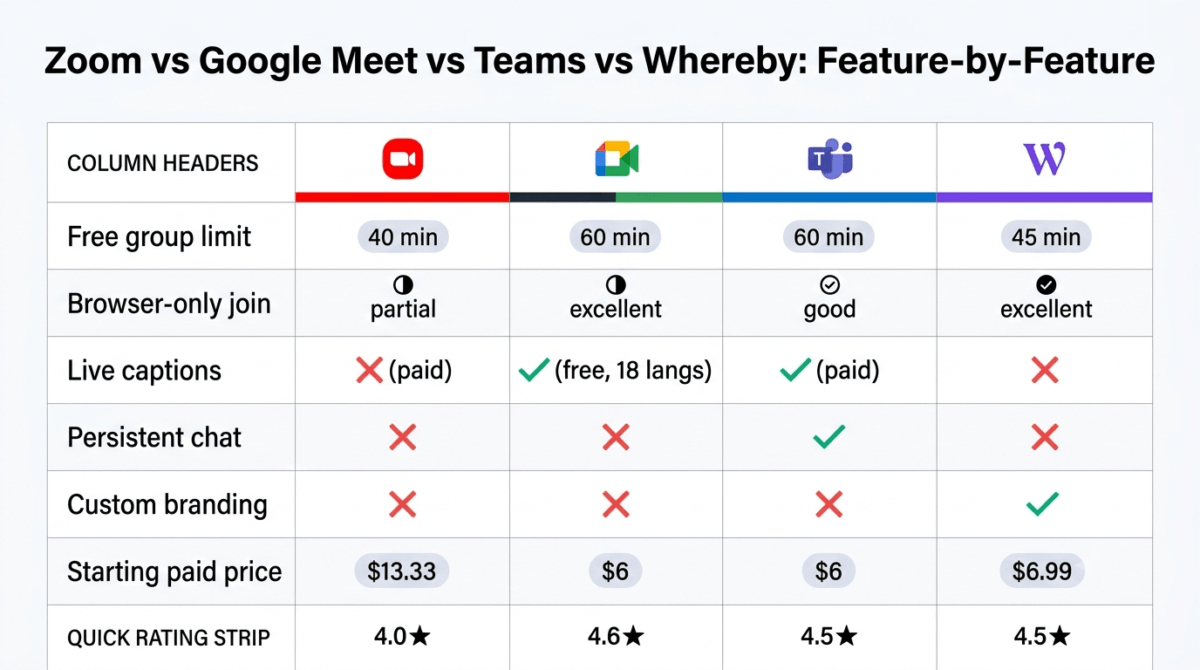
Zoom Free | Zoom Pro | Google Meet Free | Teams Free | Whereby Free | Whereby Pro | |
Price/month | $0 | $13.33 | $0 | $0 | $0 | $6.99 |
Group meeting limit | 40 min | Unlimited | 60 min | 60 min | 45 min | Unlimited |
Max participants | 100 | 100 | 100 | 100 | 100 | 100 |
Browser joining (guests) | Partial | Partial | Excellent | Good | Excellent | Excellent |
Persistent channels | No | No | No | Yes | No | No |
Whiteboarding | Basic | Basic | Limited | Excellent | No | No |
Breakout rooms | Yes | Yes | Yes | Yes | Yes | Yes |
Recording | No | Yes | No (free) | No (free) | No | Yes |
Live captions | No (free) | Yes | Yes (all plans) | Yes | No | No |
Calendar integration | Good | Good | Excellent | Excellent | Basic | Basic |
Custom branding | No | No | No | No | No | Yes |
Permanent room URL | No | No | No | No | Yes | Yes |
Desktop app | Yes | Yes | Electron | Native | No | No |
Enterprise compliance | Limited | Limited | Good | Excellent | No | No |
Best for | General | General | Google users | Microsoft users | Freelancers | Freelancers |
Which Zoom Alternative Should You Choose?
Choose Google Meet if:
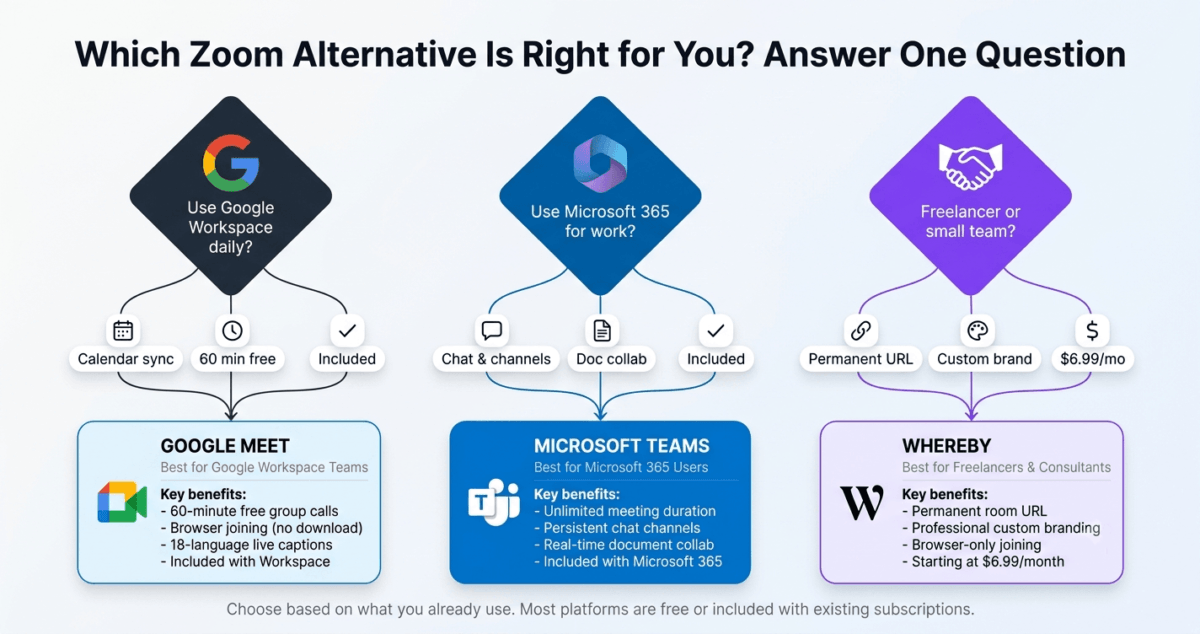
Your team already uses Google Workspace, Gmail, Google Calendar, Google Drive, and Google Docs. Meet is included in your existing subscription at no additional cost, integrates seamlessly with every Google tool you use daily, and provides the lowest-friction guest joining of any video conferencing tool. Also the best choice for teams that prioritise automatic captioning in multiple languages.
Choose Microsoft Teams if:
Your organisation uses Microsoft 365 and wants to consolidate video conferencing, team messaging, and document collaboration into one subscription. Teams replaces both Zoom and Slack for Microsoft users, eliminating the cost of both while providing better integration with Office documents. Essential for organisations with enterprise compliance requirements.
Choose Whereby if:
You are a freelancer, consultant, or small business owner who conducts regular client calls and wants the simplest possible meeting experience. Whereby’s permanent room URL means clients always know where to find you. The minimal interface, browser-only joining, and custom branding create the most professional client call experience at the lowest cost ($6.99/month). Not suitable if you need more than 100 participants or team messaging features.
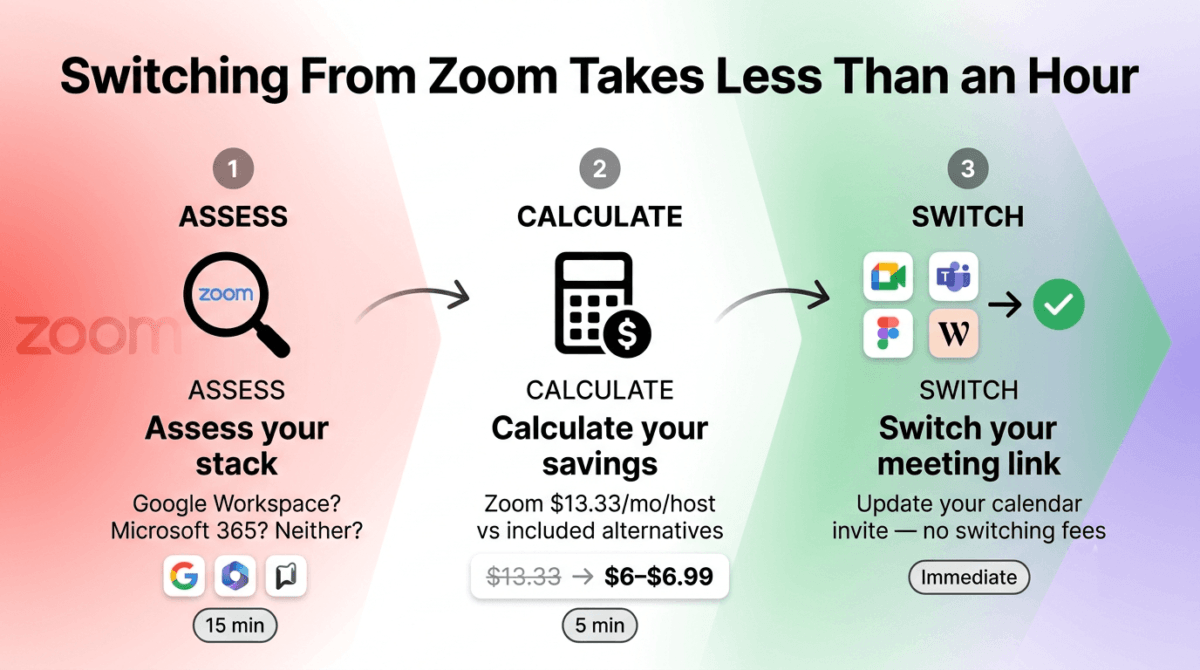
The Right Choice Is Already in Your Stack
Before switching to any alternative, check what you already have:
- Using Google Workspace? Google Meet is already included, you are paying for it and not using it if you pay separately for Zoom
- Using Microsoft 365? Teams is already included, consolidating to Teams eliminates Zoom costs immediately
- Using neither? Start with Google Meet free or Whereby free, both are more generous than Zoom free for most use cases
The best Zoom alternative for most people is the video conferencing tool already included in the software they pay for. The second-best is Whereby for freelancers who want the simplest possible client call experience.
Final Verdict
Google Meet is the best Zoom alternative for Google Workspace users, included at no additional cost, seamlessly integrated with Google Calendar and Drive, and the most friction-free guest joining experience of any tool tested.
Microsoft Teams is the best Zoom alternative for Microsoft 365 organisations, replacing both Zoom and Slack with one subscription, providing enterprise-grade compliance, and enabling document collaboration during meetings that no other tool matches.
Whereby is the best Zoom alternative for freelancers and small teams, the permanent room URL, browser-only guest joining, and custom branding create the most professional client call experience at the lowest paid plan cost of any Zoom alternative.
Ratings:
- Google Meet: 4.6 / 5
- Microsoft Teams: 4.5 / 5
- Whereby: 4.5 / 5
To keep your team’s tasks organized alongside your video calls, it is also worth evaluating the best project management software available today.
Frequently Asked Questions
What is the best free Zoom alternative in 2026?
Google Meet is the best free Zoom alternative, 60-minute group meetings (vs Zoom’s 40-minute limit), 100 participants, live captions in 18 languages, and browser-based joining at zero cost. Microsoft Teams free matches Meet’s 60-minute limit and adds persistent chat channels. Whereby free is best for 1-on-1 calls with no time limit, though group calls are limited to 45 minutes.u003cbru003e
Is Google Meet as good as Zoom?
For most use cases, team meetings, client calls, and remote collaboration within Google Workspace, Google Meet is equally capable as Zoom and superior in specific areas: lower guest friction, better calendar integration, and included at no additional cost for Google Workspace subscribers. Zoom has advantages in webinar hosting (up to 50,000 attendees), more flexible breakout room management, and broader third-party integrations for power users who need these capabilities.u003cbru003e
Does Microsoft Teams replace Zoom?
For Microsoft 365 organisations, yes, Teams replaces Zoom for video conferencing while adding persistent team messaging, document collaboration, and enterprise compliance that Zoom does not offer. Teams replaces both Zoom and Slack for Microsoft users, eliminating the cost of both while providing better integration with Office documents. The trade-off is Teams’ higher interface complexity compared to Zoom’s focused video conferencing approach.u003cbru003e
Is Whereby free?
Yes, Whereby’s free plan includes 1 permanent meeting room, unlimited 1-on-1 calls with no time limit, and group meetings up to 45 minutes. The Pro plan at $6.99/month removes the group meeting time limit, adds recording, and enables custom branding. Whereby free is the best free option for freelancers who primarily conduct 1-on-1 client calls.u003cbru003e
What is better, Google Meet or Microsoft Teams?
The right choice depends entirely on which ecosystem you use. Google Meet is better for Google Workspace users, the calendar integration, Drive recording storage, and seamless Google Docs collaboration are unmatched within Google’s ecosystem. Microsoft Teams is better for Microsoft 365 users, the Office document co-authoring, persistent chat channels, and enterprise compliance features are superior within Microsoft’s ecosystem. Neither is objectively better without considering which ecosystem the user already works in.u003cbru003e
Can I use Zoom alternatives for free permanently?
Yes, Google Meet free (60-minute group calls, 100 participants), Microsoft Teams free (60-minute group calls, unlimited chat), and Whereby free (unlimited 1-on-1, 45-minute group calls) are all permanently free without time-limited trials. All three are more generous than Zoom’s free plan (40-minute group meeting limit) for most typical use cases.u003cbru003e
Which video conferencing tool is best for client calls?
Whereby is the best video conferencing tool specifically for client calls, the permanent room URL means clients never need to receive a new link, the browser-only joining eliminates download friction, and the custom branding creates a professional first impression. Google Meet is the best alternative when clients primarily use Google accounts, the calendar integration creates a one-click meeting scheduling experience.u003cbru003e