
Every small business loses revenue to disorganised sales processes, leads that fall through the cracks, follow-ups that never happen, opportunities that go cold because nobody remembered to reach out. A CRM (Customer Relationship Management) system solves this by creating a single organised view of every prospect, client, and business relationship.
But CRM software varies enormously in complexity, cost, and focus. A tool designed for enterprise sales teams with 50 salespeople is wrong for a freelancer managing 10 client relationships. A simple contact manager is wrong for a business running complex multi-step sales pipelines with multiple team members.
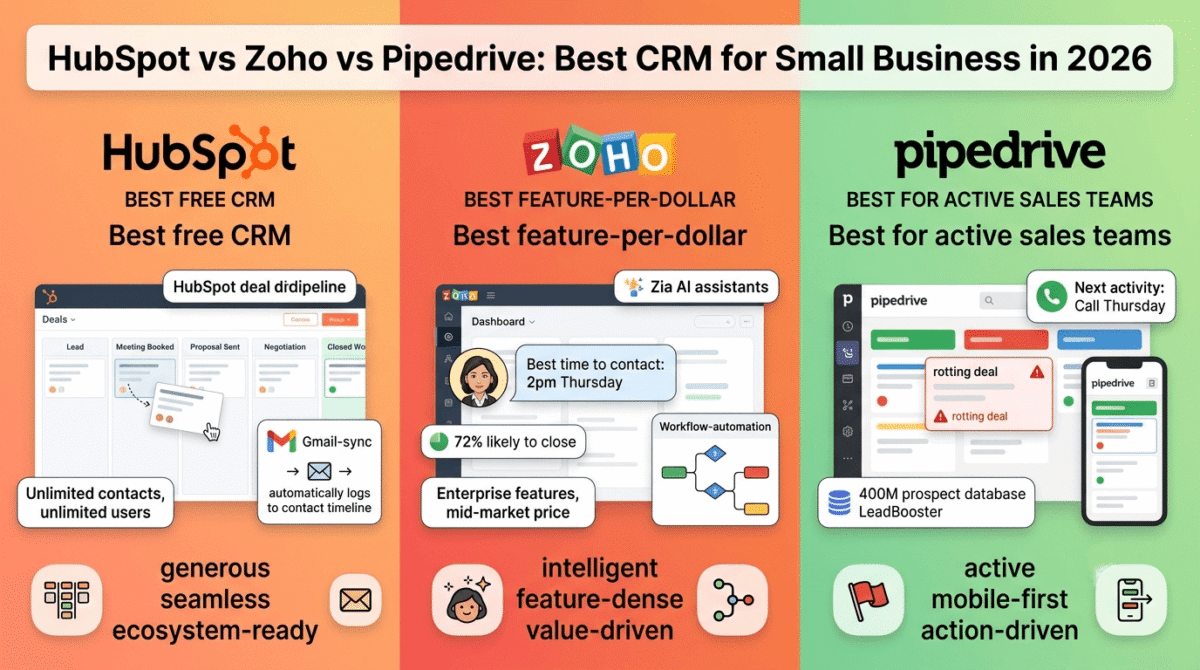
HubSpot vs Zoho vs Pipedrive are the three CRM platforms most widely evaluated by small businesses, each representing a distinct approach to relationship management. This comparison covers what each tool does best, where each falls short, and which is right for your specific business size and sales complexity.
I tested all three for 60 days managing real business relationships, prospect tracking, deal pipeline management, email sequence automation, and client communication logging.
Table of Contents
How We Evaluated These Tools
Every platform was tested across five criteria:
- Contact and deal management, how effectively does the tool organise relationships and opportunities?
- Pipeline visibility, how clearly does the tool show where each deal stands and what action is needed?
- Automation, how well does the tool automate follow-ups, data entry, and repetitive sales tasks?
- Integrations, how well does it connect with email, calendar, and other business tools?
- Value, free plan quality and paid plan pricing versus features offered
Why Small Businesses Need a CRM in 2026
Before comparing the tools, understanding what a CRM solves makes the investment case clear:
Memory is not a sales system. A freelancer with 5 active prospects can track them mentally. A small business with 50 prospects across different pipeline stages, follow-up dates, and relationship histories cannot. CRM externalises relationship management into a reliable system that does not forget.
Response speed determines deals. Research consistently shows that responding to inbound leads within 5 minutes increases conversion rates by 9x compared to waiting 30 minutes. A CRM with lead notification and mobile access enables the response speed that converts more inbound interest into revenue.
Data drives decisions. Without CRM data, sales improvement is guesswork, you do not know which lead sources convert best, which pipeline stages lose the most deals, or which team members close at the highest rates. CRM analytics answer these questions with data rather than intuition.
HubSpot CRM Review: Best Free CRM for Small Businesses
Free plan: Yes, unlimited contacts, unlimited users, core CRM features
Starting price: $15/user/month (Starter)
Best plan for most small businesses: Free plan or Starter, $15/user/month
Platforms: Web, iOS, Android
Affiliate program: Yes, up to $500 per referral
Full review: Best CRM Software →
HubSpot CRM is the most widely adopted small business CRM, and uniquely, the most capable free CRM available. The free plan includes unlimited contacts, unlimited users, a visual deal pipeline, email tracking, meeting scheduling, and basic reporting, genuinely functional CRM without any payment required.
What HubSpot does best
HubSpot’s free plan is its most compelling feature, providing more genuine CRM capability at zero cost than any competing platform. The unlimited contacts and unlimited users mean a 10-person sales team can use HubSpot CRM professionally without paying anything, making it the default starting point for cost-conscious small businesses evaluating CRM for the first time.
The visual deal pipeline, drag-and-drop deals through customisable stages (Lead → Meeting Booked → Proposal Sent → Negotiation → Closed Won/Lost), provides the pipeline visibility that is the primary value of any CRM. Seeing every active opportunity, its current stage, its value, and its probability at a glance replaces the mental model that breaks down as deal volume grows.
HubSpot’s email integration is the most seamlessly implemented of the three tools. The Gmail and Outlook plugins log every email automatically to the relevant contact record, no manual logging required. Email open tracking (knowing when a prospect opens your email) and click tracking (knowing when they click a link) appear in the contact timeline alongside all other interactions, creating a complete communication history without any manual data entry.
The meeting scheduling link, similar to Calendly but built directly into HubSpot, lets prospects book meetings from your available slots without email back-and-forth. Each booked meeting automatically creates a CRM task and contact record, eliminating the manual data entry that consumes sales time.
The HubSpot ecosystem advantage, where CRM connects seamlessly to HubSpot’s email marketing, marketing automation, customer service, and CMS tools, creates an integrated revenue platform that competing standalone CRMs cannot match. If you want to add live chat support without committing to HubSpot’s own service hub pricing, see our Intercom vs Drift vs Tidio comparison for standalone options. For small businesses that grow into more sophisticated marketing and sales automation needs, HubSpot’s ecosystem prevents the tool fragmentation that plagues businesses using disconnected point solutions.
Where HubSpot falls short
HubSpot’s paid plans are significantly more expensive than Zoho and Pipedrive, the Starter CRM Suite at $15/user/month is reasonable, but the Professional plan at $90/user/month and Enterprise at $150/user/month represent enterprise pricing for many small businesses. The jump from free to meaningful paid features is steep.
The free plan’s reporting capabilities are limited, basic deal and contact reports are available, but the custom reporting and revenue attribution analysis that inform data-driven sales decisions require paid plans.
The free plan’s automation is minimal, basic task reminders rather than the multi-step sequence automation that converts more leads without manual follow-up. The Starter plan adds sequences; the Professional plan adds full marketing automation.
HubSpot CRM pricing
| Plan | Price/user/month (annual) | Key features |
|---|---|---|
| Free | $0 | Unlimited contacts, pipeline, email tracking |
| Starter | $15 | + Email marketing, sequences, simple automation |
| Professional | $90 | + Advanced automation, custom reporting, forecasting |
| Enterprise | $150 | + Predictive scoring, custom objects, SSO |
HubSpot: Pros and Cons
Pros:
- Best free plan, unlimited contacts, unlimited users, genuine CRM capability
- Most seamless email integration, automatic logging from Gmail and Outlook
- Built-in meeting scheduling eliminates Calendly subscription
- Best ecosystem, connects to HubSpot marketing, service, and CMS
- Most recognised brand, clients and partners know it
- Up to $500 per referral affiliate commission
- Best for businesses planning to scale marketing and sales together
Cons:
- Paid plans expensive relative to Zoho and Pipedrive
- Free plan automation minimal, sequences require Starter plan
- Advanced reporting requires Professional plan ($90/user/month)
- Full marketing automation significantly more expensive than standalone tools
- Feature complexity increases with each paid tier
Rating: 4.7 / 5, Best CRM for small businesses that want the most capable free plan and plan to scale into HubSpot’s broader ecosystem.
Zoho CRM Review: Best Feature-Rich CRM for Growing Small Businesses
Free plan: Yes, up to 3 users, core features
Starting price: $14/user/month (Standard, billed annually)
Best plan for most growing small businesses: Professional, $23/user/month
Platforms: Web, iOS, Android
Affiliate program: Yes, Zoho affiliate program, 15% recurring commission
Zoho CRM is the most feature-complete CRM for the price, offering capabilities that HubSpot and Pipedrive reserve for expensive paid tiers at Zoho’s Standard and Professional plan pricing. For small businesses that need sophisticated CRM features without enterprise pricing, Zoho provides the most functionality per dollar of any CRM platform tested.
What Zoho does best
Zoho CRM’s feature breadth at mid-tier pricing is its defining advantage. The Professional plan at $23/user/month includes: multiple sales pipelines, email marketing with basic automation, social media integration, inventory management, product catalogue, quotes and invoices, Google Ads integration, and web-to-lead forms, features that HubSpot reserves for its $90/user/month Professional plan.
The AI sales assistant, Zia, is Zoho’s most distinctive feature. Zia analyses your CRM data and provides: best time to contact each lead (based on their past response patterns), deal win probability predictions, anomaly detection (alerting you when your sales metrics deviate from normal patterns), and sentiment analysis of customer emails. For data-driven sales teams, Zia surfaces the intelligence buried in CRM data that human review would miss.
The workflow automation in Zoho CRM is the most powerful of the three tools, multi-condition triggers, multi-action workflows, and scheduled actions enable complex sales process automation without custom development. Automatically assign leads based on geography, industry, or lead score; send personalised follow-up emails based on pipeline stage changes; create tasks when deals reach specific stages; update records based on email responses. The automation depth rivals dedicated marketing automation tools at CRM plan pricing.
Zoho’s Blueprint feature, defining and enforcing standardised sales processes, ensures every salesperson follows the correct steps in the correct order. Blueprint specifies who can move a deal to the next stage, what actions must be completed first, and what information must be captured, maintaining sales process quality as your team grows.
The Territory Management feature, organising sales teams and leads by geographic region, industry, or other criteria with appropriate access controls, is the most sophisticated of the three tools for businesses with geographic or segment-based sales territories.
Zoho’s integration with the broader Zoho ecosystem (Zoho Books for accounting, Zoho Desk for customer support, Zoho Campaigns for email marketing, Zoho Projects for project management) creates a comprehensive business suite, all integrated, all from one vendor. For businesses that want a complete business software stack from one provider, Zoho’s ecosystem breadth exceeds HubSpot’s at comparable total cost. If you’re building that stack from scratch rather than staying inside one ecosystem, our roundup of the best tools for small business covers the leading option in each category.
Where Zoho CRM falls short
Zoho CRM’s interface is the most complex of the three tools, the density of features creates a learning curve that simple use cases do not justify. New users frequently report feeling overwhelmed by the configuration options before they have established a basic sales workflow.
The free plan’s 3-user limit is the most restrictive of the three tools, HubSpot’s free plan covers unlimited users. For small teams of 4+ people who want to start with a free plan, Zoho’s limit forces earlier paid plan adoption than HubSpot.
The email integration, while functional, is less seamless than HubSpot’s automatic Gmail and Outlook logging, Zoho requires more manual configuration to achieve equivalent email tracking behaviour.
Customer support response times on lower-tier plans have been criticised as slow, a meaningful concern for small businesses without in-house CRM administration expertise who need reliable support during setup and troubleshooting.
Zoho CRM pricing
| Plan | Price/user/month (annual) | Key features |
|---|---|---|
| Free | $0 | 3 users, basic CRM |
| Standard | $14 | Scoring rules, workflows, multiple pipelines |
| Professional | $23 | + Blueprint, SalesSignals, inventory |
| Enterprise | $40 | + Zia AI, territory management, custom modules |
| Ultimate | $52 | + Advanced analytics, enhanced storage |
Zoho CRM: Pros and Cons
Pros:
- Most features per dollar, enterprise capabilities at mid-market pricing
- Zia AI for predictive deal scoring and optimal contact timing
- Most powerful workflow automation of the three tools
- Blueprint enforces standardised sales processes across teams
- Comprehensive Zoho ecosystem for complete business management
- Territory management for geographic/segment-based sales teams
- Inventory and product catalogue included on Professional plan
- 15% recurring affiliate commission
Cons:
- Most complex interface, steepest learning curve
- Free plan limited to 3 users
- Email integration less seamless than HubSpot
- Customer support slower on lower-tier plans
- Feature density can overwhelm simple use cases
- Zia AI requires Enterprise plan ($40/user/month)
Rating: 4.5 / 5, Best feature-rich CRM for growing small businesses that need enterprise capabilities at mid-market pricing. Requires investment in learning the platform.
Pipedrive Review: Best Sales-Focused CRM for Deal Management
Free plan: No (14-day free trial)
Starting price: $14/user/month (Essential, billed annually)
Best plan for most sales-focused small businesses: Advanced, $29/user/month
Platforms: Web, iOS, Android
Affiliate program: Yes, Pipedrive affiliate program, 33% recurring for 12 months
Pipedrive is the most sales-focused CRM in this comparison, built specifically for salespeople who want a tool that keeps deals moving forward rather than a comprehensive business management platform. The pipeline-first design, activity-based selling methodology, and clean interface make Pipedrive the CRM that sales teams adopt fastest and use most consistently.
What Pipedrive does best
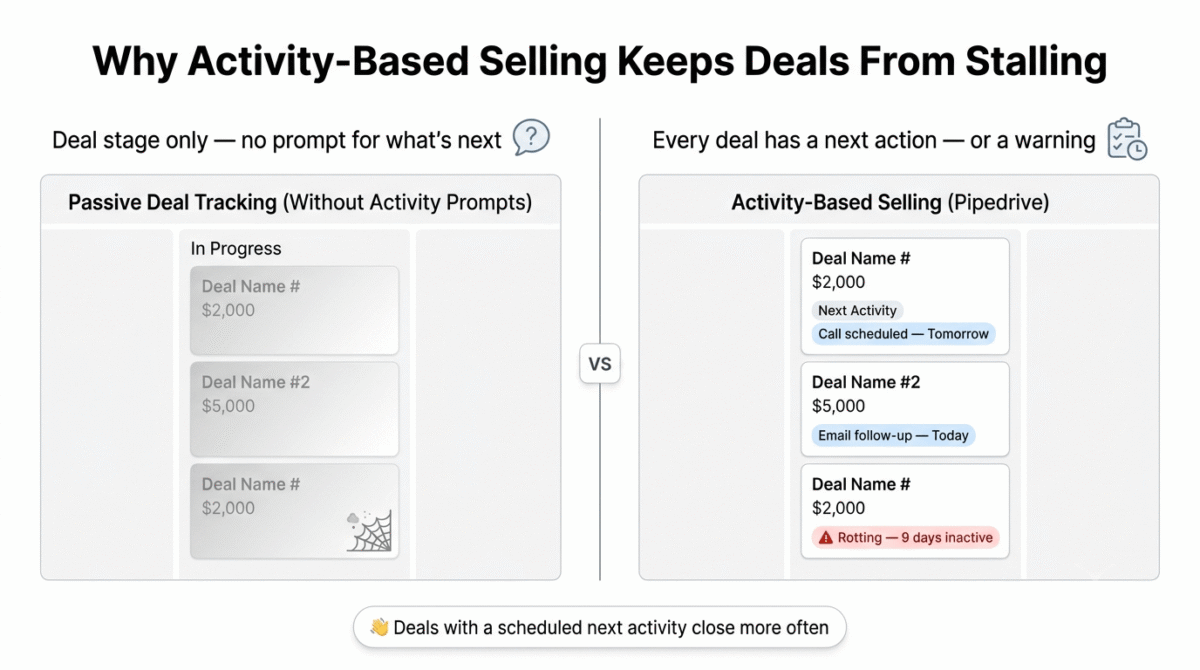
Pipedrive’s visual pipeline is the most intuitive deal management interface of the three tools, the Kanban-style board with colour-coded deal health indicators, drag-and-drop stage management, and the rotting deals feature (flagging deals that have been inactive too long) creates the pipeline visibility that prevents deals from stalling and falling through the cracks.
The activity-based selling philosophy, where Pipedrive prompts you to schedule a next activity for every deal rather than just tracking deal stage, is Pipedrive’s most practically important sales methodology feature. In Pipedrive, every deal without a scheduled next activity is flagged. The dashboard shows not just where deals are in the pipeline but what action each deal needs next, creating an activity-driven sales workflow rather than a passive deal-tracking system.
The email integration in Pipedrive, Smart Email BCC or native Gmail/Outlook sync, logs all emails to the relevant deal and contact automatically. The email templates feature (creating reusable email templates with personalisation variables) enables consistent, professional follow-up communication without writing each email from scratch. The AI email assistant generates personalised email drafts from deal context, reducing email writing time significantly.
The Sales Assistant, Pipedrive’s AI performance coach, analyses your pipeline and activity patterns to provide personalised recommendations: “You have 3 deals that haven’t been updated in 7 days,” “Your conversion rate from Proposal to Closed has dropped this month,” “Based on historical data, follow up with Acme Corp today for the best chance of conversion.” These targeted nudges guide sales behaviour without requiring management oversight.
The LeadBooster add-on, a chatbot, web forms, and prospect finder, enables lead generation directly from Pipedrive without separate lead capture tools. The Prospector feature searches a database of 400 million business profiles to find qualified prospects matching your ideal customer criteria, a prospecting capability that HubSpot and Zoho do not include natively at equivalent pricing.
Pipedrive’s mobile app is the most polished of the three tools, optimised for salespeople who update deals on their phones between meetings, with quick-add features for contacts, deals, and activities that take seconds rather than the multi-field forms that mobile CRM entry typically requires.
Where Pipedrive falls short
Pipedrive is a sales CRM, not a marketing CRM or a full business management platform. There is no built-in email marketing, no landing page builder, no customer support ticketing, and no accounting integration at the level HubSpot and Zoho provide. For the ticketing piece specifically, see our Zendesk vs Freshdesk vs Help Scout comparison for a dedicated helpdesk tool to pair with Pipedrive’s pipeline. Pipedrive focuses on moving deals through a pipeline; everything else requires separate tools or integrations.
The free plan absence, 14-day trial only, means immediate paid commitment. For small businesses wanting to evaluate CRM capability before paying, HubSpot’s free plan is more appropriate for extended testing.
The reporting capabilities, while improved, are less sophisticated than Zoho’s, custom reports and advanced analytics require the Professional plan ($49/user/month) and still lack the predictive intelligence that Zoho’s Zia AI provides.
Pipedrive pricing
| Plan | Price/user/month (annual) | Key features |
|---|---|---|
| Essential | $14 | Pipeline, basic reporting, email sync |
| Advanced | $29 | + Email templates, sequences, automations |
| Professional | $49 | + AI sales assistant, revenue forecasting, teams |
| Power | $64 | + Project planning, phone support |
| Enterprise | $99 | + SSO, unlimited custom fields, dedicated support |
Pipedrive: Pros and Cons
Pros:
- Best visual pipeline, most intuitive deal management interface
- Activity-based selling methodology keeps deals moving
- Best mobile app, optimised for on-the-go salespeople
- AI Sales Assistant provides personalised performance coaching
- LeadBooster for prospect finding and lead capture
- Clean, focused interface, lowest learning curve for salespeople
- 33% recurring affiliate commission for 12 months
Cons:
- No free plan, 14-day trial only
- Sales-only focus, no marketing or support capabilities built in
- Reporting less sophisticated than Zoho
- Email marketing requires separate tool
- Advanced automation requires Advanced plan ($29/user/month)
- Pricing becomes expensive for larger teams at Professional+ tiers
Rating: 4.6 / 5, Best CRM for sales-focused small businesses where pipeline management and deal progression are the primary requirements.
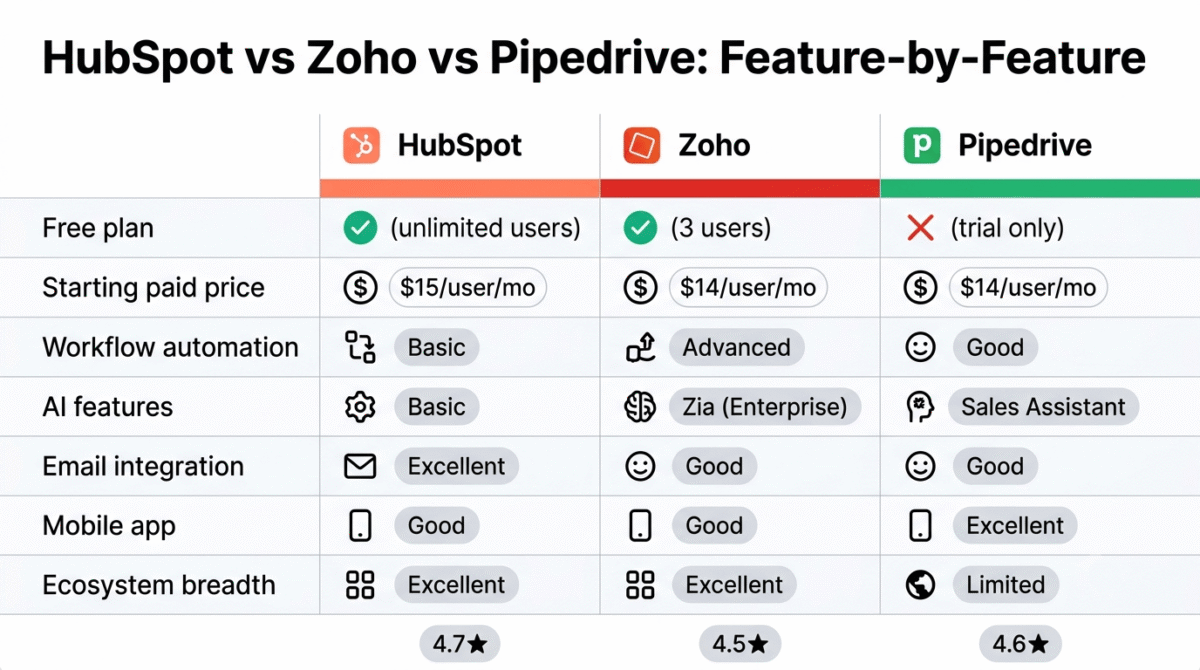
Head-to-Head Comparison
| HubSpot Free | HubSpot Starter | Zoho Standard | Pipedrive Essential | Pipedrive Advanced | |
|---|---|---|---|---|---|
| Price/user/month | $0 | $15 | $14 | $14 | $29 |
| Free plan | Yes (unlimited users) | – | Yes (3 users) | No | No |
| Contact limit | Unlimited | Unlimited | Unlimited | Unlimited | Unlimited |
| Pipeline stages | Customisable | Customisable | Customisable | Customisable | Customisable |
| Email tracking | Yes | Yes | Yes | Yes | Yes |
| Email sequences | No | Yes | Basic | No | Yes |
| Workflow automation | Basic | Basic | Advanced | Basic | Good |
| AI features | Basic | Basic | Zia (Enterprise) | Sales Assistant | Sales Assistant |
| Meeting scheduling | Yes (free) | Yes | Basic | No | No |
| Email marketing | No | Basic | Basic | No | No |
| Mobile app | Good | Good | Good | Excellent | Excellent |
| Reporting | Basic | Basic | Good | Basic | Good |
| Ecosystem | Excellent | Excellent | Excellent (Zoho) | Limited | Limited |
| Best for | Free CRM start | Growing basics | Feature-rich mid | Sales teams | Active sellers |
| Affiliate | $500/referral | $500/referral | 15% recurring | 33% recurring (12mo) | 33% recurring |
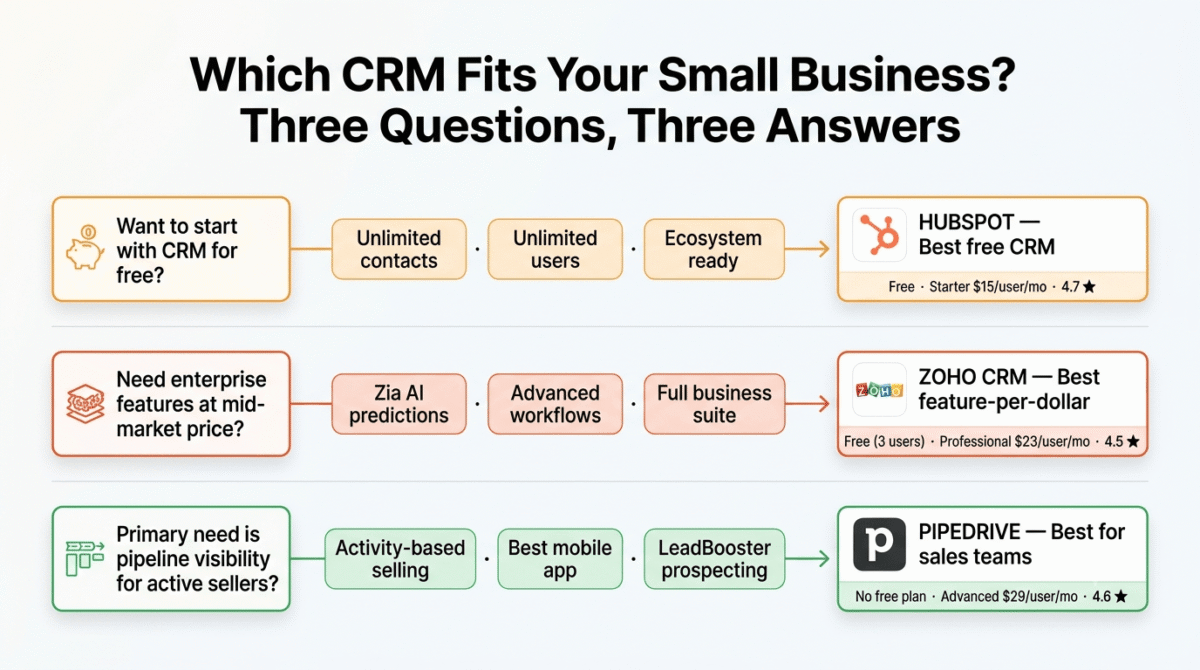
Which CRM Should You Choose?
Choose HubSpot CRM (free) if:
You want to start with CRM without paying anything. HubSpot’s free plan is the most capable free CRM available, unlimited contacts, unlimited users, pipeline management, email tracking, and meeting scheduling at zero cost. Also choose HubSpot if you plan to scale into email marketing, marketing automation, or customer service tools, the HubSpot ecosystem integration is unmatched.
Choose Zoho CRM if:
You need enterprise-level CRM features at mid-market pricing. Zoho’s Professional plan at $23/user/month includes workflow automation, multiple pipelines, inventory management, and AI features that HubSpot charges $90/user/month for. Also choose Zoho if you want a complete business software suite from one vendor, Zoho’s ecosystem breadth covers accounting, HR, project management, and customer support alongside CRM.
Choose Pipedrive if:
Your primary need is pipeline visibility and deal progression management for an active sales team. Pipedrive’s activity-based selling, visual pipeline, and mobile-first design make it the CRM that salespeople actually use consistently rather than avoid as administrative overhead. Also choose Pipedrive if prospecting is a primary need, LeadBooster’s prospect finding capability is unique at this price point.
Final Verdict
HubSpot CRM is the best CRM for most small businesses, the unlimited free plan, seamless email integration, and HubSpot ecosystem position it as the highest-value starting point for any small business new to CRM. The free plan covers everything most small businesses need, with a clear upgrade path when automation and advanced features become necessary.
Zoho CRM is the best value CRM for feature-hungry small businesses, the Professional plan at $23/user/month delivers capabilities that competitors charge $90+/user/month for. Worth the learning curve investment for businesses that need sophisticated automation, AI intelligence, and a complete business management ecosystem.
Pipedrive is the best CRM for sales-focused teams, the activity-based selling methodology, intuitive pipeline, and mobile-first design create the CRM that sales teams adopt fastest and use most consistently. The 33% recurring affiliate commission for 12 months also makes it one of the most lucrative tools to recommend to your readers.
Ratings:
- HubSpot CRM: 4.7 / 5
- Pipedrive: 4.6 / 5
- Zoho CRM: 4.5 / 5
Frequently Asked Questions
What is the best free CRM for small business in 2026?
HubSpot CRM is the best free CRM, unlimited contacts, unlimited users, pipeline management, email tracking, and meeting scheduling at zero cost. The free plan is not artificially limited to force upgrades, it provides genuine CRM functionality that many small businesses use indefinitely without needing paid features. Zoho CRM’s free plan is the best alternative but limits usage to 3 users.
What is the difference between HubSpot and Pipedrive?
HubSpot is a comprehensive business platform where CRM is one component alongside marketing, sales, customer service, and CMS tools, best for businesses that want integrated marketing and sales. Pipedrive is a focused sales CRM optimised for deal pipeline management and sales team productivity, best for businesses where moving deals through a pipeline is the primary objective. HubSpot has a stronger free plan; Pipedrive has a better pipeline interface and mobile app.
Is Zoho CRM good for small businesses?
Yes, Zoho CRM’s Professional plan at $23/user/month provides enterprise-grade features including workflow automation, multiple sales pipelines, Blueprint process management, and inventory management that competitors charge significantly more for. The main limitation is the learning curve, Zoho’s feature density requires more setup time than HubSpot or Pipedrive. For small businesses willing to invest in learning the platform, Zoho delivers the best feature-to-cost ratio in CRM.
Do small businesses really need a CRM?
Yes, once a business manages more than 20 active client relationships or 50 prospects simultaneously. At smaller scales, email and spreadsheets can track relationships adequately. Beyond this threshold, deals fall through the cracks, follow-ups are forgotten, and communication history becomes inaccessible. CRM adoption consistently increases conversion rates and client retention, the question is not whether to use CRM but when the investment becomes justified by the relationships being managed.
How long does it take to implement a CRM for a small business?
Basic CRM implementation, importing contacts, setting up the pipeline, and connecting email, takes 1–2 days for any of the three tools. Full implementation, custom fields, workflow automation, team training, and integration with other tools, takes 2–4 weeks for Pipedrive and HubSpot, and 4–8 weeks for Zoho given its greater configuration complexity. Most small businesses under-invest in CRM implementation and consequently under-use the tool’s capabilities.








