Every affiliate link you publish is a liability without the right management tool. Raw affiliate URLs are 80–120 character strings of tracking parameters and session codes that look like spam to readers, break silently when a program changes its URL structure, and give you zero data on which posts and placements actually drive clicks. Affiliate links are one piece of a bigger monetisation picture, see our guide on how to make money blogging for the full income mix bloggers rely on
An affiliate link management plugin fixes all of this at once: it cloaks your links into clean branded URLs on your own domain, updates them globally from a single dashboard when a program changes, tracks clicks by link and by page, and handles the SEO hygiene of nofollow and sponsored attributes automatically.
In 2026, every WordPress blogger earning money through affiliate marketing should be using one of these tools. This guide assumes you’re already running affiliate links and want to manage them properly, if you haven’t started yet, learn affiliate marketing first with our step-by-step guide. The question is which one. ThirstyAffiliates has been in the category since 2010 and is the default recommendation from most WordPress-focused blogs. Pretty Links built a loyal following on the strength of its free tier. Lasso arrived later and positions itself as the modern upgrade, more features, better displays, higher price.
I have used ThirstyAffiliates on RateTheTool.com since launch and tested ThirstyAffiliates vs Pretty Links vs Lasso on separate WordPress installations for 30 days. Here is the honest comparison.
Table of Contents
How We Evaluated These Plugins
Every plugin was tested across five criteria:
- Link cloaking and management, how clean are the resulting URLs, how easy is it to update a link globally, and how reliably does the redirect work across platforms?
- Click tracking and reporting, what data does the plugin provide, and is it actionable for optimising affiliate revenue?
- Advanced features, automatic keyword linking, geolocation redirects, link health monitoring, product displays
- WordPress compatibility and performance, does the plugin add meaningful page load overhead, and does it conflict with common caching and SEO plugins?
- Value at each pricing tier, what do you actually get for free versus what requires upgrading, and is the paid plan cost justified by the features it unlocks?
Why Every WordPress Affiliate Blogger Needs a Link Management Plugin
Before comparing tools, it is worth being clear on why affiliate link management is not optional for any blogger serious about monetisation.
Link cloaking builds click trust. A raw ClickBank or Amazon Associates link contains tracking codes, session IDs, and affiliate identifiers that look exactly like phishing URLs to a cautious reader. A cloaked link, ratethetool.com/go/toolname, uses your own domain, which readers recognise and trust. Studies consistently show branded links achieve 20–35% higher click-through rates than raw affiliate URLs.
Global link management saves hours of maintenance. When an affiliate program changes its URL structure, which happens regularly when companies switch platforms, rebrand, or update tracking systems, every post containing that raw URL breaks simultaneously. With a link management plugin, you update the destination in one place and every occurrence across your entire site updates instantly. Without a plugin, you hunt through every post manually.
Click tracking identifies what actually earns revenue. Without tracking, you know your total affiliate income but not which posts, which links, or which placements drive it. A plugin with click reporting shows you exactly which articles generate the most affiliate clicks, so you know where to add more internal links, where to publish follow-up content, and which pages to prioritise for conversion rate optimisation.
SEO compliance is automatic. Google’s guidelines require affiliate links to carry rel="sponsored" or rel="nofollow" attributes. Without a plugin, you must add these manually to every link. With a plugin, the attribute is applied automatically at the plugin level, you cannot accidentally publish a followed affiliate link that violates Google’s webmaster guidelines.
WordPress developer note: RateTheTool.com runs ThirstyAffiliates with the ratethetool.com/go/ prefix for all affiliate links. The plugin integrates cleanly with Rank Math SEO, LiteSpeed Cache, and Wordfence, the full stack used on this site, with no conflicts or performance degradation. See our full list of essential WordPress plugins for the rest of the stack this site runs alongside ThirstyAffiliates.
ThirstyAffiliates Review: Best Affiliate Link Plugin for WordPress Bloggers
Free plan: Yes, link cloaking, categorisation, basic statistics, unlimited links
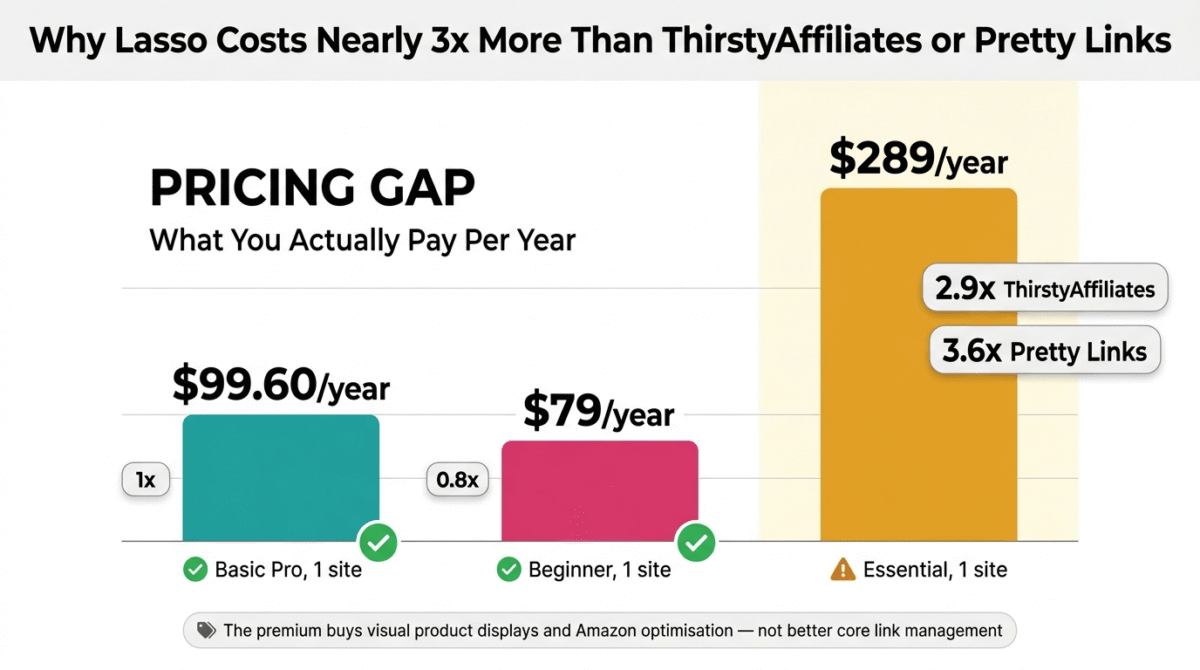
Starting paid price: $99.60/year (Basic, 1 site, annual only, no monthly billing)
Best plan for most users: Basic, $99.60/year (single site)
Platforms: WordPress only
Affiliate program: Yes, ThirstyAffiliates affiliate program
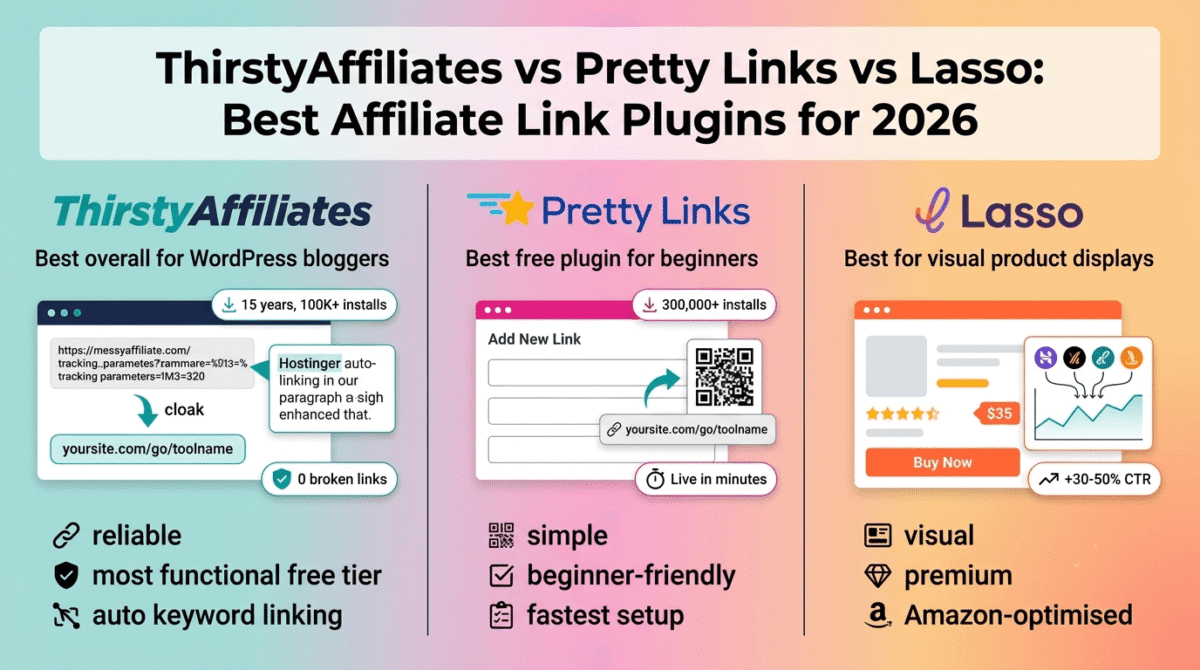
ThirstyAffiliates has been the most widely recommended affiliate link management plugin for WordPress bloggers since 2010. With over 100,000 active installations and a 4.6/5 rating across 200+ reviews, it holds this position not through marketing spend but through 15 years of consistent reliability. The free plugin is one of the most functional in this comparison, most features bloggers need in the first 12 months are available at zero cost.
What ThirstyAffiliates does best
The free plugin covers the fundamentals better than any competing free tier in this comparison. Link cloaking, categorisation, a basic click statistics dashboard, nofollow/sponsored attribute handling, and WordPress shortcode and image link types are all available without paying anything. For a blogger just starting affiliate marketing with under 50 links and a modest monthly traffic, the free ThirstyAffiliates plugin is a complete solution that requires no upgrade.
The Pro add-on is where ThirstyAffiliates becomes genuinely powerful for established blogs. Automatic keyword linking, the ability to define a keyword (“Hostinger”) and have ThirstyAffiliates automatically insert a cloaked affiliate link every time that keyword appears across your posts, pages, and comments, is the most time-saving feature in this comparison. On a blog with 70+ posts, this feature retroactively monetises every mention of a tool or product without manual link insertion.
Geolocation redirect is a Pro feature that sends visitors from different countries to different affiliate links for the same product. A UK visitor clicking your Hostinger link goes to the UK affiliate program; a US visitor goes to the US program; an Australian visitor goes to the AU program, automatically, with no reader-facing friction. For blogs with international traffic, this feature meaningfully increases effective commission rates.
The link health checker automatically monitors your affiliate links for broken redirects, changed URLs, and 404 errors, and emails you when a link goes down. On a site with 200+ affiliate links across dozens of posts, this automated monitoring prevents revenue leakage from broken links going undetected for weeks.
The Amazon API integration (Pro) pulls product data, prices, and availability directly from Amazon’s API and keeps your affiliate product information current, relevant for bloggers in niches where Amazon Associates is a primary income source.
ThirstyAffiliates integrates cleanly with Rank Math SEO, Yoast SEO, LiteSpeed Cache, WP Rocket, Wordfence, and the broader WordPress plugin ecosystem. In 16 months of daily use on RateTheTool.com, there has been zero conflict with any other plugin in the stack.
Where ThirstyAffiliates falls short
ThirstyAffiliates is a WordPress-only plugin, it cannot be used on Wix, Squarespace, Webflow, Ghost, or any non-WordPress platform. This is not a concern for the core WordPress blogger audience this blog serves, but it is worth noting for creators who operate across multiple CMS platforms.
The Pro plan has no monthly billing option, it is annual-only. At $99.60/year for the Basic (single-site) plan, this represents a $99.60 commitment before testing the Pro features, mitigated only by the 14-day refund policy.
The plugin’s statistics module, while functional for click tracking by link and by page, is documented as resource-intensive. Enabling it on a shared hosting plan or a site already running multiple analytics tools (GA4 via MonsterInsights, Rank Math SEO) adds server load that can affect page load times on lower-spec hosting. The recommendation from ThirstyAffiliates’ own documentation is to enable the stats module only when actively reviewing performance data, then disable it.
There are no product display features. ThirstyAffiliates manages and cloaks links but does not generate comparison boxes, product cards, or visual affiliate displays, capabilities that Lasso bundles into its subscription. For bloggers who want visual product displays alongside link management, ThirstyAffiliates requires a separate plugin or shortcode-based comparison table tool.
ThirstyAffiliates pricing
| Plan | Annual Price | Sites | Key features |
|---|---|---|---|
| Free | $0 | 1 | Link cloaking, categorisation, basic stats, nofollow, shortcode/image links |
| Basic (Pro) | $99.60/year | 1 | + Auto keyword linking, geolocation redirects, advanced stats, Amazon API, link health checker, CSV import/export, link scheduling |
| Plus (Pro) | $149.60/year | 5 | All Basic features, 5 sites |
| Advanced (Pro) | $199.60/year | 10 | All Basic features, 10 sites |
Annual billing only, no monthly payment option. 14-day refund policy. Plugin updates and email support included for 12 months, then renewal required.
Pricing note: The free plugin is genuinely functional and does not artificially restrict core features to force an upgrade. Most bloggers with under 100 links and fewer than 10,000 monthly visitors can operate on the free tier indefinitely. The Pro upgrade earns its cost primarily through automatic keyword linking and the link health checker, two features that save significant manual work on established blogs.
ThirstyAffiliates: Pros and Cons
Pros:
- Most generous free tier, link cloaking, categorisation, basic stats at zero cost
- Automatic keyword linking on Pro saves hours of manual link insertion across old posts
- Geolocation redirect increases effective commission rates for international traffic
- Link health checker monitors all affiliate links for broken URLs automatically
- 15 years of WordPress reliability, zero conflicts with standard plugin stacks
- Integrates cleanly with Rank Math, LiteSpeed Cache, Wordfence, WP Rocket
- Multi-site licensing up to 10 sites, best value for multi-site operators
- Free plugin never expires, no trial period
Cons:
- WordPress-only, no support for other CMS platforms
- No monthly billing, annual commitment at $99.60/year minimum for Pro
- Stats module is resource-intensive, documented performance impact on lower-spec hosting
- No visual product display features, comparison boxes require a separate plugin
- Pro plan renewal cost is full price, no renewal discount offered
Rating: 4.7 / 5, Best affiliate link management plugin for WordPress bloggers at every stage. The free tier is the most functional starting point in this comparison; the Pro plan at $99.60/year is the best-value upgrade for established blogs with more than 50 affiliate links.
Pretty Links Review: Best Free Affiliate Link Plugin for Beginners
Free plan: Yes, link cloaking, basic redirects, click tracking, unlimited links
Starting paid price: $79/year (Beginner, 1 site, annual only)
Best plan for most users: Beginner, $79/year (single site)
Platforms: WordPress only
Affiliate program: Yes, Pretty Links affiliate program
Pretty Links has been in the WordPress plugin ecosystem since 2009 and built its following on the back of a clean, beginner-friendly free tier that makes affiliate link cloaking accessible to bloggers who have never managed affiliate links before. With 300,000+ active installations, it is the most widely installed affiliate link plugin in the WordPress directory, a number driven primarily by its free version accessibility.
What Pretty Links does best
The free version is the simplest affiliate link setup experience of the three tools tested. Install the plugin, activate it, and you are adding cloaked links within minutes. The interface is clean and uncluttered, a deliberate design decision that makes Pretty Links the least intimidating entry point for bloggers new to affiliate marketing who do not want to navigate a complex settings panel on their first day.
Basic click tracking is included in the free tier, you can see total clicks per link across any date range, which is enough for bloggers with small link libraries to identify their highest-performing affiliate placements without upgrading.
The QR code generator, available on the free plan, creates scannable QR codes for any of your cloaked links, useful for offline promotion at events, in print materials, or on YouTube thumbnails where clickable links are not available.
Pretty Links’ branded URL structure is clean and professional. Your cloaked links use your own domain, yourdomain.com/go/toolname or yourdomain.com/recommends/toolname or any custom slug you define, which is identical in function to what ThirstyAffiliates produces.
The Pro Beginner plan at $79/year is the most affordable paid tier in this comparison, $20.60 cheaper annually than ThirstyAffiliates Basic at $99.60/year. It adds additional redirect types (302 temporary, pixel tracking redirect), auto-link keywords, and extended reporting. The Marketer plan at $149/year adds Google Analytics click event integration and split testing, the ability to test two different destination URLs against each other to determine which affiliate program converts better for a given link placement.
Where Pretty Links falls short
The free tier’s reporting is the most cited limitation in user reviews. Basic click totals are available, but breakdown by referral page, traffic source, or time period requires upgrading. ThirstyAffiliates’ free tier includes more granular statistics by default.
The auto-link keyword feature, one of the most valuable time-saving capabilities for bloggers with large post libraries, requires the paid Beginner plan at $79/year. ThirstyAffiliates includes this in its Pro tier at $99.60/year, making the price difference between the two tools negligible when this feature is a requirement.
Pretty Links does not offer geolocation redirects on any plan, a feature ThirstyAffiliates includes on Pro and Lasso bundles at its standard tier. For bloggers with significant international traffic across UK, US, Australia, and Canada, the absence of geolocation means leaving commission on the table from visitors who could be routed to region-specific affiliate programs.
The link health checker, which monitors your affiliate URLs for broken destinations and notifies you when a link goes down, is absent from Pretty Links entirely. On a blog with hundreds of affiliate links, silent link failures are a consistent revenue leakage problem that Pretty Links does not solve.
Pretty Links is also WordPress-only, matching ThirstyAffiliates’ platform limitation.
Pretty Links pricing
| Plan | Annual Price | Sites | Key features |
|---|---|---|---|
| Free | $0 | 1 | Link cloaking, basic click tracking, custom slugs, QR codes, nofollow |
| Beginner | $79/year | 1 | + Extra redirect types, auto-link keywords, extended reporting |
| Marketer | $149/year | 2 | + Google Analytics integration, split testing, 2 sites |
| Super Affiliate | $199/year | 5 | + Priority support, advanced reporting, 5 sites |
Annual billing only. 14-day money-back guarantee. Plugin updates and support included for 12 months.
Pricing note: The free plan is the most accessible starting point for new affiliate bloggers, cleaner interface, faster setup, and sufficient features for blogs with under 50 links and modest traffic. The gap between Beginner ($79/year) and ThirstyAffiliates Basic ($99.60/year) is modest, when auto-link keywords are a requirement, compare both plans on total feature set rather than price alone. The absence of geolocation redirects across all Pretty Links plans is its most significant competitive limitation.
Pretty Links: Pros and Cons
Pros:
- Cleanest, most beginner-friendly interface of the three tools
- 300,000+ active installations, most widely deployed affiliate link plugin in WordPress
- Free tier includes QR code generation, useful for offline and video promotion
- Most affordable paid entry point at $79/year
- Split testing on Marketer plan, test two affiliate programs against each other
- Google Analytics click event integration on Marketer plan
- Simple setup, cloaked links operational within minutes of installation
Cons:
- No geolocation redirects on any plan, revenue loss for international traffic blogs
- No link health checker, broken affiliate links go undetected until manual review
- Free tier reporting is basic, referral page and traffic source breakdown requires upgrade
- Auto-link keywords require paid plan (unlike ThirstyAffiliates’ Pro comparison point)
- Multi-site support limited to 5 sites maximum on the most expensive plan
- No visual product display features
- WordPress-only
Rating: 4.3 / 5, Best affiliate link plugin for beginners and bloggers with under 50 links who want the simplest setup experience. The free tier is a clean starting point; upgrade to ThirstyAffiliates Pro when your link library grows past 50 links and geolocation or link health monitoring become priorities.
Lasso Review: Best Affiliate Plugin for Visual Product Displays and Amazon Affiliates
Free plan: No, 14-day free trial only
Starting paid price: $24/month or $289/year (Essential, 1 site)
Best plan for most users: Essential, $289/year (single site)
Platforms: WordPress only
Affiliate program: Yes, Lasso affiliate program
Lasso launched in 2020 and positions itself as the modern affiliate marketing platform for serious content creators, combining link management with visual product display widgets, Amazon commission optimisation, and a multi-network dashboard in a single subscription. It is the most expensive tool in this comparison by a significant margin and targets bloggers who are already generating affiliate revenue rather than those just getting started.
What Lasso does best
Lasso’s product display system is genuinely differentiated. Where ThirstyAffiliates and Pretty Links manage links in the background, Lasso generates visual product cards, boxes with product image, name, price, rating, and a prominent call-to-action button, that can be inserted into any post with a shortcode or block. In independent testing, product display boxes consistently outperform raw text links in click-through rate, with uplift of 30–50% reported by affiliate bloggers who have made the switch.
The Amazon commission optimisation feature, Lasso’s most frequently cited selling point, automatically upgrades Amazon affiliate links to higher commission rates when better rates are available for a given product category. During Amazon Prime Day 2026, users reported Lasso updating product prices in their displays automatically within hours as deals went live, a workflow that would require manual checking and updating on every other tool.
The link migration feature deserves a specific callout: Lasso imports links from ThirstyAffiliates, Pretty Links, and CSV files. Migrating 300+ links from Pretty Links to Lasso reportedly takes under 15 minutes, which removes the migration friction that would otherwise make switching tools prohibitively time-consuming for established blogs.
The unified dashboard shows performance data from multiple affiliate networks alongside each other, clicks, commissions, and conversion rates from Amazon, ShareASale, Impact, CJ, and others in a single view. For bloggers managing 10+ affiliate programs simultaneously, this consolidated reporting replaces the time-consuming process of logging into each network separately to pull performance data.
Geolocation redirects are included in Lasso’s Essential plan, automatically routing international visitors to region-appropriate affiliate programs, the same feature that requires ThirstyAffiliates Pro and is absent entirely from Pretty Links.
Where Lasso falls short
The pricing is the most significant barrier and the most common reason bloggers choose ThirstyAffiliates or Pretty Links instead. At $24/month ($289/year) for a single site, Lasso costs approximately 2.9× ThirstyAffiliates Basic ($99.60/year) and 3.6× Pretty Links Beginner ($79/year). For a blogger earning $200/month in affiliate income, a $289/year tool subscription represents 12% of annual affiliate revenue, a significant overhead cost to justify on features that are valuable but not essential.
There is no free plan, the 14-day free trial is the only way to evaluate Lasso before paying. Bloggers used to ThirstyAffiliates’ permanent free tier or Pretty Links’ indefinite free plan will find the absence of a free entry point a meaningful psychological barrier.
Lasso adds server-side database tables and JavaScript files that measurably increase page complexity, documented as requiring additional configuration steps when running alongside caching plugins (WP Rocket, LiteSpeed Cache) and CDN setups. On Hostinger LiteSpeed servers with LiteSpeed Cache, the recommended hosting setup for this blog’s audience, Lasso requires specific cache-exclusion rules to prevent display widget rendering issues.
The tool’s focus on product displays and Amazon optimisation makes it specifically suited for bloggers in product review and e-commerce adjacent niches. For SaaS-focused review bloggers, where affiliate links go to software landing pages rather than Amazon product pages, and where clean text links in comparison tables are more appropriate than visual product cards, Lasso’s differentiating features are less relevant to the workflow.
Lasso pricing
| Plan | Monthly Price | Annual Price | Sites | Key features |
|---|---|---|---|---|
| Free trial | — | $0 (14 days) | 1 | Full access, time-limited |
| Essential | $24/month | $289/year | 1 | Link management, product displays, geolocation, Amazon optimisation, multi-network dashboard |
| Build | $49/month | $589/year | Unlimited | All Essential features, plus unlimited sites and white-label reports |
No permanent free plan. 30-day money-back guarantee on annual plans. Monthly billing available at a premium over annual rates.
Pricing trap warning: Lasso’s $24/month looks modest compared to many SaaS subscriptions, but it is 2.9× the cost of ThirstyAffiliates for link management capabilities that overlap significantly. The premium is paid for product display widgets and Amazon optimisation features. If you are a SaaS blogger whose affiliate income comes from software programs rather than Amazon product recommendations, these differentiating features may not justify the 3× price premium over ThirstyAffiliates.
Lasso: Pros and Cons
Pros:
- Best visual product display system, product cards increase click-through rates 30–50%
- Amazon commission optimisation automatically upgrades to higher available rates
- Link migration from ThirstyAffiliates and Pretty Links in under 15 minutes
- Unified multi-network affiliate dashboard, all programs in one performance view
- Geolocation redirects included in Essential plan
- Price and availability data updates automatically for displayed products
- 30-day money-back guarantee on annual plans
Cons:
- Most expensive at $289/year, 2.9× ThirstyAffiliates, 3.6× Pretty Links
- No free plan, 14-day trial only
- Adds database tables and JavaScript that require cache plugin configuration
- Product displays most relevant for Amazon/e-commerce bloggers; less valuable for SaaS reviewers
- WordPress-only platform
- Essential plan covers only 1 site, multi-site requires Build at $589/year
- Overkill and overpriced for bloggers just starting affiliate marketing
Rating: 4.2 / 5, Best affiliate plugin for established product review bloggers and Amazon affiliates who can justify the $289/year cost through increased click-through rates on product displays. Not the right starting point for new bloggers or SaaS-focused review sites where visual product cards are less relevant.
Head-to-Head Comparison
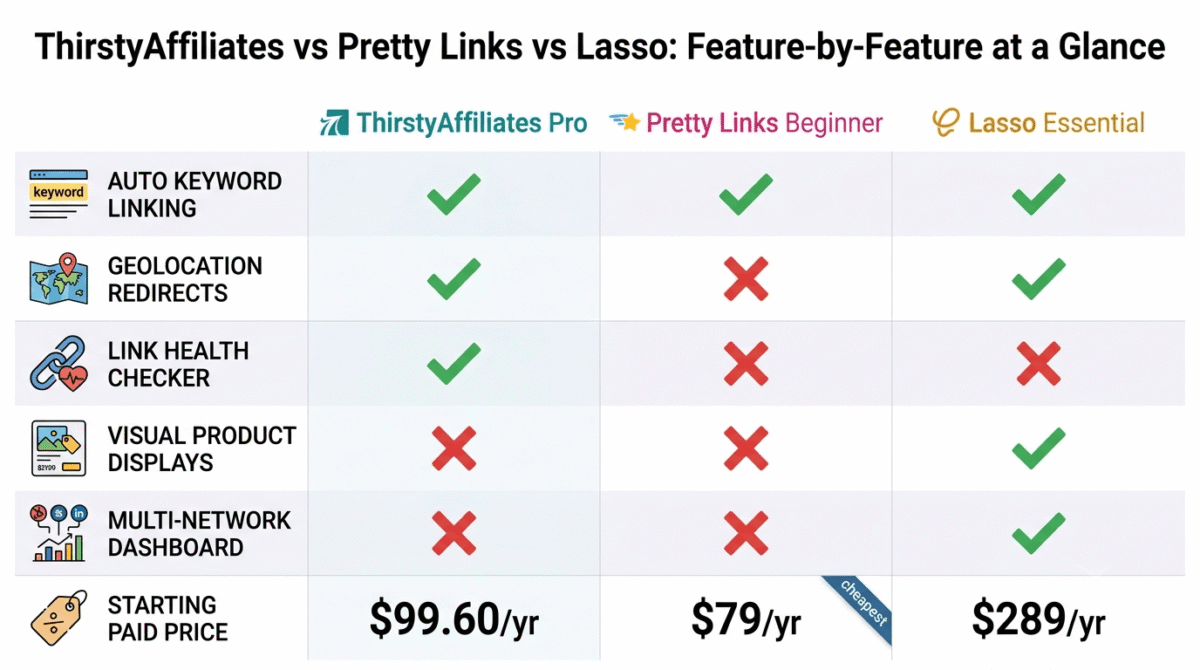
| Feature | ThirstyAffiliates Free | ThirstyAffiliates Pro (Basic) | Pretty Links Free | Pretty Links Beginner | Lasso Essential |
|---|---|---|---|---|---|
| Price | $0 | $99.60/year | $0 | $79/year | $289/year |
| Link cloaking | Yes | Yes | Yes | Yes | Yes |
| Basic click tracking | Yes | Yes | Yes | Yes | Yes |
| Auto keyword linking | No | Yes | No | Yes | Yes |
| Geolocation redirects | No | Yes | No | No | Yes |
| Link health checker | No | Yes | No | No | No |
| Advanced stats/reporting | No | Yes | No | Yes | Yes |
| Amazon API integration | No | Yes | No | No | Yes |
| Visual product displays | No | No | No | No | Yes |
| Multi-network dashboard | No | No | No | No | Yes |
| Split testing | No | No | No | Yes (Marketer) | No |
| QR code generation | No | No | Yes | Yes | No |
| Monthly billing option | No | No | No | No | Yes |
| Free plan (permanent) | Yes | — | Yes | — | No |
| Sites (single license) | 1 | 1 | 1 | 1 | 1 |
| WordPress-only | Yes | Yes | Yes | Yes | Yes |
Which Affiliate Link Plugin Should You Choose?
Choose ThirstyAffiliates Free if:
You are starting your first affiliate blog with fewer than 50 links and modest monthly traffic. The free plugin handles everything, link cloaking, categorisation, basic statistics, nofollow handling, at zero cost with no time limit. It is the plugin used on RateTheTool.com and the default recommendation for any new blogger before committing to a paid plan.
Choose ThirstyAffiliates Pro (Basic, $99.60/year) if:
Your blog has grown past 50 affiliate links and you want automatic keyword linking to retroactively monetise old posts, geolocation redirects for international traffic, and the link health checker to prevent revenue leakage from broken links. At $99.60/year this is the best overall value paid upgrade in the category for SaaS review blogs and general-purpose affiliate bloggers.
Choose Pretty Links Free if:
You want the simplest possible setup experience and are entirely new to affiliate marketing. Pretty Links’ free tier is marginally easier to navigate than ThirstyAffiliates for a first-time user, and the QR code feature is a practical bonus if you promote content in video or offline contexts. Expect to outgrow the free tier’s reporting within six to twelve months and plan for a migration decision at that point.
Choose Lasso (Essential, $289/year) if:
You run a product review blog, consumer electronics, Amazon affiliate niche sites, physical product reviews, where visual product display widgets meaningfully drive click-through rates, and your affiliate income already justifies the higher subscription cost. If your primary affiliate programs are Amazon Associates and retail brands rather than SaaS tools, Lasso’s differentiated features earn their cost. If your blog is SaaS-focused, the $189/year premium over ThirstyAffiliates Pro is difficult to justify.
Setting Up Affiliate Link Management on Your Blog, The Practical Guide
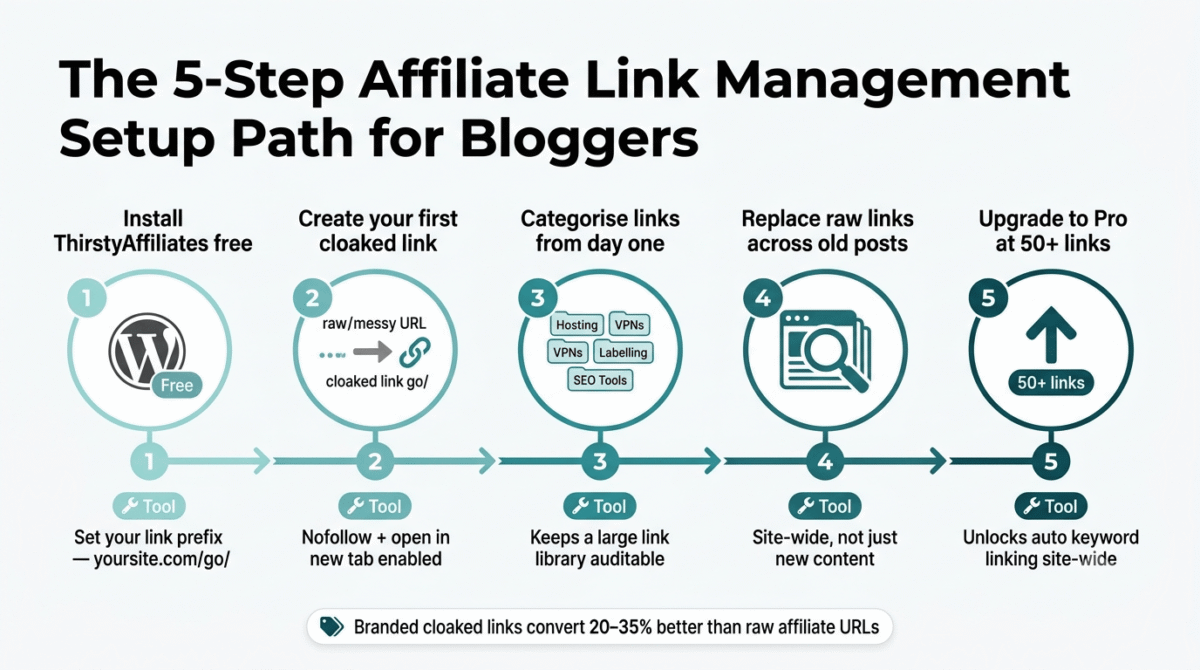
For bloggers adding affiliate link management for the first time, here is the fastest path to a properly configured setup:
Step 1, Install ThirstyAffiliates free. Search “ThirstyAffiliates” in the WordPress plugin directory, install, and activate. Go to ThirstyAffiliates → Settings and set your link prefix, use go for yoursite.com/go/toolname which is the clearest convention for readers.
Step 2, Create your first cloaked link. Go to ThirstyAffiliates → Add New Link. Enter the destination URL, write a clear internal name (e.g. “NordVPN, Main Affiliate Link”), and set the slug (nordvpn). Enable nofollow and open-in-new-tab. Save. Your first cloaked link is now live.
Step 3, Categorise your links from day one. Create categories by affiliate network or product type: Hosting, VPNs, SEO Tools, Email Marketing. A well-categorised link library is easy to audit and update; an uncategorised one becomes unusable above 100 links.
Step 4, Replace all raw affiliate links in existing posts. Use WordPress Search & Replace (or the Better Search Replace plugin) to find and replace raw affiliate URLs with your new cloaked versions. Do this across your entire post library, not just new posts.
Step 5, Upgrade to ThirstyAffiliates Pro when your link library exceeds 50 links. The moment automatic keyword linking becomes available, run it against your entire post archive. Every mention of “Hostinger”, “NordVPN”, “Semrush” or any other affiliated tool that you have already written about gains a clickable affiliate link instantly, a retroactive monetisation pass that typically takes under ten minutes and adds months of revenue potential to old content.
Final Verdict
ThirstyAffiliates is the best affiliate link management plugin for most WordPress bloggers in 2026, the free plan is the most functional starting point, the Pro upgrade at $99.60/year delivers geolocation redirects, automatic keyword linking, and link health monitoring at a price that any monetised blog can justify, and 15 years of reliability means zero surprises in a production WordPress environment.
Pretty Links is the best starting point for absolute beginners who want the simplest setup experience and are not yet ready to evaluate plugin features. The free tier covers the basics cleanly; plan to migrate to ThirstyAffiliates Pro when your link library grows and more advanced features become necessary.
Lasso is the best choice for established Amazon affiliate and product review bloggers whose visual product display requirements and multi-network reporting complexity justify the $289/year premium. For SaaS-focused review blogs like RateTheTool.com, the core link management capabilities do not justify paying 2.9× what ThirstyAffiliates Pro costs.
Ratings:
- ThirstyAffiliates: 4.7 / 5
- Pretty Links: 4.3 / 5
- Lasso: 4.2 / 5
Frequently Asked Questions
What is the best free affiliate link management plugin for WordPress in 2026?
ThirstyAffiliates offers the most functional free tier, unlimited link cloaking, categorisation, basic click statistics, nofollow and sponsored attribute handling, and WordPress shortcode integration with no time limit and no credit card required. Pretty Links’ free tier is a close alternative with a cleaner interface but slightly weaker default reporting. Both are permanently free with no feature expiry.
Do I need to cloak affiliate links on my WordPress blog?
Yes, for three reasons. First, cloaked links on your own domain build click trust with readers who are cautious about clicking long, parameter-heavy URLs. Second, cloaking allows global link management, when an affiliate program changes its URL, you update the destination in one place and every occurrence across your site updates automatically. Third, cloaked links enable click tracking so you know which posts and placements generate the most affiliate revenue.
Is ThirstyAffiliates better than Pretty Links?
For most bloggers, yes, particularly once you need Pro features. ThirstyAffiliates Pro includes geolocation redirects and the link health checker, which Pretty Links does not offer on any plan. ThirstyAffiliates’ free tier is also more feature-rich than Pretty Links’ free tier in terms of reporting depth. Pretty Links has a slight edge in interface simplicity for new users. The $20.60/year price difference between their single-site Pro plans is negligible, choose based on features rather than cost.
Does Lasso replace ThirstyAffiliates or Pretty Links entirely?
Yes, Lasso handles all the link management functions of ThirstyAffiliates and Pretty Links, plus adds product display widgets and multi-network reporting. The question is whether the $190–$210/year premium over the alternatives is justified by those additional features. For Amazon-focused bloggers doing significant product review volume, it typically is. For SaaS bloggers whose affiliate programs are software tools, the premium is harder to justify.
Does affiliate link cloaking affect SEO?
No, when implemented correctly. The key requirements are: use 301 permanent redirects (not 302 temporary), apply `rel=”nofollow”` or `rel=”sponsored”` attributes to all cloaked affiliate links, and avoid cloaking internal links or non-affiliate URLs. All three plugins in this review handle these requirements correctly on their default settings. Google can follow and evaluate cloaked affiliate links, and the `nofollow`/`sponsored` attributes signal that the links are commercial, which is exactly what Google’s guidelines require.
Can I use ThirstyAffiliates or Pretty Links on multiple WordPress sites?
Yes, both offer multi-site licensing. ThirstyAffiliates Pro Plus covers up to 5 sites at $149.60/year; ThirstyAffiliates Advanced covers 10 sites at $199.60/year. Pretty Links Marketer covers 2 sites at $149/year; Super Affiliate covers 5 sites at $199/year. For agencies or bloggers running 3+ monetised sites, ThirstyAffiliates’ multi-site pricing offers better value per site than Pretty Links.
What is the difference between link cloaking and link shortening?
Link cloaking replaces an affiliate URL with a branded URL on your own domain, `yoursite.com/go/toolname`, and uses a server-side redirect to send visitors to the affiliate destination. Link shortening (Bitly, TinyURL) replaces a URL with a shortened version on the shortener’s domain, `bit.ly/3xyz`, which does not use your domain, does not allow global management from your WordPress dashboard, and can be flagged as spam. Affiliate bloggers should always use link cloaking on their own domain, not third-party link shorteners.
How do I track which affiliate links make the most money?
The direct path is to cross-reference your plugin’s click data with your affiliate network commission reports. In ThirstyAffiliates Pro, the Advanced Statistics report shows clicks per link and clicks per referring page. Match this to your affiliate network’s conversion report to calculate a revenue-per-click figure for each link placement. Pages with high clicks but low conversion suggest a product fit or copy issue; pages with low clicks but high conversion are candidates for more prominent link placement. Lasso’s multi-network dashboard does this consolidation automatically across networks.