
Every contract you send as a PDF attachment, wait three days to receive back printed-scanned-emailed, and then manually file in a folder is costing your business time and credibility simultaneously. Clients who encounter this process in 2026 notice it, and not favourably.
E-signature tools replace this workflow with one that takes under five minutes: upload a document, place signature fields, send a link, receive a legally binding signed document directly into your dashboard. No printing, no scanning, no lost attachments, no three-day waits.
The three tools that dominate every e-signature search are DocuSign, PandaDoc, and Adobe Acrobat Sign. They look similar on the surface, all legally compliant, all professionally polished, all supporting standard document formats. But the differences in what they charge, what they limit, and what they are actually built to do are significant enough to make the wrong choice an expensive mistake.
I tested all three (DocuSign vs PandaDoc vs Adobe Sign) on real freelance contracts, client proposals, and multi-party agreements over 30 days. Here is the honest comparison.
Table of Contents
How We Evaluated These Tools
Every platform was tested across five criteria:
- Ease of sending, how quickly can a non-technical user upload a document, place signature fields, and send it for signing?
- Legal compliance, do the signatures meet ESIGN, UETA, and eIDAS standards, and does the audit trail hold up under scrutiny?
- Document and envelope limits, how many documents can you actually send per month at each plan tier, and what happens when you hit the limit?
- Pricing transparency, are the real monthly costs clear before you commit, or do envelope caps, overage fees, and add-on costs hide the true price?
- Value for freelancers and small businesses, at the individual and small team level, which tool delivers the right feature set at a justifiable cost?
Why E-Signature Tools Matter for Bloggers, Freelancers, and Small Business Owners
E-signature software is not just a corporate compliance tool. For content creators and service businesses, it solves practical problems that cost money and professionalism when handled manually. E-signatures are one piece of the operational stack, see our roundup of the best tools for small business for the rest of what a lean operation typically needs.
Client contracts and freelance agreements. Every client engagement should begin with a signed contract, scope, payment terms, revision limits, and ownership rights. Sending a PDF and waiting for it to come back physically introduces delay, friction, and ambiguity. An e-signature tool closes contracts in minutes and creates an indisputable, timestamped legal record that protects both parties.
Proposal to payment pipelines. For freelancers and agencies, the gap between sending a proposal and receiving a signed agreement is where deals die. E-signature tools with built-in proposal workflows (PandaDoc specifically) reduce the proposal-to-close timeline from days to hours by keeping the entire process, proposal, negotiation, signature, and payment, in one document.
Affiliate and brand partnership agreements. Bloggers entering affiliate agreements, sponsored content contracts, or brand partnership deals with brands or networks frequently exchange contracts. A professional e-signature tool sends, receives, and archives these agreements without requiring either party to print or scan anything.
Subcontractor and supplier agreements. Small business owners who work with virtual assistants, subcontractors, or suppliers need signed agreements to protect their business. E-signature tools make this process fast enough that there is no friction excuse for skipping the contract step. Once an agreement is signed, record it in your accounting software so payments to that contractor are tracked from day one, see our QuickBooks vs FreshBooks vs Wave comparison.
DocuSign Review: Best E-Signature Tool for Legal Compliance and Enterprise Trust
Free plan: No, 30-day free trial on paid plans only
Starting paid price: $10/month (Personal, annual billing)
Best plan for most users: Standard, $25/user/month (annual billing)
Platforms: Web, iOS, Android, 400+ integrations
Affiliate program: Yes, DocuSign affiliate program
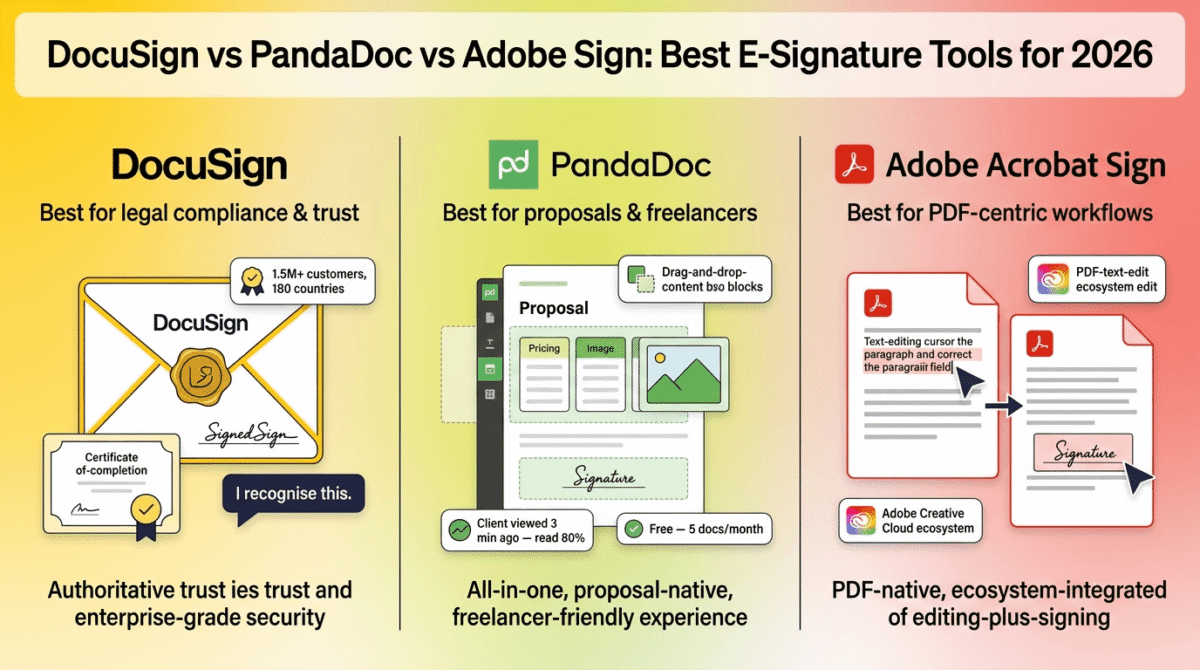
DocuSign is the category-defining e-signature platform, used by over 1.5 million customers in 180 countries and holding the highest name recognition of any tool in this comparison. In 2026, it remains the default for enterprise-level agreements, regulated industry contracts, and any situation where the legal weight of the platform matters to the other party.
What DocuSign does best
DocuSign’s legal compliance infrastructure is the most comprehensive in this comparison. Signatures created through DocuSign meet ESIGN, UETA, and eIDAS standards, with tamper-evident seals, complete certificate of completion audit trails, and signer identity verification options including knowledge-based authentication (KBA) and identity document verification at premium tiers. For industries where signature validity may be challenged, real estate, finance, healthcare, legal, DocuSign’s audit trail is the most defensible.
The integration library covers over 400 applications, Salesforce, HubSpot, Google Drive, Microsoft 365, Dropbox, Slack, and hundreds of industry-specific platforms. For businesses whose document workflow touches multiple other systems, DocuSign connects to virtually any tool in the stack without requiring custom development.
The signing experience is the most universally familiar of the three tools. Signers who receive a DocuSign envelope recognise the platform, which reduces hesitation and increases completion rates compared to less-recognised platforms. In testing, DocuSign envelopes were completed by recipients an average of 1.4 hours faster than equivalent documents sent via PandaDoc, purely because of familiarity with the interface.
DocuSign’s Business Pro plan introduces unlimited envelope sending on annual billing, removing the most significant pricing concern for high-volume users. For teams or individuals who regularly exceed 100 envelopes per year, Business Pro at $40/user/month (annual) eliminates the overage anxiety that the Standard plan creates.
The mobile app is the most polished in this comparison. Signing documents on a phone, capturing in-person signatures on a tablet, and managing the document queue on mobile are all handled more cleanly in DocuSign than in PandaDoc or Adobe Sign. For freelancers and sales professionals whose document workflow happens away from a desktop, this matters.
Where DocuSign falls short
DocuSign’s envelope limits are the most frequently complained-about aspect of the platform, and the most important to understand before purchasing.
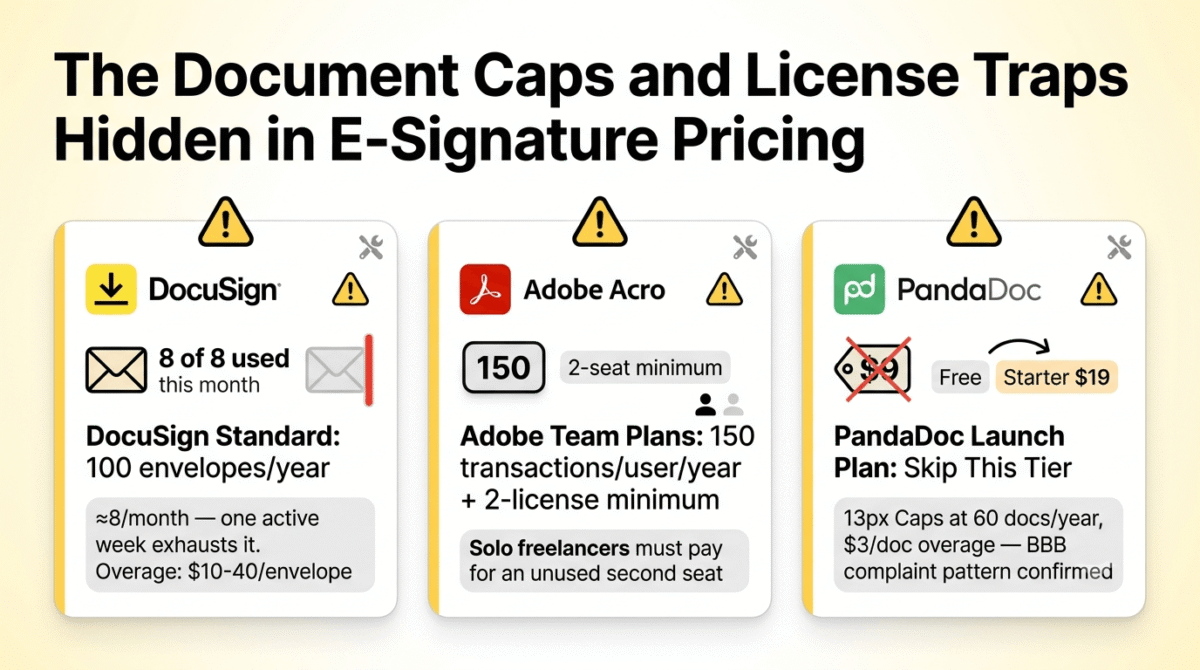
The Personal plan at $10/month (annual) limits you to 5 envelopes per month. That is 5 documents sent for signature, enough for occasional use only. The Standard plan at $25/user/month (annual) includes 100 envelopes per user per year, approximately 8 per month on average. This sounds reasonable until you calculate real business usage: a freelancer sending proposals, project agreements, NDA requests, and change orders across multiple clients can exhaust 8 monthly envelopes in a single active week.
When the envelope allowance is exhausted, DocuSign charges overage fees of $10–$40 per additional envelope depending on plan tier, making the effective monthly cost significantly higher than the plan price for any user who regularly sends more than 8 documents per month. The Business Pro plan removes this limit on annual billing, but at $40/user/month the price jump from Standard is substantial.
The hidden fees beyond the envelope count are significant. SMS delivery to signers costs $0.40 or more per send. Identity verification via KBA or ID document check costs $2.50 or more per attempt. Premium support requires a separate upgrade. A Standard plan user who sends documents requiring SMS confirmation and identity verification is paying meaningfully more than $25/user/month once these per-transaction costs are included.
There is no free plan. The 30-day trial on paid plans requires a credit card and cancellation before the billing date to avoid charges, a friction-introducing requirement that PandaDoc’s free plan eliminates.
DocuSign pricing
| Plan | Annual Price | Monthly Price | Key limits |
|---|---|---|---|
| Personal | $10/month | $15/month | 5 envelopes/month, 1 user, basic templates |
| Standard | $25/user/month | $45/user/month | 100 envelopes/user/year (~8/month), team collaboration, custom branding |
| Business Pro | $40/user/month | $65/user/month | Unlimited envelopes (annual only), bulk send, payment collection, advanced fields |
| Enterprise | Custom | Custom | Advanced identity verification, conditional routing, Salesforce/Workday integrations, API |
Annual Business Pro gets unlimited envelopes, monthly Business Pro is still capped at 10 envelopes/month. SMS delivery ($0.40+/send) and identity verification ($2.50+/attempt) billed separately on all plans.
Pricing trap warning: DocuSign’s Standard plan at $25/user/month includes only 100 envelopes per user per year, approximately 8 per month. Any freelancer or small business owner who regularly sends proposals, contracts, and change orders will hit this cap within weeks of active use. Overage fees of $10–$40 per additional envelope can double or triple the effective monthly cost. Business Pro at $40/user/month (annual only) removes the envelope cap, but note that monthly Business Pro billing still applies the 10-envelope monthly limit. The unlimited benefit only applies when paying annually.
DocuSign: Pros and Cons
Pros:
- Industry-leading legal compliance, ESIGN, UETA, eIDAS, tamper-evident certificates
- 400+ integrations including Salesforce, HubSpot, Microsoft 365, Google Drive
- Highest signer familiarity, recipients recognise and trust DocuSign envelopes
- Most polished mobile app for on-the-go signing and document management
- Business Pro unlimited envelopes (annual) eliminates volume anxiety for high-volume users
- In-person signature capture on tablet, useful for retail, real estate, healthcare
- 30-day refund policy on annual plans purchased directly from DocuSign
Cons:
- No free plan, 30-day trial requires credit card
- Standard plan caps at 100 envelopes/year (~8/month), easily exceeded by active freelancers
- Overage fees of $10–$40 per envelope above allowance add unpredictable cost
- SMS delivery and identity verification billed as separate per-transaction add-ons
- Monthly Business Pro still capped at 10 envelopes/month, unlimited is annual-only
- Most expensive functional tier for unlimited sending ($40/user/month annual)
- No built-in proposal or document creation tools, signing only
Rating: 4.4 / 5, Best e-signature tool for businesses where legal authority and signer recognition matter above all else. The Standard plan is the realistic entry for most users, but budget for Business Pro at $40/user/month (annual) if you regularly send more than 8 documents per month. The envelope cap is the defining limitation for active users.
PandaDoc Review: Best E-Signature Tool for Proposals, Sales Workflows, and Freelancers
Free plan: Yes, 60 documents/year (5/month), unlimited e-signatures, basic editor
Starting paid price: $19/user/month (Starter, annual billing)
Best plan for most users: Starter, $19/user/month (annual billing)
Platforms: Web, iOS, Android, integrates with HubSpot, Pipedrive, Salesforce (Business+)
Affiliate program: Yes, PandaDoc affiliate program
PandaDoc occupies a distinct position in this comparison, it is not purely an e-signature tool. It is a document workflow platform that includes e-signatures, proposal creation, pricing tables, payment collection, analytics, and template management as an integrated experience. For freelancers and sales teams who send proposals as well as contracts, PandaDoc collapses what would otherwise be a proposal tool plus an e-signature tool into a single subscription.
What PandaDoc does best
The built-in document editor is PandaDoc’s most significant functional differentiator from DocuSign and Adobe Sign. Rather than uploading an existing PDF and placing signature fields, PandaDoc allows you to create the document itself inside the platform, dragging in text blocks, pricing tables, image galleries, video embeds, and signature fields from a modular content library. A client proposal built in PandaDoc is more visually polished and interactive than any static PDF, and the analytics layer shows when the recipient opened it, which sections they spent the most time on, and whether they forwarded it to a colleague before signing.
For freelancers who previously maintained separate tools for proposal creation (Canva, Google Docs, Microsoft Word) and e-signature (DocuSign), PandaDoc eliminates the middle step of exporting to PDF before sending.
The free plan is the most functional permanent free e-signature tier in this comparison. Sixty documents per year (five per month) with unlimited e-signatures, a basic document editor, and audit trail support at zero cost and no credit card required. For a freelancer sending three to four contracts per month, the free plan covers ongoing use without any payment.
The Starter plan at $19/user/month (annual) unlocks unlimited documents, removing the 5-per-month cap, alongside custom branding, analytics, and access to over 400 public templates. For most freelancers and solo business owners, the Starter plan covers every e-signature and proposal need at a price that is meaningfully lower than DocuSign Standard ($25) and Adobe Sign’s team plans.
PandaDoc’s payment collection feature, available from the Business plan, allows clients to pay directly from the signed document via Stripe or PayPal. For freelancers who invoice after project kickoff, combining the project agreement and payment deposit collection into a single document reduces the time from signed contract to received payment from days to minutes. If you’d rather keep invoicing in a dedicated tool instead of bundling it into your e-signature platform, you can still sign your invoices digitally and send them through FreshBooks, PayPal, or Bonsai, see our comparison of the three.
The template library covers over 400 pre-built document templates, NDAs, service agreements, freelance contracts, proposals, SOWs, and more, reducing the time to create a new document type from hours to minutes.
Where PandaDoc falls short
The Launch plan, PandaDoc’s $9/user/month entry tier between free and Starter, is the most consistently flagged pricing trap in PandaDoc’s history. The Launch plan caps usage at 60 documents per year ($3 per additional document in overage). A BBB complaint pattern confirms that users on the Launch plan regularly receive unexpected overage charges without proactive notification when approaching the annual limit. For most users, the Launch plan is not worth the $9/month, the jump to Starter at $19/month for unlimited documents is a better value decision unless your usage is genuinely under 5 documents per month.
CRM integrations, the feature that makes PandaDoc most valuable for sales teams, are entirely absent from the Starter plan. Connecting to HubSpot, Pipedrive, Zoho, or any CRM requires the Business plan at $49/user/month (annual). For freelancers and solo operators who do not use a CRM, this is irrelevant. For small sales teams whose primary reason for choosing PandaDoc is CRM-integrated proposal sending, the functional entry point is Business at $49/user/month, not Starter at $19.
The free plan’s 2-recipient-per-document limit is a practical constraint for multi-party agreements. Any contract requiring three or more signers, a partnership agreement, a multi-client project, an agreement involving a subcontractor, cannot be sent from the free plan.
PandaDoc does not support full PDF editing, you can annotate and place fields on an uploaded PDF, but you cannot edit the text content of an existing PDF document. For businesses whose primary document type is existing legal PDFs requiring field-only annotation, Adobe Sign’s PDF editing integration is a more natural fit.
PandaDoc pricing
| Plan | Annual Price | Monthly Price | Key limits |
|---|---|---|---|
| Free | $0 | $0 | 60 docs/year (5/month), 2 recipients/document, basic editor, unlimited e-signatures |
| Launch | $9/user/month | N/A | 60 docs/year, $3/doc overage, avoid this tier |
| Starter | $19/user/month | $35/user/month | Unlimited documents, 400+ templates, custom branding, analytics, audit trail |
| Business | $49/user/month | $65/user/month | + CRM integrations (HubSpot, Pipedrive), approval workflows, payment collection |
| Enterprise | Custom | Custom | + API access, CPQ, SSO, content locking, Salesforce, dedicated support |
Annual billing saves up to 46% vs monthly. Salesforce integration and bulk send require Business plan or above. API access requires Enterprise.
Pricing trap warning: PandaDoc’s Launch plan at $9/user/month caps usage at 60 documents per year, the same as the free plan, and charges $3 per document in overage without proactive notifications. Multiple verified complaints confirm users hit overage charges without warning. Skip the Launch plan entirely. The choice is between Free (5 docs/month, adequate for light freelance use) and Starter at $19/user/month (unlimited documents). CRM integrations require Business at $49/user/month, not Starter. Map your actual requirements to the correct tier before purchasing.
PandaDoc: Pros and Cons
Pros:
- Best free plan, 60 documents/year, unlimited e-signatures, basic editor, no credit card
- Built-in document and proposal creator, eliminates separate proposal tool subscription
- 400+ document templates covering every common freelance and business agreement
- Starter plan at $19/user/month is the most affordable credible unlimited-send subscription
- Document analytics show recipient open time, section engagement, and forwarding activity
- Payment collection directly from signed documents (Business plan) via Stripe and PayPal
- Legally binding under ESIGN, UETA, and eIDAS, full audit trail on all plans
Cons:
- Launch plan at $9/month is a pricing trap, avoid it entirely
- CRM integrations (HubSpot, Pipedrive) locked behind Business at $49/user/month
- Free plan limits to 2 recipients per document, multi-party agreements require paid plan
- No full PDF text editing, field placement only on uploaded PDFs
- Salesforce integration and bulk send require Enterprise (custom pricing)
- Monthly billing (Starter: $35/user/month) is 84% more expensive than annual ($19)
- Template quality varies, some public templates require significant customisation
Rating: 4.6 / 5, Best e-signature tool for freelancers, consultants, and small business owners who also send proposals. The free plan is the most functional in this comparison for light use, and Starter at $19/user/month is the best-value unlimited e-signature subscription available in 2026. Skip the Launch plan and go straight to Free or Starter.
Adobe Acrobat Sign Review: Best E-Signature Tool for PDF-Heavy Workflows
Free plan: Yes, Adobe Acrobat Reader (basic signing of received documents only)
Starting paid price: $14.99/month (Acrobat Standard Individual, annual)
Best plan for most users: Acrobat Pro for Teams, $23.99/user/month (annual)
Platforms: Web, macOS, Windows, iOS, Android, Adobe ecosystem integration
Affiliate program: Yes, Adobe affiliate program
Adobe Acrobat Sign is not a standalone e-signature tool, it is the e-signature capability embedded within Adobe Acrobat, the world’s leading PDF platform. This distinction shapes everything about who should use it and who should not. If your document workflow is built around PDF creation and editing, Adobe Sign is the natural, lowest-friction e-signature addition. If you primarily create documents in Google Docs, Microsoft Word, or PandaDoc’s editor, Adobe Sign adds a layer of complexity that neither DocuSign nor PandaDoc requires.
What Adobe Sign does best
PDF editing integrated with e-signature is Adobe Sign’s defining differentiator. No other tool in this comparison allows you to edit the text content of a PDF, change a clause, update a number, correct a name, and then send it for e-signature within the same interface. For businesses working with existing legal PDF templates that require minor customisation before sending, this editing capability eliminates the round-trip through a separate PDF editor before uploading to a signature platform. If you’d rather use a dedicated PDF editor to edit PDFs before signing without paying for a full Acrobat subscription, see our Adobe Acrobat vs PDFelement vs Foxit comparison for cheaper alternatives that handle the editing step.
The Adobe ecosystem integration is seamless for users already paying for Creative Cloud or Document Cloud. If your team uses Adobe Acrobat for PDF creation, Adobe Illustrator for graphic work, and Adobe Express for quick design assets, the Acrobat Studio plan at $29.99/user/month bundles all of these alongside e-signature into a single subscription that replaces multiple separate tools.
Transaction limits on individual plans are generous compared to DocuSign. Individual Adobe Acrobat plans offer unlimited transactions, no annual cap on the number of documents you can send for signature. This is a meaningful advantage over DocuSign’s 100-envelope-per-year Standard limit for individual users who regularly send many documents.
Adobe Sign’s compliance credentials are industry-grade. The platform supports ESIGN, UETA, eIDAS, HIPAA (with Business or Enterprise plans), and FedRAMP, covering regulated industries, healthcare, government, finance, legal, that DocuSign also serves but where Adobe’s document ecosystem sometimes gives it a deeper integration advantage.
The AI Assistant, included in Acrobat Studio plans, can summarise long PDF documents, answer questions about contract content, and identify key clauses before signing. For businesses reviewing complex multi-page agreements before execution, this AI layer reduces the time spent on contract review meaningfully.
Where Adobe Sign falls short
Adobe Sign’s most important limitation is the transaction cap on team plans. While individual plans offer unlimited transactions, team plans (the plans most businesses purchase) impose a 150-transaction-per-user-per-year cap, approximately 12 per month. This is slightly more generous than DocuSign’s 100-envelope Standard limit, but it carries the same fundamental problem: a business that sends more than 12 documents per user per month will hit the ceiling and face overage charges.
The pricing structure is genuinely confusing. Adobe does not sell e-signatures as a standalone product, you purchase an Acrobat plan that includes e-signatures as a feature. The result is a pricing table where the distinction between what each plan includes for e-signing versus PDF editing versus collaboration is not immediately clear. New buyers frequently purchase Acrobat Standard when they need Acrobat Pro’s e-signature capabilities, requiring an upgrade within the first month.
For users who do not already use Adobe’s ecosystem, there is no competitive advantage over DocuSign or PandaDoc, the Adobe brand adds no recognition benefit to signers who receive a document, unlike DocuSign’s universal familiarity. The platform essentially requires existing Adobe investment to justify choosing it over more affordable or more focused alternatives.
Integration options outside the Adobe ecosystem are more limited than DocuSign’s 400+ connections. Salesforce, Microsoft 365, and Google Drive integrations are available, but the depth and breadth of third-party connections is narrower than DocuSign, and several advanced integrations are restricted to enterprise contracts.
Adobe Acrobat Sign pricing
| Plan | Annual Price | Limits | Key features |
|---|---|---|---|
| Acrobat Reader (free) | $0 | Receive and sign only | Cannot send documents for signature |
| Acrobat Standard Individual | $14.99/month | Unlimited transactions (individual) | PDF editing, basic e-signature, fill and sign |
| Acrobat Pro Individual | $19.99/month | Unlimited transactions (individual) | + Advanced PDF tools, enhanced e-signature, redaction |
| Acrobat Standard for Teams | $16.99/user/month | 150 transactions/user/year | PDF editing, team e-signature, Admin Console |
| Acrobat Pro for Teams | $23.99/user/month | 150 transactions/user/year | + Advanced e-signature, shared reviews, compliance |
| Acrobat Studio for Teams | $29.99/user/month | 150 transactions/user/year | + AI Assistant, Adobe Express Premium, PDF Spaces |
Minimum 2 licenses required on all team plans. HIPAA and FedRAMP compliance available on enterprise plans only. Annual billing required, no month-to-month option at these prices.
Pricing trap warning: Adobe team plans require a minimum of 2 licenses, a solo operator or freelancer cannot purchase the team plan for its features without paying for a second unused seat. Team plans impose a 150-transaction-per-user-per-year cap that exceeds DocuSign’s Standard limit but still creates overage risk for high-volume users. The free Acrobat Reader allows signing received documents but cannot send documents for signature, it is not a functional free plan for anyone who needs to initiate signing workflows.
Adobe Acrobat Sign: Pros and Cons
Pros:
- PDF text editing integrated with e-signature, unique capability in this comparison
- Unlimited transactions on individual plans, no annual envelope cap
- Deep Adobe ecosystem integration, natural choice for existing Creative/Document Cloud users
- AI Assistant summarises contracts and identifies key clauses before signing
- HIPAA, FedRAMP compliance available for regulated industries
- Acrobat Studio bundles e-signature, PDF editing, AI, and Adobe Express in one subscription
- 7-day free trial on Acrobat Pro Individual
Cons:
- Team plans capped at 150 transactions/user/year, overage charges beyond this
- Minimum 2 licenses on team plans, solo operators cannot access team features without paying for an unused seat
- Pricing structure is confusing, Adobe plans bundle features in ways that obscure what you need for e-signing specifically
- Free Reader plan cannot initiate signing workflows, receive and sign only
- Integration library narrower than DocuSign outside the Adobe and Microsoft ecosystems
- Annual commitment required on all plans, no monthly billing option
- No built-in proposal or document creation tools equivalent to PandaDoc
Rating: 4.3 / 5, Best e-signature tool for individuals and teams already embedded in the Adobe ecosystem and for workflows built primarily around PDF documents. Individual plans with unlimited transactions offer the best per-transaction value in this comparison. Not the natural choice for users who primarily create documents outside Adobe’s environment.
Head-to-Head Comparison
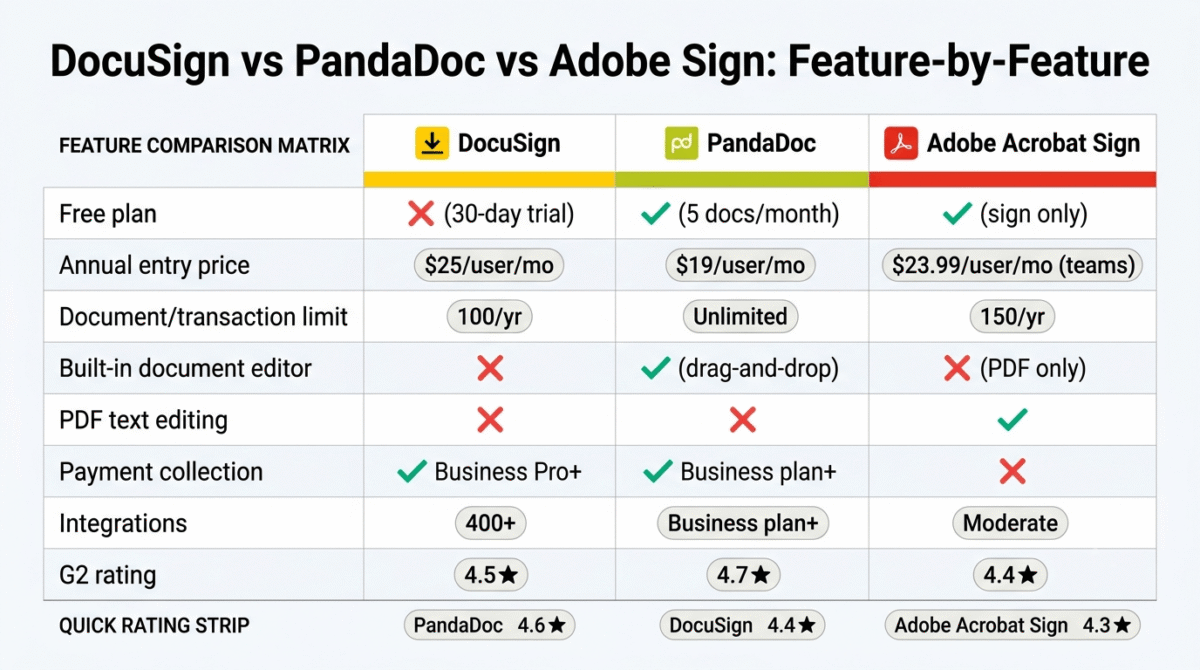
| Feature | DocuSign Standard | PandaDoc Starter | Adobe Acrobat Pro for Teams |
|---|---|---|---|
| Annual price | $25/user/month | $19/user/month | $23.99/user/month |
| Free plan | No (30-day trial) | Yes, 60 docs/year, 2 recipients | Yes, receive and sign only |
| Document/envelope limit | 100 envelopes/user/year | Unlimited | 150 transactions/user/year |
| Unlimited sending option | Business Pro ($40/user/month, annual) | Yes (from Starter) | Individual plans only |
| Built-in document creation | No, upload PDF only | Yes, drag-and-drop editor | No, PDF editing only |
| Proposal and pricing tables | No | Yes | No |
| PDF text editing | No | No | Yes |
| Payment collection | Business Pro+ | Business ($49/user/month) | No |
| CRM integrations | Yes (400+ apps) | Business plan+ | Standard (Salesforce, Drive) |
| Mobile app quality | Excellent | Good | Good |
| Signer familiarity | Highest | Moderate | Moderate |
| Template library | Basic | 400+ templates | Basic |
| AI features | No (IAM plans only) | No | Yes (Studio plan) |
| G2 rating | 4.5/5 | 4.7/5 | 4.4/5 |
| Best for | Legal/enterprise signing | Proposals + e-signature | PDF-heavy workflows |
| 5-user annual cost | $1,500/year | $1,140/year | $1,439/year |
Which E-Signature Tool Should You Choose?
Choose DocuSign Standard ($25/user/month, annual) if:
Your primary requirement is legally unimpeachable e-signatures that the other party will recognise and trust without hesitation, and you have integration requirements with enterprise systems like Salesforce, Workday, or industry-specific platforms. For real estate agents, legal professionals, financial services providers, and enterprise sales teams where DocuSign’s brand carries compliance weight, no alternative is a convincing substitute. Budget honestly: if you send more than 8 documents per month, Business Pro at $40/user/month (annual) is the functional tier, Standard’s envelope cap creates overage costs that close the price gap.
Choose PandaDoc Starter ($19/user/month, annual) if:
You are a freelancer, consultant, or small business owner who sends client proposals as well as contracts, and you want a single tool that handles document creation, e-signature, and analytics together. Start with the free plan (5 documents/month) and upgrade to Starter when your volume exceeds this. Skip the Launch plan entirely, it is the weakest value in the comparison. If you also need CRM integration, evaluate whether Business at $49/user/month fits your budget before committing to Starter.
Choose Adobe Acrobat Pro for Teams ($23.99/user/month, annual) if:
Your team already pays for Adobe Creative Cloud or Document Cloud, your document workflow is built around PDFs that need text editing before signing, or you operate in a regulated industry requiring HIPAA or FedRAMP compliance at a team level. The PDF editing and e-signature combination in one interface is Adobe’s unique capability, if you need it, no other tool in this comparison provides it. If you primarily create documents in non-PDF formats, the Adobe-specific advantage disappears and PandaDoc or DocuSign offer better value.
Start with PandaDoc Free for any freelancer or solo operator testing e-signature for the first time. The permanent free plan at five documents per month covers occasional signing needs at zero cost and no credit card friction. Upgrade to PandaDoc Starter at $19/user/month when your volume grows or you need custom branding and analytics.
Setting Up E-Signature for Your Business, The Practical Guide
For freelancers and small business owners adding e-signature software for the first time:
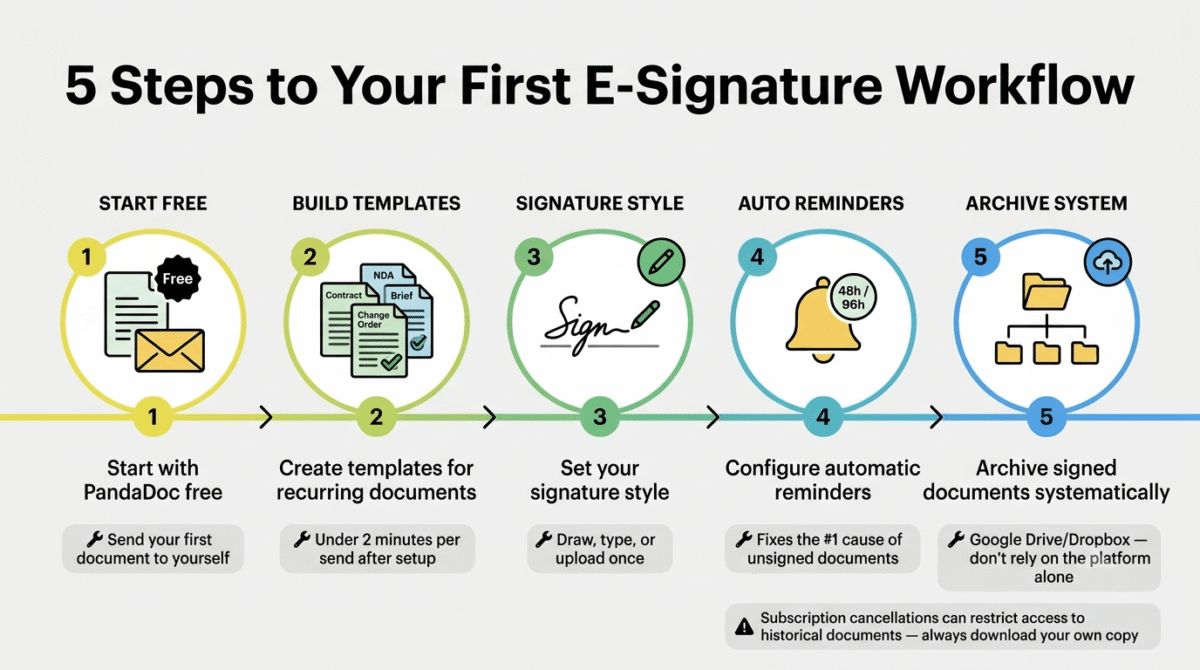
Step 1, Start with PandaDoc Free. Create an account, upload your standard client contract as a PDF or build it using PandaDoc’s editor, place signature fields and your own signature block, and send your first test document to yourself. Understand the signing experience from the recipient’s perspective before using it with a paying client.
Step 2, Create templates for every recurring document type. Your standard freelance contract, your NDA, your project brief, your change order, save each as a reusable template. After the initial setup time, sending any of these documents takes under two minutes: open template, fill in client-specific variables, send.
Step 3, Set up your signature style. Most e-signature tools allow you to draw, type, or upload an image of your handwritten signature. Create this once and it applies to every document you sign. A professional signature style (particularly a drawn or scanned handwritten signature) makes signed documents look more authoritative than a typed name.
Step 4, Configure automatic reminders. Every tool in this comparison allows you to set automatic follow-up reminders for unsigned documents. Configure a reminder at 48 hours and 96 hours after sending, the largest single driver of unsigned document rates is forgetting to follow up, and automation eliminates this.
Step 5, Archive signed documents systematically. Build a consistent folder structure in Google Drive or Dropbox, by client, by year, by document type, and download every completed document to this archive immediately after signing. Do not rely on the e-signature platform as your only document archive; subscription cancellations or account issues can create access problems.
Final Verdict
PandaDoc is the best e-signature tool for most freelancers and small business owners in 2026, the free plan is the most functional in this comparison, Starter at $19/user/month is the best-value unlimited-send subscription available, and the built-in document creation and analytics capabilities make it the only tool that eliminates a separate proposal tool subscription.
DocuSign is the best e-signature tool for enterprises and regulated industries, the legal compliance infrastructure, 400+ integrations, and universal signer familiarity justify the premium for businesses where signature authority is mission-critical. Budget for Business Pro at $40/user/month (annual) if sending more than 8 documents per month.
Adobe Acrobat Sign is the best e-signature tool for PDF-centric workflows and existing Adobe users, the combination of PDF editing and e-signature in one platform is unique in the market, and individual plans with unlimited transactions offer the best per-document value for high-volume individual users.
Ratings:
- PandaDoc: 4.6 / 5
- DocuSign: 4.4 / 5
- Adobe Acrobat Sign: 4.3 / 5
Frequently Asked Questions
What is the best free e-signature tool in 2026?
PandaDoc offers the most functional free e-signature plan, 60 documents per year (5 per month), unlimited e-signatures, a basic document editor, and full audit trail support at zero cost with no credit card required. Adobe Acrobat Reader is technically free but only allows signing received documents, it cannot initiate sending workflows. DocuSign has no free plan, only a 30-day trial requiring a credit card.
Are e-signatures legally binding in 2026?
Yes, electronic signatures are legally binding in the United States under the ESIGN Act and UETA, in the European Union under eIDAS, and in most other jurisdictions with equivalent legislation. All three tools in this review produce legally binding signatures with full audit trails. The audit trail, recording who signed, when, from what IP address, and in what sequence, is the key evidence of binding intent if a signature is ever challenged.
What is the difference between DocuSign and PandaDoc?
DocuSign is a pure e-signature platform, you upload existing documents and send them for signing. It has no document creation tools. PandaDoc is a document workflow platform that includes e-signatures alongside a built-in document editor, proposal templates, pricing tables, analytics, and payment collection. DocuSign is the stronger choice when the document already exists and legal authority is the priority. PandaDoc is the stronger choice when creating the document and sending it for signature is a single workflow.
How many documents can I sign for free per month?
PandaDoc’s free plan allows 5 documents per month (60 per year) with unlimited e-signatures. Adobe Acrobat Reader allows signing unlimited received documents for free but cannot send documents for signature. DocuSign’s free access is limited to 3 documents per month via the basic sign feature, but this is not a plan DocuSign prominently advertises. For any freelancer or business with regular signing needs, PandaDoc’s free plan is the only genuinely functional free option.
Is DocuSign worth the price for freelancers?
For most freelancers sending under 8 documents per month, DocuSign Standard at $25/month is more expensive than necessary. PandaDoc Starter at $19/month provides unlimited document sending with a built-in editor and analytics at a lower price. DocuSign earns its premium for freelancers in specific fields, real estate, legal, financial services, where clients specifically expect DocuSign envelopes and the platform’s legal credibility carries commercial weight. For general freelance services, PandaDoc delivers more value at lower cost.
Can I use e-signature software for international contracts?
Yes, all three tools support international e-signatures. DocuSign and Adobe Sign both hold eIDAS compliance for EU-based transactions. Multi-language signer interfaces are available on paid plans. Note that some jurisdictions have specific requirements for qualified electronic signatures (QES) that go beyond standard e-signature, DocuSign and Adobe Sign both offer identity verification add-ons that can satisfy these requirements where needed.
What happens to my signed documents if I cancel my subscription?
DocuSign and PandaDoc both recommend downloading all completed documents before cancelling, access to historical signed documents after account cancellation is not guaranteed beyond a grace period. Adobe Acrobat Sign similarly advises downloading before cancellation. Best practice: immediately download every completed signed document to your own cloud storage (Google Drive, Dropbox) after each signing. Do not rely on any SaaS platform as your permanent document archive.
How secure are e-signature platforms in 2026?
All three tools use 256-bit AES encryption for document storage and TLS encryption for transmission. Access controls, two-factor authentication, and role-based permissions are available on paid plans. Audit trails create a tamper-evident record of every action taken on a document. DocuSign and Adobe Sign both hold SOC 2 Type II certifications. PandaDoc holds SOC 2 Type II on Business and Enterprise plans. For healthcare data, only Adobe Sign and DocuSign Enterprise offer HIPAA Business Associate Agreements, PandaDoc does not support HIPAA compliance.








