Selling online courses is one of the highest-margin monetization strategies available to bloggers and content creators in 2026. Unlike AdSense, where you earn cents per click, or affiliate marketing, where commissions are capped by the vendor’s rate, an online course you sell for $97, $197, or $497 pays you the full price minus platform fees every single time someone enrols.
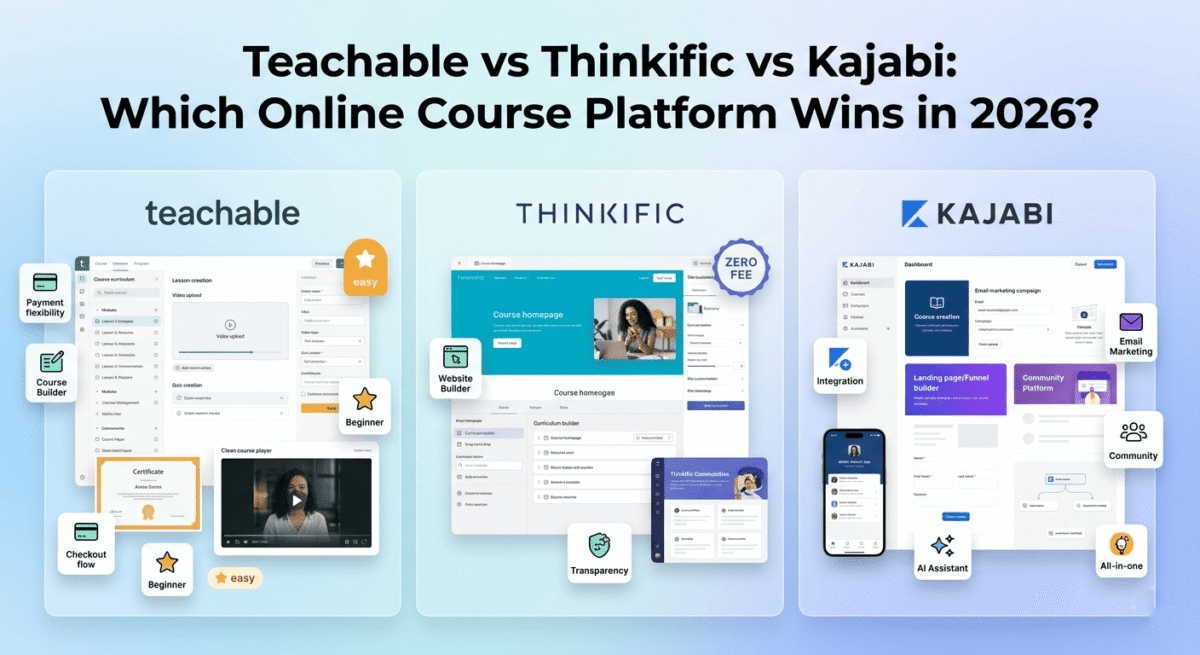
The challenge is choosing the right platform. Teachable, Thinkific, and Kajabi are the three most widely used course platforms, each with meaningfully different pricing models, feature sets, and philosophies about what course creators actually need.
I tested all three (Teachable vs Thinkific vs Kajabi) for 60 days, building and selling real courses. Here is the honest comparison.
Table of Contents
How We Evaluated These Platforms
Every platform was tested across five criteria:
– Course creation: How easy is it to build and structure a professional course?
– Student experience: How polished and engaging is the learning environment?
– Sales and marketing: built-in tools for selling, upselling, and converting visitors
– Community features: Ability to build a community alongside your course
– Value: Transaction fees, monthly costs, and hidden expenses
Why Online Courses Are the Most Valuable Monetization Strategy for Bloggers
Before comparing platforms, understanding the economics makes the choice clearer.
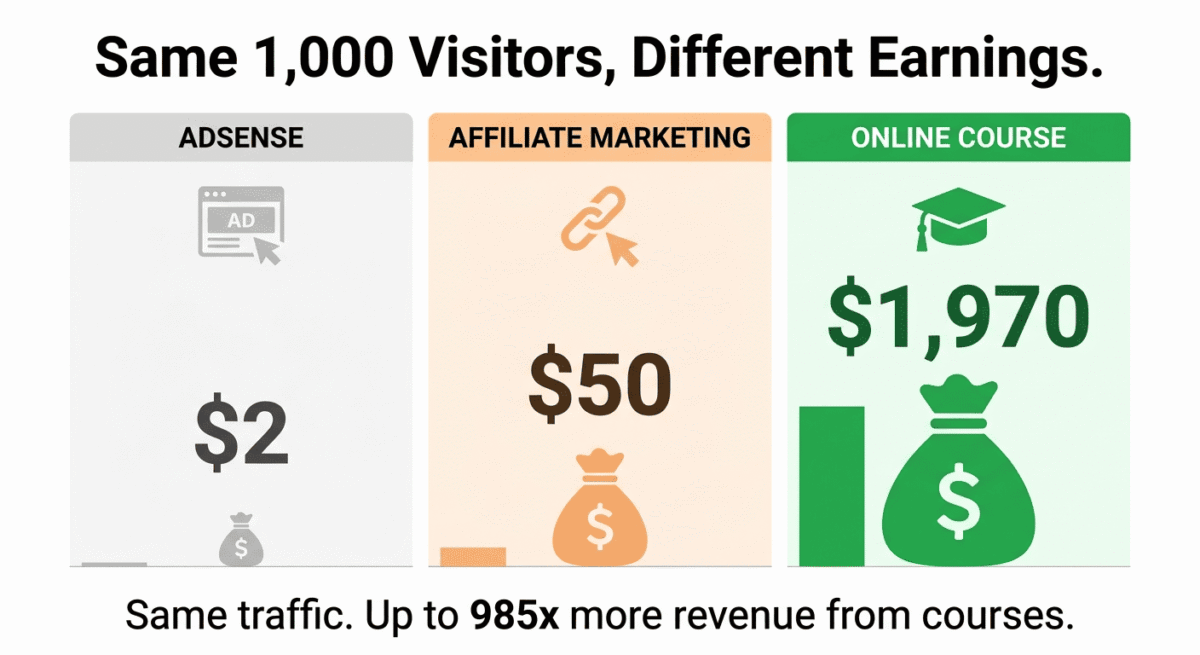
A blog post that ranks on Google and earns $2 CPM from AdSense generates $2 per 1,000 visitors. An affiliate review post might generate $50 per converted visitor. An online course priced at $197 generates $197 per enrolled student, minus platform fees, typically $170–$190 net.
The math: 1,000 blog visitors generating AdSense income = $2. 1,000 blog visitors with a 1% course conversion rate = 10 students × $197 = $1,970. Same traffic, 985x more revenue. However, maximizing this calculation relies heavily on data transparency; diagnosing where prospects fall out of your sales funnel requires the diagnostic power of advanced behavioral tracking setups to inspect your checkout flows.
Courses also generate recurring passive income, once built, a course sells while you sleep. A blogger with 10,000 monthly visitors who converts 0.5% to a $197 course earns $9,850/month from the same traffic that generates $20 in AdSense.
This is why course creation is the most important monetization upgrade for established bloggers, and why choosing the right platform matters enormously.
Teachable Review: Best Online Course Platform for Beginners
Free plan: Yes, unlimited students, 1 course, Teachable branding, transaction fees apply
Starting paid price: $39/month (Basic, billed annually)
Best plan for most creators: Pro, $119/month (billed annually)
Platforms: Web, iOS, Android
Affiliate program: Yes, Teachable affiliate program, 30% recurring commission
Teachable is the most widely used online course platform in the world, over 100,000 creators have used it to generate more than $1 billion in course sales. Its combination of a beginner-friendly course builder, built-in payment processing, and generous free plan make it the most accessible starting point for bloggers launching their first course.
What Teachable does best
Teachable’s course builder is the most intuitive of the three tools tested. Building a course follows a logical structure: create a course, add sections (modules), add lessons within each section, upload content. Content types include video, audio, text, PDF downloads, quizzes, coding exercises, and Google Drive files, all dragged into the lesson structure without technical knowledge.
The student experience is polished and professional. The learning interface shows a sidebar with the course curriculum, a main content area, and progress tracking, clean enough to compete with courses sold on Udemy or LinkedIn Learning. Students receive completion certificates automatically on courses where you enable them, a feature that increases perceived course value and completion rates.
Teachable’s payment and checkout system is the most flexible of the three tools. You can sell courses as one-time purchases, payment plans (three payments of $67 instead of one payment of $197), subscriptions, bundles, and coaching packages, all from the same platform. Order bumps (add a complementary product at checkout) and upsells (offer a premium version after initial purchase) are available on Pro plans, enabling revenue maximisation from existing buyers.
The affiliate program management is built into Teachable Pro and above, you can recruit affiliates to promote your course, set commission rates, and track affiliate-driven sales from within your Teachable dashboard. For bloggers with audiences in adjacent niches, affiliate-driven course sales can multiply revenue without additional marketing effort. If you haven’t set up affiliate partnerships before, our guide on how to start affiliate marketing covers how to structure commissions and recruit promoters before you turn this feature on.
Teachable’s free plan — allowing up to 1 published course with unlimited students, is genuinely useful for testing whether an audience will pay for your course before committing to a monthly subscription. The trade-off: Teachable charges a $1 + 10% transaction fee on free plan sales, which is steep. Upgrading to the Basic plan ($39/month) eliminates transaction fees on most payment methods.
Teachable Payments, Teachable’s built-in payment processor, is available in 130+ countries, making it the most globally accessible payment solution of the three tools. For international course creators, this broad availability is a significant practical advantage.
Where Teachable falls short
Teachable’s marketing tools are limited compared to Kajabi’s. There is no built-in email marketing, no landing page builder, and no website builder; you need separate tools (ConvertKit for email, Leadpages for landing pages) alongside Teachable to run a complete course marketing operation. Investing in premium, standalone landing page builders gives you granular design autonomy that built-in native utilities lack.
The community features are basic, Teachable has a discussion forum within courses but no standalone community platform comparable to Kajabi Communities or Circle. For creators who want to build a community alongside their courses, Teachable requires a separate community tool.
The Basic plan at $39/month still charges 5% transaction fees on payments not processed through Teachable Payments, meaningful for creators using PayPal or international payment methods.
Teachable pricing
Plan | Price/month (annual) | Transaction fee | Key features |
Free | $0 | $1 + 10% | 1 course, unlimited students, basic features |
Basic | $39 | 5% (non-Teachable Pay) | Unlimited courses, email support, coupon codes |
Pro | $119 | 0% | + Graded quizzes, certificates, affiliate program, live lessons |
Pro+ | $199 | 0% | + Priority support, advanced customisation |
Business | $499 | 0% | + Custom user roles, bulk student imports, API |
Teachable: Pros and Cons
Pros:
– Most beginner-friendly course builder, logical structure, easy content upload
– Free plan for testing course viability before paying
– Most flexible payment options, one-time, payment plans, subscriptions, bundles
– Teachable Payments available in 130+ countries
– Built-in affiliate program management on Pro plans
– Completion certificates increase perceived course value
– 30% recurring affiliate commission
– Largest creator community, most third-party resources and tutorials
Cons:
– No built-in email marketing, requires separate tool
– No website or landing page builder
– Basic plan still charges 5% transaction fees on some payments
– Community features limited, no standalone community platform
– Free plan transaction fees (10% + $1) are steep for testing
– Less marketing automation than Kajabi
Rating: 4.6 / 5 Best online course platform for beginners launching their first course. The free plan and intuitive builder make it the lowest-risk starting point.
Thinkific Review: Best Online Course Platform for Value and Flexibility
Free plan: Yes, 1 course, unlimited students, no transaction fees
Starting paid price: $36/month (Basic, billed annually)
Best plan for most creators: Start, $74/month (billed annually)
Platforms: Web, iOS, Android
Affiliate program: Yes, Thinkific affiliate program, 20% recurring commission
Thinkific is the most creator-friendly online course platform in terms of pricing transparency and feature generosity. Its free plan charges zero transaction fees, unlike Teachable’s steep 10% + $1, and its paid plans provide more built-in features per dollar than either Teachable or Kajabi.
What Thinkific does best
Thinkific’s free plan is the most genuinely useful of the three tools. You get one published course, unlimited students, and zero transaction fees — meaning every dollar your students pay goes directly to you (minus payment processor fees). For a blogger testing course viability, Thinkific free is the lowest-friction, lowest-cost starting point available.
The course builder is comparable to Teachable’s in ease of use, drag-and-drop lesson ordering, support for video, audio, text, PDFs, surveys, quizzes, and live lessons. The curriculum builder is slightly more flexible than Teachable’s, with more granular control over lesson completion requirements and drip scheduling.
Thinkific’s site builder is a significant advantage over Teachable. You can build a fully branded course website, homepage, about page, course catalogue, blog, directly within Thinkific, eliminating the need for a separate website for your course business. For creators who want a standalone course website rather than integrating into an existing WordPress blog, Thinkific’s site builder covers the essentials without additional tools.
The student experience is clean and professional, comparable to Teachable’s in quality. Thinkific’s course player shows the curriculum sidebar, content area, and progress tracking in a polished interface. Completion certificates are available on all paid plans.
Thinkific’s community feature, Thinkific Communities, is more developed than Teachable’s discussion forum. You can create a standalone community space with discussion channels, member profiles, and event hosting, available as a paid add-on or included in higher plans.
Thinkific’s analytics dashboard shows enrollment trends, completion rates, lesson engagement, quiz scores, and revenue data, giving course creators actionable insight into where students disengage and which lessons need improvement.
The app store, Thinkific Apps, integrates with ConvertKit, Mailchimp, Zapier, Google Analytics, Facebook Pixel, and dozens of other tools. For creators who want Thinkific to connect with their existing marketing stack, the app integrations cover most common workflows.
Where Thinkific falls short
Thinkific’s marketing tools are limited, like Teachable, it does not include built-in email marketing or advanced sales funnels. You need separate tools for email sequences, lead capture, and marketing automation.
The checkout experience is less flexible than Teachable’s for advanced payment scenarios, order bumps and upsells require specific plan levels, and the payment plan flexibility is somewhat less granular than Teachable.
Thinkific’s support, while adequate, is slower to respond than Teachable’s Pro tier support, a consideration for creators who may need help during course launches.
Thinkific pricing
Plan | Price/month (annual) | Transaction fee | Key features |
Free | $0 | $0 | 1 course, unlimited students, basic features |
Basic | $36 | 0% | Unlimited courses, email integrations, custom domain |
Start | $74 | 0% | + Communities, live lessons, bundles, assignments |
Grow | $149 | 0% | + Memberships, advanced analytics, priority support |
Thinkific: Pros and Cons
Pros:
– Best free plan, zero transaction fees, unlimited students
– Zero transaction fees on all paid plans
– Built-in site builder, course website without separate WordPress
– Thinkific Communities for standalone community alongside courses
– Most transparent pricing, no hidden fees
– Strong analytics for course engagement and completion
– Generous feature set per dollar vs Teachable
Cons:
– No built-in email marketing
– Less flexible payment options than Teachable
– Order bumps and upsells require higher plan
– Support slower than Teachable Pro tier
– Community features require paid add-on on lower plans
– Less third-party tutorial content than Teachable (smaller creator base)
Rating: 4.5 / 5 Best online course platform for value. Zero transaction fees and the most generous free plan make it the most creator-friendly pricing model.
Kajabi Review: Best All-in-One Platform for Serious Course Creators
Free plan: No (14-day free trial)
Starting paid price: $55/month (Kickstarter, billed annually)
Best plan for most serious creators: Basic, $119/month (billed annually)
Platforms: Web, iOS, Android
Affiliate program: Yes, Kajabi affiliate program, 30% recurring commission
Kajabi is the most comprehensive online business platform on this list, it combines online courses, email marketing, landing pages, website building, community hosting, coaching, podcasting, and affiliate management in a single subscription. For creators who are serious about building a full online education business, Kajabi eliminates the need for five or six separate tools.
What Kajabi does best
Kajabi’s all-in-one approach is its defining advantage. A complete Kajabi setup replaces:
– Teachable or Thinkific (course platform)
– ConvertKit or Mailchimp (email marketing)
– Leadpages or Unbounce (landing pages)
– WordPress or Squarespace (website)
– Circle or Mighty Networks (community)
Rather than paying $37 for Thinkific + $29 for ConvertKit + $37 for Leadpages = $103/month across three separate tools, Kajabi Basic at $119/month covers all of the above in one integrated system. The integration advantage, where email sequences trigger based on course progress, landing pages connect directly to course enrollment, and community activity is visible alongside student progress, is genuinely more valuable than the sum of disconnected tools.
Kajabi’s email marketing is the most capable built-in email system of the three platforms. Broadcast emails, automated sequences, visual email builder, segmentation based on course enrollment and engagement, and analytics covering open rates, click rates, and revenue attribution are all included. For creators who currently pay separately for email marketing, Kajabi’s built-in system justifies a significant portion of its monthly cost.
The landing page and funnel builder, Kajabi Pipelines, creates complete sales funnels: opt-in page → email sequence → sales page → checkout → thank you page, all connected and triggered automatically. For course creators whose primary bottleneck is converting traffic into enrolled students, Kajabi’s funnels are the most powerful built-in sales automation available.
Kajabi’s community platform hosts student discussions, live events, challenges, and member connections alongside your courses, all in one login for students rather than separate apps. The unified experience improves student engagement and course completion rates.
Kajabi’s mobile app for students, available on iOS and Android, is the most polished student experience of the three platforms. Students can download lessons for offline viewing, track progress, participate in community discussions, and receive push notifications for new content, all from a professional branded app.
Kajabi AI, launched in 2024 and significantly expanded in 2025, assists with course outline creation, email copywriting, landing page copy, and social media content generation. For solo creators building an entire online business, AI assistance across multiple content types saves meaningful time.
Where Kajabi falls short
Kajabi is the most expensive option, the Basic plan at $119/month is three times Thinkific’s Basic plan and the Kickstarter plan at $55/month limits you to one product. For bloggers building their first course who are not yet earning course revenue, this is a significant upfront commitment.
The 14-day trial is shorter than ideal for evaluating a platform this comprehensive. Many creators feel they have not fully explored Kajabi’s capabilities before needing to decide whether to pay.
Kajabi’s course builder, while functional, is slightly less flexible than Teachable’s for complex course structures, the all-in-one design philosophy means some course-specific features are less developed than dedicated course platforms.
Transaction fees: Kajabi charges 0% transaction fees on Basic plans and above, but the Kickstarter plan has limitations that make it unsuitable as a long-term choice for growing creators.
Kajabi pricing
Plan | Price/month (annual) | Products | Pipelines | Key features |
Kickstarter | $55 | 1 | 1 | Courses, email, landing pages, very limited |
Basic | $119 | 3 | 3 | + Website, community, 1,000 contacts |
Growth | $159 | 15 | 15 | + Advanced automations, affiliate program, 25,000 contacts |
Pro | $319 | 100 | 100 | + Custom branding, 100,000 contacts, 3 websites |
Kajabi: Pros and Cons
Pros:
– True all-in-one, courses, email, landing pages, community, website in one tool
– Best built-in email marketing of the three platforms
– Kajabi Pipelines for complete sales funnel automation
– Best student mobile app, offline download, push notifications
– Community platform integrated with courses for higher engagement
– Kajabi AI for course outlines, email copy, and landing page content
– Zero transaction fees on all plans
– 30% recurring affiliate commission
Cons:
– Most expensive, $119/month Basic with only 3 products and 1,000 contacts
– No free plan, 14-day trial only
– Kickstarter plan severely limited for real business use
– Course builder slightly less flexible than dedicated platforms
– Contact limits become restrictive as email list grows
– Overkill and overpriced for first-time course creators
Rating: 4.5 / 5 Best platform for serious course creators building a full online business. Difficult to justify for beginners, powerful for established creators replacing multiple tool subscriptions.
Head-to-Head Comparison
Teachable Pro | Thinkific Start | Kajabi Basic | |
Price/month (annual) | $119 | $74 | $119 |
Free plan | Yes (1 course, 10% fee) | Yes (1 course, 0% fee) | No (14-day trial) |
Transaction fees | 0% | 0% | 0% |
Built-in email marketing | No | No | Yes |
Landing page builder | No | Basic | Yes (Pipelines) |
Website builder | No | Yes | Yes |
Community platform | Basic | Add-on | Yes (integrated) |
Affiliate management | Yes | Add-on | Growth plan |
Student mobile app | Yes | Yes | Yes (best) |
Sales funnels | Basic | Basic | Excellent |
AI features | Limited | Limited | Yes (comprehensive) |
Courses included | Unlimited | Unlimited | 3 |
Completion certificates | Yes | Yes | Yes |
Best for | Beginners | Value seekers | Serious creators |
Affiliate commission | 30% recurring | 20% recurring | 30% recurring |
Which Online Course Platform Should You Choose?
Choose Teachable if:
You are launching your first online course and want the most beginner-friendly platform with a free plan to test viability. Teachable’s logical course builder, flexible payment options (payment plans, bundles, upsells), and global payment availability make it the best starting point for most bloggers. Upgrade to Pro ($119/month) when you need zero transaction fees and affiliate program management.
Choose Thinkific if:
You want zero transaction fees even on the free plan and a more generous pricing model than Teachable. Thinkific’s built-in site builder is valuable for creators who want a standalone course website without WordPress. The zero-fee free plan is the best way to validate course demand before any financial commitment.
Choose Kajabi if:
You are an established creator ready to replace multiple tool subscriptions with one integrated platform. If you currently pay for separate email marketing, landing pages, and course hosting, Kajabi’s $119/month Basic plan likely costs less than your current tool stack while providing better integration. Kajabi is particularly compelling for creators building membership sites alongside courses.
The Blogger Course Launch Strategy
For bloggers launching their first online course, here is the recommended path:
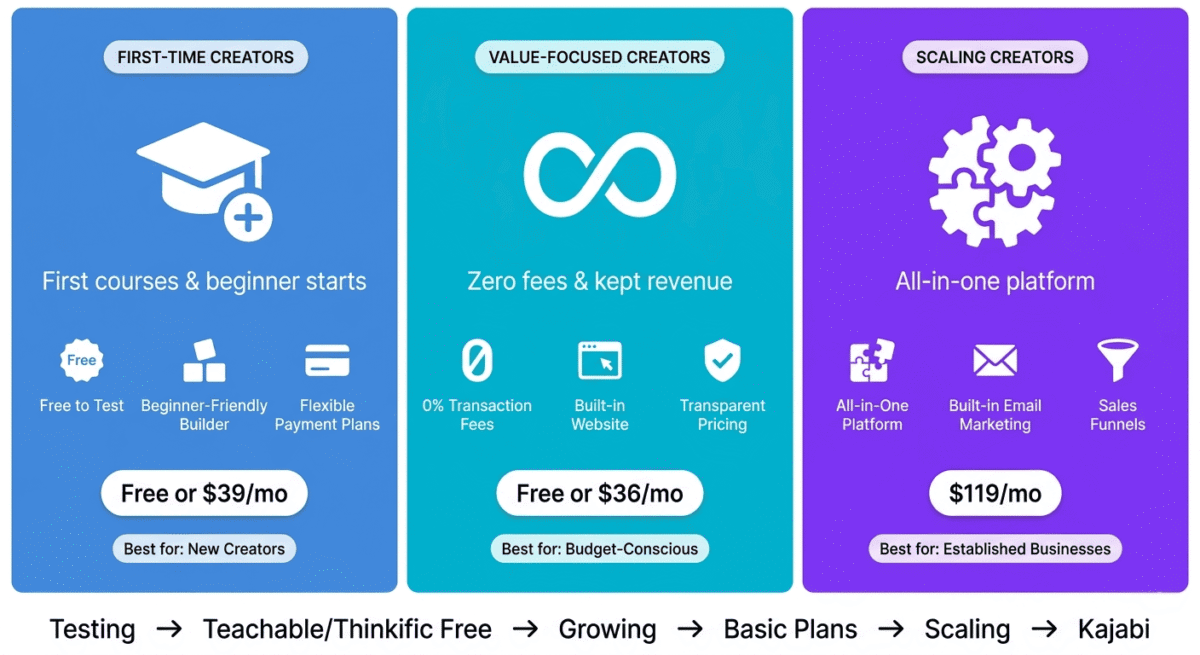
Phase 1: Validate (Month 1–2): Use Thinkific free or Teachable free to publish a minimum viable course, 5 to 10 lessons covering your blog’s most popular topic. Identifying this high-demand topic becomes significantly more precise when cross-referenced through a strategic keyword discovery suite to confirm exact reader search intents. Promote to your email list. If 10 or more people pay, the course concept is validated. Supplementing this early push by distributing informational teaser snippets across social channel automation architectures accelerates your validation cycle.
Phase 2: Launch properly (Month 3–4): Upgrade to Teachable Basic ($39/month) or Thinkific Basic ($36/month). Build a complete course with 20–30 lessons, record professional video, add quizzes and worksheets, and set up an affiliate program to recruit promoters from your network.
Phase 3: Scale (Month 6+): When course revenue exceeds $1,000/month consistently, evaluate whether Kajabi’s all-in-one approach ($119/month) would replace enough separate tools to justify the upgrade. Most creators at this stage are paying $100–$150/month across separate email marketing, landing page, and course platform subscriptions, Kajabi consolidates all of it.
Course pricing for bloggers:
– Mini course (5–10 lessons): $27–$97
– Full course (20–40 lessons): $97–$297
– Premium course with community: $297–$997
– Cohort-based course (live): $497–$2,000+
Start with a lower price point to accumulate reviews and testimonials, then raise prices as social proof builds.
Final Verdict
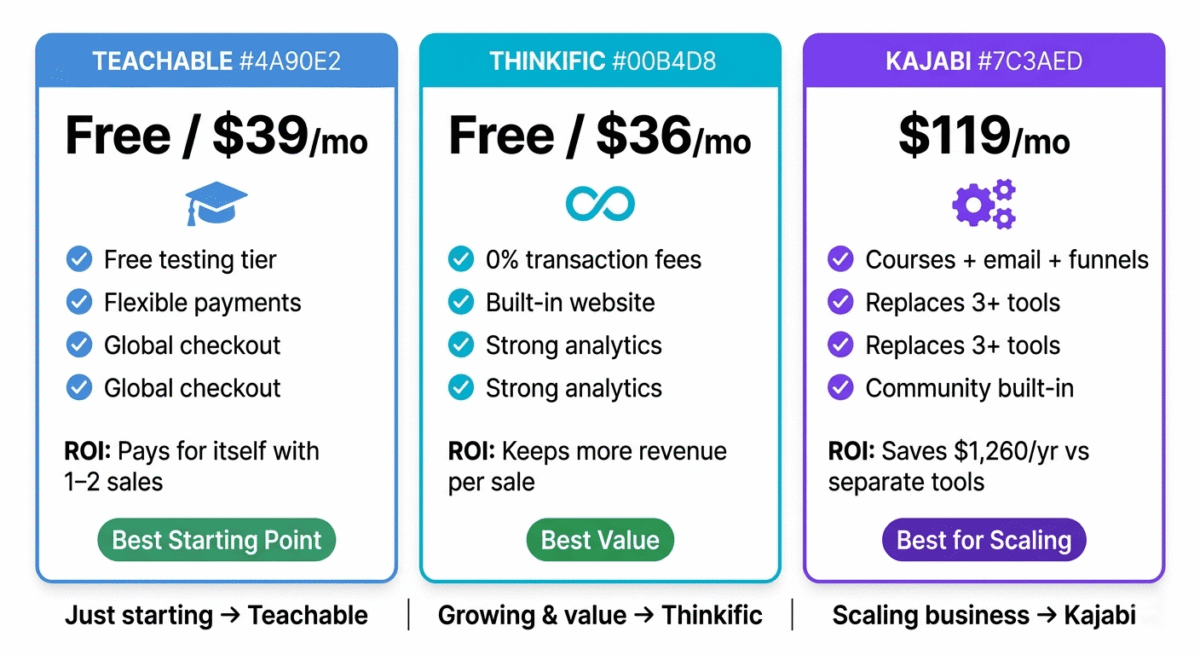
Teachable is the best online course platform for most bloggers starting out, the free plan, beginner-friendly builder, flexible payment options, and global payment availability make it the most accessible starting point for first-time course creators.
Thinkific is the best value platform zero transaction fees on the free plan and the most creator-friendly pricing model make it the most financially sensible choice for creators who want to keep more of their course revenue.
Kajabi is the best platform for serious creators ready to consolidate their online business tools. Its all-in-one approach, courses, email, funnels, community, website, delivers integration benefits that separate tools cannot match, at a price that becomes competitive when replacing multiple existing subscriptions.
Ratings:
– Teachable: 4.6 / 5
– Thinkific: 4.5 / 5
– Kajabi: 4.5 / 5
Frequently Asked Questions
What is the best online course platform for beginners in 2026?
Teachable is the best online course platform for beginners, its free plan allows you to test course viability without financial commitment, the course builder is the most intuitive available, and the platform’s large creator community means abundant tutorials and support resources. Thinkific’s free plan is also excellent for beginners, with the advantage of zero transaction fees.
Is Kajabi worth the price?
Yes, for established creators who currently pay for separate email marketing, landing pages, and course hosting. A typical tool stack of ConvertKit ($29/month) + Leadpages ($37/month) + Thinkific ($74/month) costs $140/month across three disconnected tools. Kajabi Basic at $119/month covers all three in one integrated system, saving money while improving workflow. For beginners with no existing tool subscriptions, Teachable or Thinkific provide better value.
What is the difference between Teachable and Thinkific?
Teachable is more beginner-friendly with more flexible payment options (payment plans, order bumps, upsells) and broader international payment availability. Thinkific has zero transaction fees even on the free plan, a built-in site builder, and a more transparent pricing model. For first-time course creators, both are excellent — Teachable wins on payment flexibility, Thinkific wins on fee-free pricing.
Can I sell online courses without a platform?
Yes, you can sell courses through Gumroad, Podia, or even directly via WordPress with a plugin like LearnDash or MemberPress. However, dedicated course platforms like Teachable and Thinkific provide a significantly better student experience, built-in payment processing, completion certificates, and course analytics that self-hosted solutions require significant technical setup to replicate.
How much can I earn from online courses?
Online course income varies enormously by audience size, course pricing, and marketing effort. Bloggers with email lists of 1,000–5,000 subscribers commonly earn $5,000–$30,000 from a well-executed course launch. Established creators with large audiences regularly generate $100,000+ from single launches. The key variables are email list size, list engagement, course pricing, and the strength of the sales page and email sequence.
Do online course platforms handle taxes?
Teachable, Thinkific, and Kajabi all handle payment processing but do not calculate or remit sales tax or VAT on your behalf for most transactions. You are responsible for understanding and complying with tax obligations in your jurisdiction and your students’ jurisdictions. Teachable has a Merchant of Record option for certain regions where they handle VAT/GST. Consult a tax professional familiar with digital product sales before launching internationally.
What type of course content sells best?
Courses that teach a specific, measurable skill with a clear outcome sell best, “how to start a blog that earns $1,000/month” outperforms “how to write better.” The best-selling online courses address a painful, urgent problem (not making enough money, struggling with a skill, wanting to change careers) with a specific, promised result (double your freelance rates, learn Excel in 30 days, get your first client this week). Bloggers have a natural advantage, you know exactly what problems your readers are trying to solve from the content they engage with most.
Is there a free online course platform?
Yes. Both Teachable and Thinkific offer free plans that allow you to publish one course with unlimited students. Thinkific’s free plan charges zero transaction fees, you keep everything students pay minus payment processor fees. Teachable’s free plan charges 10% + $1 per transaction. For testing course viability before investing in a paid plan, Thinkific free is the most financially sensible option.