
Every professional who has exchanged more than three emails to agree on a meeting time has experienced the scheduling problem. It is not a small inefficiency. A back-and-forth email thread to schedule a single 30-minute call, checking availability, proposing times, receiving counter-proposals, confirming, then re-confirming after a no-reply, costs an average of 17 minutes per meeting scheduled. Across 10 client calls per week, that is nearly three hours of administrative overhead that generates zero value.
Appointment scheduling software replaces this entirely. Share a link, the recipient picks a slot from your real-time availability, and the meeting appears in both calendars automatically. No email chain. No negotiation. No double-booking.
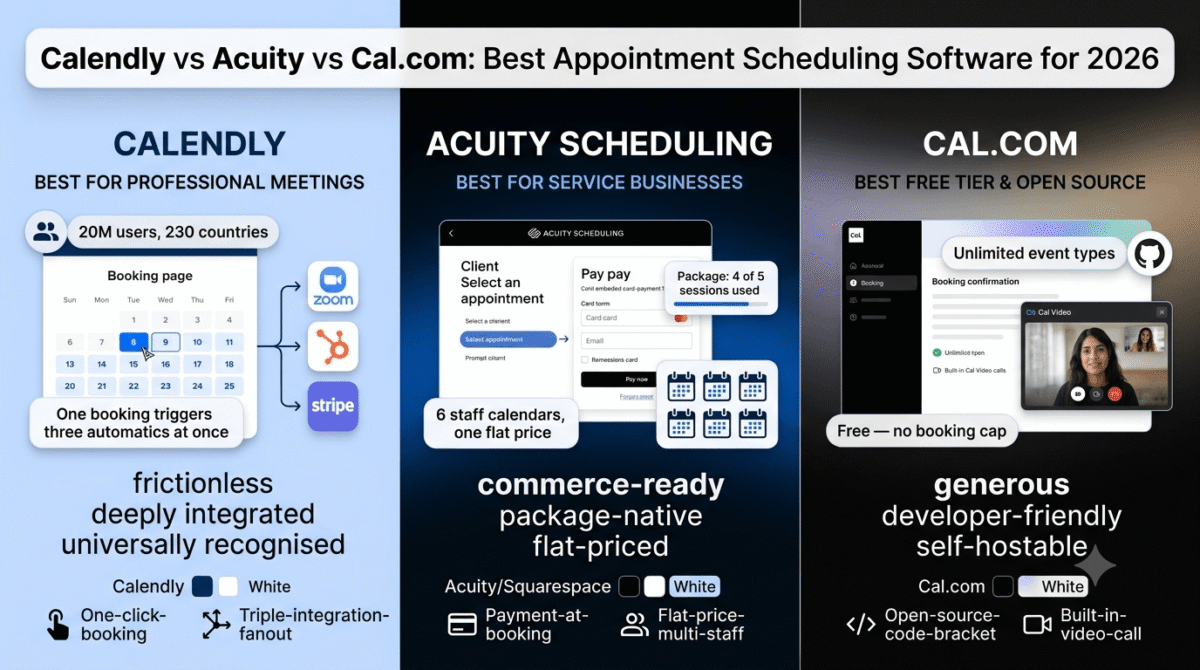
In 2026, three tools dominate the scheduling market for freelancers, consultants, coaches, and small business owners: Calendly, Acuity Scheduling, and Cal.com. Scheduling is one piece of the operational stack, see our roundup of the best tools for small business for the rest of what a lean operation typically runs on. They share the same core function but are built for fundamentally different use cases. Calendly is a meeting scheduling tool. Acuity Scheduling is an appointment booking platform for service businesses. Cal.com is an open-source scheduling infrastructure that appeals to developers and privacy-conscious teams.
I tested all three (Calendly vs Acuity vs Cal.com) in real workflows, client discovery calls, consulting sessions, group workshops, and team coordination, over 30 days. Here is the honest comparison.
Table of Contents
How We Evaluated These Tools
Every platform was tested across five criteria:
- Booking experience, how easy is it for the person being booked to find a slot, confirm an appointment, and receive confirmation without confusion or friction?
- Calendar and tool integration, does the tool sync reliably with Google Calendar, Outlook, Zoom, and the broader productivity stack without manual intervention?
- Advanced scheduling features, group scheduling, round-robin routing, payment collection, intake forms, SMS reminders
- Pricing transparency, are the real monthly costs and feature limits clear before committing, or do per-seat scaling and feature gates obscure what you actually pay?
- Value for the core audience, at the freelancer, consultant, and small business owner level, which tool delivers the right features at a justifiable cost?
Why Scheduling Software Matters for Bloggers and Content Creators
Scheduling software is not just for sales teams and service businesses. For bloggers and content creators, it solves specific high-value problems.
Monetizing consulting and coaching offers. Bloggers who offer paid consulting sessions, coaching calls, or strategy sessions need a professional booking experience. A scheduling link that accepts payment at booking, rather than sending a PayPal invoice after scheduling separately, reduces the friction between interest and commitment. Acuity’s payment collection and Calendly’s Stripe integration both solve this directly.
Podcast and interview guest coordination. Content creators who produce interviews, podcast episodes, or collaboration content schedule dozens of recording sessions per month. A scheduling tool that syncs with Zoom, sends automatic reminders to guests, and eliminates email coordination saves hours of weekly administrative overhead.
Sponsored content and brand call booking. Bloggers managing brand partnership calls, affiliate program onboarding calls, and PR agency introductions handle more inbound meeting requests as their site grows. A public booking page handles all of these without requiring a personal email response to every request.
Freelancer discovery call management. Freelancers who offer a free 15-minute discovery call as the first step in their client acquisition process need a friction-free booking experience. A scheduling link shared in a cold email, social media bio, or proposal document converts more prospects into booked calls than “reply to this email to arrange a time.”
Calendly Review: Best Appointment Scheduling Tool for Professionals and Teams
Free plan: Yes, 1 active event type, 1 calendar connection, unlimited bookings
Starting paid price: $10/user/month (Standard, annual billing)
Best plan for most users: Standard, $10/user/month (annual billing)
Platforms: Web, iOS, Android, integrates with Zoom, Google Meet, HubSpot, Salesforce, Stripe, 100+ apps
Affiliate program: Yes, Calendly affiliate program
Calendly is the most widely used scheduling platform in the world with 20 million users across 230 countries. Its dominance comes from being the tool that perfected one specific thing: making it as easy as possible for one person to book a meeting with another, without either party needing to explain how the tool works. The simplicity is not accidental, it is the product.
What Calendly does best
The booking experience is the cleanest in this comparison, for both the host and the invitee. Setting up a new event type takes under five minutes: name the meeting, set the duration, connect your calendar, and share the link. The invitee sees a calendar interface showing your real available slots, picks one, fills in their name and email, and receives an instant confirmation with calendar invite. There are no decisions for the invitee to make beyond picking a time.
The integration ecosystem is the deepest of the three tools tested, over 100 native integrations including Zoom, Google Meet, Microsoft Teams, HubSpot, Salesforce, Stripe, PayPal, and Zapier. For professionals whose scheduling workflow feeds into a CRM, a video conferencing platform, and a payment processor, Calendly connects all three automatically from a single booking. When a discovery call is booked through Calendly, it can simultaneously create a Zoom link, add the contact to HubSpot, and charge a deposit via Stripe, without any manual action. If you haven’t picked a CRM yet, connect it to your CRM matters more once bookings start flowing in automatically, see our HubSpot vs Zoho vs Pipedrive comparison.
Routing forms, available from the Teams plan, allow conditional logic in the booking flow: ask the prospect qualifying questions and route them to different calendar owners or event types based on their answers. A coaching business with three coaches specialising in different areas can route prospects to the right coach automatically based on their intake responses, without any human review.
The calendar conflict detection works across multiple connected calendars simultaneously. Connect your personal Google Calendar, your work Google Calendar, and your Outlook calendar, and Calendly treats busy time across all three as unavailable, eliminating the double-booking risk that sharing multiple separate scheduling links creates.
The Standard plan at $10/user/month (annual) is the most affordable credible scheduling subscription in this comparison. For a solo freelancer who needs unlimited event types, Stripe payments, multiple calendar connections, and automated follow-up emails, the $10/month Standard plan covers every requirement at a price lower than either Acuity or Cal.com’s paid entry tiers.
Where Calendly falls short
The free plan’s single active event type is the most limiting free tier restriction in this comparison. A freelancer who offers both a 15-minute discovery call and a 60-minute consultation session cannot have both active simultaneously on the free plan, only one event type can be live at a time. Any professional who needs more than one meeting type is effectively forced to the Standard plan at $10/month immediately.
Calendly is a meeting scheduling tool, not an appointment booking platform for service businesses. It does not natively support appointment packages (buying five sessions in advance), gift certificates, class or group session management, or membership-based recurring bookings. These are all Acuity Scheduling capabilities that Calendly does not replicate. A yoga studio, personal trainer, therapist, or any service provider whose scheduling needs go beyond simple one-off meeting booking will find Calendly’s feature set insufficient.
The Teams plan at $16/user/month (annual) is required for round-robin scheduling, collective events (multiple team members on one call), and Salesforce integration, features that many small teams expect to find on the Standard plan. The per-seat pricing model means a 10-person team on Teams pays $160/month annually, compared to Acuity’s flat per-account pricing that covers multiple staff members at the same plan price.
Calendly pricing
| Plan | Annual Price | Monthly Price | Key features |
|---|---|---|---|
| Free | $0 | $0 | 1 active event type, 1 calendar, unlimited bookings, basic email notifications |
| Standard | $10/user/month | $12/user/month | Unlimited event types, multiple calendars, Stripe/PayPal payments, custom email reminders, routing forms (basic) |
| Teams | $16/user/month | $20/user/month | + Round-robin scheduling, collective events, Salesforce, admin features, routing forms (advanced) |
| Enterprise | Custom (~$15,000+/year) | Custom | + SSO, SCIM, custom contracts, advanced security, dedicated support |
Annual billing saves approximately 17–20% vs monthly. Teams plan offers volume-based discounts beyond 30 seats.
Pricing trap warning: Calendly’s free plan allows only 1 active event type, a limitation that affects any professional who offers more than one type of meeting. This pushes almost every active user to Standard at $10/month. The Teams plan at $16/user/month scales by the number of seats, a 10-person team pays $160/month, making it significantly more expensive than Acuity’s flat per-account pricing for multi-staff businesses. Enterprise pricing starts at approximately $15,000/year, an abrupt jump from $16/user/month Teams.
Calendly: Pros and Cons
Pros:
- Cleanest booking experience, lowest friction for both host and invitee
- Most widely recognised, invitees need no explanation of how it works
- Deepest integration library, 100+ native connections including Zoom, HubSpot, Salesforce
- Standard plan at $10/user/month is the most affordable credible paid scheduling subscription
- Multi-calendar conflict detection prevents double-booking across personal and work calendars
- Routing forms with conditional logic route prospects to the right team member automatically
- 20 million users in 230 countries, most universally recognised scheduling tool
Cons:
- Free plan limited to 1 active event type, almost all professionals need Standard immediately
- Not suitable for service business appointment booking (packages, classes, memberships)
- Teams plan required for round-robin and collective events, $16/user/month per seat
- Per-seat pricing becomes expensive for larger teams vs Acuity’s flat account pricing
- No native group class or recurring session management
- Enterprise pricing ($15,000+/year) is an extreme jump from the Teams tier
Rating: 4.6 / 5, Best appointment scheduling tool for freelancers, consultants, and professional service providers who need a clean, universally recognised booking experience with deep CRM and video conferencing integration. The Standard plan at $10/user/month (annual) is the most competitive pricing in this comparison for individual users.
Acuity Scheduling Review: Best Appointment Booking Software for Service Businesses
Free plan: No, 7-day free trial only (no credit card required)
Starting paid price: $16/month (Emerging, annual billing, 1 staff calendar)
Best plan for most users: Growing, $27/month (annual billing, 6 staff calendars)
Platforms: Web, iOS, Android, integrates with Stripe, Square, PayPal, Zoom, Mailchimp, QuickBooks, Zapier
Affiliate program: Yes, Acuity Scheduling affiliate program (via Squarespace)
Acuity Scheduling (acquired by Squarespace in 2019) is built for a fundamentally different use case than Calendly. Where Calendly optimises for scheduling individual meetings between professionals, Acuity optimises for managing client appointments in service-based businesses, salons, therapists, personal trainers, coaches, nutritionists, yoga studios, medical clinics. If your scheduling involves payment at booking, appointment packages, group classes, or client intake forms with health or personal information, Acuity is the most purpose-built tool in this comparison.
What Acuity does best
Payment collection at the time of booking is Acuity’s most commercially important feature. Clients book an appointment and pay simultaneously, reducing no-shows dramatically compared to tools that collect payment after. Acuity supports Stripe, Square, and PayPal, and integrates tip collection, coupons, discount codes, and gift certificates into the checkout flow. For any service business where no-shows represent lost revenue, requiring payment at booking is the highest-impact operational change available and Acuity implements it more completely than Calendly or Cal.com.
Appointment packages and subscriptions, selling five sessions for the price of four, or monthly memberships with a set number of included appointments, are native Acuity features available from the Growing plan. This capability is absent from Calendly and Cal.com at any tier. For coaches, personal trainers, and therapists whose business model is built on recurring client relationships rather than one-off bookings, package management is not a premium feature, it is a requirement.
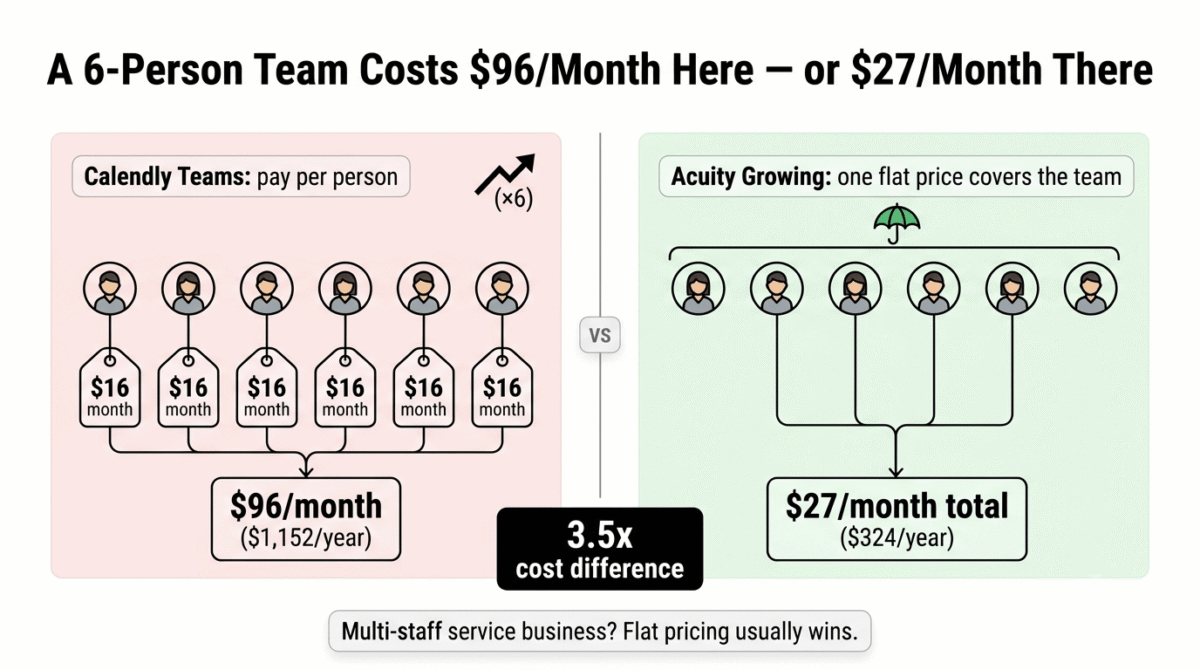
The flat per-account pricing model is Acuity’s most significant commercial advantage over Calendly for multi-staff service businesses. The Emerging plan covers one staff calendar, Growing covers six staff calendars, and Powerhouse covers 36, all at a single account price with no per-seat charges. A physiotherapy clinic with 6 practitioners pays $27/month on Acuity Growing, compared to $96/month on Calendly Teams (6 seats at $16/user/month). For any multi-staff service business, Acuity’s pricing model produces substantially lower monthly costs.
Custom intake forms with conditional logic allow Acuity to collect detailed client information before appointments. Health history forms, pre-session questionnaires, waivers, and intake documents can be built into the booking flow, collecting information that the practitioner needs before the appointment without a separate email or paper form. If you want more advanced form logic than Acuity’s built-in intake forms offer, you can collect client info with forms using a dedicated builder like Typeform, JotForm, or Google Forms, see our comparison of the three. HIPAA compliance is available on the Powerhouse plan, making Acuity the only tool in this comparison with a viable path for healthcare providers at a self-service price point.
SMS appointment reminders, available from the Growing plan, reduce no-shows by sending automated text reminders to clients before their appointments. Independent data from service businesses consistently shows 30–50% no-show reduction from SMS reminder implementation. Calendly includes email reminders on paid plans but SMS requires an integration or add-on. Acuity builds SMS natively into the Growing tier at $27/month.
Where Acuity falls short
There is no free plan, only a 7-day trial. This makes Acuity the highest-friction tool to evaluate in this comparison. Calendly’s free plan and Cal.com’s permanent free tier allow unlimited time to determine fit before paying anything. Acuity’s 7-day window is real but short, fully configuring a service business’s appointment types, staff calendars, intake forms, and payment processing in seven days while simultaneously running a business requires prioritising the evaluation intentionally.
The interface is the most dated of the three tools. Acquired by Squarespace in 2019, Acuity’s design language reflects its pre-acquisition aesthetic, functional but less visually polished than Calendly’s interface or Cal.com’s modern design. The setup process takes longer than Calendly, expect at least 30 minutes of configuration before the booking page is client-ready. For technically sophisticated users this is not a barrier; for business owners who want to be live immediately, the setup time is a genuine friction point.
SMS reminders, which are among the most impactful features for service businesses, require the Growing plan at $27/month (annual). On the $16/month Emerging plan, reminders are email-only. For any solo service provider whose primary interest in scheduling software is no-show reduction via SMS, the functional minimum is Growing at $27/month, not Emerging at $16/month.
API access is locked to the Powerhouse plan at $49/month. Businesses that want to embed Acuity’s scheduling into their own website or application with custom code cannot do this on Emerging or Growing.
Acuity Scheduling pricing
| Plan | Annual Price | Monthly Price | Staff Calendars | Key features |
|---|---|---|---|---|
| Emerging | $16/month | $20/month | 1 | Client self-booking, intake forms, payment collection, email reminders, basic integrations |
| Growing | $27/month | $34/month | 6 | + SMS reminders, packages/subscriptions, gift certificates, group classes, remove Acuity branding |
| Powerhouse | $49/month | $61/month | 36 | + Custom API access, advanced workflows, multiple time zones, priority support, HIPAA BAA |
| Enterprise | Custom | Custom | Custom | + Custom features, dedicated account manager, advanced security |
Per-account pricing, not per seat. No free plan. 7-day free trial, no credit card required. Annual billing saves approximately 20% vs monthly.
Pricing trap warning: Acuity’s Emerging plan at $16/month covers only 1 staff calendar and email-only reminders. SMS reminders, one of the most impactful no-show reduction features, require Growing at $27/month. API access requires Powerhouse at $49/month. For service businesses whose evaluation is driven by SMS reminders and multi-staff support, Growing at $27/month is the functional minimum. The 7-day trial window is shorter than the time needed for full configuration and client testing, prioritise setup in the first two days to make meaningful evaluation possible.
Acuity Scheduling: Pros and Cons
Pros:
- Best service business appointment management, packages, subscriptions, gift certificates, group classes
- Payment collection at booking reduces no-shows more effectively than post-booking invoicing
- Flat per-account pricing covers multiple staff at lower cost than Calendly’s per-seat model
- SMS appointment reminders on Growing plan reduce no-shows 30–50%
- Custom intake forms with conditional logic, health history, waivers, pre-session questionnaires
- HIPAA compliance on Powerhouse plan, only self-service HIPAA option in this comparison
- No-show and cancellation policy enforcement with deposit requirements at booking
Cons:
- No free plan, 7-day trial only
- Emerging plan limited to 1 staff calendar and email-only reminders
- SMS reminders require Growing plan at $27/month minimum
- Most dated interface of the three tools, less visually polished than Calendly or Cal.com
- API access locked to Powerhouse at $49/month
- Not designed for team meeting scheduling, Calendly is better for CRM-integrated sales workflows
- 7-day trial is short for thorough evaluation with real client booking
Rating: 4.4 / 5, Best appointment booking software for service businesses, coaches, therapists, personal trainers, clinics, salons, and any business that needs payment at booking, appointment packages, and multi-staff scheduling at a flat per-account price. Not the right tool for professionals who primarily schedule business meetings rather than client service appointments.
Cal.com Review: Best Scheduling Software for Developers and Privacy-Conscious Teams
Free plan: Yes, unlimited event types, unlimited bookings, Cal Video included, permanent
Starting paid price: $12/user/month (Teams, annual billing)
Best plan for most users: Teams, $12/user/month (annual billing)
Platforms: Web, iOS, Android, open-source self-hosting available via Cal.diy; 100+ integrations
Affiliate program: Yes, Cal.com affiliate program
Cal.com launched in 2022 as an open-source alternative to Calendly and rapidly built a developer following through its transparent codebase, self-hosting option, and a free tier that genuinely outperforms Calendly’s free plan in feature generosity. In 2026, it has evolved beyond its open-source roots into a commercial scheduling platform with two distinct audiences: individual users and small teams who want Calendly-level scheduling at lower cost, and technical teams and developers who want API access, custom integrations, and data control without a six-figure enterprise contract.
What Cal.com does best
The free plan is the most genuinely functional in this comparison. While Calendly’s free plan limits you to one active event type, Cal.com’s free tier includes unlimited event types, unlimited calendar connections, unlimited bookings, routing forms, workflow automation, payment processing via Stripe, and Cal Video, a built-in video conferencing feature that eliminates the need for a separate Zoom subscription for basic video calls. For a freelancer who needs a fully featured scheduling tool and will never pay a subscription, Cal.com’s free plan makes this possible without the single-event-type restriction that makes Calendly’s free tier unusable for most professionals.
The Teams plan at $12/user/month (annual) sits between Calendly Standard ($10/user/month) and Calendly Teams ($16/user/month) in price, but includes round-robin scheduling, routing forms, booking analytics, and branding removal, features Calendly gates to its Teams tier at $16/user/month. For teams that need round-robin meeting distribution without paying Calendly’s Teams premium, Cal.com Teams represents meaningful savings.
The self-hosting option through Cal.diy (the open-source community edition) allows technically capable teams to run Cal.com on their own infrastructure at the cost of the server only, typically $5–50/month depending on scale. For organizations with strict data residency requirements or a preference for keeping scheduling data off third-party servers, this is a capability no Calendly or Acuity equivalent provides at any price.
The Organizations plan at $28/user/month (annual) includes SOC 2 Type II, HIPAA compliance, and ISO 27001 certification, making it the most comprehensively compliant option in this comparison for healthcare, finance, and regulated industries. The same HIPAA compliance costs $49/month (for the whole account) on Acuity Powerhouse, Cal.com Organizations at $28/user/month provides compliance per individual user with a more complete certification portfolio.
Cal.ai, Cal.com’s AI phone scheduling agent, can handle inbound booking calls autonomously, integrating with the scheduling calendar to book, reschedule, and cancel appointments over the phone without human involvement. At approximately $0.29/minute of call time, it is a practical tool for service businesses with phone-first customer bases that want to automate appointment booking without hiring a receptionist.
Where Cal.com falls short
Cal.com moved its main product closed-source in 2026 and relaunched the open-source code as Cal.diy, a separate community edition for self-hosting. This transition disappointed portions of the developer community who built workflows around the open-source version’s flexibility. Cal.diy remains available for self-hosting, but it is increasingly a tool for technical users comfortable managing their own infrastructure rather than a straightforward alternative to the commercial product.
The booking experience, while functional, lacks the visual polish that Calendly has refined over a decade of iteration. The invitee-facing scheduling interface is clean but not as intuitively navigable as Calendly’s. For client-facing scheduling where the booking experience reflects your brand’s professionalism, this difference is perceptible.
The 14-day trial on Teams and Organizations plans requires contacting Cal.com’s sales team rather than signing up directly through the website, a friction point that Calendly (immediate free trial access) and Acuity (direct 7-day trial signup) avoid. For professionals who want to evaluate a tool without a sales conversation, this gating is frustrating.
Cal.ai’s per-minute pricing model introduces usage-based costs that neither Calendly nor Acuity have equivalents for. Teams experimenting with AI scheduling automation can accumulate Cal.ai costs faster than the fixed monthly plan price suggests if call volume is higher than expected.
Cal.com pricing
| Plan | Annual Price | Monthly Price | Key features |
|---|---|---|---|
| Free | $0 | $0 | Unlimited event types, unlimited bookings, routing forms, Cal Video, workflow automation, Stripe payments, Cal.com branding |
| Teams | $12/user/month | ~$16/user/month | + Round-robin, booking analytics, remove branding, team features, 14-day trial |
| Organizations | $28/user/month | ~$37/user/month | + Company subdomain, SAML SSO, SCIM, SOC 2/HIPAA/ISO 27001, dedicated database |
| Enterprise | Custom | Custom | + SLA guarantees (99.9%/99.99%), dedicated onboarding, custom development |
| Cal.ai (AI phone agent) | ~$0.29/minute | Usage-based | Autonomous phone booking, separate usage charge on all plans |
Annual billing saves approximately 25% vs monthly. Self-hosted Cal.diy is free (infrastructure costs only). Teams/Organizations trial requires sales team contact.
Pricing note: Cal.com’s free plan is the most feature-complete free scheduling tier in this comparison, unlimited event types, routing, automation, and payments at zero cost. The Teams plan at $12/user/month sits below Calendly Teams ($16/user/month) while including comparable round-robin and analytics features. The Cal.ai AI phone agent adds usage-based cost on top of any plan, budget for this separately if phone scheduling automation is a use case you plan to implement.
Cal.com: Pros and Cons
Pros:
- Most feature-complete free plan, unlimited event types, booking automation, Stripe payments, Cal Video
- Teams plan includes round-robin scheduling at $12/user/month, cheaper than Calendly’s equivalent $16/user/month
- Self-hosting via Cal.diy provides data residency control unavailable in any competing product
- Organizations plan includes SOC 2, HIPAA, and ISO 27001, most complete compliance portfolio
- Cal.ai AI phone agent handles inbound booking calls autonomously
- Best option for developers who want scheduling API access without enterprise contract pricing
- Transparent open-source heritage, greater community accountability for product decisions
Cons:
- Main product moved closed-source in 2026, Cal.diy self-hosting is for technical users only
- Booking interface less polished than Calendly’s decade-refined invitee experience
- Teams/Organizations 14-day trial requires sales team contact, no direct self-signup
- Cal.ai per-minute pricing adds unpredictable usage cost at scale
- Cal.com branding visible on free plan, Teams required for white-label
- Not purpose-built for service business appointment management (packages, classes, POS)
- Smaller integration ecosystem than Calendly for CRM-specific connectors
Rating: 4.3 / 5, Best scheduling tool for developers, technical teams, and privacy-conscious organizations who want open-source flexibility, comprehensive compliance, and a genuinely functional free tier. The free plan is the strongest individual scheduling starting point in this comparison. Not the best choice for service businesses needing packages and payment-at-booking or for professionals who prioritize the most polished client-facing booking experience.
Head-to-Head Comparison
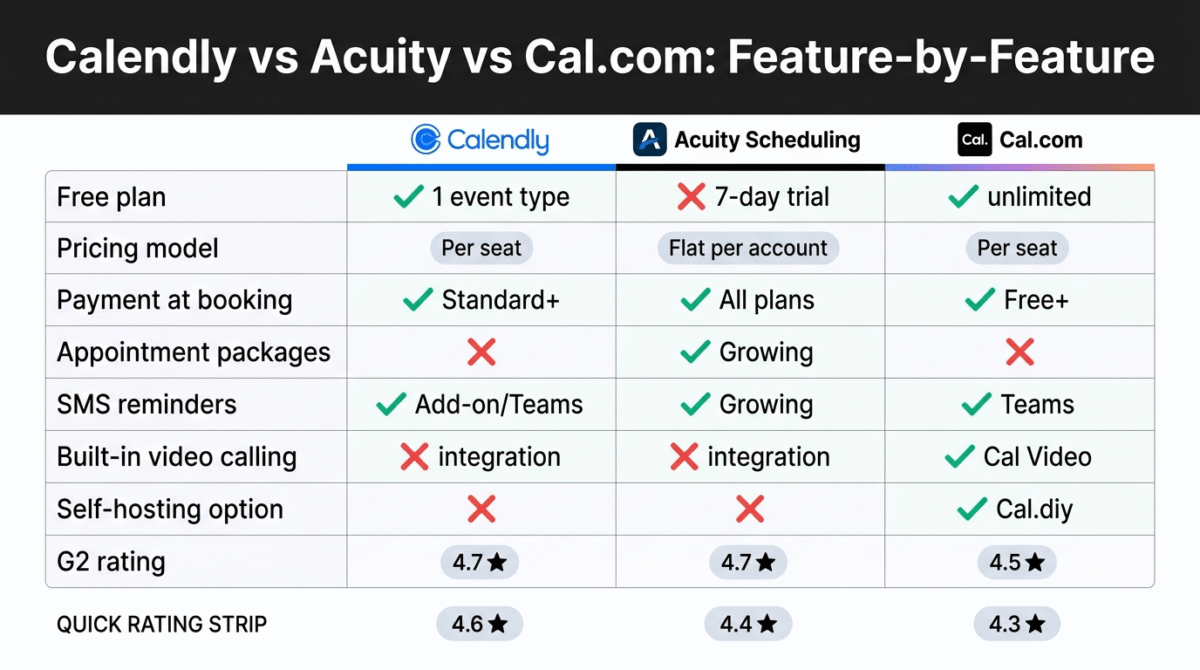
| Feature | Calendly Standard | Acuity Growing | Cal.com Teams |
|---|---|---|---|
| Annual price | $10/user/month | $27/month (flat, 6 staff) | $12/user/month |
| Free plan | 1 event type, unlimited bookings | No (7-day trial) | Unlimited event types and bookings |
| Multiple event types | Standard+ | All paid plans | Free+ |
| Payment collection | Standard+ (Stripe/PayPal) | All plans (Stripe/Square/PayPal) | Free+ (Stripe) |
| SMS reminders | Add-on or Teams | Growing ($27/month) | Teams ($12/user) |
| Appointment packages/subscriptions | No | Growing ($27/month) | No |
| Group classes/multi-person | Teams ($16/user) | Growing ($27/month) | Free (group events) |
| Round-robin scheduling | Teams ($16/user) | No | Teams ($12/user) |
| HIPAA compliance | Enterprise only | Powerhouse ($49/month) | Organizations ($28/user) |
| Self-hosting option | No | No | Yes (Cal.diy) |
| CRM integrations | 100+ (Standard+) | Zapier-based | 50+ native |
| Intake/screening forms | Standard+ | All plans | Free+ |
| Built-in video | No (Zoom/Meet integration) | No (Zoom integration) | Yes (Cal Video, free) |
| API access | Teams+ | Powerhouse ($49/month) | Organizations+ |
| Pricing model | Per seat | Per account | Per seat |
| 6-staff team annual cost | $1,152/year (Teams) | $324/year (Growing) | $864/year (Teams) |
| G2 rating | 4.7/5 | 4.7/5 | 4.5/5 |
Which Appointment Scheduling Tool Should You Choose?
Choose Calendly Standard ($10/user/month, annual) if:
You primarily schedule professional meetings, client discovery calls, consulting sessions, sales demos, internal team meetings, rather than service business appointments. Calendly’s cleanest booking experience, deepest CRM integration (HubSpot, Salesforce), and universal invitee recognition make it the most frictionless tool for the professional meeting scheduling use case. At $10/user/month, Standard covers every individual scheduling need at the most competitive price in this comparison.
Choose Acuity Scheduling Growing ($27/month flat, annual) if:
You run a service business where clients book appointments that require payment at booking, appointment package management, group classes, or intake forms. The flat per-account pricing at $27/month covering 6 staff calendars makes Acuity Growing dramatically cheaper than Calendly Teams for multi-staff service businesses, a 6-person team pays $27/month on Acuity versus $1,152/year ($96/month) on Calendly Teams. SMS reminders and no-show reduction features make Growing the minimum functional plan for any service business serious about appointment management.
Choose Cal.com Free or Teams ($12/user/month, annual) if:
You want the most generous free scheduling tier available and can accept Cal.com branding on your booking page, or you are a developer/technical team that values API access, data control, and open-source transparency. The free plan covers individual scheduling more completely than any competing free tier. Teams at $12/user/month includes round-robin scheduling at a lower per-seat price than Calendly Teams. For organizations with compliance requirements, Organizations at $28/user/month delivers SOC 2, HIPAA, and ISO 27001 at a self-service price.
Setting Up Your First Scheduling Tool, The Practical Guide
For bloggers and freelancers adding scheduling software for the first time:
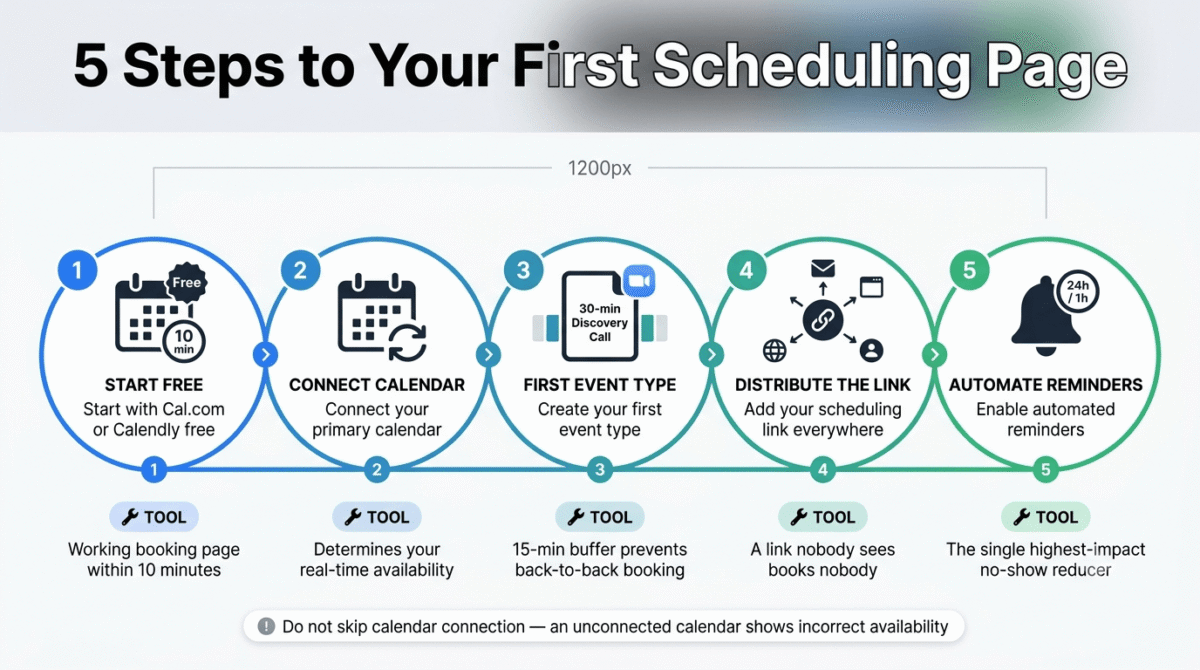
Step 1, Start with Cal.com free or Calendly free. Both provide a working scheduling page within 10 minutes of signup. Cal.com free allows unlimited event types; Calendly free allows one. If you need more than one meeting type immediately, start with Cal.com free.
Step 2, Connect your primary calendar. Google Calendar users connect in one click. Outlook users require Microsoft permission approval. This calendar connection determines your available slots in real time, do not skip it or your booking page will show incorrect availability.
Step 3, Create your first event type. A 30-minute discovery call is the most valuable first event type for any freelancer or consultant. Name it, set duration, add a brief description of what the call covers, enable automatic Zoom or Google Meet link generation, and set buffer time before and after (15 minutes prevents back-to-back scheduling). If you haven’t settled on a video platform yet, see our Zoom vs Microsoft Teams vs Google Meet comparison before you book meetings via video call by default.
Step 4, Add your scheduling link everywhere. Email signature, website contact page, social media bios, proposal documents, and direct messages. The scheduling link earns its value from exposure, a link that nobody sees books nobody.
Step 5, Enable automated reminders. Configure a 24-hour and 1-hour reminder email (and SMS if on a plan that supports it) for every event type. Automated reminders are the single highest-impact scheduling feature for reducing no-shows, and they operate without any recurring manual action once configured.
Final Verdict
Calendly is the best appointment scheduling tool for individual professionals and teams who primarily schedule business meetings, the cleanest booking experience, the deepest integration library, and the $10/user/month Standard price make it the natural choice for consultants, freelancers, and sales teams where CRM integration and invitee familiarity drive the decision.
Acuity Scheduling is the best tool for service businesses, flat per-account pricing, payment at booking, appointment packages, SMS reminders, and HIPAA compliance make it purpose-built for coaches, therapists, trainers, clinics, and any multi-staff service business where Calendly’s per-seat model would cost three to four times as much.
Cal.com is the best tool for individual users who want a fully featured free scheduling experience and for developers and technical teams who need API access, self-hosting, and comprehensive compliance at commercial scale pricing.
Ratings:
- Calendly: 4.6 / 5
- Acuity Scheduling: 4.4 / 5
- Cal.com: 4.3 / 5
Frequently Asked Questions
What is the best free appointment scheduling tool in 2026?
Cal.com offers the most functional permanent free scheduling tier, unlimited event types, unlimited bookings, unlimited calendar connections, built-in Cal Video for video calls, Stripe payment collection, routing forms, and workflow automation at zero cost with no booking cap or time limit. Calendly’s free plan is limited to one active event type, functional for simple single-meeting-type use cases but restrictive for any professional who offers more than one meeting format.
Is Calendly worth paying for in 2026?
Yes, for professionals who need more than one event type or Stripe payment collection. The Standard plan at $10/user/month (annual) removes the one-event-type restriction, adds multiple calendar connections, payment collection, and custom email reminders. For anyone who schedules more than five client calls per month and values their time at $50/hour or more, the $10/month Standard plan pays back in the first week of eliminated scheduling email threads.
What is the difference between Calendly and Acuity Scheduling?
Calendly is a meeting scheduling tool optimised for professionals scheduling one-on-one or team business meetings. Acuity Scheduling is an appointment booking platform optimised for service businesses, salons, coaches, therapists, fitness studios, that need payment at booking, appointment packages, client intake forms, and multi-staff calendar management. Calendly is better for business meetings; Acuity is better for client service appointments.
How much does Acuity Scheduling cost for a team of six?
Acuity Scheduling Growing at $27/month (annual) covers up to 6 staff calendars, making the total cost $27/month for a six-person team. Calendly Teams for the same six users costs $96/month (6 seats at $16/user/month annual). Acuity’s flat per-account pricing makes it significantly more economical than Calendly for any multi-staff service business where all staff share the same appointment booking infrastructure.
Does Cal.com work without technical knowledge?
The cloud-hosted Cal.com (cal.com) works without any technical knowledge, it is a standard SaaS product with a signup page, guided setup, and support resources. The self-hosting option (Cal.diy, the open-source community edition) requires server management, Docker configuration, and ongoing technical maintenance, it is designed for developers comfortable with infrastructure management. Most non-technical users should use the cloud-hosted product and ignore the self-hosting path.
Can appointment scheduling software reduce no-shows?
Yes, significantly. Studies from service businesses implementing scheduling software with payment-at-booking and automated SMS reminders consistently show 30–60% reductions in no-show rates. The two most impactful mechanisms are financial commitment at booking (clients who have paid are less likely to skip without notice) and multi-channel reminder sequences (24-hour email plus 1-hour SMS produces better results than either channel alone). Acuity’s combination of payment at booking and SMS reminders on the Growing plan implements both mechanisms in one tool.
Is Cal.com still open source in 2026?
Partially. Cal.com moved its main commercial product closed-source in 2026. The open-source codebase was relaunched as Cal.diy, a separate community edition available on GitHub for self-hosting. The cal.com commercial platform (cloud-hosted) is no longer open-source. Self-hosting via Cal.diy remains possible for technical users but requires managing your own server infrastructure, updates, and security patching.
Which scheduling tool is best for coaches and consultants?
For coaches who sell single sessions: Calendly Standard ($10/user/month) with Stripe payment collection handles one-off session booking cleanly at the lowest price. For coaches who sell session packages (buy 5 sessions, book one at a time): Acuity Scheduling Growing ($27/month) is the only tool in this comparison with native package and subscription management. For coaches who want a free starting point with payment collection included: Cal.com free covers single session booking with Stripe at zero cost.








