Most small businesses lose sales not because their product is bad,, but because they lose track of leads. A potential customer emails on Monday, gets a follow-up on Friday, and by then they have already bought from a competitor who called them on Tuesday.
A CRM (Customer Relationship Management) system solves this. It tracks every lead, every conversation, every deal stage, and every follow-up task in one place, so nothing falls through the cracks and no opportunity goes cold by accident.
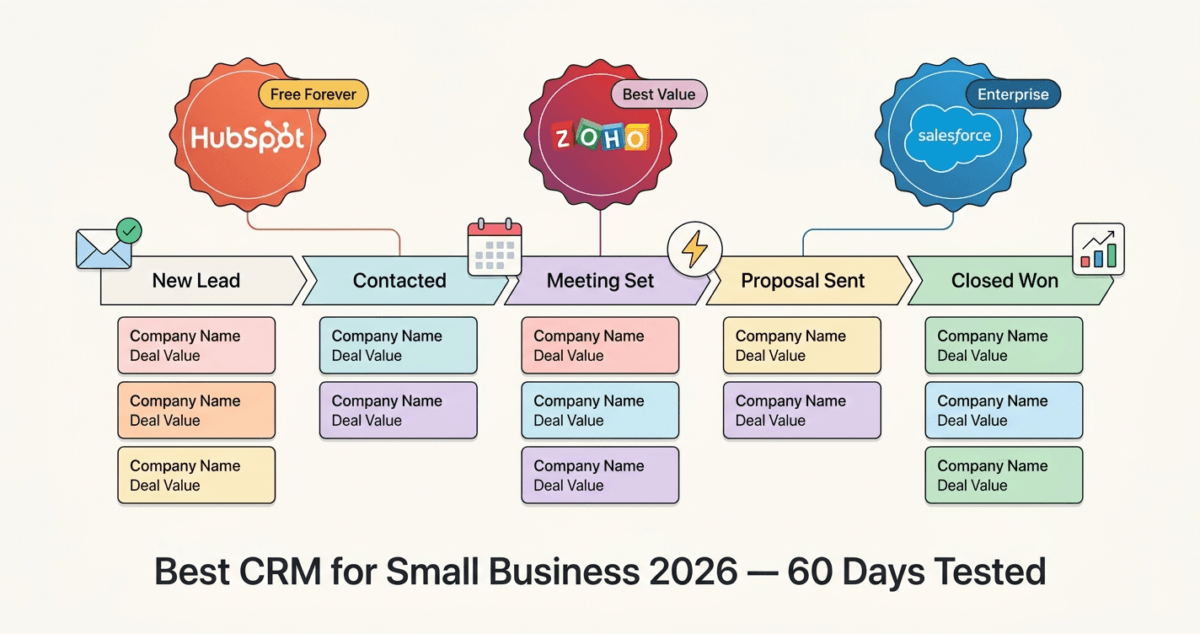
The challenge in 2026 is choosing the right CRM. HubSpot is the most popular. Salesforce is the most powerful. Zoho is the most affordable. I tested all three, HubSpot vs Salesforce vs Zoho, for 60 days on real sales pipelines and business workflows. Here is the honest comparison.
Table of Contents
What Is CRM Software and Do You Actually Need It?
Before comparing tools, let us answer the fundamental question.
A CRM is software that manages your relationships with customers and prospects. At its core, it stores contact information, tracks your communications with each contact, and shows you where every potential sale stands in your pipeline from first contact to closed deal.
Without a CRM, most small businesses manage this in spreadsheets, email inboxes, and memory. That works when you have ten customers. It breaks down at fifty. And it becomes actively harmful at a hundred. Leads get forgotten, follow-ups get missed, and your best customers get the same generic treatment as new prospects. Once a deal successfully moves to the ‘Closed-Won’ stage, streamline the financial transition by using the best invoicing software for freelancers to instantly bill your new accounts.
You need a CRM when:
– You have more leads than you can track comfortably in your head
– You have a sales process with multiple steps or multiple team members
– You are losing track of follow-ups or missing opportunities
– You want to understand which marketing activities actually generate customers
– You are growing and need a system that scales with you
For bloggers and content creators: a CRM becomes valuable when you start managing sponsor relationships, affiliate partnerships, freelance clients, or a growing email audience. While you can track initial outreach using a flexible workspace like the ones in our Notion vs Trello vs Asana review, a dedicated CRM scales as your deal flow grows. It is not just for traditional sales teams. If you are just beginning your journey, learn how to start a blog in 2026 to build your audience first.
How We Evaluated These CRM Tools
Every platform was tested across five criteria:
– Ease of setup: how quickly can a non-technical user get a working CRM running?
– Contact and deal management: how well does it track leads, deals, and customer information?
– Sales pipeline: how clear and customisable is the visual sales pipeline?
– Automation: can it automatically send follow-ups, assign tasks, and move deals? If your consultants or sales reps bill clients based on communication hours tracked inside your system, pairing it with the best time tracking software 2026 ensures every billable minute is logged accurately.
– Value: free plan quality and paid plan pricing versus features offered
HubSpot CRM Review: Best Free CRM and Best for Growing Businesses
Free plan: Yes, genuinely unlimited contacts, unlimited users, core CRM features
Starting paid price: $15/month/seat (Starter)
Best plan for most small businesses: Starter, $15/seat/month
Platforms: Web, iOS, Android, Chrome extension
Affiliate program: Yes, up to $500 per referral via the HubSpot affiliate program
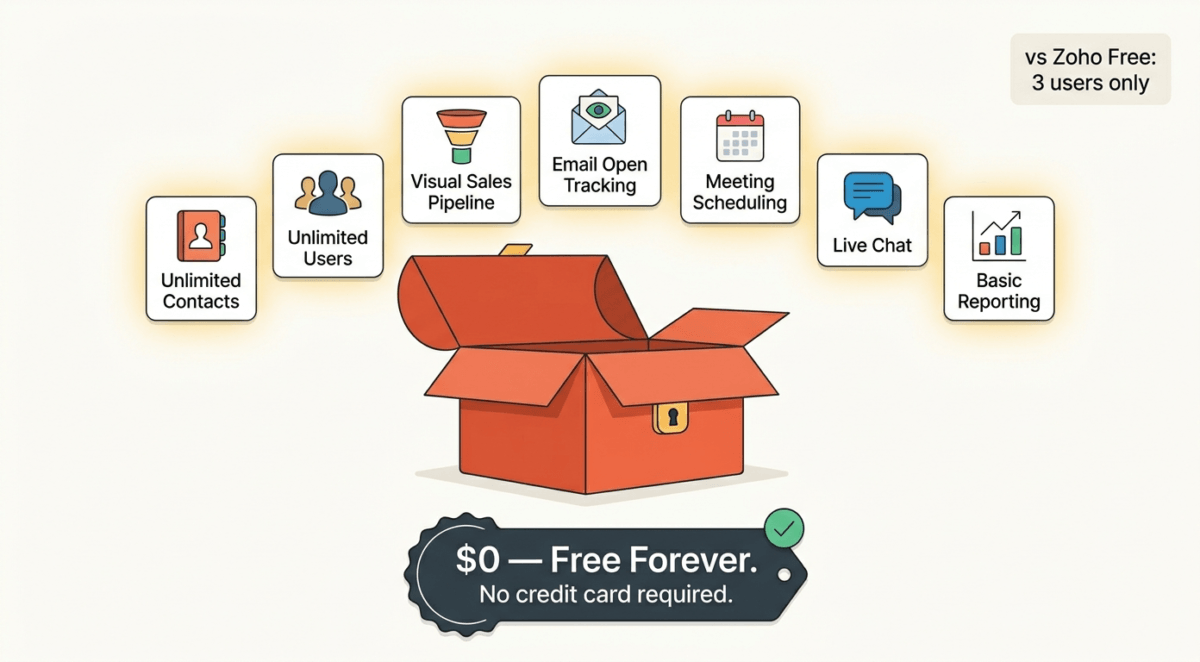
HubSpot CRM is the most widely used CRM for small and medium businesses, and its free plan is the main reason why. HubSpot offers a genuinely useful, unlimited free CRM that includes contact management, deal pipelines, email tracking, meeting scheduling, and live chat. It is the most generous free CRM available in 2026 by a significant margin.
What HubSpot does best
HubSpot’s free CRM is built around one principle: remove every barrier to getting started. There are no contact limits, no user limits, and no time restrictions on the free plan. A team of ten can use HubSpot CRM free indefinitely, managing unlimited contacts and deals without paying a dollar.
The contact and company management system is intuitive and powerful. Every contact has a dedicated record showing their full interaction history: every email, every call, every meeting, every deal, every form submission on a single timeline. You never have to search through email threads to remember where a conversation left off.
The visual sales pipeline is one of HubSpot’s strongest features. Deals move through customisable stages via drag-and-drop from “New Lead” to “Meeting Scheduled” to “Proposal Sent” to “Closed Won.” The pipeline gives you an immediate visual overview of your entire sales process and where every opportunity stands.
Email integration is seamless. HubSpot connects to Gmail and Outlook and tracks email opens and clicks automatically. You can see in real time when a prospect opens your email, enabling perfectly timed follow-ups. Email templates save time on repetitive outreach, and sequences automate multi-step follow-up email campaigns.
Meeting scheduling is built into the free plan. You share a link, prospects pick a time, and the meeting appears in your calendar automatically, eliminating the back-and-forth of scheduling emails.
HubSpot’s ecosystem is its ultimate advantage. The CRM connects seamlessly to HubSpot’s Marketing Hub, Sales Hub, Service Hub, and Content Hub, meaning as your business grows, HubSpot grows with you. All your marketing, sales, and customer service data lives in one connected platform, giving you a complete view of every customer relationship.
HubSpot free vs paid: what actually changes
HubSpot’s free plan covers the CRM fundamentals. The paid Starter plan ($15/seat/month) adds:
– Email marketing (up to 5,000 emails/month per seat)
– Simple automation, automated follow-up sequences, task creation
– Removal of HubSpot branding from forms, emails, and chat
– Ad management integration (Google Ads, Facebook Ads)
– Multiple deal pipelines (free plan limited to one)
– Calling with recording (up to 500 minutes/month)
The Professional plan ($90/seat/month) adds powerful marketing automation, custom reporting, and team management features, but it is a significant price jump that most small businesses do not need initially.
Where HubSpot falls short
HubSpot’s free plan, while generous, is deliberately designed to funnel you toward paid plans. The most powerful automation, reporting, and customisation features are locked behind Professional and Enterprise tiers that cost $90–$150+ per seat per month. For a small team, this can become expensive quickly as needs grow.
Customer support on the free plan is limited to community forums and documentation; there is no live chat or phone support. Paid plans unlock email and chat support.
HubSpot’s reporting on the free plan is also limited. Custom reports and detailed analytics require paid plans, which can be frustrating when you want deeper insights into your pipeline performance.
HubSpot pricing
Plan | Price/seat/month | Key features |
Free | $0 | Unlimited contacts, 1 pipeline, email tracking, meetings |
Starter | $15 | Email marketing, automation, multiple pipelines, calling |
Professional | $90 | Advanced automation, custom reporting, sequences |
Enterprise | $150 | Custom objects, advanced permissions, predictive scoring |
HubSpot: Pros and Cons
Pros:
– Best free CRM, unlimited contacts, unlimited users, no time limit
– Visual sales pipeline with drag-and-drop deal management
– Email tracking shows when prospects open your emails
– Built-in meeting scheduling on free plan
– Seamless Gmail and Outlook integration
– Connects to HubSpot’s full marketing and service ecosystem
– Up to $500 per referral on affiliate program
– Excellent mobile app for iOS and Android
Cons:
– Most powerful features locked behind expensive Professional plan ($90/seat/month)
– Free plan support limited to community forums
– Can become expensive as team grows and needs escalate
– Reporting limited on free and Starter plans
– Interface can feel overwhelming for very small businesses or solo users
Rating: 4.7 / 5 Best free CRM and best for growing businesses that want to scale within one ecosystem.
Salesforce Review: Most Powerful CRM, But Is It Right for Small Businesses?
Free plan: No (30-day free trial)
Starting price: $25/user/month (Starter Suite)
Best plan for small businesses: Starter Suite, $25/user/month
Platforms: Web, iOS, Android
Affiliate program: Yes, Salesforce partner program
Salesforce is the world’s largest CRM company, with over 150,000 customers and a platform so comprehensive it has become the industry standard for enterprise sales teams. It is also, for most small businesses, significantly more than they need, and considerably more expensive than the alternatives.
What Salesforce does best
Salesforce’s depth is unmatched. It handles every conceivable sales scenario, complex multi-stakeholder deals, territory management, revenue forecasting, AI-powered lead scoring, custom application development, and industry-specific solutions for healthcare, financial services, manufacturing, and more. To manage client onboarding deliverables smoothly after the sales handoff, your fulfilment team will need to align via the best project management tools remote teams 2026.
The AppExchange, Salesforce’s marketplace of third-party integrations, offers over 7,000 apps, making Salesforce the most extensible CRM platform available. If you need your CRM to connect with any other business software, there is almost certainly a Salesforce integration for it.
Einstein AI, Salesforce’s artificial intelligence layer, analyses your pipeline and predicts which deals are most likely to close, which leads are most likely to convert, and when to follow up for maximum impact. For large sales teams managing hundreds of active deals, this AI prioritisation saves significant time.
Reporting and analytics in Salesforce are the most powerful of the three tools tested. Custom dashboards, real-time reports, and forecasting tools give sales managers complete visibility into team performance, pipeline health, and revenue projections.
Salesforce for small businesses: the honest assessment
Salesforce launched its Starter Suite specifically to compete with HubSpot and Zoho in the small business market. At $25/user/month, it includes contact and account management, opportunity tracking, email integration, and basic reporting, a functional CRM at a reasonable price point.
However, Salesforce’s small business experience still feels like a simplified version of an enterprise tool rather than a purpose-built small business solution. The interface, while improved in recent years, carries the complexity of a platform designed for companies with dedicated Salesforce administrators. New users frequently find themselves confused by terminology (Leads vs Contacts vs Accounts vs Opportunities) that HubSpot and Zoho handle more intuitively.
Setup time is significantly longer than HubSpot or Zoho. Getting Salesforce configured for a specific business’s workflow typically requires either a Salesforce-certified consultant or significant self-study. This overhead cost, in time and often in money, is a genuine barrier for small businesses.
For businesses with five or fewer users managing a straightforward sales process, Salesforce’s power is largely wasted. HubSpot’s free plan or Zoho’s affordable tiers provide 80% of what small businesses actually use in Salesforce, at a fraction of the cost and complexity.
Where Salesforce shines
Salesforce becomes clearly the right choice when:
– Your business has 20+ sales team members with complex territories
– You need custom application development on your CRM platform
– Your industry has specific compliance or data requirements Salesforce addresses
– You are integrating CRM with complex ERP, marketing automation, or customer service systems
– You plan to scale to enterprise and want one platform from small to large
Salesforce pricing
Plan | Price/user/month | Key features |
Starter Suite | $25 | Contacts, accounts, opportunities, email, basic reports |
Pro Suite | $100 | Advanced pipeline management, quoting, real-time chat |
Enterprise | $165 | Workflow automation, API access, advanced reporting |
Unlimited | $330 | AI features, 24/7 support, unlimited customisation |
Salesforce: Pros and Cons
Pros:
– Most powerful and customisable CRM available
– 7,000+ AppExchange integrations, connects to everything
– Einstein AI for deal scoring and lead prioritisation
– Industry-specific solutions for regulated sectors
– Best reporting and forecasting of the three tools
– Scales from small business to enterprise without switching platforms
– 30-day free trial
Cons:
– No free plan, paid from day one
– Most expensive of the three for equivalent functionality
– Steepest learning curve, designed for enterprise users
– Setup typically requires consultant or significant time investment
– Overkill and overpriced for most small businesses
– Starter Suite feels like a stripped-down enterprise tool rather than purpose-built for SMBs
Rating: 4.1 / 5 Best CRM for mid-market and enterprise. Hard to justify for most small businesses when HubSpot free and Zoho exists.
Zoho CRM Review: Best Value CRM for Small Businesses
Free plan: Yes, up to 3 users
Starting price: $14/user/month (Standard)
Best plan for most small businesses: Professional, $23/user/month
Platforms: Web, iOS, Android
Affiliate program: Yes, Zoho affiliate program
Zoho CRM is the most underrated CRM on this list. It offers a feature set that rivals Salesforce at a fraction of the price, a free plan for up to three users, and the deepest integration with a broader business software ecosystem of any tool tested. If budget matters, and for most small businesses, it does, Zoho CRM deserves serious consideration.
What Zoho does best
Zoho CRM’s feature depth at its price point is remarkable. The Standard plan at $14/user/month includes scoring rules for leads and contacts, email insights, workflow automation, custom dashboards, and 100,000 records, features that require HubSpot’s Professional plan at $90/seat/month or Salesforce’s Enterprise plan at $165/user/month.
The sales pipeline in Zoho is fully customisable. You can create multiple pipelines for different products, services, or sales processes, each with their own stages and probability weightings. The Kanban board view makes pipeline management visual and intuitive, comparable to HubSpot’s drag-and-drop experience.
Automation in Zoho is particularly strong. Workflow rules trigger automatically based on conditions you define. When a deal reaches a certain stage, Zoho can automatically send an email, create a task, update a field, or notify a team member. Blueprint, Zoho’s advanced process automation, guides sales teams through a defined sequence of steps, ensuring consistency across every deal.
Zia, Zoho’s AI assistant, analyses your sales data and provides predictions, anomaly detection, and recommendations. It identifies which leads are most likely to convert, alerts you to deals at risk of going cold, and suggests the best time to contact each prospect based on their engagement history. This AI functionality is available from the Professional plan, significantly cheaper than Salesforce’s Einstein AI equivalent.
The Zoho ecosystem is vast. Zoho offers 55+ business applications covering accounting (Zoho Books), email marketing (Zoho Campaigns), HR (Zoho People), helpdesk (Zoho Desk), project management (Zoho Projects), and more, all connected to Zoho CRM. For businesses that want one vendor for their entire software stack, Zoho One ($37/user/month) bundles all 55+ applications, an extraordinary value for comprehensive business software coverage.
Where Zoho falls short
Zoho’s interface, while functional, is less polished than HubSpot’s. The platform carries the weight of its comprehensive feature set; new users occasionally find the depth of options overwhelming, and the design feels slightly dated compared to HubSpot’s modern aesthetic.
Customer support quality has been a historically inconsistent point for Zoho. While paid plan support has improved, response times and resolution quality can be variable. Users in time zones far from Zoho’s primary support centres sometimes experience delays.
The free plan’s three-user limit is restrictive compared to HubSpot’s unlimited free users. Teams larger than three need a paid plan from day one, which removes one of Zoho’s competitive advantages for growing teams.
Zoho CRM pricing
Plan | Price/user/month | Key features |
Free | $0 | Up to 3 users, basic CRM features |
Standard | $14 | Scoring rules, email insights, custom dashboards |
Professional | $23 | Blueprints, inventory management, SalesSignals |
Enterprise | $40 | Zia AI, multi-user portals, advanced customisation |
Ultimate | $52 | Advanced BI, enhanced storage, premium support |
Zoho CRM: Pros and Cons
Pros
– Best value paid CRM, Professional plan at $23/user/month rivals Salesforce at $165
– Zia AI available from Professional plan, not just enterprise tiers
– Deep automation with Blueprint process management
– 55+ Zoho ecosystem apps, one vendor for your entire business
– Zoho One bundle ($37/user/month) covers everything
– Customisable pipelines, modules, and fields on all paid plans
– Strong mobile apps on iOS and Android
Cons:
– Free plan limited to 3 users, less generous than HubSpot free
– Interface less polished than HubSpot
– Learning curve steeper than HubSpot for new CRM users
– Support quality can be inconsistent
– Less name recognition, harder to convince team members to adopt
– Fewer native integrations with Western SaaS tools than HubSpot or Salesforce
Rating: 4.5 / 5 Best value CRM. Ideal for budget-conscious small businesses that need powerful features without Salesforce prices.
Head-to-Head Comparison
HubSpot Free | HubSpot Starter | Zoho Professional | Salesforce Starter | |
Price | $0 | $15/seat/mo | $23/user/mo | $25/user/mo |
Free plan | Yes (unlimited users) | — | Yes (3 users) | No |
Contact limit | Unlimited | Unlimited | Unlimited | Unlimited |
Pipelines | 1 | Multiple | Multiple | Multiple |
Email tracking | Yes | Yes | Yes | Yes |
Automation | No | Basic | Advanced | Basic |
AI features | No | No | Yes (Zia) | No (paid add-on) |
Meeting scheduling | Yes | Yes | Yes | No |
Reporting | Basic | Basic | Advanced | Basic |
Mobile app | Excellent | Excellent | Good | Good |
Support | Community | Email/chat | Email/phone | |
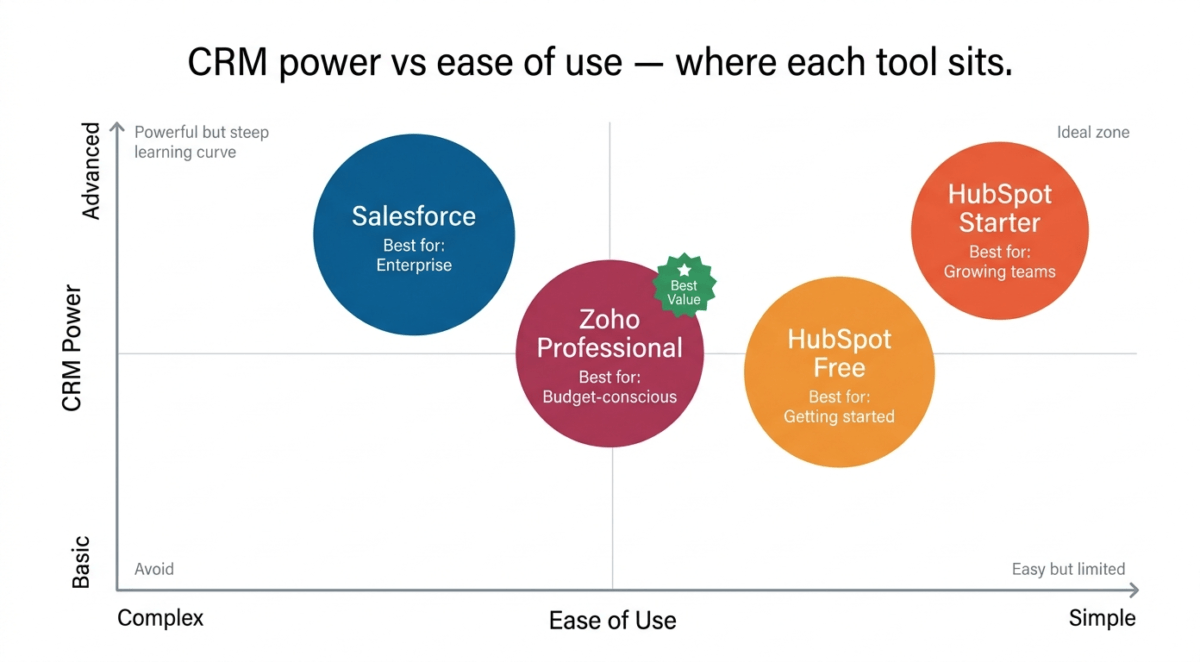
Best for | Getting started | Growing teams | Budget-conscious SMBs | Enterprise scale |
Which CRM Should Your Small Business Choose?
Choose HubSpot Free if:
You are getting started with CRM and want the easiest, most polished experience at zero cost. HubSpot’s free plan covers everything a small business needs to start tracking leads and managing a sales pipeline, with unlimited contacts and unlimited users. Start here. Upgrade only when you need automation or multiple pipelines.
Choose HubSpot Starter if:
Your team has outgrown the free plan, and you need email marketing, automated follow-up sequences, and multiple deal pipelines. At $15/seat/month, it is affordable, and the upgrade path within HubSpot is smooth; you do not need to migrate to a new platform as you grow.
Choose Zoho CRM Professional if:
You want advanced automation, AI-powered lead scoring, and deep customisation at a price significantly below Salesforce. Zoho is particularly compelling if you plan to use other Zoho apps; the ecosystem integration creates genuine efficiency gains that single-tool competitors cannot match.
Choose Salesforce if:
Your business has complex sales processes, a large team (20+ users), industry-specific compliance requirements, or you are building toward enterprise scale and want to invest in one platform that grows with you. For most small businesses under ten users with straightforward sales processes, Salesforce’s power is overkill and its cost is hard to justify.
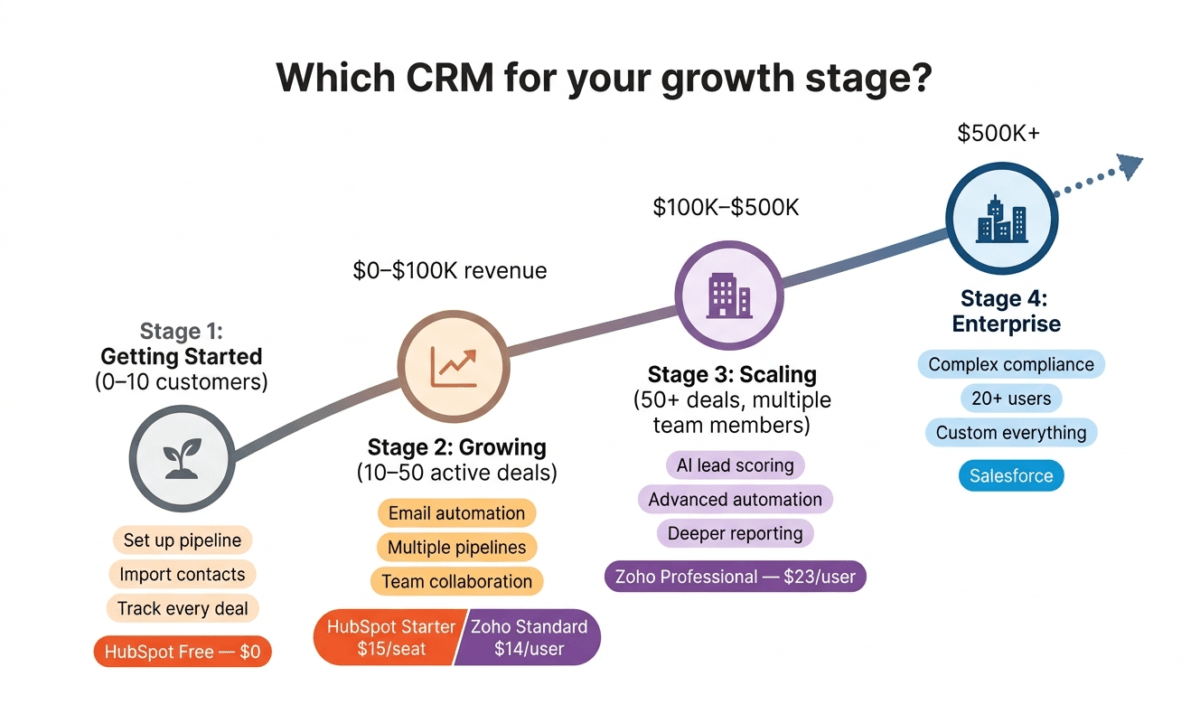
Our Recommended Path for Small Businesses
Stage 1 (Getting started 0–10 customers): HubSpot Free. Set up your pipeline, import your contacts, and start tracking every deal. Cost: $0.
Stage 2 (Growing 10–50 active deals): HubSpot Starter ($15/seat/month) for email automation and multiple pipelines, OR Zoho Standard ($14/user/month) if you want more features at a similar price.
Stage 3 (Scaling 50+ active deals, multiple team members): Zoho Professional ($23/user/month) for AI features and advanced automation, or HubSpot Professional ($90/seat/month) if you are deeply integrated into HubSpot’s marketing ecosystem and want everything in one place.
Stage 4 (Enterprise): Salesforce, when complexity, team size, and compliance requirements justify the investment.
Final Verdict
HubSpot is the best CRM for most small businesses in 2026, primarily because its free plan is genuinely excellent and requires no financial commitment to get started. The polished interface, seamless email integration, and visual pipeline make it the easiest CRM to adopt for teams new to CRM software.
Zoho CRM is the best value paid CRM, offering features at $23/user/month that Salesforce charges $165/user/month for. For budget-conscious businesses that need serious CRM power, Zoho delivers it at a fraction of the competition’s price.
Salesforce is the most powerful CRM, but the wrong choice for most small businesses. Its complexity, cost, and setup requirements are designed for organisations with dedicated sales operations teams, not five-person companies managing their first pipeline.
Ratings:
– HubSpot CRM: 4.7 / 5
– Zoho CRM: 4.5 / 5
– Salesforce: 4.1 / 5
Frequently Asked Questions
What is the best free CRM for small business in 2026?
HubSpot CRM is the best free CRM in 2026. Its free plan includes unlimited contacts, unlimited users, a visual sales pipeline, email tracking, meeting scheduling, and Gmail/Outlook integration, with no time limit and no credit card required. Zoho CRM also offers a free plan but limits it to three users.
Is HubSpot CRM really free?
Yes. HubSpot’s core CRM is genuinely free with no contact limits and no user limits. The free plan is not a trial; it is a permanent free tier. HubSpot makes money by selling its Marketing Hub, Sales Hub, and Service Hub paid add-ons to businesses that want advanced features like automation, custom reporting, and email marketing.
Is Salesforce worth it for small businesses?
For most small businesses, no. Salesforce’s power, complexity, and cost are designed for mid-market and enterprise companies. Small businesses with fewer than 20 users and straightforward sales processes are better served by HubSpot (free to $15/seat/month) or Zoho CRM ($14–$23/user/month). Consider Salesforce when your team grows beyond 20 users or your sales process requires enterprise-grade customisation.
What is the difference between HubSpot and Zoho CRM?
HubSpot is more polished, easier to use, and has a more generous free plan (unlimited users vs Zoho’s 3-user limit). Zoho is more feature-rich at comparable price points, particularly for automation and AI, and integrates with a broader ecosystem of 55+ Zoho business apps. HubSpot is better for teams prioritising ease of use; Zoho is better for teams prioritising features per dollar.
How many users does HubSpot CRM free support?
HubSpot CRM free supports unlimited users. There is no limit on the number of team members who can access and use HubSpot’s free CRM. This makes it the most scalable free CRM option for growing teams.
What does CRM stand for and what does it do?
CRM stands for Customer Relationship Management. CRM software tracks your relationships with customers and prospects, storing contact information, recording every interaction (emails, calls, meetings), showing where each potential sale stands in your pipeline, and automating follow-up tasks. It replaces spreadsheets and email inboxes as the central system for managing your sales process and customer relationships.
Can I use a CRM for my blog or content business?
Yes. CRM software is valuable for bloggers, content creators, and freelancers managing sponsor relationships, affiliate partnerships, freelance clients, or media contacts. HubSpot’s free plan works well for tracking outreach to potential sponsors, managing relationships with affiliate managers, and following up with potential clients for freelance writing or consulting work.
How long does it take to set up a CRM?
HubSpot can be set up and usable within 30–60 minutes for a basic pipeline. Zoho CRM takes 2–4 hours to configure properly for a small business. Salesforce typically requires days to weeks of setup, often with professional assistance. All three offer onboarding guides and video tutorials to help new users get started.