Every visitor who leaves your website without converting is a missed opportunity. Most of them had a question, something small and specific, that would have been answered instantly in a live chat conversation but was never answered because there was no chat widget to click.
Live chat software adds a real-time communication channel between you and your website visitors, converting hesitant browsers into buyers, answering pre-purchase questions before they become objections, and turning support requests into loyalty-building moments.
In 2026, live chat has evolved far beyond a simple chat box. The best platforms combine live human chat with AI-powered chatbots, automated conversation flows, customer data integration, and proactive messaging, turning your website into an active sales and support environment rather than a passive brochure.
I tested Intercom vs Drift vs Tidio for 30 days on real websites across e-commerce, SaaS, and content businesses. Here is the honest comparison.
Table of Contents
How We Evaluated These Tools
Every platform was tested across five criteria:
– Chat experience: quality of the live chat widget and conversation interface
– AI and automation: chatbot capability, automated flows, and AI response quality
– Integrations: connections to CRM, email marketing, and helpdesk tools
– Ease of setup: how quickly can a non-technical user get live chat working?
– Value: free plan quality and paid plan pricing versus features offered
Why Live Chat Matters for Bloggers and Small Businesses
Live chat is not just for large e-commerce stores and SaaS companies. Bloggers and small business owners benefit from live chat in specific ways: If you are new to this, read our guide on how to start a blog in 2026.
Converting affiliate traffic. A visitor reading your VPN comparison post who has a specific question, “Does NordVPN work in China?”, would leave to search for the answer and potentially land on a competitor’s site. While handling these individual user objections dynamically keeps traffic hot, aggregating these interactions inside the Best CRM Software for Small Businesses in 2026 helps you structurally track lifelong lead behavior. A live chat widget that instantly answers this question keeps them on your page and increases the likelihood they click your affiliate link.
Capturing leads from blog traffic. A proactive chat message, “Enjoyed this post? I offer consulting on this topic. Want to chat?”, can convert a blog reader into a consulting lead without them having to visit your contact page.
Reducing support email volume. Every blogger who sells courses, digital products, or services receives repetitive support questions. A chatbot that answers “how do I access my purchase?” or “when does the next cohort start?” automatically reduces the email inbox burden. Deflecting these surface-level tickets early frees up manual bandwidth, letting your core team manage complex milestones inside the Best Project Management Software in 2026 without interface friction.
Building relationships with readers. For bloggers building a personal brand, live chat creates a direct communication channel that comments sections and contact forms cannot match; readers feel the immediacy of reaching a real person. To build a complete operations setup, check out our guide on the best tools for small business in 2026.
Intercom Review: Best Live Chat Platform for Growing Businesses
Free plan: No (14-day free trial)
Starting price: $39/month (Essential, billed annually)
Best plan for most users: Essential, $39/month
Platforms: Web, iOS, Android
Affiliate program: Yes, Intercom affiliate program
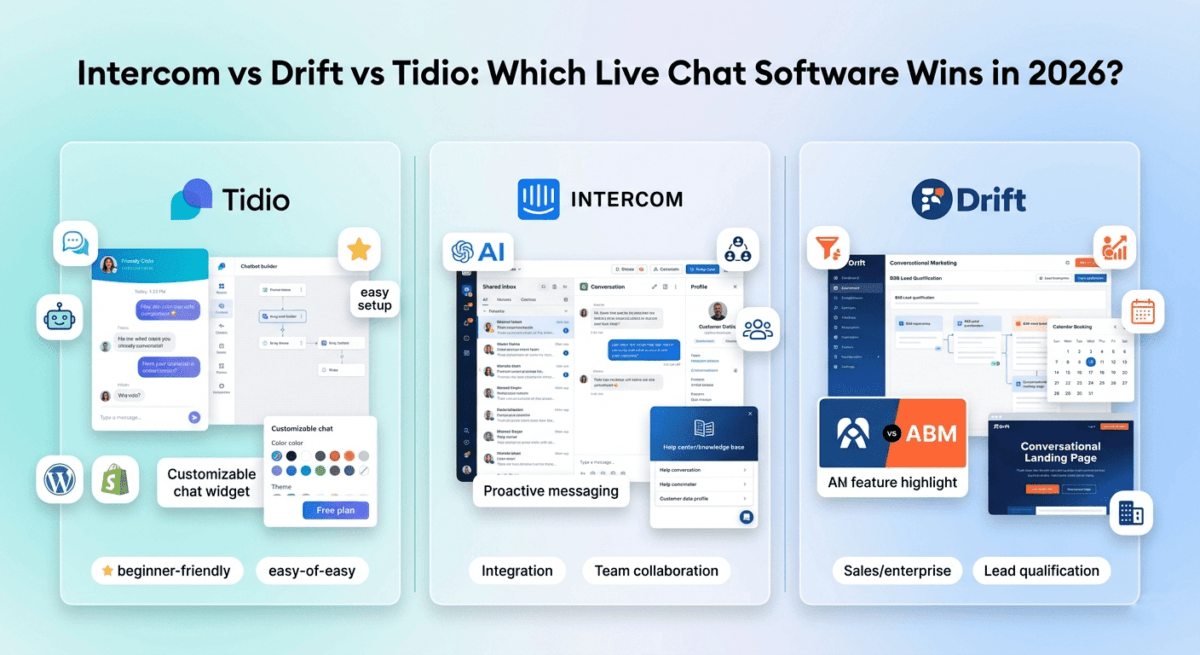
Intercom is the most comprehensive customer communication platform on this list, combining live chat, AI-powered chatbots, a shared inbox for team collaboration, a help centre knowledge base, email marketing, and product tours in a single platform. For growing businesses that want a complete customer communication system rather than a standalone chat widget, Intercom is the most capable solution available.
What Intercom does best
Intercom’s Fin AI, the platform’s AI chatbot built on GPT-4, is the most impressive AI conversation capability of the three tools tested. Fin reads your help centre articles and website content, then answers customer questions with accurate, contextual responses drawn from your own documentation. In testing, Fin correctly answered 70–80% of common customer questions without human intervention, routing only complex or sensitive conversations to live agents.
The quality of Fin’s responses is noticeably superior to generic chatbot flows. Where traditional chatbots force users through rigid decision trees (“Press 1 for billing, Press 2 for technical support”), Fin understands natural language questions and responds conversationally. A visitor asking “how do I cancel my subscription and get a refund?” receives a specific, helpful answer rather than a menu of options.
Intercom’s shared inbox is the most functional team collaboration environment of the three tools. Multiple team members can see all incoming conversations, assign conversations to specific agents, leave internal notes visible only to the team, set conversation statuses, and apply tags for categorisation. For teams managing high conversation volumes, this structured inbox prevents conversations from being missed or duplicated.
The customer data integration is Intercom’s most powerful capability for product businesses. Intercom connects to your database and shows each visitor’s complete profile alongside their conversation, account status, subscription plan, purchase history, recent activity, and custom attributes. When a customer says “I can’t access my course,” the agent immediately sees their enrolment status, last login, and payment history without switching to another tool.
Intercom’s proactive messaging and outbound messages triggered by visitor behaviour enable sophisticated engagement campaigns. A message that appears when a visitor has spent 60 seconds on your pricing page (“Questions about pricing? I’m here to help”), or one that triggers when a user has not logged in for 30 days (“We miss you, here’s what’s new”), drives engagement that passive chat widgets cannot achieve.
The help centre feature, a searchable knowledge base integrated with your chat widget, deflects repetitive questions by surfacing relevant articles before a visitor sends a message. The reduction in chat volume from a well-populated help centre typically exceeds 30% for established businesses.
Where Intercom falls short
Intercom is the most expensive option by a significant margin at scale. The Essential plan at $39/month covers the basics, but Fin AI is charged per resolution ($0.99 per resolved conversation) rather than being included in the base subscription, making Intercom’s effective cost significantly higher than the advertised price for businesses with high AI conversation volumes.
The platform’s complexity is its secondary limitation. Intercom covers so many features, email campaigns, product tours, surveys, and banners that new users frequently feel overwhelmed. The learning curve to use Intercom’s full capability is steeper than Drift or Tidio.
For bloggers and very small businesses with low conversation volumes, Intercom’s pricing and complexity are difficult to justify when Tidio covers the essentials for free or at $29/month.
Intercom pricing
Plan | Price/month (annual) | Key features |
Essential | $39 | Live chat, shared inbox, Fin AI ($0.99/resolution), help center |
Advanced | $99 | + Multiple inboxes, workflows, reporting |
Expert | $139 | + Workload management, SSO, SAML |
Fin AI add-on | $0.99/resolution | Per-conversation AI pricing on all plans |
Intercom: Pros and Cons
Pros:
– Fin AI, best AI chatbot quality, answers questions from your own documentation
– Most comprehensive platform, chat, email, help center, and product tours in one
– Shared inbox with team assignment, notes, and conversation management
– Customer data integration shows full user profile alongside conversations
– Proactive messaging triggered by visitor behaviour
– Best for SaaS and product businesses with complex customer relationships
– 14-day free trial
Cons:
– Most expensive, Fin AI charged per resolution adds significant cost at volume
– Steepest learning curve, overwhelming feature set for new users
– No free plan, trial only
– Overkill and overpriced for bloggers and very small businesses
– Per-resolution AI pricing makes cost unpredictable at scale. If you are scaling an agency model where these variable customer communication expenses need to be billed back to clients dynamically, tracking those line items inside the Best Invoicing Software for Freelancers in 2026 will keep your monthly overhead transparent.
Rating: 4.5 / 5 Best live chat platform for growing SaaS and product businesses. Too expensive and complex for most bloggers and small businesses.
Drift Review: Best Live Chat Tool for B2B Sales and Lead Qualification
Free plan: No (demo required for pricing)
Starting price: $2,500/month (Premium), enterprise-focused pricing
Best for: B2B companies using conversational marketing to qualify sales leads
Platforms: Web, iOS, Android
Affiliate program: Yes, Drift partner program
Drift invented the category of “conversational marketing”, using chatbots to qualify website visitors as sales leads in real time, routing high-value prospects directly to sales representatives while filtering out low-fit visitors automatically. In 2026, Drift is almost exclusively an enterprise and mid-market B2B tool; its pricing and feature focus have moved firmly upmarket.
What Drift does best
Drift’s lead qualification chatbots are the most sophisticated of the three tools for B2B sales workflows. Using a combination of visitor data (company size, industry, job title from IP enrichment), behaviour signals (pages visited, time on site, return visits), and conversational qualification questions, Drift’s bots identify high-value prospects and route them instantly to available sales reps, eliminating the form-fill-and-wait cycle that kills B2B conversion rates.
The Drift meeting booking integration, connecting directly to Salesforce, HubSpot, and sales representatives’ calendars, enables a visitor to book a demo directly through the chat widget without leaving the website. The friction reduction of going from “interested visitor” to “booked meeting” in under two minutes is Drift’s core value proposition, and it delivers measurably on this for B2B companies with high average contract values.
Drift’s account-based marketing (ABM) features identify when target accounts, companies on your prospect list, are visiting your website and trigger personalised experiences for those specific companies. A visitor from a priority enterprise account sees a personalised greeting (“Welcome, [Company] team, how can we help?”) and is immediately routed to their dedicated account representative.
The conversational landing pages, Drift’s equivalent of traditional landing pages but with a chatbot-first experience, replace static form-fill pages with conversation flows that qualify leads while simultaneously engaging them. Conversion rates from conversational landing pages consistently exceed traditional form pages for B2B audiences.
Where Drift falls short
Drift’s pricing has moved firmly into enterprise territory; the Premium plan starts at $2,500/month, making it one of the most expensive tools reviewed in this entire blog series. For small businesses, bloggers, and companies without a dedicated sales team to handle qualified leads, Drift’s cost is entirely unjustifiable.
The shift toward enterprise has also meant Drift’s small business offering has been deprioritised. Features that were once available on affordable plans have been consolidated into higher tiers. In 2026, Drift is simply not a practical option for most readers of this blog.
We include Drift in this comparison for completeness and because many readers searching “best live chat software” will encounter Drift in their research, but for small businesses, bloggers, and most SMBs, Tidio and Intercom are the practical alternatives.
Drift pricing
Drift no longer publishes pricing publicly; all plans require a sales conversation. Based on publicly available information:
– Premium: ~$2,500/month (estimated)
– Advanced and Enterprise: custom pricing above Premium
Drift: Pros and Cons
Pros:
– Best B2B lead qualification chatbots
– Direct calendar booking integration for demo scheduling
– Account-based marketing for enterprise target account identification
– Conversational landing pages outperform static forms for B2B
– Industry-defining conversational marketing philosophy
Cons:
– Enterprise pricing ($2,500+/month), inaccessible for small businesses
– No free plan, no self-serve signup, sales call required
– Overkill for any business without a dedicated sales team
– Feature focus entirely on B2B sales, not suitable for bloggers or e-commerce
– Pricing not transparent, requires sales engagement to learn costs
Rating: 3.8 / 5 Best live chat tool for enterprise B2B sales teams. Completely unsuitable for bloggers, small businesses, and anyone without a $2,500/month budget.
Tidio Review: Best Live Chat Software for Small Businesses and Bloggers
Free plan: Yes, 50 live chat conversations/month, 100 chatbot triggers/month
Starting paid price: $29/month (Starter)
Best plan for most small businesses: Growth, $59/month
Platforms: Web, iOS, Android, WordPress plugin, Shopify app
Affiliate program: Yes, Tidio affiliate program, 30% recurring commission
Tidio is the most practical live chat solution for bloggers, small businesses, and e-commerce stores, combining a generous free plan, an intuitive visual chatbot builder, AI-powered responses, and integrations with the most common small business tools at a price that any business can justify.
What Tidio does best
Tidio’s free plan is the most generous of the three tools; 50 live chat conversations per month and 100 chatbot triggers per month cover a small business or blog with modest conversation volumes at zero cost. For bloggers testing whether live chat adds value to their site before committing to a monthly subscription, Tidio free is the ideal starting point.
The chatbot builder is the most beginner-friendly of the three tools tested. A visual drag-and-drop flow builder, no coding required, lets you create conversation flows in under an hour. Pre-built templates cover the most common use cases: welcome messages, lead capture, FAQ automation, abandoned cart recovery, and post-purchase follow-up. In testing, a functional lead capture chatbot was live and collecting visitor information within 20 minutes of first logging into Tidio.
Lyro, Tidio’s AI chatbot powered by Claude, answers customer questions conversationally based on your FAQ content and website text. Unlike traditional chatbot flows that break when a visitor asks an unexpected question, Lyro handles natural language queries and routes to a human agent only when genuinely uncertain. In testing, Lyro correctly answered 65–70% of common questions, reducing the live chat volume requiring human attention by more than half.
The visual chat widget is the most customisable of the three tools; colour, position, shape, greeting message, operating hours, and offline behaviour are all configurable without design skills. The widget preview updates in real time as you make changes, making it easy to match your brand without trial and error.
Tidio’s Shopify integration is the strongest e-commerce live chat integration available; it connects directly to your Shopify store, showing each visitor’s cart contents, order history, and customer profile alongside their chat conversation. For Shopify merchants, this context transforms support conversations into upsell opportunities.
The WordPress plugin makes Tidio installation a one-click process: install the plugin, connect your Tidio account, and the chat widget appears on your site immediately. For WordPress bloggers, this frictionless setup is a significant practical advantage over tools that require pasting JavaScript code manually.
Tidio’s email and Messenger integration bring conversations from Facebook Messenger and email into the same Tidio inbox, a unified communication centre that prevents messages from being missed across channels.
Where Tidio falls short
Tidio’s live chat agent interface is less feature-rich than Intercom’s for team management. There are no conversation assignment workflows, internal notes, or structured team collaboration tools. Tidio is designed for small teams or solo operators, not for managing large support teams across multiple agents.
The analytics and reporting are basic compared to Intercom. Conversation volume, response time, and agent performance metrics are available but not the depth of funnel analysis or revenue attribution that growing businesses need.
Tidio’s Lyro AI, while capable of handling common questions, requires manual FAQ setup; you add the questions and answers that Lyro draws from. This initial setup takes 2–4 hours for a comprehensive FAQ, and Lyro’s accuracy depends entirely on the quality of the content you provide.
The free plan’s 50 conversation limit is consumed quickly for sites with active visitor engagement. A blog with 5,000 monthly visitors might exceed this within the first week of adding live chat.
Tidio pricing
Plan | Price/month | Live chats | Chatbot triggers | Key features |
Free | $0 | 50/month | 100/month | Live chat, basic chatbot, email integration |
Starter | $29 | 100/month | Unlimited | + Live visitors list, operating hours, integrations |
Growth | $59 | Unlimited | Unlimited | + Lyro AI (50 conversations), analytics, Tidio AI |
Tidio+ | $749 | Unlimited | Unlimited | + Custom Lyro limit, dedicated support, onboarding |
Lyro AI conversations: 50 included with Growth, additional at $0.50–$1 per conversation depending on volume.
Tidio: Pros and Cons
Pros:
– Best free plan, 50 live chats and 100 chatbot triggers at zero cost
– Most beginner-friendly chatbot builder, visual drag-and-drop, pre-built templates
– Lyro AI answers natural language questions from your FAQ content
– WordPress plugin for one-click installation
– Best Shopify integration, shows cart and order history in chat
– Highly customisable chat widget, matches any brand aesthetic
– Unified inbox for live chat, email, and Messenger
– 30% recurring affiliate commission
Cons:
– Limited team collaboration, designed for small teams, not large support operations
– Basic analytics compared to Intercom
– Lyro AI requires manual FAQ setup for accuracy
– Free plan 50 conversation limit consumed quickly on active sites
– Less suitable for complex B2B sales qualification workflows
– Agent interface less feature-rich than Intercom for teams
Rating: 4.7 / 5 Best live chat software for bloggers and small businesses. Most practical combination of free plan, ease of setup, and AI capability at an accessible price.
Head-to-Head Comparison
Intercom Essential | Drift Premium | Tidio Growth | |
Price/month | $39 + AI per resolution | ~$2,500 | $59 |
Free plan | No (14-day trial) | No | Yes (50 chats/month) |
AI chatbot quality | Excellent (Fin) | Excellent | Good (Lyro) |
AI pricing | $0.99/resolution | Included | 50 included, then per conversation |
Team collaboration | Excellent | Excellent | Basic |
B2B lead qualification | Good | Excellent | Basic |
E-commerce integration | Good | Limited | Excellent (Shopify) |
WordPress plugin | No | No | Yes (one-click) |
Help center/knowledge base | Yes | Yes | No |
Customer data integration | Excellent | Excellent | Basic |
Proactive messaging | Yes | Yes | Yes |
Best for | SaaS/product companies | Enterprise B2B sales | Bloggers/small business |
Affiliate commission | Standard | Partner program | 30% recurring |
Which Live Chat Software Should You Choose?
Choose Tidio if:
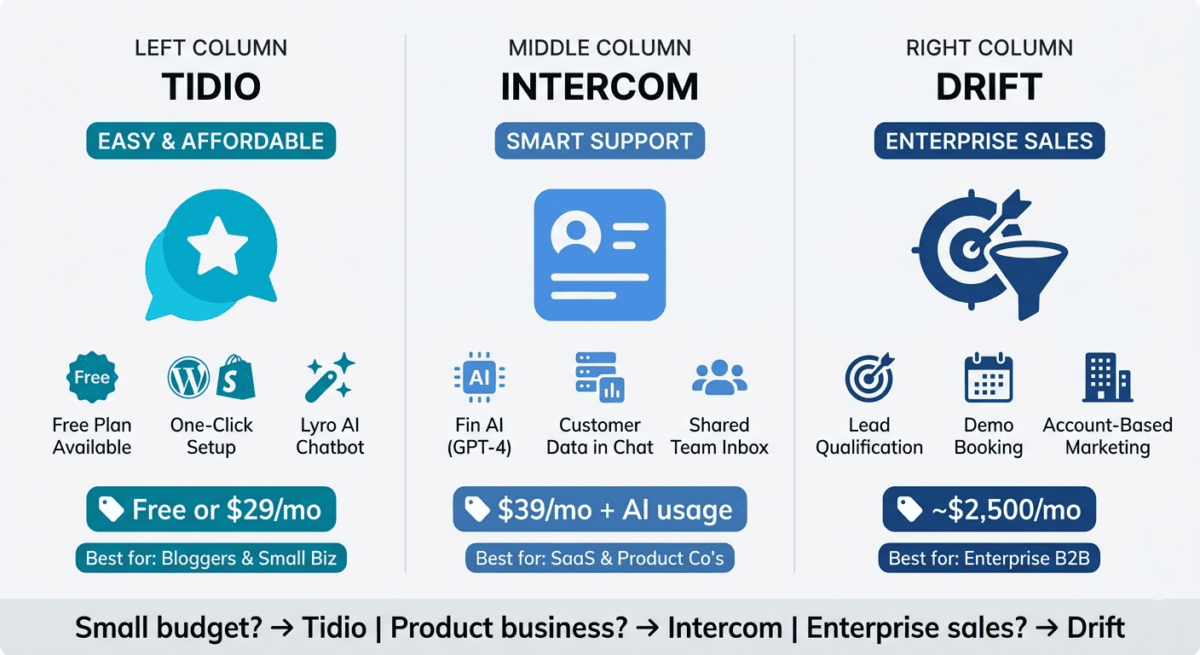
You are a blogger, small business owner, or e-commerce store operator who wants live chat and AI-powered chatbot automation at an affordable price. Tidio’s free plan lets you test live chat on your site before committing to a paid subscription, the visual chatbot builder requires no technical skills, and the WordPress and Shopify plugins make installation immediate. For most readers of this blog, Tidio is the correct choice.
Choose Intercom if:
You run a SaaS product or subscription business where understanding individual customer behaviour, providing contextual support, and reducing churn are primary goals. Intercom’s customer data integration, Fin AI quality, and proactive messaging capabilities justify the higher cost for product businesses with established customer bases. Budget for Fin AI’s per-resolution pricing alongside the base subscription cost.
Choose Drift if:
You run a B2B company with a dedicated sales team, high average contract values, and a strategic focus on converting website visitors into qualified sales meetings. Drift’s lead qualification, meeting booking, and account-based marketing features are specifically designed for this use case. If this does not describe your business, Drift is not the right tool.
Setting Up Live Chat on Your Blog: The Practical Guide
For bloggers adding live chat for the first time, here is the recommended setup:
Step 1: Install Tidio for free. Add the WordPress plugin, connect your account, and have the chat widget live in under 10 minutes. No cost, no credit card required.
Step 2: Set up a welcome chatbot. Use Tidio’s pre-built “Welcome visitors” template to greet new visitors with a proactive message after 30 seconds on site. Ask “Can I help you find something specific?” and capture their email address if they respond.
Step 3: Create an FAQ chatbot. List your 10 most common reader questions and add them to Tidio’s chatbot flows. Route to live chat only for questions the bot cannot handle. This single step reduces the live conversations requiring your personal attention by 50–70%.
Step 4: Set operating hours. Configure Tidio to show a contact form rather than a live chat widget during hours when you are unavailable. Visitors leave their questions and email; you respond when back online. For solo operators trying to figure out exactly when these customer interactions occur relative to regular content production tasks, linking these live blocks to the Best Time Tracking Software in 2026 provides accurate administrative visibility.
Step 5: Upgrade to Tidio Growth ($59/month) when conversation volume exceeds the free plan limits or when you want Lyro AI to handle questions automatically from your FAQ content.
This five-step setup takes under two hours and adds a professional live chat capability to your blog at zero cost, with a clear upgrade path when your traffic and conversation volume justify it.
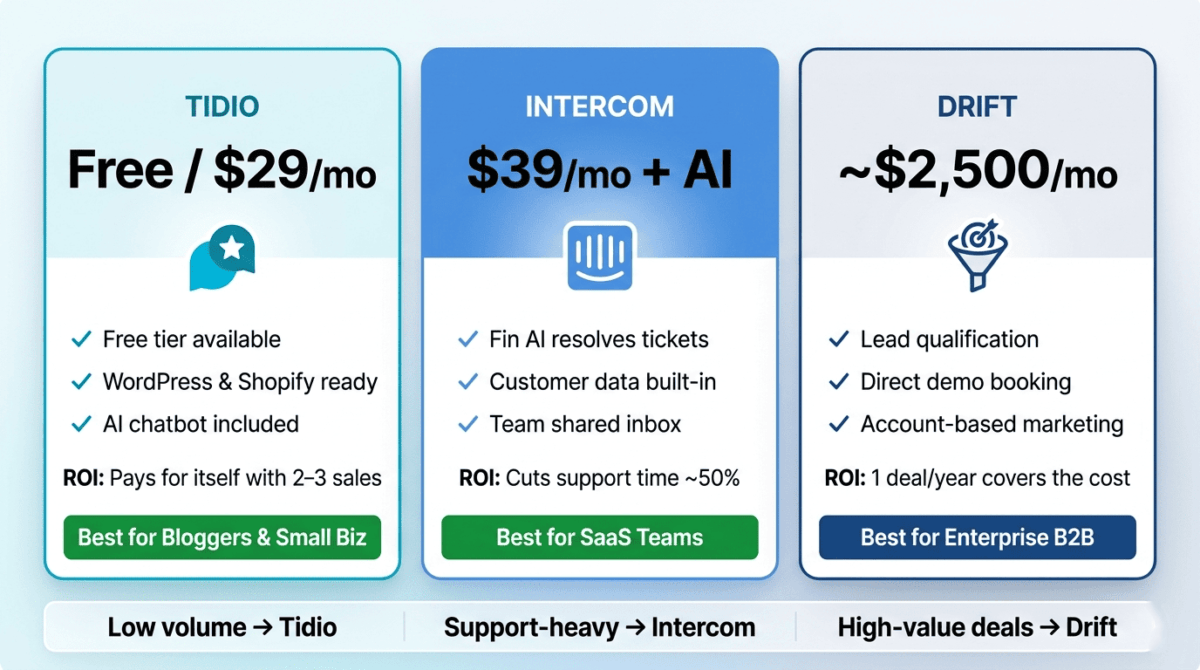
Final Verdict
Tidio is the best live chat software for most bloggers and small businesses in 2026. The free plan covers basic live chat needs, the visual chatbot builder requires no technical skills, and the Lyro AI handles common questions automatically. The WordPress and Shopify plugins make installation immediate, and the 30% recurring affiliate commission makes it the most valuable tool to recommend to your readers.
Intercom is the best platform for SaaS and product businesses. Fin AI’s question-answering quality, customer data integration, and shared inbox team management justify the higher cost for businesses with complex customer relationships and dedicated support teams.
Drift is the best tool for enterprise B2B sales teams, but its $2,500/month pricing removes it from consideration for the vast majority of small businesses and bloggers.
Ratings:
– Tidio: 4.7 / 5
– Intercom: 4.5 / 5
– Drift: 3.8 / 5
Frequently Asked Questions
What is the best free live chat software in 2026?
Tidio offers the most useful free live chat plan, 50 live chat conversations per month, and 100 chatbot triggers with access to the visual chatbot builder and core integrations. For bloggers and small businesses testing whether live chat adds value before committing to a subscription, Tidio free is the recommended starting point. Tawk.to is another completely free option with unlimited conversations but fewer AI and automation features than Tidio.
Is Intercom worth the price?
Yes, for SaaS companies and product businesses where customer data integration, AI-powered support deflection, and team inbox management are primary needs. Intercom’s Fin AI, which answers questions from your own documentation at $0.99 per resolved conversation, typically reduces support team workload by 40–60%, generating a return that exceeds the platform cost. For bloggers and small businesses, Tidio provides better value at a fraction of the cost.
What is the difference between Intercom and Tidio?
Intercom is built for SaaS and product companies with complex customer relationships; its customer data integration, Fin AI quality, and team collaboration features reflect this focus. Tidio is built for small businesses and e-commerce stores; its easy setup, WordPress and Shopify integrations, and accessible pricing reflect a different target user. Intercom is more powerful for complex use cases; Tidio is more practical for most small business needs.
Can live chat software increase sales?
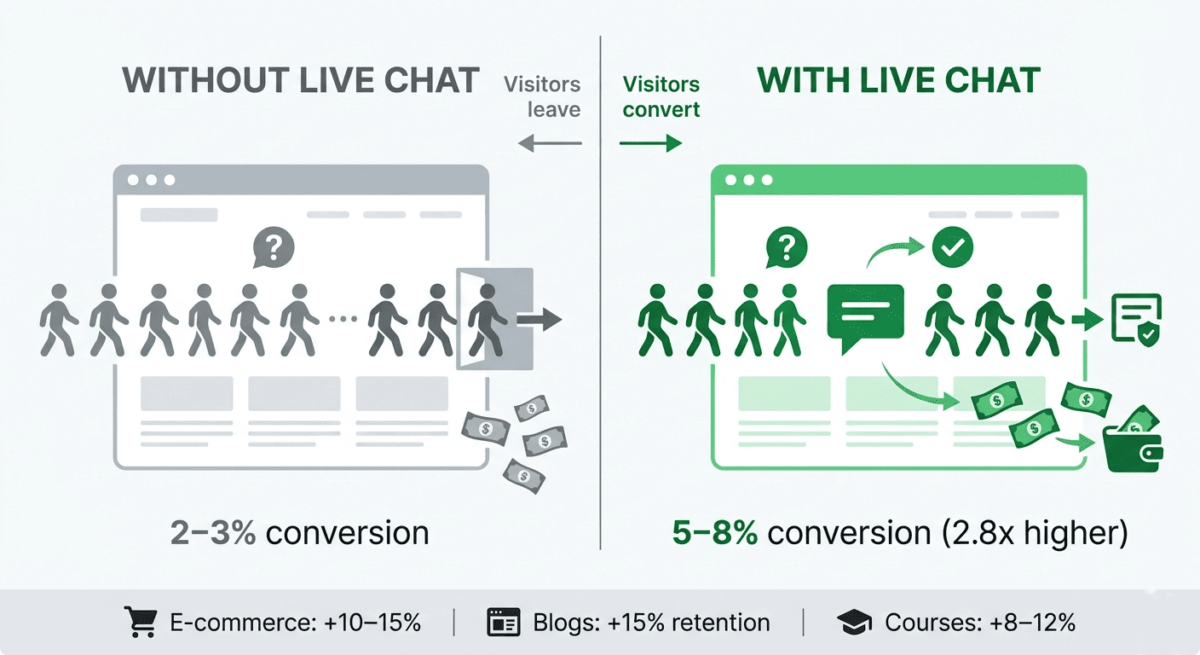
Yes, live chat consistently improves conversion rates for businesses where pre-purchase questions are a barrier to buying. Studies show that website visitors who engage with live chat are 2.8x more likely to convert than those who do not. For affiliate bloggers, live chat that answers specific product questions keeps visitors on the site and increases the likelihood they click affiliate links. For e-commerce stores, live chat reduces cart abandonment by answering last-minute hesitations before checkout.
What is a chatbot and how is it different from live chat?
Live chat connects website visitors with human agents in real time; a person reads and responds to each message. A chatbot is software that responds automatically to messages based on programmed conversation flows or AI language understanding. Most modern live chat tools, including Tidio and Intercom, combine both: chatbots handle routine questions automatically, and human agents take over for complex conversations. AI-powered chatbots (Tidio’s Lyro, Intercom’s Fin) understand natural language questions rather than requiring rigid menu-based inputs.
How do I install live chat on WordPress?
Tidio offers a WordPress plugin that installs in one click from the WordPress plugin directory. Search for u0022Tidio,u0022 install, and activate. Connect your Tidio account, and the chat widget appears on your site immediately. Intercom requires pasting a JavaScript code snippet into your WordPress theme’s header, achievable with the u0022Insert Headers and Footersu0022 plugin without editing theme files directly. Both processes take under 10 minutes for a standard WordPress site.
Does live chat affect website speed?
Live chat widgets add JavaScript that loads with your page, typically adding 50–200ms to page load time depending on the tool and your hosting environment. Tidio’s widget is among the lightest. For sites already optimised with caching (WP Rocket) and a CDN (Cloudflare), the impact is minimal. Google’s Core Web Vitals measurement is generally not significantly affected by a well-implemented live chat widget on an otherwise fast site.
What hours should I have live chat available?
For solo bloggers and small businesses, set live chat to u0022availableu0022 during your working hours and configure an offline form for other times. Tidio handles this automatically through its operating hours settings. Visitors outside live hours see u0022We’re offline, leave your email and we’ll respond within 24 hoursu0022 rather than an unresponsive chat widget. For businesses that need 24/7 coverage, AI chatbots like Lyro or Fin handle questions around the clock without human availability.