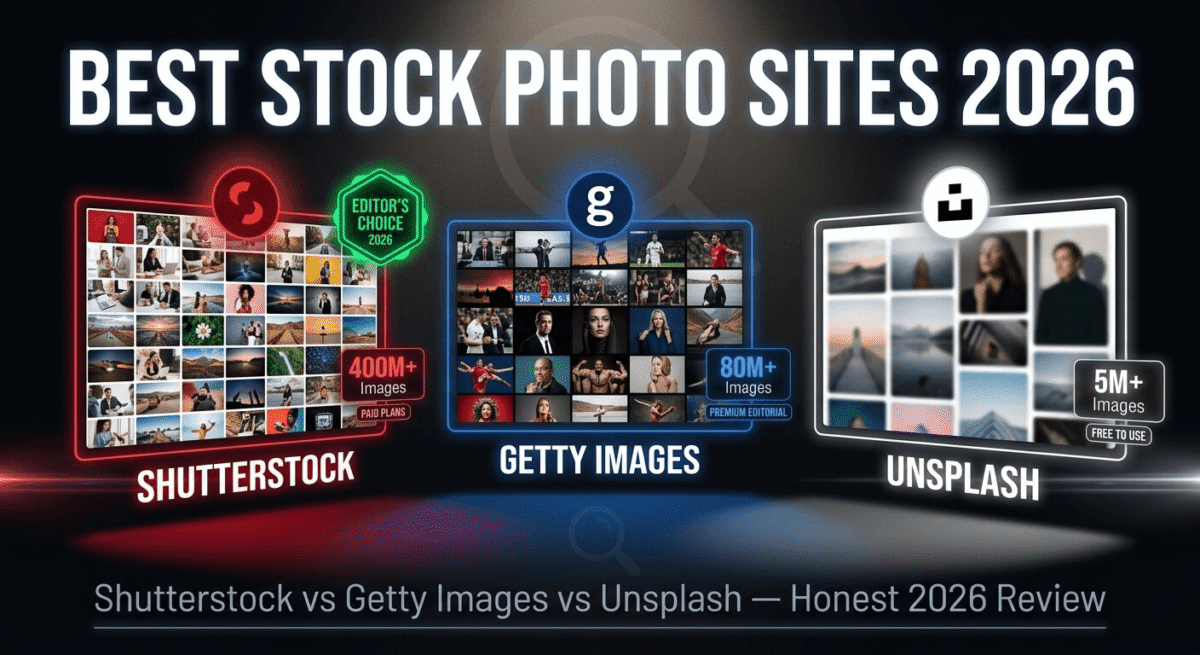
Every blog post needs images. Every social media post needs visuals. Every presentation, website, email newsletter, and marketing document needs photography or illustrations that look professional without requiring a photoshoot.
Stock photo sites solve this, giving you access to millions of professional images, illustrations, and videos that you can legally use in your content for a flat monthly fee or per-download price.
But not all stock photo sites are equal. Some have the best selection but charge per image. Some offer unlimited downloads but with lower quality. Some are completely free. And the licensing terms, which determine what you can and cannot do with the images, vary significantly between platforms in ways that matter enormously for bloggers and businesses.
I tested Shutterstock vs Getty Images vs Unsplash for 30 days across real content projects, blog post featured images, social media graphics, presentation slides, and website design mockups. If website mockups are your main use case, see our full design tool comparison of Figma vs Adobe XD vs Sketch for where these stock images actually get placed. Here is the honest comparison.
Table of Contents
How We Evaluated These Platforms
Every platform was tested across five criteria:
– Image quality and selection, variety, relevance, and visual quality of available images
– Search capability, how accurately does search surface relevant, usable images?
– Licensing clarity, what can you actually do with downloaded images?
– Pricing value, cost per image versus quality and selection
– Ease of use, how quickly can you find, download, and use images?
Why Stock Photos Matter for Bloggers
Before comparing the platforms, a practical note on why stock photos deserve more attention than most bloggers give them.
Featured images affect click-through rates: Your blog post’s featured image appears in Google Discover, social media shares, and email newsletter previews. A compelling, relevant featured image increases click-through rates by 30–50% compared to a generic or low-quality image, directly affecting your traffic and affiliate click opportunities.
Images affect SEO: Pages with relevant, properly optimised images rank better than text-only pages. Google’s image search sends traffic to image-illustrated posts. Alt text on stock images contributes to keyword coverage on your page.
Legal compliance matters: Using images without proper licensing, grabbing images from Google Image Search, using Pinterest images without attribution, exposes your blog to copyright infringement claims. Stock photo subscriptions provide legal protection for every image you use through proper licensing documentation.
Brand consistency: Bloggers who consistently use a particular photographic style, warm tones, minimal white space, authentic human photography, develop a recognisable visual identity that readers associate with their brand. Stock photo subscriptions give you enough selection to maintain this consistency. Stock photography is one piece of that visual identity, see our full content creator toolkit roundup for the rest of what goes into a consistent, professional-looking blog.
Shutterstock Review: Best Stock Photo Subscription for Bloggers
Free plan: No (free trial images available occasionally)
Starting price: $29/month (10 images/month, billed annually)
Best plan for most bloggers: 750 images/month – $199/month (billed annually)
Platforms: Web, iOS, Android, API
Affiliate program: Yes, Shutterstock affiliate program, up to $300 per referral
Shutterstock is the world’s largest stock photo marketplace, over 400 million images, videos, music tracks, and illustrations across every conceivable subject, style, and format. For bloggers who publish regularly across multiple topics, Shutterstock’s sheer volume ensures you find a relevant, high-quality image for virtually any subject you write about.
What Shutterstock does best
Shutterstock’s image library breadth is unmatched. 400 million assets covering every industry, concept, emotion, location, and visual style means the image you are looking for almost certainly exists. Searching for “entrepreneur using laptop” returns hundreds of relevant, authentic-feeling results, not just Western stock photo clichés. This global representation in Shutterstock’s library is increasingly important as blogging audiences become more internationally diverse.
The search algorithm is the most sophisticated of the three platforms tested. Searching for abstract concepts, “business growth,” “creative thinking,” “digital transformation”, returns conceptually relevant images, not just literal interpretations. The AI-powered search understands context, surfaces trending images, and learns from your click behaviour to improve results over time.
The image quality is consistently professional across Shutterstock’s catalogue. Every image is reviewed by Shutterstock’s curation team before being accepted, ensuring minimum technical standards for resolution, focus, exposure, and composition. The result is a catalogue where even searching broad generic terms returns professional-quality results without wading through amateur snapshots.
The licensing, Shutterstock Standard License, covers virtually everything bloggers and small businesses need:
– Use in websites, blogs, social media, and email newsletters
– Use in presentations, proposals, and marketing materials
– Use in print materials (brochures, flyers, posters) up to 500,000 copies
– Use in digital advertising
The Standard License does not cover merchandise (selling products with the image on them), editorial-only images used commercially, or print runs exceeding 500,000 copies, scenarios that apply to a small minority of typical blog use cases.
Shutterstock’s editor, a basic design tool built into the platform, lets you add text, resize images, and create social media graphics from stock photos without leaving Shutterstock or opening Canva. If you’d rather use these images in Canva for more design flexibility than Shutterstock’s built-in editor offers, see our Canva Pro vs Adobe Express comparison. For bloggers who want to quickly create a featured image from a stock photo with a text overlay, the built-in editor covers this without additional software.
The video library, 50 million+ clips, is a significant advantage for bloggers who create video content alongside written posts. Using a Shutterstock subscription covers both image and video needs without a separate video stock subscription.
Where Shutterstock falls short
Shutterstock’s subscription pricing model has a significant limitation: unused image downloads do not roll over to the next month. If your plan allows 10 images per month and you use only 3 in a given month, you lose the remaining 7 credits. For bloggers with variable publishing schedules, this use-it-or-lose-it structure means paying for unused capacity.
The lower-tier plans (10 images/month at $29, 50 images/month at $99) have high effective per-image costs compared to what a high-volume subscription unlocks. A blogger publishing daily who needs 30 featured images per month needs the 750-image plan ($199/month) for reasonable per-image cost, otherwise per-image costs are steep.
On-demand purchases (buying images without a subscription) are expensive, typically $29–$49 per image for the standard licence. For occasional users, free alternatives like Unsplash provide better value than on-demand Shutterstock purchases.
Shutterstock pricing
Plan | Price/month (annual) | Images/month | Per-image cost |
10 images | $29 | 10 | $2.90 |
50 images | $99 | 50 | $1.98 |
350 images | $169 | 350 | $0.48 |
750 images | $199 | 750 | $0.27 |
On-demand (25 pack) | $229 one-time | 25 | $9.16 |
Shutterstock: Pros and Cons
Pros:
– Largest library, 400 million images, videos, and illustrations
– Best search algorithm, understands context and abstract concepts
– Consistent professional quality across all images
– Global representation, diverse subjects and locations
– Video library included with image subscription
– Built-in editor for quick social media graphic creation
– Clear Standard License covers all typical blog use cases
– Up to $300 per referral on affiliate program
Cons:
– Unused downloads do not roll over, use-it-or-lose-it monthly credits
– Expensive per-image cost on lower-tier plans
– On-demand purchases expensive at $9–$29 per image
– No free plan, paid subscription required
– Some images feel overused, common Shutterstock clichés recognisable by readers
Rating: 4.6 / 5 – Best stock photo subscription for bloggers who publish regularly and need consistent access to high-quality, legally licensed images.
Getty Images Review: Best Premium Stock Photos for Editorial and Commercial Use
**Free plan: No (embed only, watermarked embed for non-commercial use)
Starting price: $175/month (5 images/month – Ultra plan)
Best plan for most users: Custom subscription based on usage
Platforms: Web, iOS, Android, API
Affiliate program: Yes, Getty Images affiliate program
Getty Images is the most prestigious stock photo agency in the world, the source of images used by major newspapers, magazines, broadcast networks, and global brands. Its collection includes unique editorial photography that no other stock photo site can match: exclusive coverage of world events, celebrity photography, historic archives, and professional sports photography captured by Getty’s own team of photographers worldwide.
What Getty Images does best
Getty Images’ editorial photography is its most distinctive and unmatched capability. While Shutterstock and Unsplash offer generic commercial photography, Getty has exclusive agreements with professional sports organisations (NBA, NFL, Premier League, Olympics), news wire services, entertainment studios, and royal families. Images of current events, live sporting moments, celebrity appearances, and historical occasions are available through Getty that simply do not exist anywhere else.
The image quality ceiling at Getty is the highest of the three platforms, top-tier Getty images are shot by the world’s most respected photojournalists and commercial photographers, at technical standards that exceed what typical stock photo contributors achieve. For premium commercial campaigns, magazine-quality layouts, and brand photography where quality is the primary concern, Getty’s top-tier images are genuinely superior.
The iStock by Getty Images platform — Getty’s more affordable sub-brand, provides access to a large curated stock photo collection at subscription prices comparable to Shutterstock. iStock Essential plans start at $9.99/month for 3 images, more affordable than Getty’s main collection for bloggers who want Getty-quality curation at lower prices.
Getty Images’ licensing is the most comprehensive and legally robust of the three platforms, model releases, property releases, and rights documentation are more thoroughly maintained than competitors, making Getty images the safest choice for high-visibility commercial campaigns where legal exposure is a concern.
Where Getty Images falls short
Getty’s pricing is prohibitive for most bloggers and small businesses. The main Getty collection charges $175/month for just 5 images, $35 per image, which is difficult to justify when Shutterstock provides 10 images for $29 or Unsplash provides unlimited images for free.
Getty’s extensive editorial photography, its greatest strength, comes with “editorial use only” licensing on many images. Editorial images can be used in news articles, blog posts discussing the pictured event, and educational content, but not in advertising, promotional materials, or any commercial context that implies endorsement. This editorial-only restriction catches many users off-guard and creates licensing confusion.
For everyday blog use cases, featured images for software reviews, social media graphics, and website photography, Getty’s premium pricing is rarely justified when Shutterstock and Unsplash provide sufficient quality at dramatically lower cost. Getty’s value is clearest for professional media organisations, large brands, and situations where unique editorial photography is required.
Getty Images pricing
Plan | Price | Images | Per-image cost |
iStock Essential | $9.99/month | 3/month | $3.33 |
iStock Signature | $29.99/month | 3/month | $10 |
Getty Ultra | $175/month | 5/month | $35 |
Getty custom | Contact sales | Custom | Custom |
On-demand (single image) | $499+ | 1 | $499+ |
Getty Images: Pros and Cons
Pros:
– Best editorial photography, exclusive sports, news, celebrity, historical archives
– Highest quality ceiling, world’s best photographers
– Most robust licensing documentation, safest for high-stakes commercial use
– iStock sub-brand provides affordable access to curated Getty quality
– Unique images unavailable on any other platform
– API access for media organisations
Cons:
– Most expensive, $175/month for 5 images on main Getty collection
– Many top images editorial-use only, restricted commercial licensing
– Overkill and overpriced for typical blog use cases
– On-demand single images cost $499+, prohibitive for casual use
– iStock plans less generous than Shutterstock for equivalent pricing
Rating: 4.2 / 5 – Best for editorial use and premium commercial photography. Too expensive for most bloggers, iStock by Getty is the more accessible option for quality-conscious small budgets.
Unsplash Review: Best Free Stock Photo Site
Free plan: Yes, completely free, all images, unlimited downloads
Starting price: Free forever
Best for: Bloggers, students, non-profits, and anyone who needs high-quality free images
Platforms: Web, iOS, API
Affiliate program: None – free service
Unsplash is the most widely used free stock photo site in the world, a community-driven platform where professional photographers donate their work for free use by anyone. In 2026, Unsplash hosts over 5 million high-quality images across every genre, and its API powers free image access in hundreds of applications including Notion, Squarespace, and the WordPress media library.
What Unsplash does best
Unsplash’s completely free model is its defining feature. Every image on Unsplash, all 5 million+ of them, is free to download and use for any purpose, commercial or personal, without registration, attribution requirements, or licensing fees. A blogger who needs a featured image for every post can download unlimited images at zero cost, legally, without a subscription or credit card.
The image quality is the biggest surprise about Unsplash, far higher than you would expect from a free platform. Unsplash’s curation is selective and quality-focused. The community of contributing photographers skews toward talented enthusiasts and professional photographers building their portfolios, resulting in a collection that frequently rivals paid platforms in visual quality for lifestyle, nature, architecture, and technology subjects.
The aesthetic is Unsplash’s most distinctive characteristic. Unsplash images have a recognisable editorial feel, natural light, authentic human moments, creative compositions, and a cinematic quality that stock photo clichés lack. A blogger who consistently uses Unsplash images develops a more authentic visual aesthetic than one using the polished but sometimes artificial-looking stock photography prevalent on paid platforms.
Unsplash’s search is competent for most common subjects, searching “workspace,” “laptop,” “team meeting,” or “coffee shop” returns numerous relevant, high-quality results immediately. For subjects that have significant Unsplash communities (travel photography, food, architecture, nature) the selection is genuinely excellent.
The Unsplash API – free, integrates Unsplash search and download directly into other applications. WordPress’s built-in media library can search Unsplash natively with a free plugin, finding and inserting stock photos without leaving the WordPress editor.
Where Unsplash falls short
Unsplash’s selection gaps become apparent for specific commercial and cultural subjects. Searching for “American business woman,” “South Asian family,” or niche professional subjects returns limited results compared to Shutterstock’s 400 million image library. Unsplash skews heavily toward Western, particularly European and American, subjects, a limitation for bloggers targeting diverse international audiences.
The Unsplash license, while permissive, has one important restriction: you cannot use Unsplash images to create a competing stock photo marketplace or to sell prints of the photos without the photographer’s permission. For all standard blog, website, and marketing use cases, the Unsplash license covers what you need.
Because Unsplash is free and widely used, some images appear on thousands of websites, making truly distinctive visual differentiation difficult. A featured image used on your software review blog may appear identical to featured images on competitor blogs if both use the same popular Unsplash photo. Shutterstock’s paid selection includes more images that have not been widely downloaded and reused.
Unsplash does not include video content, for stock video footage, Pexels (a similar free platform) provides video alongside photos.
Unsplash pricing
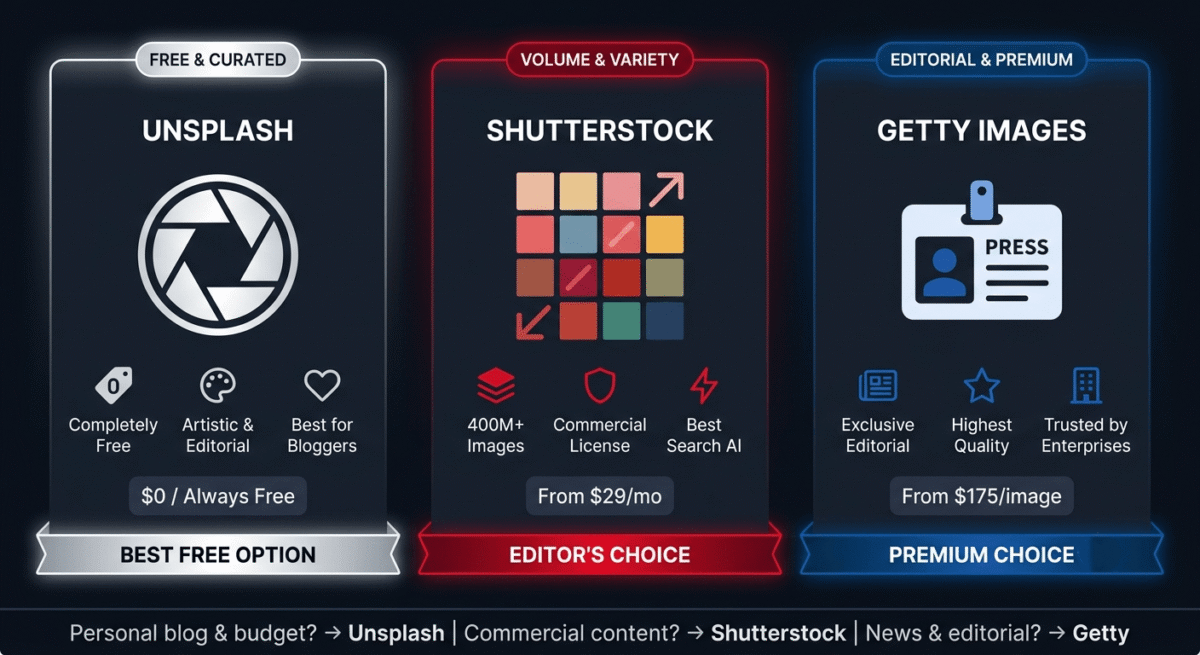
Unsplash is completely free, no plans, no subscriptions, no credit card required. All 5 million+ images are available for immediate free download.
Unsplash: Pros and Cons
Pros:
– Completely free, unlimited downloads, no registration required
– High quality, curated by selective community of talented photographers
– Editorial aesthetic, more authentic and less clichéd than paid stock photos
– No attribution required (though appreciated by photographers)
– Unsplash API integrates with WordPress, Notion, Squarespace, and more
– Large selection for lifestyle, nature, architecture, and technology subjects
– Commercial use permitted without payment
Cons:
– Limited selection for specific cultural and professional subjects
– Western bias, underrepresents South Asian, African, and Middle Eastern subjects
– Popular images overused across many websites, less visual differentiation
– No video content (use Pexels for free stock video)
– Cannot compete with Shutterstock’s 400 million image breadth
– No editorial sports or news photography
Rating: 4.5 / 5 – Best free stock photo platform. Should be every blogger’s first stop before considering paid alternatives.
Head-to-Head Comparison
Shutterstock (350/mo) | Getty iStock Essential | Unsplash | |
Price/month | $169 | $9.99 | Free |
Images available | 400 million+ | 200 million+ | 5 million+ |
Images per month | 350 | 3 | Unlimited |
Per-image cost | $0.48 | $3.33 | Free |
Image quality | Excellent | Excellent | Very good |
Editorial photography | Limited | Extensive | None |
Video included | Yes | Add-on | No (use Pexels) |
Search quality | Excellent | Good | Good |
Global representation | Excellent | Good | Limited |
API access | Yes | Yes | Yes (free) |
Attribution required | No | No | No (appreciated) |
Commercial use | Standard license | Standard license | Free license |
Best for | Regular bloggers | Quality-focused users | Budget bloggers |
Which Stock Photo Site Should You Choose?
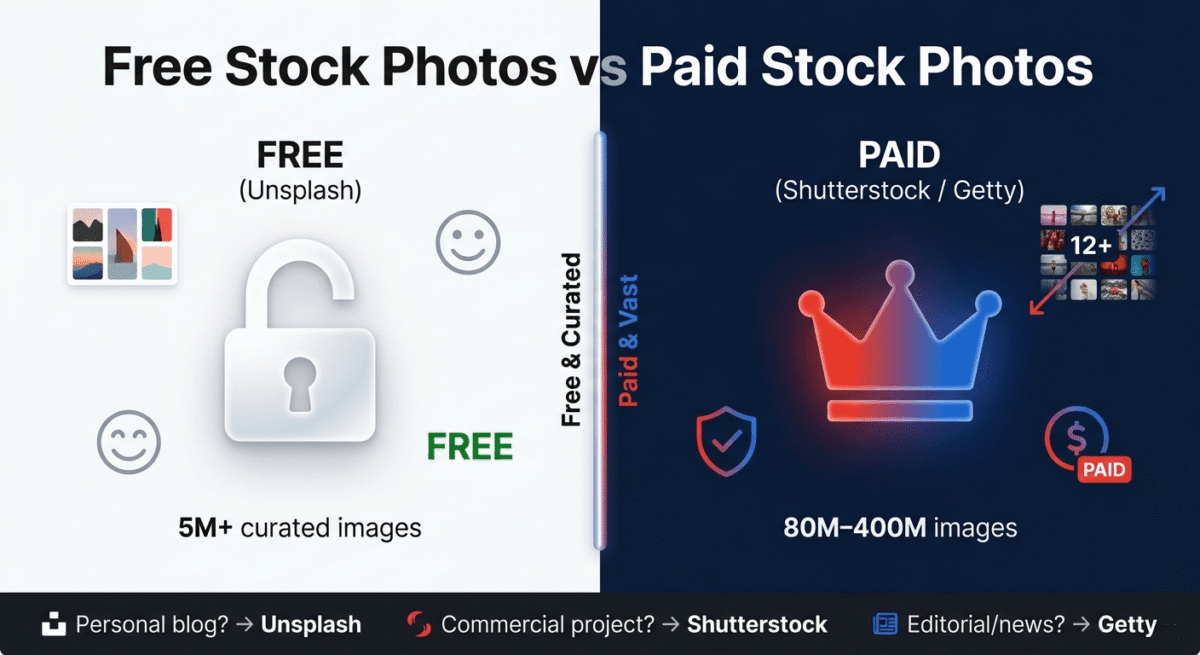
The honest answer: start with Unsplash free, add Shutterstock when your needs exceed it.
Use Unsplash if:
You are starting a new blog, have a limited budget, primarily cover lifestyle, technology, or nature topics, and can find relevant images from a 5 million image library. Unsplash covers the majority of stock photo needs for most bloggers at zero cost. Start here before spending money.
Use Shutterstock if:
You publish daily or multiple times per week, need images across diverse global subjects and professional scenarios, require consistent quality across all content, or need video footage alongside images. The 350-image plan at $169/month is the most cost-effective paid option for regular bloggers.
Use Getty Images (iStock) if:
You need editorial sports, news, or entertainment photography, require the most legally robust image licensing for a high-stakes commercial project, or want Getty-curated quality at iStock’s more accessible pricing. Not recommended as a primary stock photo source for bloggers given the image count limitations per plan.
Free Stock Photo Sites Worth Knowing
Beyond Unsplash, several other free platforms provide useful stock photography:
Pexels, (pexels.com), similar to Unsplash with 3 million+ free photos and free stock video. Strong for technology, business, and lifestyle subjects. Slightly different photographer community means different image aesthetics from Unsplash.
Pixabay, (pixabay.com), 4 million+ free images, illustrations, vectors, and videos. Broader content types than Unsplash but slightly lower average quality. Good for illustrations and vectors alongside photography.
StockSnap.io, smaller collection but high curation standards. Good for minimalist lifestyle and workspace photography.
Burst by Shopify, (burst.shopify.com), free photos focused on e-commerce and small business subjects. Particularly strong for product photography, retail, and entrepreneurship themes, useful for software review blogs.
The recommended free workflow: Search Unsplash first → if not found, try Pexels → if not found, try Pixabay → if still not found, use Shutterstock paid.
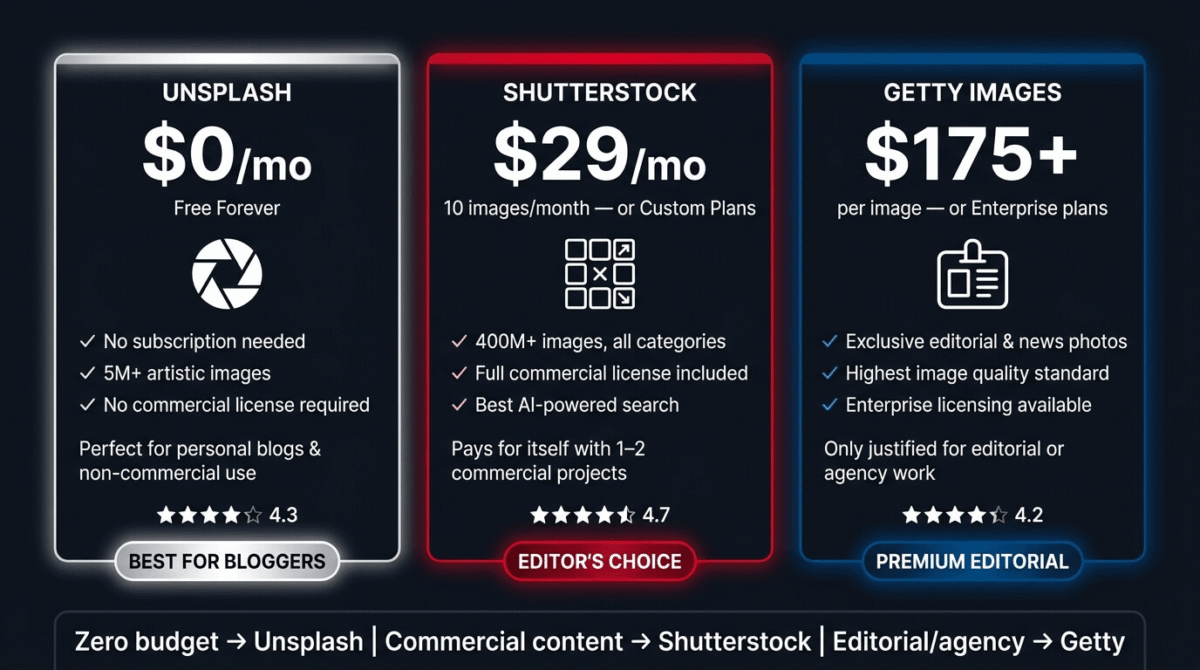
Image Optimisation After Downloading
Regardless of which stock photo site you use, every image needs optimisation before uploading to WordPress:
Resize before uploading:
– Featured images: 1200×630px (optimal for social sharing and blog display)
– In-post images: maximum 1200px wide (WordPress can handle downscaling)
– Never upload full-resolution stock photos (often 5,000–8,000px wide) to WordPress
Compress before uploading:
– Use Imagify plugin (installed on your WordPress site) for automatic compression on upload
– Or compress manually at squoosh.app (Google’s free online compressor) before uploading
– Target file size: under 150KB for featured images, under 100KB for body images
Name files correctly for SEO:
– Rename downloaded files before uploading: “nordvpn-review-2026.jpg” not “shutterstock_12345678.jpg”
– WordPress uses the filename in the image URL, descriptive filenames help SEO
Write alt text for every image:
– Alt text: brief description of what the image shows, including your target keyword where natural
– Example: “Person using NordVPN on laptop for secure browsing”, not “image1” or left blank
Final Verdict
Unsplash is where every blogger should start, 5 million high-quality images, completely free, no registration required, unlimited downloads. For the majority of blog use cases, Unsplash provides everything needed at zero cost.
Shutterstock is the best paid stock photo subscription, for bloggers who need broader selection, global representation, video footage, and consistent quality across high-volume publishing. The 350-image plan at $169/month offers the best per-image value for regular publishers.
Getty Images is the best for editorial and premium commercial photography, unique access to sports, news, and exclusive event coverage that no other platform provides. Too expensive for typical blog use; iStock by Getty is the more accessible option for quality-conscious smaller budgets.
Ratings:
– Shutterstock: 4.6 / 5
– Unsplash: 4.5 / 5
– Getty Images: 4.2 / 5
Frequently Asked Questions
What is the best free stock photo site in 2026?
Unsplash is the best free stock photo site, 5 million high-quality images available for free download without registration, attribution requirements, or licensing fees. Pexels is an excellent alternative with a different photographer community and free stock video included. Both should be checked before paying for a stock photo subscription.
Is it legal to use Shutterstock images on my blog?
Yes, with an active Shutterstock subscription, you have a Standard License to use downloaded images on your blog, website, social media, email newsletters, and print materials up to 500,000 copies. Keep your subscription active and retain your download confirmation emails as licensing documentation. Do not use images after your subscription ends without repurchasing them.
Can I use Unsplash images for commercial purposes?
Yes. The Unsplash license permits use in commercial projects, including blogs that monetize through advertising and affiliate marketing, business websites, and marketing materials, without payment or attribution. The primary restriction is that you cannot resell Unsplash images as stock photos or compile them into a competing stock photo product.
What is the difference between royalty-free and rights-managed images?
Royalty-free (Shutterstock, Unsplash) means you pay once (or nothing) and can use the image repeatedly without paying additional royalties per use. Rights-managed (some Getty Images) means you pay based on specific usage, how many times you use it, where, and for how long. For bloggers, royalty-free is almost always the right choice, pay once, use repeatedly without additional fees.
How many stock photos does a blog need per month?
It depends on your publishing frequency. A daily publishing schedule needs 30–40 featured images per month (one per post) plus occasional in-post images. A weekly publishing schedule needs 4–8 per month. Start with Unsplash free, if you find yourself frequently unable to locate relevant images, that is the signal to add a Shutterstock subscription.
Do stock photos hurt SEO?
Not inherently, stock photos are widely used by highly-ranked websites. The SEO impact comes from optimisation: image file size (unoptimised large images slow page speed, hurting rankings), alt text (missing alt text misses a ranking signal), and image filename (descriptive filenames help). Properly optimised stock photos support rather than hurt SEO.
What stock photos should I use for software review posts?
For software review blog posts, the most effective images are: screenshots of the actual software interface (created by you, most compelling and unique), people using computers or devices in professional settings (Unsplash has many), abstract technology concepts like locks for security posts or graphs for analytics posts, and team collaboration scenes for project management reviews. Avoid obvious stock photo clichés, business people shaking hands, people pointing at whiteboards, generic “teamwork” imagery.