
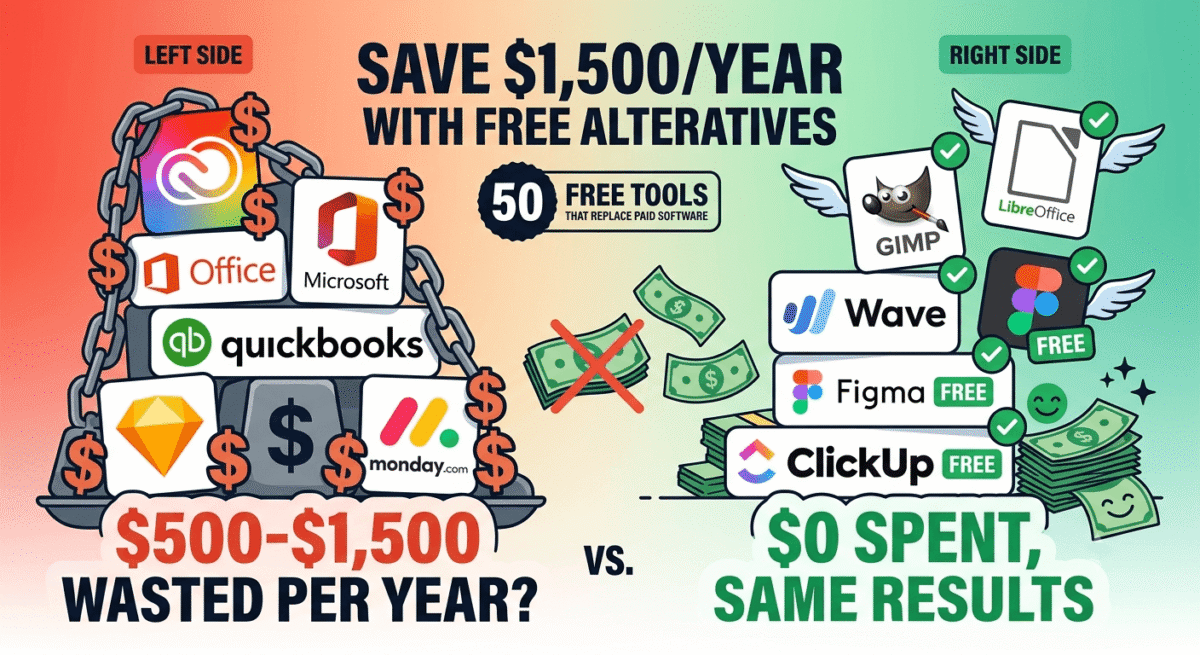
The average small business or freelancer spends $500–$1,500 per year on software subscriptions. Many of those subscriptions replace tools that have excellent free alternatives, alternatives that are just as capable, sometimes more capable, and cost absolutely nothing.
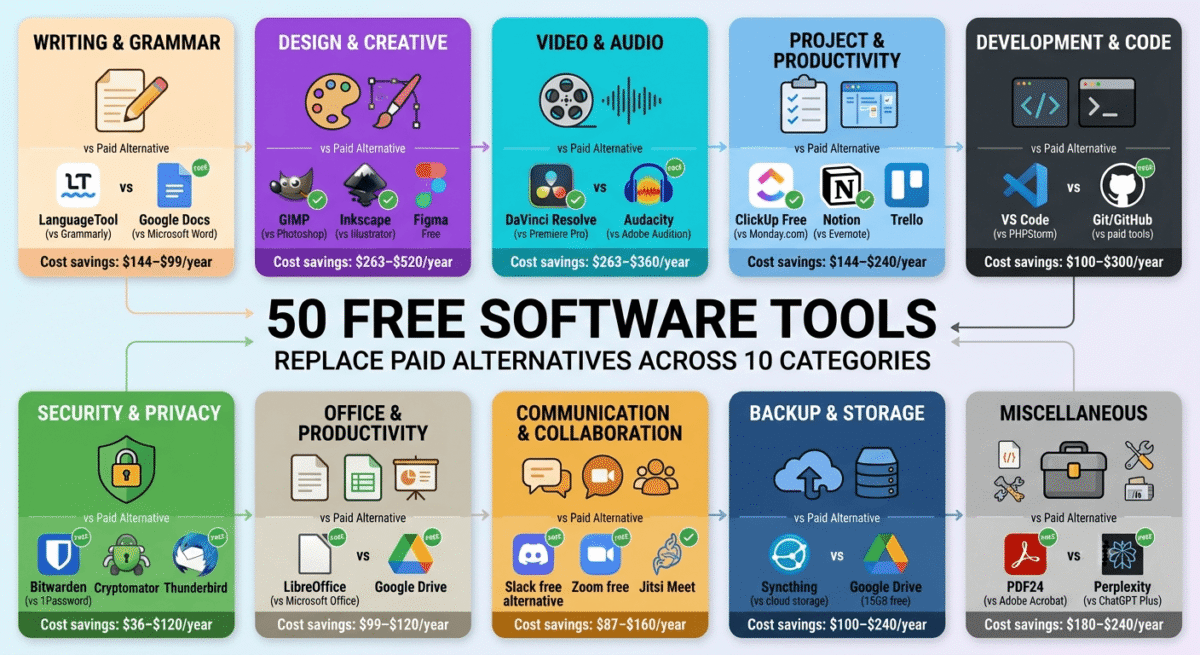
This guide covers Best 50 Free Software Tools across 10 categories, each one a legitimate replacement for a popular paid alternative. Every tool listed has been tested. No freemium traps where the free version is useless. No tools that put a watermark on everything. Just genuinely free software that works.
One honest disclaimer: Some tools here are free because they are open-source community projects. Some are free because the company offers a genuinely capable free tier as a lead generation strategy. A few are free because they monetize through optional paid upgrades that the free version does not need. All of them are worth using.
Table of Contents
Category 1: Writing and Grammar Tools
1. LanguageTool, Free Alternative to Grammarly Premium ($144/year)
Free version: Unlimited grammar and spelling checking in 30+ languages
Download: languagetool.org
LanguageTool’s free browser extension checks grammar, spelling, and style in Gmail, Google Docs, WordPress, and virtually every web-based text editor. The free version has no word count limit, unlike Grammarly’s free plan which only catches basic errors, LanguageTool free catches advanced grammar issues and style suggestions.
Particularly strong for non-native English speakers, the 30+ language support and nuanced phrasing suggestions explain English idiom usage rather than just flagging errors.
Full review: Best Grammar Checkers →
2. Hemingway Editor, Free Web Version (Alternative to ProWritingAid $120/year)
Free version: Full web editor at hemingwayapp.com
Download: hemingwayapp.com (web, free) | Desktop app ($19.99 one-time)
The Hemingway Editor web version is completely free, paste any text and receive instant feedback on readability grade level, passive voice, adverb overuse, and overly complex sentences. The colour-coded highlights make editing intuitive without reading any instructions.
For bloggers who want to ensure their posts are readable by a broad audience, Hemingway’s simplicity-focused feedback complements Grammarly or LanguageTool’s error detection perfectly.
Full review: Grammarly vs Hemingway Editor →
3. Google Docs, Free Alternative to Microsoft Word ($99/year)
Free version: Unlimited documents, real-time collaboration, 15GB storage
Access: docs.google.com
Google Docs provides full word processing capability, formatting, tables, images, comments, track changes, and real-time collaboration, at zero cost. For bloggers and freelancers who do not need advanced Microsoft Word features (mail merge, complex macros, specific enterprise formatting), Google Docs is entirely sufficient.
The collaboration features, multiple real-time editors, suggestion mode, and comment threads, are actually superior to Microsoft Word’s collaboration for most team workflows.
4. LibreOffice, Free Alternative to Microsoft Office ($99/year)
Free version: Complete office suite, Writer, Calc, Impress, Draw
Download: libreoffice.org
LibreOffice is the most capable free Microsoft Office replacement, a complete open-source office suite that opens, edits, and saves Word, Excel, and PowerPoint files. For users who need offline document editing without cloud dependency, LibreOffice is the only legitimate free alternative to Microsoft Office.
Available on Windows, Mac, and Linux. Actively maintained with regular updates. Used by millions of professionals worldwide.
5. Notion Free, Free Alternative to Evernote Premium ($107/year)
Free version: Unlimited pages and blocks, 7-day version history, limited guests
Access: notion.so
Notion’s free plan provides full note-taking, database, and wiki functionality, replacing Evernote’s premium subscription for most users. The database feature, creating interconnected tables of notes, provides capabilities Evernote’s paid plan does not offer at any price.
Full review: Best Note-Taking Apps →
6. Obsidian, Free Alternative to Roam Research ($165/year)
Free version: Fully featured for personal use, unlimited notes, all plugins
Download: obsidian.md
Obsidian is completely free for personal use, the bidirectional linking, knowledge graph, and 1,000+ community plugins are all available at zero cost. For serious knowledge management and personal note-taking, Obsidian provides capabilities that $15–$20/month paid tools cannot match.
Full review: Best Note-Taking Apps →
Category 2: Design and Creative Tools
7. Canva Free, Free Alternative to Adobe Express Premium ($99/year)
Free version: 250,000+ templates, unlimited designs, 5GB storage
Access: canva.com
Canva’s free plan is genuinely excellent, access to the majority of templates, all core design tools, and the ability to create professional graphics for social media, presentations, and marketing without any design skills. The free plan does not include brand kit, background remover, or premium templates, but covers 80% of what most bloggers and small businesses need.
Full review: Canva vs Adobe Express →
8. GIMP, Free Alternative to Adobe Photoshop ($263/year)
Free version: Complete professional image editor
Download: gimp.org
GIMP (GNU Image Manipulation Program) is a professional-grade open-source photo editor covering everything most users need from Photoshop, layers, masks, filters, colour correction, retouching, and complex selections. The learning curve is steeper than Photoshop, but the capability is genuine.
For photographers, bloggers who edit product images, and anyone who needs serious image editing without an Adobe subscription, GIMP is the most capable free option available.
9. Inkscape, Free Alternative to Adobe Illustrator ($263/year)
Free version: Complete vector graphics editor
Download: inkscape.org
Inkscape is a professional open-source vector graphics editor, the free alternative to Adobe Illustrator for creating logos, icons, illustrations, and scalable graphics. SVG-native, cross-platform, and actively maintained by a large open-source community.
For bloggers and designers who need occasional vector graphics without an Illustrator subscription, Inkscape handles the common use cases competently.
10. Figma Free, Free Alternative to Sketch ($20/month)
Free version: 3 projects, unlimited collaborators, all core features
Access: figma.com
Figma’s free plan provides full UI/UX design capability, components, auto-layout, prototyping, and developer handoff, for up to 3 projects. For individual designers and WordPress developers who do not need unlimited projects, Figma free replaces Sketch’s $20/month subscription entirely.
Full review: Best Design Tools →
11. DaVinci Resolve, Free Alternative to Adobe Premiere Pro ($263/year)
Free version: Professional-grade video editor, full colour grading, Fairlight audio, Fusion VFX
Download: blackmagicdesign.com/products/davinciresolve
DaVinci Resolve’s free version is used by professional Hollywood editors, it is not a “free lite” version but a complete professional tool with optional paid upgrade (Studio, $295 one-time) for advanced AI features. For bloggers and YouTubers, the free version provides more capability than most will ever use.
Full review: Best Video Editing Software →
12. OBS Studio, Free Alternative to Camtasia ($180/year)
Free version: Complete screen recording and live streaming software
Download: obsproject.com
OBS Studio is completely free, open-source, and the industry standard for screen recording and live streaming. Used by professional streamers and YouTubers worldwide. No watermarks, no time limits, no feature restrictions, everything is free.
Full review: Best Screen Recording Software →
13. Unsplash, Free Alternative to Shutterstock ($169/month)
Free version: 5 million+ professional photos, unlimited downloads, commercial use
Access: unsplash.com
Unsplash provides high-quality stock photography for free, with no subscription, no attribution required, and commercial use permitted. For bloggers and small businesses whose photography needs can be met by a curated 5 million image library, Unsplash eliminates the need for a paid stock photo subscription.
Full review: Best Stock Photo Sites →
14. Pexels, Free Alternative to Getty Images
Free version: Millions of photos and videos, unlimited downloads
Access: pexels.com
Pexels offers free stock photos and videos, a different photographer community from Unsplash, meaning different aesthetic styles and subjects. Use both Unsplash and Pexels to maximise your free stock photo library coverage.
Category 3: Productivity and Project Management
15. ClickUp Free, Free Alternative to Monday.com ($12/seat/month)
Free version: Unlimited tasks, unlimited members, multiple views
Access: clickup.com
ClickUp’s free plan provides unlimited tasks, unlimited team members, and access to list, board, calendar, and Gantt views, replacing Monday.com’s paid plans for most small teams. The free storage limit (100MB) is the only meaningful restriction.
Full review: Best Project Management Tools →
16. Trello Free, Free Alternative to Asana Premium ($131/year)
Free version: Unlimited cards, 10 boards, unlimited members
Access: trello.com
Trello’s free plan provides Kanban-style project management for unlimited team members across 10 boards, sufficient for most small teams and individual project tracking. The Power-Ups (integrations) are limited on the free plan but the core board functionality is unrestricted.
17. Clockify, Free Alternative to Harvest ($11/user/month)
Free version: Unlimited users, unlimited projects, unlimited time tracking
Access: clockify.me
Clockify is completely free for unlimited users, the most generous free time tracking plan available. Teams of any size can track time, manage projects, and generate reports at zero cost.
Full review: Best Time Tracking Software →
18. Google Calendar, Free Alternative to Fantastical ($40/year)
Free version: Full calendar, event management, meeting links
Access: calendar.google.com
Google Calendar provides complete calendar management, event creation, reminders, shared calendars, and Google Meet integration, at no cost. For most users, Google Calendar’s free plan provides everything Fantastical or other premium calendar apps offer, without the subscription.
19. Calendly Free, Free Alternative to Acuity Scheduling ($20/month)
Free version: 1 event type, unlimited bookings
Access: calendly.com
Calendly’s free plan covers one scheduling link type with unlimited bookings, sufficient for freelancers who book a single type of meeting (discovery calls, consultations, or check-ins). Upgrade to paid only when you need multiple different event types.
20. HubSpot CRM Free, Free Alternative to Salesforce ($25/user/month)
Free version: Unlimited contacts, unlimited users, pipeline management, email tracking
Access: hubspot.com/crm
HubSpot’s free CRM provides unlimited contacts, a visual sales pipeline, email tracking, meeting scheduling, and basic reporting, replacing Salesforce’s entry plans for small businesses and freelancers who do not need enterprise CRM complexity.
Full review: Best CRM Software →
Category 4: Communication Tools
21. Google Meet Free, Free Alternative to Zoom Pro ($13.33/month)
Free version: Unlimited meetings, 60-minute group meetings, 100 participants
Access: meet.google.com
Google Meet’s free plan provides unlimited video calls, 60-minute limit on group calls with up to 100 participants, without downloading any software. For teams already using Google Workspace, Meet is the zero-friction video calling solution.
Full review: Best Video Conferencing Software →
22. Discord, Free Alternative to Slack Pro ($7.25/user/month)
Free version: Unlimited messages, unlimited servers, voice/video channels
Access: discord.com
Discord is completely free with no message history limits, no file storage limits that restrict basic use, and no per-seat pricing. For small teams and communities that want persistent channels, voice rooms, and text communication, Discord provides Slack’s core functionality without subscription costs.
23. Thunderbird, Free Alternative to Outlook ($6.99/month)
Free version: Full-featured email client, unlimited accounts
Download: thunderbird.net
Mozilla Thunderbird is a completely free, open-source email client handling unlimited email accounts from any provider. The recent Supernova redesign significantly modernised the interface. OpenPGP encryption for secure email is built in, a feature no paid email client includes natively.
Full review: Best Email Clients →
24. Signal, Free Alternative to Telegram Premium ($5/month)
Free version: End-to-end encrypted messaging, voice and video calls
Download: signal.org
Signal is completely free and provides the strongest encryption available in any messaging app, end-to-end encryption for all messages, calls, and file sharing by default. For freelancers and small businesses who need secure client communication, Signal provides enterprise-grade security at zero cost.
25. Loom Free, Free Alternative to Vidyard ($19/month)
Free version: 25 videos, 5-minute limit per video
Access: loom.com
Loom’s free plan provides screen recording with instant shareable links, 25 videos at up to 5 minutes each covers casual business communication use. For async video messaging with clients and teams without a monthly subscription, Loom free is the most practical option.
Category 5: Security Tools
26. Bitwarden, Free Alternative to 1Password ($2.99/month)
Free version: Unlimited passwords, unlimited devices, browser autofill
Access: bitwarden.com | bitwarden.com (self-hosted)
Bitwarden’s free personal plan provides unlimited password storage, sync across unlimited devices, and browser autofill, the core functionality of any password manager, at zero cost. The open-source codebase provides security transparency that proprietary tools cannot match.
Full review: Best Password Managers →
27. Wordfence Free, Free Alternative to Sucuri ($199/year)
Free version: Firewall, malware scanner, login security for WordPress
Access: WordPress plugin directory
Wordfence’s free plan provides a web application firewall, malware scanner, and brute force protection for WordPress sites, covering the core security requirements that most bloggers and small business sites need. The paid version adds real-time threat intelligence updates (30-day delay on free), worth upgrading for high-traffic commercial sites.
28. Let’s Encrypt, Free Alternative to Commercial SSL ($50–$200/year)
Free version: Full SSL/TLS certificates, 90-day renewal (auto-renewable)
Access: letsencrypt.org (via your hosting provider)
Let’s Encrypt provides free SSL certificates, the padlock in your browser URL bar, supported by virtually every major hosting provider including Hostinger, SiteGround, and most others. There is no reason to pay for an SSL certificate for a standard blog or small business website.
29. Have I Been Pwned, Free Alternative to Dark Web Monitoring Services ($10+/month)
Free version: Email breach checking, domain monitoring (free for personal use)
Access: haveibeenpwned.com
Have I Been Pwned checks whether your email addresses have appeared in known data breaches, free, instant, and comprehensive. Set up email notifications for future breaches on your accounts. Eliminates the need for paid dark web monitoring subscriptions for personal and small business use.
30. Malwarebytes Free, Free Alternative to Norton ($29.99/year)
Free version: On-demand malware scanner (no real-time protection)
Download: malwarebytes.com
Malwarebytes Free provides the best malware removal scanning tool available, used by IT professionals to clean infected devices. While it does not include real-time protection (that requires Malwarebytes Premium), running a free scan monthly or when something seems wrong covers the most critical malware detection use case.
Full review: Best Antivirus Software →
Category 6: Development and Technical Tools
31. VS Code, Free Alternative to PHPStorm ($89/year)
Free version: Full-featured code editor, thousands of extensions
Download: code.visualstudio.com
Visual Studio Code is completely free, Microsoft’s open-source code editor that has become the most widely used development tool in the world. Extensions cover every programming language, framework, and workflow. For WordPress developers who do not need PHPStorm’s full IDE capabilities, VS Code handles PHP, HTML, CSS, and JavaScript development excellently.
32. Git + GitHub Free, Free Alternative to Bitbucket Premium ($3/user/month)
Free version: Unlimited public repositories, unlimited private repositories (limited)
Access: github.com
GitHub’s free plan provides unlimited public repositories and unlimited private repositories for individual users, covering most freelance and small business version control needs. Git itself is completely free and open-source.
33. FileZilla, Free Alternative to Transmit ($45 one-time)
Free version: Full FTP, SFTP, and FTPS client
Download: filezilla-project.org
FileZilla is a completely free FTP client, upload and download files to web servers without any cost. For WordPress developers who frequently transfer files between local and server environments, FileZilla covers all standard FTP workflows.
34. XAMPP / LocalWP, Free Alternative to Kinsta Local ($0 comparison)
Free version: Complete local WordPress development environment
Download: localwp.com (LocalWP) | apachefriends.org (XAMPP)
LocalWP (formerly Local by Flywheel) is the best free local WordPress development environment, install WordPress sites locally on your computer, develop without internet, and push live with one click. Completely free for personal and commercial use.
35. Postman Free, Free Alternative to Insomnia ($8/month)
Free version: API testing, 3 collections, unlimited requests
Download: postman.com
Postman’s free plan covers API testing and development for individual developers, sending requests, inspecting responses, and organising endpoints into collections. For WordPress developers building custom REST API integrations, Postman free handles all standard testing workflows.
Category 7: Analytics and SEO
36. Google Analytics 4, Free Alternative to Mixpanel ($28/month)
Free version: Complete web analytics, traffic, users, events, conversions
Access: analytics.google.com
Google Analytics 4 is completely free with no meaningful limits for standard website analytics. Traffic sources, audience demographics, conversion tracking, and custom event analysis are all available without paying anything.
Full review: Best Website Analytics →
37. Google Search Console, Free SEO Tool (No Paid Alternative Needed)
Free version: Keyword rankings, indexing status, Core Web Vitals, sitemap management
Access: search.google.com/search-console
Google Search Console is the most important free SEO tool available, showing exactly which keywords your pages rank for, your average position, click-through rates, and any technical indexing issues. There is no paid alternative that provides this specific Google-sourced data. Every website owner should use it.
38. Ahrefs Webmaster Tools, Free Alternative to Ahrefs Lite ($108/month)
Free version: Site audit and backlink data for verified domains
Access: ahrefs.com/webmaster-tools
Ahrefs Webmaster Tools provides free site audit and backlink analysis for websites you verify ownership of, meaningful SEO data at zero cost. While it does not include competitor research (which requires paid Ahrefs), the free tier’s site health monitoring and backlink profile are genuinely useful.
Full review: Best SEO Tools →
39. Rank Math Free, Free Alternative to Yoast Premium ($99/year)
Free version: On-page SEO analysis, schema, sitemap, redirects, multiple focus keywords
Access: WordPress plugin directory
Rank Math’s free plan provides more SEO features than Yoast Premium, multiple focus keywords per post, advanced schema markup, Google Search Console integration, and redirect management are all available at zero cost. The best free SEO plugin for WordPress.
Full review: Best WordPress Plugins →
40. Hotjar Free, Free Alternative to FullStory ($300/month)
Free version: Unlimited heatmaps, 35 daily session recordings
Access: hotjar.com
Hotjar’s free plan provides unlimited heatmaps (click, scroll, and move maps) and 35 daily session recordings, enough for most small websites to identify key usability issues without any cost. The free plan is genuinely useful, not a crippled trial.
Full review: Best Website Analytics →
Category 8: Email and Marketing
41. ConvertKit Free, Free Alternative to Mailchimp Paid ($13/month)
Free version: Up to 10,000 subscribers, unlimited emails, landing pages, forms
Access: convertkit.com
ConvertKit’s free plan is the most generous email marketing free tier, 10,000 subscribers with unlimited email sends at zero cost. Compare this to Mailchimp’s free plan which caps at 500 contacts. For bloggers building an email list, ConvertKit free covers everything needed for the first year or more.
Full review: Best Email Marketing Software →
42. Brevo Free, Free Alternative to ActiveCampaign ($29/month)
Free version: Unlimited contacts, 9,000 emails/month
Access: brevo.com
Brevo’s free plan provides unlimited contacts with 9,000 emails per month, unlimited subscribers is a significant advantage over Mailchimp and ConvertKit’s free contact limits. For businesses with large inactive lists, Brevo free provides the best value.
43. Buffer Free, Free Alternative to Hootsuite Pro ($99/month)
Free version: 3 social channels, 10 scheduled posts per channel
Access: buffer.com
Buffer’s free plan covers the essential social media scheduling workflow for bloggers and small businesses, 3 channels and 10 scheduled posts per channel is enough for consistent social presence without a paid subscription.
Full review: Best Social Media Scheduling →
44. Mailchimp Free, Free Alternative to Klaviyo ($45/month)
Free version: 500 contacts, 1,000 emails/month, basic templates
Access: mailchimp.com
Mailchimp’s free plan, while significantly reduced from its earlier 2,000-contact limit, still provides functional email marketing for very small lists. Best for businesses with under 500 contacts who want Mailchimp’s extensive third-party integrations.
Category 9: Business Operations
45. Wave, Free Alternative to QuickBooks ($35/month)
Free version: Complete accounting, invoicing, expense tracking, bank connections, reports
Access: waveapps.com
Wave provides professional double-entry accounting completely free, profit and loss reports, balance sheets, bank reconciliation, and invoice management at zero cost. For freelancers and small businesses with straightforward finances, Wave eliminates the need for QuickBooks or FreshBooks subscriptions.
Full review: Best Accounting Software →
46. Google Drive Free, Free Alternative to Dropbox Plus ($11.99/month)
Free version: 15GB storage, unlimited Google Docs, Sheets, Slides
Access: drive.google.com
Google Drive’s 15GB free plan, shared across Gmail, Drive, and Photos, provides cloud storage and file sharing without cost. The Google Docs, Sheets, and Slides apps provide office suite functionality alongside storage, adding significant value beyond raw storage alone.
Full review: Best Cloud Storage →
47. Zoom Free, Free Alternative to Zoom Pro for Light Users
Free version: Unlimited 1-on-1 meetings, 40-minute group meeting limit
Access: zoom.us
Zoom’s free plan covers unlimited 1-on-1 video calls, only group meetings (3+ participants) are limited to 40 minutes. For freelancers and small teams whose meetings are primarily 1-on-1 client calls, the free plan eliminates the need for Zoom Pro entirely.
48. Trello Free, Free Alternative to Monday.com for Simple Projects
Free version: Unlimited cards, 10 boards, unlimited team members
Access: trello.com
Trello’s free Kanban boards cover simple project tracking needs, to-do, in-progress, done columns for any project type. For teams that do not need the advanced views and automation of Monday.com, Trello free provides all the project visibility needed.
Category 10: Miscellaneous Must-Haves
49. PDF24, Free Alternative to Adobe Acrobat ($180/year)
Free version: PDF compression, merging, splitting, conversion, no limits, no watermarks
Access: pdf24.org
PDF24 provides every common PDF operation, compress, merge, split, convert, rotate, add watermarks, protect with password, completely free with no watermarks and no usage limits. For bloggers and small businesses whose PDF needs are operational (not editing existing PDF text), PDF24 eliminates the need for an Adobe Acrobat subscription.
Full review: Best PDF Editors →
50. Perplexity AI Free, Free Alternative to ChatGPT Plus for Research
Free version: AI-powered search with cited sources, unlimited queries
Access: perplexity.ai
Perplexity provides AI-powered research with cited, verifiable sources, completely free for unlimited queries. For bloggers who need current, sourced information for their posts, Perplexity free is more useful than paying $20/month for ChatGPT Plus solely for research purposes. The Pro version ($20/month) adds access to more powerful models but the free version covers research use cases fully.
The Complete Free Software Stack, By User Type
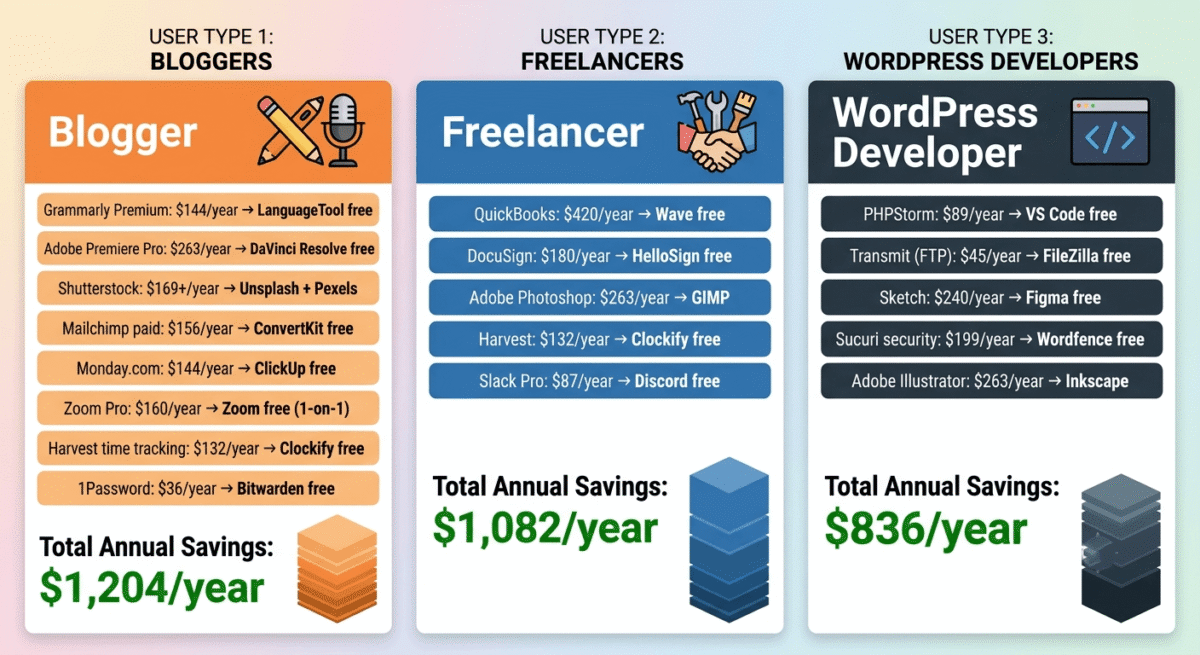
For Bloggers (Total savings: ~$1,200/year)
Paid tool replaced | Free alternative | Annual savings |
Grammarly Premium | LanguageTool free | $144 |
Adobe Premiere Pro | DaVinci Resolve free | $263 |
Shutterstock | Unsplash + Pexels | $169+ |
Mailchimp paid | ConvertKit free (to 10k) | $156 |
Monday.com | ClickUp free | $144 |
Zoom Pro | Zoom free (1-on-1) | $160 |
Harvest time tracking | Clockify free | $132 |
1Password | Bitwarden free | $36 |
Total saved | ~$1,204/year |
For Freelancers (Total savings: ~$900/year)
Paid tool replaced | Free alternative | Annual savings |
QuickBooks | Wave free | $420 |
DocuSign | HelloSign free (3/mo) | $180 |
Adobe Photoshop | GIMP | $263 |
Harvest | Clockify free | $132 |
Slack Pro | Discord free | $87 |
Total saved | ~$1,082/year |
For WordPress Developers (Total savings: ~$800/year)
Paid tool replaced | Free alternative | Annual savings |
PHPStorm | VS Code free | $89 |
Transmit (FTP) | FileZilla free | $45 |
Local dev environment | LocalWP free | $0 (was free too) |
Sketch | Figma free | $240 |
Sucuri | Wordfence free | $199 |
Adobe Illustrator | Inkscape | $263 |
Total saved | ~$836/year |
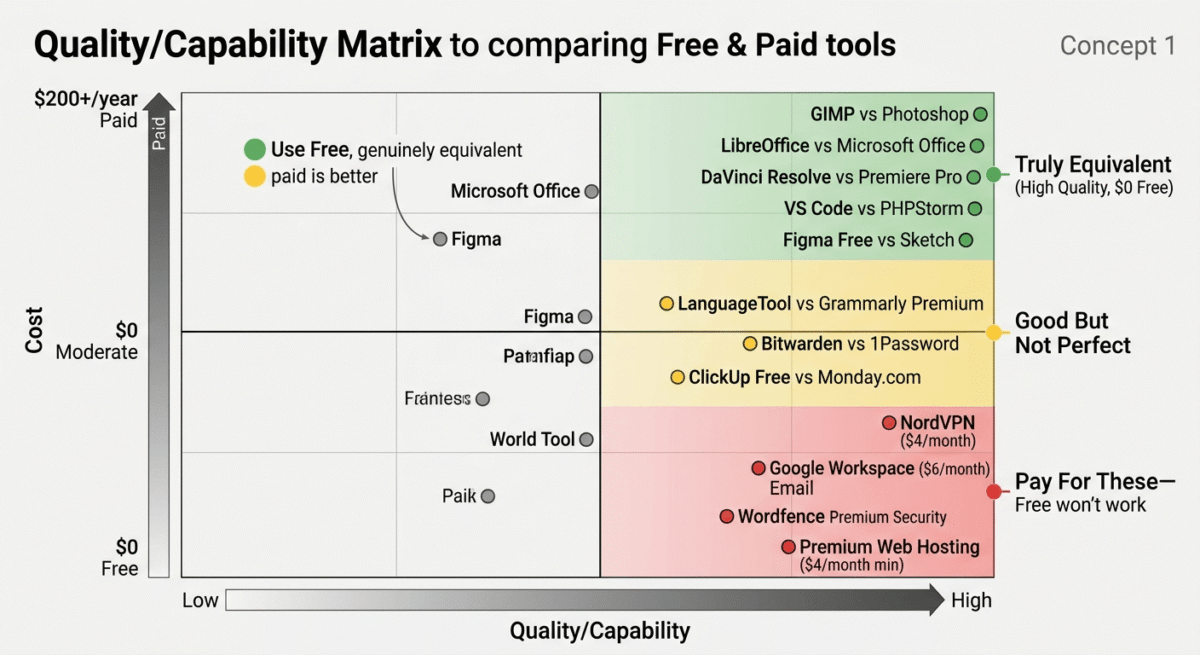
When Free Is Not Good Enough
This guide is honest about free tools, and honest means acknowledging when paying is the right decision.
Pay for web hosting. Free hosting (000webhost, InfinityFree) is unreliable, slow, and unsuitable for any serious website. Hostinger at $3.99/month is the minimum investment for professional web presence.
Pay for a VPN. Free VPNs monetize through data collection, the opposite of what a VPN is supposed to do. NordVPN at $3.99/month is inexpensive security that free VPNs cannot safely replicate.
Pay for professional email. A Gmail address is fine for personal use but projects unprofessionalism for business communications. Google Workspace at $6/month provides yourdomain.com email that free Gmail cannot.
Pay for advanced security when it matters. Wordfence free is excellent for low-traffic blogs. High-traffic commercial sites with sensitive customer data benefit from Wordfence Premium’s real-time threat intelligence.
Pay for tools that directly generate income. If a $19/month tool helps you invoice more professionally and get paid faster, the ROI calculation is obvious. Free tools make sense when they are genuinely equivalent, not when paying would meaningfully improve your income.
Frequently Asked Questions
Are free software tools safe to use?
Yes, with appropriate evaluation. Tools from established companies (Google, Microsoft, Mozilla, Canva) with free tiers are safe and maintained. Open-source tools (LibreOffice, GIMP, Thunderbird, Bitwarden) are often more secure than proprietary alternatives because their code is publicly auditable. Avoid obscure free tools with no established user base or company backing, particularly for security-sensitive functions like password management.
What is the best completely free office suite?
LibreOffice is the best completely free offline office suite, a full replacement for Microsoft Office covering word processing (Writer), spreadsheets (Calc), and presentations (Impress). Google Workspace (Docs, Sheets, Slides) is the best free cloud-based office suite with superior collaboration features but requiring internet access.
Can free tools handle professional work?
Yes, many of the tools on this list are used by large enterprises and professional teams. DaVinci Resolve free is used by Hollywood productions. VS Code is used by professional developers at major technology companies. Bitwarden free is used by security-conscious professionals who trust open-source more than proprietary tools. Free does not mean unprofessional.
What is the best free alternative to Adobe Creative Cloud?
GIMP (Photoshop alternative), Inkscape (Illustrator alternative), DaVinci Resolve (Premiere Pro alternative), Canva free (Express alternative), and Figma free (XD alternative) together replace Adobe Creative Cloud’s most-used applications. The combined cost: $0, versus Adobe Creative Cloud All Apps at $719.88/year.
Are open-source tools reliable?
Yes, the most widely used open-source tools (Firefox, LibreOffice, GIMP, WordPress, VLC, Thunderbird) have been developed and maintained for decades with millions of active users. Open-source tools are often more reliable than proprietary alternatives because bugs are identified and fixed by a global community rather than a single company’s engineering team.
How do I know if a free tool is actually free or just a trial?
Check for: a “free forever” or “free plan” designation rather than “free trial”; no credit card required at signup; clear documentation of what is included in the free plan; and the ability to use the tool’s core functionality without a paywall. The tools in this guide have been verified as genuinely free, not time-limited trials or heavily crippled versions designed to frustrate users into paying.








