Posting consistently on social media is one of the most effective ways to drive traffic to your blog, and one of the most time-consuming if you do it manually. Logging into Instagram, then Twitter/X, then LinkedIn, then Pinterest, then Facebook, creating and formatting each post individually, and trying to remember the optimal posting time for each platform is a workflow that consumes hours every week.
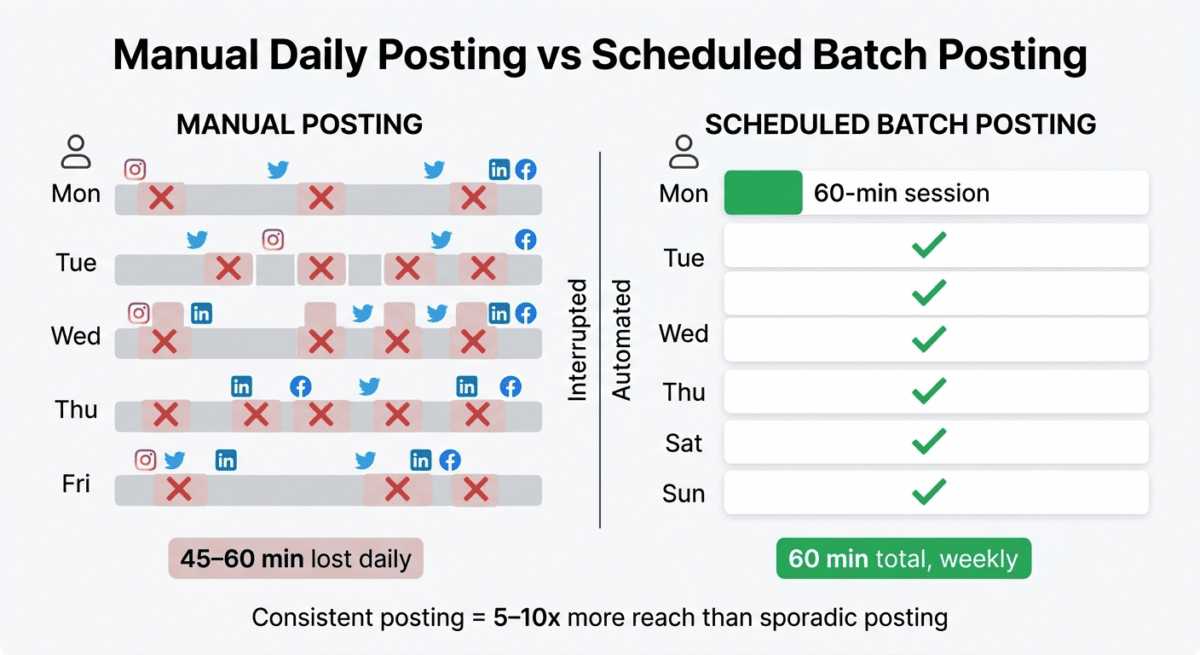
Social media scheduling tools solve this by letting you create all your posts in one place, schedule them to go out automatically at the best times, and manage every platform from a single dashboard, turning a daily distraction into a once-weekly batch task.
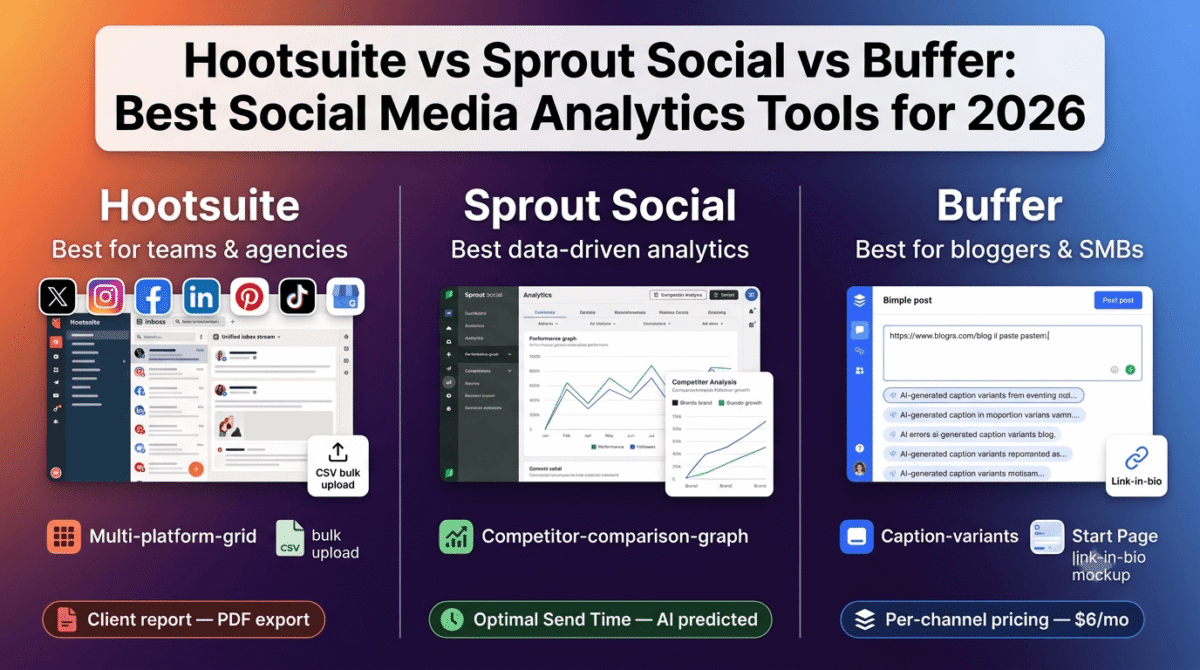
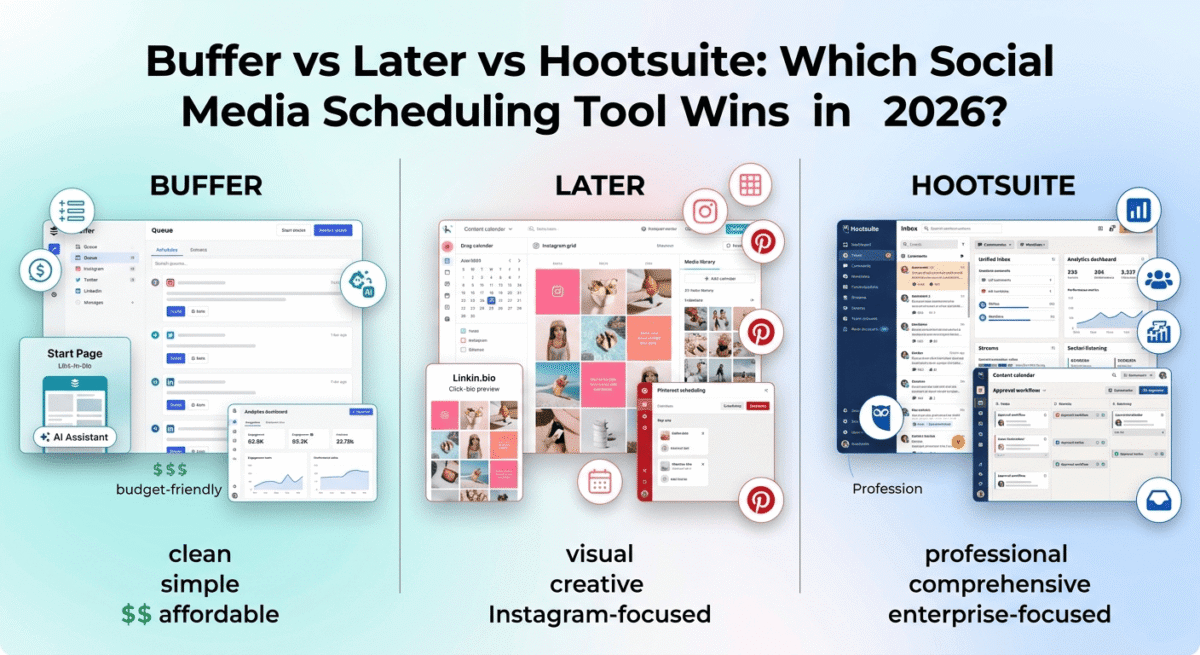
I tested Buffer vs Hootsuite vs Later for 30 days across real social media accounts, a blog promotion strategy covering Instagram, Pinterest, LinkedIn, Twitter/X, and Facebook. Here is the honest comparison.
Table of Contents
How We Evaluated These Tools
Every platform was tested across five criteria:
– Scheduling and publishing: ease of creating, scheduling, and publishing posts across platforms
– Analytics: depth and usefulness of performance data
– AI features: content suggestions, caption writing, and best-time recommendations
– Platform support: which social networks each tool covers
– Value: free plan quality and paid plan pricing for individuals and teams
Why Social Media Scheduling Matters for Bloggers
Before comparing the tools, a note on why social media scheduling specifically matters for content creators building a blog.
Consistent presence without constant effort. The algorithm reward for consistent posting on every major social platform- Instagram, LinkedIn, Pinterest, TikTok, is measurable. Accounts that post consistently outperform those that post sporadically, regardless of individual post quality. Scheduling tools make consistency achievable without being online every day.
Pinterest as a traffic channel. Pinterest is uniquely powerful for bloggers because pins have a long lifespan; a single pin can drive traffic for months or years after it is published. Later’s Pinterest-specific features make it the most practical tool for bloggers who want to use Pinterest as a traffic source. This continuous traffic loop is ideal for consistently feeding prospects into premium digital course ecosystems or high-margin membership platforms.
Batch content creation. Scheduling tools enable you to create a week or month of social content in a single focused session, then let the scheduler publish automatically. This batching approach is dramatically more efficient than creating posts one at a time each day. When balanced alongside targeted search indexing optimization, this multichannel execution ensures your brand gains ground both via social discovery and organic algorithmic search.
Analytics for content decisions. Understanding which posts drive the most traffic and engagement tells you which content to create more of, data that random manual posting never surfaces clearly.
Pallyy: The visual per-brand scheduler
Free plan: Yes. 1 social set, 1 account, 15 scheduled posts/month
Starting paid price: $15/month (Starter)
Best plan for most users: Pro $25/month
Platforms: Instagram, Facebook, LinkedIn, TikTok, Pinterest, Google Business Profile, YouTube, X (Twitter), Threads, and Bluesky
Pallyy is built for brands and small agencies who post across a lot of networks. Pricing is per brand, not per channel, so one brand on seven networks stays $25/month. Visual calendar, client approvals, and a unified inbox (including Google Business and TikTok) are included. Analytics and client reports come with the same plan.
Best for: multi-network brands and small agencies who are done with per-channel pricing.
What Pallyy does best
Pallyy does best as an all-in-one social media management platform for freelancers, agencies, and brands that need more than basic scheduling. It combines multi-platform publishing, a visual content calendar, Instagram Grid Preview, analytics, social inbox, link-in-bio, AI captions, and client approval workflows in one dashboard. Its Social Set system also makes it easy to keep different brands or clients organized, while Pro adds unlimited posts, shared calendars, team collaboration, and approval features.
Where Pallyy falls short
Pallyy’s main weakness is that its lower-priced plans are quite limited, with restrictions on accounts and scheduled posts, so active users will likely need the Pro plan to get the most value. Additional Social Sets can also increase the cost for agencies managing many clients, while advanced collaboration features are reserved for higher-tier plans. Compared with Hootsuite, Pallyy is also less focused on enterprise-level social listening and large-scale social intelligence.
Pally Pricing
| Plan | Price/month | Social sets | Posts/month | Key features |
|---|---|---|---|---|
| Free | $0 | 1 | 15 | Content calendar, analytics |
| Starter | $15 | 1 | 20 | Content calendar, analytics, link-in-bio, API access |
| Pro | $25 | 1 | Unlimited | Analytics, post ideas, queue scheduling, social inbox, link-in-bio, AI captions, approvals, shared calendars |
| Agency | Custom/varies | 10 | Unlimited | 11 accounts/social set, 3 users, team collaboration, approvals, client workflows |
| Scale | Custom | 30 | Unlimited | 11 accounts/social set, 10 users, advanced agency/team capabilities |
Pallyy: Pros and Cons
Pros:
– Excellent all-in-one workflow for scheduling, analytics, inbox, approvals, and link in bio
– Supports Instagram, Facebook, LinkedIn, TikTok, Pinterest, YouTube, X, Threads, Bluesky, and Google Business Profile
– Strong client approval and collaboration workflow for agencies and freelancers
– Visual content calendar with drag-and-drop scheduling
– Instagram Grid Preview for planning the visual appearance of your feed
– Social Inbox combines comments, messages, and reviews
– Pro plan includes unlimited scheduled posts
– AI captions and post ideas available on Pro
– Social Sets keep different brands and clients organized
– More affordable entry point than enterprise-focused social media management platforms
Cons:
– Free plan limited to one account and 15 scheduled posts per month
– Starter limited to two accounts and 20 posts per month
– Additional Social Sets cost extra
– Full agency collaboration features require higher-tier plans
– Where Pallyy falls shortLess focused on enterprise-level social listening than Hootsuite
Rating: Suggested 4.7 / 5 for agencies, freelancers, creators, and brands that want scheduling plus approvals, analytics, inbox management, and client workflows in one platform.
Planable Review: Best Social Media Management Tool For Teams That Need Approval Before Publishing
Free plan: Free trial, 50 posts, no time limit, no card required
Starting paid price: ~$33/month per workspace (Basic, billed annually)
Best plan for most teams: Pro, for required approvals and client-hidden comments
Platforms: Facebook, Instagram, LinkedIn, X, TikTok, YouTube, Pinterest, Google Business Profile, Threads
Planable is a social media management tool for marketing teams and agencies where a post has to be reviewed and signed off before it goes live. Where Buffer is built around one person publishing quickly, Planable is built around several people agreeing on a post first: the client, the strategist and the designer all see the same preview, comment on it, and approve it in one place. It is the tool to pick when the bottleneck is not scheduling but getting a yes.
Best for: teams and agencies that need approval before publishing.
What Planable Does Best
Planable’s pricing is per workspace, not per user or per channel: A workspace is one brand or one client, and you can add as many teammates, reviewers and client contacts to it as you like without the invoice changing. For a blogger this matters less; for an agency that needs three people and a client to look at every post, it is the single biggest cost difference from Hootsuite’s per-seat plans and Buffer’s per-channel plans.
Approval is the core of the product rather than a bolt-on: Optional approval is available on every paid plan, required approval (a post cannot publish until someone signs it off) starts on Pro, and multi-level approval, for when legal and the client both have to agree in sequence, is on Enterprise. Once approved, a post is locked, so what was signed off is what publishes.
Clients and stakeholders review from a shared link without creating an account. Internal comments on Pro and above are hidden from clients, so the team can argue about a caption privately and show the client only the finished version. Every post is shown as a realistic preview of the live network, in calendar, feed, list or grid view, which removes the “that is not what I approved” conversation entirely.
Planable publishes to nine networks, including TikTok, Threads and Google Business Profile, and imports up to 400 posts at a time from a CSV, so a month of content built in a spreadsheet can be loaded in one go. Canva, Zapier and Slack integrations are included, and there is a public API plus an MCP connector for Claude and ChatGPT for teams that want to draft or schedule from an AI assistant.
Monitoring is available as add-ons rather than bundled into the base price: Analytics covers cross-channel and per-channel reporting plus competitor benchmarking across five networks; Social Listening tracks brand and keyword mentions across X, YouTube, Reddit, TikTok, Facebook, Instagram, LinkedIn and the wider web, with volume and sentiment; and the Social Inbox brings comments and DMs from Facebook, Instagram, LinkedIn and TikTok into one place.
Where Planable Falls Short
Planable is not the right fit for solo creators or freelancers. The approval workflow is the product, and a single person publishing their own content has nobody to approve for. Buffer or Later will be cheaper and simpler for that use case.
Analytics, social listening and the inbox are paid add-ons, so a workspace that needs client reporting costs more than the entry price. Enterprises that need very advanced, custom analytics will still find Hootsuite’s reporting deeper.
There is no link-in-bio tool and no white-label option at any tier, so agencies that want to present the platform under their own brand will need to look elsewhere.
Planable Pricing
| Plan | Price/workspace/month (annual) | Pages | Posts/month | Key features |
|---|---|---|---|---|
| Free trial | $0 | — | 50 posts total, no time limit | Scheduling, previews, comments, calendar |
| Basic | ~$33 | 4 | 60 | Optional approval, media library, Canva integration |
| Pro | $49 | 10 | 150 | Required approval, grid view, internal comments hidden from clients |
| Enterprise | Custom | Unlimited | Unlimited | Multi-level approval, list view, dedicated support |
Add-ons per workspace per month: Analytics $14, Social Inbox $9, Social Listening (price on request).
For an agency managing one client with a four-person team and the client reviewing: one workspace, ~$33/month, no per-seat charges.
Planable: Pros And Cons
Pros:
- Priced per workspace, not per user or per channel, so reviewers and clients cost nothing extra
- Optional, required and multi-level approval workflows built into the product
- Clients review and approve from a link, no account needed
- Channel-accurate previews in calendar, feed, list and grid views
- Internal comments hidden from clients on Pro and above
- Nine networks including TikTok, Threads and Google Business Profile
- CSV import of up to 400 posts per upload
- Public API and MCP connector for Claude and ChatGPT
Cons:
- Not built for solo creators or freelancers
- Analytics, social listening and inbox are paid add-ons
- No link-in-bio tool
- No white-label option
- Very advanced, enterprise-grade analytics are not its strength
- Some capabilities depend on the plan chosen
Rating: 4.7/ 5 Best social media management tool for marketing teams and agencies that need approval before publishing. G2 rating 4.6 / 5.
Buffer Review: Best Social Media Scheduling Tool for Bloggers and Individuals
Free plan: Yes, 3 channels, 10 scheduled posts per channel
Starting paid price: $6/month/channel (Essentials, billed annually)
Best plan for most bloggers: Essentials, $6/month for 1 channel, or Team at $12/month/channel
Platforms: Web, iOS, Android, Chrome extension
Affiliate program: Yes, Buffer affiliate program, 20% recurring commission
Buffer is the most widely used social media scheduling tool among individual creators and bloggers, and its transparent pricing, clean interface, and genuinely useful free plan make it the default recommendation for anyone new to social media scheduling. It is not the most powerful tool on this list, but it is the most practical for the use cases most bloggers actually have. If you are working solo, you might also want to explore our guide to the best tools for freelancers to streamline your entire workflow.
What Buffer does best
Buffer’s interface is the cleanest and most intuitive of the three tools tested. Creating a scheduled post takes under two minutes: paste your content, add an image, select your channels, choose a time, and click schedule. The queue system automatically slots posts into your predefined posting schedule. You add content to the queue, and Buffer publishes it at the next available slot, with no manual time selection required.
The free plan is genuinely useful; 3 channels and 10 scheduled posts per channel cover a solo blogger managing Instagram, Twitter/X, and LinkedIn with a week of content always scheduled ahead. Most free plan restrictions are about quantity rather than features; you get access to the core scheduling functionality without a paywall.
Buffer’s AI Assistant, available on paid plans, generates post captions, suggests content ideas based on your existing posts, rewrites content for different platforms (a LinkedIn post automatically reformatted for Twitter/X), and recommends the best posting times based on your audience’s activity patterns. In testing, the AI caption suggestions were genuinely usable, not generic filler, and the cross-platform reformatting saved meaningful time.
The Start Page feature, Buffer’s link-in-bio tool, creates a simple mobile-optimised page where all your important links live, replacing the single-link limitation of Instagram and TikTok bios. For bloggers who want to direct social followers to multiple blog posts, affiliate links, or lead magnets, Start Page provides this without a separate tool.
Buffer’s analytics show engagement rate, reach, impressions, clicks, and follower growth for each platform and each post. The data is clear and actionable; you can see at a glance which post types and topics generate the most engagement, enabling data-driven content decisions without random manual posting. However, keeping tabs on your off-site social traffic metrics is only half the battle; it should always be matched against your on-site conversion configurations to track final user journeys.
Buffer Engage, available on paid plans, consolidates comments and mentions from all connected platforms into a single inbox. Rather than checking each platform separately for replies, Buffer Engage lets you respond to everything from one place, a significant time-saver for creators with active social audiences.
Where Buffer falls short
Buffer’s analytics are less deep than Hootsuite’s. Competitor analysis, industry benchmarking, and custom report generation, features in Hootsuite’s analytics, are not available in Buffer. For creators who need detailed performance analysis rather than basic engagement metrics, Buffer’s reporting is insufficient.
Buffer does not support TikTok scheduling natively on all plans, a significant gap given TikTok’s importance as a traffic channel in 2026. Direct TikTok publishing requires workarounds on lower plans.
The free plan’s 10-post-per-channel limit is adequate for light use but restrictive for bloggers who want to schedule two weeks of content across multiple platforms simultaneously.
Buffer does not include a visual content calendar; posts are managed as a queue list rather than a drag-and-drop calendar view. For visual planners who want to see a month of content at a glance, this is a notable limitation compared to Later.
Buffer pricing
Plan | Price/channel/month (annual) | Channels | Key features |
Free | $0 | 3 | 10 posts/channel, basic scheduling |
Essentials | $6 | 1 | + Team collaboration, approval workflows |
Team | $12 | 1 | + Team collaboration, approval workflows |
Agency | $120 | 10 | + 10 channels, client management |
For a blogger managing 4 channels on Essentials: $24/month.
For a blogger managing 4 channels on Team: $48/month.
Buffer: Pros and Cons
Pros:
– Best free plan for individuals, 3 channels, functional scheduling
– Cleanest, most intuitive interface, fastest to learn
– AI Assistant for captions, reformatting, and best-time suggestions
– Start Page link-in-bio tool included
– Queue-based scheduling eliminates manual time selection
– Buffer Engage for unified comment management
– 20% recurring affiliate commission
– Transparent per-channel pricing, pay only for what you use
Cons:
– Less deep analytics than Hootsuite
– No visual content calendar, queue list only
– TikTok scheduling limitations on lower plans
– Free plan 10-post limit restricts heavy schedulers
– No social listening or competitor monitoring
– Less suitable for large teams or agencies
Rating: 4.6 / 5 Best social media scheduling tool for bloggers and individual creators. Clean interface, useful free plan, and transparent pricing.
Hootsuite Review: Best Social Media Management Tool for Teams and Analytics
Free plan: No (30-day free trial)
Starting paid price: $99/month (Professional, billed annually)
Best plan for most users: Professional — $99/month (1 user, 10 social accounts)
Platforms: Web, iOS, Android
Affiliate program: Yes, Hootsuite affiliate program
Hootsuite is the most comprehensive social media management platform on this list, built for marketing teams, agencies, and enterprise brands that need deep analytics, team collaboration, social listening, and multi-account management in a single tool. It is also the most expensive, making it difficult to justify for individual bloggers and small businesses when Buffer or Later cover most of their needs at a fraction of the cost.
What Hootsuite does best
Hootsuite’s analytics are the strongest of the three tools by a significant margin. The analytics dashboard covers engagement rate, reach, impressions, clicks, follower growth, best posting times, competitor comparison, industry benchmarking, and custom report generation, exportable as branded PDF reports. For marketing teams that need to present social media performance data to clients or executives, Hootsuite’s reporting is the most professional available.
The unified inbox consolidates every comment, mention, direct message, and engagement notification from all connected social accounts into a single chronological feed. Team members can be assigned specific conversations, apply labels, mark items as resolved, and track response times, turning social engagement into a managed customer service operation. For brands with high comment volumes, this inbox management is genuinely essential.
Hootsuite Streams, customisable columns showing real-time social feeds, hashtag searches, keyword mentions, and competitor activity, provide social listening capabilities that Buffer and Later do not offer. Monitoring what your audience says about your brand, tracking trending conversations in your niche, and watching competitor activity all happen in real time in the Streams interface.
The content calendar is the most feature-complete of the three tools; drag-and-drop rescheduling, multi-platform previews, content tagging for campaign tracking, and team approval workflows make it the most practical tool for marketing teams planning campaigns weeks or months in advance.
Hootsuite’s integration library covers over 150 tools, including Canva (direct image creation from within Hootsuite), Adobe Express, Google Drive, Dropbox, Salesforce, HubSpot, and more. For teams that want to design, schedule, and track social content without leaving one platform, Hootsuite’s integrations reduce context switching.
Hootsuite OwlyWriter AI, the platform’s AI content assistant, generates post captions, suggests trending topics, rewrites existing content, and creates multiple caption variations from a single brief. In testing, OwlyWriter produced more varied and platform-appropriate suggestions than Buffer’s AI equivalent.
Where Hootsuite falls short
Hootsuite’s pricing is its most significant barrier. The Professional plan at $99/month is more than twice the cost of a full year of Buffer Essentials for an equivalent channel count. For individual bloggers and small businesses, this price is difficult to justify when Buffer or Later cover the core scheduling needs at a fraction of the cost.
The interface, while comprehensive, is the most complex of the three tools; new users face a significant learning curve before becoming productive. The density of features that make Hootsuite powerful for teams makes it overwhelming for individuals.
Hootsuite has also faced consistent criticism in recent years for declining customer support quality and product decisions that frustrated long-term users. The platform’s pricing increases have been steeper than many users consider justified by feature improvements.
Hootsuite pricing
Plan | Price/month (annual) | Users | Social accounts | Key features |
Professional | $99 | 1 | 10 | Scheduling, analytics, inbox, streams |
Team | $249 | 3 | 20 | + Team roles, message assignment |
Business | $739 | 5 | 35 | + Advanced analytics, custom reports |
Enterprise | Custom | Unlimited | Unlimited | + Dedicated support, custom onboarding |
Hootsuite: Pros and Cons
Pros:
– Best analytics, competitor comparison, industry benchmarking, custom PDF reports
– Unified inbox with team assignment and response tracking
– Social listening via Streams, real-time keyword and competitor monitoring
– Most comprehensive content calendar with approval workflows
– 150+ integrations including Canva and Adobe Express
– OwlyWriter AI for content generation and variation
– 30-day free trial
Cons:
– Most expensive, $99/month with no free plan
– Steep learning curve, complex interface for new users
– Overkill and overpriced for individual bloggers
– Customer support quality criticism from long-term users
– Pricing increases without proportional feature improvements
– No link-in-bio tool
Rating: 4.3 / 5 Best social media management tool for marketing teams and agencies. Unjustifiably expensive for individual bloggers and small businesses.
Later Review: Best Social Media Scheduling Tool for Visual Content and Pinterest
Free plan: Yes. 1 social set (1 profile per platform), 30 posts/month
Starting paid price: $16.67/month (Starter, billed annually)
Best plan for most bloggers: Growth, $33.33/month (billed annually)
Platforms: Web, iOS, Android
Affiliate program: Yes, Later affiliate program, 30% recurring commission
Later was built specifically for visual content creators, Instagram-first, with a focus on aesthetics, visual content planning, and the link-in-bio functionality that turns social followers into website visitors. In 2026, Later has evolved into a comprehensive social media scheduling tool while maintaining its visual content planning strengths, and its Pinterest scheduling capabilities make it uniquely valuable for bloggers who use Pinterest as a traffic channel.
What Later does best
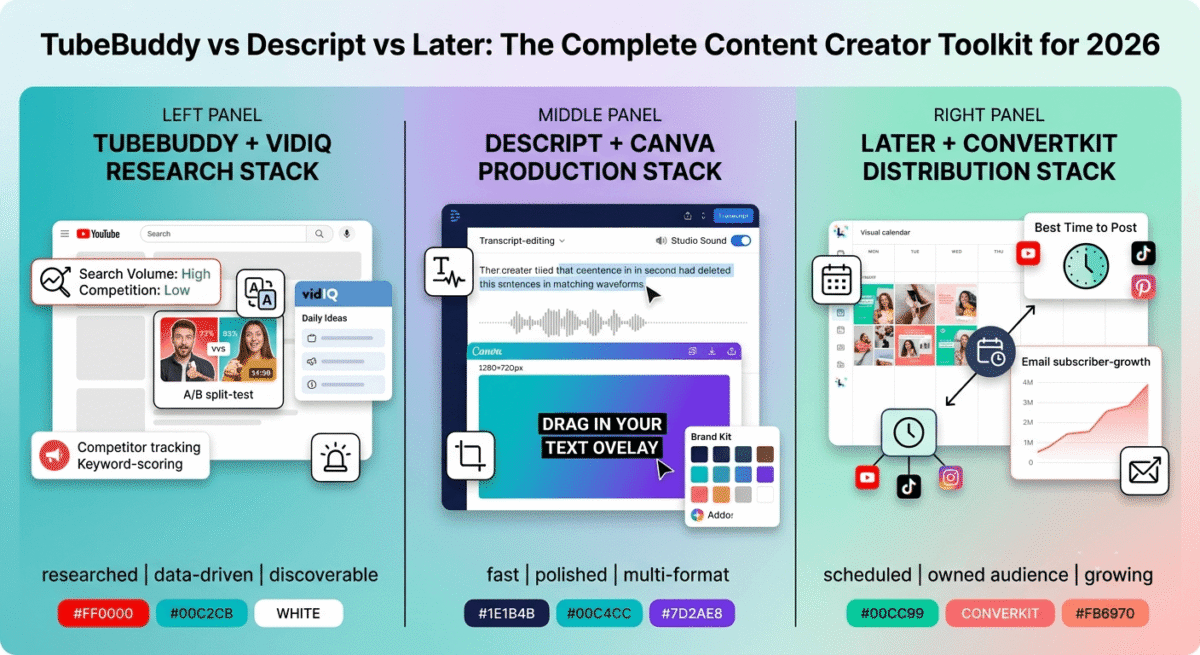
Later’s visual content calendar is the most beautiful and intuitive of the three tools. Instead of a list-based queue, Later shows your scheduled posts as a drag-and-drop visual grid, you can see exactly how your Instagram feed will look before posts go live, rearrange posts by dragging them to different dates, and plan your visual aesthetic weeks ahead. For bloggers who care about their Instagram grid’s visual cohesion, this preview is invaluable.
The media library is Later’s most practical feature. Every image, video, and graphic you upload to Later is stored permanently in a searchable, taggable media library, no re-uploading the same images repeatedly. For bloggers who reuse blog featured images across multiple social platforms, the media library eliminates the friction of finding and re-uploading files every time.
Later’s link-in-bio tool, Linkin.bio, is the most sophisticated of the three tools. It creates a clickable version of your Instagram grid where every post links to a specific URL, a blog post, an affiliate product, a landing page. When a follower clicks your bio link and then clicks a post image, they go directly to the relevant page rather than a generic link list. In testing, Linkin.bio drove significantly more blog traffic from Instagram than a standard link-in-bio page.
Pinterest scheduling is Later’s most distinctive capability. Later connects directly to Pinterest and schedules pins natively, including pin title, description, and destination URL, without the workarounds required in Buffer or Hootsuite. For bloggers who generate significant traffic from Pinterest (food, lifestyle, DIY, travel, finance niches particularly benefit), Later’s Pinterest integration is reason enough to choose it over competitors.
The Best Time to Post feature analyses your audience’s activity patterns and recommends optimal posting times for each platform, presented as a visual heatmap showing when your specific followers are most active. This data-driven scheduling recommendation consistently outperforms generic “best times” advice.
Later’s AI Caption Writer, available on paid plans, generates captions with platform-appropriate tone (more casual for Instagram, more professional for LinkedIn), includes relevant hashtag suggestions, and can rewrite captions for different audiences. The hashtag suggestion tool is particularly useful, Later analyses which hashtags your target audience follows and recommends those with the highest reach-to-competition ratio.
Where Later falls short
Later’s analytics are less comprehensive than Hootsuite’s and comparable to Buffer’s; engagement rate, reach, impressions, and follower growth are covered, but competitor analysis and custom reporting are not available. For teams that need detailed performance reporting, Later’s analytics are insufficient.
The free plan’s 30-posts-per-month limit across all platforms is restrictive for active posters; a blogger posting once per day on three platforms exhausts the monthly allowance in 10 days.
Later’s desktop editing capabilities are less polished than Buffer’s; the image editor is basic, and video editing requires a separate tool. For creators who want to edit content within their scheduling tool, Later requires working in Canva or a separate editor first.
Twitter/X scheduling has historically been less reliable in Later than in Buffer; occasional sync issues mean some posts require manual publishing. For bloggers who rely heavily on Twitter/X, Buffer’s more robust Twitter integration may be preferable.
Later pricing
Plan | Price/month (annual) | Social sets | Posts/month | Key features |
Free | $0 | 1 | 30 | Basic scheduling, visual calendar |
Starter | $16.67 | 1 | Unlimited | + Analytics, AI captions, best time to post |
Growth | $33.33 | 3 | Unlimited | + Linkin.bio, hashtag suggestions, team members |
Advanced | $66.67 | 6 | Unlimited | + Advanced analytics, priority support |
Later: Pros and Cons
Pros:
– Best visual content calendar, drag-and-drop Instagram grid preview
– Best Pinterest scheduling, native integration with full pin details
– Linkin.bio converts Instagram followers to blog traffic most effectively
– Permanent media library, no re-uploading files
– Best Time to Post heatmap based on your specific audience data
– AI captions with platform-appropriate tone and hashtag suggestions
– 30% recurring affiliate commission, highest of the three tools
– Most suitable for visual-content-heavy niches
Cons:
– Less comprehensive analytics than Hootsuite
– Free plan 30-posts/month limit restrictive for active posters
– Basic image editor, requires Canva or separate tool for editing
– Twitter/X scheduling occasionally unreliable
– Less suitable for text-heavy platforms (LinkedIn, Twitter/X)
– Social listening not available
Rating: 4.5 / 5 Best social media scheduling tool for visual content creators and bloggers using Pinterest as a traffic channel.
Head-to-Head Comparison
| Buffer Essentials | Planable Basic | Hootsuite Professional | Pallyy Pro | Later Growth | |
|---|---|---|---|---|---|
| Price/month (annual) | $6/channel | ~$33/workspace | $99 (10 accounts) | $20 (billed annually) | $33.33 (3 sets) |
| Free plan | Yes (3 channels, 10 posts) | Yes (50 posts total, no time limit) | No (30-day trial) | Yes (1 set, 15 posts) | Yes (1 set, 30 posts) |
| Visual content calendar | No | Yes | Yes | Yes | Yes (best of three) |
| Instagram grid preview | No | No | No | Yes | Yes |
| Pinterest scheduling | Basic | Yes | Basic | Yes | Excellent |
| Analytics depth | Basic | Add-on | Excellent | Yes | Moderate |
| Social listening | No | Add-on | Yes (Streams) | No | No |
| Link-in-bio tool | Yes (Start Page) | No | No | Yes | Yes (Linkin.bio – best) |
| AI caption writing | Yes | Yes | Yes (OwlyWriter) | Yes | Yes |
| Unified inbox | Yes (Engage) | Add-on | Yes (comprehensive) | Yes | Limited |
| Team collaboration | Team plan | Yes | Yes | Yes | Growth plan |
| TikTok support | Limited | Yes | Yes | Yes | Yes |
| Best for | Bloggers/individuals | Teams/agencies with approvals | Teams/agencies | Agencies/freelancers/brands | Visual creators/Pinterest |
| Affiliate commission | 20% recurring | 15-25% | Standard | 20% recurring | 30% recurring |
Which Social Media Scheduling Tool Should You Choose?
Choose Buffer if:
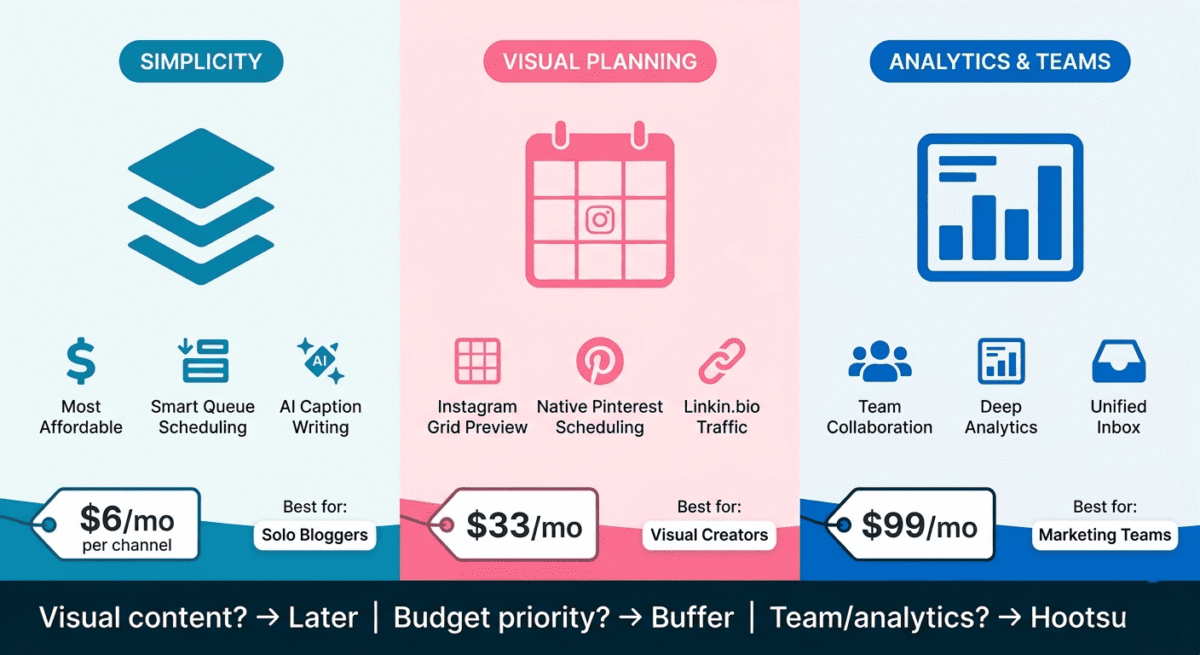
You want the most affordable, cleanest, and easiest-to-use social media scheduler for managing your blog’s social presence across multiple platforms. Buffer’s free plan covers solo bloggers with basic scheduling needs, and the $6/channel/month Essentials plan is the most cost-effective paid option. The queue-based scheduling and AI caption assistant make consistent posting achievable without significant time investment.
Choose Planable if:
You work in a team or agency where posts have to be approved before they publish, and you are tired of paying per seat for every reviewer. Planable’s per-workspace pricing means the client, the strategist and the designer can all review the same preview at no extra cost, and required approval stops anything going live before it is signed off. It is not the tool for a solo blogger, but for an agency managing client accounts it removes the approval back-and-forth that eats a day a week.
Choose Hootsuite if:
You manage social media for multiple brands or clients and need deep analytics, social listening, team collaboration, and custom reporting. Hootsuite’s Professional plan at $99/month is difficult to justify for individual bloggers, but for marketing agencies and enterprise brands where social media is a core revenue driver, the comprehensive feature set is worth the investment.
Choose Pallyy if:
You manage social media for clients, multiple brands, or a growing business and want scheduling, analytics, approvals, inbox management, and link-in-bio tools in one platform. Pallyy’s biggest advantage is its combination of multi-platform publishing and agency-friendly workflow features without the enterprise-level pricing of Hootsuite. The Pro plan at $25/month adds unlimited scheduled posts, a social inbox, AI captions, post ideas, client and team approvals, and shared calendars, while the Social Set system keeps each brand or client organized separately.
Choose Later if:
You use Instagram and Pinterest as primary traffic channels and want the best visual content planning experience. Later’s drag-and-drop visual calendar, Instagram grid preview, and native Pinterest scheduling make it the most practical tool for visual-content-heavy niches, food, travel, lifestyle, DIY, fashion, and home decor. The Linkin.bio feature also makes it the most effective tool for driving Instagram followers to specific blog posts.
The Blogger Social Media Strategy
For bloggers promoting content on social media, here is the most effective approach using scheduling tools:
Platform priority by niche:
– Food, travel, lifestyle, DIY, home, fashion: Instagram + Pinterest (use Later)
– B2B, marketing, career, finance: LinkedIn + Twitter/X (use Buffer)
– General blogging and news: Twitter/X + Facebook (use Buffer)
– Video content: YouTube + TikTok (use Later or Buffer depending on platform mix)
Weekly batching workflow:
– Monday: Create one week of social content (captions + images in Canva)
– Monday: Upload all content to your scheduling tool and schedule for the week
– Tuesday–Sunday: Let the scheduler post automatically, check notifications daily
Repurposing blog posts into social content:
– Turn each blog post’s key points into 5–7 individual social posts
– Create a quote graphic from the post’s most shareable insight
– Write a carousel post (Instagram/LinkedIn) summarising the post’s main takeaways
– Pin the post’s featured image to Pinterest with SEO-optimised pin description
– Share the post link on LinkedIn with a personal commentary angle. If your social content is geared heavily toward lead capture, route this incoming traffic directly into specialized, conversion-focused landing design systems rather than broad corporate homepages.
This workflow turns one blog post into a week of social content, with maximum distribution and minimum additional creation effort.
Recommended setup for bloggers:
– Visual niches (food, travel, lifestyle): Later Growth at $33.33/month for Instagram grid preview, Pinterest scheduling, and Linkin.bio
– Text-heavy niches (finance, B2B, tech): Buffer Essentials at $6/channel/month for clean scheduling across LinkedIn, Twitter/X, and Facebook
– Budget-first approach: Buffer free plan (3 channels, 10 posts/channel) to start, upgrade when you are posting consistently and want analytics
Final Verdict
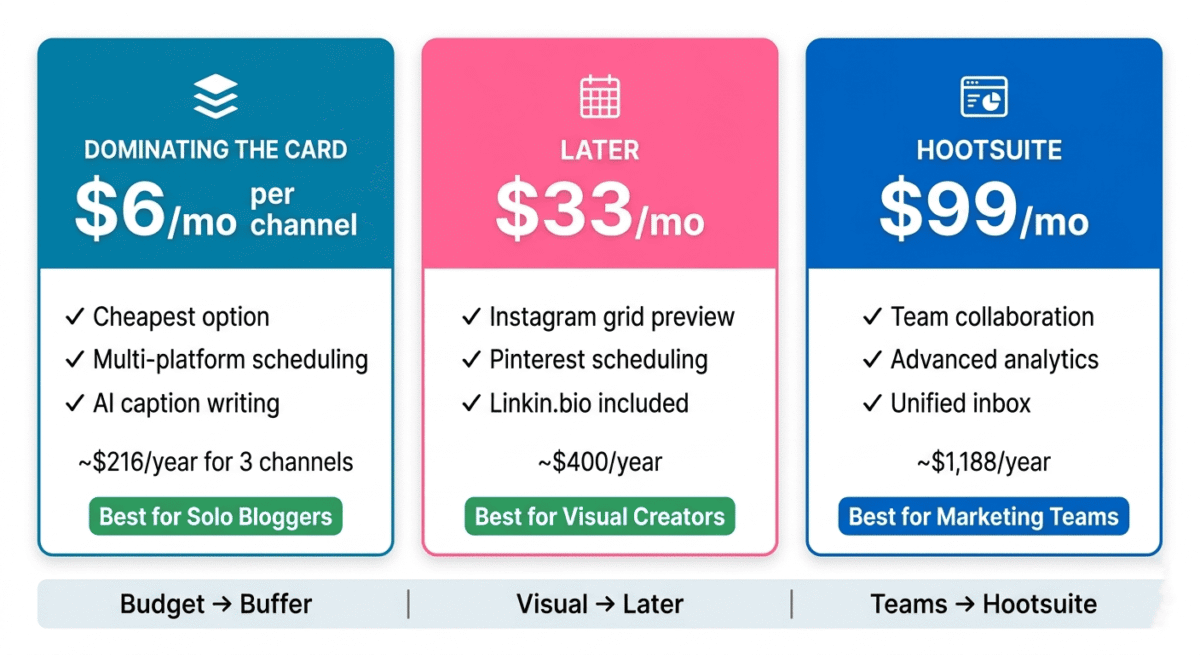
Buffer is the best social media scheduling tool for most bloggers: the cleanest interface, the most transparent pricing, the most useful free plan, and the lowest cost for multi-platform scheduling make it the default recommendation for content creators who want consistent social presence without overspending.
Planable is the best tool for teams and agencies that need approval before publishing: per-workspace pricing, built-in approval workflows and client review by link make it the practical choice when several people have to agree on a post, at a fraction of Hootsuite’s per-seat cost.
Later is the best tool for visual content creators and Pinterest users: the visual content calendar, Instagram grid preview, native Pinterest scheduling, and Linkin.bio make it uniquely valuable for bloggers in visual niches who drive significant traffic from Instagram and Pinterest.
Hootsuite is the best tool for marketing teams and agencies: its analytics depth, social listening, and team collaboration features justify the $99/month cost for professional social media management, but not for individual bloggers.
Ratings:
– Pallyy: 4.7/5
– Planable: 4.7 / 5
– Buffer: 4.6 / 5
– Later: 4.5 / 5
– Hootsuite: 4.3 / 5
In addition to social schedulers, using the right WordPress plugins can significantly improve your blog’s performance.
Frequently Asked Questions
What is the best free social media scheduling tool in 2026?
Buffer offers the most useful free plan, 3 social channels and 10 scheduled posts per channel with access to core scheduling features. Later’s free plan covers 1 social set with 30 posts per month and includes the visual content calendar. Both are genuinely functional free tiers rather than crippled trials. For bloggers just starting with social media scheduling, Buffer free is the recommended starting point.
Is Hootsuite worth the price?
For marketing teams and agencies managing multiple brand accounts with clients who require detailed analytics reports, yes. For individual bloggers and small businesses, no, Buffer and Later provide the core scheduling functionality at a fraction of Hootsuite’s $99/month cost. The analytics and social listening features that justify Hootsuite’s premium are unnecessary for most bloggers whose primary goal is consistent content distribution rather than enterprise-level social intelligence.
What is the best social media scheduler for Instagram?
Later is the best social media scheduler for Instagram, its visual grid preview lets you see exactly how your feed will look before posts publish, the drag-and-drop calendar makes rescheduling instant, and the Linkin.bio feature converts Instagram followers into blog visitors more effectively than a standard link-in-bio page. For Instagram-first creators, Later’s visual planning capabilities are unmatched.
What is the best social media scheduling tool for Pinterest?
Later is the best social media scheduling tool for Pinterest; it offers native Pinterest scheduling with full pin details (title, description, destination URL, board selection) without the workarounds required in Buffer or Hootsuite. For bloggers who drive significant traffic from Pinterest, Later’s Pinterest integration is reason enough to choose it over competitors.
Can I schedule Instagram Reels and TikTok videos?
Yes. Buffer supports Reels scheduling on paid plans. Later supports both Reels and TikTok scheduling on paid plans. Hootsuite supports both. Video scheduling has some platform-specific limitations; auto-publishing works for most video formats, but some require mobile notification completion. Check each tool’s current video publishing capabilities before committing, as platform API changes affect this frequently.
How many social media accounts can I manage with Buffer?
Buffer’s pricing is per channel; you pay $6/month/channel (Essentials) for each social account connected. Three channels cost $18/month, five channels cost $30/month. The free plan covers 3 channels at no cost. This per-channel model is more affordable for bloggers managing a small number of accounts than Hootsuite’s bundle pricing, which charges $99/month regardless of how few accounts you use.
What is the best time to post on social media?
Optimal posting times vary by platform, audience, and niche; generic best times advice is often inaccurate for specific accounts. Later’s Best Time to Post feature analyses your specific audience’s activity patterns and recommends personalised optimal times. Buffer’s AI assistant also provides posting time recommendations based on your account data. Both are more accurate than industry averages for your specific audience.
Do I need a social media scheduling tool or can I post manually?
Manual posting works for one or two platforms with infrequent posting. It breaks down into three or more platforms, daily posting frequency, or batch content creation workflows. The time cost of manually logging into each platform, formatting each post for platform-specific requirements, and posting at optimal times for each platform typically exceeds the cost of a scheduling tool within the first month. For bloggers treating social media as a traffic channel rather than a hobby, a scheduling tool is worth the investment.