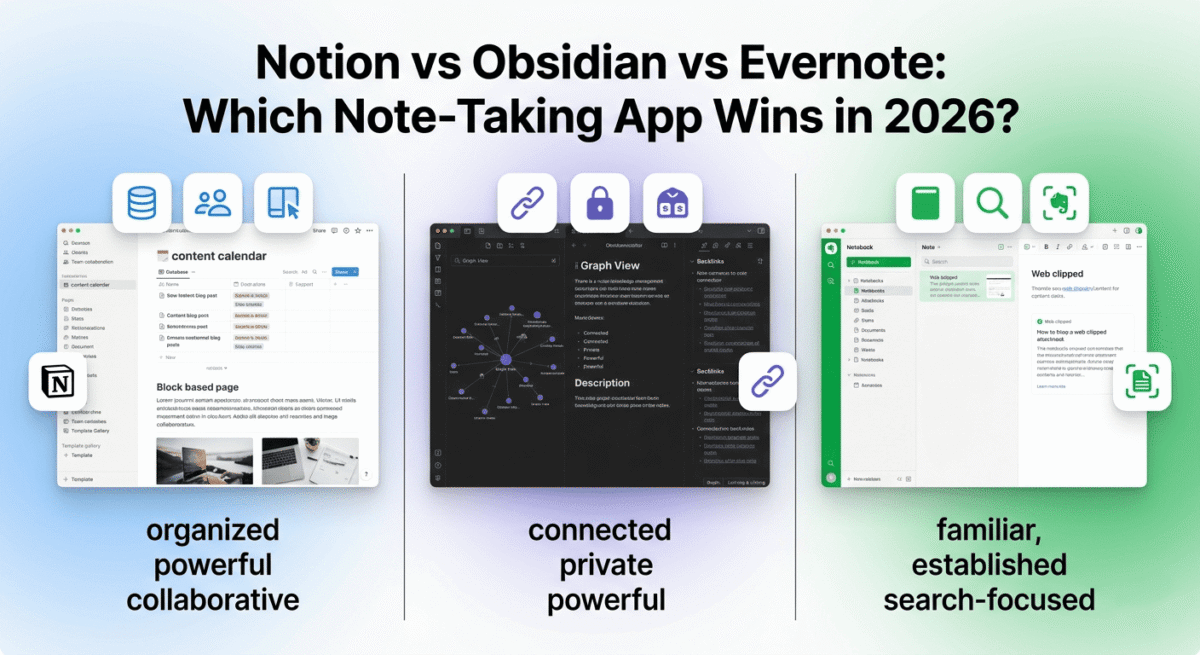
The right note-taking app is the difference between a scattered, forgetful mind and a second brain that remembers everything, connects ideas across projects, and surfaces the right information exactly when you need it.
But in 2026, note-taking apps have evolved far beyond digital notebooks. Notion is a full workspace. Obsidian is a knowledge graph. Evernote is the original that defined the category and has spent years fighting to stay relevant. Choosing between them is not a simple preference question; each is built on a fundamentally different philosophy about how people think and work.
I tested Notion vs Obsidian vs Evernote for 60 days as a primary knowledge management system, capturing ideas, managing blog content, organising research, storing reference material, and planning projects. Here is the honest comparison.
Table of Contents
How We Evaluated These Apps
Every app was tested across five criteria:
– Note creation and organisation: how easy and flexible is creating, linking, and finding notes?
– Knowledge management: how well does it handle large volumes of interconnected information?
– Collaboration: can teams work together effectively within the app?
– Cross-platform experience: how well does it work across desktop, mobile, and web?
– Value: free plan quality and paid plan pricing versus features offered
Why Note-Taking Apps Matter for Bloggers
Before comparing the tools, a brief note on why note-taking deserves more attention than most bloggers give it.
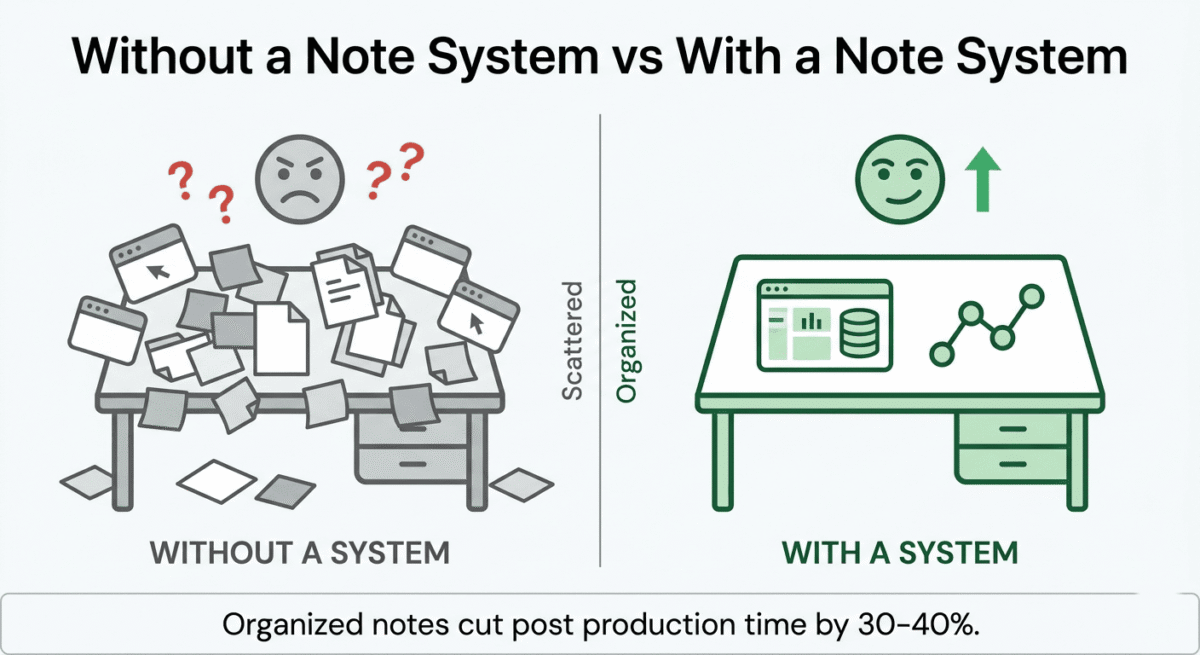
Content research organisation. Every blog post requires research, product pricing, feature comparisons, user reviews, and statistical claims. Without a system to capture and organise this research, you re-research the same information repeatedly and miss connections between topics that would strengthen your content. Once your collected data is structured, moving it through a comprehensive writing analysis tool guarantees that technical correctness matches the depth of your research.
Content calendar and idea management. The best blog post ideas come at unpredictable moments, in the shower, reading a competitor’s post, or responding to a reader’s email. A note-taking app that is always available (on phone, desktop, and browser) captures these ideas before they evaporate.
Blog post templates and SOPs. Storing your blog post structure, publishing checklist, affiliate link library, and keyword research process as reusable templates in a note-taking app creates a repeatable content production system that scales as your blog grows.
Personal knowledge base. For a software review blog, a personal database of software features, pricing, affiliate rates, and comparison notes, built up over months of research, becomes an increasingly valuable asset. The right note-taking app makes this knowledge retrievable rather than buried. Note-taking is one piece of a freelance blogger’s stack, see our roundup of tools for freelancers for the rest of what a solo content business typically runs on.
Notion Review: Best Note-Taking App for Bloggers and Teams
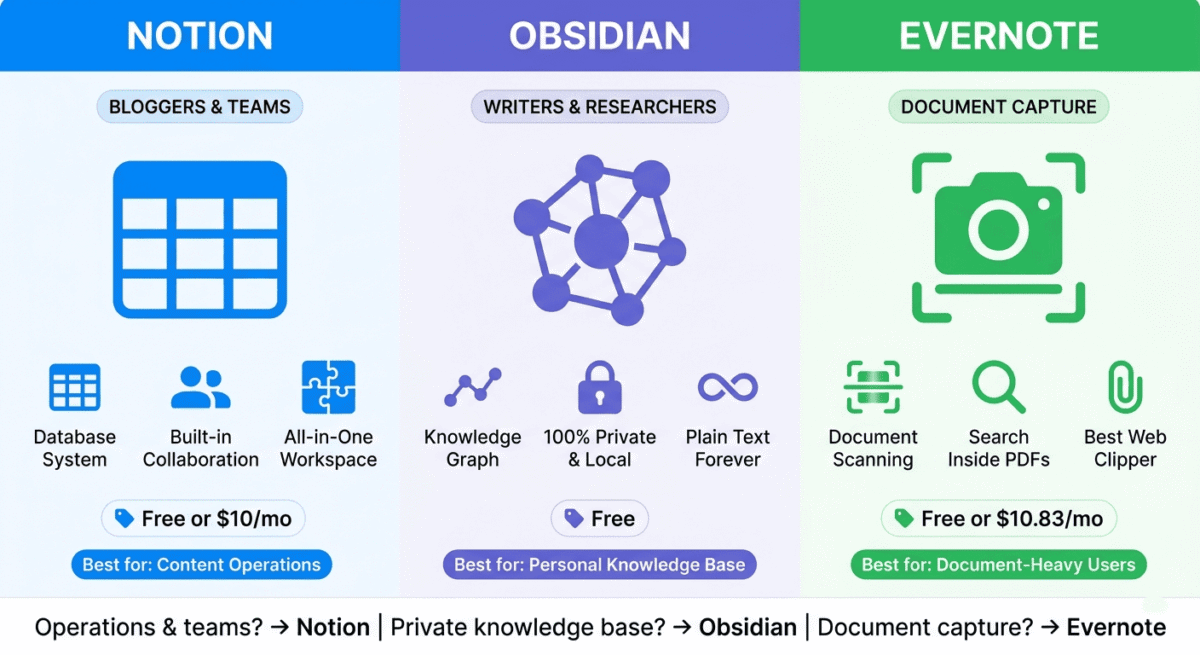
Free plan: Yes, unlimited pages and blocks, limited collaboration
Starting paid price: $10/month (Plus, billed annually)
Best plan for most users: Free plan or Plus, $10/month (billed annually)
Platforms: Web, Windows, Mac, iOS, Android
Affiliate program: Yes, Notion affiliate program
Notion is the most versatile productivity tool on this list, a hybrid between a note-taking app, a database, a project manager, and a wiki. For bloggers who want one tool to manage their content calendar, research notes, affiliate link library, and editorial workflow simultaneously, Notion is the most capable all-in-one solution available.
What Notion does best
Notion’s block-based editor is the most flexible note creation interface of the three tools. Every piece of content in Notion is a block, text, heading, image, video, code, bookmark, table, to-do list, toggle, callout, quote, divider, or any of dozens of other types. You mix and match blocks freely within any page, creating rich, structured documents that pure text editors cannot replicate.
The database feature is Notion’s most powerful capability, and the one that most separates it from traditional note-taking apps. A Notion database is a collection of pages that share a common structure; each page has the same set of properties (text fields, dates, selects, numbers, relations, formulas, rollups) and can be viewed as a table, board (Kanban), calendar, gallery, list, or timeline. For bloggers, this enables:
– A content calendar database showing every blog post with status (Draft, Published, Scheduled), target keyword, word count, and publication date
– An affiliate program database tracking every affiliate program with commission rate, cookie duration, payment threshold, and affiliate link
– A keyword research database storing target keywords with search volume, difficulty, and the post assigned to target each keyword
– A blog post ideas database capturing ideas with priority level, estimated traffic potential, and assigned writing date
The relations feature connects databases, linking a blog post to its target keywords, connecting an affiliate program to all posts that promote it, or associating a research note with the blog posts it informs. This connected structure transforms a collection of notes into a genuine knowledge management system.
Notion’s template gallery, both official templates and thousands of community-created templates, provides ready-made systems for content creators, students, project managers, and virtually every other use case. A blogger can install a complete content management system, editorial calendar, content brief template, SEO checklist, and publishing workflow in under five minutes from the template gallery.
The web clipper extension captures web pages, articles, and resources directly into your Notion workspace, saving the full page content, the URL, and a summary for later reference. For bloggers researching competitor content and software features, the web clipper replaces a separate bookmarking tool.
Notion AI, available as a paid add-on or included on Plus plans, assists with note summarisation, content drafting, translation, action item extraction from meeting notes, and Q&A over your Notion workspace. For a deeper look at AI-enhanced note-taking specifically, see our Notion AI vs Taskade vs Mem comparison of dedicated AI productivity tools. Asking “what affiliate programs do I have with over 30% commission?” and getting an instant answer from your own database is genuinely useful for bloggers managing complex affiliate relationships.
Where Notion falls short
Notion’s performance on large workspaces has historically been a criticism; pages with many blocks or databases with thousands of rows can load slowly, particularly on mobile. Performance has improved significantly in recent updates but remains below the instant responsiveness of Obsidian’s local-first approach.
Notion requires an internet connection for full functionality, while offline access has improved, it is not as reliable as Obsidian’s completely offline operation. For writers who work in areas with unreliable internet, this dependency is a genuine practical limitation.
The learning curve, while lower than Obsidian’s, is real, the database system particularly takes time to understand and configure correctly. New users sometimes build inefficient structures that require rebuilding as their understanding of Notion’s capabilities matures.
Notion’s free plan limits real-time collaboration to a small number of guests; solo bloggers and small teams are well-served by the free plan, but larger collaborative teams benefit from the Plus plan. If your team is distributed, pairing Notion with the right remote work tools rounds out a proper collaborative setup, see our full roundup.
Notion pricing
Plan | Price/month (annual) | Key features |
Free | $0 | Unlimited pages, 7-day history, limited guests |
Plus | $10 | Unlimited history, unlimited guests, Notion AI |
Business | $15 | + Advanced permissions, private teamspaces, SAML SSO |
Enterprise | Custom | + Advanced security, audit log, customer success |
Notion: Pros and Cons
Pros:
– Most versatile, notes, databases, project management, wiki in one tool
– Database feature transforms notes into structured knowledge management
– Largest template library, ready-made systems for every workflow
– Web clipper for saving research from any webpage
– Notion AI for workspace Q&A and content assistance
– Best collaboration features of the three tools
– Free plan genuinely useful for solo users
– Constantly improving, most active development team
Cons:
– Slower performance on large workspaces especially mobile
– Requires internet connection for full functionality
– Learning curve for database system
– Can become complex and disorganised without deliberate structure
– Notion AI requires paid plan or add-on
– Not the best pure writing environment
Rating: 4.7 / 5 Best note-taking app for bloggers who want a complete content management and knowledge system in one tool.
Obsidian Review: Best Note-Taking App for Deep Knowledge Management
Free plan: Yes, fully featured for personal use, completely free
Starting paid price: $50/year (Sync add-on) | $96/year (Publish add-on)
Best plan for most users: Free with optional Sync ($50/year) for multi-device
Platforms: Windows, Mac, Linux, iOS, Android
Affiliate program: No, Obsidian has no affiliate program
Obsidian is the most intellectually ambitious note-taking tool on this list, built around the principle that ideas are most valuable when connected to other ideas. Rather than organising notes in folders and notebooks, Obsidian encourages linking notes to each other, creating a personal knowledge graph where every concept is connected to the concepts that relate to it. The result, when used consistently, is a second brain that surfaces unexpected connections and makes knowledge genuinely retrievable.
What Obsidian does best
Obsidian’s bidirectional linking is its defining feature. Every note can link to any other note using double bracket syntax, [[Note Title]], and every note automatically shows which other notes link back to it (backlinks). Over time, as you write more notes and link them together, Obsidian’s Graph View visualises your entire knowledge base as an interactive network of connected nodes, revealing clusters of related ideas, isolated notes that need more connections, and the conceptual relationships between different areas of your work.
For a software review blogger, this means a note about “VPN encryption protocols” automatically appears as a backlink in your NordVPN review, your ExpressVPN comparison, and your “how VPNs work” explainer post, connecting your research to every post that uses it, without manual cross-referencing.
Obsidian’s local-first architecture is its most technically distinctive feature. All notes are stored as plain text Markdown files on your own device, not on any company’s server. This has three practical implications: notes load instantly regardless of internet connection, your data is never at risk from a company going out of business or changing its pricing, and you can read and edit your notes with any text editor, forever. Markdown files created in Obsidian today will be readable in 50 years on whatever software exists then.
The plugin ecosystem, over 1,000 community-developed plugins, extends Obsidian’s capabilities to cover almost any workflow. Relevant plugins for bloggers include:
– Dataview: turns your notes into queryable databases, similar to Notion’s database feature
– Templater: creates powerful note templates with dynamic content and automated fields
– Calendar: adds a calendar view for date-based notes and daily journaling
– Excalidraw: embeds a drawing and diagramming canvas inside notes
– Kanban: adds a board view for task management within Obsidian. If task tracking is your primary need rather than a side feature bolted onto notes, see our roundup of task management alternatives (Todoist vs TickTick vs Microsoft To Do) built specifically for that job.
The daily notes feature creates a new note automatically each day, a blank canvas for capturing the day’s ideas, tasks, and observations that can be linked to longer-form notes for permanent storage.
Obsidian’s writing environment is the cleanest of the three tools, a distraction-free Markdown editor with a live preview mode that renders formatted text as you type. For writers who prefer focusing on words rather than the interface, Obsidian’s minimal editor is the most pleasant writing environment of the three.
Where Obsidian falls short
Obsidian has the steepest learning curve of the three tools; the linking philosophy, Markdown syntax, plugin installation, and vault configuration require meaningful time investment before the system works effectively. New users who open Obsidian for the first time and immediately start writing notes without understanding the linking system get less value than a simpler tool would provide.
Collaboration is minimal; Obsidian is designed for individual use. While the Obsidian Sync add-on enables multi-device syncing and basic version history, real-time collaborative editing is not supported. For teams who need to work on shared notes simultaneously, Notion is far better suited.
The mobile experience, while improved in recent updates, is less smooth than Notion’s dedicated mobile apps. The mobile plugin support is limited, and the interface is optimised for desktop use.
Multi-device sync requires either the paid Obsidian Sync add-on ($50/year) or a third-party sync solution (iCloud, Dropbox, or similar). The free plan is fully featured but device-bound without additional setup.
Obsidian pricing
Feature | Price | Notes |
Obsidian (personal) | Free | Fully featured, local storage |
Obsidian Sync | $50/year | Multi-device sync, version history |
Obsidian Publish | $96/year | Publish notes as a public website |
Commercial licence | $50/year | Required for business use |
Obsidian: Pros and Cons
Pros:
– Best knowledge graph, bidirectional linking reveals idea connections
– Local-first, all notes stored as plain text files on your device
– Complete privacy, no data ever sent to external servers
– Cleanest writing environment, distraction-free Markdown editor
– 1,000+ plugins for virtually any workflow extension
– Free for personal use, no subscription required
– Works offline completely, no internet dependency
– Future-proof, plain text files readable forever
Cons:
– Steepest learning curve, requires time investment to use effectively
– No real-time collaboration, individual use only
– Multi-device sync requires paid add-on or manual setup
– Mobile experience less polished than Notion
– Plugin management requires technical comfort
– No database feature without Dataview plugin
Rating: 4.6 / 5 Best note-taking app for deep knowledge management and privacy-conscious writers. Requires investment to unlock full value.
Evernote Review: The Original & Still Useful, No Longer the Best
Free plan: Yes, 1 notebook, 50 notes, 60MB monthly upload
Starting paid price: $14.99/month (Personal, billed annually, $10.83/month)
Best plan for most users: Personal, $10.83/month (billed annually)
Platforms: Web, Windows, Mac, iOS, Android
Affiliate program: Yes, Evernote affiliate program
Evernote invented the modern note-taking app category. Launched in 2008, it defined what digital note-taking could be: cross-platform sync, web clipping, document scanning, search within images, genuinely revolutionary features. In 2026, Evernote remains functional and familiar to millions of long-term users. It is also, honestly, no longer the best option for most new users.
What Evernote does best
Evernote’s web clipper is still the best of any note-taking tool, saving web pages in multiple formats (full page, simplified article, screenshot, bookmark) with better formatting preservation than Notion’s clipper and without Obsidian’s manual import requirement. For researchers and bloggers who save large volumes of web content for reference, Evernote’s clipping quality is genuinely superior.
The search capability is Evernote’s strongest remaining advantage. Evernote searches text inside PDF attachments, images (via OCR), handwritten notes, and scanned documents, not just note titles and text content. A photo of a handwritten meeting note is searchable in Evernote. A scanned contract is searchable by any word in its text. For users who need to find information across a large archive of mixed-format documents, this search depth is unmatched.
The notebook and tag organisation system, while less flexible than Notion’s databases or Obsidian’s linking, is familiar and requires minimal learning. Notes go in notebooks, notebooks go in stacks, and tags provide cross-notebook categorisation. For users who think in hierarchical folder structures, this familiar organisation model is immediately usable.
Evernote’s document scanning, using your phone camera to scan physical documents with automatic edge detection and perspective correction, remains one of the best mobile scanning implementations available. For bloggers who attend events, receive press kits, or collect physical reference materials, Evernote’s scanning workflow is more polished than Notion’s or Obsidian’s mobile capabilities.
Where Evernote falls short
Evernote’s free plan has been aggressively restricted: 1 notebook, 50 notes maximum, and a 60MB monthly upload limit. This is not a functional free plan for any serious user. In practical terms, Evernote has eliminated its free tier and requires a paid subscription for real use.
The Personal plan at $10.83/month (billed annually) costs essentially the same as Notion Plus ($10/month), but provides significantly fewer features. Notion’s database system, template library, collaboration features, and block-based editor all offer more capability per dollar than Evernote’s note-plus-notebook model.
Evernote’s development pace has slowed compared to Notion and Obsidian. The interface feels dated; it has not changed fundamentally in years while competitors have significantly advanced their feature sets. Users who need cutting-edge productivity features will find Evernote frustrating.
The company has faced financial difficulties and ownership changes. Bending Spoons acquired Evernote in 2022 and subsequently laid off most of its staff, raising concerns among long-term users about the platform’s long-term viability. While Evernote continues to operate, this uncertainty is a genuine consideration for users building a long-term knowledge management system.
Evernote pricing
Plan | Price/month (annual) | Notes | Upload/month | Key features |
Free | $0 | 50 | 60MB | 1 notebook, basic features |
Personal | $10.83 | Unlimited | 10GB | Unlimited notebooks, offline, calendar |
Professional | $14.17 | Unlimited | 20GB | + Tasks, Slack integration, customisation |
Teams | $20.83/user | Unlimited | 20GB/user | + Admin controls, team spaces |
Evernote: Pros and Cons
Pros:
– Best web clipper, superior formatting preservation across page types
– Best search, searches inside PDFs, images (OCR), and scanned documents
– Best document scanning via mobile camera
– Familiar notebook/tag organisation for hierarchical thinkers
– Long track record, most mature of the three tools
– Available on all major platforms
Cons:
– Free plan practically unusable, 50 note limit
– Similar price to Notion with significantly fewer features
– Development pace slower than competitors
– Interface feels dated compared to Notion and Obsidian
– Company ownership uncertainty raises long-term viability concerns
– No knowledge graph or bidirectional linking
– No database or structured data features
Rating: 4.0 / 5 Functional but outclassed. Best for existing long-term users and specific use cases (document scanning, deep search). Not recommended as a starting point for new users in 2026.
Head-to-Head Comparison
Notion Free | Notion Plus | Obsidian Free | Evernote Personal | |
Price/month | $0 | $10 | $0 | $10.83 |
Note limit | Unlimited | Unlimited | Unlimited | Unlimited |
Database/structured notes | Excellent | Excellent | Via plugin | No |
Bidirectional linking | Basic | Basic | Excellent | No |
Knowledge graph | No | No | Yes | No |
Collaboration | Limited guests | Unlimited guests | No | Yes |
Web clipper | Good | Good | Via plugin | Excellent |
Offline access | Limited | Limited | Full | Yes (paid) |
Mobile experience | Excellent | Excellent | Good | Good |
Document scanning | No | No | No | Excellent |
OCR/image search | No | No | No | Yes |
Privacy/local storage | Cloud | Cloud | Local | Cloud |
AI features | Add-on | Included | No | Limited |
Plugin ecosystem | Limited | Limited | 1,000+ plugins | No |
Template library | Excellent | Excellent | Community | Limited |
Best for | Bloggers/teams | Bloggers/teams | Knowledge workers | Document capture |
Which Note-Taking App Should You Choose?
Choose Notion if:
You want the most versatile all-in-one productivity tool for managing your blog, content calendar, research, affiliate tracking, and project notes in a single workspace. Notion’s database system is uniquely powerful for bloggers who want structured content management alongside freeform notes. The free plan covers solo bloggers completely; Plus at $10/month adds AI and unlimited collaboration.
Choose Obsidian if:
You are a serious writer or researcher who wants to build a genuine personal knowledge base where ideas connect and compound over time. Obsidian’s linking philosophy, local-first privacy, and plugin ecosystem reward the investment required to learn it. Completely free for personal use, the best free knowledge management tool available.
Choose Evernote if:
You are an existing Evernote user with years of notes already captured, migration costs exceed the benefits of switching. Or if your primary use case is capturing and searching physical documents via scanning and OCR, where Evernote’s capabilities remain genuinely superior. For new users starting fresh in 2026, Notion or Obsidian are the better starting points.
The Blogger Note-Taking System
For bloggers specifically, here is the recommended knowledge management setup:
Use Notion as your content operations centre:
– Content calendar database, every post with status, keyword, word count, publish date
– Affiliate program tracker, all programs with commission rates, affiliate links, payment dates
– Blog post template, your standard structure for new posts
– Keyword research database, target keywords with search volume and assigned posts
– Ideas database, future post ideas with priority ratings
Use Obsidian as your personal knowledge base:
– Software research notes, detailed notes on every software tool you review
– Competitive intelligence, notes on competitor blogs and their top content
– Industry reading, notes from articles and resources you want to remember
– Concept library, explanations of technical concepts you reference repeatedly. This environment mirrors the distraction-free approach of a minimalist writing tool, which helps you strip away layout complexities and isolate raw syntax before polishing.
This dual-tool approach gives you Notion’s structured database power for operational blog management and Obsidian’s knowledge graph for deep research and idea development, each tool doing what it does best.
Final Verdict
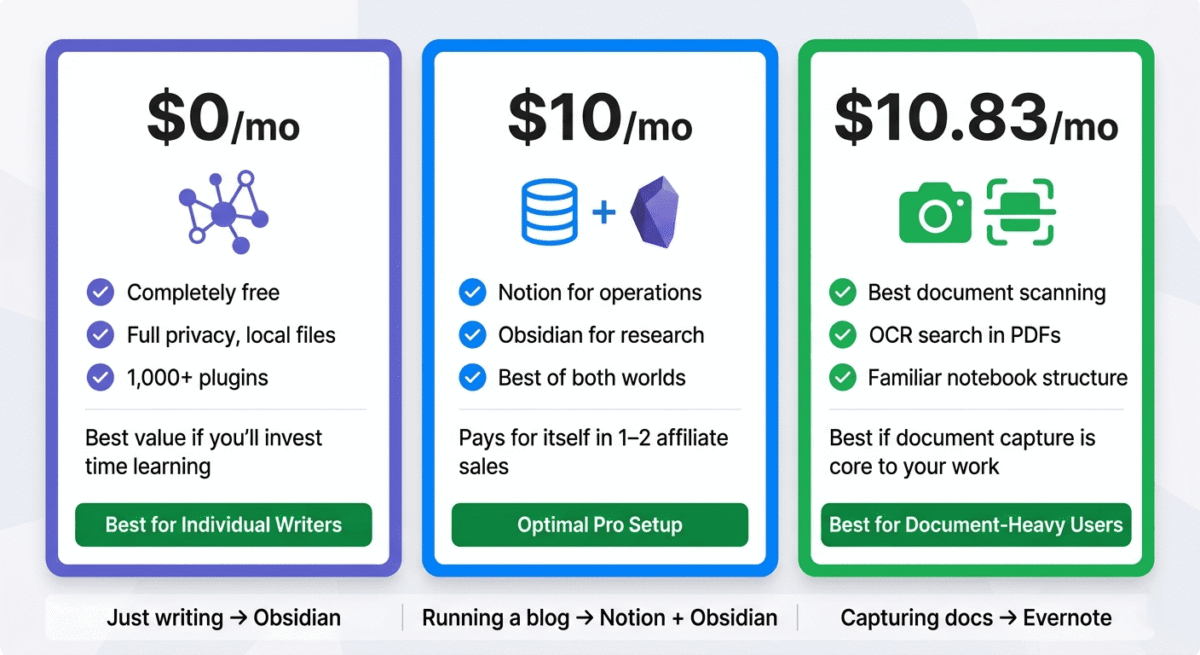
Notion is the best note-taking app for most bloggers in 2026. The database system, template library, and collaboration features make it the most capable all-in-one tool for managing a content business. The free plan is genuinely useful; Plus, at $10/month is worth it for AI features and unlimited collaboration.
Obsidian is the best tool for deep knowledge management. Its bidirectional linking, local-first privacy, and plugin ecosystem make it the most powerful personal knowledge base available. Completely free for personal use, an extraordinary value for serious writers.
Evernote is the right choice for existing users and document-heavy workflows its web clipper and OCR search remain strong, but its pricing, limited free plan, and slower development make it difficult to recommend as a starting point for new users when Notion and Obsidian offer more for less.
Ratings:
– Notion: 4.7 / 5
– Obsidian: 4.6 / 5
– Evernote: 4.0 / 5
Frequently Asked Questions
What is the best note-taking app for bloggers in 2026?
Notion is the best note-taking app for bloggers; its database system enables structured content management (editorial calendar, keyword tracking, affiliate program database) alongside freeform notes. The free plan covers solo bloggers, and the Plus plan at $10/month adds AI and unlimited collaboration. For bloggers who also want a personal knowledge graph, using Notion for operations and Obsidian for research is the optimal combination.
Is Obsidian really free?
Yes. Obsidian is completely free for personal use with no feature restrictions, unlimited notes, all core features, and access to the plugin ecosystem at zero cost. The paid Sync add-on ($50/year) enables multi-device synchronisation. Commercial use requires a licence ($50/year per user). For individual bloggers using Obsidian personally, the cost is zero.
Is Evernote still worth using in 2026?
For existing users with large note libraries, yes, migration costs typically exceed the benefits of switching. For new users starting fresh, no, Notion provides more features at a similar price, and Obsidian provides better knowledge management for free. Evernote’s best remaining capabilities (OCR search, document scanning, web clipping) are specific enough that they do not justify its subscription cost for general note-taking use.
What is the difference between Notion and Obsidian?
Notion is a cloud-based, collaborative workspace combining notes, databases, and project management, best for structured content and teamwork. Obsidian is a local-first, privacy-focused knowledge base built around bidirectional note linking, best for individual deep research and long-term knowledge building. Notion is more accessible; Obsidian is more powerful for personal knowledge management. Many serious users use both for different purposes.
Can I use Notion for free?
Yes. Notion’s free plan includes unlimited pages and blocks, 7-day version history, and limited guest collaboration, genuinely functional for solo bloggers and small teams. The free plan is not artificially crippled to force upgrades; it covers the core note-taking and database functionality that most individual users need. Upgrading to Plus ($10/month) adds unlimited version history, unlimited guests, and Notion AI.
Which note-taking app is best for students?
Notion is the most popular choice among students; the free plan covers student budgets, the template gallery includes study systems and lecture note templates, and the database feature handles course tracking and assignment management. Obsidian is preferred by graduate students and researchers who need serious knowledge management for academic work. Evernote’s limited free plan makes it less practical for budget-conscious students.
Does Notion work offline?
Partially. Notion has improved its offline capabilities; pages you have previously opened are cached and accessible offline, and changes sync when your connection returns. However, Notion is fundamentally cloud-dependent and not designed for full offline use. For writers who need complete offline reliability, Obsidian’s local-first architecture is significantly more robust.
What is a knowledge graph and why does it matter?
A knowledge graph is a visual map of how your notes connect; nodes represent notes and edges represent the links between them. Obsidian’s Graph View shows this map interactively. The value of a knowledge graph is discovering unexpected connections, seeing that your note about “email marketing open rates” connects to your note about “subject line psychology,” which connects to your post about “best email marketing software,” reveals relationships that improve all three pieces of content simultaneously. Over time, a rich knowledge graph makes you a better writer by surfacing the connections between everything you know.