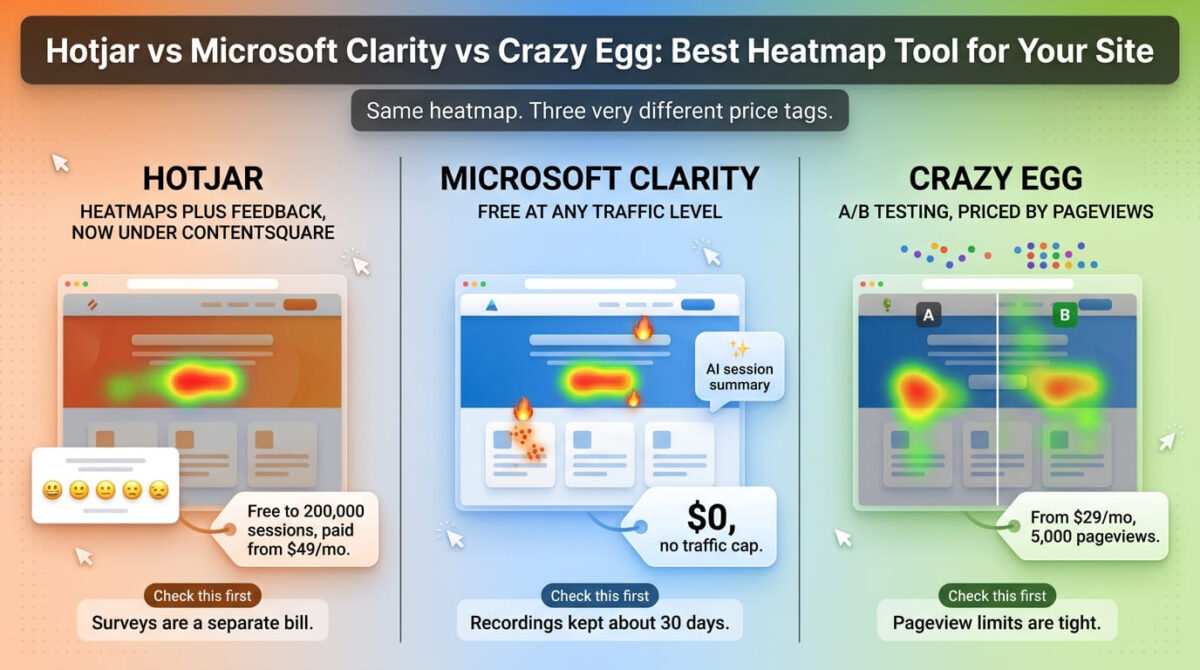
Hotjar vs Microsoft Clarity vs Crazy Egg is a comparison where the best-known name has changed the most. Hotjar is no longer sold on its own. Its heatmaps, recordings, and surveys now sit inside Contentsquare, and hotjar.com/pricing sends visitors to Contentsquare’s pricing page. The cheapest option in the comparison, Clarity, costs nothing at any traffic level.
The three tools meter the same job differently. Clarity is free with no paid tier. Crazy Egg is independent and bills by tracked pageviews, with A/B testing included from its second plan. Hotjar’s heatmaps and recordings are now one product and its surveys are another, which means two separate bills for teams that want both.
I tested Hotjar vs Microsoft Clarity vs Crazy Egg for 30 days, installing each one on the same reliable web hosting test environment and pricing out what 7,000, 45,000, and 200,000 monthly sessions would cost on each. Here is the honest comparison, including why the same heatmap costs nothing on one platform, $29 for 5,000 pageviews on another, and $49 or more on the third.
Table of Contents
How We Tested
Five criteria shaped the testing:
- Free plan limits: how much traffic, recording, and data retention each free tier covers
- Cost as traffic grows: what 7,000, 45,000, and 200,000 monthly sessions cost
- Feature scope: whether heatmaps, recordings, surveys, and A/B testing live in one product
- Data retention: how long recordings and heatmap data stay available
- Pricing information that has changed: where older articles describe plans that no longer exist
Why Hotjar Isn’t Quite Hotjar Anymore
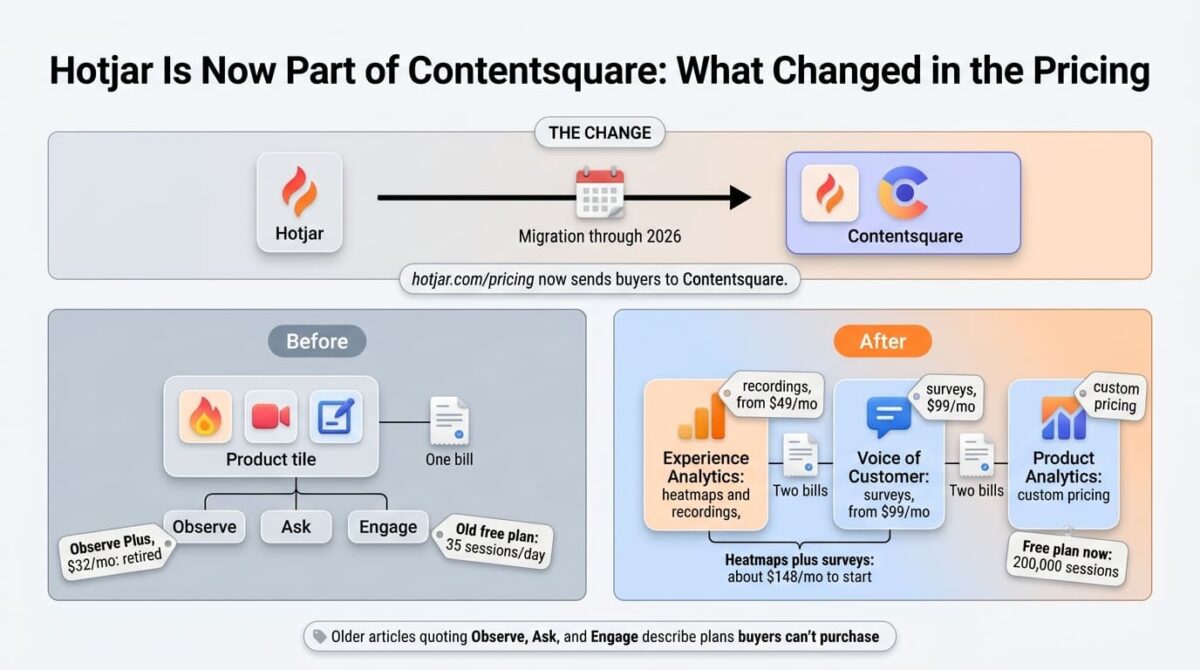
Contentsquare, which acquired Hotjar, has folded the product into its own platform. The hotjar.com domain redirects to Contentsquare for pricing, signup, and documentation, standalone Hotjar plans are no longer sold to new customers, and existing customers are being moved to Contentsquare’s plan structure through 2026. The old $32 per month Observe Plus plan has been retired.
What was one product with one bill is now sold as separate product lines. Experience Analytics covers heatmaps and recordings from $49 a month. Voice of Customer covers surveys from $99 a month. Product Analytics is custom-priced. A team that wants heatmaps and surveys together starts around $148 a month, so any article quoting the old Observe, Ask, and Engage plan names describes a structure buyers can no longer purchase.
Hotjar Review: A Bigger Free Plan, Now Sold Through Contentsquare
Free plan: Yes, 200,000 sessions/month, 10,000 session replays, 1 month of data
Starting price: $49/month (Growth, billed annually), 7,000 sessions
Best plan for most users: Growth, for sites that need 13 months of data and zone-based heatmaps
Platforms: Web, with integrations through Contentsquare
Affiliate program: Unconfirmed, check Contentsquare’s partner page before adding links
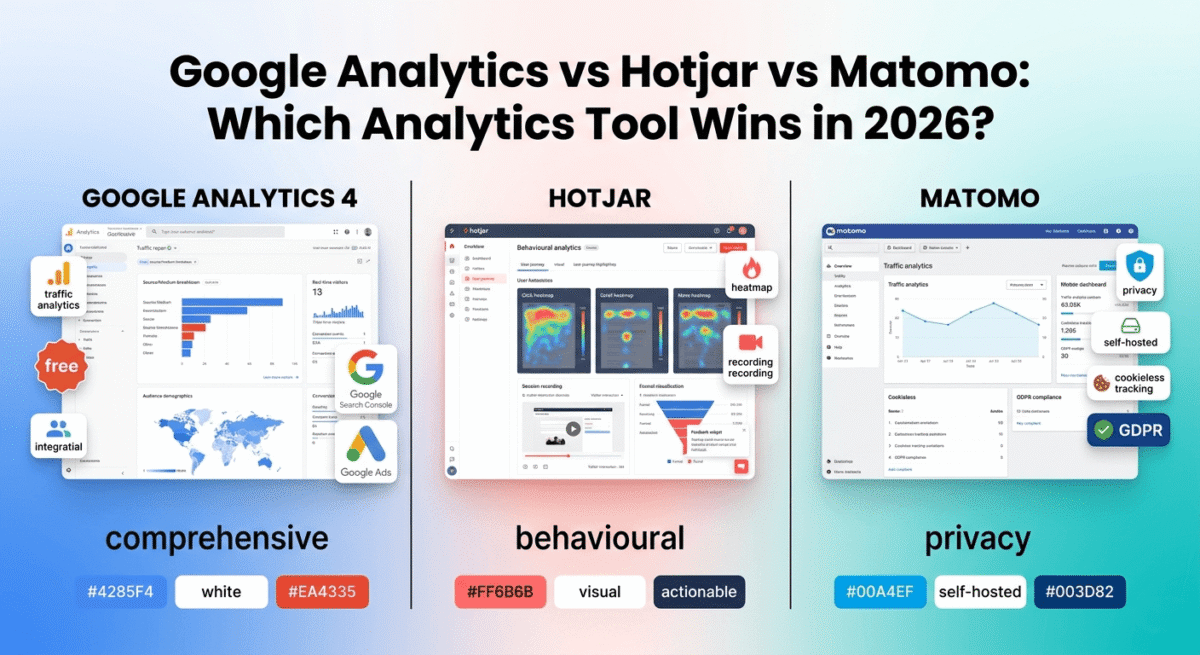
Hotjar built its reputation on pairing visual behavior data with feedback tools, much like dedicated user feedback collection platforms, and that combination is still its clearest strength inside the Contentsquare platform.
What Hotjar does best
The free plan is far larger than the old one. It now covers 200,000 monthly sessions with heatmaps, session replay, funnels, error monitoring, and basic surveys, compared with the 35 daily sessions the old Hotjar Basic plan allowed. For a small site, that makes the free tier a usable ongoing option, not a short trial.
Surveys and feedback widgets sitting next to heatmaps and recordings are where Hotjar still separates itself from Clarity, which has no survey tool. Paid plans also keep data for 13 months, far longer than Clarity’s recording retention.
Where Hotjar falls short
Surveys are a separate paid product, so a team that wants qualitative feedback alongside heatmaps pays two bills. Growth pricing climbs with session volume, from $49 at 7,000 sessions to $119 at 20,000, $219 at 45,000, and up to $739 at 200,000 or more.
A quirk in the Growth ladder is that the price keeps rising while the replay allowance stops growing. Above 20,000 sessions the plan includes 20,000 replays, because heatmaps and funnels use the full session count but replays are capped. The migration is also still in progress, so plan names and limits may differ between what existing customers see and what new buyers see.
Hotjar pricing
| Plan | Price | Sessions/Month | Notable Feature |
|---|---|---|---|
| Free | $0 | 200,000 | 10,000 replays, heatmaps, funnels, basic surveys |
| Growth (entry) | $49/month | 7,000 | 13 months of data, zone-based heatmaps |
| Growth (mid) | $119-$219/month | 20,000-45,000 | Replays capped at 20,000 |
| Growth (top) | Up to $739/month | 200,000+ | Same replay cap, higher session volume |
| Voice of Customer (surveys) | From $99/month | Separate product | Full surveys, billed separately |
Hotjar: Pros and Cons
Pros:
- Free plan covers 200,000 sessions a month, far above the old 35-per-day limit
- Surveys and feedback widgets sit alongside heatmaps and recordings
- Paid plans retain data for 13 months
- Established brand with a large user base and tutorial library
Cons:
- No longer sold standalone, with pricing moved to Contentsquare
- Surveys are a separate $99+/month product, creating two bills
- Replay allowance stops growing at 20,000 even as price rises
- Plan names and limits are mid-migration, so older reviews are out of date
Rating: 4.1 / 5, the richest mix of behavior data and feedback tools, now split across two bills and mid-migration to a new owner’s pricing.
Microsoft Clarity Review: Free at Any Traffic Level
Free plan: Yes, the only plan, no paid tier exists
Starting price: $0, permanently
Best plan for most users: The free plan, for any site that needs heatmaps and recordings without surveys
Platforms: Web, mobile app SDKs, Google Analytics 4 integration
Affiliate program: No, Clarity is a free Microsoft product with no referral program
Microsoft Clarity offers heatmaps, session recordings, frustration signals, and AI summaries at no cost, with no traffic limits and no cap on the number of websites.
What Microsoft Clarity does best
Price is the clearest advantage. There’s no paid tier, no credit card, and no trial that expires, and traffic isn’t capped, so a site with millions of monthly visitors gets the same tool as a small blog. Click, scroll, and area heatmaps are unlimited, and frustration signals like rage clicks and dead clicks are flagged automatically.
Copilot, Microsoft’s AI layer, adds a written summary of each session recording, similar to how conversational AI engagement tools handle visitor insights, and the Google Analytics 4 integration lets a team open recordings from GA4 directly. For a team that only needs heatmaps and recordings, Clarity beats the entry plans of both competitors on value.
Where Microsoft Clarity falls short
Retention is short. Recordings are kept for 30 days according to the most detailed recent breakdown, with favorited or labeled recordings and a random sample kept up to nine months, and heatmap data kept for nine months. Other sources quote 90 days or even a year, so check the current figure in Clarity’s own documentation. Either way, it’s less than Hotjar’s 13 months on paid plans.
There’s no survey or feedback widget tool, and no native A/B testing, so Clarity covers the observation side of the job and nothing beyond it. Because it’s free, Microsoft’s data practices matter: one review says the anonymous data collected helps improve Microsoft’s machine learning models, which is a reason to read its privacy terms before installing it on a site with strict compliance needs.
Microsoft Clarity pricing
| Plan | Price | Limits | Notable Feature |
|---|---|---|---|
| Free (only plan) | $0 | No traffic cap, unlimited projects | Heatmaps, recordings, Copilot AI summaries, GA4 integration |
| Recording retention | Included | ~30 days (conflicting reports) | Favorited recordings kept up to 9 months |
| Heatmap retention | Included | 9 months | Each heatmap aggregates up to 100,000 page views |
Microsoft Clarity: Pros and Cons
Pros:
- Completely free with no traffic limits, no paid tier, and unlimited websites
- Unlimited click, scroll, and area heatmaps
- Copilot AI summaries and GA4 integration included
- Automatic rage click and dead click detection
Cons:
- Recording retention of about 30 days is the shortest of the three
- No survey or feedback tool
- No native A/B testing
- Data practices deserve a close read for compliance-sensitive sites
Rating: 4.3 / 5, the best value of the three by a wide margin, with shorter retention and a narrower feature set than the paid tools.
Crazy Egg Review: Independent, With A/B Testing and Tight Pageview Limits
Free plan: No permanent free plan, 30-day free trial
Starting price: $29/month (Starter, billed annually), 5,000 tracked pageviews
Best plan for most users: Plus, $99/month, once A/B testing and 150,000 pageviews are needed
Platforms: Web, with Shopify, WordPress, and Wix integrations
Affiliate program: Unconfirmed, check Crazy Egg’s partner page before adding links
Crazy Egg, co-founded by Neil Patel in 2005, remains independent and bundles heatmaps, recordings, surveys, and A/B testing into one subscription priced by tracked pageviews.
What Crazy Egg does best
Native A/B testing is a core pillar of conversion optimization alongside high-converting lead capture software: none of the free tools in this comparison bundle split testing, and Crazy Egg includes it from the $99 Plus plan. Its Confetti reports break click data out by traffic source, which shows how paid and organic visitors interact with the same page differently.
Every plan includes unlimited domains and team members, and there are no overage charges. Pricing also depends on which pages are tracked, so a site can limit spending by tracking only the pages that matter.
Where Crazy Egg falls short
Volume limits are tight. The $29 Starter plan covers 5,000 tracked pageviews, 5 heatmap reports, and 50 recordings a month, so the tier a site needs is set by its traffic, not by the features it wants. Recent reviews describe it as a good first heatmap tool and a poor long-term one for that reason.
There’s no permanent free plan, only a 30-day trial, while Clarity gives unlimited recordings and heatmaps for nothing. Older guides also list a $49 Standard plan and a $499 Enterprise plan, but recent checks of Crazy Egg’s pricing page show Starter, Plus, Pro, and Enterprise at $29, $99, $249, and $599, so older figures are out of date.
Crazy Egg pricing
| Plan | Price (Annual Billing) | Tracked Pageviews/Month | Notable Feature |
|---|---|---|---|
| Starter | $29/month | 5,000 | 5 heatmap reports, 50 recordings, 6 months storage |
| Plus | $99/month | 150,000 | A/B testing, conversion and error tracking, 2 years storage |
| Pro | $249/month | 500,000 | 5,000 recordings, 100 heatmap reports |
| Enterprise | $599/month | 1,000,000+ | SAML SSO, onboarding, highest limits |
Crazy Egg: Pros and Cons
Pros:
- Native A/B testing from the Plus plan, which the free tools lack
- Confetti reports segment clicks by traffic source
- Independent company with unlimited domains and team members on every plan
- No overage charges and a 30-day trial
Cons:
- Starter’s 5,000 pageview limit is tight for most active sites
- No permanent free plan
- Pricing is set by traffic, so costs climb with growth regardless of feature needs
- Older pricing guides cite plans and prices that no longer match the current page
Rating: 3.8 / 5, the only one of the three with built-in A/B testing, priced tightly enough by traffic that most growing sites outgrow its entry plan quickly.
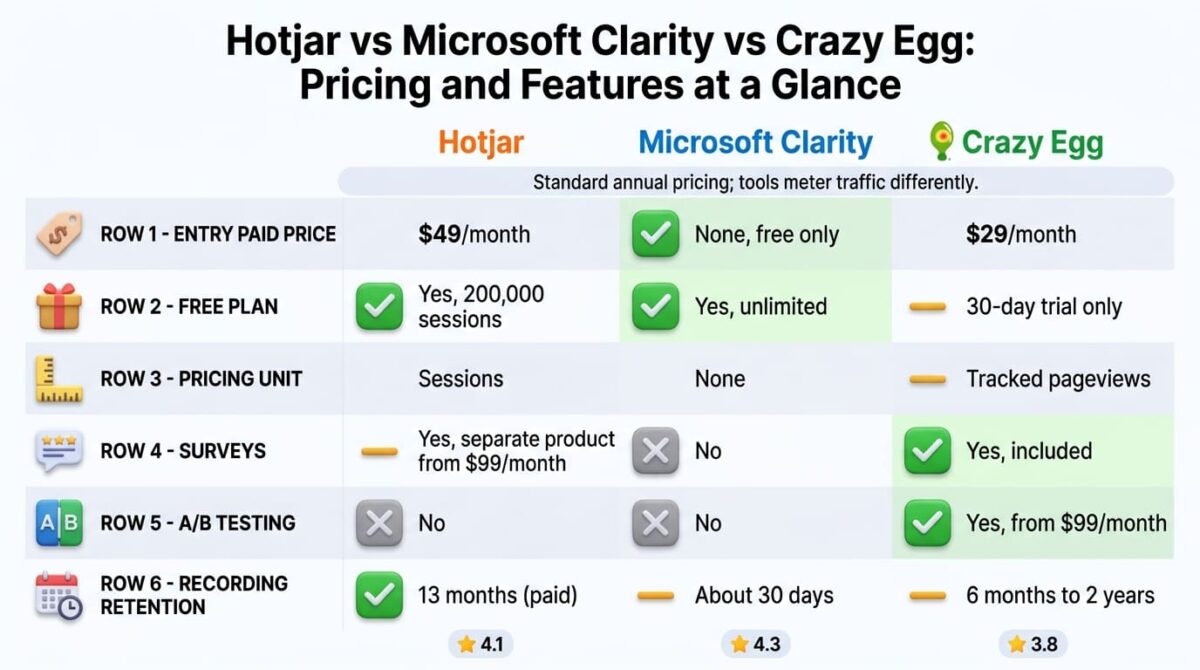
Head-to-Head Comparison
| Feature | Hotjar (Contentsquare) | Microsoft Clarity | Crazy Egg |
|---|---|---|---|
| Entry paid price | $49/month | None (free only) | $29/month |
| Free plan | Yes, 200,000 sessions | Yes, unlimited | No (30-day trial) |
| Pricing unit | Sessions | None | Tracked pageviews |
| Surveys | Yes, separate product from $99/month | No | Yes, included |
| A/B testing | No | No | Yes, from $99/month |
| Recording retention | 13 months (paid) | ~30 days | 6 months to 2 years |
| Ownership | Contentsquare | Microsoft | Independent |
| Best suited for | Teams wanting behavior data plus surveys | Any site wanting free heatmaps and recordings | Teams that want A/B testing in the same tool |
Which Should You Choose?
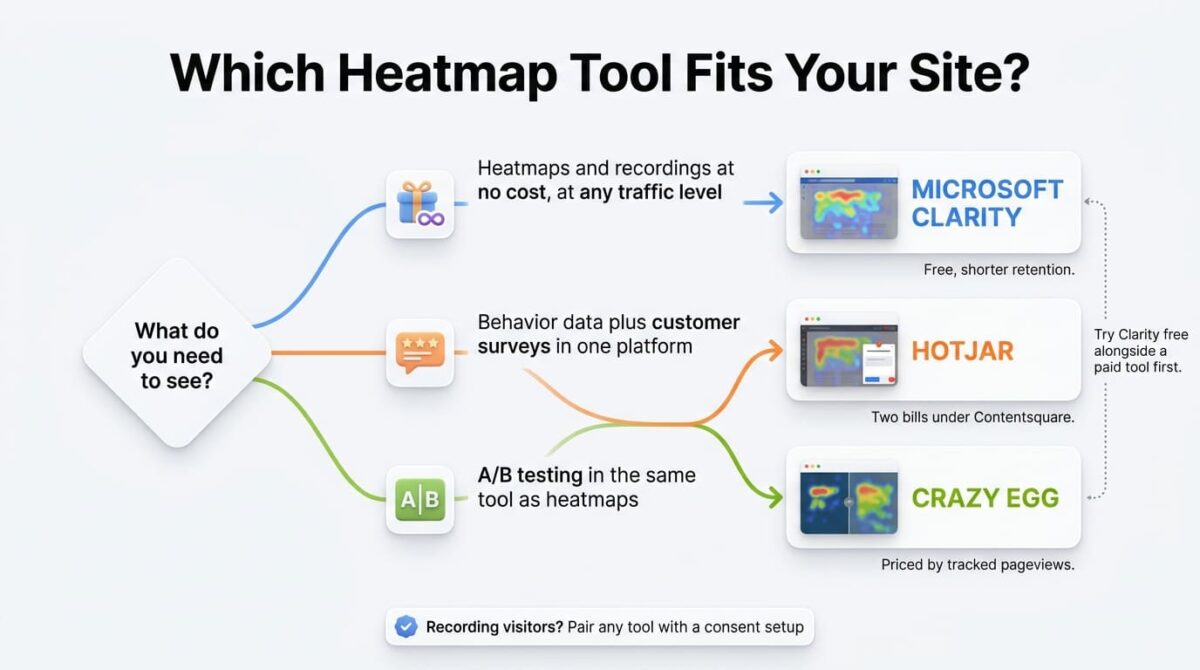
Choose Hotjar if heatmaps, recordings, and surveys all matter, and a two-bill structure under Contentsquare’s pricing is acceptable.
Choose Microsoft Clarity if heatmaps and recordings are the main need, and the free price outweighs shorter retention and the missing survey and A/B tools.
Choose Crazy Egg if A/B testing in the same tool matters, and the site’s traffic stays within a tier’s tracked pageview limit.
Our Recommendations
Based on 30 days of testing across setup, pricing at different traffic levels, and plan limits, here is the recommended setup by situation:
Any site starting with heatmaps and recordings: Microsoft Clarity, since it costs nothing and has no traffic limits.
Team that needs customer surveys alongside behavior data: Hotjar’s free plan first, then Growth plus a Voice of Customer plan once volume justifies two bills.
Marketing team running landing page tests: Crazy Egg Plus, for A/B testing and conversion tracking in the same product as heatmaps.
High-traffic site on a tight budget: Clarity, since Crazy Egg and Hotjar both scale their price with volume.
Any site that records visitor behavior: Pair the tool with a consent setup, since recording tools collect behavioral data and visitors in some regions must be asked first. Our cookie consent comparison covers the options.
Final Verdict
Hotjar, Microsoft Clarity, and Crazy Egg all show where visitors click and scroll, and the pricing and feature gaps between them are bigger than the visual output suggests.
- Microsoft Clarity – 4.3 / 5: the best value, free at any traffic level, with shorter retention and no survey or A/B tools
- Hotjar – 4.1 / 5: the richest behavior and feedback mix, now mid-migration into Contentsquare with two separate bills
- Crazy Egg – 3.8 / 5: the only built-in A/B testing, with pageview limits that push growing sites up its plan ladder
Before paying for any of these, install Clarity alongside it for a few weeks and compare what each shows. If Clarity covers the questions being asked, the other two are paying for surveys, retention, or A/B testing rather than for heatmaps.
Frequently Asked Questions
Is Hotjar still its own product?
Not for new customers. Contentsquare has folded Hotjar into its platform, hotjar.com/pricing redirects to Contentsquare, and standalone Hotjar plans are no longer sold to new buyers. Existing customers are migrating to Contentsquare’s plan structure through 2026.
How much does Hotjar cost now?
Heatmaps and recordings start at $49 a month on the Growth plan for 7,000 sessions, rising to about $739 at 200,000 sessions or more. Surveys are a separate product from $99 a month, and a free plan covers 200,000 sessions.
Is Microsoft Clarity really free?
Yes. It has no paid tier, no traffic limits, and no cap on the number of websites. The tradeoffs are shorter recording retention, no survey tool, and no native A/B testing.
How long does Microsoft Clarity keep recordings?
The most detailed recent breakdown says 30 days, with favorited or labeled recordings and a random sample kept up to nine months and heatmap data kept nine months. Other sources say 90 days or longer, so confirm in Clarity’s documentation.
Does Crazy Egg have a free plan?
Not a permanent one. It offers a 30-day free trial on paid plans, with Starter at $29 a month for 5,000 tracked pageviews. One review lists a free plan, but most current sources and the vendor’s trial offer don’t support that.
What did Crazy Egg’s pricing change?
Older guides list a $49 Standard plan and a $499 Enterprise plan. Recent checks of the current pricing page show Starter at $29, Plus at $99, Pro at $249, and Enterprise at $599.
Which tool has A/B testing built in?
Crazy Egg, from its $99 Plus plan. Neither Clarity nor Hotjar includes native A/B testing, so teams running split tests with those tools need a separate testing product.
Can I use Clarity and Hotjar together?
Yes. Running Clarity’s free plan alongside a paid tool is a common way to compare what each one shows, and it costs nothing extra to try.