Mac users have a password manager decision that Windows users do not, iCloud Keychain. Apple’s built-in password manager is deeply integrated into macOS and iOS, completely free, and genuinely capable. So the real question for Mac users is not just “which password manager should I use?” but “is iCloud Keychain good enough, or is it worth paying for 1Password or Bitwarden?”
I tested all three (1Password vs Bitwarden vs iCloud Keychain) for 30 days as the primary password manager across a MacBook Pro, iPhone, and iPad, covering daily autofill, password generation, secure note storage, cross-platform sharing, and security features. Here is the honest verdict.
Table of Contents
How We Evaluated These Tools
Every tool was tested across five criteria:
- Mac and iPhone integration, how seamlessly does it work within the Apple ecosystem?
- Cross-platform support, does it work on Windows, Android, and other platforms?
- Security features, encryption standards, breach monitoring, and two-factor authentication
- Sharing and family use, how well does it handle shared passwords and family plans?
- Value, what does free cover and what requires paid upgrade?
Why Every Mac User Needs a Password Manager
Before comparing the tools, a brief case for why password management matters more in 2026 than ever before.
The average person has 100+ online accounts. The average person uses fewer than 10 unique passwords across those accounts. This means the average person is one data breach away from having dozens of accounts compromised simultaneously, a single leaked password from a minor website opens every other account using the same password.
Password managers solve this by generating and storing a unique, strong password for every account, so a breach at one service never compromises another. The question is which tool does this best for Mac users specifically.
iCloud Keychain Review: Best Free Password Manager for Apple-Only Users
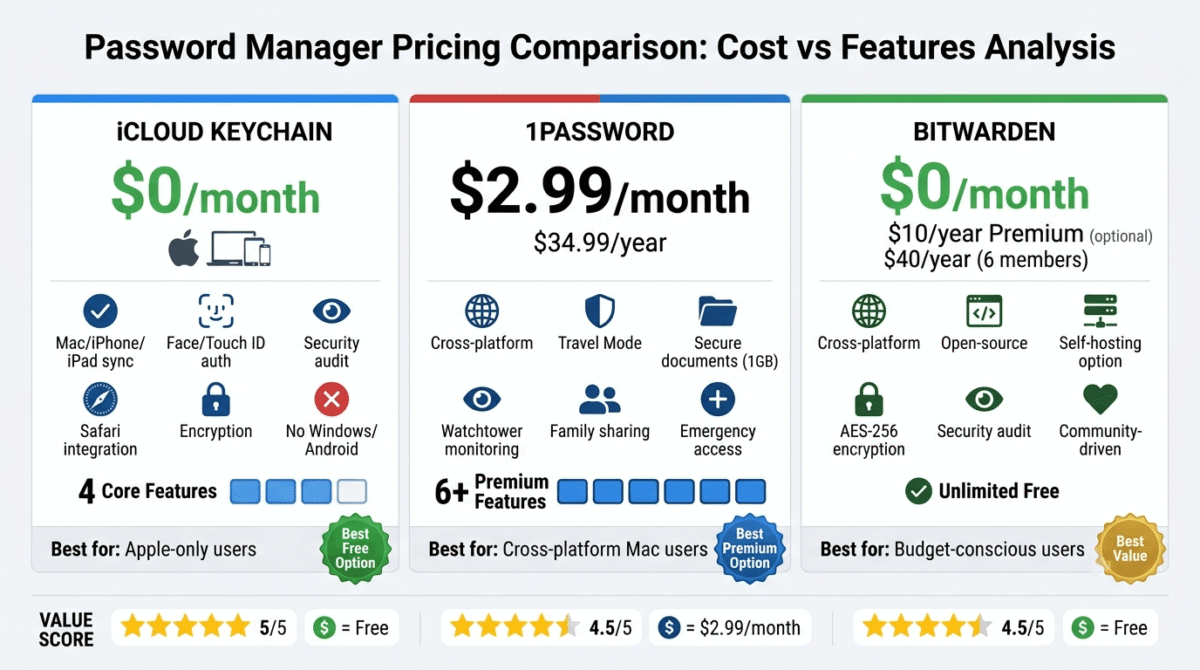
Price: Free, included with every Apple device and Apple ID
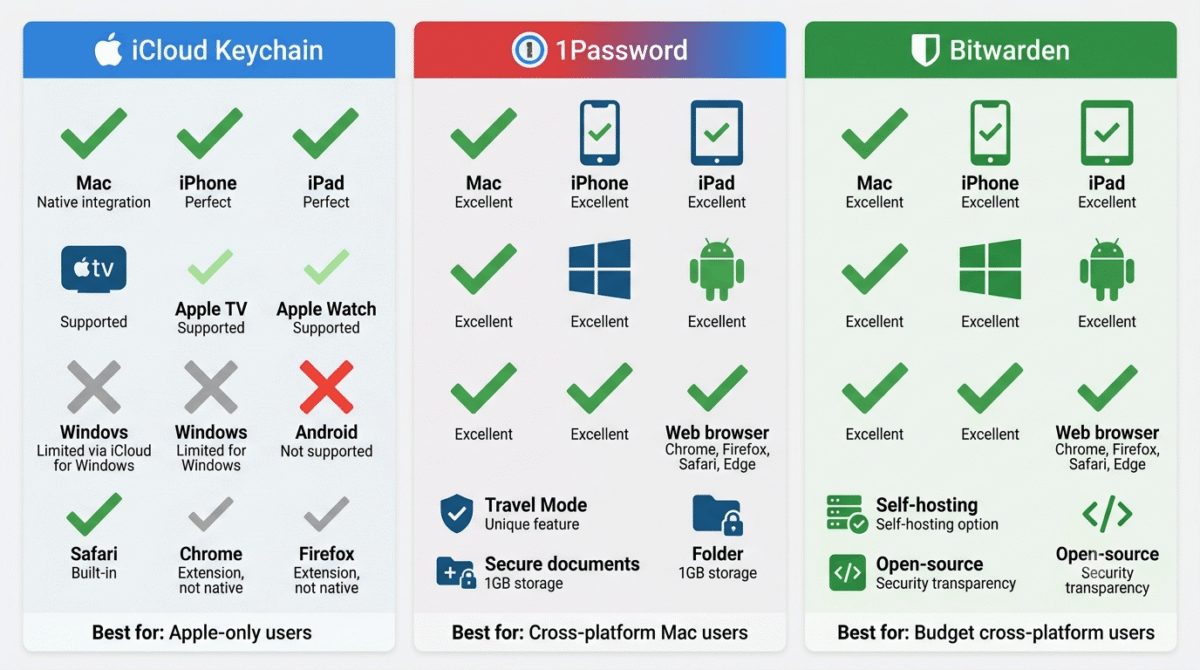
Platforms: Mac, iPhone, iPad, Apple TV, Apple Watch, Safari on Windows via iCloud for Windows
Affiliate: None, Apple product
iCloud Keychain is Apple’s built-in password manager, integrated directly into Safari, System Settings, and every Apple app that uses authentication. For users who live entirely within the Apple ecosystem, Mac, iPhone, iPad, with Safari as their primary browser, iCloud Keychain handles password management invisibly and effortlessly at zero cost.
What iCloud Keychain does best
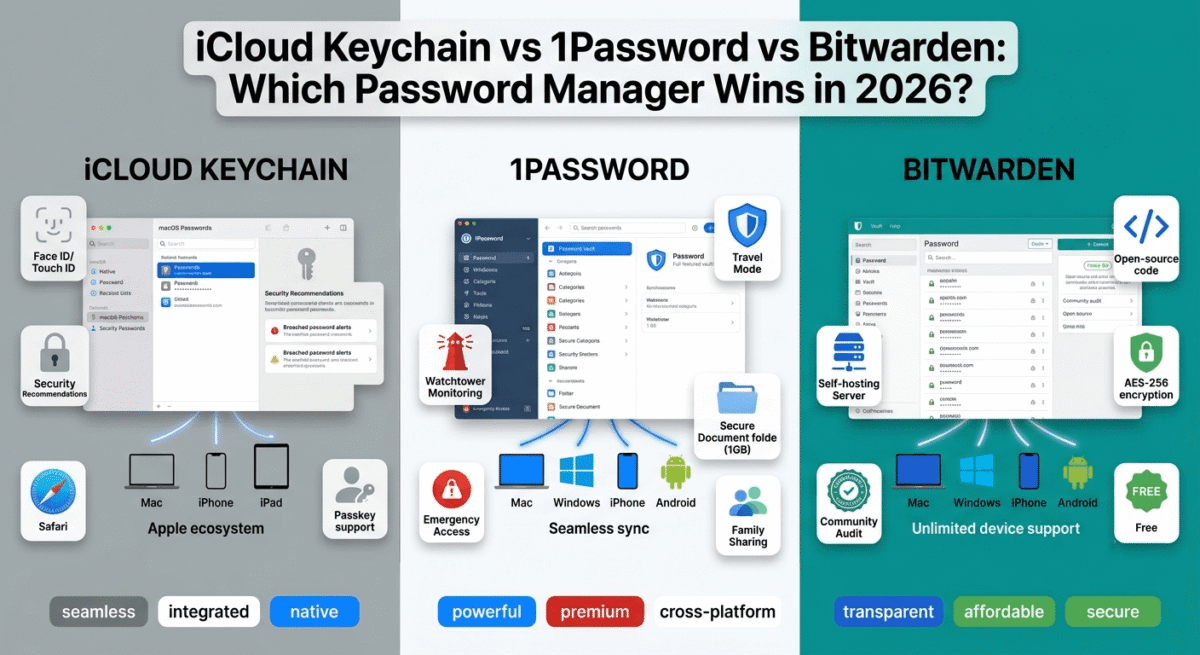
The integration with Safari and macOS is unmatched. When you create a new account in Safari, Keychain offers to generate and save a strong password automatically, no plugin, no popup from a separate app, just a native system dialog. When you return to the site, Keychain fills the password instantly via Face ID on iPhone or Touch ID on Mac, the fastest, most friction-free autofill experience of the three tools tested.
The Passwords app, introduced in iOS 18 and macOS Sequoia (2024), gives iCloud Keychain a dedicated interface that was previously buried in Settings. The standalone Passwords app shows all saved passwords, passkeys, and secure Wi-Fi passwords in a clean, searchable interface. Organise passwords into folders, search by site name or username, and view security recommendations in a single organised space.
The passkey support is the most seamless of the three tools. Passkeys, the passwordless authentication standard replacing passwords for supported sites, are created, stored, and used through iCloud Keychain with complete invisibility to the user. Sites that support passkeys (Apple, Google, Microsoft, GitHub, PayPal) use Face ID or Touch ID for instant login with no password entry. This is the future of authentication, and Keychain handles it most naturally.
The Security Recommendations section audits your saved passwords, flagging reused passwords, weak passwords, and passwords that have appeared in known data breaches via the Have I Been Pwned database. For users who have been using iCloud Keychain for years, running this audit typically reveals dozens of passwords that need updating.
iCloud Keychain syncs across all your Apple devices instantly through iCloud, passwords saved on iPhone appear on Mac within seconds, and vice versa.
Where iCloud Keychain falls short
The cross-platform limitation is iCloud Keychain’s most significant weakness. Windows support requires iCloud for Windows and the iCloud Passwords Chrome extension, functional but clunkier than native. Android support does not exist, iCloud Keychain passwords are completely inaccessible on Android devices. For Mac users who also use a Windows work computer or an Android phone, iCloud Keychain creates a platform gap that requires a separate solution.
Browser support is limited to Safari natively. The Chrome and Firefox extensions exist but are less integrated than Safari, autofill works but feels more like a third-party plugin than a native experience. Power users who prefer Chrome or Firefox as their primary browser get a degraded experience compared to Safari.
Secure notes and document storage are basic, iCloud Keychain stores passwords, credit cards, and Wi-Fi passwords, but lacks the secure note storage, passport/identity document storage, and file attachment capabilities that 1Password provides. For users who want to store sensitive documents alongside passwords, Keychain is insufficient. For more robust organization, you might want to pair it with one of the best note-taking apps.
There is no emergency access feature, if you lose access to your Apple ID and cannot recover it, all Keychain passwords are permanently inaccessible. 1Password and Bitwarden both provide emergency access mechanisms that Keychain does not.
Family sharing works through Family Sharing but is limited, you cannot easily share specific passwords with family members unless they are in your iCloud Family group, and the sharing experience is less structured than 1Password’s family vaults.
iCloud Keychain pricing
Feature | Cost |
Keychain storage | Free, included with Apple ID |
iCloud storage for sync | Free 5GB included (usually sufficient for passwords) |
iCloud+ (additional storage) | $0.99/month for 50GB |
iCloud Keychain: Pros and Cons
Pros:
- Completely free, no subscription required
- Best Safari and macOS integration, most seamless native experience
- Best passkey support on Apple platforms
- Touch ID and Face ID autofill, fastest authentication of the three tools
- Security audit flags reused, weak, and breached passwords
- Dedicated Passwords app (iOS 18/macOS Sequoia) provides clean interface
- No setup required, works from first Apple device login
Cons:
- No Android support, completely inaccessible on Android devices
- Limited Windows support, requires iCloud for Windows, less polished
- Chrome and Firefox less integrated than Safari
- No secure document storage or file attachments
- No emergency access mechanism for account recovery
- Limited family password sharing compared to 1Password Families
- No travel mode or advanced security features
Rating: 4.4 / 5, Best password manager for Mac users who use only Apple devices and Safari. Not recommended for anyone using Windows or Android alongside their Mac. If you want to discover more cost-effective options, see our guide to the best free software tools.
1Password Review: Best Premium Password Manager for Mac Users
Price: $2.99/month (Individual, billed annually) | $4.99/month (Families, up to 5 members)
Platforms: Mac, Windows, Linux, iOS, Android, Chrome, Firefox, Safari, Edge, Brave
Affiliate: Up to $60 per referral
Full review: Best Password Managers →
1Password is the best premium password manager for Mac users, built by a company with deep Apple roots (Toronto-based, longtime Mac-first development), the most polished macOS and iOS interface of any cross-platform password manager, and features that go significantly beyond what iCloud Keychain provides.
What 1Password does best
The Mac app is the most beautifully designed password manager available, native Swift UI, Apple design language throughout, and an interface that feels genuinely at home on macOS rather than a Windows app ported to Mac. The sidebar categories, search, and vault organisation follow Mac conventions precisely. For Mac users who care about software aesthetics alongside functionality, 1Password is the only cross-platform password manager that meets Apple design standards.
The Safari extension is the best non-Apple browser integration available, autofill in Safari works as smoothly as iCloud Keychain for most sites, with the added benefit of working across Chrome, Firefox, Edge, and Brave with equal capability. Mac users who use Chrome as their primary browser get a significantly better experience in 1Password than in iCloud Keychain.
Watchtower, 1Password’s integrated security monitoring, continuously checks all saved passwords against the Have I Been Pwned breach database, flags weak and reused passwords, identifies accounts without two-factor authentication enabled, and alerts to websites with expired SSL or known vulnerabilities. The Watchtower dashboard gives a single security score for your entire password vault, a clear health indicator that motivates ongoing security improvements.
Travel Mode is 1Password’s most distinctive security feature, and the one with no equivalent in iCloud Keychain or Bitwarden. Before crossing international borders, activate Travel Mode and designate specific vaults as “safe for travel.” All other vaults are removed from all your devices, they do not appear to exist. For Mac users who travel internationally with sensitive business information, Travel Mode provides border crossing security that no other password manager offers.
The secret key, a device-specific authentication component combined with your master password, means a stolen master password alone is insufficient to access your 1Password account. Even if someone obtains your password through phishing or a data breach, they cannot access your vault without also having your secret key. This dual-authentication at the account level is 1Password’s most significant security architecture advantage.
The secure document and note storage handles sensitive information beyond passwords, store passport copies, insurance documents, SSH keys, API keys, software licences, Wi-Fi passwords, and any sensitive file securely in 1Password alongside your passwords. The document storage is end-to-end encrypted, 1Password cannot read your stored documents even if required to by law.
The 1Password Families plan ($4.99/month for up to 5 members) provides individual private vaults for each family member alongside shared family vaults, each person sees only their own private passwords plus specifically shared credentials. When a teenager needs the Netflix password, share just that credential from the family vault without revealing everything else.
Where 1Password falls short
1Password costs $2.99/month, not expensive, but more than zero. For Mac users whose needs are fully met by iCloud Keychain and who use only Apple devices, paying for 1Password is difficult to justify.
The initial setup, generating a secret key, saving the emergency kit PDF, and understanding the vault structure, takes longer than iCloud Keychain’s zero-setup experience. The secret key is genuinely more secure but also introduces a failure mode: lose the secret key and emergency kit, and account recovery is very difficult.
1Password’s passkey support, while present, is less seamlessly integrated than iCloud Keychain’s on Apple devices, you may be prompted to choose between 1Password and iCloud Keychain for passkey creation, adding a decision step that Keychain eliminates.
1Password pricing
Plan | Price/month (annual) | Users | Key features |
Individual | $2.99 | 1 | Unlimited passwords, Watchtower, Travel Mode, 1GB document storage |
Families | $4.99 | Up to 5 | + Family vaults, shared credential management, recovery for family members |
Teams Starter | $19.95/month flat | Up to 10 | Business features, admin controls |
1Password: Pros and Cons
Pros:
- Best designed Mac and iOS app, most native-feeling cross-platform password manager
- Travel Mode, unique border crossing security feature
- Secret key for dual-factor account authentication
- Best Mac-to-Windows-to-Android cross-platform experience
- Watchtower security monitoring with comprehensive breach detection
- Secure document and file storage up to 1GB
- Best family sharing, private vaults plus shared credentials
- Works in Chrome, Firefox, Edge, and Brave on Mac at full capability
Cons:
- $2.99/month, not free like iCloud Keychain
- More complex initial setup than iCloud Keychain
- Passkey experience slightly less seamless than iCloud Keychain on Apple devices
- Secret key creates a recovery complexity not present in simpler tools
- Overkill for Mac users who never leave the Apple ecosystem
Rating: 4.8 / 5, Best password manager for Mac users who also use Windows, Android, or non-Safari browsers. The most polished cross-platform password manager available.
Bitwarden Review: Best Free Cross-Platform Password Manager for Mac
Price: Free (personal, unlimited) | $10/year (Premium)
Platforms: Mac, Windows, Linux, iOS, Android, all major browsers
Affiliate: Bitwarden affiliate
Full review: Best Password Managers →
Bitwarden is the best open-source password manager, completely free for personal use with unlimited passwords and cross-device sync, and available on every platform including Linux. For Mac users who want a cross-platform password manager without paying 1Password’s monthly fee, Bitwarden is the best alternative.
What Bitwarden does best
Bitwarden free provides unlimited password storage with sync across unlimited devices, Mac, iPhone, Windows, Android, and any browser, at zero cost. This is the key differentiator from iCloud Keychain (Apple-only) and the primary value proposition versus 1Password ($2.99/month). Full cross-platform password management for free.
The open-source architecture is Bitwarden’s most distinctive security credential. Every line of Bitwarden’s code is publicly available on GitHub, security researchers worldwide continuously audit the codebase for vulnerabilities. This radical transparency is impossible to fake, and it means Bitwarden’s security cannot rely on “trust us”, it can be independently verified by anyone with the skills to review it.
The self-hosting option, running your own Bitwarden server on your own infrastructure, provides complete data sovereignty for users unwilling to store passwords on any third-party server. While most Mac users will use Bitwarden’s cloud service, the self-hosting option exists for those with extreme privacy requirements.
Bitwarden’s browser extensions work across Chrome, Firefox, Safari, Edge, and Brave on Mac, providing consistent autofill capability regardless of which browser you use. The Safari extension works well on Mac, though autofill is slightly less seamless than iCloud Keychain or 1Password in Safari.
The Premium plan at $10/year ($0.83/month) adds meaningful security features, TOTP authenticator code generation within Bitwarden (eliminating the need for a separate authenticator app), advanced breach reports, encrypted file attachments, and emergency access. At $10/year, Premium is significantly cheaper than 1Password’s $35.88/year.
The Bitwarden Send feature, creating encrypted, self-destructing links for sharing sensitive information temporarily, is unique among the three tools. Share a password or sensitive document via a link that expires after a set number of views or time period, a practical secure sharing mechanism for one-off sensitive information transfers.
Where Bitwarden falls short
Bitwarden’s Mac app and browser extension are functional but less polished than 1Password, the interface is more utilitarian, the design less refined, and the overall experience reflects its open-source community development rather than a dedicated design team. Mac users accustomed to Apple’s design standards may find Bitwarden’s aesthetics jarring compared to 1Password or even iCloud Keychain.
Autofill reliability on complex login forms, those with unusual field arrangements, JavaScript-heavy authentication, or multi-step login processes, is occasionally less reliable than 1Password. Most standard websites work flawlessly; edge cases surface more frequently in Bitwarden than in its premium competitor.
The free plan does not include TOTP (two-factor authentication code generation), this requires the $10/year Premium upgrade. 1Password includes TOTP generation in its base $2.99/month plan. For Mac users who want both password management and authenticator codes in one app, the price comparison shifts slightly.
Emergency access, allowing a trusted contact to request access to your vault if you are incapacitated, requires the $10/year Premium plan. 1Password’s emergency kit provides a different (less automated but also effective) recovery mechanism at no additional cost.
Bitwarden pricing
Plan | Price/year | Key features |
Free | $0 | Unlimited passwords, all devices, browser extensions |
Premium | $10 | + TOTP generation, breach reports, file attachments, emergency access |
Families | $40 | Up to 6 users, Premium features for all |
Bitwarden: Pros and Cons
Pros:
- Free for unlimited passwords across unlimited devices, best free cross-platform option
- Open-source, publicly auditable codebase provides verifiable security
- Self-hosting option for complete data sovereignty
- Works on every platform including Linux and all browsers
- Premium at $10/year, most affordable paid upgrade in password management
- Bitwarden Send for secure temporary information sharing
- Active security audit programme by independent researchers
Cons:
- Less polished Mac app compared to 1Password
- Autofill less reliable on complex login forms than 1Password
- TOTP generation requires $10/year Premium (included free in 1Password)
- Interface less refined, reflects open-source community design
- No Travel Mode equivalent
- No secret key security architecture (relies on master password alone)
Rating: 4.6 / 5, Best free cross-platform password manager for Mac. The open-source transparency and unlimited free plan make it the best 1Password alternative for budget-conscious users.
Head-to-Head Comparison
iCloud Keychain | 1Password Individual | Bitwarden Free | Bitwarden Premium | |
Price/month | Free | $2.99 | Free | $0.83 |
Mac app | Excellent | Excellent | Good | Good |
iPhone app | Excellent | Excellent | Good | Good |
Windows support | Limited | Excellent | Excellent | Excellent |
Android support | None | Excellent | Excellent | Excellent |
Safari autofill | Best | Excellent | Good | Good |
Chrome/Firefox autofill | Limited | Excellent | Good | Good |
Passkey support | Best | Good | Good | Good |
Security audit/Watchtower | Good | Excellent | Basic | Good |
Travel Mode | No | Yes | No | No |
Secure document storage | No | Yes (1GB) | No | Yes (1GB) |
TOTP authentication | No | Yes | No | Yes |
Emergency access | No | Via kit | No | Yes |
Family sharing | Basic | Excellent | Basic | Good |
Open source | No | No | Yes | Yes |
Self-hosting | Nov | No | Yes | Yes |
Best for | Apple-only users | Cross-platform Mac users | Budget cross-platform | Affordable premium |
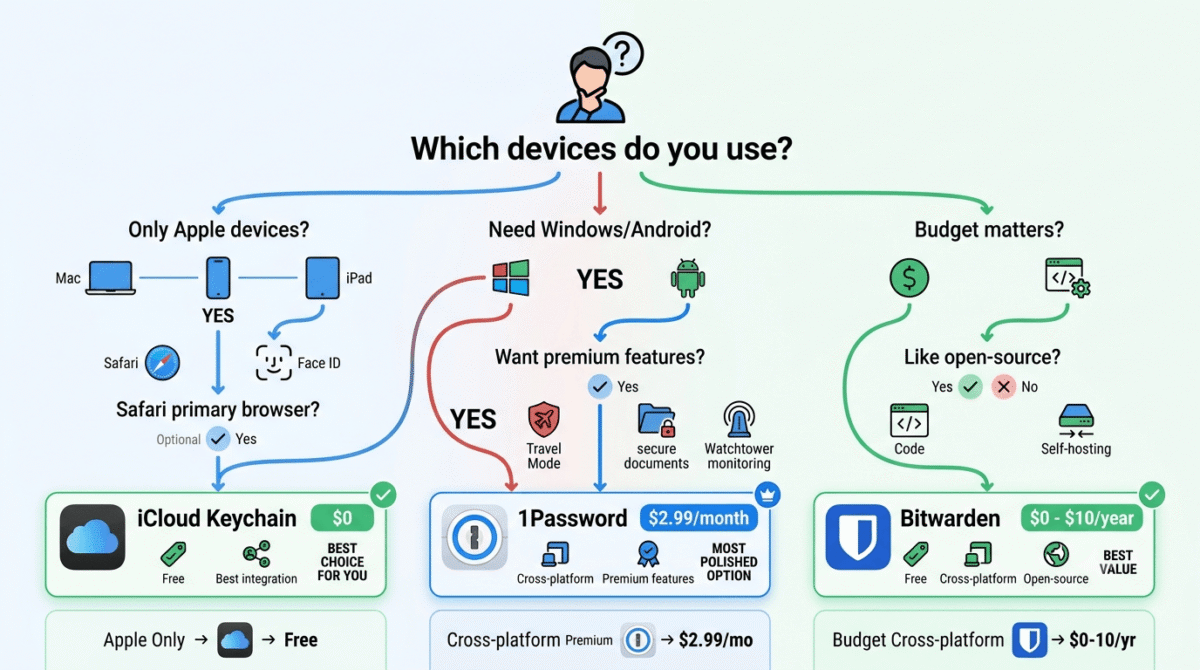
Which Password Manager Should You Choose?
Choose iCloud Keychain if:
You use exclusively Apple devices, Mac, iPhone, and iPad, with Safari as your primary browser, and have no need to access passwords on Windows or Android. Keychain’s free, frictionless, perfectly integrated experience is genuinely excellent for this specific use case. Do not pay for a password manager if Keychain fully meets your needs.
Choose 1Password if:
You use Mac alongside any Windows machines or Android devices, prefer Chrome or Firefox over Safari, want the most polished cross-platform password manager available, need secure document storage, or require Travel Mode for international travel. The $2.99/month investment is justified by the cross-platform capability and superior feature set that iCloud Keychain cannot provide.
Choose Bitwarden if:
You want a cross-platform password manager without any monthly fee, value open-source security transparency, or want the option to self-host your password vault. Bitwarden free covers all essential password management needs across Mac, iPhone, Windows, and Android at zero cost. Upgrade to Premium ($10/year) for TOTP generation and emergency access.
Migrating From iCloud Keychain to 1Password or Bitwarden
If you have been using iCloud Keychain and want to switch to a cross-platform manager, the migration takes approximately 30 minutes:
Export from iCloud Keychain:
- Open the Passwords app (iOS 18/macOS Sequoia) or go to Settings → Passwords (older versions)
- Export passwords → enter your Mac password to confirm
- Save the CSV file securely (temporarily, delete after import)
Import to 1Password:
- Open 1Password → File → Import → iCloud Keychain CSV
- Review imported items, verify key accounts imported correctly
- Delete the CSV export file permanently after confirming successful import
Import to Bitwarden:
- Bitwarden web vault → Tools → Import Data → iCloud Keychain CSV
- Upload the CSV file → confirm import
- Delete the CSV export file permanently after confirming successful import
After importing, disable iCloud Keychain password autofill (Settings → Passwords → Password Options → disable iCloud Passwords) and enable your new manager. Run both simultaneously for one week to ensure all accounts transferred correctly before fully disabling Keychain autofill.
Final Verdict
iCloud Keychain is the best password manager for Apple-only users, free, deeply integrated, and genuinely excellent for Mac and iPhone users who never leave the Apple ecosystem. If this describes you, stop reading and stick with Keychain.
1Password is the best premium password manager for Mac users, the most polished cross-platform experience, Travel Mode, Watchtower monitoring, and secure document storage justify the $2.99/month for anyone who uses Windows or Android alongside their Mac.
Bitwarden is the best free cross-platform password manager, unlimited passwords across unlimited devices at zero cost, backed by open-source security transparency. The best alternative to 1Password for budget-conscious Mac users who need cross-platform support.
Ratings: Full review: Best Password Managers → 1Password is
- 1Password: 4.8 / 5
- Bitwarden: 4.6 / 5
- iCloud Keychain: 4.4 / 5
Frequently Asked Questions
Is iCloud Keychain good enough as a password manager?
Yes, for Mac users who use only Apple devices and Safari. iCloud Keychain’s integration, passkey support, and security audit features make it a genuinely capable password manager at zero cost. It falls short for users who also use Windows or Android devices, prefer Chrome or Firefox, or need features like secure document storage, Travel Mode, or emergency access.u003cbru003e
Is 1Password worth it on Mac?
Yes, for Mac users who need cross-platform password management or want the most polished and feature-complete experience. The $2.99/month cost delivers the most beautifully designed cross-platform password manager available, with Mac-native design, Safari and Chrome excellence, Travel Mode, Watchtower monitoring, and secure document storage that iCloud Keychain does not provide.u003cbru003e
Can I use both iCloud Keychain and 1Password?
Yes, but it creates confusion, you will be prompted to choose which manager fills passwords on each login. The recommended approach is to pick one primary manager and disable autofill for the other. If transitioning from Keychain to 1Password, import Keychain passwords into 1Password, then disable Keychain’s autofill in System Settings → Passwords → Password Options.u003cbru003e
Is Bitwarden safe to use?
Yes, Bitwarden uses AES-256 bit end-to-end encryption, and its open-source codebase has been independently audited multiple times by security firms. The 2018 and 2023 security audits found no critical vulnerabilities. For users who prioritise security transparency, Bitwarden’s open-source model is actually more verifiably secure than proprietary alternatives like 1Password, you can read the code rather than trusting a company’s claims.u003cbru003e
What happened to iCloud Keychain on Mac?
Apple significantly upgraded iCloud Keychain in 2024 with the standalone Passwords app in iOS 18 and macOS Sequoia, giving it a dedicated interface separate from Settings. The new app adds folder organisation, security recommendations, and a cleaner browsing experience. If you are running macOS Sonoma or earlier, the Passwords experience is more buried in System Settings, upgrade to Sequoia for the best Keychain experience.u003cbru003e
How do I share passwords with family on Mac?
iCloud Keychain: Family Sharing allows creating a shared keychain visible to Family Sharing members, available in iOS 17/macOS Sonoma and later. 1Password Families ($4.99/month for 5 members): each family member gets a private vault plus access to shared family vaults, the most structured family sharing available. Bitwarden Families ($40/year for 6 members): similar to 1Password with private plus shared organisation vaults.u003cbru003e
Which password manager has the best Safari integration on Mac?
iCloud Keychain has the deepest Safari integration, it is built into the browser at the system level. 1Password’s Safari extension is an excellent close second, autofill works reliably and the extension integrates well with Safari’s toolbar. Bitwarden’s Safari extension is functional but slightly less smooth than 1Password’s in edge cases.u003cbru003e