
A survey with a 4% completion rate is not a survey, it is a question nobody answered. Customer feedback often flows from the same place support tickets do, see our Zendesk vs Freshdesk vs Help Scout comparison of customer support software if you’re building out that side of the operation too. The gap between a well-designed survey and a poorly designed one is rarely about the questions themselves; it is about whether the respondent feels like filling it out is worth thirty seconds of their day. The tool you build a survey in has more influence over that decision than most people realize, because design, pacing, and perceived effort all shape whether someone finishes or abandons halfway through.
In 2026, survey software has split clearly along a use-case line rather than a single best-tool answer. Typeform won the category on respondent experience and completion rates. SurveyMonkey remains the broadest, most research-capable option for structured feedback programs. Tally emerged as the genuinely free alternative that covers most small business needs without a subscription. I tested all three (Typeform vs SurveyMonkey vs Tally) for 30 days running real customer feedback and intake surveys. Here is the honest comparison.
Table of Contents
How We Tested These Tools
Every platform was evaluated against five criteria:
- Completion rate, how many respondents who started the survey actually finished it, holding the question set constant across tools
- Question types and logic depth, how well does the tool handle branching, skip logic, and the specific question formats a feedback program needs (NPS, CSAT, ranking, Likert scales)
- Analytics and reporting, how useful is the built-in reporting without exporting to a spreadsheet first
- Free plan usability, what can you actually accomplish before hitting a paywall
- Integration with the rest of a small business’s stack, does it connect cleanly to email tools, CRMs, and spreadsheets, or does it live in isolation
Why Survey Tool Choice Affects Your Response Rate More Than Your Questions Do
It is tempting to assume that response rate is mostly a function of incentive, pay people enough or ask at the right moment and they will respond regardless of the tool. The reality is more specific: format and pacing measurably change completion behavior independent of the incentive offered.
A conversational, one-question-at-a-time format consistently produces higher completion than a traditional long-form survey page showing every question at once, because it reduces the perceived effort of starting. This is the single biggest reason Typeform built an entire company around a format decision that sounds almost too simple to matter, it does, and the data backs it up across nearly every comparison in this category.
Typeform Review: Best for Customer-Facing Surveys Where Completion Rate Matters Most
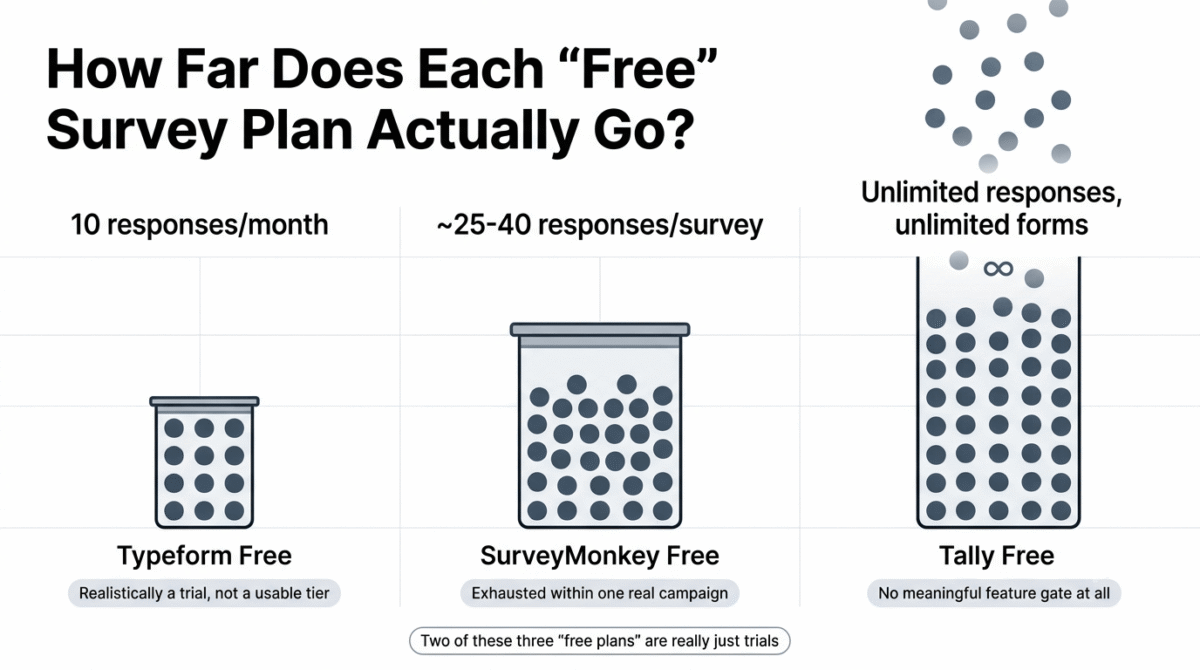
Free plan: Yes, limited to 10 responses per month
Starting paid price: Around $25/month (Basic, billed annually)
Best plan for most small businesses: Plus, for the question volume and logic depth most feedback programs need
Platforms: Web, iOS, Android
Affiliate program: Yes, Typeform affiliate program
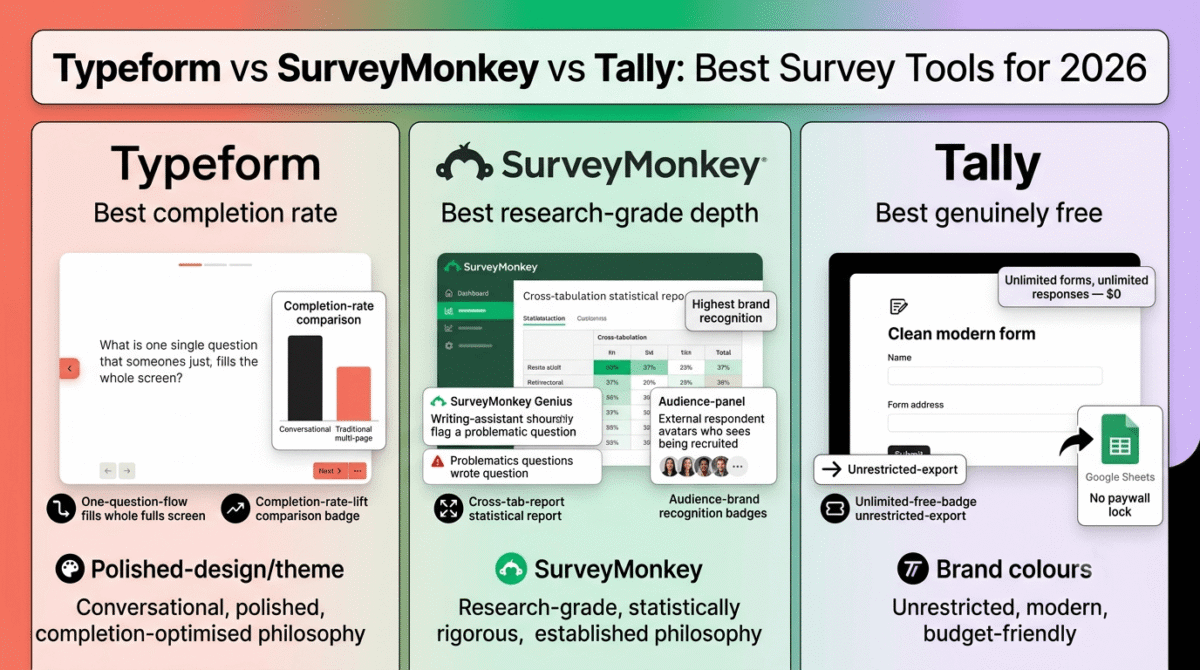
Typeform built its entire reputation on one design decision: show one question at a time instead of a full page of questions. That conversational format consistently produces measurably higher completion rates than traditional surveys, and it remains the clearest reason to choose Typeform over its competitors for any survey where a stranger’s willingness to finish matters to your business.
What Typeform does best
The one-question-at-a-time format is Typeform’s defining feature and the reason it commands premium pricing in a category with several free competitors. Across independent testing, Typeform’s format produces noticeably higher completion rates than traditional multi-question survey pages, a meaningful difference for any customer-facing survey, lead capture form, or event registration where every additional completion has real value.
Typeform’s visual design quality is the best of the three tools by a clear margin. Custom themes, background imagery, video embeds, and smooth transitions between questions make a Typeform survey feel like part of a polished brand experience rather than a generic data-collection form, which matters disproportionately for external-facing surveys where the respondent’s perception of your business is part of what is being tested.
The question type variety extends beyond standard survey formats to include image choice questions, ranking, opinion scales, and Net Promoter Score questions with appropriate visual treatment for each, the format adapts to the question type rather than forcing everything into the same visual template.
For lead generation specifically, Typeform’s quiz and calculator-style logic lets you build interactive experiences that qualify or segment respondents based on their answers in real time, which goes well beyond what a traditional survey tool offers and edges into territory normally requiring a dedicated landing page tool.
Where Typeform falls short
Typeform’s free plan, limited to 10 responses per month, is the most restrictive of the three tools tested, it is realistically a trial rather than a usable free tier for any business collecting feedback at meaningful volume.
Pricing escalates quickly once you need features beyond the basics. CAPTCHA protection, a feature most businesses running any paid traffic to a form will eventually need, is locked behind Typeform’s highest-priced plan, a widely reported pain point for marketing teams running ad campaigns into Typeform-built forms.
Native integrations beyond the most common tools require either a paid plan tier or routing through Zapier, adding both cost and complexity compared to competitors that include broader integration support at lower price points.
Response limits on paid plans are also a real constraint, businesses running high-volume customer feedback programs can hit response caps that require an upgrade specifically because of volume, not because of any feature need.
Typeform pricing
| Plan | Price/month (annual) | Key features |
|---|---|---|
| Free | $0 | 10 responses/month, basic question types |
| Basic | ~$25 / mo | 100 responses/month, 1 user seat, basic logic jumps |
| Plus | ~$50 / mo | 1,000 responses/month, 3 user seats, custom branding removal |
| Business | ~$83+ / mo | 10,000 responses/month, 5 user seats, conversion drop-off analytics |
Typeform: Pros and Cons
Pros:
- Best-in-class respondent experience with measurably higher completion rates
- Most polished visual design and customization of the three tools
- Quiz and calculator logic extends well beyond standard survey use cases
- Strong question type variety with format-appropriate visual treatment
- Best choice when brand experience is part of the value being delivered
Cons:
- Most restrictive free plan of the three tools, 10 responses per month
- CAPTCHA locked behind the highest-priced plan
- Pricing escalates quickly for response volume and advanced logic
- Native integrations limited without a higher-tier plan or Zapier
- Expensive relative to Tally for businesses that don’t need the design polish
Rating: 4.5 / 5, Best for customer-facing surveys, lead generation, and any form where completion rate and brand experience justify the cost. Overkill and expensive for simple internal data collection.
SurveyMonkey Review: Best for Structured Feedback Programs and Research-Grade Reporting
Free plan: Yes, limited to 25–40 responses per survey depending on plan changes
Starting paid price: Around $39/month (billed annually)
Best plan for most small businesses: Standard, for NPS tracking and broader question logic
Platforms: Web, iOS, Android
Affiliate program: Limited, check current availability directly
SurveyMonkey is the incumbent of this category for a reason: it has the broadest template library, the deepest research-oriented feature set, and the strongest brand recognition among respondents, a real factor when an external survey’s perceived legitimacy affects whether someone is willing to answer honestly.
What SurveyMonkey does best
SurveyMonkey’s template library is the most extensive of the three tools, covering NPS tracking, employee engagement, customer satisfaction, market research, and dozens of other structured use cases with pre-built question sets informed by methodology best practices rather than generic templates.
SurveyMonkey Genius, the platform’s built-in writing assistance feature, flags problematic question wording and predicts where respondents are likely to drop off before you send the survey, a genuinely useful quality check that neither Typeform nor Tally offers in comparable form.
Brand recognition matters more for survey response rates than most people assume. Respondents who recognize the SurveyMonkey name and interface are statistically more likely to trust that a survey is legitimate and complete it, particularly for external customer or market research surveys where the respondent has no existing relationship with your business.
The built-in audience panel, access to pre-recruited survey respondents for market research purposes, is a feature unique to SurveyMonkey among the three tools tested, and genuinely useful for small businesses that need outside respondent data rather than just surveying their own customer base.
For cross-tabulation and statistical analysis, SurveyMonkey’s reporting goes deeper than either Typeform or Tally, which matters for businesses treating survey data as input to real decisions rather than simple feedback collection.
Where SurveyMonkey falls short
SurveyMonkey’s free plan is genuinely too limited to be useful for most ongoing use, a 10-question, 40-response cap (with reports of even tighter limits on some current free tiers) means most small businesses will need a paid plan within their first real survey campaign.
Pricing escalates expensively beyond the base plan, and SurveyMonkey charges per additional response beyond your plan’s cap, a cost structure that can produce a surprising bill for a business that does not carefully track response volume against their plan limit.
The interface feels notably dated compared to Typeform’s or Tally’s more modern design, which affects both the survey-builder experience for you and, more importantly, the completion experience for your respondents.
Native analytics and CRM integration depth lag behind what dedicated tools in adjacent categories offer, businesses wanting survey feedback to flow automatically into a CRM or trigger automated workflows will likely need a third-party integration or a different category of tool entirely. See our HubSpot vs Zoho vs Pipedrive comparison if you haven’t picked a CRM yet to route that feedback into.
SurveyMonkey pricing
| Plan | Price/month (annual) | Key features |
|---|---|---|
| Free | $0 | Limited questions and responses per survey |
| Standard | ~$39 / mo | More questions, basic skip logic, more responses |
| Advantage | ~$99 / mo | Advanced logic, SurveyMonkey Genius, custom branding |
| Premier | Custom | Multilingual surveys, advanced statistical features |
Exact response caps and pricing tiers have shifted in recent updates, confirm current limits on SurveyMonkey’s pricing page before committing to a plan.
SurveyMonkey: Pros and Cons
Pros:
- Broadest template library, informed by research methodology best practices
- SurveyMonkey Genius catches wording issues before you send
- Highest brand recognition, which can improve external response rates
- Built-in audience panel for market research needs
- Deepest cross-tabulation and statistical reporting of the three tools
Cons:
- Free plan too limited for meaningful ongoing use
- Per-response overage charges can produce unexpected costs
- Interface feels dated compared to Typeform and Tally
- Weaker native CRM and automation integration than competitors
- Pricing escalates quickly once you need advanced logic or branding removal
Rating: 4.3 / 5, Best for structured feedback programs, NPS tracking, and market research where breadth of question types and research-grade reporting matter more than visual design.
Tally Review: Best Free Survey Tool for Small Businesses and Freelancers
Free plan: Yes, unlimited forms and unlimited responses, genuinely free
Starting paid price: Around $29/month (Pro, for branding removal and team features)
Best plan for most freelancers and small businesses: Free plan covers most needs; Pro only when branding removal matters
Platforms: Web
Affiliate program: Check current availability directly
Tally is the platform most likely to surprise readers who assume “free survey tool” means a stripped-down, limited product. It does not, Tally’s free plan supports unlimited forms and unlimited responses with a genuinely modern, Notion-inspired interface, which is the core reason it has become the default recommendation for cost-conscious freelancers and small businesses across nearly every comparison in this category. See our full freelancer toolkit roundup for the rest of what a cost-conscious solo operation typically runs alongside a free survey tool like Tally.
What Tally does best
Unlimited free responses and unlimited free forms is Tally’s single most important feature, and it is not a small detail, SurveyMonkey caps free responses around 25–40 per survey, and Typeform caps free responses at 10 per month. Tally imposes neither limit, which means a small business can run real, ongoing feedback collection without ever paying, as long as removing Tally’s branding is not a requirement.
Despite being free, Tally supports the full standard survey feature set: multiple choice, rating scales, NPS questions, Likert scales, ranking questions, and conditional logic, there is no meaningful feature gate separating the free experience from a “real” survey tool’s capabilities, which is unusual in software generally and especially unusual in this specific category.
The interface is clean, fast, and modern, closer in feel to Typeform’s design quality than to SurveyMonkey’s, but without Typeform’s restrictive free tier. For a freelancer building a client intake form or a small business collecting customer feedback, Tally produces a professional-looking result without requiring a design background or a paid plan.
Tally’s export options are genuinely unrestricted on the free plan, data exports, Google Sheets integration, and Zapier connections all work without a paywall, where SurveyMonkey specifically locks export functionality behind its paid Standard plan.
Where Tally falls short
Tally’s brand recognition is essentially nonexistent compared to SurveyMonkey or Typeform, which can matter for external surveys where respondent trust in the platform affects willingness to complete it, an unfamiliar tool name carries less implicit legitimacy than an established one, even when the actual product quality is comparable.
Advanced statistical analysis and cross-tabulation, the features that make SurveyMonkey valuable for research-grade work, are simply not present in Tally. For businesses treating survey data as input to formal research decisions rather than directional feedback, Tally’s reporting will feel thin.
Tally lacks the audience panel and pre-built methodology templates that SurveyMonkey offers, if you need to recruit outside respondents rather than survey your own audience, Tally has no answer to that need at all.
The one-question-at-a-time conversational format that drives Typeform’s completion-rate advantage is not Tally’s default experience, Tally surveys read more like a clean traditional form than a conversational flow, which means businesses specifically chasing Typeform-level completion rates on external customer-facing surveys may still find Typeform’s format advantage worth paying for.
Tally pricing
| Plan | Price/month | Key features |
|---|---|---|
| Free | $0 | Unlimited forms, unlimited responses, conditional logic, exports |
| Pro | ~$29 / mo | Branding removal, team collaboration features |
Tally: Pros and Cons
Pros:
- Genuinely unlimited free forms and responses, with no meaningful feature gate
- Full standard survey feature set, including conditional logic, on the free plan
- Clean, modern interface comparable in quality to Typeform’s
- Unrestricted data export, even on the free plan
- Best value of the three tools for budget-conscious freelancers and small businesses
Cons:
- Minimal brand recognition compared to SurveyMonkey or Typeform
- No advanced statistical analysis or cross-tabulation for research-grade work
- No audience panel for external respondent recruitment
- Lacks Typeform’s conversational one-question format and its completion-rate advantage
- Smaller template library than SurveyMonkey’s research-informed catalog
Rating: 4.4 / 5, Best free survey tool available, and the most defensible default choice for freelancers and small businesses that don’t need research-grade statistical reporting or Typeform’s premium completion-rate format.
Head-to-Head Comparison
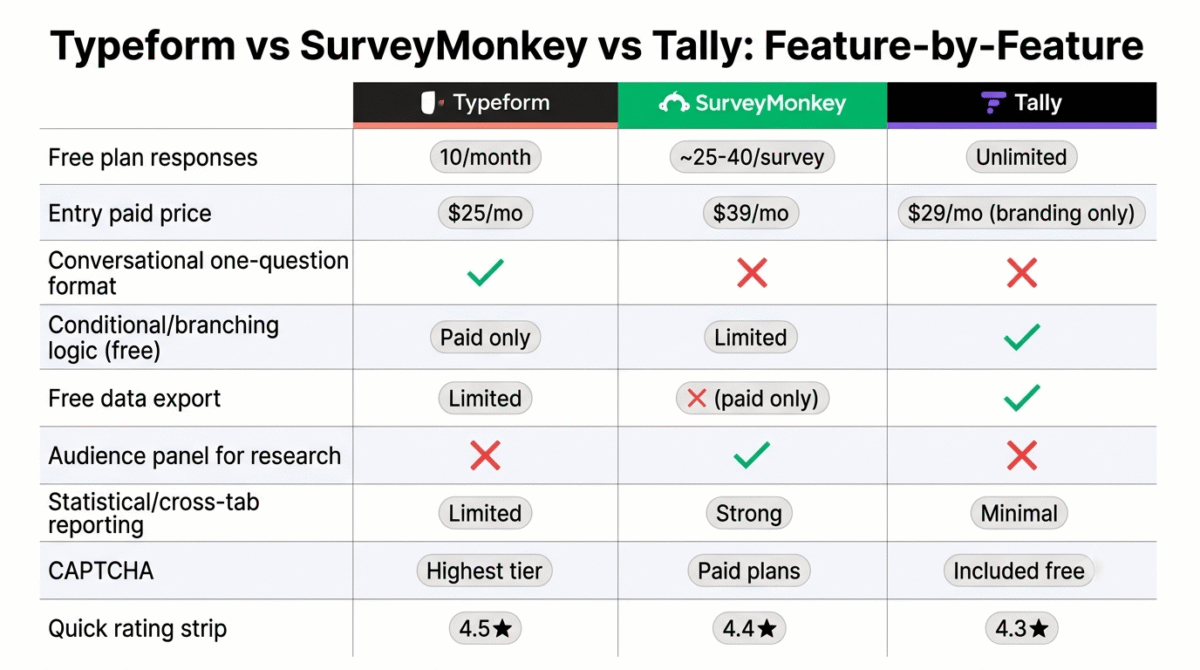
| Feature / Category | Typeform | SurveyMonkey | Tally |
|---|---|---|---|
| Free plan responses | 10 / month | ~25–40 / survey | Unlimited |
| Entry paid price | ~$25 / mo | ~$39 / mo | ~$29 / mo (branding only) |
| Conversational one-question format | Yes | No | No |
| Conditional/branching logic | Yes (paid tiers) | Limited on free | Yes, even on free |
| Free data export | Limited | No (paid only) | Yes |
| Audience panel for research | No | Yes | No |
| Statistical/cross-tab reporting | Limited | Strong | Minimal |
| Brand recognition | High | Highest | Low |
| Best for | Customer-facing, lead gen | Structured research, NPS | Budget-conscious freelancers, small business |
| CAPTCHA | Highest tier only | Included on paid plans | Included |
Which Tool Should You Choose?
Choose Typeform if:
You are running a customer-facing survey, lead generation form, or event registration where completion rate directly affects business outcomes, and the visual brand experience is worth paying a premium for. The one-question-at-a-time format is the clearest, most consistently documented advantage in this entire comparison, pay for it when completions genuinely matter to your bottom line.
Choose SurveyMonkey if:
You are running a structured feedback program, NPS tracking, employee engagement surveys, or market research, where research-grade reporting, statistical depth, and access to an external respondent panel matter more than visual polish. SurveyMonkey’s brand recognition also helps when surveying people unfamiliar with your business.
Choose Tally if:
You are a freelancer or small business that needs to collect real survey feedback without paying for software, and you don’t specifically need Typeform’s conversational format or SurveyMonkey’s statistical depth. For the majority of RateTheTool’s readers, bloggers running reader surveys, freelancers building client intake forms, small businesses collecting basic customer feedback, Tally’s unlimited free tier covers the actual need without a subscription.
The Small Business Setup Recommendation
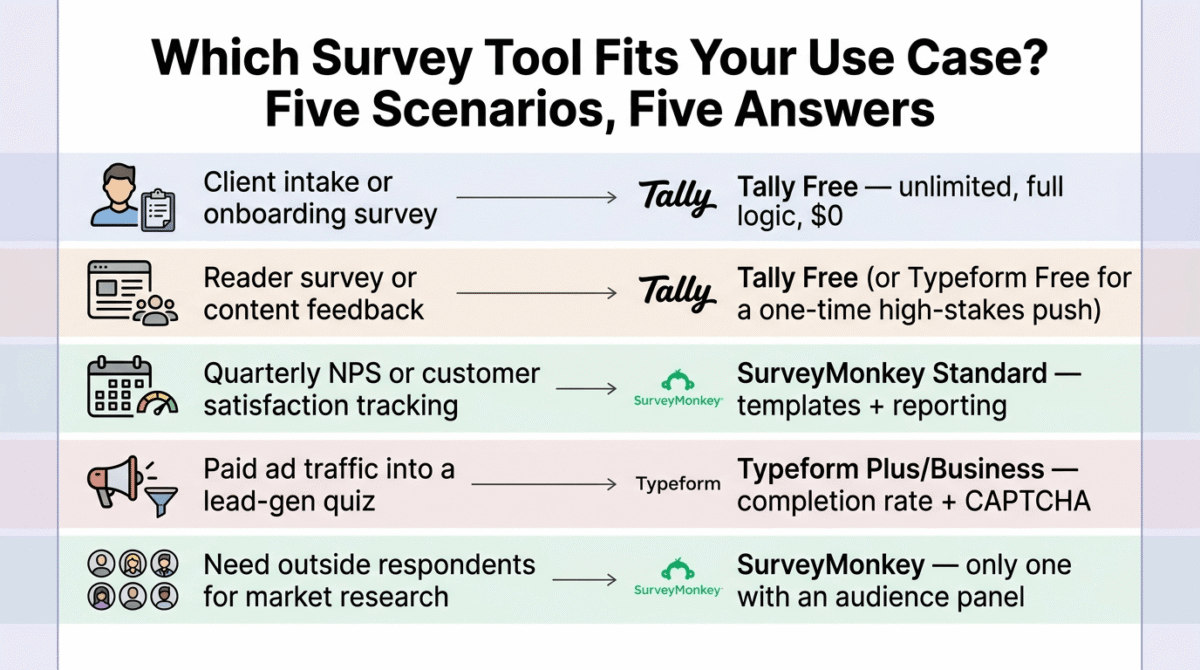
Based on 30 days of testing across real feedback campaigns, here is the recommended setup by use case:
Freelancer building a client intake or onboarding survey: Tally’s free plan. Unlimited responses, full conditional logic, and a clean professional appearance cover this use case completely without any cost.
Blogger running a reader survey or content feedback form: Tally’s free plan, unless you specifically want the higher completion rate Typeform’s format produces for a one-time, high-stakes survey, in which case Typeform’s free 10-response tier may even be enough for a smaller blog’s audience size.
Small business running quarterly NPS or customer satisfaction tracking: SurveyMonkey Standard. The NPS-specific templates and reporting depth are worth the cost once feedback collection becomes a recurring, decision-informing process rather than a one-off check-in.
Agency or business running paid ad traffic into a lead-gen quiz or form: Typeform Plus or Business, accepting the cost for the completion-rate lift, but budget for the CAPTCHA requirement if you are running traffic at meaningful volume.
Business needing access to outside respondents for market research: SurveyMonkey is the only one of the three tools with a built-in audience panel, neither Typeform nor Tally offers an equivalent.
Final Verdict
Tally is the best survey tool for most bloggers, freelancers, and small businesses in 2026, its genuinely unlimited free plan, full conditional logic, and modern interface cover the actual needs of most RateTheTool readers without a subscription, which makes it the most defensible default recommendation in this category.
Typeform remains the best choice when completion rate is the business metric that matters, its conversational format produces a measurable, well-documented lift in completions, and for customer-facing surveys, lead generation, or event registration, that lift can be worth the premium price.
SurveyMonkey is the best choice for structured, research-grade feedback programs, NPS tracking, employee surveys, and market research benefit from its template depth, statistical reporting, and audience panel access in ways neither competitor matches.
Ratings:
- Typeform: 4.5 / 5
- Tally: 4.4 / 5
- SurveyMonkey: 4.3 / 5
Frequently Asked Questions
What is the best survey tool in 2026?
Tally is the best default choice for most freelancers and small businesses due to its genuinely unlimited free plan and full feature set. Typeform is the better choice when completion rate is critical to a business outcome, such as lead generation or customer-facing surveys. SurveyMonkey is the better choice for structured, research-grade feedback programs like NPS tracking or market research.
Is Tally really free, or are there hidden limits?
Tally’s free plan supports unlimited forms and unlimited responses with the full standard survey feature set, including conditional logic and unrestricted data export. The only meaningful reason to upgrade to Tally’s paid Pro plan is to remove Tally’s branding or add team collaboration features, the core survey functionality is not gated behind a paywall.
Why does Typeform cost so much more than Tally or SurveyMonkey’s free plans?
Typeform’s pricing reflects its conversational one-question-at-a-time format, which produces measurably higher completion rates than traditional survey layouts. For businesses where every additional completed response has real value, lead generation, paid registrations, customer-facing feedback, that completion-rate lift can justify the cost. For internal or low-stakes surveys, the premium is harder to justify.
Does SurveyMonkey’s free plan work for a small business?
It is workable for occasional, low-volume surveys but becomes limiting quickly. SurveyMonkey’s free plan caps both the number of questions and the number of responses per survey, and exporting your own response data requires a paid plan. Most small businesses running regular feedback collection will outgrow the free plan faster than they would with Tally’s unlimited equivalent.
What is the difference between a survey tool and a form builder?
Survey software is built around data collection and analysis, it typically includes advanced skip logic, statistical reporting, and research-grade question types like NPS and Likert scales. Form builders focus more on structured submissions like registrations, orders, and applications. Tally and Typeform both blur this line effectively, functioning well as either a survey tool or a form builder depending on how you configure them. See our Typeform vs JotForm vs Google Forms form builder comparison if structured submissions, not survey data, are actually what you need.
Which survey tool has the best mobile completion rate?
Typeform’s one-question-per-screen format consistently produces the strongest mobile completion experience among traditional survey tools, since each screen requires minimal scrolling or visual parsing on a small screen. SurveyMonkey’s traditional multi-question layout performs noticeably worse on mobile by comparison.
How many questions should a survey have to maximize response rate?
Shorter surveys consistently outperform longer ones, five to ten questions is a reasonable target for most feedback campaigns, since each additional question measurably reduces the likelihood a respondent finishes. If you need more depth, consider running a shorter survey to a broader audience and a longer, optional follow-up to a smaller engaged segment rather than asking everyone to complete a long form.








