
A whiteboard used to mean a literal wall with markers, useful only to the people standing in the room when the ideas happened. Remote teams lost that wall and spent years trying to replace it with screen shares, slide decks, and sticky notes pasted into documents that nobody revisited. The online whiteboard category exists to solve a specific problem none of those substitutes handle well: capturing messy, spatial, in-progress thinking in a way a distributed team can return to and build on later.
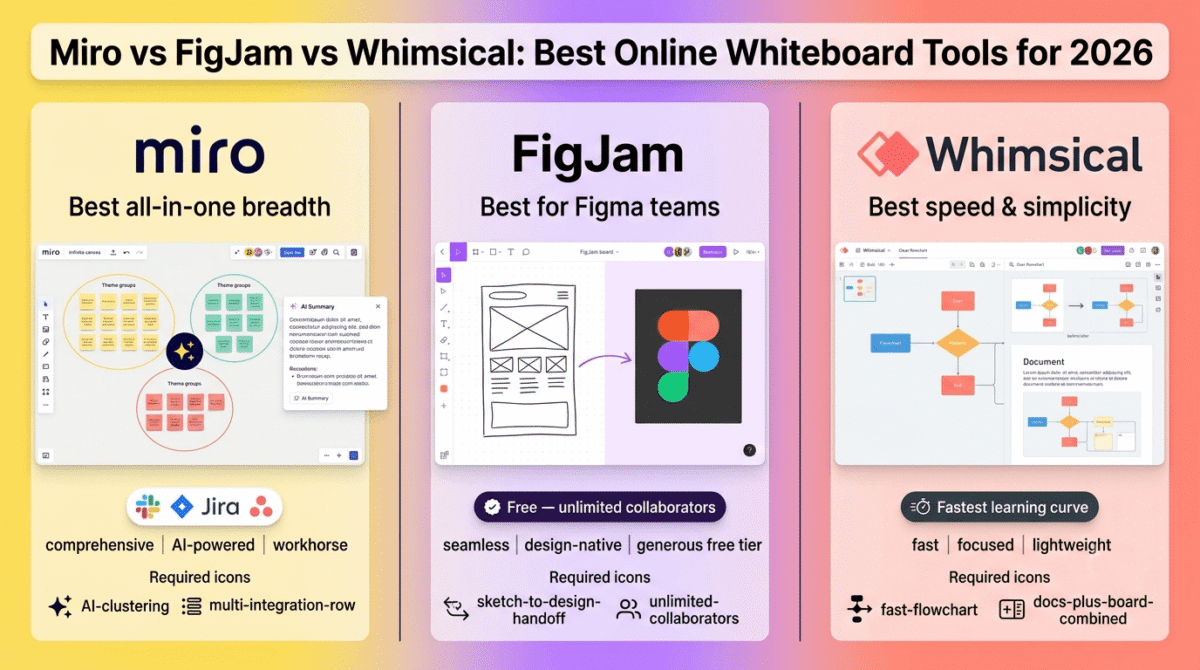
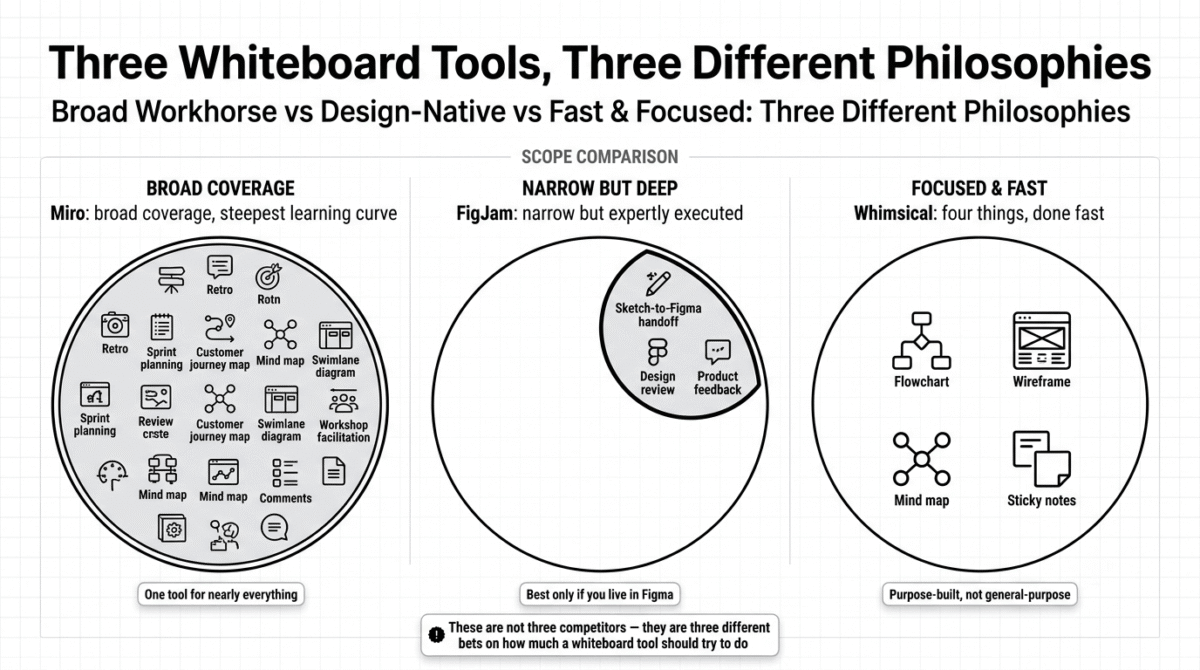
In 2026, the category has split into three distinct philosophies rather than three interchangeable competitors. Miro is the broad, deeply integrated workhorse. FigJam is the design-team-native tool that lives next to Figma. Whimsical is the lightweight, fast alternative for teams who want diagrams and flows without a steep learning curve. I tested all three (Miro vs FigJam vs Whimsical) for 30 days across real brainstorming sessions, sprint planning, and content calendar mapping. Here is the honest comparison.
Table of Contents
How We Tested These Tools
Every platform was evaluated against five criteria:
- Ease of getting started, how quickly can a new team member open a blank board and start contributing without training?
- Real-time collaboration quality, how smoothly does the board handle multiple people editing simultaneously, including on large or complex boards?
- Template and structure depth, how good are the built-in templates for common use cases (retros, sprint planning, content calendars, mind maps)?
- Integration with existing tools, does it connect cleanly to the software your team already uses, or does it live in isolation?
- Value at the team size that actually matters, what does it cost for a typical 5–15 person team, not just the headline per-seat price?
Why Whiteboard Tools Matter for More Than Just Designers
It is easy to assume whiteboard software is a design-team tool that bloggers, freelancers, and small business owners can skip. That assumption misses how broadly useful a visual canvas actually is once you have used one properly.
Content calendars, editorial planning boards, customer journey maps, simple flowcharts for a new process, and even visual outlines for a long blog post all benefit from a spatial canvas rather than a linear document. Once that spatial thinking turns into tracked tasks, you’ll want a dedicated project management tool, see our Monday.com vs ClickUp vs Basecamp comparison for options that pick up where the whiteboard leaves off. The reason this category has grown well beyond design teams is that “moving sticky notes around” turns out to be a genuinely better way to think through almost any non-linear problem than typing a bulleted list, your brain organizes ideas spatially long before it organizes them into sentences.
Miro Review: Best for Teams That Want One Tool to Cover Every Visual Collaboration Need
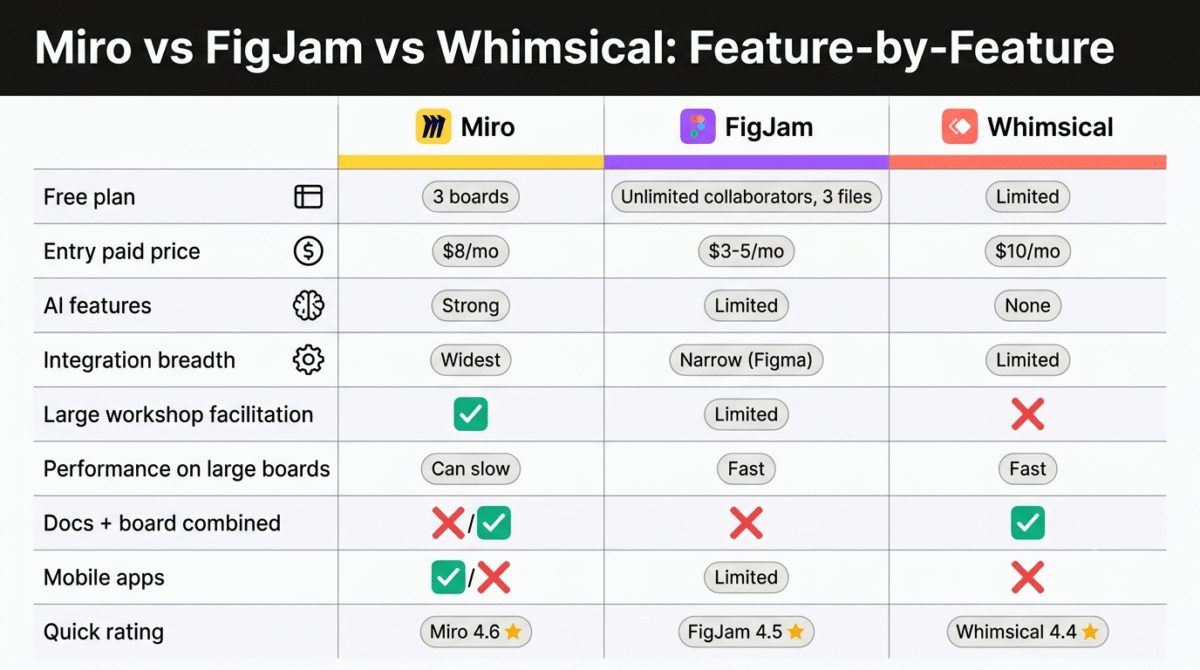
Free plan: Yes, limited to 3 editable boards
Starting paid price: Around $8/member/month (Starter, billed annually)
Best plan for most teams: Business, for teams needing advanced integrations and security controls
Platforms: Web, Windows, Mac, iOS, Android
Affiliate program: Yes, Miro affiliate program
Miro is the category leader for a reason: it has spent years building the deepest feature set and the widest integration ecosystem of any whiteboard tool, and for teams that want a single visual workspace to handle everything from brainstorming to project tracking, nothing else covers as much ground.
What Miro does best
Miro’s infinite canvas combined with its template library is the platform’s core strength. There are templates for retrospectives, sprint planning, customer journey mapping, mind maps, swimlane diagrams, and dozens of other structured use cases, which means most teams never start from a truly blank board, they start from a relevant starting point and customize it.
The AI layer added across 2025 and 2026 is genuinely useful rather than a bolt-on feature for marketing purposes. Miro can generate a board structure from a written prompt, automatically cluster sticky notes by theme after a brainstorm, and summarize a long session into a digestible recap, all of which save real time for a facilitator who would otherwise manually organize dozens of contributions after a workshop.
Integration breadth is where Miro separates itself most clearly from smaller competitors. It connects to Slack, Jira, Asana, Microsoft Teams, Google Workspace, and dozens of other tools a remote team already uses, which means a Miro board does not live in isolation, it can pull in or push out to the rest of your workflow. See our Notion vs Trello vs Asana comparison if you haven’t picked the project management tool Miro would actually integrate with.
For teams running structured workshops with facilitation needs, timed activities, private brainstorming before a reveal, the ability to bring everyone’s view to the same spot on the board, Miro’s facilitation tooling, while not as workshop-specific as Mural’s, is strong enough for most teams’ needs without requiring a second dedicated tool.
Where Miro falls short
Miro’s pricing scales aggressively per editor, and the free plan’s 3-board limit makes it impractical for ongoing use beyond a trial. A team of 10 on the Business plan can run well over $150/month, which is a meaningful cost for a tool that some teams use only occasionally rather than daily.
Performance on very large, long-running boards is a recurring complaint, boards that accumulate months of content across dozens of frames can become noticeably sluggish, which undercuts the “one board we keep coming back to” use case that makes whiteboard tools valuable in the first place.
Miro’s sheer feature surface area means new users face a genuinely complex interface compared to lighter competitors. Teams that only need simple flowcharts or basic sticky-note brainstorms are paying for, and navigating around, a significant amount of functionality they will never touch.
Miro pricing
| Plan | Price/member/month (annual) | Key features |
|---|---|---|
| Free | $0 | 3 editable boards, core templates |
| Starter | $8 / user / mo | Unlimited boards, basic integrations |
| Business | $16 / user / mo | Advanced integrations, AI features, admin controls |
| Enterprise | Custom | SSO, advanced security, dedicated support |
Miro: Pros and Cons
Pros:
- Deepest template library and broadest use-case coverage of the three tools
- Strongest integration ecosystem (Slack, Jira, Asana, Google Workspace, and more)
- Genuinely useful AI features for board generation and session summarization
- Capable facilitation tools for structured workshops
- Cross-platform apps, including solid mobile support
Cons:
- Per-editor pricing scales expensively for larger teams
- Free plan’s 3-board limit is too restrictive for real ongoing use
- Performance degrades on very large, long-running boards
- Steepest learning curve of the three tools
- SSO and advanced security gated behind the highest-cost tier
Rating: 4.6 / 5, Best for teams that want one comprehensive visual collaboration tool covering brainstorming, planning, and structured workshops, and are willing to pay for the breadth.
FigJam Review: Best Free Option for Teams Already Using Figma
Free plan: Yes, unlimited collaborators on up to 3 files
Starting paid price: Around $3–5/editor/month (Professional)
Best plan for most teams: Free tier covers most non-design use cases; Professional for teams needing more files and advanced features
Platforms: Web, Windows, Mac
Affiliate program: Not widely available
FigJam is Figma’s whiteboard, and it is built around a specific insight: the gap between a rough whiteboard concept and an actual design file is one of the most common points of friction on a product or design team, and closing that gap is more valuable than trying to be a general-purpose Miro competitor. If you haven’t settled on a design tool yet, see our Figma vs Adobe XD vs Sketch comparison, FigJam only makes sense once you’re actually in the Figma ecosystem.
What FigJam does best
FigJam’s integration with Figma is the feature that defines the entire product. You can drag actual design components directly onto a FigJam board, sketch around them, gather feedback, and push refined ideas back into a real Figma design file, all without exporting, re-importing, or switching tools. For any team already paying for Figma, this hand-off is something no competitor, including Miro, replicates as cleanly.
The free tier is the most generous of the three platforms in a way that matters: unlimited collaborators on up to 3 files, at zero cost, with no team-size restriction on who can join a board. A team of 20 people can all collaborate on the same three FigJam boards for free, Miro’s free tier limits boards in a similar way but FigJam’s per-file collaborator allowance is more generous in practice.
FigJam’s interface is noticeably faster and lighter than Miro’s, which matters more than it sounds for everyday use. Boards open quickly, the toolset is smaller and easier to learn, and the overall experience feels closer to a focused tool than an all-purpose platform trying to do everything.
For any team that already pays for a Figma seat, FigJam effectively comes bundled at no additional cost, which makes it the most economically obvious choice in this comparison for design-adjacent teams, not just an honorable mention.
Where FigJam falls short
FigJam is genuinely weaker than Miro and Whimsical for use cases outside the design-and-product workflow it was built for. Teams looking for general business brainstorming, content calendars, or process mapping unrelated to a Figma design file will find fewer relevant templates and a less tailored experience than the other two tools offer.
The integration ecosystem beyond Figma itself is thin. Where Miro connects broadly across a remote team’s entire toolset, FigJam’s value proposition is almost entirely about the Figma connection, outside of that, it offers less.
FigJam’s AI features, while present, lag behind Miro’s in both depth and polish, board generation and clustering tools exist but are less developed than the equivalent Miro features at the time of testing.
FigJam pricing
| Plan | Price/editor/month | Key features |
|---|---|---|
| Free | $0 | Unlimited collaborators, up to 3 files |
| Professional | $3 – $5 / editor / mo | Unlimited files, more templates, additional features |
| Organization / Enterprise | Custom | Admin controls, SSO, advanced governance |
Included automatically with most existing Figma plans at no extra cost for many use cases, confirm current bundling on Figma’s pricing page.
FigJam: Pros and Cons
Pros:
- Cheapest genuinely useful free tier of the three tools, with unlimited collaborators per file
- Unmatched hand-off between whiteboard sketches and real Figma design files
- Fast, lightweight interface compared to Miro
- Effectively bundled at no extra cost for teams already paying for Figma
- Lower learning curve than Miro
Cons:
- Narrower use case, built around design and product workflows specifically
- Thin integration ecosystem outside of Figma itself
- AI features less developed than Miro’s
- Less suited to general business brainstorming or non-design content planning
- Only 3 files on the free tier, similar to Miro’s board limit
Rating: 4.5 / 5, Best for design and product teams already using Figma. The tightest design-to-whiteboard workflow available, and effectively free for existing Figma customers.
Whimsical Review: Best for Speed, Simplicity, and Product/Dev Workflows
Free plan: Yes, limited boards and documents
Starting paid price: Around $10/editor/month (Pro, billed annually)
Best plan for most teams: Pro, for the core flowchart, wireframe, and mind map toolset
Platforms: Web
Affiliate program: Yes, Whimsical affiliate program
Whimsical’s entire pitch is that most teams do not need an infinite, feature-saturated canvas, they need four specific artifacts done well: flowcharts, wireframes, mind maps, and sticky notes. By narrowing its scope deliberately, Whimsical ends up faster and easier to learn than either Miro or FigJam for the specific work most product managers and developers actually ship.
What Whimsical does best
Whimsical’s flowchart and wireframe tools are noticeably faster to use than Miro’s equivalent features. Creating a clean flowchart with proper connectors and consistent styling takes a fraction of the clicks it does in Miro, because Whimsical’s toolset is purpose-built for exactly that task rather than adapted from a general-purpose drawing canvas.
The combination of docs and visual boards in one place is a distinctive feature, Whimsical lets you embed a flowchart or mind map directly inside a written document, which removes the awkward “screenshot the whiteboard and paste it into your doc” step that Miro and FigJam users deal with regularly when they need to share a finished diagram somewhere more permanent than the board itself.
For mind mapping specifically, Whimsical’s tool is more refined and purpose-built than the equivalent feature in either competitor, branches reflow automatically, and the overall experience feels designed specifically for that task rather than a generic shape-and-line system repurposed for it.
Whimsical’s learning curve is the gentlest of the three tools. A new team member can open a blank board and produce a clean, professional-looking flowchart or wireframe within minutes, without learning a complex toolbar or menu structure first.
Where Whimsical falls short
Whimsical is explicitly not built for large-scale workshops or sprawling, long-running boards with dozens of contributors, it is a tool for small, focused teams working on specific artifacts, and it will feel limiting the moment you try to run a 50-person brainstorm or facilitate a large structured workshop.
The template library, while solid for its core use cases, is narrower than Miro’s. If your need falls outside flowcharts, wireframes, mind maps, and sticky notes, Whimsical has noticeably less to offer than Miro’s broader catalog.
Integration breadth is limited compared to Miro, Whimsical connects to a smaller set of tools, which matters less for teams using it as a standalone thinking tool but is a real gap for teams wanting deep workflow automation tied to other software.
There is no meaningful AI layer at the time of testing, which puts Whimsical behind both Miro and, to a lesser extent, FigJam on a feature dimension that is becoming a real differentiator in this category.
Whimsical pricing
| Plan | Price/editor/month | Key features |
|---|---|---|
| Free | $0 | Limited boards and documents |
| Pro | $10 / editor / mo | Unlimited boards, docs, advanced features |
| Organization | Custom | Admin controls, SSO, advanced permissions |
Whimsical: Pros and Cons
Pros:
- Fastest, simplest tool for flowcharts, wireframes, and mind maps specifically
- Lowest learning curve of the three platforms
- Docs and visual boards combined in one place, removing the screenshot-and-paste workflow
- Clean, professional output with minimal effort
- Best fit for product and development team workflows specifically
Cons:
- Not built for large workshops or sprawling, long-running boards
- Narrower template library than Miro
- Limited integration ecosystem
- No meaningful AI features at the time of testing
- Less useful for teams needing broad, general-purpose whiteboarding
Rating: 4.4 / 5, Best for product and development teams who want fast, clean flowcharts, wireframes, and mind maps without the complexity of a full-featured platform.
Head-to-Head Comparison
| Feature / Metric | Miro | FigJam | Whimsical |
|---|---|---|---|
| Free plan | 3 boards | Unlimited collaborators, 3 files | Limited boards & docs |
| Entry paid price | ~$8 / member / mo | ~$3–5 / editor / mo | ~$10 / editor / mo |
| Best for | General-purpose, all-in-one visual workspace | Design and product teams built around Figma | Flowcharts, wireframes, and mind maps |
| AI features | Strong | Limited | None |
| Integration breadth | Widest | Narrow (Figma-centric) | Limited |
| Large workshop facilitation | Yes | Limited | No |
| Performance on large boards | Can slow down | Fast | Fast |
| Docs + visual board combined | No | No | Yes |
| Learning curve | Highest | Moderate | Lowest |
| Mobile apps | Yes | Limited | No |
Which Tool Should You Choose?
Choose Miro if:
Your team needs one comprehensive tool for brainstorming, structured workshops, sprint planning, and process mapping, and you are willing to pay for the breadth of templates, integrations, and AI features. Miro is the right call for remote teams running regular facilitated sessions who want everything in one platform rather than switching between specialized tools.
Choose FigJam if:
Your team already pays for Figma, or your work is centered on product and design collaboration specifically. The hand-off between rough whiteboard sketches and finished design files is unmatched, and the generous free tier makes it the most economical choice for design-adjacent teams of any size.
Choose Whimsical if:
You primarily need flowcharts, wireframes, and mind maps done quickly and cleanly, without the complexity or cost of a full-featured platform. Whimsical is the right fit for product managers and developers who want a fast, focused tool rather than an all-purpose canvas they will only use a fraction of.
The Remote Team Setup Recommendation
Based on 30 days of testing across real team workflows, here is the recommended setup by team type:
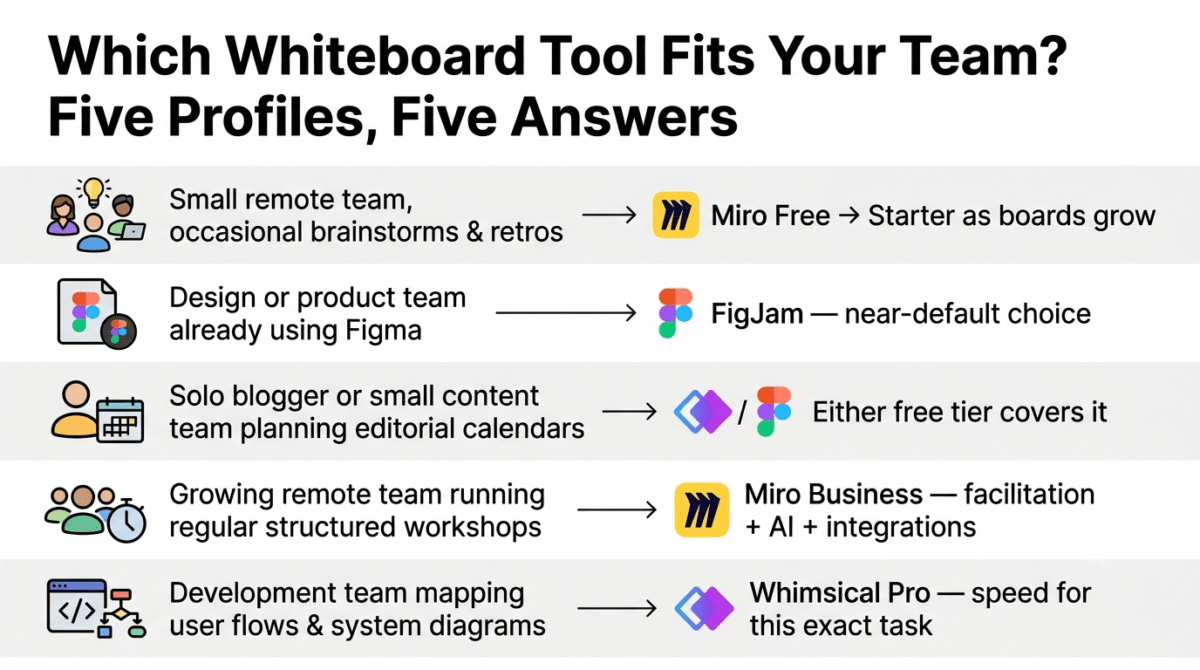
Small remote team running occasional brainstorms and retros: Miro’s free tier, upgrading to Starter once 3 boards becomes limiting. The template library alone justifies starting here even at small scale.
Design or product team already using Figma: FigJam, full stop. The integration with your existing design files makes this close to a default choice rather than a genuine three-way decision.
Solo blogger or small content team planning editorial calendars and content outlines: Whimsical’s free tier or FigJam’s free tier, either covers basic content planning without the cost or complexity of Miro’s broader feature set. See our full freelancer toolkit roundup for the rest of what a solo content operation typically runs alongside a free whiteboard tool.
Growing remote team running regular structured workshops: Miro Business, for the facilitation tooling, AI summarization, and integration depth that pays off once whiteboard sessions become a regular part of how the team operates.
Development team mapping out user flows and system diagrams: Whimsical Pro, for the speed and purpose-built flowchart and wireframe tools that outperform Miro’s general-purpose equivalents for this specific task.
Final Verdict
Miro is the best online whiteboard for most remote teams in 2026, its template depth, integration breadth, and increasingly capable AI features make it the most complete tool for teams that want one platform to handle brainstorming, planning, and structured facilitation.
FigJam is the best choice for design and product teams already in the Figma ecosystem, the seamless hand-off between whiteboard and design file, combined with a genuinely generous free tier, makes it close to a default pick for that specific audience rather than a true toss-up.
Whimsical is the best choice for speed and simplicity, if your team’s whiteboard needs are mostly flowcharts, wireframes, and mind maps rather than sprawling collaborative brainstorms, Whimsical gets you there faster with less to learn.
Ratings:
- Miro: 4.6 / 5
- FigJam: 4.5 / 5
- Whimsical: 4.4 / 5
Frequently Asked Questions
What is the best online whiteboard tool in 2026?
Miro is the best overall choice for most remote teams due to its template depth, integration breadth, and AI features. FigJam is the better choice specifically for design and product teams already using Figma, and Whimsical is the better choice for teams that primarily need fast flowcharts, wireframes, and mind maps without a full-featured platform’s complexity.
Is FigJam really free?
Yes, with limits. FigJam’s free tier supports unlimited collaborators on up to 3 files, which is generous enough for many small teams to use indefinitely without upgrading. Teams needing more than 3 active files, or additional administrative controls, will need the Professional plan.
Is Miro worth the price compared to free alternatives?
For teams running regular structured workshops, facilitated brainstorms, or needing deep integrations with tools like Jira and Slack, yes, Miro’s breadth justifies the cost. For teams with simpler needs, such as occasional flowcharts or content planning, a free tier from FigJam or Whimsical may cover everything required without any subscription cost at all.
What is the difference between Miro and FigJam?
Miro is a general-purpose whiteboard with the widest template library, broadest integrations, and strongest AI features, designed to handle nearly any visual collaboration need. FigJam is purpose-built around the Figma design workflow, offering an unmatched hand-off between rough whiteboard sketches and finished design files, but with a narrower use case outside of design and product work.
Can I use these whiteboard tools for content planning as a blogger?
Yes, all three tools work well for visual content calendars, editorial planning boards, and outlining long-form posts spatially before writing them linearly. Whimsical and FigJam’s free tiers are usually sufficient for a solo blogger’s needs, while Miro’s broader template library may be worth the cost for a content team coordinating across multiple contributors.
Do these tools work well on mobile devices?
Miro has the most capable mobile apps of the three, with reasonably full-featured iOS and Android versions. FigJam’s mobile experience is more limited, and Whimsical does not currently offer a dedicated mobile app, making it primarily a desktop-browser tool.
Which whiteboard tool has the best AI features?
Miro currently leads on AI features, including generating board structures from written prompts, automatically clustering sticky notes by theme, and summarizing brainstorming sessions. FigJam’s AI tools are present but less developed, and Whimsical does not offer meaningful AI features at the time of testing.








