
Every customer support interaction is a trust moment. A fast, helpful response turns a frustrated customer into a loyal advocate. A slow, impersonal reply turns a minor issue into a public complaint. As small businesses grow beyond 10,20 customers, managing support through a shared Gmail inbox becomes the single biggest obstacle to delivering consistently good customer experiences.
Customer support tools, also called helpdesks or ticketing systems, organise incoming support requests, route them to the right team member, track response times, and ensure nothing falls through the cracks. The best tools go further: they surface customer history alongside every conversation, automate repetitive responses, and provide analytics that identify which issues are causing the most support volume.
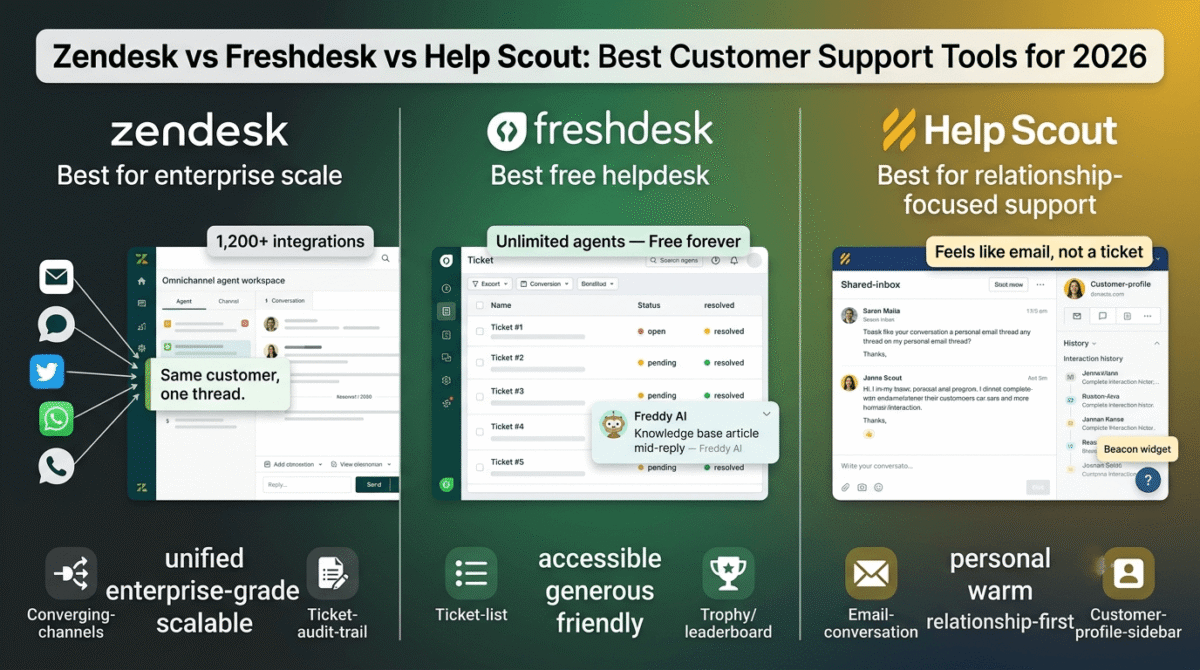
In 2026, Zendesk vs Freshdesk vs Help Scout are the three most widely evaluated customer support platforms for small and growing businesses. Each represents a different philosophy: enterprise depth, generous free features, and simplicity-first design respectively.
I tested all three for 30 days managing real customer support workflows, email tickets, live chat integration, knowledge base creation, and team collaboration. Here is the honest comparison.
Table of Contents
How We Evaluated These Tools
Every platform was tested across five criteria:
- Ticket management, how effectively does the tool organise, prioritise, and route incoming support requests?
- Team collaboration, how well can multiple agents work together on shared customer conversations?
- Automation, how effectively does the tool reduce manual repetitive support tasks?
- Customer self-service, how well does the knowledge base and self-service capability deflect tickets?
- Value, free plan quality and paid plan pricing versus features offered
Why Customer Support Tools Matter for Small Businesses and Bloggers
Before comparing the platforms, understanding when a dedicated support tool becomes necessary shapes the right timing decision:
Shared inbox breaks at scale. A Gmail inbox shared by two or three people works until you exceed 20,30 support emails per day. At that volume: emails get missed, two agents reply to the same customer, response times become inconsistent, and there is no data on how your support is performing. A helpdesk solves all four problems simultaneously.
Customer history is invisible without a tool. When a customer emails for the third time about the same issue, your support team needs to see the previous two conversations instantly, not ask the customer to repeat themselves. Helpdesks surface complete customer history alongside every new conversation, enabling genuinely personalised support.
For bloggers specifically: Growing blogs receive reader questions, partnership inquiries, affiliate programme questions, and technical support requests through contact forms. A helpdesk organises these into categories, assigns priorities, and ensures every message receives a timely response, protecting the reader relationships that drive affiliate conversion and repeat visits.
Self-service reduces volume. A knowledge base that answers the most common questions before customers email reduces support volume by 20,40%, freeing support time for complex issues that genuinely require human attention. Customer support is one piece of a small business’s software stack, see our roundup of the best tools for small business for the rest of what a lean operation typically needs.
Zendesk Review: Best Customer Support Platform for Growing Businesses
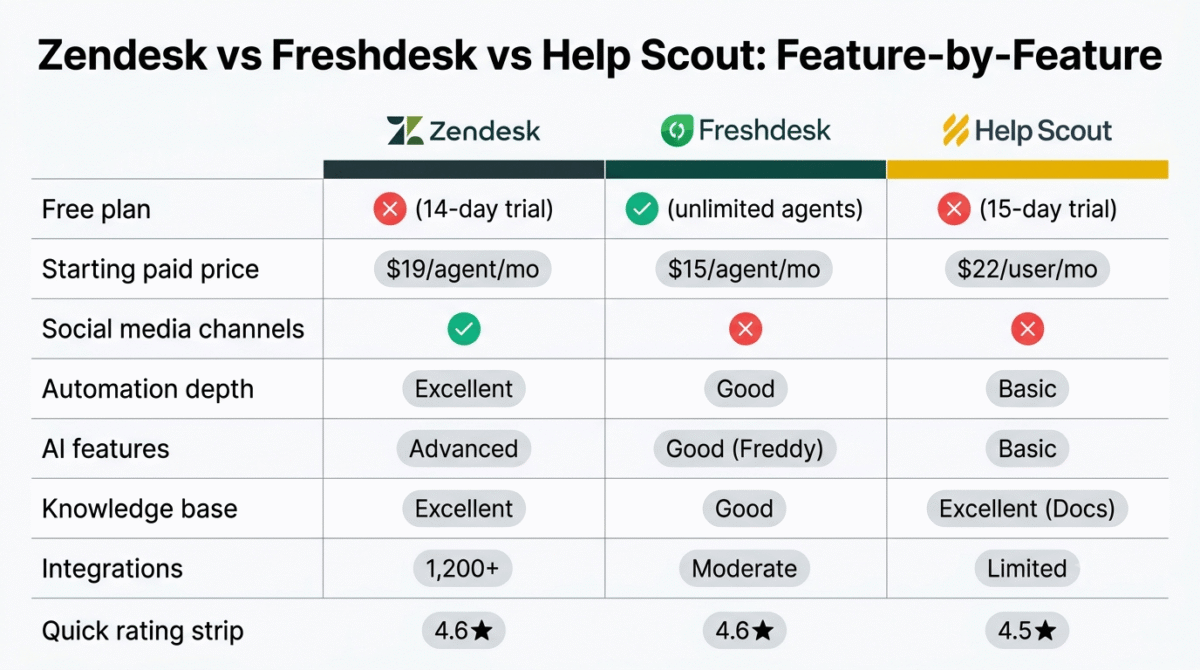
Free plan: No (14-day free trial)
Starting price: $19/agent/month (Support Team, billed annually)
Best plan for most businesses: Support Professional, $55/agent/month
Platforms: Web, iOS, Android
Affiliate program: Yes, Zendesk affiliate program
Zendesk is the world’s most widely used customer support platform, serving over 100,000 businesses from startups to Fortune 500 companies. Its combination of enterprise-grade features, the most extensive integration library of any helpdesk, and the deepest analytics make it the platform growing businesses choose when they need support infrastructure that will scale without replacement.
What Zendesk does best
Zendesk’s ticketing system is the most sophisticated of the three tools, every incoming support request becomes a ticket with a unique ID, status tracking, priority level, assignee, tags, and a complete audit trail of every action taken. The ticket view is fully customisable, agents see exactly the information most relevant to their role, filtered by priority, channel, team, or any combination of attributes.
The omnichannel support capability is Zendesk’s most distinctive enterprise feature. Email, live chat, phone, social media (Twitter/X, Facebook, Instagram), WhatsApp, and mobile SDK are all unified in one agent workspace, customer conversations from any channel appear in the same interface with complete cross-channel history. A customer who tweeted a complaint and then emailed about the same issue is recognised as one customer with one continuous conversation, not two separate tickets.
Zendesk’s automation engine, called Triggers and Automations, handles the most sophisticated support workflow automation of the three platforms. Triggers fire when specific conditions are met (ticket created from VIP customer → assign to senior agent + set high priority + send immediate acknowledgement). Automations fire on time-based conditions (ticket open for 48 hours without response → escalate to manager + send internal notification). The combination enables complex support workflows without manual management.
The Zendesk Help Center, the knowledge base and self-service portal, is the most capable built-in knowledge base of the three tools. Article organisation, custom themes, translation into 40+ languages, and community forums (where customers answer each other’s questions) create a comprehensive self-service resource. The Article Suggestions feature, automatically surfacing relevant knowledge base articles to agents while they write replies, reduces research time per ticket and improves answer consistency.
Zendesk’s reporting and analytics are the most comprehensive of the three platforms. Pre-built dashboards show key metrics (first response time, resolution time, CSAT score, ticket volume by channel and category) alongside custom report building for metrics specific to your support operation. The benchmark reports comparing your performance against industry averages identify improvement priorities with external context.
The integration library, 1,200+ apps in the Zendesk Marketplace, connects to Salesforce, HubSpot, Shopify, Jira, Slack, and virtually every major business tool. If you haven’t settled on your CRM yet, see our HubSpot vs Zoho vs Pipedrive comparison, that choice affects which helpdesk integrations matter most. For businesses with complex technology stacks, Zendesk’s integrations preserve existing workflows rather than requiring replacement.
Where Zendesk falls short
Zendesk’s pricing is the highest of the three tools, the Support Team plan at $19/agent/month is competitive, but meaningful features (custom reports, multilingual support, SLA management) require the Professional plan at $55/agent/month. For small businesses with 2,3 support agents, the total monthly cost escalates quickly relative to Freshdesk’s free plan coverage.
The interface is the most complex of the three platforms, the depth of configuration options creates a setup experience that small businesses without dedicated IT or operations staff find overwhelming. Initial configuration to match a specific support workflow typically requires external implementation help or significant self-study.
The 14-day trial, without a genuine free plan, means committing to paid subscription before experiencing the tool with real support volume. Two weeks is insufficient for evaluating a tool this complex under realistic conditions.
Zendesk pricing
| Plan | Price/agent/month (annual) | Key features |
|---|---|---|
| Support Team | $19 | Ticketing, email, basic reporting |
| Support Professional | $55 | + SLAs, multilingual, CSAT surveys, custom reports |
| Support Enterprise | $115 | + Custom roles, sandbox, AI features |
| Suite plans | $55, $169 | All channels + Guide + Chat bundled |
Zendesk: Pros and Cons
Pros:
- Most comprehensive enterprise feature set
- Best omnichannel support, all channels in one workspace
- Most sophisticated automation and workflow management
- 1,200+ marketplace integrations
- Most detailed analytics and reporting
- Best multilingual support, 40+ languages
- Knowledge base with community forums
- Scales from startup to enterprise without replacement
Cons:
- Most expensive, Professional plan required for key features
- No free plan, 14-day trial only
- Steepest learning curve and configuration complexity
- Overkill and overpriced for very small businesses
- Implementation often requires external help for complex setups
- Interface density can overwhelm agents new to helpdesk tools
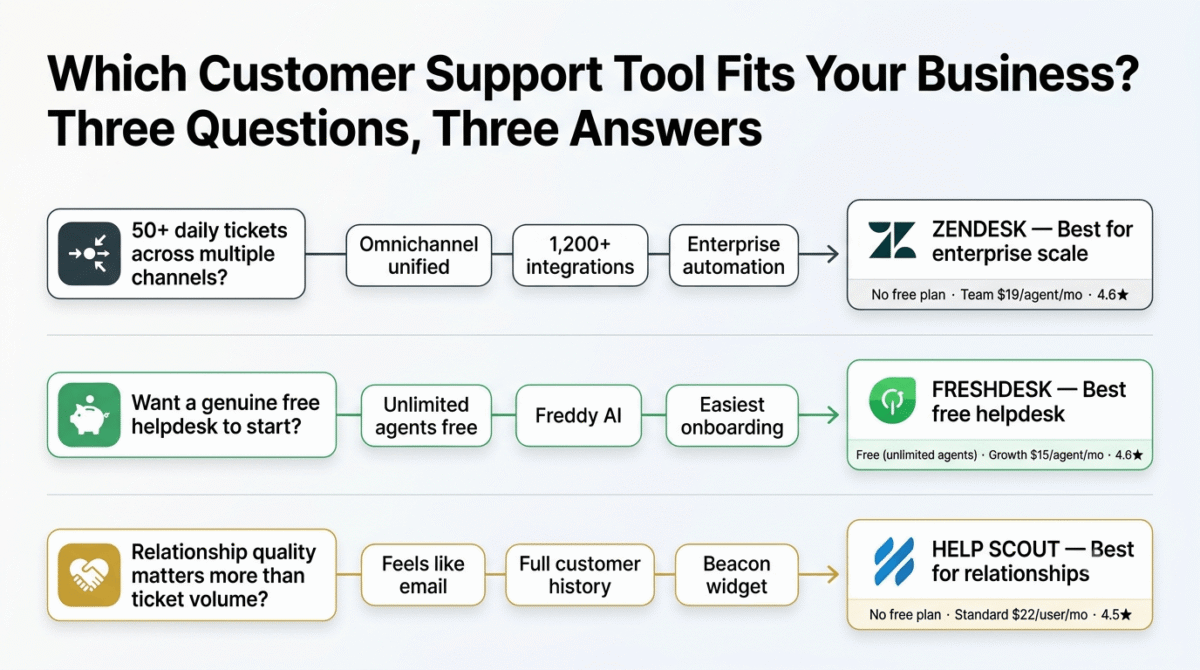
Rating: 4.6 / 5, Best customer support platform for businesses expecting significant growth. The enterprise depth justifies the cost for businesses managing 50+ daily tickets.
Freshdesk Review: Best Free Customer Support Tool for Small Businesses
Free plan: Yes, unlimited agents, core features
Starting price: $15/agent/month (Growth, billed annually)
Best plan for most small businesses: Growth, $15/agent/month or Free plan
Platforms: Web, iOS, Android
Affiliate program: Yes, Freshdesk affiliate program, 15% recurring commission
Freshdesk is the most generous free customer support platform, the free plan covers unlimited agents with core ticketing functionality, making it the default recommendation for small businesses exploring helpdesk software for the first time. The combination of a genuinely capable free tier and competitive paid plan pricing makes Freshdesk the best value helpdesk for cost-conscious businesses.
What Freshdesk does best
Freshdesk’s free plan is its most distinctive and compelling feature, unlimited agents with email ticketing, basic reporting, and knowledge base capability at zero cost. For small businesses with 2,5 support team members who want to test helpdesk software before committing to a subscription, Freshdesk’s free plan provides real operational value rather than a limited demo.
The ticket management interface is clean and intuitive, new support agents reach productive effectiveness faster with Freshdesk than with Zendesk’s more complex interface. The Ticket View organises incoming requests by status, priority, and assignee with clear visual indicators. The collision detection feature, alerting agents when another team member is viewing or replying to the same ticket, prevents the duplicate response problem that plagues shared email inbox support.
Freshdesk’s automation, called Dispatcher and Observer, handles the most common routing and workflow automation needs. Dispatcher automatically routes incoming tickets based on email subject keywords, requester properties, or ticket attributes, directing product complaints to the product support team and billing questions to the billing team without manual sorting. Observer triggers actions when specific conditions are met, sending follow-up emails, updating ticket status, or notifying managers of escalations.
The Freddy AI assistant, Freshdesk’s built-in AI, provides three practically valuable capabilities: Email Bot (automatically responding to common questions from the knowledge base before routing to agents), Article Suggestions (surfacing relevant knowledge base articles to agents while they compose replies), and Predictive Support (categorising and routing tickets based on historical patterns). If you’re curious how Freddy’s support-specific AI compares to general AI chatbots like ChatGPT, Claude, and Gemini for broader business use, see our comparison of the three. For businesses with high support volume and a well-populated knowledge base, Freddy’s deflection capabilities meaningfully reduce ticket volume.
The Freshdesk Arcade, a gamification system where agents earn points for fast responses, positive CSAT ratings, and ticket resolution, is unique among the three platforms. For support teams where agent motivation and consistency are management challenges, the leaderboard and achievement system creates productivity incentives without external management pressure.
The multi-product support, managing customer support for multiple products or brands from one Freshdesk account, is valuable for businesses that offer multiple products or white-label their support for clients. Each product maintains a separate inbox, knowledge base, and agent group while sharing the same Freshdesk account and billing.
Where Freshdesk falls short
Freshdesk’s free plan covers basic ticketing but reserves the most impactful features, automation, CSAT surveys, custom reports, round-robin ticket assignment, and time-based triggers, for paid plans. The free plan is genuinely useful for getting started, but meaningful support operation improvement requires the Growth plan ($15/agent/month) or higher.
The reporting on free and Growth plans is less sophisticated than Zendesk’s, custom report building requires the Pro plan ($49/agent/month), and the analytics depth never quite matches Zendesk’s for complex support operations.
The integration library, while covering major platforms, is smaller than Zendesk’s 1,200+ marketplace, niche tools not in Freshdesk’s native integration list require Zapier workarounds.
Freshdesk pricing
| Plan | Price/agent/month (annual) | Key features |
|---|---|---|
| Free | $0 | Unlimited agents, email ticketing, basic knowledge base |
| Growth | $15 | + Automation, SLA, CSAT, collision detection |
| Pro | $49 | + Custom reports, round-robin, multilingual |
| Enterprise | $79 | + AI features, sandbox, custom roles |
Freshdesk: Pros and Cons
Pros:
- Best free plan, unlimited agents, genuine core functionality
- Most intuitive interface, fastest agent onboarding
- Freddy AI for ticket deflection and agent assistance
- Arcade gamification for agent motivation
- Multi-product support for agencies and multi-brand businesses
- Freshworks ecosystem (Freshsales CRM, Freshchat) for integrated business management
- 15% recurring affiliate commission
Cons:
- Key features (automation, CSAT) require Growth plan ($15/agent/month)
- Reporting less sophisticated than Zendesk
- Integration library smaller than Zendesk’s
- Free plan too limited for serious support operation improvement
- Enterprise AI features less developed than Zendesk’s
Rating: 4.6 / 5, Best customer support tool for small businesses prioritising cost efficiency. The free plan and competitive Growth plan pricing make it the most accessible helpdesk entry point.
Help Scout Review: Best Customer Support Tool for Customer-Centric Small Businesses
Free plan: No (15-day free trial)
Starting price: $22/user/month (Standard, billed annually)
Best plan for most small businesses: Standard, $22/user/month
Platforms: Web, iOS, Android
Affiliate program: Yes, Help Scout affiliate program, 30% recurring for 12 months
Help Scout is the most deliberately simple and customer-focused customer support platform, built on the philosophy that support should feel like a personal email conversation rather than a ticket number system. For businesses where relationship quality is as important as response speed, agencies, consultancies, SaaS businesses with high-touch customer relationships, Help Scout’s human-centred design produces better customer experiences than ticket-number-first alternatives.
What Help Scout does best
Help Scout’s shared inbox, the primary interface, looks and feels like email rather than a ticketing system. Customers receive replies that read as genuine personal emails, not form responses with ticket numbers and case IDs. This seemingly simple design decision produces measurably better customer satisfaction for businesses where personalised relationships matter: customers feel they are corresponding with a person, not interacting with a support system.
The customer profile sidebar, visible alongside every conversation, shows the customer’s complete interaction history, previous conversations, company information, and any custom properties your team has recorded. This context is visible before the agent writes a single word of reply, enabling personalised responses that reference previous interactions without asking customers to repeat information.
The internal collaboration features, @mentions for bringing team members into conversations, private notes visible only to agents, and saved replies for common responses, create efficient team collaboration within a simple email-like interface. The collision detection prevents two agents from responding to the same conversation simultaneously.
The Docs knowledge base, Help Scout’s self-service portal, produces the most visually polished customer-facing knowledge base of the three tools. The clean design, contextual search, and the Beacon widget (embedding knowledge base search directly on your website alongside a contact form) create the most integrated self-service experience. Beacon’s in-context help, showing relevant knowledge base articles based on which page the customer is viewing, reduces support volume from customers who would otherwise email rather than search.
The Beacon widget, a lightweight embeddable widget that combines knowledge base search, live chat, and contact form in a single floating button, is Help Scout’s most practically valuable feature for small businesses. If live chat specifically is your priority rather than a bundled widget, see our Intercom vs Drift vs Tidio comparison for a dedicated live chat tool built around that one function. A single Beacon on your website covers self-service, proactive chat, and contact form in one tool, replacing multiple separate widgets.
Help Scout’s reporting, first response time, resolution time, CSAT, and conversation volume, is clean and accessible without the configuration complexity of Zendesk’s reporting. Pre-built reports cover the metrics most relevant to small business support operations without requiring custom report building.
Where Help Scout falls short
Help Scout’s per-user pricing, $22/user/month on the Standard plan, applies to every team member, including managers and administrators. For businesses with large teams where only a subset actively handle support, per-agent pricing (as used by Zendesk and Freshdesk) is more cost-effective than per-user pricing.
The automation capabilities are less sophisticated than both Zendesk and Freshdesk, Help Scout’s Workflows cover basic routing and assignment automation but cannot match the conditional branching and time-based automation of the competing tools. For businesses with complex support routing requirements, Help Scout’s automation may be insufficient.
The free plan absence, 15-day trial only, requires paid commitment before evaluating the tool with real support volume. Freshdesk’s free plan is significantly more accessible for businesses uncertain about helpdesk investment.
The integration library, while covering essentials, is the smallest of the three platforms, less relevant for businesses with complex technology stacks requiring extensive CRM, e-commerce, and project management integration.
Help Scout pricing
| Plan | Price/user/month (annual) | Key features |
|---|---|---|
| Standard | $22 | 2 mailboxes, Docs, Beacon, basic reporting |
| Plus | $44 | + Custom fields, teams, advanced reporting, 5 mailboxes |
| Pro | $65 | + HIPAA compliance, dedicated account manager |
Help Scout: Pros and Cons
Pros:
- Most human-centred design, support feels like personal email
- Best customer profile sidebar, complete history visible before replying
- Most visually polished Docs knowledge base
- Beacon widget combines self-service, chat, and contact form
- Cleanest, most intuitive interface, lowest learning curve
- Best for relationship-focused businesses (agencies, SaaS, consultancies)
- 30% recurring affiliate commission for 12 months
Cons:
- No free plan, 15-day trial only
- Per-user pricing more expensive for large teams than per-agent competitors
- Automation less sophisticated than Zendesk and Freshdesk
- Smallest integration library of the three tools
- Fewer channels than Zendesk (email and chat only on standard)
- Reporting less detailed than Zendesk
Rating: 4.5 / 5, Best customer support tool for businesses where relationship quality and personalised communication are the primary customer experience goals.
Head-to-Head Comparison
| Zendesk Team | Freshdesk Free | Freshdesk Growth | Help Scout Standard | |
|---|---|---|---|---|
| Price/agent/month | $19 | $0 | $15 | $22 |
| Free plan | No | Yes (unlimited agents) | – | No |
| Trial | 14 days | Forever free | – | 15 days |
| Email ticketing | Yes | Yes | Yes | Yes |
| Live chat | Add-on | Add-on | Add-on | Beacon widget |
| Phone support | Add-on | No | No | No |
| Social media | Yes | No | No | No |
| Automation | Excellent | Basic | Good | Basic |
| AI features | Advanced | Good (Freddy) | Good | Basic |
| Knowledge base | Excellent | Basic | Good | Excellent (Docs) |
| CSAT surveys | Professional+ | No | Yes | Yes |
| Custom reports | Professional+ | No | Pro plan | Plus plan |
| Multilingual | Professional+ | No | Pro plan | No |
| Integrations | 1,200+ | Moderate | Moderate | Limited |
| Mobile app | Yes | Yes | Yes | Yes |
| Best for | Enterprise scale | Cost-conscious start | Growing SMB | Relationship-focused |
| Affiliate | Standard | 15% recurring | 15% recurring | 30% recurring (12mo) |
Which Customer Support Tool Should You Choose?
Choose Zendesk if:
Your business handles 50+ daily support tickets across multiple channels (email, chat, social, phone), has a team of 5+ support agents, and needs enterprise-grade automation, reporting, and integrations. Zendesk’s investment is justified when support quality and efficiency at scale are business-critical, when a poorly managed support operation costs more in lost customers than the platform subscription costs.
Choose Freshdesk if:
You are implementing a helpdesk for the first time and want to start free before committing to paid plans. Freshdesk’s free plan covers unlimited agents with core ticketing, the best risk-free way to establish a helpdesk operation and evaluate which features you actually need before paying. Upgrade to Growth ($15/agent/month) when automation and CSAT surveys become priorities.
Choose Help Scout if:
Your business prioritises personalised, relationship-focused customer communication over ticket processing efficiency. Agencies, consultancies, SaaS businesses with white-glove support models, and any business where customers should never feel like they are interacting with a support system will deliver better experiences with Help Scout’s email-like interface and customer profile depth.
Customer Support for Bloggers
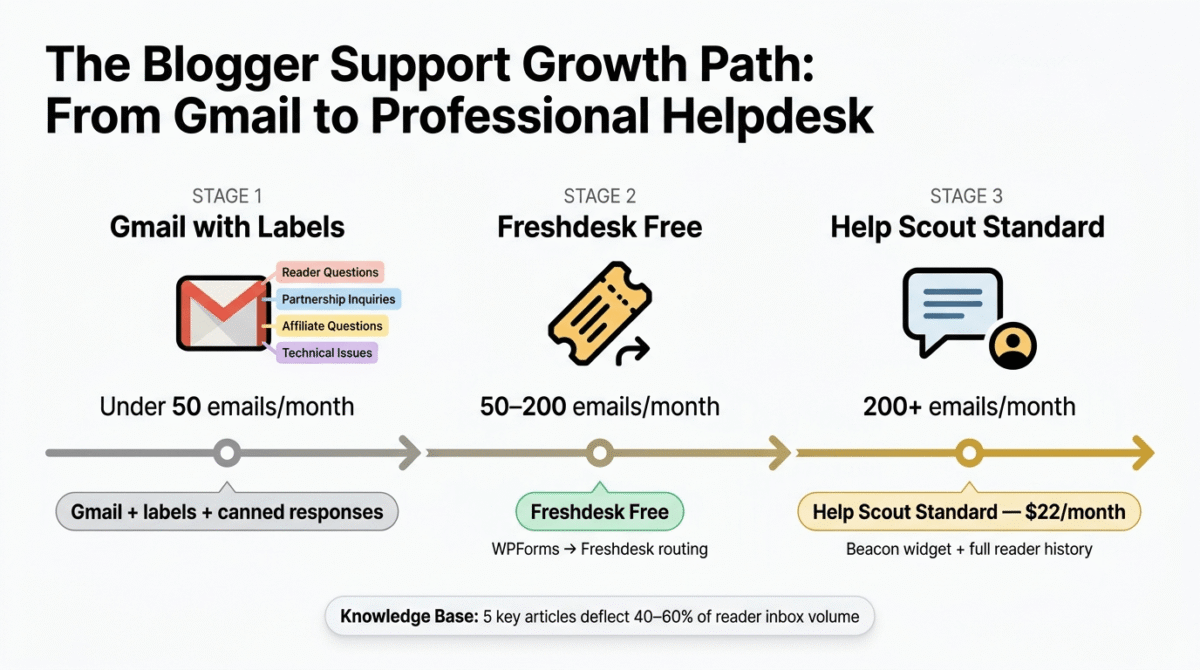
For bloggers managing reader communications, the recommended approach scales with growth:
Stage 1, Under 50 reader emails/month: A dedicated Gmail account with a well-organised label system (Reader Questions, Partnership Inquiries, Affiliate Questions, Technical Issues) covers basic organisation without any helpdesk cost. Set up canned responses for the most common questions.
Stage 2, 50,200 emails/month: Freshdesk free handles this volume with proper ticket organisation, route contact form submissions from your WPForms form to Freshdesk, create canned replies for common questions, and build a basic knowledge base answering the most-asked reader questions.
Stage 3, 200+ emails/month: Help Scout Standard ($22/month) provides the most professional reader communication experience, personalised email-like replies, complete reader history, and Beacon’s in-context help reduce volume while improving response quality.
The blogger knowledge base strategy: Build a knowledge base answering: “How do I access my purchase?”, “What is your affiliate disclosure policy?”, “Can I republish your content?”, “How do I contact you for partnerships?”, “What tools do you personally use?”. These five articles deflect 40,60% of typical blogger inbox volume.
Final Verdict
Freshdesk is the best starting point for most small businesses, the free plan’s unlimited agents and core ticketing capability provide genuine helpdesk value at zero cost. The Growth plan at $15/agent/month adds the automation and CSAT features that transform basic ticket organisation into a systematic support operation. Best risk-free entry into customer support software.
Help Scout is the best tool for relationship-focused businesses, the email-like interface, customer profile depth, and Beacon widget create the most personalised customer support experience available. Best for agencies, consultancies, and SaaS businesses where customer relationship quality is a competitive differentiator.
Zendesk is the best platform for businesses scaling to enterprise support, the omnichannel capability, sophisticated automation, and 1,200+ integrations provide the infrastructure for a support operation that grows without replacement. Best for businesses expecting significant customer volume growth.
Ratings:
- Freshdesk: 4.6 / 5
- Zendesk: 4.6 / 5
- Help Scout: 4.5 / 5
Frequently Asked Questions
What is the best free customer support software in 2026?
Freshdesk is the best free customer support software, unlimited agents, email ticketing, basic knowledge base, and core reporting at zero cost. The free plan is genuinely operational rather than a limited demo, covering the essential helpdesk functions that small businesses need to move beyond shared Gmail inbox support. Upgrade to Freshdesk Growth ($15/agent/month) when automation and CSAT surveys become priorities.
What is the difference between Zendesk and Freshdesk?
Zendesk is a more sophisticated, enterprise-focused platform with deeper automation, more extensive integrations (1,200+), and broader channel support, but significantly higher cost and steeper learning curve. Freshdesk provides comparable core ticketing functionality with a more accessible free plan and lower paid plan pricing. Zendesk is better for complex support operations at scale; Freshdesk is better for cost-conscious small businesses starting their helpdesk journey.
Is Help Scout good for small businesses?
Yes, Help Scout’s email-like interface and customer relationship focus make it particularly effective for small businesses where personalised communication is important. The Standard plan at $22/user/month is priced comparably to Freshdesk Growth but with a more polished interface and better customer profile integration. The limitation is per-user (not per-agent) pricing, which makes it more expensive for teams where only some members actively handle support.
Do I need customer support software for my blog?
Not until your reader communication volume exceeds what a well-organised Gmail can manage, typically around 50 emails per month. Below this threshold, Gmail labels and canned responses suffice. Above this volume, Freshdesk free provides ticket organisation, team collaboration, and basic reporting that dramatically improve response consistency and time management. The right time to implement a helpdesk is when you start worrying about missing reader emails or response consistency.
What is a helpdesk ticketing system?
A helpdesk ticketing system converts incoming customer communications (emails, chat messages, social media mentions) into organised tickets with unique IDs, status tracking, priority levels, and assignment to specific agents. Each ticket maintains a complete history of all communications related to that issue, ensuring nothing is lost and any agent can pick up the conversation with full context. Ticketing systems solve the fundamental problem of shared inbox support, missed emails, duplicate responses, and no visibility into team performance.
How much does customer support software cost?
Customer support software ranges from free (Freshdesk free) to $150+/agent/month for enterprise platforms. Typical small business investment: $0 (Freshdesk free), $15,$22/agent/month (Freshdesk Growth or Help Scout Standard), $49,$55/agent/month (Freshdesk Pro or Zendesk Professional). A 3-agent team using Freshdesk Growth pays $45/month total, typically justified by the time saved organising support and the improvement in customer retention from faster, more consistent responses.








