Remote work has fundamentally changed what a productive workday looks like. In 2026, over 30% of knowledge workers work remotely full-time, and the gap between remote workers who thrive and those who struggle is almost entirely determined by their tools and systems.
The right remote work software stack replaces everything an office provides: spontaneous communication (Slack replaces hallway conversations), visual collaboration (Figma replaces whiteboards), team visibility (project management tools replace the ability to see what colleagues are working on), and the seecurity infrastructure that corporate IT departments previously managed on your behalf.
This guide covers the 30 best tools for remote work in 2026, tested across real distributed team workflows covering communication, project management, documentation, security, and the home office infrastructure that makes professional remote work sustainable.
Table of Contents
Why Remote Work Tools Are Different From Office Tools
Before listing tools, understanding what makes remote work software requirements different is important for choosing correctly.
Async by default. In an office, you can tap a colleague on the shoulder for a quick answer. Remote work requires building async-first communication habits, documented decisions, recorded meetings, written status updates, because real-time interruption is not always possible across time zones.
Documentation replaces institutional memory. In an office, knowledge lives in people’s heads and spreads through conversation. Remote teams that do not document everything consistently create knowledge silos, critical information known only to one person who is unreachable when needed.
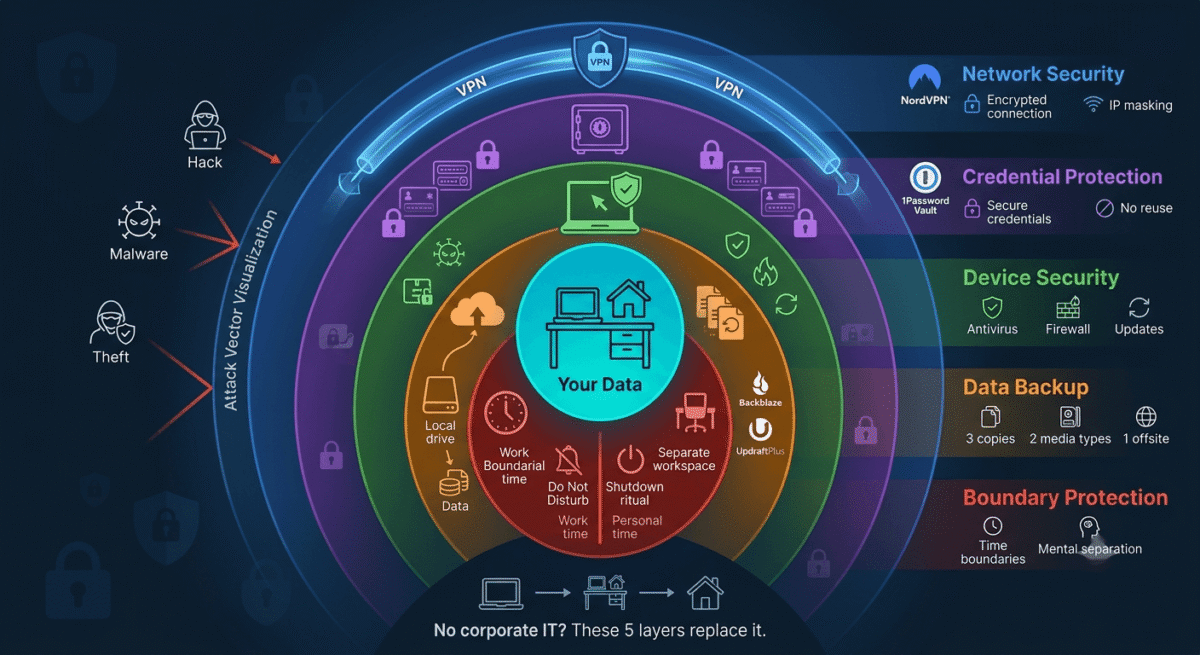
Security without IT support. Office networks have corporate firewalls, managed devices, and IT departments that handle security. Remote workers on home networks are personally responsible for the security of company data, making VPNs, password managers, and encrypted communication tools mandatory rather than optional.
Energy management is harder. The commute that once provided a mental transition between work and home no longer exists. Remote workers who do not deliberately manage their environment and schedule consistently report higher rates of burnout than office workers, tools that structure focus and protect non-working hours are genuinely valuable.
Section 1: Communication Tools
1. Slack, Best Team Messaging for Remote Teams
Price: Free (90-day message history) | $7.25/user/month (Pro)
No affiliate, industry standard
Full review: Best Live Chat Software →
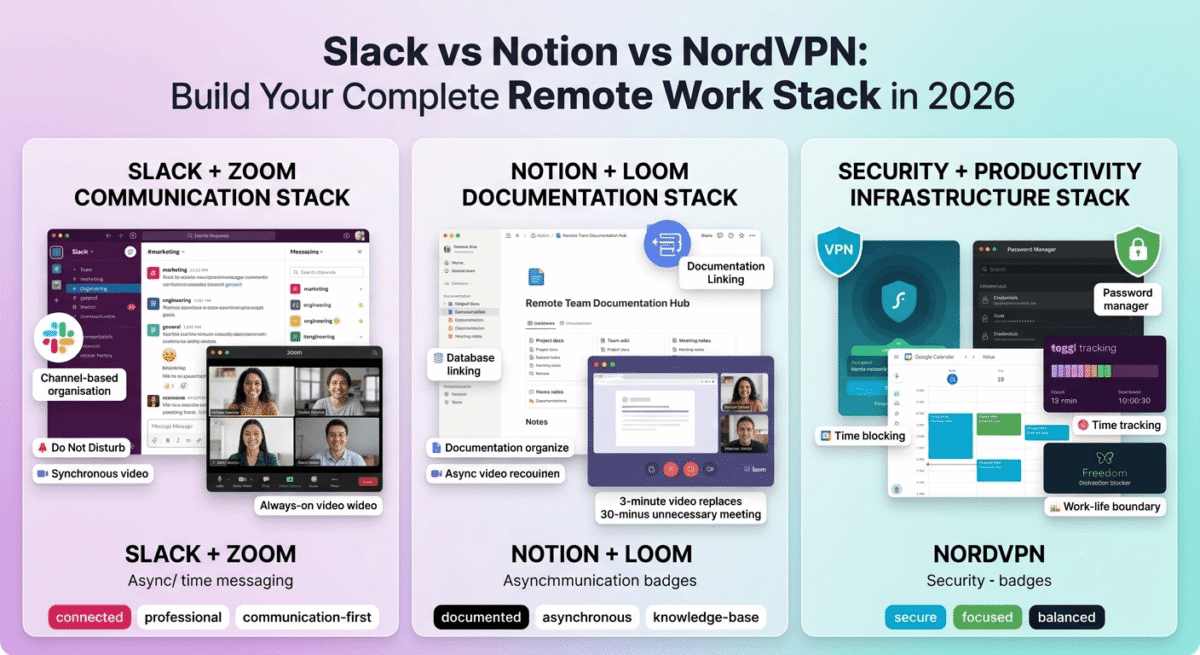
Slack is the central nervous system of remote team communication, channel-based messaging that organises conversations by team, project, and topic in a way that group email chains and WhatsApp groups cannot replicate. The searchable message history means decisions made in conversations are findable weeks later, unlike ephemeral chat that disappears from memory.
Essential Slack practices for remote teams:
- Create channels for every project and every standing team function, #marketing, #engineering, #product, #general-announcements
- Use threads for all replies, keeping channels scannable rather than drowning in responses
- Set Do Not Disturb hours, Slack’s notification schedule prevents work bleeding into personal time
- Use Status to signal availability, “In deep work until 3pm,” “On client call,” “Offline, back tomorrow”
- Document important decisions in Notion immediately when made in Slack, Slack is not a documentation tool
Free vs paid: The 90-day message history on Slack free is the primary limitation, conversations and files older than 90 days disappear. For teams where searchable history matters (legal, compliance, project documentation), the Pro plan at $7.25/user/month is necessary.
2. Zoom, Best Video Conferencing for Remote Teams
Price: Free (40-minute group limit) | $13.33/month (Pro)
Affiliate: Zoom affiliate program
Full review: Best Video Conferencing Software →
Zoom remains the most reliable video conferencing tool for professional remote work, joining requires one link click with no account creation for external participants, connection quality holds up on variable home internet better than competitors, and the interface is universally familiar to clients, partners, and colleagues worldwide.
Remote work Zoom best practices:
- Always-on video for internal team meetings, face-to-face connection reduces remote isolation
- Breakout rooms for workshop and collaborative sessions
- Cloud recording for asynchronous meeting consumption, team members in different time zones watch recordings rather than attending at unreasonable hours
- Virtual backgrounds, a consistent, professional background regardless of home office environment
- Noise cancellation, essential when working in homes with ambient noise (traffic, family, pets)
3. Loom, Best Async Video Communication for Remote Workers
Price: Free (25 videos, 5-minute limit) | $12.50/month (Starter)
Affiliate: Loom affiliate program
Full review: Best Screen Recording Software →
Loom is the most impactful tool for reducing unnecessary meetings in remote teams. Record your screen with a webcam overlay and share instantly via link, a 3-minute Loom explaining a design decision replaces a 30-minute meeting where most attendees were observers rather than participants.
Remote work Loom use cases:
- Weekly team updates, record once, team watches async, no meeting required
- Code review explanations, walk through the code with commentary rather than writing long text comments
- Design feedback, show the design issue on screen rather than describing it in words
- Client onboarding, record a walkthrough of the product once, share to all new clients
- Status updates to managers, a 2-minute Loom on your weekly progress is more engaging than a written report
The 5-minute limit on Loom free is constraining for detailed walkthroughs, the Starter plan at $12.50/month removes limits and adds viewer engagement analytics.
4. Google Meet, Best Free Video Conferencing for Google Workspace Teams
Price: Free (60-minute group meetings) | Included in Google Workspace ($6/user/month)
No affiliate
Full review: Best Video Conferencing Software →
For teams already using Google Workspace, Google Meet is the natural default video conferencing tool, meetings are created directly from Google Calendar events, no separate account is required, and the integration with Google Docs (collaborative note-taking during meetings) and Google Drive (automatic recording storage) makes Meet the most cohesive part of the Google remote work ecosystem.
5. Discord, Best Free Team Communication for Tech and Creative Remote Teams
Price: Free (unlimited messages, unlimited history) | $9.99/month (Nitro)
No affiliate
Discord’s always-on voice channels, where team members can drop in and out of audio conversations throughout the day, replicate the ambient office environment better than any other remote communication tool. Team members working in the same voice channel can ask quick questions, share reactions, and maintain the social connection that remote work otherwise eliminates.
For startups, creative agencies, and tech teams comfortable with a less corporate interface, Discord provides Slack’s core functionality (channels, direct messages, file sharing) alongside persistent voice channels, all completely free with no message history limits.
Section 2: Project Management and Collaboration
6. Notion, Best Documentation and Knowledge Base for Remote Teams
Price: Free | $10/user/month (Plus) | $15/user/month (Business)
Affiliate: Notion affiliate
Full review: Best Note-Taking Apps →
Remote teams that do not document everything consistently develop knowledge silos that slow down hiring, create single points of failure, and make onboarding new team members unnecessarily painful. Notion is the best documentation tool for remote teams, the combination of wiki-style pages, databases, and collaborative editing makes it the most flexible knowledge base available.
What remote teams document in Notion:
- Company handbook, values, policies, processes, and culture documentation
- Project documentation, briefs, decisions, meeting notes, and status updates for every project
- Onboarding guides, step-by-step setup instructions for new team members
- SOPs, standard operating procedures for every repeatable process
- Meeting notes, searchable record of every team decision ever made
The Notion AI feature, asking questions about your Notion workspace and receiving answers from its content, turns your documentation from passive storage into an active knowledge tool.
7. ClickUp, Best Project Management for Remote Teams
Price: Free (unlimited tasks) | $7/user/month (Unlimited)
Affiliate: ClickUp affiliate, 20% recurring
Full review: Best Project Management Tools →
ClickUp provides the cross-project visibility that remote team managers need, the Everything view shows every task across every project in one place, the Workload view shows each team member’s task load (identifying who is overloaded and who has capacity), and the Calendar view shows all deadlines across the team in a single timeline.
For remote teams where work is invisible unless documented, ClickUp’s task management creates shared visibility into what everyone is working on, replacing the passive awareness that comes from sitting in the same office.
8. Figma, Best Design Collaboration for Remote Creative Teams
Price: Free (3 projects) | $12/editor/month (Professional)
Affiliate: Figma affiliate
Full review: Best Design Tools →
Figma’s real-time collaborative design, multiple team members editing the same file simultaneously, with each person’s cursor visible to all, is the remote design tool that replaced the whiteboard in distributed creative teams. Design reviews happen in Figma’s commenting system rather than in meetings. Stakeholder feedback is pinned to specific design elements rather than described in email.
For remote product teams, the FigJam whiteboard, shared digital brainstorming space with sticky notes, diagrams, and freehand drawing, replicates the collaborative energy of in-person design sprints in an async-compatible format.
9. Miro, Best Virtual Whiteboard for Remote Teams
Price: Free (3 boards) | $8/user/month (Starter)
No affiliate
Miro is the most capable virtual whiteboard for remote teams that run workshops, strategy sessions, and collaborative planning, an infinite canvas where teams can map customer journeys, plan sprints, brainstorm product features, and run retrospectives simultaneously from different locations.
The template library, covering sprint planning, SWOT analysis, customer journey mapping, and dozens of other common workshop formats, makes structured facilitation accessible to remote team leaders without workshop design experience.
10. GitHub / GitLab, Best Code Collaboration for Remote Development Teams
Price: Free (GitHub) | Free self-hosted (GitLab)
No affiliate, industry standard
For remote software development teams, GitHub is the central collaboration platform, pull requests with inline code review comments, issue tracking, project boards, and CI/CD pipelines replace the in-person code review and pair programming that office-based teams rely on.
The async code review workflow, where reviewers comment on specific lines of code and authors respond in writing rather than in synchronous review meetings, is more thorough and better documented than synchronous code review, making it one of the areas where remote development teams frequently outperform office-based counterparts.
Section 3: Productivity and Focus Tools
11. Toggl Track, Best Time Tracking for Remote Workers
Price: Free (unlimited projects) | $9/user/month (Starter)
Affiliate: Toggl affiliate
Full review: Best Time Tracking Software →
Remote workers who do not track time consistently struggle to distinguish productive working time from time spent near a computer. Toggl’s one-click timer, browser extensions that add tracking to 100+ tools, and weekly time reports create honest data about how working hours are actually spent.
For remote freelancers and consultants who bill clients by the hour, accurate time tracking is the foundation of honest invoicing, clients trust detailed time reports far more than estimated hours.
12. RescueTime, Best Automatic Productivity Monitor for Remote Workers
Price: Free (limited) | $12/month (Premium)
No affiliate
RescueTime runs in the background continuously, tracking every application and website, categorising activity as productive or distracting, and delivering weekly reports on time distribution. The FocusTime feature blocks distracting sites during scheduled deep work periods.
For remote workers whose biggest challenge is staying focused without the social pressure of a shared office environment, RescueTime’s automated tracking and blocking provides the accountability that self-discipline alone frequently cannot sustain.
13. Forest, Best Focus App for Remote Workers
Price: Free (Android) | $1.99 (iOS)
No affiliate
The gamification mechanic, virtual trees that die if you leave the app to check social media, provides psychological friction against distraction that notification settings alone cannot create. For remote workers whose phones are both work tools and distraction sources, Forest’s physical proximity creates a visible commitment device during focus sessions.
14. Freedom, Best Cross-Device Distraction Blocker for Remote Workers
Price: $2.42/month (billed annually)
No affiliate
Freedom blocks distracting websites and apps across all devices simultaneously, phone, tablet, and computer, during scheduled focus sessions. Unlike single-device blockers that are easily circumvented by switching to another device, Freedom’s cross-device blocking creates genuine distraction barriers.
Scheduled blocking sessions, automatically blocking social media every morning from 9am to 12pm, for example, remove the daily decision of whether to block distractions. Automated consistency beats manual willpower for long-term focus.
15. Notion AI, Best AI Writing and Thinking Assistant for Remote Workers
Price: Included in Notion Plus ($10/user/month) | Add-on for free plan ($8/month)
Affiliate: Notion affiliate
Notion AI’s most valuable remote work feature is its ability to answer questions about your team’s Notion workspace, asking “what was the decision we made about the pricing strategy last month?” returns an answer from your documented meeting notes rather than requiring you to search manually.
The AI writing features, summarising long documents, generating first drafts of SOPs, translating content for international team members, reduce the documentation burden that makes remote team knowledge management feel overwhelming.
Section 4: Security for Remote Workers
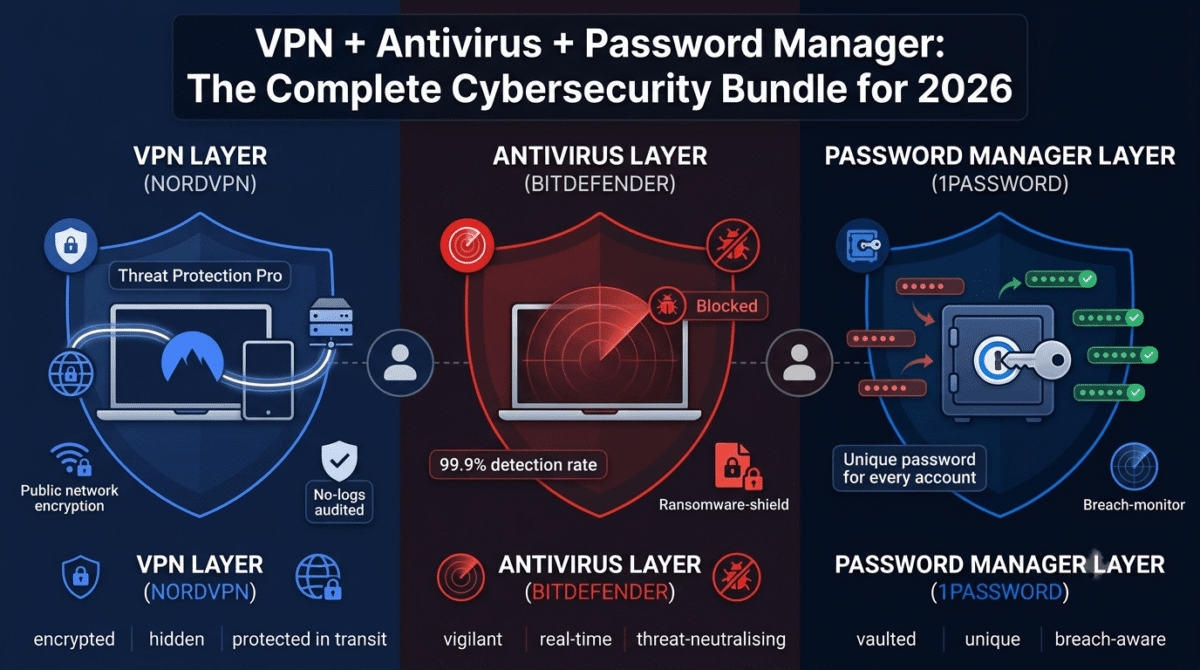
16. NordVPN, Best VPN for Remote Workers
Price: $3.99/month (2-year plan)
Affiliate: 40% + 30% recurring commission
Full review: Best VPN for Beginners →
Home networks are significantly less secure than corporate networks, no enterprise firewall, no network monitoring, and often shared with family members whose devices may be compromised. A VPN encrypts all internet traffic between your home computer and the websites and services you use, protecting company data from network-level interception.
NordVPN’s Meshnet feature, creating a private encrypted network between team members’ devices, enables secure peer-to-peer file sharing and remote device access between remote team members without commercial VPN routing.
17. 1Password, Best Password Manager for Remote Workers
Price: $2.99/month (Individual) | $19.95/month (Teams, up to 10 users)
Affiliate: Up to $60 per referral
Full review: Best Password Managers →
Remote workers manage more passwords than office workers, every SaaS tool in the stack requires separate credentials, and the corporate single sign-on systems that office networks provide are often not available for home-based access. 1Password stores every password securely, generates strong unique passwords automatically, and autofills across all browsers and devices.
The Travel Mode feature, temporarily removing sensitive vaults from devices when crossing borders, is relevant for remote workers who travel internationally and face device inspection at immigration.
18. Wordfence / Cloudflare, Best Security for Remote Workers with Websites
Price: Wordfence Free | Cloudflare Free
Full review: Best WordPress Plugins →
Remote workers who manage client websites or their own web properties need security tools that function without IT support. Wordfence protects WordPress sites with a firewall and malware scanner. Cloudflare provides DDoS protection, free SSL, and CDN for any website, both free, both effective without technical maintenance overhead.
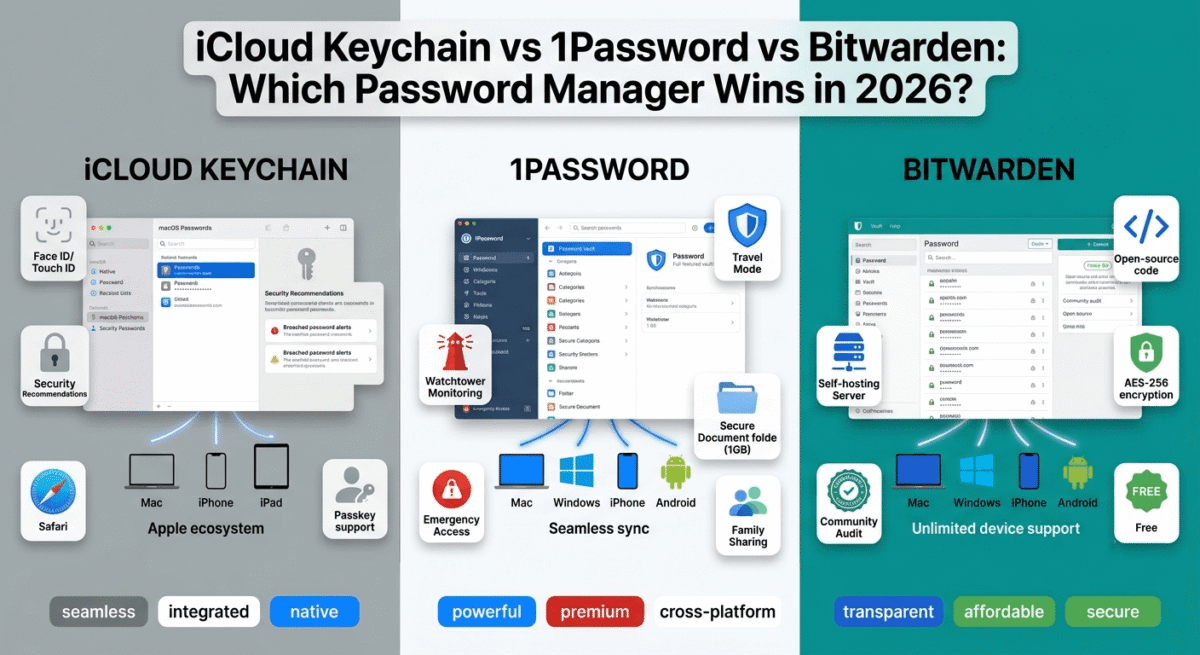
19. Bitwarden, Best Free Password Manager for Budget-Conscious Remote Workers
Price: Free (unlimited passwords, unlimited devices)
Full review: Best Password Managers →
For remote workers who want password management at zero cost, Bitwarden’s free plan provides unlimited password storage, sync across all devices, and browser autofill, the core password management functionality. The open-source codebase provides security transparency that proprietary tools cannot match.
Section 5: Home Office Infrastructure
20. Google Workspace, Best Business Email and Collaboration for Remote Workers
Price: $6/user/month (Business Starter)
No affiliate, essential tool
Professional email at your own domain (name@yourcompany.com) is as important for remote workers as for office workers, arguably more so, since email is the primary first impression you make on clients and partners who never meet you in person.
Google Workspace combines custom domain Gmail (professional email with powerful spam filtering), Google Drive (shared file storage with real-time collaboration), Google Calendar (shared team calendars for remote coordination), and Google Meet (video conferencing) in one subscription that integrates seamlessly with every Google product remote workers use daily.
21. Calendly, Best Meeting Scheduling for Remote Workers
Price: Free (1 event type) | $10/month (Standard)
Affiliate: Calendly affiliate
Remote workers in different time zones from their clients and colleagues face the scheduling friction of converting time zones and finding mutual availability. Calendly displays your available times in each visitor’s local time zone automatically, eliminating the “what time is 3pm EST for you?” email exchange entirely.
The round-robin scheduling feature (Standard plan) distributes inbound meeting requests among available team members, essential for remote customer-facing teams where fair lead distribution matters.
22. Otter.ai, Best Meeting Transcription for Remote Teams
Price: Free (300 minutes/month) | $8.33/month (Pro)
No affiliate
Otter.ai automatically transcribes Zoom, Google Meet, and Microsoft Teams meetings in real time, producing searchable transcripts that team members who missed a meeting (or attended from a different time zone at an awkward hour) can read in minutes rather than watching a full recording.
The AI summary feature extracts action items and key decisions from meeting transcripts automatically, the most time-saving feature for remote team managers who attend multiple meetings daily and need rapid summaries of what was decided and who is responsible for what.
23. Zapier, Best Workflow Automation for Remote Teams
Price: Free (100 tasks/month) | $19.99/month (Starter)
Affiliate: Zapier affiliate
Remote teams that use multiple tools, Slack, Notion, ClickUp, Google Workspace, HubSpot, need automation to prevent manual data transfer between systems from consuming hours of productive time. Zapier connects 5,000+ apps and triggers automated actions when specific events occur: “When a new HubSpot contact is created, add them to a ClickUp task and send a Slack notification to the sales channel.”
The free plan covers 100 automated tasks per month, sufficient for light automation. The Starter plan at $19.99/month covers most small team automation needs.
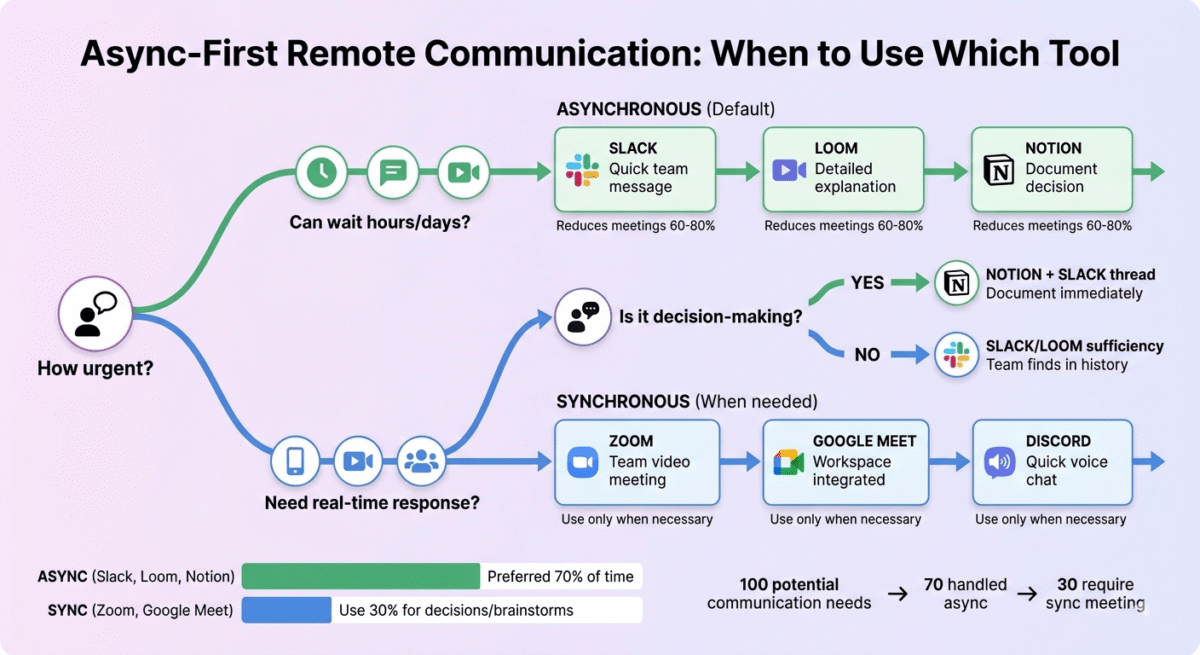
24. Loom + Notion + Slack, The Async Communication Stack
These three tools together form the most effective async communication system for remote teams:
- Slack for quick messages, notifications, and channel-based team conversation
- Loom for visual explanations, walkthroughs, and updates that would otherwise require a meeting
- Notion for documenting decisions, knowledge, and processes that emerge from Slack and Loom
The three tools cover the full spectrum of remote communication, quick (Slack), visual (Loom), and permanent (Notion), without redundancy.
25. AnyDesk, Best Remote Desktop for Remote Workers Who Support Clients
Price: Free (personal) | $14.90/month (Solo)
Affiliate: AnyDesk affiliate, recurring commission
Full review: Best Remote Desktop Software →
Remote workers who provide technical support to clients, WordPress developers, IT consultants, software trainers, need remote desktop access to troubleshoot and configure client systems directly. AnyDesk provides the fastest remote desktop connection available (DeskRT codec) with a lightweight application under 4MB that runs without installation on the client’s machine.
Section 6: Wellbeing and Work-Life Balance Tools
26. Headspace or Calm, Best Mindfulness Apps for Remote Workers
Price: $12.99/month (Headspace) | $14.99/month (Calm)
No affiliate
Remote work isolation and the blurred boundaries between work and home contribute to higher burnout rates among remote workers compared to office workers. Structured mindfulness practice, even 10 minutes daily, measurably reduces anxiety and improves focus in research studies.
Both Headspace and Calm offer structured meditation courses alongside sleep content, focus music, and movement exercises. Student and annual discounts bring both to $5–$7/month, a mental health investment with demonstrable ROI in work quality and personal wellbeing.
27. f.lux or Apple Night Shift, Best Blue Light Management for Remote Workers
Price: Free (f.lux) | Built into Apple devices
No affiliate
Remote workers spend more hours on screens than office workers, without the natural breaks that commuting, in-person meetings, and office social interactions provide. F.lux automatically adjusts your monitor’s colour temperature throughout the day, warm in the evening to support natural melatonin production and healthy sleep, neutral during working hours.
Better sleep quality from reduced evening blue light exposure has compounding productivity effects, well-rested remote workers are consistently more focused and effective than sleep-deprived ones.
28. Spotify or Brain.fm, Best Focus Music for Remote Workers
Price: Spotify $9.99/month | Brain.fm $6.99/month
No affiliate
Music and ambient audio affect cognitive performance, research consistently shows that certain types of audio (instrumental music, nature sounds, consistent ambient noise) improve focus for many people during deep work, while lyrics distract from language-intensive tasks like writing and coding.
Brain.fm’s AI-generated focus music is specifically designed to improve sustained attention, the company publishes EEG research showing measurable differences in brain activity during focus sessions with their audio versus popular music.
29. Toggl Track + Google Calendar, The Remote Worker Time System
These two free tools together create the most effective time management system for remote workers:
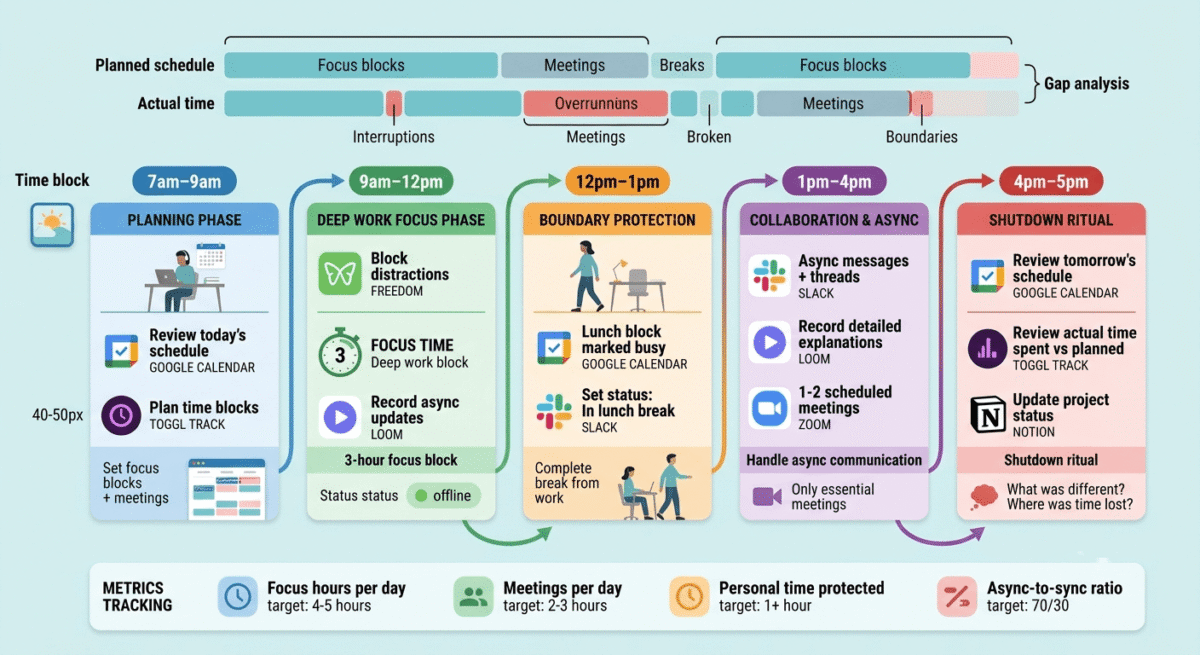
Google Calendar holds all commitments, meetings, focus blocks, personal time, and work boundaries, visible to teammates who need to schedule with you.
Toggl Track records how time is actually spent versus how it was planned, the gap between calendar intentions and actual activity is where remote worker time management improves.
Review the gap weekly: which meetings overran? Which focus blocks were interrupted? Which personal time was encroached upon by work? The data makes patterns visible and actionable.
30. UpdraftPlus + Backblaze, Best Backup System for Remote Workers
Price: UpdraftPlus free | Backblaze $99/year
Full review: Best Cloud Backup Software →
Remote workers are personally responsible for the data on their devices, there is no IT department to restore files from a server backup when a laptop is stolen or a hard drive fails. UpdraftPlus automated WordPress backups to Google Drive and Backblaze continuous computer backup together implement the 3-2-1 backup rule that protects every piece of work from every failure scenario.
The Complete Remote Work Software Stack by Role
For Remote Freelancers and Consultants
Tool | Purpose | Monthly Cost |
Google Workspace | Business email + Drive | $6 |
Zoom Pro | Client video calls | $13.33 |
Loom Starter | Async client updates | $12.50 |
Notion | Project docs + knowledge base | Free |
ClickUp | Task management | Free |
Toggl Track | Time tracking + billing | Free |
NordVPN | Network security | $3.99 |
1Password | Password management | $2.99 |
Calendly Standard | Meeting scheduling | $10 |
Backblaze | Computer backup | $8.25 |
Total | ~$57/month |
For Remote Team Members (Employed)
Tool | Purpose | Monthly Cost |
Slack Pro | Team communication | $7.25 (employer) |
Zoom Pro | Video meetings | $13.33 (employer) |
Notion | Documentation | $10 (employer) |
ClickUp | Project management | $7 (employer) |
NordVPN | Home network security | $3.99 (personal) |
1Password | Password management | $2.99 (personal) |
Loom Starter | Async updates | $12.50 (personal/employer) |
Personal tools total | ~$20/month |
For Remote Team Managers
Add to remote team member stack:
Tool | Purpose | Monthly Cost |
Otter.ai Pro | Meeting transcription | $8.33 |
Miro Starter | Virtual whiteboard | $8 |
Calendly Standard | Team scheduling | $10 |
Zapier Starter | Workflow automation | $19.99 |
Additional monthly | ~$46/month |
Remote Work Principles That Matter More Than Tools
The best remote work software stack in the world does not compensate for poor remote work practices. These three principles determine whether any tool stack succeeds:
Principle 1: Documentation over memory. Every important decision, process, and piece of institutional knowledge should be in Notion before it is needed, not written down retroactively after someone asks “where is that documented?” The effort of documentation during a project feels inefficient; the cost of undocumented knowledge during onboarding, team changes, and troubleshooting is always higher.
Principle 2: Async by default, sync when valuable. Default to Slack messages and Loom videos before scheduling Zoom calls. Reserve synchronous meetings for decisions that genuinely benefit from real-time discussion, creative brainstorming, sensitive feedback conversations, complex problem-solving sessions. Most status updates, approvals, and information sharing are better handled async.
Principle 3: Protect boundaries deliberately. Remote work’s flexibility is also its primary risk, without deliberate protection, work expands to fill all available time. Set working hours in Google Calendar as “busy” blocks. Turn off Slack notifications outside working hours. Establish a shutdown ritual (close laptop, review tomorrow’s priorities, physically move away from your workspace) that creates the mental transition that office commutes previously provided.
Frequently Asked Questions
What tools do remote workers use most?
The most universally used remote work tools are Slack (team communication), Zoom (video meetings), Google Workspace (email, docs, calendar), a project management tool (ClickUp, Notion, or Monday.com), and a VPN for secure home network connection. These five tools cover the foundational remote work infrastructure for most roles and team sizes.
What is the best communication tool for remote teams?
Slack is the best async text communication tool for remote teams, channel-based organisation, searchable history, and extensive integrations make it the remote work standard for team messaging. Zoom is the best synchronous video communication tool. Loom bridges the gap, async video that eliminates unnecessary synchronous meetings. All three together form the complete remote communication stack.
How do remote workers stay productive?
The most effective remote productivity strategies are: time blocking (scheduling focused work periods in Google Calendar and protecting them), async-first communication (reducing real-time interruptions), regular time tracking (Toggl) to maintain honest awareness of how hours are spent, distraction blocking (Freedom or RescueTime) during deep work, and deliberate end-of-day shutdown rituals that create work-life boundaries.
Is a VPN necessary for remote work?
Yes, for any remote worker handling company data, client information, or sensitive communications on a home network. Home internet connections lack the enterprise security infrastructure of office networks, a VPN encrypts all traffic and protects data from network-level interception. Many employers now require VPN use for remote access to company systems. NordVPN at $3.99/month is the recommended option for individual remote workers.
What is the best project management tool for remote teams?
ClickUp (free plan) is the best project management tool for remote teams that need comprehensive task management across multiple projects and team members. Notion works best for teams that want project management integrated with documentation. Monday.com is the best for visual, status-based project tracking with strong automation. The right choice depends on whether your primary need is task management (ClickUp), documentation (Notion), or visual project tracking (Monday.com).
What home office equipment do remote workers need?
Beyond software, the physical home office setup that most impacts remote work quality: a reliable high-speed internet connection (minimum 25Mbps upload for stable video conferencing), a quality webcam or laptop with a good built-in camera, a noise-cancelling microphone or headset (audio quality matters more than video quality in meetings), good lighting (a ring light or window light behind your monitor), and an ergonomic chair and desk setup for all-day comfort.