Podcasting has become one of the most accessible content formats for bloggers, entrepreneurs, educators, and creators in 2026. More than 500 million people listen to podcasts monthly. The barrier to starting has never been lower, professional-quality podcast production is achievable with a laptop, a decent microphone, and the right software stack. For those expanding beyond audio into video platforms, we have compiled a list of the best tools for content creators in 2026. Many of these creators also leverage the best AI tools for bloggers to streamline their writing and content production.
But the software landscape for podcasters is crowded and confusing. Recording tools, editing tools, hosting platforms, distribution services, transcript generators, and monetization tools, each category has dozens of options competing for your attention and subscription budget.
This guide covers the Best Tools for Podcasters in 2026, tested across real podcast workflows from solo shows to multi-guest interview formats. Every recommendation is honest about free versus paid options, and the complete professional setup costs less than most people spend on streaming subscriptions. If you are running your podcast as a commercial venture, exploring the best tools for small business in 2026 can help streamline your operations.
Table of Contents
The Podcast Production Workflow
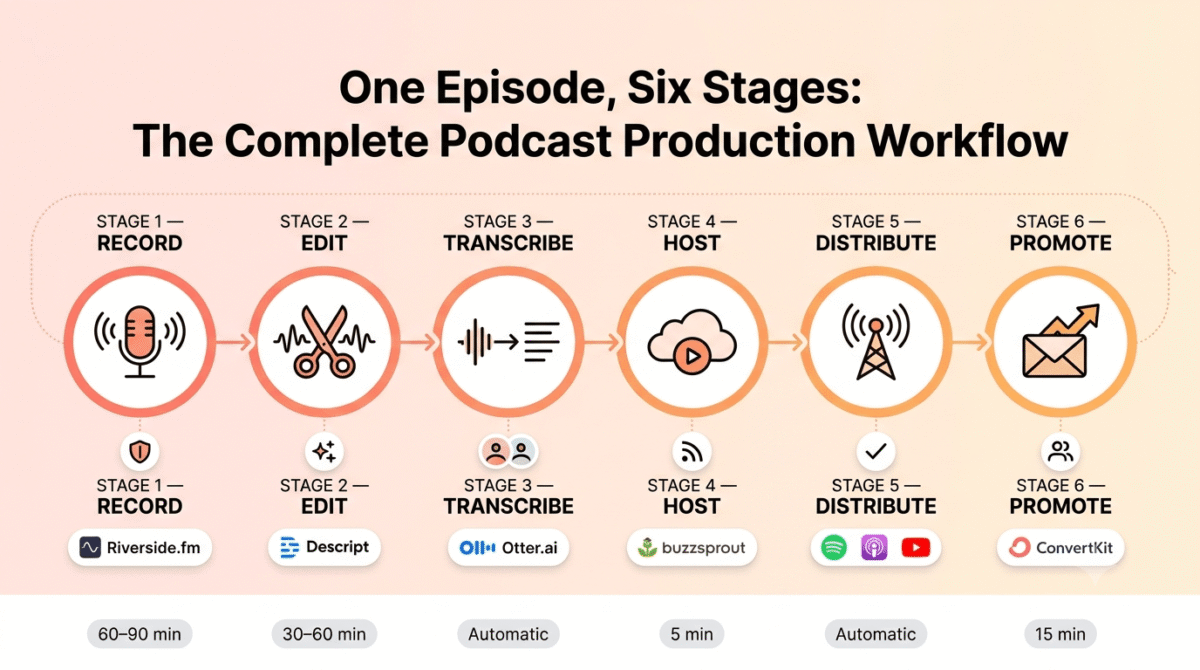
Before diving into individual tools, understanding the full podcast production workflow helps you choose tools for the right job:
Stage 1- Recording: Capturing audio from you and your guests with the best possible quality
Stage 2- Editing: Removing mistakes, improving audio quality, adding music and effects
Stage 3- Transcription: Converting audio to text for show notes, SEO, and accessibility
Stage 4- Hosting: Storing your podcast files and generating your RSS feed
Stage 5- Distribution: Getting your podcast onto Spotify, Apple Podcasts, and other platforms
Stage 6- Promotion: Building an audience through social media, email, and SEO
You need one tool for each stage. The mistake most new podcasters make is either using too many overlapping tools or using a single tool that handles everything poorly. This guide identifies the best tool for each specific job.
Stage 1: Recording Tools
1. Riverside.fm, Best Remote Podcast Recording Tool
Price: Free (limited) | $15/month (Standard) | $24/month (Pro)
Affiliate: Riverside.fm affiliate, 20% recurring commission
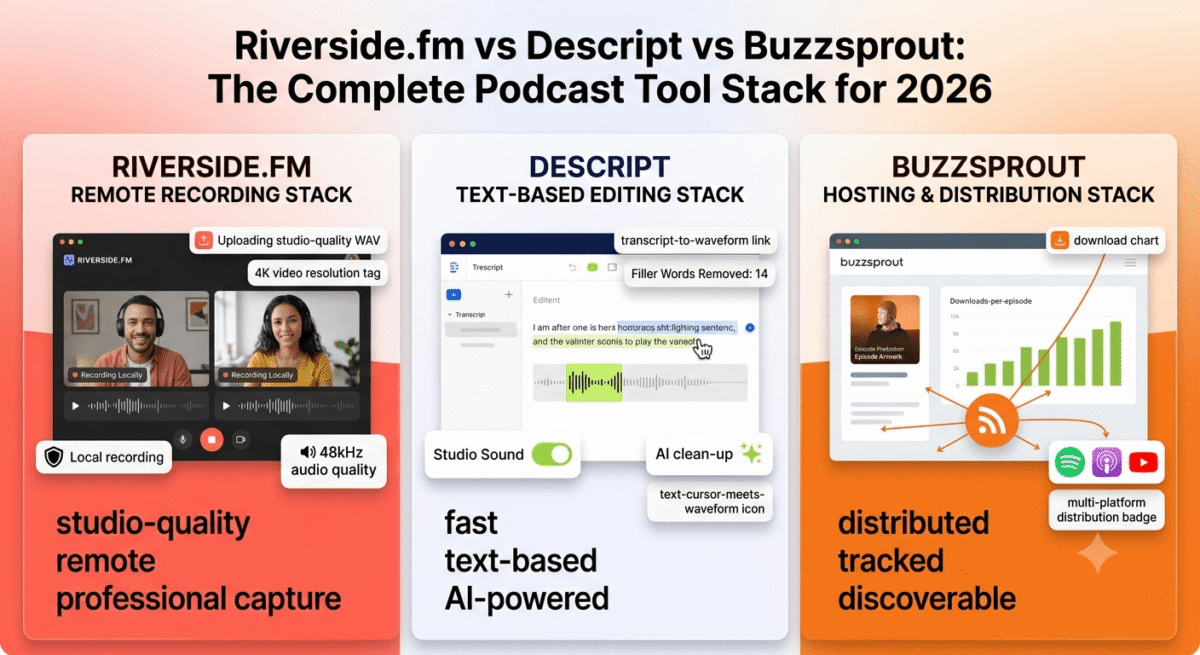
Riverside.fm is the best remote podcast recording platform in 2026, the tool professional podcasters use when recording with remote guests. Unlike Zoom or Google Meet (which compress audio to prioritise connection stability), Riverside records each participant’s audio locally at studio quality (up to 48kHz WAV) and uploads the files after the session, eliminating the audio quality degradation of internet compression.
Why local recording matters: A guest on a variable internet connection sounds poor on Zoom because Zoom reduces audio quality to maintain the connection. The same guest recorded via Riverside sounds studio-quality because their audio is captured locally on their device and uploaded as a separate high-quality file after the session.
The video recording capability, recording separate 4K video tracks for each participant, enables YouTube and social media content creation from the same session, turning a single podcast recording into both audio and video content.
The AI-powered tools in Riverside (Standard plan and above) include automatic noise removal, automatic filler word removal (“um,” “uh,” “like”), and video clip generation, creating shareable social media clips from your podcast automatically without additional editing.
The free plan covers 2 hours of recording per month, sufficient for testing whether Riverside meets your needs before committing to a paid subscription.
When to use Riverside vs Zoom: Use Riverside whenever audio quality matters, which is always for podcast recording. Use Zoom for pre-interview conversations, guest relationship building, and informal discussions where you are not recording the final episode.
2. Audacity, Best Free Local Recording and Editing Software
Price: Completely free and open source
Download: audacityteam.org
Audacity is the most widely used free audio recording and editing software available, and for solo podcasters recording locally (not with remote guests), it covers both recording and basic editing in one free application.
The recording quality in Audacity is determined by your microphone, not the software, Audacity records at any quality your audio interface or USB microphone supports, including studio-quality 24-bit/96kHz audio. The editing tools cover everything most podcasters need: cutting sections, removing silence, noise reduction, normalisation, and volume adjustment.
Audacity’s practical limitations for podcasters:
- Multitrack editing is functional but not as polished as Descript or Adobe Audition
- The interface is less beginner-friendly than newer tools
- No cloud storage or collaboration features
- Limited AI-powered editing features
For podcasters on zero budget, Audacity records and edits professional-quality audio. For podcasters who want faster, more intuitive editing, Descript is worth the monthly fee.
3. GarageBand, Best Free Recording for Mac Users
Price: Free (Mac only)
No affiliate, Apple built-in
GarageBand is pre-installed on every Mac and provides a polished, beginner-friendly recording and editing environment that exceeds Audacity’s ease of use on Apple hardware. The Smart Noise Reduction, built-in audio effects, and intuitive multitrack editor make GarageBand the best free starting point for Mac-based podcasters.
The podcast-specific template, available in GarageBand’s project menu, sets up a basic podcast recording session with appropriate track configuration immediately.
4. Adobe Audition, Best Professional Audio Editing for Podcasters
Price: $22.99/month (standalone) | Included in Creative Cloud All Apps ($54.99/month)
Affiliate: Adobe affiliate, up to 85% first month commission
Adobe Audition is the professional audio editing standard for broadcasters and podcast producers, the tool used by NPR, BBC podcast teams, and professional audio engineers. The Spectral Frequency Display shows audio problems visually (allowing surgical removal of specific frequencies rather than blanket noise reduction), the Multitrack session handles complex podcast productions with music beds, sound effects, and multiple voice tracks, and the Auto-ducking feature automatically reduces background music volume when voices are speaking.
For podcasters whose production quality needs to match professional broadcast standards, narrative podcasts with complex editing, interview shows with multiple guests and sophisticated post-production, Audition provides capabilities that consumer tools cannot match.
Most podcasters do not need Audition. Descript and Audacity cover the editing needs of 90% of podcasters at dramatically lower cost. Consider Audition only when your production requirements genuinely exceed what simpler tools handle.
Stage 2: Editing Tools
5. Descript, Best Podcast Editing Tool for Beginners and Intermediates
Price: Free (1 hour transcription) | $12/month (Creator) | $24/month (Pro)
Affiliate: Descript affiliate, 15% recurring commission
Descript is the most innovative and beginner-friendly podcast editing tool available, it edits audio by editing a text transcript. Import your recording, Descript transcribes it automatically, and you edit the audio by editing the text, delete a word from the transcript and it disappears from the audio. Cut a paragraph and the corresponding audio is removed. No waveform editing required.
This text-based editing approach reduces podcast episode editing time from hours to minutes for most podcasters, finding and removing specific sentences, filler words, and awkward pauses is as fast as editing a Google Doc.
Descript’s most valuable features for podcasters:
Overdub (AI voice cloning): Record a voice model of yourself, then fix verbal mistakes in your recording by typing the correct words, Descript generates your voice saying the correction using AI. A stumbled sentence becomes a clean, corrected delivery without re-recording.
Studio Sound: One-click audio enhancement that removes background noise, reduces room echo, and balances audio levels, turning a home recording environment into a studio-quality sound without acoustic treatment.
Filler word removal: Automatically identifies and removes every “um,” “uh,” “like,” and “you know” from your recording, with a preview showing exactly which words will be removed before applying.
Screen recording: Record screen content alongside audio, enabling podcast episodes with visual components for YouTube publication.
Social clips: Automatically generate short-form video clips from your podcast for TikTok, Instagram Reels, and YouTube Shorts, complete with auto-generated captions.
The Descript Creator plan at $12/month is the best value in podcast editing software, it replaces separate transcription, editing, noise reduction, and clip creation tools that would collectively cost far more.
6. Alitu, Best All-in-One Podcast Maker for Complete Beginners
Price: $32/month
Affiliate: Alitu affiliate program
Alitu is the most beginner-friendly podcast production tool available, it handles recording, cleaning, editing, and publishing in one simplified interface designed for people who find audio software overwhelming. Upload your recording and Alitu automatically removes background noise, balances audio levels, and adds your intro and outro music, producing a finished episode ready for upload with minimal manual effort.
The built-in music library, episode builder, and publishing integration make Alitu the closest thing to a one-button podcast production tool. For bloggers adding a podcast to their content strategy without wanting to learn audio engineering, Alitu’s automation handles the technical complexity.
When to choose Alitu over Descript: Choose Alitu if you want maximum simplicity and minimal learning curve. Choose Descript if you want more control, more features, and better value at a lower price point.
7. Auphonic, Best Automatic Audio Post-Processing for Podcasters
Price: Free (2 hours/month) | $11/month (Standard)
No affiliate
Auphonic is an automated audio post-processing service, upload your raw recording and Auphonic automatically applies noise reduction, loudness normalisation to podcast standards (LUFS target for Spotify and Apple Podcasts), dynamic range compression, and file format conversion. The output meets broadcast quality standards without any manual audio engineering.
For podcasters who record clean audio but want automatic mastering that ensures consistent loudness and quality across every episode, Auphonic free’s 2 hours per month covers most podcasting schedules at zero cost.
Stage 3: Transcription Tools
8. Otter.ai, Best AI Transcription for Podcasters
Price: Free (300 minutes/month) | $8.33/month (Pro)
No affiliate
Otter.ai provides AI-powered transcription with speaker identification, automatically distinguishing between host and guest voices in interview recordings and labelling each section accordingly. The accuracy for clear speech in English is 85–95%, requiring light editing but dramatically faster than manual transcription.
Podcast transcripts serve multiple purposes:
- Show notes that help listeners follow along and reference specific moments
- Full episode transcripts for SEO, Google indexes text, not audio
- Accessibility for hearing-impaired audience members
- Content repurposing, pull quotes for social media, key insights for blog posts
The free plan’s 300 minutes per month covers a weekly 30–45 minute podcast episode with capacity remaining for other uses.
9. Descript Transcription, Best Integrated Transcription for Descript Users
Price: Included in Descript plans**
For podcasters using Descript for editing, the built-in transcription is included in the subscription, eliminating the need for a separate transcription service. Descript’s transcription accuracy is comparable to Otter.ai and the integration with text-based editing makes it the most practical transcription workflow for Descript users.
10. Rev, Best Human Transcription for High-Accuracy Requirements
Price: $1.50/minute (human) | $0.25/minute (AI)
No affiliate
For podcasts where transcription accuracy is critical, legal topics, medical discussions, technical content with specific terminology, Rev’s human transcription service provides 99%+ accuracy that AI transcription cannot consistently achieve. The $1.50/minute rate for a 45-minute episode is $67.50, expensive for regular use but worth it for important episodes where accuracy is non-negotiable.
Stage 4: Podcast Hosting
11. Buzzsprout, Best Podcast Hosting for New Podcasters
Price: Free (90-day episode storage) | $12/month (3 hours/month) | $18/month (6 hours/month)
Affiliate: Buzzsprout affiliate, $20 per paid signup + recurring
Buzzsprout is the most beginner-friendly podcast hosting platform, clean interface, simple episode upload, automatic submission to Spotify and Apple Podcasts, and detailed analytics showing downloads per episode, listener geography, and listening app breakdown.
The Magic Mastering feature, Buzzsprout’s automatic audio enhancement applied on upload, ensures consistent loudness and quality across episodes without requiring Auphonic or manual audio mastering.
The free plan stores episodes for 90 days, sufficient for testing the platform and launching your first episodes before committing to a paid plan.
What podcast hosting provides:
- Secure file storage for your audio files (podcast audio files are large, 20–100MB per episode)
- RSS feed generation, the technical backbone that distributes your podcast to Spotify, Apple Podcasts, and other directories
- Analytics, download counts, listener geography, and listening device data
- Episode management, show notes, chapters, transcripts, and episode artwork
12. Transistor, Best Podcast Hosting for Multiple Shows
Price: $19/month (Starter, unlimited episodes, 2 shows) | $49/month (Professional, 10 shows)
Affiliate: Transistor affiliate, 25% recurring commission
Transistor is the best podcast hosting platform for bloggers and businesses running multiple shows, the flat-rate pricing covers unlimited episodes and multiple podcasts under one subscription. For a blogger who runs a main podcast and a bonus content series, Transistor’s Professional plan at $49/month covers both shows without per-show additional costs.
The private podcast feature, password-protected episodes available only to specific subscribers, enables member-only content, paid podcast tiers, and internal company podcast channels.
13. Anchor by Spotify, Best Free Podcast Hosting
Price: Completely free
No affiliate, Spotify product
Anchor (now Spotify for Podcasters) provides completely free podcast hosting with unlimited episode storage, automatic Spotify distribution, and basic analytics at zero cost. For podcasters starting out who want to test the format before investing in paid hosting, Anchor provides functional hosting without any upfront commitment.
The trade-offs: Spotify’s analytics are less detailed than Buzzsprout’s, the monetization options are limited to Spotify’s own Subscriptions and Ads programmes, and the platform’s terms give Spotify certain rights over content hosted on Anchor.
Stage 5: Distribution and Discovery
14. Spotify for Podcasters, Essential Free Distribution
Price: Free
No affiliate
Every podcast needs to be on Spotify, 30%+ of podcast listening happens on Spotify globally, making it the single largest podcast listening platform. Submit your podcast RSS feed at podcasters.spotify.com, Spotify reviews and approves new shows within 24–72 hours.
15. Apple Podcasts Connect, Essential Free Distribution
Price: Free
No affiliate
Apple Podcasts remains the second largest podcast platform globally and the primary listening app for iPhone users. Submit your RSS feed at podcastsconnect.apple.com, Apple reviews new shows within 24–72 hours of submission.
16. Podchaser, Best Podcast Directory and Review Platform
Price: Free
No affiliate
Podchaser is the “IMDb of podcasting”, a comprehensive podcast directory where listeners leave reviews, rate episodes, and discover new shows. Claiming your podcast on Podchaser and actively managing your profile improves discoverability on the platform and across podcast search tools that pull Podchaser data.
Stage 6: Audience Building and Monetization
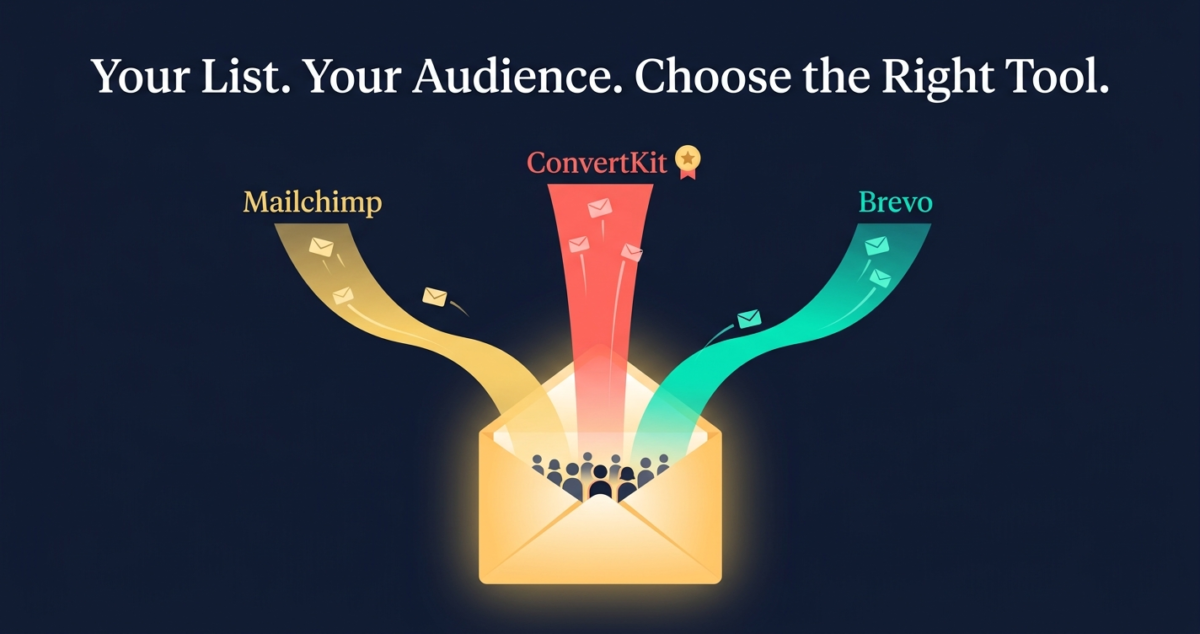
17. ConvertKit, Best Email Marketing for Podcasters
Price: Free (up to 10,000 subscribers) | $25/month (Creator)
Affiliate: 30% recurring for 24 months
Full review: Best Email Marketing Software →
Your email list is the only podcast audience you truly own, Spotify can de-platform you, Apple can change its algorithms, but your email subscribers are yours regardless of what any platform decides. Every podcast should have an email list from episode one.
ConvertKit’s free plan (up to 10,000 subscribers) covers all email marketing needs for podcasters starting out, automated welcome sequences for new subscribers, episode announcement newsletters, and subscriber segmentation based on content interests.
Building your podcast email list:
- Mention your email list in every episode with a specific reason to sign up (“subscribe for the show notes and resource links from today’s episode”)
- Create episode-specific lead magnets (checklists, templates, and resources mentioned in the episode)
- Link to your sign-up page in every podcast directory description and social media bio
18. Patreon, Best Membership and Support Platform for Podcasters
Price: Free to start (5–12% platform fee on earnings)
No affiliate
Patreon enables podcasters to offer exclusive content, bonus episodes, early access, ad-free versions, and community access, to paying members. The tiered membership model ($5/month for basic, $15/month for premium, $50/month for superfan) creates predictable recurring revenue from a dedicated audience core.
For established podcasts with engaged audiences of 500+ regular listeners, a successful Patreon launch typically converts 1–3% of listeners to paying members, 1,000 listeners �,1.5% conversion �,$10 average tier = $150/month in predictable recurring income.
19. Riverside.fm Clips, Best Social Media Clip Creation for Podcasters
Price: Included in Riverside Standard and Pro plans
Affiliate: Riverside.fm affiliate, 20% recurring
Riverside’s AI-powered clip creation automatically identifies the most engaging moments in your podcast recording and generates short-form video clips with auto-generated captions, formatted for TikTok, Instagram Reels, and YouTube Shorts. A 45-minute podcast episode becomes 5–8 shareable social media clips without additional editing time.
For podcasters who want to maximise the reach of each episode across social platforms without building a separate video editing workflow, Riverside’s integrated clip generation is the most time-efficient distribution tool available.
20. Podbean, Best Podcast Monetization Platform
Price: Free (5 hours storage) | $9/month (Unlimited Audio)
Affiliate: Podbean affiliate, 30% commission
Podbean’s built-in monetization tools, dynamic ad insertion, listener support (Patron programme), and Podbean’s own ad marketplace connecting podcasters with advertisers, make it the most monetization-focused podcast hosting platform available. For podcasters whose primary goal is generating advertising revenue, Podbean’s advertiser relationships and dynamic ad insertion technology provide revenue opportunities that Buzzsprout and Transistor do not offer at equivalent plan levels.
The Complete Podcast Tool Stack by Budget
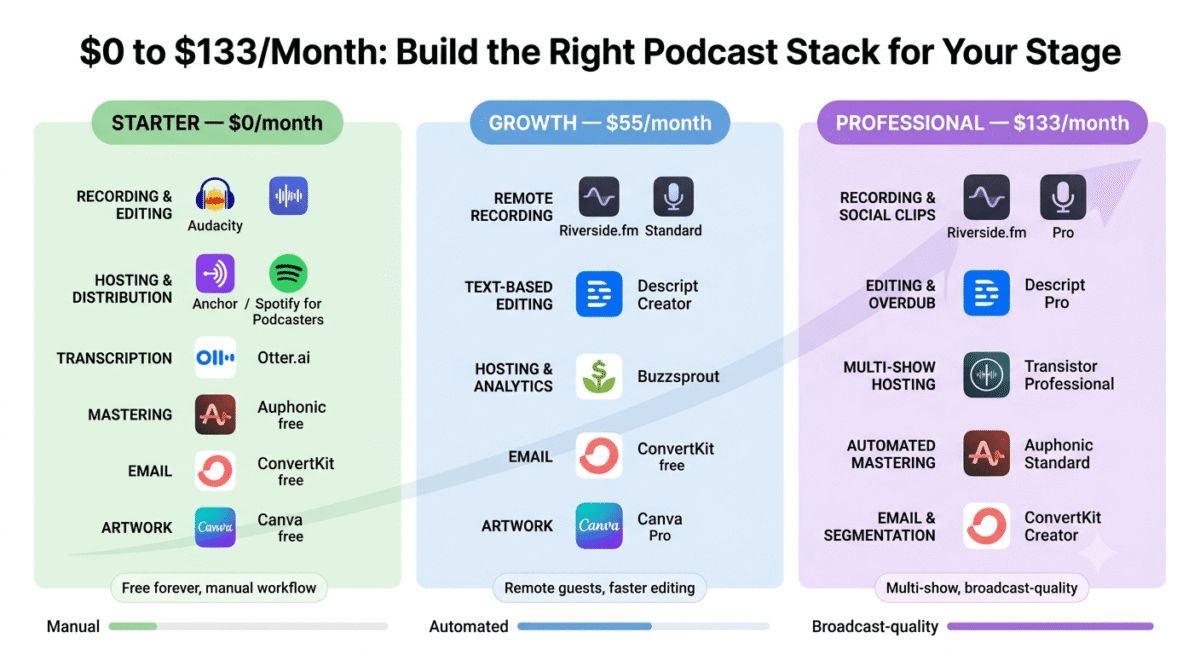
Starter Stack, $0/month (Completely Free)
Tool | Purpose |
Audacity or GarageBand | Recording and editing |
Anchor (Spotify for Podcasters) | Hosting and distribution |
Otter.ai free | Transcription (300 min/month) |
Auphonic free | Audio mastering (2 hours/month) |
ConvertKit free | Email list building |
Canva free | Episode artwork |
Total | $0/month |
This free stack produces a professional podcast. Limitations: no remote guest recording (local only or Zoom), basic editing workflow (no text-based editing), and limited analytics.
Growth Stack – ~$55/month
Tool | Purpose | Cost |
Riverside.fm Standard | Remote recording | $15 |
Descript Creator | Text-based editing | $12 |
Buzzsprout | Hosting and analytics | $12 |
ConvertKit free | Email marketing | Free |
Canva Pro | Artwork and graphics | $12.99 |
Total | ~$52/month |
This stack covers professional remote guest recording, fast text-based editing, detailed analytics, and social media clip creation. Appropriate from episode 10 onward when podcast production is a regular commitment.
Professional Stack – ~$120/month
Tool | Purpose | Cost |
Riverside.fm Pro | Remote recording + clips | $24 |
Descript Pro | Advanced editing + Overdub | $24 |
Transistor Professional | Multi-show hosting | $49 |
Auphonic Standard | Audio mastering | $11 |
ConvertKit Creator | Email marketing | $25 |
Total | ~$133/month |
This stack produces broadcast-quality audio across multiple shows with automated mastering, AI-powered editing, and sophisticated email marketing. Appropriate for established podcasters generating income from their show.
Equipment Recommendations (Hardware)
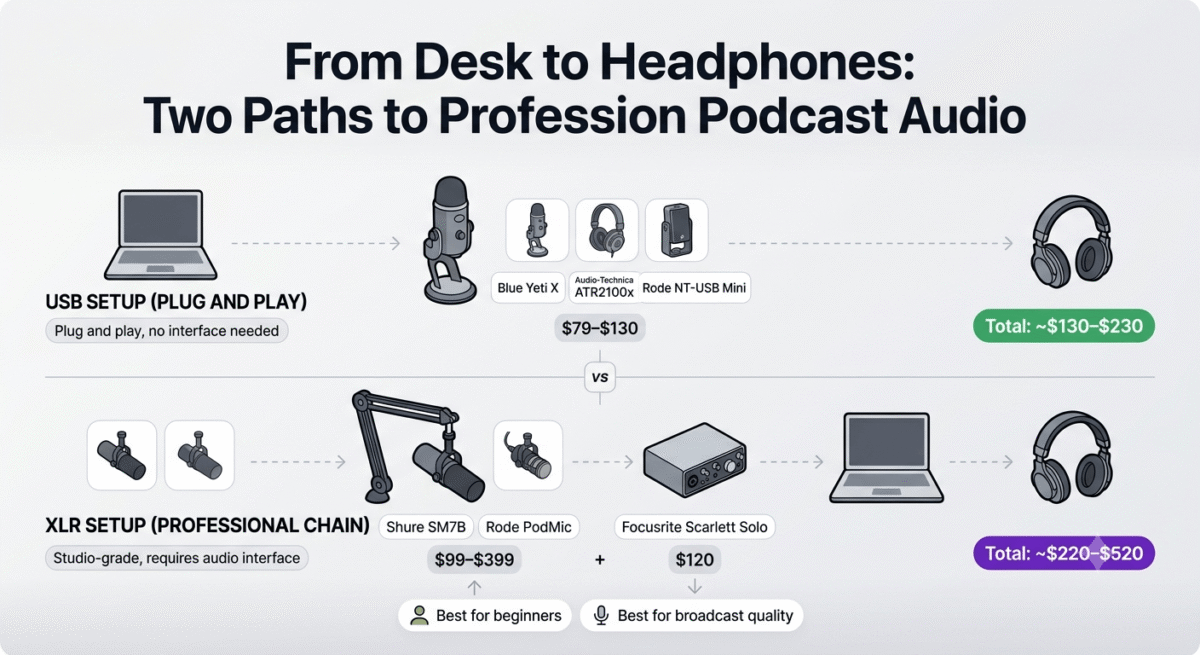
Software quality is limited by hardware quality, particularly your microphone. Here are the minimum equipment recommendations for a professional-sounding podcast:
USB Microphones (Plug and Play, No Audio Interface Required)
Blue Yeti X (~$130): The most popular USB podcasting microphone, excellent sound quality, multiple polar patterns, and a built-in headphone monitoring jack. Works plug-and-play on any computer.
Audio-Technica ATR2100x (~$79): The best value USB/XLR hybrid microphone, can be used directly via USB or connected to an audio interface via XLR. The dynamic capsule is more forgiving of background noise than condenser microphones.
Rode NT-USB Mini (~$99): The most compact professional USB microphone, magnetic desk mount, excellent sound quality, and simple design make it the best option for podcasters with limited desk space.
XLR Microphones + Audio Interface (Higher Quality, More Complex Setup)
Shure SM7B (~$399) + Focusrite Scarlett Solo (~$120): The professional podcast microphone setup used by major podcast networks and YouTube creators. The SM7B’s dynamic capsule requires the Scarlett Solo audio interface and considerable gain, the Cloudlifter ($149) in-line preamp is recommended alongside this setup.
Rode PodMic (~$99) + Focusrite Scarlett Solo (~$120): The best value XLR podcast setup, the PodMic’s broadcast-quality sound and built-in shock mount deliver professional audio at half the SM7B’s cost.
Headphones (Essential for Monitoring)
Sony MDR-7506 (~$99): The industry-standard closed-back headphone for podcast monitoring, flat frequency response, comfortable for long sessions, and durable enough for years of daily use.
Audio-Technica ATH-M50x (~$149): The most widely used studio headphone by podcasters and musicians, excellent isolation and accurate frequency response for hearing your audio clearly during recording and editing.
Podcast SEO, Getting Discovered Through Search
Podcast discovery is fundamentally different from blog discovery, audio is not indexed by Google. Podcast SEO requires a different strategy:
Show notes with full transcripts: Publish complete episode transcripts as blog posts on your website. Google indexes text, not audio, the transcript makes your podcast content discoverable through web search. A 45-minute episode transcript is approximately 7,000–9,000 words of searchable content.
Episode titles with keywords: “Episode 47: Interview with John Smith” is not searchable. “How to Grow a Podcast to 10,000 Downloads in 12 Months, Interview with John Smith” targets specific search queries.
YouTube publication: Upload your podcast as a video (even a static image with audio) to YouTube, the world’s second-largest search engine. YouTube’s search algorithm indexes spoken words in videos, making your podcast searchable in ways audio-only platforms cannot match.
Podcast directories profile optimisation: Complete your show profile on Spotify, Apple Podcasts, Podchaser, and Listen Notes with keyword-rich descriptions that explain specifically what your show covers and who it is for.
If you need to edit your video tracks, you will want to choose the best video editing software for your workflow.
Frequently Asked Questions
How much does it cost to start a podcast in 2026?
A professional podcast can be started for $0 using Audacity (free), Anchor (free hosting), and a laptop’s built-in microphone. The minimum investment for genuinely professional quality is approximately $80–$150 for a decent USB microphone (Audio-Technica ATR2100x or Rode NT-USB Mini) plus free software. A mid-level professional setup, Riverside.fm Standard ($15/month), Descript Creator ($12/month), and Buzzsprout ($12/month), costs $39/month in software alongside the one-time microphone purchase.u003cbru003e
What is the best free podcast hosting?
Anchor (Spotify for Podcasters) is the best completely free podcast hosting, unlimited episode storage, automatic Spotify distribution, and basic analytics at zero cost. Buzzsprout’s free plan stores episodes for 90 days before requiring an upgrade, better analytics but not truly permanent free hosting. For podcasters who want professional features at zero cost as long as possible, Anchor is the recommended starting point.u003cbru003e
Do I need a podcast host or can I host it myself?
Self-hosting a podcast is technically possible but impractical, podcast audio files are large (50–100MB per episode), podcast listeners generate high bandwidth consumption (thousands of downloads per episode multiplied by file size), and podcast RSS feeds have specific technical requirements. Dedicated podcast hosting platforms (Buzzsprout, Transistor, Anchor) handle all of this efficiently at costs ranging from free to $20/month. Self-hosting on standard web hosting creates bandwidth overage charges that typically exceed the cost of dedicated hosting.u003cbru003e
What software do professional podcasters use?
Professional podcasters typically use: Riverside.fm or Squadcast for remote recording, Adobe Audition or Descript for editing, Transistor or Buzzsprout for hosting, and ConvertKit for email list management. The specific combination depends on whether the podcast is interview-format (remote recording essential), narrative (complex editing required), or solo (simpler setup sufficient).u003cbru003e
How do podcasters make money?
Podcasters monetize through: sponsorships and advertising (brands pay $18–$50 per 1,000 downloads CPM), listener support via Patreon ($5–$50/month from dedicated listeners), premium content subscriptions (exclusive episodes, early access), live events and merchandise, and affiliate marketing (recommending relevant products with affiliate links in show notes). Advertising revenue typically becomes meaningful at 5,000+ downloads per episode, Patreon income can start generating money from a much smaller dedicated audience.u003cbru003e
How long should a podcast episode be?
Episode length should match your content, not a predetermined target. Data from Spotify and Apple Podcasts shows that most popular podcasts fall into three ranges: 20–30 minutes (commute-friendly, focused topics), 45–60 minutes (interview format, in-depth topics), and 90–120 minutes (long-form conversation, superfan audiences). The most important metric is listener retention, if most listeners drop off at 15 minutes, a 45-minute episode is 30 minutes too long regardless of industry averages.u003cbru003e
Is podcasting still worth starting in 2026?
Yes, podcast listenership grew 8% in 2025 and continues growing in 2026. While there are more podcasts than ever (4+ million active shows), most niches remain underserved with genuinely high-quality, specific content. A podcast focused on a specific niche, UX design for e-commerce, financial planning for freelancers, can build a loyal audience of 1,000–10,000 dedicated listeners that generates meaningful income through sponsorships, Patreon, and affiliate marketing, without competing directly with major podcast networks.u003cbru003e