A single compromised password in a business environment does not just affect one account, it can cascade through an entire organisation. An employee whose work email password is reused across personal accounts becomes the entry point for ransomware, data breaches, and the kind of security incidents that make international news.
Business password managers solve this differently from personal password managers. They do not just store passwords, they enforce password policies across your entire team, control which employees can access which credentials, audit who accessed what and when, and enable secure password sharing between team members without anyone ever seeing the actual password.
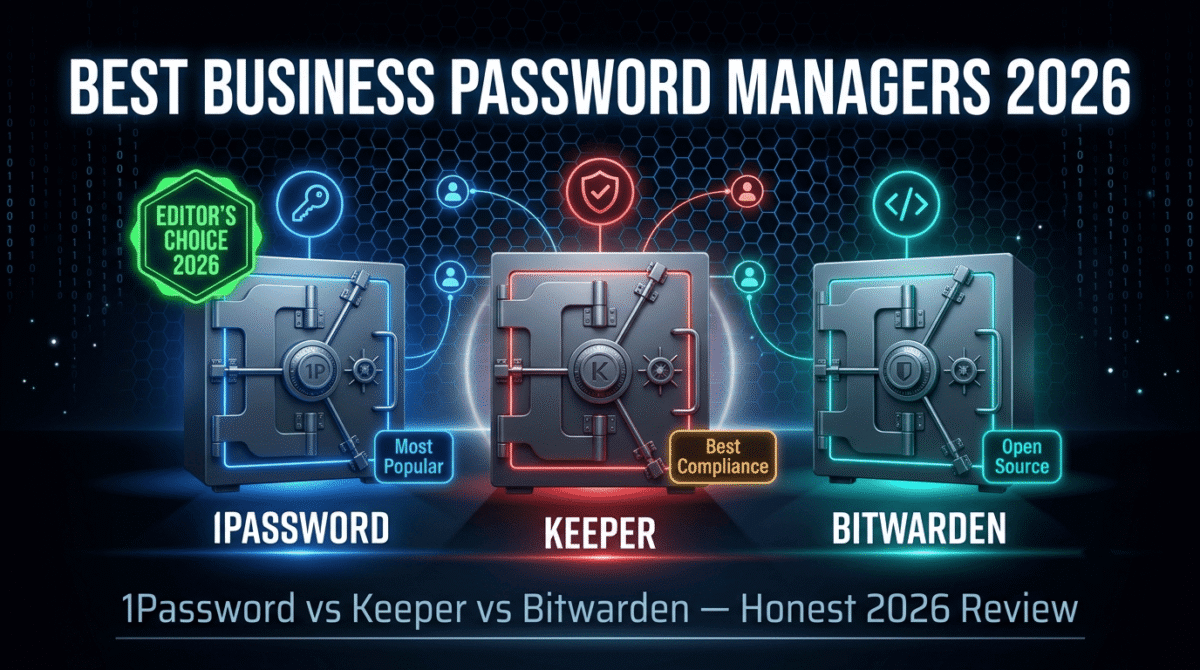
I tested 1Password vs Keeper vs Bitwarden for Business for 60 days across a real small business team, setting up vaults, managing team members, sharing credentials, configuring security policies, and evaluating admin controls. Here is the honest comparison.
Table of Contents
How We Evaluated These Tools
Every platform was tested across five criteria:
– Team management, how easily can admins control access, onboard users, and manage permissions?
– Security features, encryption standards, zero-knowledge architecture, and breach monitoring
– Sharing and vaults, how effectively can credentials be shared across teams and departments?
– Integrations, SSO, directory sync, and third-party app connections
– Value, per-seat pricing and what each plan actually includes
Why Business Password Managers Are Different From Personal Ones
Before comparing the tools, understanding what makes business password managers distinct from personal ones matters for choosing correctly.
Personal password managers, (reviewed in our separate guide to the best password managers) focus on individual use, storing your own passwords, generating strong ones, and autofilling across your personal devices. They are priced per individual user. If you’re only managing your own accounts rather than a team’s, see our personal security bundle guide for how a password manager fits alongside a VPN and antivirus for individual use.
Business password managers, add capabilities that personal tools lack:
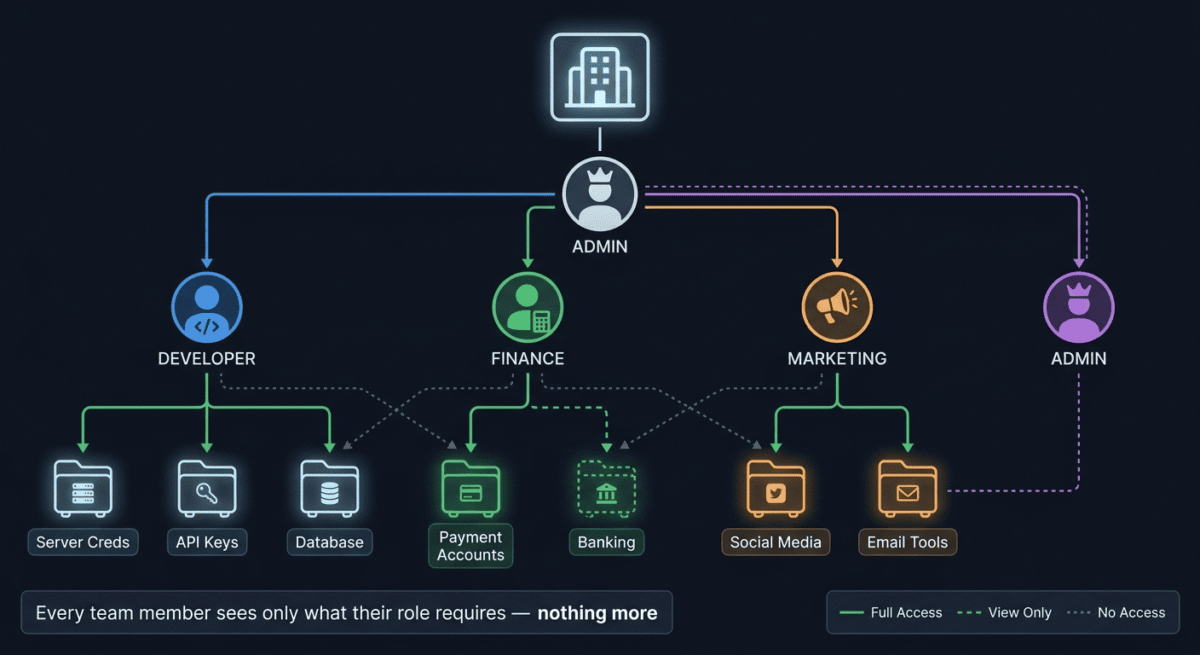
– Centralised admin control, IT administrators can see all team members, their access levels, and their activity without seeing the actual passwords
– Role-based access control, different team members get access to different credential vaults (marketing team accesses social media accounts, developers access server credentials, finance team accesses payment accounts)
– Password policy enforcement, force all team members to use passwords of minimum length and complexity, prevent password reuse, require 2FA
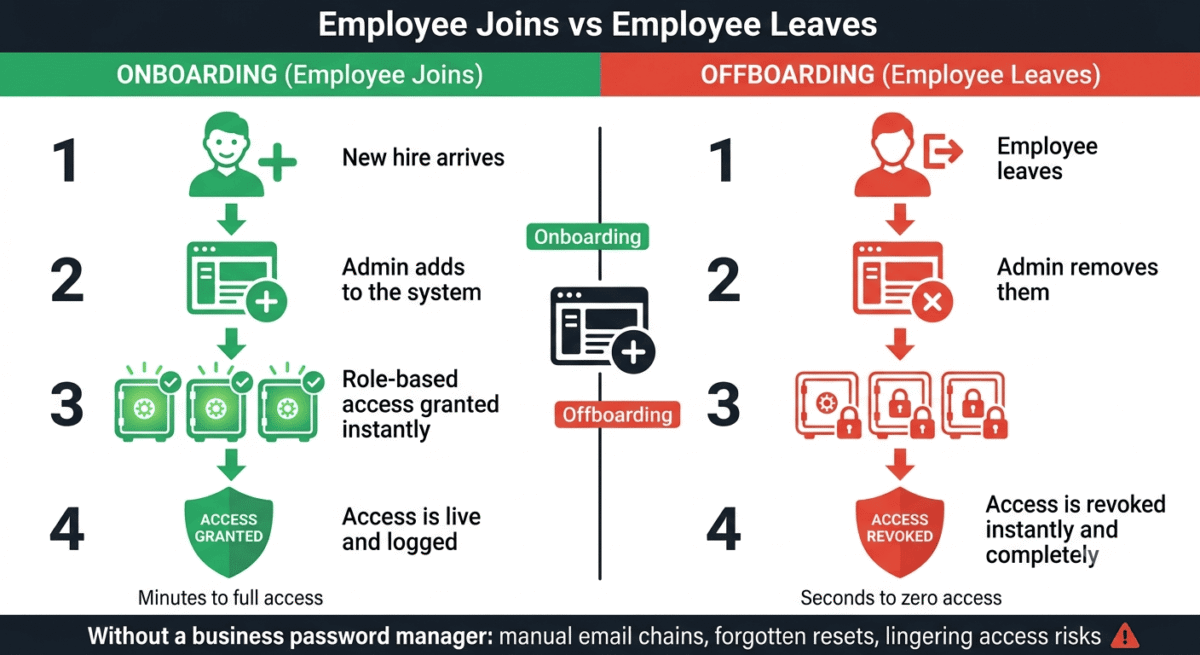
– Offboarding security, when an employee leaves, revoke their access to all shared credentials instantly from one dashboard
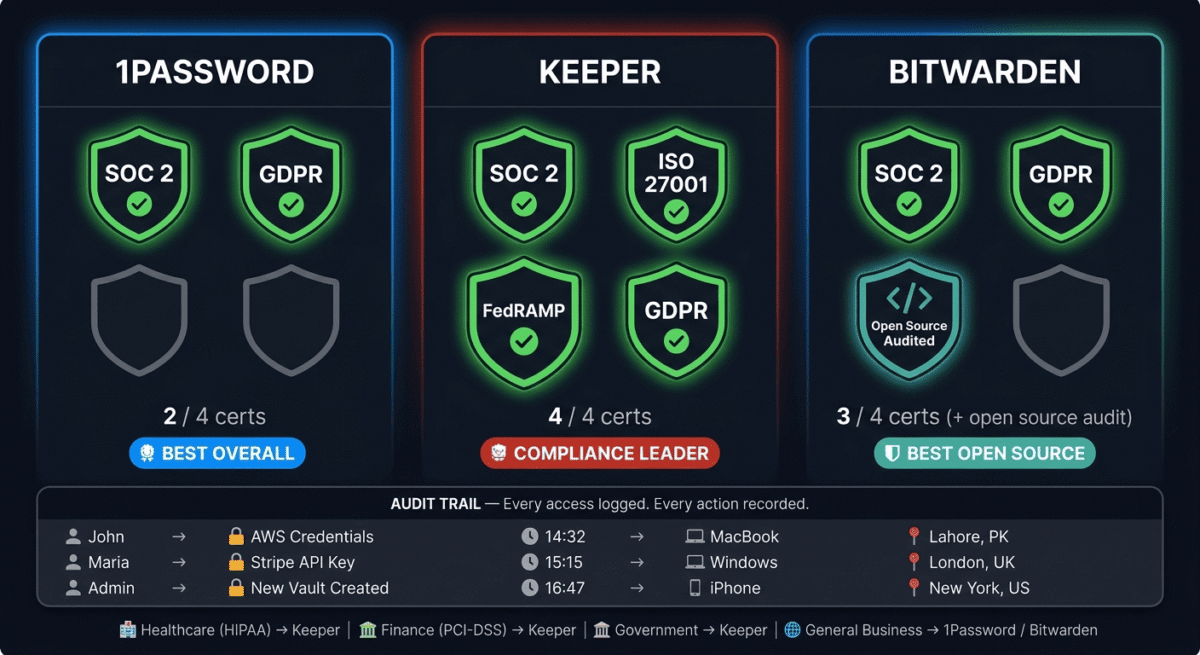
– Audit logs, complete record of who accessed which credential, when, and from which device, critical for security compliance and incident investigation
– Emergency access and recovery, mechanisms for recovering access when an employee is unavailable
For bloggers who work with a virtual assistant, content writers, or developers, even a two or three person team, business password managers provide security controls that personal tools cannot replicate. To build a fully secure workflow, check out our guide to the best tools for small business. Password management is one layer of a broader business security stack, pair it with antivirus protection across your team’s devices; see our Norton vs Bitdefender vs Malwarebytes comparison for options that scale to a small team.
1Password Teams Review: Best Business Password Manager for Small Teams
Free plan: No (14-day free trial)
Starting price: $19.95/month for up to 10 users (Teams Starter Pack)
Best plan for most small businesses: Teams Starter Pack, $19.95/month (up to 10 users)
Platforms: Web, Windows, Mac, Linux, iOS, Android, browser extensions
Affiliate program: Yes, 1Password affiliate program, up to $60 per referral
1Password is the most polished and user-friendly business password manager available, built with the philosophy that security tools people actually enjoy using provide more security than tools that are technically superior but get bypassed because they are frustrating. For small businesses and teams where most members are not technical, 1Password’s approachable interface and minimal friction get universal adoption rather than quiet workarounds.
What 1Password Teams does best
The Teams Starter Pack, $19.95/month for up to 10 users, is the most compelling entry point in business password management. A team of ten pays $19.95/month total, approximately $2/user/month, covering every team member with full business password management capability. This flat-rate pricing for small teams is significantly more affordable than Keeper’s per-seat model for teams under 10 users.
1Password’s vault system is the most intuitive team credential organisation of the three tools tested. Create separate vaults for different purposes, “Marketing Team,” “Development Credentials,” “Finance Accounts,” “Client Portals”, and share each vault only with the team members who need it. Permissions can be set to view-only (team members can use the credential but cannot see or copy the password) or full access (team members can view, edit, and delete). This granular control prevents the security risk of sharing a spreadsheet of passwords that any recipient can copy and take with them.
The Travel Mode feature, unique to 1Password, temporarily removes sensitive vaults from all devices when crossing international borders. Activate Travel Mode before travel and only the vaults you mark as “safe for travel” remain accessible. Customs officials who demand device access cannot see credentials in removed vaults, the vaults do not appear to exist. For business travellers and remote workers crossing borders with sensitive client credentials, this feature has no equivalent in Keeper or Bitwarden.
Watchtower, 1Password’s integrated security monitoring, continuously checks your team’s saved passwords against the Have I Been Pwned breach database, flags weak and reused passwords, identifies accounts without two-factor authentication enabled, and alerts you to websites with expired SSL certificates or known vulnerabilities. This proactive security monitoring surfaces risks before they become incidents.
1Password’s browser extensions are the most polished of the three tools, autofill works reliably across complex login forms, including those with unusual field arrangements, JavaScript-heavy authentication flows, and multi-step login processes that simpler autofill engines struggle with.
The Secret Key, 1Password’s unique account recovery mechanism, combines your master password with a device-specific secret key for authentication. This means stolen master passwords alone are insufficient to access your account, the attacker also needs physical access to an authenticated device. This dual-factor authentication at the account level is more secure than master password alone systems used by competitors.
Where 1Password falls short
1Password does not offer a free plan, the 14-day trial is the only way to evaluate it without paying. For businesses that want to thoroughly test a tool before committing, two weeks may feel rushed.
The Teams Starter Pack covers up to 10 users, teams larger than 10 move to the Business plan at $7.99/user/month, which becomes significantly more expensive for larger organisations. For teams of 25, 1Password Business costs $199.75/month compared to Bitwarden’s $48/month.
1Password’s advanced SSO (Single Sign-On) integrations, connecting to Azure AD, Okta, and other enterprise identity providers, require the Business plan. Teams on the Starter Pack cannot implement SSO.
1Password pricing
Plan | Price | Users | Key features |
Teams Starter Pack | $19.95/month | Up to 10 | Unlimited vaults, shared items, admin controls |
Business | $7.99/user/month | Unlimited | + SSO, advanced reports, custom security policies |
Enterprise | Custom | Unlimited | + Dedicated support, custom contract, SLA |
1Password: Pros and Cons
Pros:
– Most polished interface, highest user adoption among non-technical team members
– Teams Starter Pack, best value for teams under 10 ($19.95/month flat)
– Travel Mode, temporarily removes vaults for border crossings
– Watchtower security monitoring, proactive breach and weakness detection
– Secret Key adds authentication layer beyond master password
– Best browser extension autofill reliability
– Linux desktop app, unique among the three tools
– Family accounts included for employees at no extra cost
Cons:
– No free plan, 14-day trial only
– Expensive for larger teams, $7.99/user/month on Business plan
– SSO requires Business plan, not available on Starter Pack
– Some advanced features require higher plan tiers
Rating: 4.7 / 5 – Best business password manager for small teams and user experience. The Teams Starter Pack is exceptional value for teams up to 10 people.
Keeper Business Review: Best Business Password Manager for Security and Compliance
Free plan: No (14-day free trial)
Starting price: $4.92/user/month (Business, billed annually, minimum 5 users)
Best plan for most businesses: Business, $4.92/user/month
Platforms: Web, Windows, Mac, Linux, iOS, Android, browser extensions
Affiliate program: Yes, Keeper affiliate program, up to $50 per referral
Keeper is the most security-focused and compliance-ready business password manager on this list, built for organisations where regulatory compliance (SOC 2, HIPAA, PCI DSS, GDPR), detailed audit trails, and enterprise-grade access controls are requirements rather than nice-to-haves. For businesses in regulated industries or with formal security programmes, Keeper’s compliance credentials are the most comprehensive of the three tools.
What Keeper does best
Keeper’s role-based access control (RBAC) is the most granular of the three tools. Rather than simple vault-level sharing, Keeper allows administrators to define custom roles with precise permission sets, creating a “Content Manager” role that can view social media credentials but not edit them, a “Developer” role that can create and share technical credentials but not access financial accounts, and an “Executive” role with visibility across all vaults. These custom roles can be assigned to any combination of team members and updated instantly across the organisation when responsibilities change.
The BreachWatch feature, Keeper’s dark web monitoring service, continuously scans dark web databases, paste sites, and hacker forums for credentials associated with your organisation’s email domains. When a team member’s credentials appear in a breach database, BreachWatch alerts both the affected user and the administrator immediately, enabling password rotation before the compromised credential is exploited. This proactive breach detection is more comprehensive than 1Password’s Watchtower and unavailable in Bitwarden.
Keeper’s audit and compliance reporting is the most detailed of the three tools, every credential access, share, creation, deletion, and modification is logged with timestamp, user identity, device, and IP address. Reports can be filtered, exported, and scheduled for delivery to compliance officers or security teams. For businesses undergoing SOC 2 audits, PCI DSS certification, or HIPAA compliance reviews, Keeper’s audit trails are the most audit-ready documentation available.
The secure file storage, 100GB per business account, allows storing sensitive documents (contracts, certificates, legal documents) alongside credentials in the same encrypted, access-controlled environment. A team member’s vault can contain both the login credentials for a client portal and the associated contract documents in one secure location.
Keeper’s SSO Connect, included in the Business plan, integrates with Azure Active Directory, Google Workspace, Okta, JumpCloud, and other identity providers. When a team member logs into their company identity (Microsoft or Google account), Keeper unlocks automatically, reducing friction while maintaining security.
The automated provisioning and deprovisioning via directory sync ensures that new employees are automatically added to Keeper with the correct role assignments when their company directory account is created, and removed from Keeper, with their access revoked, when their directory account is disabled. This automation prevents the human error of forgetting to remove a departing employee’s access.
Where Keeper falls short
Keeper’s per-seat pricing, $4.92/user/month with a minimum of 5 users, means a minimum monthly cost of $24.60 for even the smallest team. For very small teams (2–3 people), 1Password’s Starter Pack or Bitwarden’s free plan are more cost-effective.
The interface, while functional and professional, is less polished than 1Password’s, the design is more utilitarian and the learning curve for non-technical users is slightly steeper. Teams without IT support to assist with onboarding may experience more resistance to adoption.
BreachWatch, Keeper’s most valuable differentiating feature, is an add-on that costs extra beyond the base Business plan. Teams that want full dark web monitoring need to budget for this additional cost.
Keeper pricing
Plan | Price/user/month (annual) | Min users | Key features |
Business Starter | $2/user | 5 | Basic password management, sharing |
Business | $4.92/user | 5 | + RBAC, SSO, audit logs, secure storage |
Enterprise | $7.99/user | 5 | + Advanced reporting, SIEM integration |
BreachWatch add-on | $2.46/user | — | Dark web monitoring |
Keeper: Pros and Cons
Pros:
– Most granular role-based access control
– Most comprehensive audit logging for compliance
– BreachWatch dark web monitoring (add-on)
– 100GB secure file storage per account
– Best compliance credentials, SOC 2, ISO 27001, FedRAMP
– SSO Connect included in Business plan
– Automated directory provisioning and deprovisioning
– Most suitable for regulated industries
Cons:
– Interface less polished than 1Password
– BreachWatch is a paid add-on, not included in base plan
– Minimum 5 users, not cost-effective for very small teams
– Higher total cost when BreachWatch is added
– Steeper learning curve for non-technical users
Rating: 4.5 / 5 – Best business password manager for compliance-focused organisations and regulated industries. Strongest audit logging and access control of the three tools.
Bitwarden for Business Review: Best Open-Source Business Password Manager
Free plan: Yes, Bitwarden Free (personal use, 2 users for organisations)
Starting price: $3/user/month (Teams Organisation, billed annually)
Best plan for most small businesses: Teams Organisation, $3/user/month
Platforms: Web, Windows, Mac, Linux, iOS, Android, browser extensions, command line
Affiliate program: Yes, Bitwarden affiliate program
Bitwarden is the only open-source password manager on this list, its entire codebase is publicly available for inspection, security audit, and self-hosting. For businesses where data sovereignty (keeping all credential data on your own servers), cost, or open-source principles are primary requirements, Bitwarden provides business password management capabilities at the lowest price of the three tools tested.
What Bitwarden does best
Bitwarden’s open-source architecture is its most fundamentally distinctive feature. Every line of Bitwarden’s code is publicly available on GitHub — meaning any security researcher, developer, or organisation can inspect exactly how the encryption, authentication, and data storage work. This radical transparency is impossible to fake, you are not trusting a company’s claim that their security is strong; you are reading the actual code that implements it.
The self-hosting option, available for free with Bitwarden’s open-source server, allows organisations to run their own Bitwarden server on their own infrastructure, keeping all credential data entirely within their control. For organisations with data residency requirements (credentials must not leave specific geographic regions), sensitive government or defence work, or extreme privacy requirements, self-hosting Bitwarden provides security guarantees that cloud-hosted services cannot offer.
Bitwarden’s Teams Organisation plan at $3/user/month is the most affordable paid business password management available, a team of 10 pays $30/month versus 1Password’s $7.99/user ($79.90/month) for equivalent team size beyond the Starter Pack. For price-sensitive organisations that need business features without the premium pricing, Bitwarden’s cost advantage is substantial.
The feature set on Bitwarden Teams covers the essential business password management requirements, unlimited shared collections, role-based access (admin, manager, user), event logs for audit trails, directory connector for SSO integration, and priority customer support. The feature coverage is less comprehensive than Keeper’s compliance tooling but covers what most small to medium businesses actually need.
The command-line interface, unique among the three tools at this level, enables scripting and automation of Bitwarden operations. IT administrators can script bulk credential imports, automated vault management, and integration with existing automation workflows. For technically sophisticated organisations, this CLI access is valuable.
Bitwarden’s browser extension and mobile apps are fully featured and regularly updated. The autofill reliability across different website authentication patterns has improved significantly in recent versions though still slightly behind 1Password’s autofill in handling edge cases like unusual form layouts.
Where Bitwarden falls short
Bitwarden’s interface is the most functional but least polished of the three tools, it looks like open-source software. The design is utilitarian rather than refined, and new users without technical background may find the interface less immediately intuitive than 1Password’s or Keeper’s. Adoption rates among non-technical team members are typically lower than 1Password without dedicated onboarding support.
Advanced business features, enterprise SSO policies, advanced custom roles beyond admin/manager/user, SCIM provisioning, and enterprise-level compliance reporting, require the Enterprise plan at $5/user/month. The Teams plan covers basics but has meaningful gaps for organisations with sophisticated requirements.
The dark web monitoring feature is not available in Bitwarden, there is no equivalent to 1Password’s Watchtower breach detection or Keeper’s BreachWatch. Organisations that want proactive breach monitoring need a separate tool or must upgrade to a paid tier that still does not match Keeper’s BreachWatch depth.
Bitwarden pricing
Plan | Price/user/month | Key features |
Free (personal) | $0 | Unlimited passwords, 2-device sync |
Premium (personal) | $1/year | 1 user, advanced 2FA, breach reports |
Teams Organisation | $3/user | Shared collections, event logs, directory connector |
Enterprise Organisation | $5/user | + SSO, SCIM, enterprise policies, custom roles |
Bitwarden: Pros and Cons
Pros:
– Open-source, entire codebase publicly auditable
– Self-hosting option, complete data sovereignty on your own servers
– Most affordable paid plan, $3/user/month for Teams
– Command-line interface for automation and scripting
– Transparent security through open-source verification
– Free plan covers personal use and 2-user organisations
– Strong community and frequent security audits by independent researchers
– Available on every platform including Linux and command line
Cons:
– Least polished interface, lower non-technical user adoption
– No dark web monitoring feature
– Advanced enterprise features require Enterprise plan ($5/user)
– Autofill less reliable than 1Password on complex login forms
– Self-hosting requires technical expertise to maintain
– Less compliance documentation than Keeper
Rating: 4.5 / 5 – Best open-source business password manager. Best value for price-sensitive organisations and those requiring data sovereignty through self-hosting.
Head-to-Head Comparison
1Password Teams | 1Password Business | Keeper Business | Bitwarden Teams | |
Price (10 users) | $19.95/mo flat | $79.90/mo | $49.20/mo | $30/mo |
Price (25 users) | N/A (max 10) | $199.75/mo | $123/mo | $75/mo |
Free plan | No | No | No | Yes (2 users) |
Trial | 14 days | 14 days | 14 days | N/A |
Open source | No | No | No | Yes |
Self-hosting | No | No | No | Yes |
SSO integration | No | Yes | Yes | Enterprise plan |
Dark web monitoring | Watchtower (basic) | Watchtower | BreachWatch (add-on) | No |
Role-based access | Basic | Advanced | Most granular | Basic |
Audit logging | Basic | Detailed | Most comprehensive | Yes |
Secure file storage | 1GB | 5GB | 100GB | 1GB |
Travel Mode | Yes | Yes | No | No |
Directory sync | No | Yes | Yes | Yes |
Compliance certs | SOC 2 | SOC 2 | SOC 2, ISO 27001, FedRAMP | SOC 2 |
Best for | Small teams | Growing teams | Regulated industries | Budget/open-source |
Which Business Password Manager Should You Choose?
Choose 1Password Teams if:
Your team has 10 or fewer people and you want the most user-friendly tool that everyone will actually adopt without resistance. The $19.95/month flat rate for up to 10 users is the best value in business password management for small teams. Also choose 1Password if Travel Mode matters (frequent international business travel) or if you value the most reliable browser extension autofill.
Choose Keeper Business if:
You operate in a regulated industry (healthcare, finance, legal, government) where compliance documentation, detailed audit trails, and role-based access control are formal requirements. Keeper’s SOC 2, ISO 27001, and FedRAMP certifications, combined with its granular RBAC and comprehensive audit logging, make it the most compliance-ready option. Add BreachWatch for proactive dark web monitoring.
Choose Bitwarden Teams if:
Cost is a primary concern, your team has technical users comfortable with a less polished interface, you have data sovereignty requirements best met by self-hosting, or open-source transparency is a principle your organisation values. At $3/user/month Bitwarden provides serious business password management at the lowest price available.
Security Best Practices for Business Password Management
Regardless of which tool you choose, these practices maximise your team’s password security:
Enforce master password strength: Set a minimum master password length (16 characters minimum) and complexity requirement in your admin settings. A weak master password is the single biggest vulnerability in password manager deployments.
Require two-factor authentication for all team members: All three tools support 2FA enforcement, make it mandatory, not optional. TOTP authenticator apps (Google Authenticator, Authy) are more secure than SMS-based 2FA.
Audit shared vaults quarterly: Review which team members have access to which vaults every quarter. Access permissions accumulate over time, employees who have changed roles often retain access to credentials they no longer need.
Implement least-privilege access: Give each team member access only to the credentials they actually need for their role, not everything “just in case.” This minimises damage if any individual account is compromised.
Create an offboarding checklist: When any team member leaves, immediately: revoke their password manager access, rotate any shared credentials they had access to, review audit logs for any unusual access in their final week, and remove their account from directory sync.
Rotate critical shared credentials regularly: Shared passwords to critical systems (hosting accounts, payment processors, admin panels) should be rotated every 90 days, all three tools can remind you when credentials are approaching rotation intervals.
Final Verdict
1Password Teams is the best business password manager for most small businesses, the flat-rate $19.95/month for up to 10 users, polished interface, and Travel Mode make it the most practical and cost-effective choice for teams where non-technical adoption is a priority.
Keeper Business is the best choice for compliance-focused organisations, its granular RBAC, comprehensive audit logging, and compliance certifications are unmatched for regulated industries.
Bitwarden Teams is the best open-source option, at $3/user/month with the option to self-host, it provides serious business password management at the lowest cost for price-sensitive or data-sovereignty-focused organisations.
Ratings:
– 1Password Teams: 4.7 / 5
– Keeper Business: 4.5 / 5
– Bitwarden Teams: 4.5 / 5
Frequently Asked Questions
What is the best business password manager in 2026?
1Password Teams is the best business password manager for most small businesses, the $19.95/month flat rate for up to 10 users, most polished interface, and highest non-technical adoption make it the practical recommendation for teams prioritising ease of use. For compliance-heavy regulated industries, Keeper Business provides superior audit logging and RBAC.u003cbru003e
How is a business password manager different from a personal one?
Business password managers add admin controls, role-based access, audit logging, policy enforcement, and offboarding management that personal tools lack. They allow administrators to control team-wide password policies, share credentials securely between team members without revealing the actual passwords, and instantly revoke all access when an employee leaves, capabilities that personal password managers are not designed to provide.u003cbru003e
Can I use a personal password manager for my business?
Technically yes, but it creates security gaps. Personal password managers lack admin visibility (you cannot see if team members are using strong passwords or following policies), shared credential management (sharing passwords via email or chat is insecure), audit trails (no record of who accessed what), and offboarding controls (you cannot revoke a departing employee’s access to credentials they know). For any business with more than one person accessing shared accounts, a business password manager provides significantly better security.u003cbru003e
Is Bitwarden safe for business use?
Yes, Bitwarden’s open-source codebase has been independently audited by multiple security firms and consistently found to implement strong security correctly. Its zero-knowledge architecture ensures that even Bitwarden’s own servers cannot decrypt your team’s passwords. The self-hosting option provides additional data sovereignty for organisations with strict requirements. For most businesses, Bitwarden cloud is safe; for organisations with extreme data control requirements, self-hosting is available.u003cbru003e
What happens to shared passwords when an employee leaves?
With a business password manager, departing employees are removed from the system by the administrator — their access to all shared vaults is immediately revoked. Best practice is to then rotate any credentials the departing employee had access to, since they may have memorised passwords before leaving. All three tools provide instant access revocation and audit logs showing the departing employee’s recent credential access history.u003cbru003e
How many users does 1Password Teams support?
1Password Teams Starter Pack covers up to 10 users at $19.95/month flat. Teams larger than 10 users move to 1Password Business at $7.99/user/month. For a team of exactly 10, the Starter Pack at $2/user/month is significantly more affordable than the Business plan at $7.99/user.u003cbru003e
Do business password managers work with Google Workspace and Microsoft 365?
Yes. All three tools integrate with Google Workspace and Microsoft 365 for SSO (Single Sign-On), team members log in with their Google or Microsoft account and Keeper or Bitwarden unlocks automatically. 1Password SSO requires the Business plan. Directory sync with Google Workspace or Azure Active Directory automates adding and removing team members as their company accounts are created or disabled.u003cbru003e