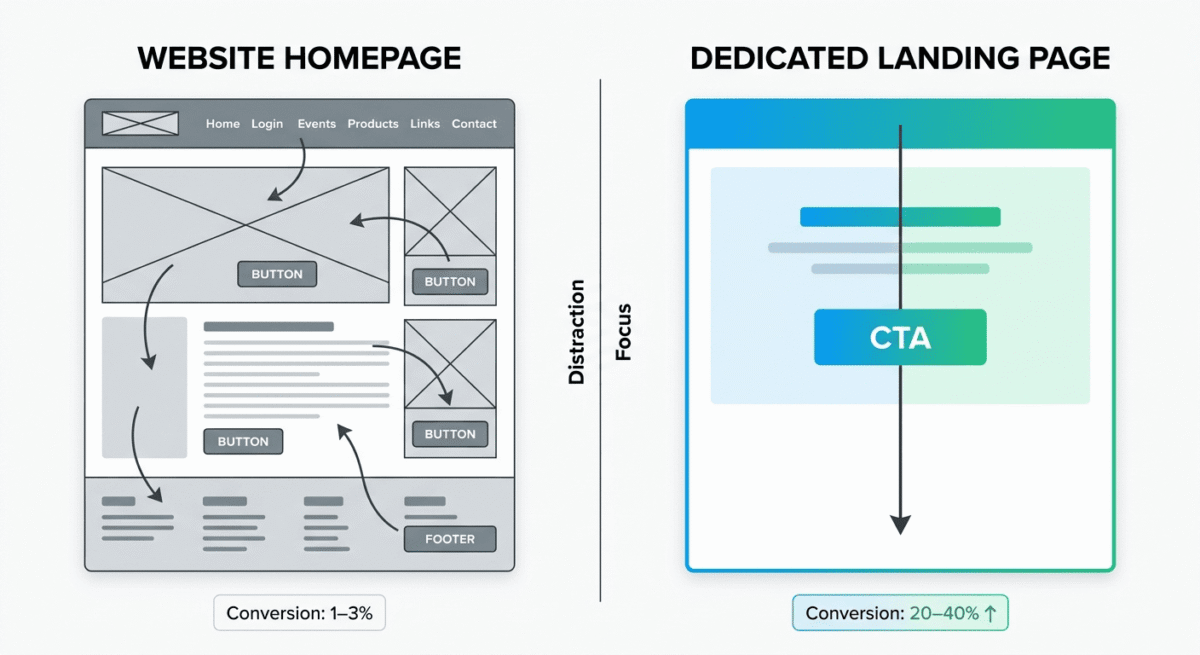
Your website homepage is not a landing page. A landing page has one job: convert a specific visitor into a specific action. Sign up for a free trial. Download an eBook. Book a demo. Buy a product.
When you send paid traffic to your homepage, you are hoping visitors will find what they need among everything your site offers. When you send paid traffic to a dedicated landing page, you are guiding them toward exactly one outcome, and conversion rates typically double, triple, or higher as a result.
Landing page builders exist to make creating these focused, high-converting pages fast, easy, and testable, without requiring a developer every time you want to run a new campaign.
I tested Unbounce vs Leadpages vs Instapage for 30 days across real paid campaigns, organic lead generation, and email marketing funnels. Here is the honest verdict.
Table of Contents
How We Evaluated These Tools
Every platform was tested across five criteria:
– Page builder quality: how easy is it to build a professional landing page without design skills?
– Conversion features: A/B testing, pop-ups, sticky bars, and optimisation tools
– AI capabilities: how well does each tool use AI to improve page performance?
– Integrations: connections to email marketing, CRM, and ad platforms
– Value: free plan quality and paid plan pricing versus features offered
Why Landing Page Builders Matter for Bloggers and Marketers
Before comparing the tools, a brief note on why dedicated landing page builders outperform regular website pages for conversion:
Single focus. A landing page removes navigation menus, sidebars, footer links, and every other distraction that might pull a visitor away from the primary action. The removal of choice increases the likelihood of completing the intended action.
Speed to test. Landing page builders let you create, publish, and A/B test a new page in hours rather than days. Testing which headline, image, or call-to-action button converts better is the most direct path to improving campaign ROI.
No developer dependency. Every time a marketing team needs a new campaign page and has to wait for a developer, conversion opportunities are lost. Landing page builders give marketers autonomy to create and iterate without technical bottlenecks.
For bloggers specifically, landing pages matter for:
– Building email subscribers from paid or social traffic
– Promoting affiliate products with a dedicated review or comparison page. Publishing detailed comparative software reviews alongside dedicated opt-in funnels allows creators to capture intent-driven search traffic efficiently
– Selling digital products or courses directly
– Capturing leads for freelance or consulting services. For service-based leads especially, you can add live chat to your landing page to answer questions in real time instead of losing hesitant visitors, see our Intercom vs Drift vs Tidio comparison for the best fit. While these pages convert cold traffic exceptionally well, pairing them with insights from enterprise-grade SEO platforms ensures that the organic paths driving users to your funnels are thoroughly optimized
Unbounce Review: Best Landing Page Builder for Conversion Optimisation
Free plan: No (14-day free trial)
Starting price: $74/month (Build, billed annually)
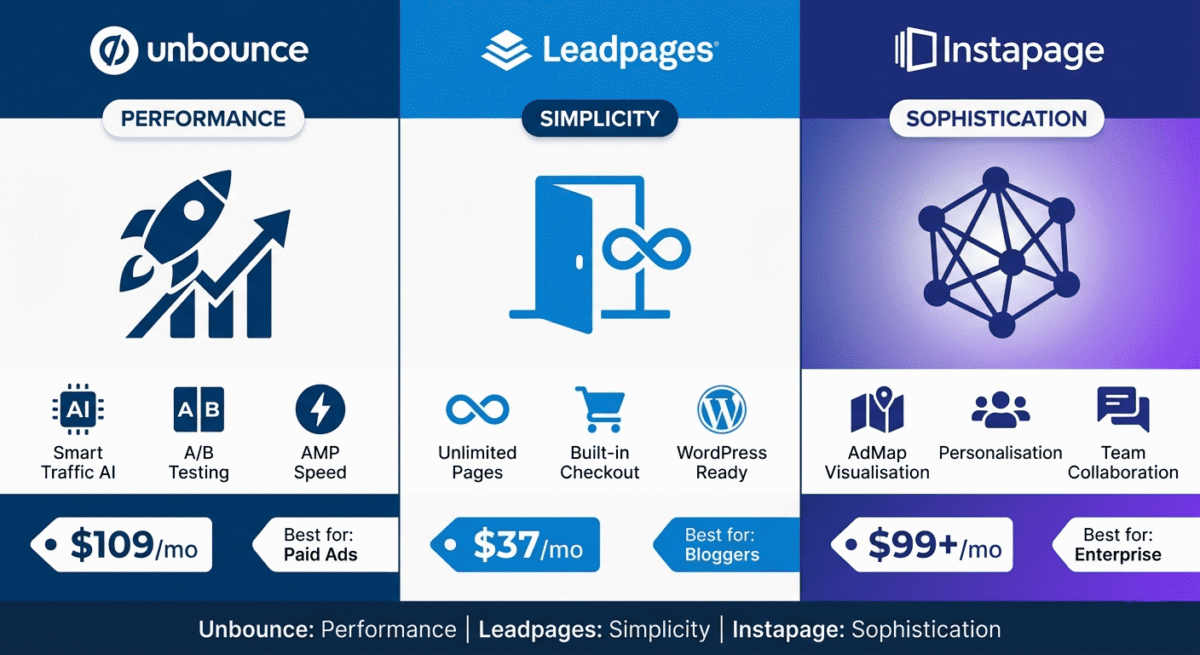
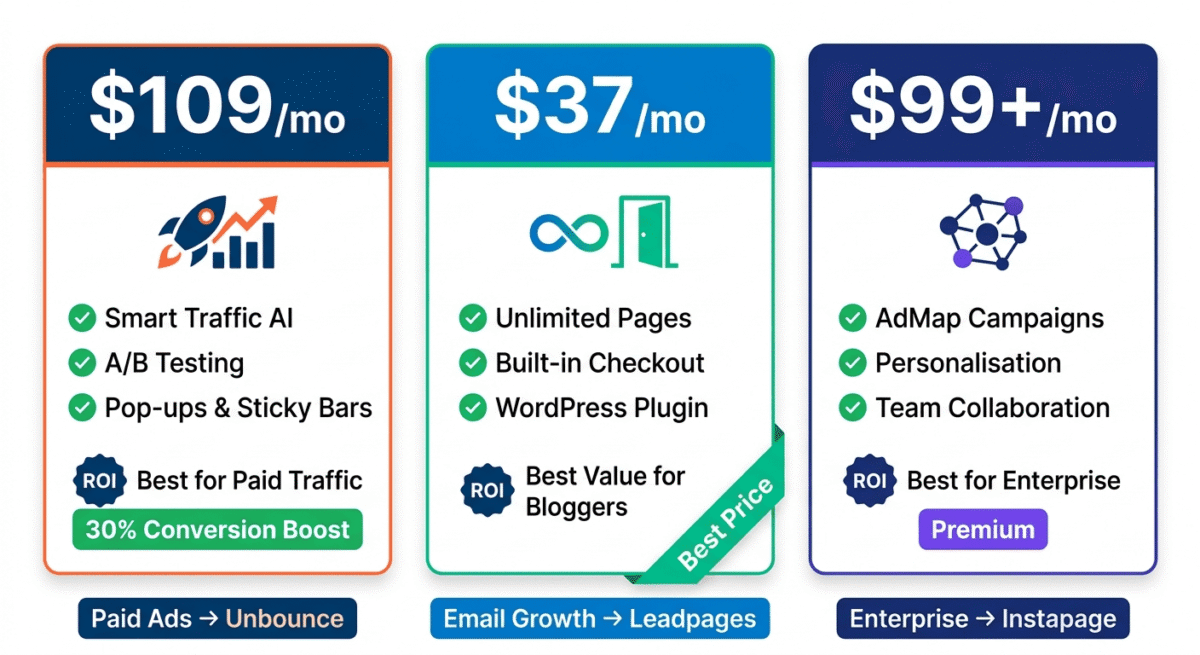
Best plan for most users: Optimize, $109/month (billed annually)
Platforms: Web
Affiliate program: Yes, Unbounce affiliate program, 20% recurring commission
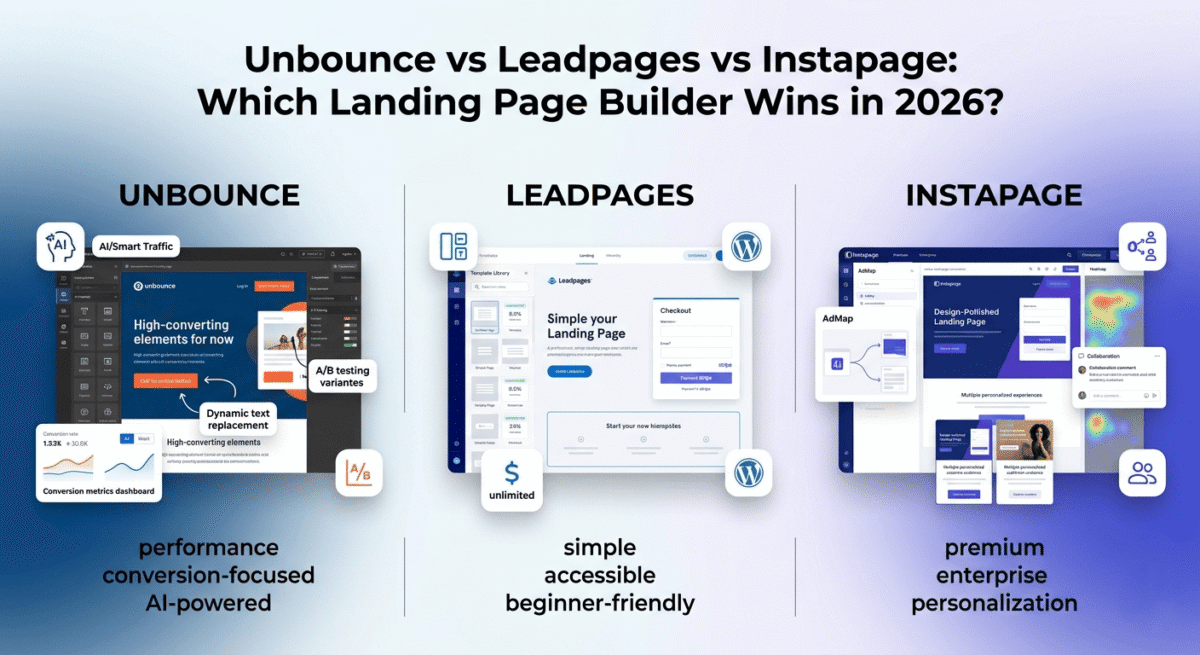
Unbounce is the original dedicated landing page platform; it pioneered the category in 2009 and remains the most conversion-focused tool available in 2026. Its AI-powered Smart Traffic feature, comprehensive A/B testing capabilities, and the most flexible drag-and-drop editor on this list make it the preferred choice for performance marketers and agencies running high-volume paid campaigns.
What Unbounce does best
Unbounce’s drag-and-drop builder is the most flexible of the three tools; elements can be placed anywhere on the canvas with pixel-level precision, including outside the standard grid constraints that limit Leadpages and Instapage. This freedom enables advanced page layouts that match any design specification without custom code.
Smart Traffic is Unbounce’s most distinctive and valuable feature. Rather than traditional A/B testing, where you split traffic 50/50 between two variants and wait weeks for statistical significance, Smart Traffic uses AI to automatically route each visitor to the landing page variant most likely to convert them, based on their device, location, browser, and other signals. Unbounce reports that Smart Traffic improves conversions by an average of 30% compared to showing all visitors the same page. In our testing, Smart Traffic delivered measurably better results than manual A/B testing within the first week of a campaign.
The template library contains over 100 professionally designed, conversion-optimised templates across every campaign type, lead generation, click-through, product launch, webinar registration, app download, and more. Every template is built around conversion best practices, social proof placement, benefit-focused headlines, and clear call-to-action hierarchy.
Unbounce’s popups and sticky bars extend landing page conversion tactics to your existing website without requiring a new page. A sticky bar that appears after a visitor scrolls 50% down a blog post, offering a relevant content upgrade, can convert blog readers into email subscribers without redirecting them away from the content they came to read.
Dynamic Text Replacement, a feature unique to Unbounce among the three tools, automatically matches the headline text on your landing page to the search keyword that brought the visitor there. A visitor who searched “best VPN for streaming” sees a headline about streaming; a visitor who searched “best VPN for privacy” sees a privacy-focused headline on the same landing page. This keyword-level personalisation consistently improves Quality Scores in Google Ads and conversion rates simultaneously.
Unbounce’s AMP (Accelerated Mobile Pages) support creates lightning-fast mobile landing pages that load in under a second, critical for paid mobile traffic where page speed directly affects both conversion rates and ad costs.
Where Unbounce falls short
Unbounce is the most expensive option on this list. The Build plan at $74/month is already more than Leadpages’ entire top-tier plan, and the Optimize plan at $109/month, where Smart Traffic lives, is a significant monthly commitment for small businesses.
The free trial is 14 days, longer than Instapage’s but shorter than Leadpages’ unlimited free plan. For users who want to evaluate comprehensively before paying, the time pressure is real.
Unbounce’s e-commerce capabilities are limited. It is built for lead generation and click-through campaigns, not direct product sales. For landing pages that need a checkout flow, WooCommerce or Shopify are better integrations than native Unbounce functionality.
Unbounce pricing
Plan | Price/month (annual) | Conversions | Visitors | Key features |
Build | $74 | 500 | 20,000 | Builder, templates, popups, sticky bars |
Optimize | $109 | 1,000 | 30,000 | + Smart Traffic AI, A/B testing, heatmaps |
Scale | $180 | 2,500 | 50,000 | + More conversions, advanced integrations |
Enterprise | Custom | Unlimited | Unlimited | + Dedicated support, custom limits |
Unbounce: Pros and Cons
Pros:
– Smart Traffic AI optimises conversions automatically, average 30% improvement
– Most flexible drag-and-drop editor, pixel-precise placement
– Dynamic Text Replacement matches headlines to search keywords
– AMP support for sub-second mobile page loading
– Popups and sticky bars extend conversion to existing website
– 100+ conversion-optimised templates
– 20% recurring affiliate commission
Cons:
– Most expensive starting price, $74/month with no free plan
– Smart Traffic requires Optimize plan ($109/month)
– Limited e-commerce/checkout capabilities
– Conversion and visitor limits on all plans, overages charged
– 14-day trial only, time pressure for evaluation
– Steeper learning curve than Leadpages
Rating: 4.7 / 5 Best landing page builder for performance marketers running paid campaigns. Smart Traffic AI is a genuine competitive advantage.
Leadpages Review: Best Landing Page Builder for Small Businesses and Bloggers
Free plan: No, but Standard plan starts at $37/month (annually) with unlimited pages
Starting price: $37/month (Standard, billed annually)
Best plan for most users: Standard, $37/month (billed annually)
Platforms: Web, WordPress plugin
Affiliate program: Yes, Leadpages affiliate program, 10–50% recurring commission
Leadpages is the most accessible landing page builder on this list, the fastest to learn, the most affordable at entry level, and the best choice for bloggers, coaches, and small business owners who need professional landing pages without the complexity or cost of Unbounce.
What Leadpages does best
Leadpages’ pricing is its first and most significant advantage. The Standard plan at $37/month includes unlimited landing pages, unlimited traffic, and unlimited leads, no conversion caps, no visitor limits, and no overage charges. For small businesses and bloggers who want predictable monthly costs and no surprises, Leadpages’ unlimited model is a relief compared to Unbounce’s conversion-capped plans.
The template library is the largest of the three tools, with over 200 templates organised by conversion rate, so you can sort by highest-converting and start with pages that have a proven performance record. Every template is mobile-responsive and editable without touching code.
Leadpages’ conversion rate data, showing the average conversion rate of each template based on real usage data, is a uniquely useful feature. Rather than choosing a template based on aesthetics, you can select the one with the highest historical conversion rate for your campaign type. This data-driven template selection is a practical advantage that neither Unbounce nor Instapage offers equivalently.
The drag-and-drop editor is simpler than Unbounce’s, more constrained but also easier to use correctly. New users produce professional-looking pages faster in Leadpages than in Unbounce because the simpler editor has fewer ways to accidentally create misaligned or inconsistent layouts.
Leadpages includes built-in checkout functionality through Leadpages Checkout, powered by Stripe, enabling direct product sales from landing pages without a separate e-commerce platform. For bloggers selling eBooks, courses, or coaching packages directly from a landing page, this built-in checkout eliminates the need for a separate tool.
The WordPress plugin makes Leadpages pages publishable directly to your WordPress site, appearing as standard WordPress pages with your domain URL rather than a Leadpages subdomain. For bloggers who want landing pages integrated with their existing WordPress site rather than hosted separately, this plugin is a significant practical advantage.
A/B testing is available on the Pro plan, and above, you can test two variants of a landing page, and Leadpages tracks which converts better. Not as sophisticated as Unbounce’s Smart Traffic AI, but functional for straightforward headline and CTA testing.
Where Leadpages falls short
Leadpages’ editor is less flexible than Unbounce’s. The section-based layout constrains element placement to a grid structure, fine for standard layouts, but limiting for advanced designs that require precise pixel positioning. Teams with specific design requirements will find Unbounce more accommodating.
A/B testing requires the Pro plan at $74/month; the Standard plan at $37/month does not include split testing. For conversion-focused marketers who consider A/B testing essential, the effective starting price doubles.
Leadpages does not have an AI traffic optimisation feature comparable to Unbounce’s Smart Traffic. A/B testing in Leadpages is manual; you set the split, monitor results, and declare a winner yourself. Unbounce’s AI automates this process and adapts faster.
Pop-ups and alert bars require the Pro plan; they are not available on Standard. For bloggers who want both landing pages and website pop-ups from one tool, the Standard plan is insufficient.
Leadpages pricing
Plan | Price/month (annual) | Pages | Traffic | Key features |
Standard | $37 | Unlimited | Unlimited | 1 site, templates, unlimited leads |
Pro | $74 | Unlimited | Unlimited | + A/B testing, pop-ups, online sales, 3 sites |
Advanced | $239 | Unlimited | Unlimited | + 50 sites, advanced integrations, priority support |
Leadpages: Pros and Cons
Pros:
– Most affordable entry price, $37/month with unlimited pages and traffic
– No conversion caps or visitor limits, predictable pricing
– Largest template library (200+) with conversion rate data for each
– Built-in checkout for direct product sales via Stripe
– WordPress plugin for seamless site integration
– Most beginner-friendly editor, fastest to productive results
– 10–50% recurring affiliate commission
Cons:
– Less flexible editor than Unbounce, grid-constrained layout
– A/B testing requires Pro plan ($74/month)
– Pop-ups and alert bars require Pro plan
– No AI traffic optimisation equivalent to Unbounce Smart Traffic
– Less suitable for advanced performance marketing campaigns
– Design output less impressive than Instapage for premium brands
Rating: 4.5 / 5 Best landing page builder for bloggers, coaches, and small businesses. Most affordable entry point with unlimited traffic and pages.
Instapage Review: Best Landing Page Builder for Enterprise and Ad Personalisation
Free plan: No (14-day free trial)
Starting price: $99/month (Create, billed annually)
Best plan for most users: Create, $99/month (billed annually)
Platforms: Web
Affiliate program: Yes, Instapage affiliate program
Instapage is the most design-forward landing page builder on this list and the most enterprise-focused. Its collaboration features, pixel-perfect editor, and AdMap, a visual tool connecting ads directly to personalised landing page experiences, make it the preferred choice for agencies, large marketing teams, and brands running sophisticated personalisation campaigns at scale.
What Instapage does best
Instapage’s page editor produces the most visually polished results of the three tools. The designer-grade canvas allows pixel-perfect element placement with alignment guides, spacing controls, and design tokens that ensure visual consistency across all pages. For brands where design quality directly reflects brand standards, Instapage’s output looks more premium than Leadpages or Unbounce at equivalent designer skill levels.
AdMap is Instapage’s most innovative feature, a visual diagram that maps each of your ads to its corresponding landing page experience. Rather than connecting ads to pages through separate dashboards, AdMap shows all your campaigns and their landing page connections in one canvas, making it easy to identify which ads lack personalised experiences and which pages serve multiple ad variations. For teams managing dozens or hundreds of ad-to-page connections, AdMap reduces the organisational complexity that causes personalisation campaigns to fail.
Personalisation at scale is Instapage’s strongest capability. Each landing page can have multiple personalised experiences, different headlines, images, and social proof for different audience segments, without creating separate pages for each variation. A single Instapage URL can serve a different experience to a visitor from a Facebook ad than to a visitor from a Google search, with content dynamically matched to the traffic source.
The collaboration features are the strongest of the three tools. Team members and clients can leave comments directly on landing page elements, tracked in a threaded sidebar, with approval workflows that move pages from draft to review to approved without email chains. For agencies managing client landing page approval processes, this built-in collaboration eliminates the screenshot-and-email approval workflow that wastes hours.
Heatmaps and click tracking are built into all Instapage plans, showing visually where visitors click, scroll, and spend time on your landing pages. This behavioural data informs optimisation decisions without requiring a separate analytics tool.
Where Instapage falls short
Instapage is the most expensive entry-level option, $99/month on the Create plan, with no free plan and only a 14-day trial. For small businesses and bloggers, this price point is difficult to justify compared to Leadpages at $37/month.
The Create plan has significant limitations: 30 published landing pages maximum, limited integrations, and no A/B testing. A/B testing requires the Optimize plan at custom pricing, making the effective cost for a conversion-optimised setup significantly higher than the advertised $99/month entry price.
Instapage does not include pop-ups or sticky bars. If you need these conversion tools alongside landing pages, you need a separate tool or a different platform.
The platform is primarily designed for advertising-driven traffic; it is less suited to organic landing pages, SEO-focused pages, or content marketing funnels than Leadpages or Unbounce.
Instapage pricing
Plan | Price/month (annual) | Pages | Key features |
Create | $99 | 30 | Builder, templates, heatmaps, collaboration |
Optimize | Custom | Unlimited | + A/B testing, AI experiments, advanced personalisation |
Convert | Custom | Unlimited | + AdMap, AMP, enterprise security, dedicated support |
Instapage: Pros and Cons
Pros:
– Most design-polished output, premium brand quality
– AdMap for visual ad-to-page connection management
– Best personalisation, multiple experiences per page URL
– Best collaboration features, inline commenting, approval workflows
– Built-in heatmaps on all plans
– Best for agencies managing multiple client campaigns
– Enterprise-grade security and compliance features
Cons:
– Most expensive entry price, $99/month with significant plan limitations
– A/B testing requires custom-priced Optimize plan
– No pop-ups or sticky bars
– 30 page limit on entry plan
– Primarily ad-traffic focused, less suitable for organic/content funnels
– Overkill for small businesses and bloggers
Rating: 4.2 / 5 Best landing page builder for enterprises and agencies running sophisticated personalisation campaigns. Too expensive and complex for most small businesses.
Head-to-Head Comparison
Unbounce Optimize | Leadpages Standard | Instapage Create | |
Price/month (annual) | $109 | $37 | $99 |
Free plan | No (14-day trial) | No (14-day trial) | No (14-day trial) |
Unlimited traffic | No (30k visitors) | Yes | Yes |
A/B testing | Yes | Pro plan only | Custom plan only |
AI optimisation | Smart Traffic | No | AI experiments (custom) |
Pop-ups & sticky bars | Yes | Pro plan only | No |
Built-in checkout | No | Yes (Stripe) | No |
WordPress plugin | Yes | Yes | No |
Heatmaps | Optimize plan | No | Yes (all plans) |
Collaboration tools | Basic | Basic | Excellent |
AdMap | No | No | Yes |
Dynamic text replacement | Yes | No | Yes |
Template library | 100+ | 200+ | 500+ |
Best for | Performance marketers | Bloggers/SMBs | Enterprises/agencies |
Affiliate commission | 20% recurring | 10–50% recurring | Standard |
Which Landing Page Builder Should You Choose?
Choose Unbounce if:
You run paid advertising campaigns and want AI-powered conversion optimisation that works automatically. Smart Traffic’s ability to route each visitor to their highest-converting page variant, without manual A/B testing, is a genuine performance advantage for teams spending significant budget on paid traffic. Also, the best choice if you need Dynamic Text Replacement for keyword-level ad personalisation.
Choose Leadpages if:
You are a blogger, coach, or small business owner who wants professional landing pages at the most affordable price, with no conversion caps, no visitor limits, and no surprise overage charges. The built-in Stripe checkout makes it uniquely useful for bloggers selling digital products directly from landing pages. The WordPress plugin integrates seamlessly with existing WordPress blogs.
Choose Instapage if:
You manage multiple ad campaigns for clients or run sophisticated personalisation at enterprise scale. The AdMap visualisation, inline collaboration, and multi-experience personalisation justify the higher cost for agencies and large marketing teams. Small businesses should look at Leadpages or Unbounce first.
The Blogger Landing Page Strategy
For bloggers building an email list and selling affiliate products or digital downloads, here is the most effective landing page approach:
Email list building: Create a dedicated opt-in landing page for each lead magnet, a free checklist, eBook, template, or email course. Send paid social traffic or promote within blog posts to this page rather than asking visitors to subscribe via a sidebar widget. Automating this promotional phase using social media scheduling tools allows you to maintain steady top-of-funnel discovery without manual daily publishing. Dedicated landing pages convert email subscribers at 20–40% versus 1–3% for sidebar opt-ins. Before launching that opt-in page, make sure you can connect to your email tool so new subscribers flow straight into your list, our Mailchimp vs ConvertKit vs Brevo comparison covers which platform integrates most smoothly with each builder. To maximize these conversion spaces, integration with solid website analytics tools ensures you can isolate traffic drop-off points.
Affiliate product promotion: Create a dedicated comparison or review landing page for high-commission affiliate products. A page that compares NordVPN vs ExpressVPN with clear recommendation and a “Get NordVPN” button converts better than a generic blog post with affiliate links scattered throughout.
Digital product sales: Use Leadpages’ built-in checkout to sell ebooks, templates, or mini-courses directly from a landing page, with no WooCommerce setup required. A simple sales page with benefit bullets, social proof, and a Stripe checkout converts readers to buyers without the friction of a multi-page store experience.
Recommended setup for bloggers: Leadpages Standard at $37/month gives you unlimited landing pages, unlimited traffic, built-in checkout, and WordPress integration — everything a blogger needs to build an email list and sell digital products without overpaying for enterprise features you will never use.
Final Verdict
Leadpages is the best landing page builder for most bloggers and small businesses. The most affordable entry price, unlimited traffic and pages, built-in checkout, and WordPress integration make it the most practical tool for content creators who want professional landing pages without enterprise complexity or cost.
.Unbounce is the best landing page builder for performance marketers Smart Traffic AI, Dynamic Text Replacement, and AMP support provide genuine conversion advantages for teams running paid advertising campaigns at scale. The higher cost is justified when campaign ROI can be measured directly.
.Instapage is the best landing page builder for agencies and enterprises AdMap, multi-experience personalisation, and built-in collaboration features make it the most sophisticated tool available, at a price that only enterprise use cases justify.
Ratings:
– Unbounce: 4.7 / 5
– Leadpages: 4.5 / 5
– Instapage: 4.2 / 5
Frequently Asked Questions
What is the best landing page builder for beginners in 2026?
Leadpages is the best landing page builder for beginners; its template library with conversion rate data, beginner-friendly drag-and-drop editor, and affordable $37/month Standard plan make it the lowest-friction starting point. The WordPress plugin integrates directly with existing blogs, and the built-in Stripe checkout enables product sales without additional tools.
Is Unbounce worth the price?
Yes, for performance marketers running paid advertising campaigns. Unbounce’s Smart Traffic AI, which automatically routes visitors to their highest-converting page variant, delivers measurable conversion improvements that typically exceed the tool’s cost within the first month of a paid campaign. For organic traffic and simple lead generation, Leadpages provides better value at lower cost.
What is Smart Traffic in Unbounce?
Smart Traffic is Unbounce’s AI optimisation feature that automatically routes each visitor to the landing page variant most likely to convert them, based on their device, location, browser, and other behavioural signals. Unlike traditional A/B testing, which splits traffic 50/50 and requires weeks to reach statistical significance, Smart Traffic adapts in real time and begins improving conversions within 50 visits. Unbounce reports an average 30% conversion improvement compared to showing all visitors the same page.
Can I use a landing page builder with WordPress?
Yes. Leadpages offers a WordPress plugin that publishes landing pages directly to your WordPress site, appearing as standard WordPress pages with your domain URL. Unbounce also has a WordPress plugin for similar functionality. Both allow you to use a dedicated landing page builder while keeping your domain and WordPress setup intact.
What is the difference between a landing page and a website?
A website has multiple pages, navigation menus, and serves various purposes, informing visitors about your business, showcasing your portfolio, and providing contact information. A landing page has one page, no navigation menu, and serves one purpose: converting visitors into a specific action (email signup, purchase, booking). Landing pages consistently outperform website pages for conversion because they eliminate all distractions and focus visitors on a single decision.
Do I need a landing page builder or can I use my website builder?
You can create basic landing pages in website builders like Wix, Squarespace, or WordPress, but dedicated landing page builders offer advantages that justify the additional cost for conversion-focused campaigns: AI optimisation (Unbounce Smart Traffic), conversion rate data by template (Leadpages), built-in heatmaps (Instapage), and A/B testing are all features that general website builders do not provide at equivalent depth.
What landing page conversion rate should I expect?
Average landing page conversion rates vary significantly by industry and campaign type. Email opt-in pages typically convert at 20–40% for targeted traffic. Product sales pages convert at 1–5% for cold traffic. Webinar registration pages convert at 30–50% for warm audiences. These benchmarks assume relevant, targeted traffic; sending broad or mismatched traffic to any landing page produces lower results regardless of the tool used.
Is Instapage better than Unbounce?
For enterprise use cases, agencies managing multiple client campaigns, brands running sophisticated personalisation, teams needing built-in collaboration and approval workflows, Instapage’s AdMap and multi-experience personalisation provide advantages that Unbounce does not match. For individual marketers and small businesses, Unbounce’s Smart Traffic AI and more affordable pricing make it the better choice. Neither is universally better — the right tool depends on team size, budget, and campaign sophistication.