Social media is the fastest way for bloggers and small businesses to build an audience before organic search traffic kicks in. But posting randomly across platforms without understanding what resonates, which content drives the most engagement, which posting times reach the most followers, which platforms drive the most traffic to your website, is effort without intelligence.
Social media analytics tools answer these questions. They track performance across every platform, identify what is working, schedule content for optimal reach, and surface the insights that turn social media from a time sink into a genuine traffic and revenue driver.
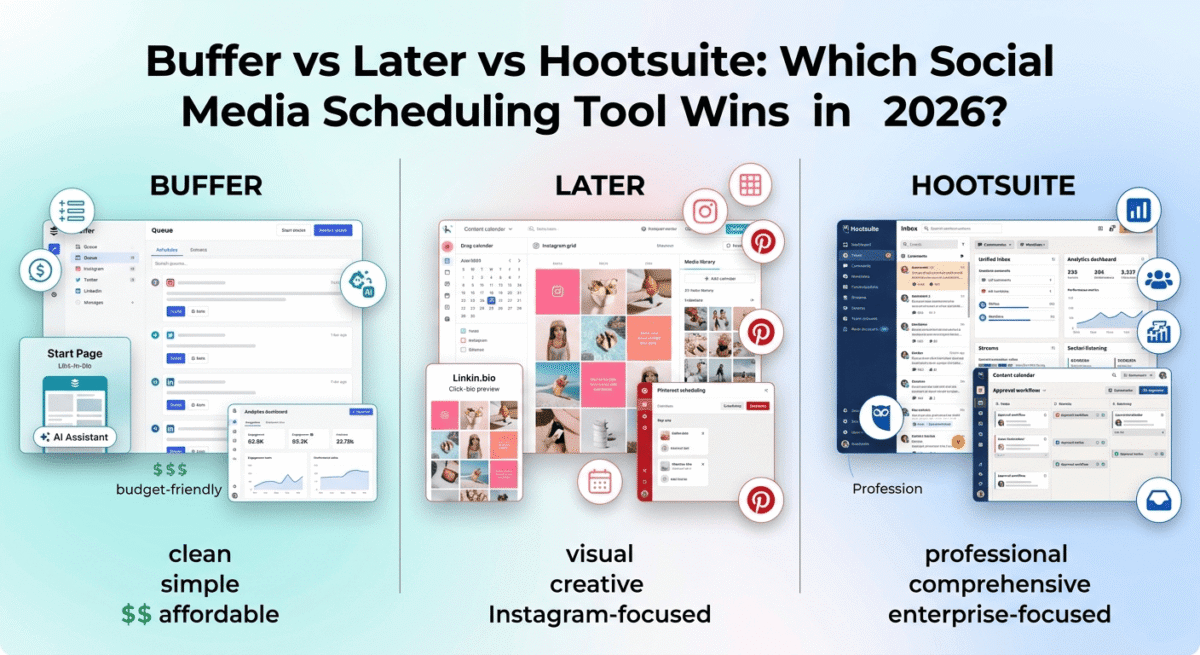
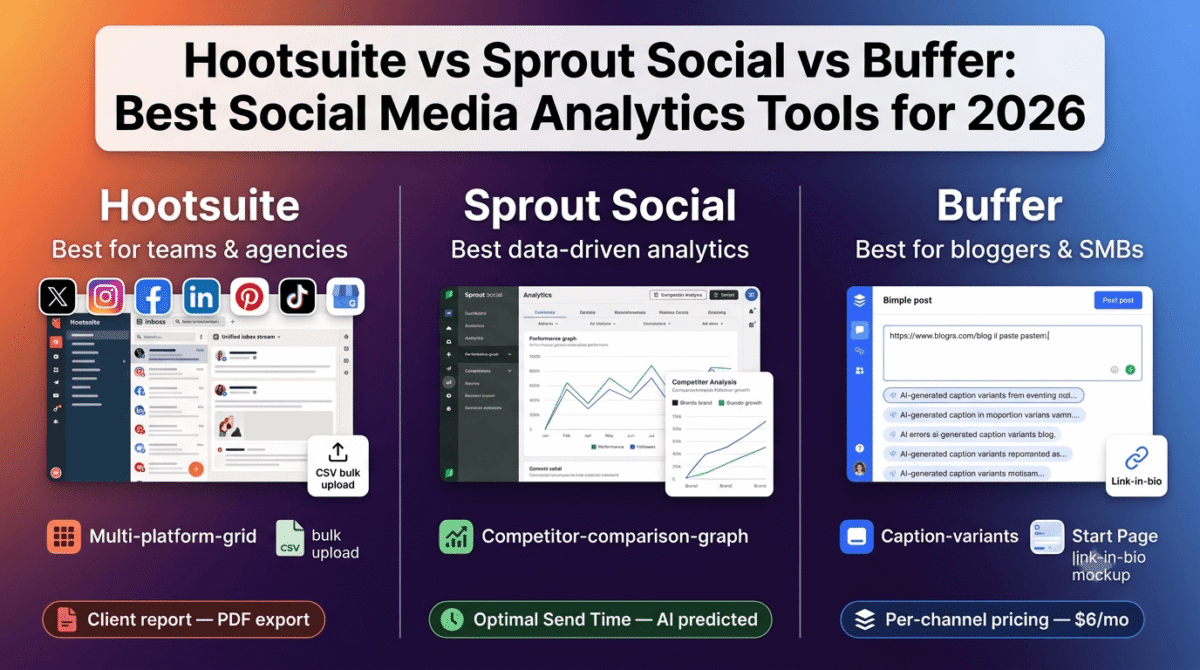
In 2026, Hootsuite vs Sprout Social vs Buffer are the three most widely used social media management and analytics platforms. Each serves a different user, Hootsuite for teams and agencies, Sprout Social for data-driven marketers, and Buffer for independent bloggers and small businesses who want simplicity without sacrificing insight.
I tested all four for 30 days across real social media accounts, managing content for LinkedIn, Twitter/X, Instagram, Pinterest, and Facebook simultaneously, analysing performance, and scheduling content calendars. Here is the honest comparison.
Table of Contents
How We Evaluated These Tools
Every platform was tested across five criteria:
- Analytics depth, how specifically does the tool identify what is working and what is not?
- Scheduling capability, how effectively does it schedule and publish content across multiple platforms?
- Engagement management, how well does it handle comments, mentions, and direct messages?
- Reporting, how clearly does it present performance data for decision-making?
- Value, free plan quality and paid plan pricing versus features offered
Why Social Media Analytics Matter for Bloggers
Before comparing the tools, understanding what social media analytics actually changes for bloggers shapes the right investment decision:
Content performance data prevents guessing. Without analytics, you post consistently and hope something works. With analytics, you see that your LinkedIn posts comparing two software tools get 5x more engagement than your promotional posts, and double down on what your audience actually responds to.
Optimal posting times are not universal. The “best times to post on Instagram” articles you read are population averages, your specific audience has different activity patterns. Social media analytics tools show when your actual followers are online, enabling scheduling that reaches more of your existing audience without requiring more content.
Platform ROI comparison drives better resource allocation. A blogger spending equal time on Instagram and Pinterest might discover that Pinterest drives 10x more blog traffic. Analytics surface this imbalance, enabling reallocation of social media time toward the highest-performing channels.
Follower growth trajectory predicts future traffic. Tracking follower growth, engagement rates, and click-through trends over time shows whether your social media investment is building a compounding audience or plateauing, the signal to either double down or change strategy.
Pallyy: Scheduling plus reports, without the team-tool price
Free plan: Yes, 1 social set, 1 account, 15 scheduled posts/month
Starting price: $15/month (Starter)
Best plan for most users: Pro, $25/month ($20/month billed annually)
Platforms: Instagram, Facebook, LinkedIn, TikTok, Pinterest, Google Business Profile, YouTube, X (Twitter), Threads, and Bluesky
Affiliate program: Yes, Pallyy affiliate program
Pallyy includes analytics and client reports with scheduling, positioning itself as one of the best social media scheduling tools, so you don’t pay Hootsuite or Sprout to see what went out. Approvals and a unified inbox sit in the same workspace. No social listening, and it is a smaller company than Buffer.
Best for: small teams who want reports and approvals without Sprout-level pricing.
What Pallyy does best
Pallyy does best as an all-in-one social media workflow for people managing multiple channels or clients. Its calendar lets you plan and publish content across Instagram, Facebook, LinkedIn, TikTok, Pinterest, Google Business Profile, YouTube, X, Threads, and Bluesky, while features such as Instagram grid preview, best-time-to-post insights, queue scheduling, AI captions, analytics, a unified inbox, client approvals, and shared calendars reduce the need for separate tools. Pallyy also lets agencies organize each client as a Social Set, share calendars for approvals, and create client-ready reports, making it particularly strong when scheduling needs to be combined with collaboration and account management.
Where Pallyy falls short
Pallyy’s biggest limitation is that the lower plans have relatively tight usage limits, with Free capped at 15 posts per month and Starter at 20, while some of its most useful workflow features such as unlimited scheduling, queue scheduling, social inbox, AI captions, and approvals begin with Pro at $25/month. Agencies managing many clients also need additional Social Sets, which cost $10/month each on Starter, Pro, and Agency, while team users are mainly available on the Agency and Scale plans. Pallyy is therefore less attractive for very small occasional users and is more compelling once you need its broader management and collaboration workflow.
Pallyy pricing
| Plan | Price/month | Social sets | Posts/month | Key features |
|---|---|---|---|---|
| Free | $0 | 1 | 15 | Content calendar, analytics |
| Starter | $15 | 1 | 20 | Content calendar, analytics, link-in-bio, API access |
| Pro | $25 | 1 | Unlimited | Analytics, post ideas, queue scheduling, social inbox, link-in-bio, AI captions, approvals, shared calendars |
| Agency | Custom/varies | 10 | Unlimited | 11 accounts/social set, 3 users, team collaboration, approvals, client workflows |
| Scale | Custom | 30 | Unlimited | 11 accounts/social set, 10 users, advanced agency/team capabilities |
Pallyy currently offers annual billing at a lower effective monthly rate, with Pro costing $20/month when billed annually. Agency is $99/month and Scale is $199/month, with annual billing also reducing the effective monthly cost.
Pallyy: Pros and Cons
Pros:
– All-in-one scheduling, analytics, inbox, approvals, and client workflow
– Supports Instagram, Facebook, LinkedIn, TikTok, Pinterest, YouTube, X, Threads, Bluesky, and Google Business Profile
– Visual calendar with drag-and-drop scheduling
– Instagram grid preview and best-time-to-post heatmap
– Unified inbox for comments, messages, and reviews
– Client approval and shared-calendar workflows
– AI caption generation and post ideas on Pro
– Unlimited scheduled posts on Pro
– Competitor tracking for up to 10 Instagram competitors
– Link-in-bio pages included
Cons:
– Free plan limited to 15 scheduled posts/month
– Starter limited to 20 scheduled posts/month
– Additional Social Sets cost $10/month each on applicable plans
– Team users require Agency or Scale
– Not as focused on enterprise social intelligence as Sprout Social
Rating: 4.7 / 5, Best for agencies, freelancers, creators, and small businesses that want scheduling, analytics, engagement, and client collaboration in one platform.
Hootsuite Review: Best Social Media Management for Teams and Agencies
Free plan: No (30-day free trial)
Starting price: $99/month (Professional, 1 user, 10 social accounts)
Best plan for most teams: Team, $249/month (3 users, 20 accounts)
Platforms: Web, iOS, Android
Affiliate program: Yes, Hootsuite affiliate program, 15% recurring commission
Hootsuite is the world’s most widely used social media management platform, serving over 18 million users including Fortune 500 companies, government agencies, and marketing agencies globally. Its combination of the most comprehensive platform coverage, team collaboration features, and enterprise-grade analytics make it the industry standard for professional social media management.
What Hootsuite does best
Hootsuite’s platform coverage is the most extensive of the three tools, natively supporting Twitter/X, Instagram, Facebook, LinkedIn, Pinterest, YouTube, TikTok, and Google My Business in one dashboard. For agencies and social media managers who maintain brand presence across all major platforms simultaneously, Hootsuite’s unified inbox and scheduling calendar covers every channel without switching tools.
The unified social inbox, showing every comment, mention, direct message, and brand tag across all connected platforms in one chronological stream, is Hootsuite’s most practically valuable engagement management feature. Responding to a LinkedIn comment, a Twitter/X reply, an Instagram DM, and a Facebook mention all from one inbox reduces the platform-hopping that fragments social media engagement time.
Hootsuite’s Best Time to Post feature, analysing your historical engagement data to identify the specific times your audience is most active on each platform, is the analytics feature with the most immediate impact on reach. Scheduling content for the times your specific audience is online (rather than generic industry averages) consistently increases impressions and engagement without requiring additional content.
The bulk scheduling feature, uploading a CSV file containing hundreds of scheduled posts with dates, times, captions, and platform selections, enables social media content management at scale. For agencies managing content calendars for multiple clients, or bloggers who batch-create a month of social content in one session, bulk scheduling compresses hours of manual scheduling into minutes.
Hootsuite’s Analytics, available on Professional and above, provides detailed performance reports across all connected platforms: reach, impressions, engagement rate, follower growth, click-through rate, and competitive benchmarking against industry averages. The custom report builder creates shareable PDF or PowerPoint reports for client presentation, the most important reporting feature for agencies managing social media for clients.
Hootsuite Streams, customisable columns showing content from specific accounts, hashtags, keywords, or mentions, enable social listening and competitor monitoring from the main dashboard. Tracking a competitor’s social activity, monitoring relevant industry hashtags, and responding to brand mentions all happen from one interface without separate social listening tools.
The team collaboration features, assigning social conversations to specific team members, adding internal notes to conversations, setting approval workflows for content before publishing, make Hootsuite the most capable multi-user social media management platform.
Where Hootsuite falls short
Hootsuite’s pricing is the highest of the three tools, the Professional plan at $99/month covers only one user and ten social accounts. For individual bloggers and small businesses, this pricing is difficult to justify when Buffer provides comparable scheduling for $6/month and Sprout Social provides deeper analytics for $249/month (with significantly more user and account coverage at that price point).
The interface is the most dated of the three platforms, Hootsuite’s column-based dashboard design has not fundamentally changed in years while Buffer and Sprout Social have modernised their interfaces significantly. New users from other tools frequently find Hootsuite’s interface less intuitive than they expect given the platform’s market position.
The Instagram scheduling has historically been less seamless than competitors, auto-publishing to Instagram requires the mobile app notification workflow for some post types, which breaks the fully automated scheduling that Sprout Social and Buffer achieve more consistently.
Hootsuite pricing
| Plan | Price/month (annual) | Users | Accounts | Key features |
|---|---|---|---|---|
| Professional | $99 | 1 | 10 | Scheduling, analytics, bulk scheduling |
| Team | $249 | 3 | 20 | + Collaboration, approval workflows |
| Business | $739 | 5 | 35 | + Custom analytics, social listening |
| Enterprise | Custom | Unlimited | Unlimited | + SSO, custom integrations |
Hootsuite: Pros and Cons
Pros:
- Most comprehensive platform coverage, all major networks
- Best team collaboration, assignments, approvals, internal notes
- Bulk scheduling via CSV upload
- Best Time to Post analysis based on your specific audience
- Unified social inbox for all platforms
- Client reporting with custom PDF/PowerPoint exports
- 18 million users, most established platform
- 15% recurring affiliate commission
Cons:
- Most expensive, $99/month for one user
- No free plan, 30-day trial only
- Interface most dated of the three tools
- Instagram scheduling less seamless than competitors
- Pricing per user becomes very expensive for larger teams
- Overkill and overpriced for individual bloggers
Rating: 4.4 / 5, Best social media management for agencies and teams managing multiple client accounts. Difficult to justify for individual bloggers at $99/month.
Sprout Social Review: Best Social Media Analytics for Data-Driven Marketers
Free plan: No (30-day free trial)
Starting price: $249/month (Standard, 5 users, unlimited accounts)
Best plan for most growing businesses: Standard, $249/month
Platforms: Web, iOS, Android
Affiliate program: Yes, Sprout Social affiliate program, 20% recurring commission
Sprout Social is the most analytically sophisticated social media platform, built for marketers and businesses where data-driven decision-making, competitive intelligence, and ROI measurement are the primary goals. The combination of the deepest analytics, the most actionable reporting, and the strongest social listening capabilities makes Sprout Social the premium tool for businesses that treat social media as a serious revenue channel.
What Sprout Social does best
Sprout Social’s analytics are the most comprehensive and actionable of the three platforms. The Performance Report shows every key metric, reach, impressions, engagement, clicks, follower growth, for each platform and each post individually, with trend lines over customisable date ranges. The Tag Report, tracking performance of specific content themes or campaigns by tag, enables content strategy data analysis that neither Hootsuite nor Buffer matches natively.
The Competitor Analysis feature, tracking competitors’ follower growth, posting frequency, engagement rates, and top-performing content, is Sprout Social’s most strategically valuable analytics capability. For bloggers and businesses in competitive niches, understanding what content types are performing for competitors (before investing in creating similar content) eliminates guesswork from content strategy.
The Optimal Send Times, Sprout Social’s AI-powered posting time recommendation, goes beyond simple audience activity analysis to predict which specific posting times will generate the highest engagement for each platform based on your historical performance patterns. The recommendations update dynamically as your audience behaviour evolves.
Sprout Social’s Smart Inbox, unifying messages, mentions, comments, and brand tags from all platforms, is the most polished unified engagement management interface of the three tools. The smart filtering, surfacing messages that require responses and suppressing automated/bot interactions, reduces inbox noise for high-volume accounts. The conversation history panel shows every previous interaction with each user before you reply, enabling genuinely personalised engagement at scale.
The publishing workflow, with draft review, approval queues, and post preview across all platforms simultaneously, supports agency and enterprise publishing processes where multiple stakeholders review content before publication. The visual content calendar shows the full month’s scheduled content with drag-and-drop rescheduling.
Sprout Social’s social listening, monitoring brand mentions, industry keywords, and competitor activity across Twitter/X, Reddit, news sites, and review platforms, provides the market intelligence that standalone social listening tools charge significant additional monthly fees for. For businesses that want to understand the conversation around their brand and industry, this built-in listening replaces expensive separate tools.
The Sprout Social integration with Salesforce, HubSpot, and Microsoft Dynamics, showing CRM contact data alongside social interactions, enables genuine social selling workflows where social media conversations inform sales team actions. For businesses where social media generates qualified leads, this CRM integration turns social analytics into revenue attribution data.
Where Sprout Social falls short
Sprout Social’s pricing is the most restrictive for small teams and individual users, the Standard plan at $249/month covers 5 users, but the per-user pricing for additional seats escalates significantly. For solo bloggers and small businesses, $249/month for social media management is extraordinarily difficult to justify unless social media is a primary revenue channel.
The free plan absence, 30-day trial only, means paying before experiencing the tool under real conditions. The tool’s sophistication requires time to configure analytics, set up listening streams, and establish reporting workflows that take longer than 30 days to generate meaningful data.
The interface, while polished, is the most complex of the three, new users encounter more options, settings, and views before reaching the features that are immediately useful.
Sprout Social pricing
| Plan | Price/month (annual) | Users | Accounts | Key features |
|---|---|---|---|---|
| Standard | $249 | 5 | Unlimited | Publishing, analytics, smart inbox |
| Professional | $399 | 5 | Unlimited | + Competitive reports, social listening |
| Advanced | $499 | 5 | Unlimited | + AI tools, sentiment analysis, chatbots |
| Enterprise | Custom | Unlimited | Unlimited | + Premium support, custom solutions |
Sprout Social: Pros and Cons
Pros:
- Best analytics depth, most comprehensive performance reporting
- Competitor analysis for content strategy intelligence
- Best social listening, built-in across Twitter/X, Reddit, news
- CRM integration, Salesforce, HubSpot, Dynamics
- Most polished unified inbox, best engagement management
- Optimal Send Times AI recommendation
- 5 users on Standard plan, better team value than Hootsuite
- 20% recurring affiliate commission
Cons:
- Most expensive, $249/month starting price
- No free plan, 30-day trial only
- Complex interface, steepest learning curve
- Overkill and overpriced for individual bloggers
- Social listening requires Professional plan ($399/month)
- ROI difficult to justify for businesses without established social presence
Rating: 4.6 / 5, Best social media analytics platform for data-driven marketers and growing businesses where social media drives measurable revenue. Pricing limits accessibility for small businesses.
Buffer Review: Best Social Media Analytics for Bloggers and Small Businesses
Free plan: Yes, 3 channels, 10 scheduled posts per channel
Starting price: $6/month/channel (Essentials)
Best plan for most bloggers: Essentials, $6/month per channel ($18/month for 3 channels)
Platforms: Web, iOS, Android
Affiliate program: Yes, Buffer affiliate program, 20% recurring commission
Full review: Best Social Media Scheduling →
Buffer is the most blogger-friendly and small-business-accessible social media tool, straightforward scheduling, clean analytics, and pricing that scales with your actual needs rather than locking you into expensive multi-user plans before you need them. The combination of the most generous free plan and the lowest paid plan entry point makes Buffer the recommended starting point for bloggers building their social media presence.
What Buffer does best
Buffer’s simplicity is its most consistently praised quality, new users schedule their first post within minutes of creating an account without reading documentation or watching tutorials. The post composer, schedule calendar, and analytics are all immediately intuitive in a way that Hootsuite and Sprout Social, despite their greater capabilities, are not.
The per-channel pricing model, paying $6/month per connected social channel rather than per user or per seat, is the most flexible pricing structure for bloggers who want to focus resources on their best-performing platforms. A blogger who publishes primarily on LinkedIn and Pinterest pays $12/month for those two channels, adding Instagram for $6/month when ready rather than paying for all platforms upfront.
Buffer’s analytics, available on all paid plans, provides the essential performance data bloggers need: post reach, impressions, engagement rate, follower growth, click-through rate, and best performing content identification. The Answers feature, AI-generated insights explaining what the data means and what to do next, makes analytics actionable for non-data-specialist bloggers who want recommendations rather than raw numbers.
The Best Time to Post analysis shows the optimal posting windows based on your specific audience’s activity patterns for each connected platform, the single most impactful scheduling optimisation available from any of the three tools, and available at Buffer’s accessible price point.
Buffer’s free plan, 3 channels and 10 scheduled posts per channel, is the most genuinely useful free social media management tier available. For bloggers just starting their social media strategy, Buffer free enables a consistent posting schedule across three platforms without any cost or credit card commitment.
The Start Page feature, a free, customisable link-in-bio page hosted by Buffer, turns your social media bio link into a mini landing page showing your recent posts, affiliate links, and website links. For bloggers who use Instagram or TikTok where clickable links in post captions are not possible, Start Page converts social media followers into blog visitors through the bio link.
Buffer’s AI assistant, generating social media captions from your blog post URL or a brief description, dramatically reduces the time required to repurpose blog content into platform-appropriate social captions. Paste your blog post URL, receive five different caption variations optimised for different platforms, select the best, and schedule, a workflow that takes five minutes rather than thirty.
Where Buffer falls short
Buffer’s analytics, while covering the essential metrics, are significantly less deep than Sprout Social’s, no competitive analysis, no social listening, no custom reporting, and no sentiment analysis. For businesses that need data-driven content strategy intelligence rather than basic performance metrics, Buffer’s analytics may be insufficient.
The engagement management, Buffer has limited unified inbox capability for managing replies, comments, and mentions across platforms from one interface. Unlike Hootsuite’s and Sprout Social’s comprehensive social inboxes, Buffer’s engagement features are more basic, less suitable for high-volume social accounts where active community management is a significant time investment.
Buffer’s team collaboration features are limited on lower plans, content approval workflows and team member permissions require the higher Team plan. For agencies managing social media for clients, the collaboration limitations make Buffer less suitable than Hootsuite or Sprout Social.
Buffer pricing
| Plan | Price/channel/month (annual) | Channels | Key features |
|---|---|---|---|
| Free | $0 | 3 | 10 posts/channel, basic analytics |
| Essentials | $6 | Per channel | + Unlimited posts, analytics, AI assistant |
| Team | $12 | Per channel | + Unlimited team members, approval workflows |
| Agency | $120 | 10 channels | + Client access, white-label reports |
Buffer: Pros and Cons
Pros:
- Most accessible, lowest learning curve of the three tools
- Most generous free plan, 3 channels, 10 posts per channel
- Best per-channel pricing, pay only for platforms you use
- AI caption generator from blog post URL
- Start Page link-in-bio included free
- Best Time to Post analysis on paid plans
- AI Answers feature for non-technical analytics interpretation
- Most affordable paid entry, $6/channel/month
- 20% recurring affiliate commission
Cons:
- Analytics less deep than Sprout Social
- Limited unified inbox for engagement management
- No social listening capability
- Team collaboration requires higher plan
- Less suitable for agencies managing multiple client accounts
- Competitive analysis not available at any plan level
Rating: 4.7 / 5, Best social media management tool for bloggers and small businesses. The free plan and per-channel pricing make it the most accessible and cost-effective choice for independent content creators.
Head-to-Head Comparison
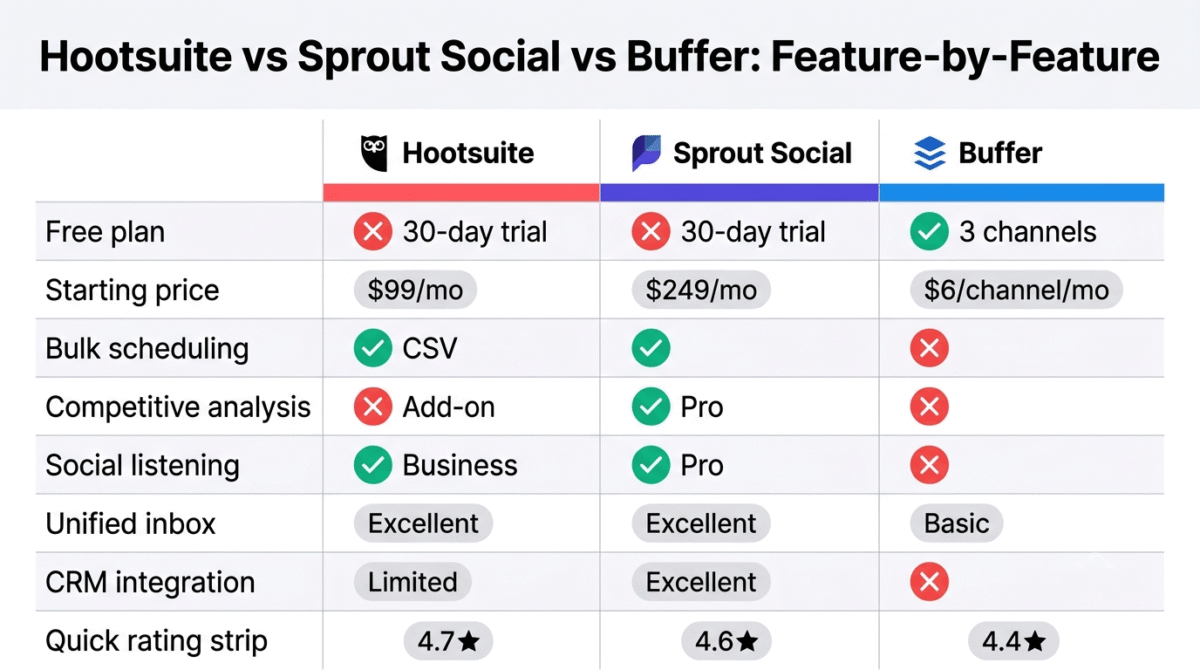
| Hootsuite Professional | Sprout Social Standard | Buffer Essentials (3 channels) | Pallyy Pro | |
|---|---|---|---|---|
| Price/month | $99 | $249 | $18 | $25 |
| Free plan | No | No | Yes (3 channels) | Yes (1 set, 15 posts) |
| Users | 1 | 5 | Unlimited | 1 |
| Social accounts | 10 | Unlimited | 3 | 11 |
| Scheduling | Excellent | Excellent | Excellent | Excellent |
| Bulk scheduling | Yes (CSV) | Yes | No | Yes |
| Analytics depth | Good | Excellent | Good | Good |
| Competitive analysis | Add-on | Yes (Professional) | No | Yes (Instagram) |
| Social listening | Yes (Business) | Yes (Professional) | No | No |
| Unified inbox | Excellent | Excellent | Basic | Yes |
| Best Time to Post | Yes | Yes (AI) | Yes | Yes (Instagram) |
| AI caption generation | Basic | Yes | Yes | Yes |
| CRM integration | Limited | Yes (Salesforce, HubSpot) | No | No |
| Client reporting | Yes (PDF/PPT) | Yes | Basic | Yes |
| Approval workflows | Yes | Yes | Team plan | Yes |
| Platform coverage | Most comprehensive | Comprehensive | Major platforms | Major platforms |
| Mobile app | Yes | Yes | Yes | No |
| Best for | Teams/agencies | Data-driven marketers | Bloggers/SMBs | Agencies/freelancers/brands |
| Affiliate commission | 15% recurring | 20% recurring | 20% recurring | 20% recurring |
Which Social Media Analytics Tool Should You Choose?
Choose Buffer if:
You are a blogger or small business owner who wants affordable, simple social media scheduling with actionable analytics. Buffer’s free plan covers the basics; the Essentials plan at $6/channel/month adds unlimited scheduling, full analytics, and AI caption generation at a price that any blogger can justify. Buffer is the starting point for 90% of individual content creators, the right tool until your social media complexity genuinely demands more.
Choose Hootsuite if:
You manage social media for multiple clients as an agency, need bulk scheduling for high-volume content calendars, or require team collaboration features including content approval workflows. Hootsuite’s $99/month Professional plan is expensive for individuals but reasonable for agencies billing social media management to clients at $500–$2,000/month per account.
Choose Sprout Social if:
Social media is a primary revenue channel for your business, you need competitive intelligence to inform your content strategy, or you want the deepest analytics available to measure social media ROI. Sprout Social’s $249/month Standard plan is difficult to justify for businesses without an established social media presence, but for businesses generating significant revenue from social, the analytics intelligence pays back in better-performing content and more efficient social media investment.
Choose Pallyy if:
You manage multiple brands or clients and want scheduling, analytics, engagement, approvals, and reporting in one affordable platform. Pallyy’s Pro plan costs $25/month ($20/month billed annually) and includes unlimited posts, up to 11 social accounts, a unified inbox, AI captions, approvals, analytics, and link-in-bio pages. It’s especially useful for agencies, freelancers, and small businesses.
The Blogger Social Media Strategy
For bloggers building RateTheTool.com or a similar software review blog, here is the recommended social media approach:
Platforms to prioritise (in order of blog traffic ROI):
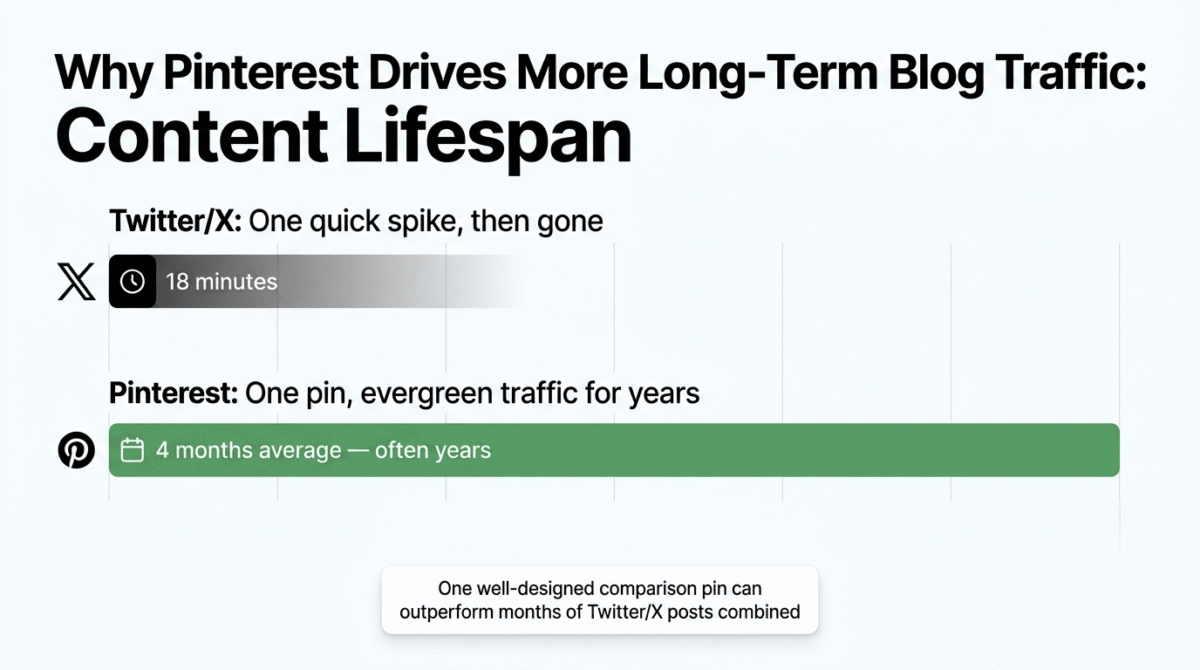
- Pinterest, software comparison infographics and tool recommendation pins drive long-term evergreen traffic. Pinterest content has a 4-month average lifespan versus Twitter/X’s 18-minute lifespan. One well-designed comparison pin can drive consistent blog traffic for years.
- LinkedIn, your WordPress developer background gives authentic authority for software and productivity content. LinkedIn’s algorithm favours personal experience posts over promotional content, sharing what you learned testing each tool resonates with the professional audience.
- Twitter/X, quick software takes, pricing alerts, and tool comparisons perform well with tech-savvy audiences. UTM-tracked links measure which Twitter/X content drives actual blog visits versus vanity metrics.
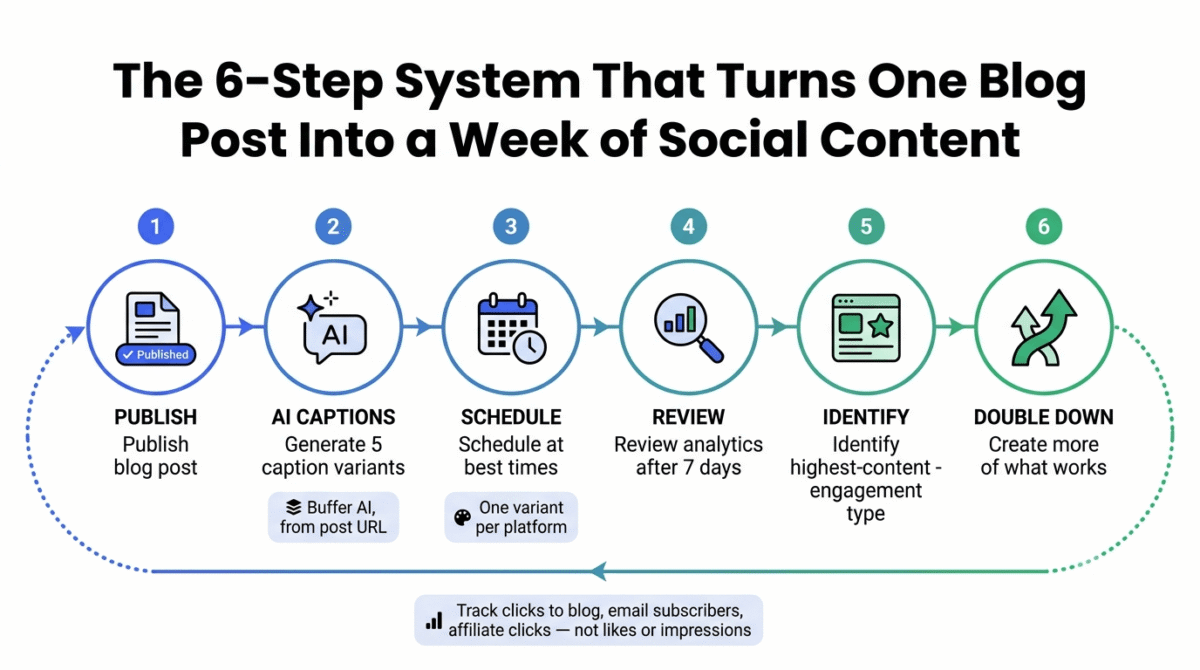
Content repurposing system using Buffer:
- Publish blog post → 2. Generate 5 caption variants using Buffer AI from post URL → 3. Schedule one variant per platform at Buffer’s recommended times → 4. Review analytics after 7 days → 5. Identify highest-engagement content type → 6. Create more of what works
Metrics that matter for bloggers (not vanity metrics):
- Click-through rate to blog (not follower count)
- Which posts drive email subscribers (not likes)
- Which platforms send the most affiliate link clickers (not impressions). For the full picture of how these traffic and affiliate metrics translate into actual income, see our guide on how to make money blogging.
Final Verdict
Buffer is the best social media analytics tool for bloggers and small businesses, the generous free plan, intuitive interface, AI caption generation, and per-channel pricing make it the most accessible and cost-appropriate tool for individual content creators and small businesses. Start with the free plan and upgrade one channel at a time as your social media strategy matures.
Sprout Social is the best analytics platform for data-driven marketers, the competitive analysis, social listening, and CRM integration justify the $249/month investment for businesses where social media is a measurable revenue channel. Not appropriate for bloggers without an established social media presence generating business results.
Hootsuite is the best tool for social media agencies, the team collaboration, client reporting, and bulk scheduling capabilities justify the pricing for agencies billing social media management to multiple clients. Individual bloggers should avoid Hootsuite’s pricing at the Professional plan level.
Ratings:
- Pollyy: 4.7
- Buffer: 4.7 / 5
- Sprout Social: 4.6 / 5
- Hootsuite: 4.4 / 5
Frequently Asked Questions
What is the best free social media analytics tool in 2026?
Buffer’s free plan is the best free social media management tool, 3 channels, 10 scheduled posts per channel, and basic analytics at zero cost. The native analytics within each social platform (LinkedIn Analytics, Twitter/X Analytics, Instagram Insights, Pinterest Analytics) are also completely free and provide platform-specific performance data that third-party tools aggregate. For bloggers starting social media, using native platform analytics alongside Buffer free covers all essential analytics needs without any cost.
Is Hootsuite worth the money?
For agencies managing multiple client social media accounts, yes, the team collaboration, bulk scheduling, and client reporting justify the $99–$249/month cost when billing clients $500–$2,000/month per account. For individual bloggers and small businesses, no, Buffer provides comparable scheduling with adequate analytics at $6/channel/month, making Hootsuite’s $99/month difficult to justify.
What is the difference between Hootsuite and Buffer?
Hootsuite is a comprehensive social media management platform designed for teams and agencies, more features, more complexity, more expensive. Buffer is a streamlined scheduling and analytics tool designed for individuals and small businesses, simpler, cheaper, and focused on the features most relevant to content creators. Hootsuite includes team collaboration, approval workflows, and enterprise analytics; Buffer includes AI caption generation, per-channel pricing, and a link-in-bio page. Choose Hootsuite for agency use; choose Buffer for individual and small business use.
How do social media analytics tools improve social media performance?
Social media analytics tools improve performance by replacing guesswork with data, showing which content types generate the most engagement, which posting times reach the most followers, which platforms drive the most website traffic, and which campaigns generate measurable business results. The most impactful analytics insight for most bloggers is the Best Time to Post analysis, scheduling content for when your specific audience is most active consistently increases reach by 20–40% without requiring additional content.
Do I need a paid social media analytics tool or are free platform analytics sufficient?
For bloggers and small businesses in the early stages, native platform analytics (free from each social network) combined with Google Analytics for traffic attribution are sufficient. To combine with website analytics and see exactly what your social traffic does after the click, see our Google Analytics vs Hotjar vs Matomo comparison. The primary value of paid social media management tools is scheduling (automating consistent posting without daily manual effort) rather than analytics alone. Pay for scheduling convenience first; analytics depth becomes valuable once you have enough social media data to analyse meaningfully.
What social media platforms should bloggers focus on in 2026?
Pinterest and LinkedIn provide the highest traffic-to-time-invested ratio for bloggers in most niches. Pinterest’s visual search drives evergreen traffic for years from one pin; LinkedIn’s algorithm rewards expertise-demonstrating content that software review bloggers are naturally positioned to create. Twitter/X is valuable for real-time tech community engagement but drives less sustained traffic than Pinterest. Instagram requires the most time investment for the least blog traffic return unless your content is highly visual. Focus on 2 platforms consistently rather than 5 platforms inconsistently.