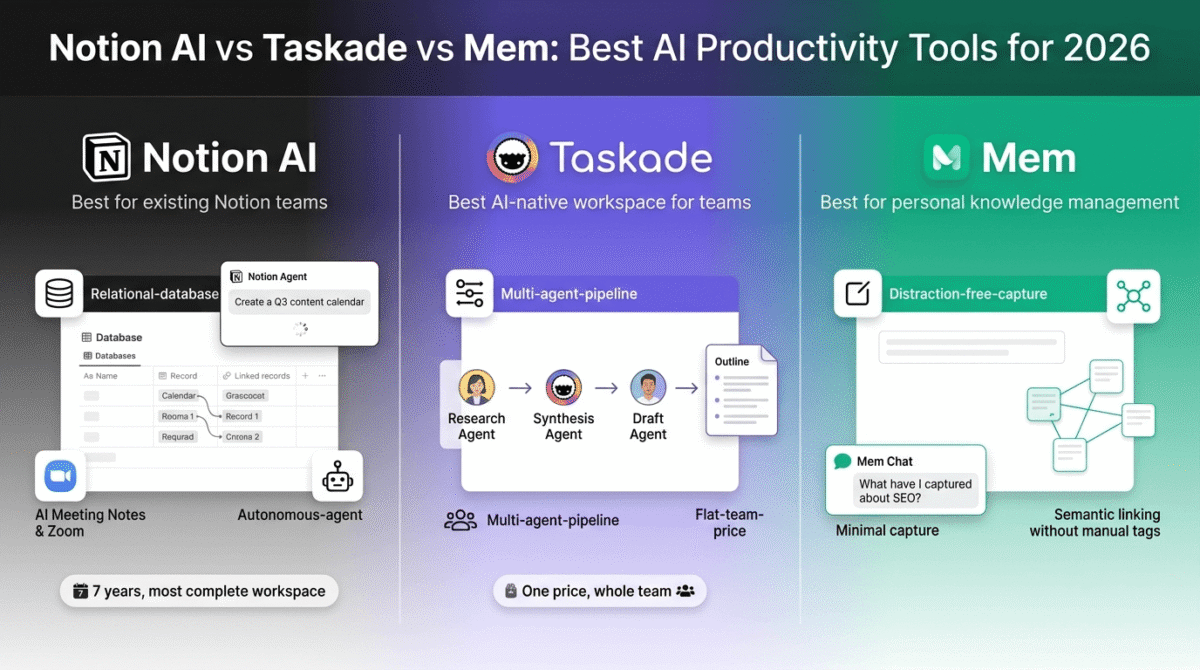
Every productivity tool promises to fix the same problem: you have too much information, too many tasks, and not enough time to manage both. Notion solved this better than anyone else for most of the 2020s by putting documents, databases, wikis, and project boards into a single flexible workspace.
Then AI arrived and exposed a structural problem. Notion was built in 2016 as a document and database platform. When large language models became practical, Notion bolted AI on top of an architecture that was never designed for it. The result is a capable but awkward AI layer sitting on top of a workspace that predates it.
In 2026, a new category has emerged: AI-native productivity tools, platforms built from day one with AI as the foundational layer rather than an afterthought. Taskade and Mem are the two most widely discussed examples. Taskade treats AI agents as the primary unit of work. Mem treats AI-powered knowledge organization as the replacement for manual filing entirely.
I tested Notion AI vs Taskade vs Mem across 30 days of real work, content planning, client research, team project management, and personal knowledge capture. Here is the honest comparison.
Table of Contents
How We Evaluated These Tools
Every platform was tested across five criteria:
- AI quality and usefulness, does the AI genuinely save time and improve output, or does it produce generic results that require heavy editing to use?
- Core workspace capability, how good is the underlying notes, tasks, and knowledge management experience independent of the AI layer?
- Pricing transparency, are the real monthly costs clear before you sign up, or do usage limits and tier restrictions obscure what you actually get?
- Ease of adoption, how long does it take to move a real workflow into the tool, and how steep is the learning curve for non-technical users?
- Value for the core audience, does the tool solve problems that bloggers, freelancers, and content creators actually face at a price they can justify?
Why AI Productivity Tools Matter for Bloggers and Content Creators
AI productivity tools are not just for enterprise teams and software developers. For content creators building a publishing business, they address specific and expensive problems.
Research capture and recall. A blogger researching a competitive niche reads dozens of articles, saves screenshots, and clips excerpts, then struggles to find any of it two weeks later when writing the post. An AI-powered knowledge tool that automatically connects related research notes and surfaces them contextually when you start writing eliminates this retrieval problem.
Content planning and idea development. AI agents that can take a content calendar brief and automatically generate post outlines, keyword clusters, and social media variations compress hours of planning work into minutes. For bloggers publishing daily, this multiplier is significant.
Client and project management. Freelancers managing multiple concurrent clients need to track deliverables, communication history, and project status without switching between five different tools. An AI-native workspace that connects tasks, notes, and client context in one place reduces the administrative overhead that eats into billable time.
Second brain for evergreen content. The most productive content creators maintain a personal knowledge base, a searchable archive of ideas, quotes, data points, and insights accumulated over years of reading and research. An AI tool that organises this automatically and surfaces relevant connections when drafting new content is a compounding competitive advantage. If you want a simpler setup, check out our comparison of the best note-taking apps.
Notion AI Review: Best AI Productivity Tool for Existing Notion Users
Free plan: Yes, unlimited pages and blocks, limited AI trial (20 total AI responses)
Starting paid price: $12/user/month (Plus, annual billing), AI only on Business at $20/user/month
Best plan for most users: Business, $20/user/month (annual billing)
Platforms: Web, macOS, Windows, iOS, Android
Affiliate program: Yes, Notion affiliate program
Notion is used by millions of individuals and teams as their primary workspace for notes, wikis, databases, and project management. The platform has evolved significantly in 2026, adding Notion Agent, AI Meeting Notes, AI Search across workspaces, and Custom Agents, but the most important pricing change is the one that catches the most users off guard. If you only need task tracking, see our guide to the best project management software.
What Notion AI does best
Notion’s workspace is the most feature-complete of the three tools tested. Documents, databases, project boards, wikis, linked views, and formulas all coexist in a single flexible environment that no competitor fully matches in depth. For teams with complex, interconnected workflows, publishing calendars linked to task databases linked to content briefs, Notion’s relational database architecture is genuinely more capable than Taskade’s project management tools or Mem’s note-focused interface.
The AI Meeting Notes feature, launched in 2026, joins Zoom, Google Meet, and Microsoft Teams calls without a visible bot, transcribes and summarises them, and deposits the output directly into your Notion workspace as a structured note. For bloggers and freelancers doing regular client calls or podcast interviews, this eliminates a separate meeting transcription subscription and keeps all meeting context in the same place as your projects.
Notion Agent is the platform’s most ambitious 2026 feature: an autonomous AI that can take a high-level instruction (“create a content calendar for Q3 based on our audience research database”), navigate your workspace, pull data from multiple databases, and produce structured output. In testing, Notion Agent handled multi-step workspace tasks significantly more reliably than Taskade’s agents for workflows that required reading and writing across multiple Notion databases.
Custom Agents, launched February 2026, extend automation further, running on schedules or triggers (a database property change, a new form submission) to execute recurring tasks automatically. For a content team that regularly processes incoming client briefs, routes them to the right project, and notifies team members, Custom Agents eliminate the manual workflow management that would otherwise require a dedicated tool.
Notion AI Search works across your entire workspace, pages, databases, comments, and even linked Google Drive files if you use the integration. Asking “what did the client say about the Q3 budget in our meeting notes?” returns a direct answer with a source link, rather than a list of search results to manually scan.
Where Notion AI falls short
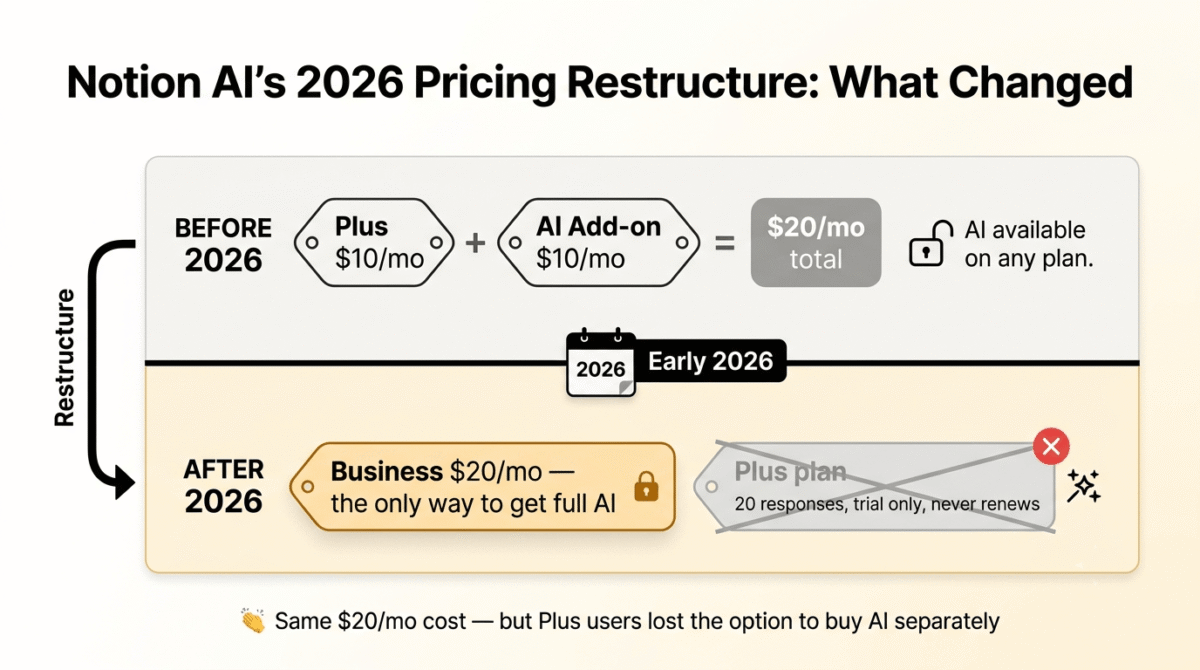
The 2026 AI pricing restructure is the most significant change in Notion’s history and it catches a large number of existing users off guard. The standalone Notion AI add-on, previously purchasable on any plan including Free and Plus for $10/user/month, was retired in early 2026 for new subscribers. Full Notion AI is now bundled exclusively into the Business plan at $20/user/month.
A solo creator who was paying $10/month for Plus plus $10/month for the AI add-on was on $20/seat. That same setup now requires Business at $20/seat, with more AI features included, but no way to access AI on Plus for new accounts. Free and Plus users receive only 20 total AI responses as a trial, not 20 per month. Once exhausted, AI stops working entirely until upgrading.
For individual users, the math is uncomfortable: $20/month for Business is the minimum to get meaningful Notion AI in 2026. That is double the Plus plan price and significantly more than both Taskade and Mem for comparable or less AI functionality.
Custom Agents now bill on credits, $10 per 1,000 Notion credits with no rollover, purchased separately on top of the Business plan subscription. Teams running frequent automated workflows will hit credit limits and pay overages that are not reflected in the per-seat price.
The AI quality, while solid, is generic in the areas that matter most for content creators. Notion AI writes competent first drafts and summaries, but the output frequently requires substantial editing before it matches the quality a skilled writer would produce independently. The AI is most useful as a drafting accelerator, not a finished-content generator.
Notion AI pricing
| Plan | Annual Price | Monthly Price | AI Access |
|---|---|---|---|
| Free | $0 | $0 | 20 total AI responses (trial only, never renews) |
| Plus | $10/user/month | $12/user/month | No AI for new subscribers (add-on retired) |
| Business | $15/user/month | $20/user/month | Full Notion AI — Notion Agent, AI Search, AI Meeting Notes, AI Autofill |
| Enterprise | Custom | Custom | Everything in Business + SCIM, audit logs, zero retention |
| Custom Agents | +$10/1,000 credits | — | Billed separately, no rollover, Business/Enterprise only |
Annual billing saves approximately 20% compared to monthly. The Business plan is the only tier with full AI access for new subscribers. Free and Plus plans receive a 20-response AI trial that does not renew.
Pricing trap warning: Notion AI’s restructuring means Plus users cannot purchase AI access under new account terms, Business at $20/user/month is the required minimum. For solo users who previously paid $18–20/seat for Plus plus the AI add-on, the effective price change is minimal in cost but eliminates plan flexibility. Custom Agent credits add unpredictable usage costs above the per-seat subscription for teams running frequent automations.
Notion AI: Pros and Cons
Pros:
- Most complete workspace, documents, databases, wikis, project boards in one platform
- Notion Agent handles complex multi-step workspace tasks reliably
- AI Meeting Notes joins calls without a bot, deposits summaries directly into workspace
- AI Search across entire workspace including linked Google Drive files
- Custom Agents automate recurring workflows on schedules or triggers
- Most mature platform, seven years of development, largest template library
- Strongest relational database architecture for interconnected content workflows
- Free plan unlimited pages and blocks, no storage restrictions
Cons:
- Full AI requires Business plan at $20/user/month, no AI add-on for new Plus/Free users
- 20 total AI responses on Free/Plus trial, not per month, never renews
- Custom Agent credits add unpredictable costs above per-seat pricing
- AI layer feels architecturally separate from the workspace, not natively integrated
- Most expensive of the three tools for individual creators
- Steeper learning curve than Taskade or Mem for new users building first workspace
- Overkill for solo creators who only need notes and a light project board
Rating: 4.4 / 5, Best AI productivity tool for teams and individuals already using Notion as their primary workspace, and for anyone who needs relational databases, wiki-style documentation, and autonomous AI agents in one platform. The 2026 pricing means Business at $20/month is the real entry point for AI features.
Taskade Review: Best AI-Native Workspace for Teams and Freelancers
Free plan: Yes, unlimited projects, 150 AI tasks/month, basic collaboration, 3 members
Starting paid price: $6/month (Starter, annual billing, 1 user)
Best plan for most users: Pro, priced per team (flat rate, not per seat)
Platforms: Web, macOS, Windows, iOS, Android, browser extension
Affiliate program: Yes, Taskade affiliate program
Taskade was built from 2017 with AI as a core design principle, not an add-on. In 2026, that architectural decision produces a meaningfully different product from Notion: AI agents are first-class citizens that can be trained on your workspace data, assigned specific roles, and orchestrated as teams to handle multi-step research and workflow tasks autonomously.
What Taskade does best
Taskade’s AI agents are the most capable autonomous workflow tool tested in this comparison. Unlike Notion Agent, which works primarily within the Notion workspace, Taskade agents can search the web, read uploaded documents, access connected APIs, and pass outputs to other agents in a coordinated pipeline. A content research workflow, where one agent searches for recent data on a topic, a second agent synthesises the findings into structured notes, and a third agent drafts an outline, runs automatically from a single prompt.
The flat team pricing model is Taskade’s most distinctive commercial characteristic. While Notion charges $20/user/month and Mem charges per individual account, Taskade Pro covers an entire team at a single flat monthly price. For a 10-person team, Taskade costs a fraction of what Notion Business would charge for the same headcount, a difference that compounds significantly as teams grow.
Taskade Genesis, the platform’s AI app builder, creates custom productivity applications from a natural language description. “Build me a content pipeline tracker with stages for ideation, drafting, editing, and publishing, with a field for target keyword and publish date” generates a functional, database-backed application in under a minute. For freelancers and small teams who want custom tools without a developer, this is genuinely transformative.
The built-in AI models are comprehensive: GPT-4o, Claude, and Gemini are all accessible on paid plans without separate API subscriptions. If you want to understand the underlying AI chatbot differences between these models before relying on Taskade’s Auto mode, see our ChatGPT vs Claude vs Gemini comparison. For creators who already pay for ChatGPT Plus and Claude Pro separately, consolidating AI access inside Taskade reduces total monthly spending while adding the project and workflow context that standalone chatbots lack.
The 5,000+ AI templates cover content creation, project management, marketing, research, and business operations, most are production-ready without customisation. For bloggers setting up a new content workflow, deploying a template and adapting it to their specific process takes under an hour.
Multiple project views, outline, board, calendar, mind map, table, and gantt, make Taskade more flexible than Mem for structured project tracking. A content calendar view and a kanban board for the same project are both available without configuration, switching between them with a single click.
Where Taskade falls short
Taskade’s AI credits system applies a similar caveat to the one found in ManyChat and Runway: every AI action, agent run, app generation, and automation step draws from a monthly credit pool. The free plan includes 1,000 credits per month, heavy AI users can exhaust this within the first day of serious use. Even the Pro plan has credit limits, and top-up credit packs are available for purchase above the plan allowance.
The note-taking and knowledge capture experience is lighter than both Notion and Mem. Taskade is structured around projects, tasks, and outlines rather than free-form note capture. For knowledge workers whose primary use case is capturing and connecting unstructured ideas and research, the “second brain” use case, Taskade’s rigid task and project model creates friction that Mem’s folderless approach eliminates.
The database capabilities are less sophisticated than Notion. Filtered views, linked databases, and complex formula properties, features that power Notion’s most flexible workflows, are either absent or significantly simplified in Taskade. Teams that have built complex Notion workspaces with relational databases will find Taskade a step backward in structured data management.
Customer support on lower-tier plans has received mixed reviews. The free and Starter plans rely primarily on documentation and community resources rather than direct support channels, which creates friction for non-technical users troubleshooting setup issues.
Taskade pricing
| Plan | Annual Price | Users | AI Credits/Month | Key features |
|---|---|---|---|---|
| Free | $0 | Up to 3 | 1,000 | Unlimited projects, basic AI, 150 AI tasks, web and mobile |
| Starter | $6/month | 1 | 10,000 | All models, unlimited AI apps, calendar integration |
| Plus | $16/month | Up to 5 | 50,000 | All models, advanced guests, larger uploads |
| Pro | Flat team price | Up to 20 | 200,000 | Unlimited AI agents, Genesis app builder, all frontier models, API access |
| Business | Custom | Custom | Custom | White-labeling, custom domain, enterprise controls |
Annual billing saves approximately 20%. The flat team pricing on Pro is Taskade’s most distinctive commercial feature, the per-team price (rather than per-seat) makes it dramatically cheaper than competitors for teams of 5+ people. Verify current Pro flat pricing on taskade.com as it updates with platform versions.
Pricing note: Taskade’s credit system means AI-heavy users on the free and Starter plans can exhaust monthly credits faster than expected. The free plan’s 1,000 credits are described by users as enough for light evaluation, not for sustained daily AI agent use. Pro plan credits (200,000/month) are sufficient for most team workflows, with pay-as-you-go top-ups available if needed.
Taskade: Pros and Cons
Pros:
- Most capable AI agents, can search the web, read documents, orchestrate multi-agent pipelines
- Flat team pricing model, dramatically cheaper than Notion for teams of 5+ people
- Access to GPT-4o, Claude, and Gemini on paid plans, no separate AI subscriptions needed
- Genesis AI app builder creates custom productivity applications from a text prompt
- 5,000+ AI workflow templates, production-ready without customisation
- Multiple project views, outline, board, calendar, mind map, table, gantt
- Free plan genuinely functional for light individual use (150 AI tasks/month)
- Built-in real-time collaboration, chat, and video calls
Cons:
- AI credits limit heavy use on free and lower-tier plans, credit exhaustion a common complaint
- Lighter note-taking experience, less suited for free-form knowledge capture than Mem
- Database capabilities less sophisticated than Notion, no relational linked databases
- Learning curve for agent configuration, autonomous agents require setup time to be useful
- Mixed customer support on lower tiers
- Pricing structure is complex, credits, flat team rates, and per-seat options coexist
- Gantt and advanced project views require higher-tier plans
Rating: 4.5 / 5, Best AI-native workspace for freelancers and small teams who need autonomous AI agents, multi-model AI access, and flat team pricing. The most cost-effective option for teams of 5 or more. Less suitable for individual knowledge workers whose primary workflow is free-form note capture.
Mem Review: Best AI Tool for Personal Knowledge Management
Free plan: Yes, basic note capture, limited AI features, restricted storage
Starting paid price: $15/month (paid plan, annual billing)
Best plan for most users: Premium, $20/month (individual)
Platforms: Web, iOS (Android in development), macOS app
Affiliate program: Yes, Mem affiliate program
Mem was founded on a single radical conviction: manual organisation of notes is a failure mode, not a best practice. Every folder hierarchy, tagging system, and notebook structure eventually collapses under the weight of real-world information volume. Mem’s answer is to eliminate folders entirely and let AI handle organisation automatically, surfacing the right notes at the right moment based on semantic meaning rather than manual filing.
What Mem does best
Automatic semantic linking is Mem’s defining feature and the capability that most differentiates it from both Notion and Taskade. As you add notes to Mem, research snippets, meeting summaries, article clips, ideas, the AI continuously analyses the semantic content of your library and surfaces connections you did not manually create. Writing a note about podcast monetisation strategies? Mem automatically shows related notes about email list building, affiliate marketing, and content repurposing from across your library, not because you tagged them that way, but because the AI understood they are conceptually related.
This automatic linking solves a problem that defeats most personal knowledge management systems: the maintenance burden. Obsidian, Roam Research, and Notion all require you to manually create links between notes for connections to become visible. Mem does this automatically, which means the knowledge base compounds in usefulness over time without any organisational work on your part.
Mem Chat is the conversational interface for your knowledge base. Instead of searching for notes, you ask questions: “What have I captured about keyword research?” or “Summarise everything I know about Semrush.” Mem searches semantically across your entire library, not just titles and tags, and returns a synthesised answer with citations from the source notes. For researchers, consultants, and content creators who accumulate large bodies of knowledge, this retrieval mode is significantly faster than manual search.
The distraction-free capture interface is intentionally minimal. There are no toolbars, no sidebar of notebooks to navigate, no decisions about where to file anything. You open Mem, write your thought, and close it. The AI handles everything else. For writers who find that complex tool interfaces interrupt creative flow, this minimalism is a genuine advantage over Notion’s feature-rich environment.
Mem 2.0, released in early 2026, significantly improved speed, stability, and the quality of AI-generated connections. The updated semantic engine produces more accurate note groupings and fewer irrelevant suggestions than the 2024 version, addressing the most common criticism in earlier reviews.
Where Mem falls short
Mem is a personal knowledge management tool, not a team collaboration platform. There are basic sharing and team features, but they are significantly less developed than Notion’s collaborative workspace or Taskade’s real-time team tools. For a freelancer managing a solo knowledge base, this is not a limitation. For a team that needs shared project management, task assignment, and collaborative documentation, Mem is the wrong tool.
The integration ecosystem is limited compared to both Notion and Taskade. Mem does not natively connect to Slack, Google Drive, Notion, or the range of business tools that most professionals use daily. Notes must be captured directly in Mem or via the browser extension and iOS app, there is no automated pipeline that pulls research from other tools into your Mem library without manual copy-paste.
The free tier is genuinely restrictive. Active daily users of Mem consistently report hitting free plan limits within two weeks of real use, at which point the choice is to upgrade to the Premium plan at $20/month or stop using the tool meaningfully. The free plan functions as an evaluation tier rather than a sustainable long-term option for any serious knowledge capture workflow.
The platform is web and iOS-first. Android users are officially on a waiting list as of June 2026. Windows and Linux users access Mem exclusively through the browser, there is no native desktop application for non-Mac users, which is a practical limitation for developers and business users on Windows.
Project and task management are not strengths. Mem handles notes and knowledge capture with excellence and task management with basic adequacy. For content creators who need a unified tool that covers both knowledge management and project tracking, Mem requires a supplementary tool, negating some of the consolidation benefit.
Mem pricing
| Plan | Monthly Price | Annual Price | Key features |
|---|---|---|---|
| Free | $0 | $0 | Basic note capture, limited AI suggestions, restricted storage |
| Premium | $20/month | ~$15/month (annual) | Unlimited notes, full Mem Chat, semantic linking, Collections, Daily Notes, 100GB storage |
| Teams | Custom | Custom | Shared knowledge bases, team Collections, admin controls, SSO |
Annual billing reduces the Premium plan to approximately $15/month. Free tier limits are not published precisely, active users consistently report hitting them within 2 weeks of daily use. No monthly breakdown of exactly what the free tier includes is available from Mem’s official pricing page.
Pricing note: Mem’s Premium at $15–20/month is the most straightforwardly priced tool in this comparison, one plan, one price, all features. The challenge is that the free tier’s undisclosed limits make it difficult to evaluate the tool properly before committing to the subscription. The recommendation from Mem’s own community is to use the free tier seriously for two weeks and upgrade if you hit limits, the 20-day window gives enough time to validate whether the tool fits your workflow.
Mem: Pros and Cons
Pros:
- Best automatic semantic note linking, AI surfaces connections without manual tagging or folders
- Zero folder hierarchy, eliminates the maintenance burden that defeats most knowledge systems
- Mem Chat answers natural language questions across your entire note library
- Distraction-free capture interface, no decisions about where to file anything
- Mem 2.0 (2026) significantly improved semantic accuracy and platform speed
- Best tool for the “second brain” use case, individual knowledge workers and researchers
- Cleanest, least intimidating interface of the three tools
Cons:
- Limited team collaboration features, built for individual use, not team workflows
- Small integration ecosystem, no native Slack, Google Drive, or Notion connections
- Free tier limits hit quickly with daily use, effectively evaluation-only
- No Android app as of June 2026, iOS and web only for mobile users
- Weak project and task management, requires a supplementary tool for project tracking
- Entirely cloud-dependent, no offline mode or local storage option
- Premium at $20/month is fair but harder to justify for light or occasional note-takers
Rating: 4.3 / 5, Best AI productivity tool for individual knowledge workers, researchers, and content creators whose primary need is capturing and connecting research without manual organisation. Not suitable as a primary team collaboration or project management tool.
Head-to-Head Comparison
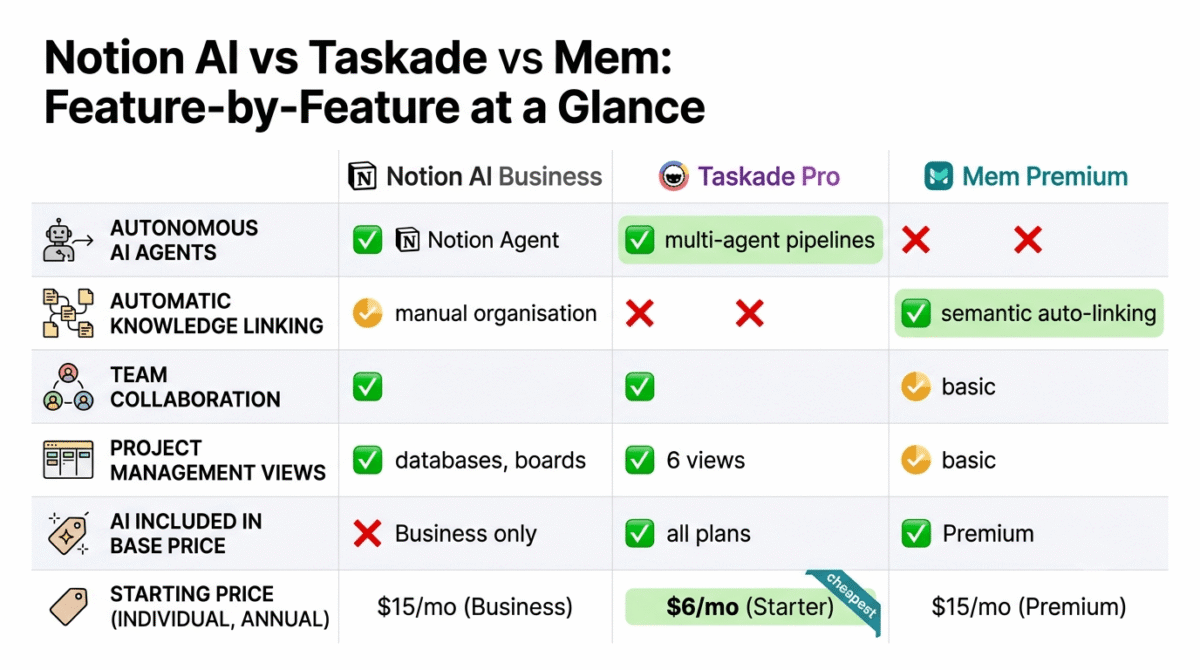
| Feature | Notion AI (Business) | Taskade (Pro) | Mem (Premium) |
|---|---|---|---|
| Price (individual, annual) | $15/user/month | Flat team rate | ~$15/month |
| Free plan | 20 total AI responses (trial) | Yes — 150 AI tasks/month | Yes — limited, 2-week realistic ceiling |
| AI quality | Good — generic drafting | Excellent — autonomous agents | Excellent — semantic knowledge linking |
| AI agents | Yes (Notion Agent, Custom Agents) | Yes — multi-agent pipelines, web search | No |
| Knowledge management | Good (manual organisation) | Basic | Excellent (automatic AI organisation) |
| Team collaboration | Excellent | Excellent | Basic |
| Project management | Excellent (databases, boards) | Good (multiple views) | Basic (tasks in notes) |
| Note-taking | Good | Good | Excellent |
| Offline access | Yes (desktop apps) | Yes (desktop apps) | No |
| Mobile apps | iOS and Android | iOS and Android | iOS only (Android pending) |
| Integrations | 100+ | 18 native + Zapier | Very limited |
| Learning curve | Steep | Moderate | Low |
| AI included in base price | No (Business only) | Yes (all plans) | Yes (Premium) |
| Best for | Teams with complex workflows | Teams needing AI agents + flat pricing | Solo knowledge workers and researchers |
Which AI Productivity Tool Should You Choose?
Choose Notion AI (Business) if:
You or your team already use Notion as a primary workspace and rely on its relational databases, linked views, and wiki structure. The 2026 AI additions, Notion Agent, AI Meeting Notes, Custom Agents, are genuinely powerful and the Business plan at $15/user/month (annual) is reasonable for teams that extract full value from the platform. For new users evaluating AI productivity tools from scratch without an existing Notion investment, the $20/month minimum and learning curve are harder to justify against the alternatives.
Choose Taskade if:
You want autonomous AI agents that can research, draft, and execute multi-step tasks without manual intervention, and you work in a team where flat-rate pricing makes the cost significantly lower than per-seat alternatives. Taskade Pro’s multi-agent orchestration, Genesis app builder, and access to GPT-4o, Claude, and Gemini within one subscription are the most capable AI productivity stack available at the price point. For solo freelancers, the Starter plan at $6/month (annual) is the most affordable AI-inclusive workspace in this comparison.
Choose Mem if:
Your primary productivity bottleneck is knowledge retrieval, you capture more information than you can manually organise, and finding the right note at the right moment consistently costs more time than capturing it did. Mem’s automatic semantic linking and Mem Chat conversational search solve this problem more elegantly than any competing tool. For bloggers building a research-heavy content business, the compounding knowledge base Mem creates over months of use is a genuine competitive advantage. Start with the free tier for two weeks; upgrade to Premium at ~$15/month (annual) if you hit limits, you likely will.
Setting Up Your AI Productivity Stack, The Practical Guide
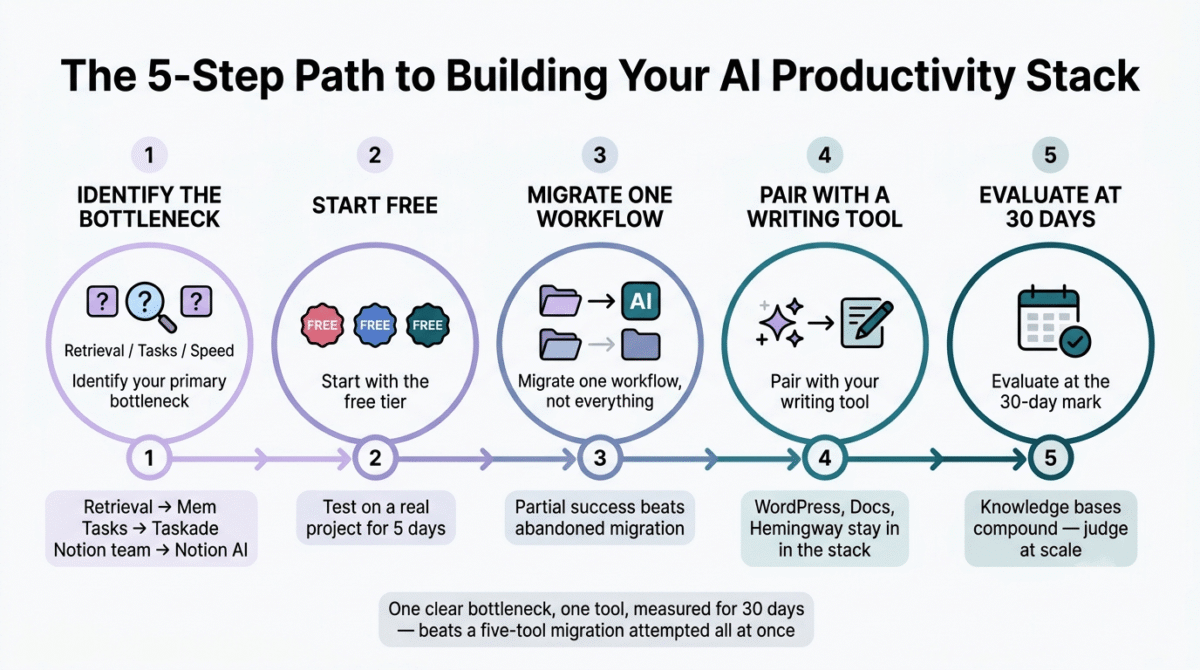
For bloggers and content creators building their first AI-assisted workflow:
Step 1, Identify your primary bottleneck. Is it knowledge retrieval (finding old research)? Task management (tracking what needs doing)? Content production speed (writing faster)? Your answer determines your tool. If task management turns out to be your only real bottleneck, a full AI workspace may be overkill, see our Todoist vs TickTick vs Microsoft To Do comparison for a lighter task management app instead. Retrieval → Mem. Task management + AI → Taskade. Existing Notion team → Notion AI.
Step 2, Start with the free tier. All three tools offer free access. Use each one for five days on a real current project before evaluating. Marketing page demos do not reveal how a tool behaves under the pressure of actual work.
Step 3, Migrate one workflow, not everything. The most common mistake is attempting a complete system migration. Move one specific workflow, content research capture, or client project tracking, or idea logging, to your chosen tool and measure whether it saves time. A partial implementation that works beats a complete migration that gets abandoned.
Step 4, Pair with a writing tool. None of these tools is a standalone writing environment. Notion AI writes inside Notion. Taskade generates outlines and drafts. Mem captures and surfaces. Your preferred writing environment, WordPress, Google Docs, Hemingway, Ulysses, stays in your stack. The productivity tool feeds the writing environment, not replaces it.
Step 5, Evaluate at the 30-day mark. AI productivity tools compound in value over time, a knowledge base that is two weeks old delivers less than one that is six months old. Commit to 30 days of real use before deciding whether to continue, upgrade, or try an alternative.
Final Verdict
Taskade is the best AI productivity tool for most bloggers and freelancers in 2026, autonomous AI agents, flat team pricing, access to all major frontier models on one subscription, and a free plan that covers real individual use make it the highest-value option across the widest range of creator use cases.
Notion AI is the best platform for teams already invested in the Notion ecosystem, the 2026 AI additions are genuinely capable, and for teams that need relational databases, collaborative wikis, and autonomous workspace agents, Business at $15/user/month (annual) is reasonable. For new users without an existing Notion investment, the learning curve and pricing are harder to justify.
Mem is the best tool for individual knowledge workers and research-heavy content creators, the automatic semantic linking and Mem Chat conversational knowledge retrieval solve the specific problem of information overwhelm more elegantly than any competing product. It is the narrowest tool of the three, which is also why it is the best at what it does.
Ratings:
- Taskade: 4.5 / 5
- Notion AI: 4.4 / 5
- Mem: 4.3 / 5
Frequently Asked Questions
What is the best free AI productivity tool in 2026?
Taskade offers the most functional free plan, unlimited projects, 150 AI tasks per month, basic multi-agent access, and support for up to 3 team members at zero cost and no credit card required. Notion’s free plan is generous for workspace storage (unlimited pages and blocks) but provides only 20 total AI responses, a trial, not an ongoing free AI tier. Mem’s free plan hits practical limits within two weeks of daily use.
Is Notion AI worth it in 2026?
Yes, for teams already embedded in Notion’s ecosystem who will use the Business plan’s full feature set, Notion Agent, AI Meeting Notes, Custom Agents, and AI Search. For solo bloggers or small teams who only need AI writing assistance and basic note organisation, the $20/user/month minimum is difficult to justify when Taskade’s Starter plan at $6/month or Mem’s Premium at $15/month deliver comparable AI value for specific use cases.
What is the difference between Notion AI and Taskade?
Notion AI is a workspace platform with AI layered on top, the underlying strength is the relational database and wiki architecture that predates the AI features. Taskade is AI-native, built from the ground up around AI agents as the primary working unit. Notion is better for teams with complex interconnected databases and established documentation workflows. Taskade is better for teams that want autonomous agents to handle research, content generation, and workflow automation with less manual setup.u003cbru003e
Is Mem AI worth the $20 per month?
For individual knowledge workers and research-heavy content creators, yes. Mem’s automatic semantic linking and conversational knowledge retrieval genuinely save more time than the subscription costs once your knowledge base reaches meaningful volume, typically after four to eight weeks of daily capture. If you are a light note-taker who captures fewer than five notes per week, the free tier may be sufficient and the Premium upgrade difficult to justify. The honest test is to use the free tier seriously for two weeks, if you are not hitting limits, your use case may not warrant the upgrade.u003cbru003e
Can I use Taskade instead of both Notion and ChatGPT?
For many creators, yes. Taskade’s Pro plan includes access to GPT-4o, Claude, and Gemini alongside project management, note-taking, and autonomous agents, consolidating what previously required separate Notion, ChatGPT Plus, and potentially Claude Pro subscriptions into one flat-rate plan. The trade-off is that Taskade’s database capabilities are less sophisticated than Notion’s, and the knowledge management experience is less elegant than Mem’s. If your Notion usage is primarily task boards, meeting notes, and content planning rather than complex relational databases, Taskade is a viable consolidation.u003cbru003e
What happened to Notion AI’s add-on in 2026?
Notion retired the standalone AI add-on, previously available on any plan including Free and Plus for $10/user/month, for new subscribers in early 2026. Full Notion AI is now bundled exclusively into the Business plan at $20/user/month (or $15/user/month annual). Free and Plus plans receive 20 total AI responses as a trial that does not renew. Existing subscribers who purchased the add-on before the change retain grandfathered access, but new accounts cannot purchase AI separately from the Business plan.u003cbru003e
Which AI productivity tool is best for bloggers?
For most bloggers, the recommendation splits by use case. If your primary challenge is knowledge and research management, capturing and finding relevant information across a growing content library, start with Mem’s free tier. If your primary challenge is content workflow management and you want AI agents to handle research tasks autonomously, Taskade Starter at $6/month is the best value starting point. If you are already running a team on Notion and want AI added to your existing workspace, Notion Business at $15/user/month (annual) is the natural upgrade path.u003cbru003e
Is Taskade good for project management?
Yes, Taskade is a capable project management tool with multiple views (outline, board, calendar, mind map, table, gantt), task assignment, due dates, real-time collaboration, and built-in video calls. It is less sophisticated than dedicated project management tools like ClickUp or Monday.com for complex enterprise workflows, but for the project management needs of most bloggers, freelancers, and small teams, content calendars, client project tracking, launch planning, it is more than adequate. The flat team pricing makes it dramatically more cost-effective than Monday.com or ClickUp for teams of 5 or more.