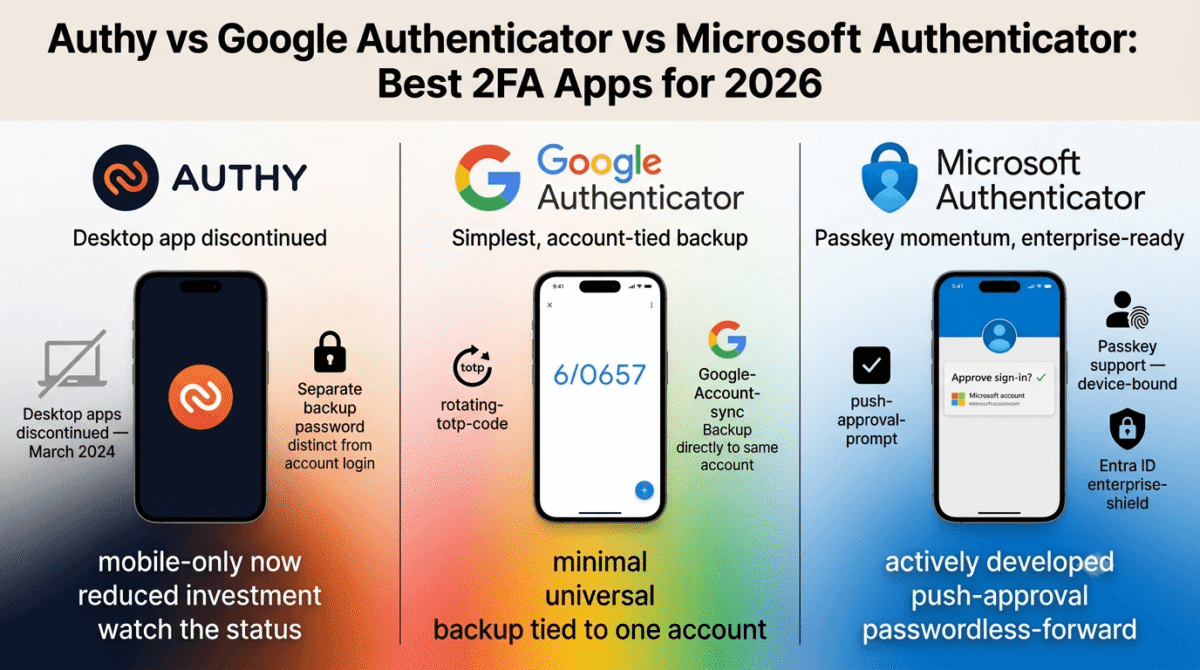
Every account with two-factor authentication turned on needs somewhere to generate that rotating six-digit code, and for most people that somewhere is one of three apps: Authy, Google Authenticator, or Microsoft Authenticator. All three do the same core job, reading a shared secret and producing a code that changes every 30 seconds, but how each one backs up, syncs, and extends that job differs enough to matter.
This category has also shifted more than most comparison articles account for. One of these three apps lost a major piece of its functionality in the last two years, and several older reviews still recommend it as if that change never happened.
I tested Authy vs Google Authenticator vs Microsoft Authenticator for 30 days, setting up the same set of accounts across all three, simulating a lost-phone recovery, and checking how each app is holding up against where authentication is heading. Here is the honest comparison, including a status update on Authy that most comparison articles still get wrong.
Table of Contents
How We Tested
Five criteria shaped the testing:
- Backup and recovery, how cleanly codes transfer to a new device after a lost or replaced phone
- Security architecture, what protects the backup itself, and what a compromised account would expose
- Platform support, which devices and operating systems each app currently runs on, not historically
- Passkey and passwordless readiness, how each app fits into where account security is heading
- Maintenance signals, how actively each product is still being developed and supported
How These Compare to Passkeys and Hardware Security Keys
All three apps in this comparison generate time-based one-time passcodes, a method that is not phishing-resistant,a convincing fake login page can capture and relay a TOTP code the same way it captures a password, a vulnerability that site administrators often mitigate on the backend using web application firewalls like Wordfence, Sucuri, and iThemes Security. Passkeys and hardware security keys solve that specific weakness through domain-bound cryptography that a lookalike site simply can’t use.
That doesn’t make TOTP apps obsolete. Most services still don’t support passkeys, and a TOTP app remains the practical fallback for the accounts that haven’t caught up yet. The realistic setup for 2026 treats a passkey or hardware key as the primary sign-in method where available, with one of these three apps as the working solution everywhere else.
Authy Review: Cross-Device Backup, With a Status Update to Know First
Free plan: Yes, the only plan, no paid tier for personal use
Starting price: Free
Best plan for most users: Free (no other option)
Platforms: iOS, Android (desktop apps discontinued March 2024)
Affiliate program: No, Authy runs no consumer referral program
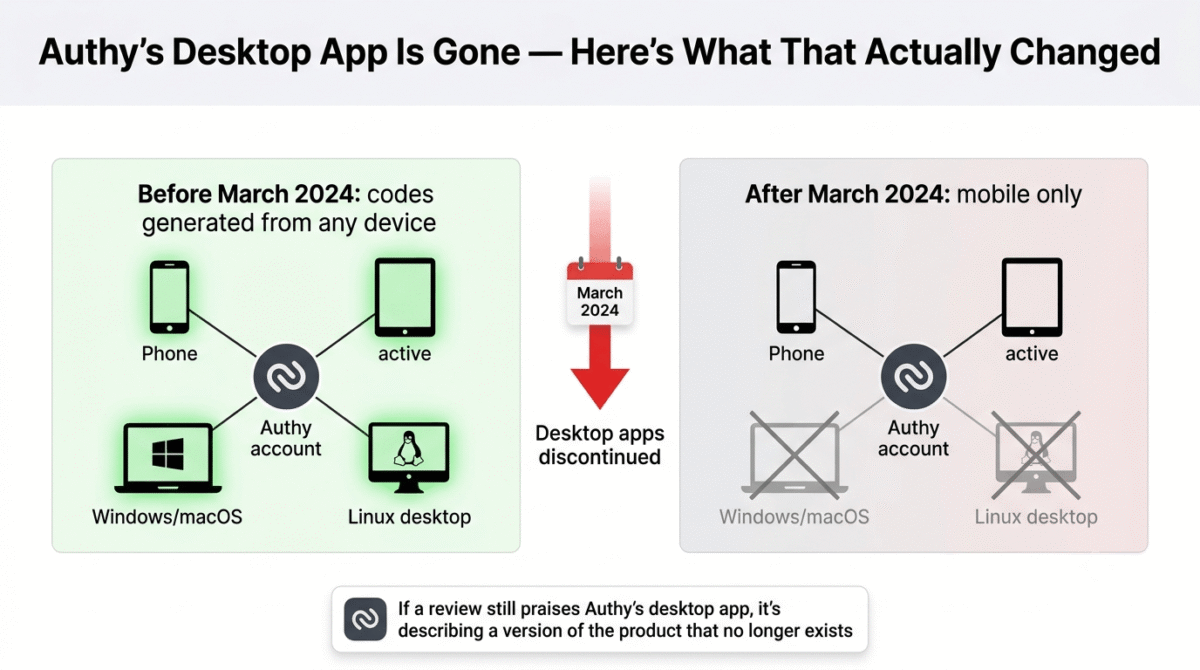
Authy, owned by Twilio, built its early reputation on two things neither competitor offered at the time: multi-device sync and a desktop app. One of those two reasons is gone now.
What Authy does best
Backup security is where Authy still holds a clear advantage. Codes back up to Twilio’s servers encrypted with a password you set yourself, separate from your Twilio or phone account credentials. That separation means a compromised email or phone number alone doesn’t expose your 2FA codes the way it can with an account-tied backup model.
Multi-device access, while reduced from its original scope, still lets the mobile app run on more than one phone or tablet signed into the same account, useful for anyone who splits time between a personal and work device, such as freelancers jumping between workspaces in Notion, ClickUp, or Trello, and doesn’t want to set up every service twice.
Where Authy falls short
The desktop apps for Windows, macOS, and Linux reached end of life in March 2024, and Twilio has given no indication of bringing them back as of this writing. The workflow that drew a lot of people to Authy in the first place, generating codes from a laptop without reaching for a phone, no longer exists. Anyone comparing Authy against current alternatives based on an older review that praises the desktop app is comparing against a version of the product that isn’t available anymore.
Twilio has also publicly shifted focus toward its enterprise Verify API and away from the consumer app, and Authy suffered a security incident in 2024 that exposed millions of phone numbers tied to user accounts. Combined with the desktop shutdown and no announced passkey roadmap, the product reads as maintained rather than actively developed.
Authy Feature Summary
| Category | Detail |
|---|---|
| Cost | Free for personal use |
| Platforms | iOS, Android only |
| Backup model | Separate backup password, Twilio-encrypted |
| Passkey support | None |
| Development status | Reduced investment, maintenance mode |
Authy: Pros and Cons
Pros:
- Backup password is separate from account credentials, a stronger model than account-tied backup
- Multi-device access across more than one phone or tablet
- Free for personal use with no account limits
- Works across a wide range of third-party services
Cons:
- Desktop apps discontinued in March 2024, mobile-only now
- 2024 security incident exposed phone numbers tied to accounts
- No passkey support and no announced roadmap toward one
- Publicly reduced investment as Twilio focuses on its enterprise API
Rating: 3.5 / 5, a workable authenticator held back by measurable declines in platform support and product investment that most comparisons don’t mention.
Google Authenticator Review: The Simplest Option, By Design
Free plan: Yes, the only plan, no paid tier
Starting price: Free
Best plan for most users: Free (no other option)
Platforms: iOS, Android, basic Wear OS support
Affiliate program: No, Google runs no referral program for this app
Google Authenticator does one thing, generate TOTP codes, and has resisted adding much beyond that for over a decade, which is either its strongest feature or its clearest limitation depending on what you need from it.
What Google Authenticator does best
Simplicity keeps the attack surface small. There’s no push notification system to misconfigure, no passwordless layer to manage, just a code that regenerates every 30 seconds and works fully offline once an account is set up, a crucial feature whether you are managing local content or configuring complex multi-language web environments with WPML, Weglot, or TranslatePress. For anyone who wants an authenticator that does exactly one job without extra settings to think about, that minimalism is the appeal.
Cloud backup through your Google Account, added a few years back, finally solved the old lost-phone problem without requiring a separate account or password. Since almost every service that supports 2FA—from core infrastructure dashboards at Namecheap, GoDaddy, and Porkbun to simple web apps, supports plain TOTP, compatibility is effectively universal.
Where Google Authenticator falls short
Backup security is tied directly to your Google Account, with no separate backup password the way Authy offers. A compromised Google Account becomes a more direct path to every TOTP secret stored in it, a meaningful tradeoff for the convenience of automatic cloud sync.
There’s no push-approval login, no passkey management, and no indication Google plans to build either into this specific app, passkeys live in Google Password Manager instead, a separate product from Google Authenticator entirely. Anyone expecting this app to evolve toward passwordless authentication will be waiting on a different product.
Google Authenticator Feature Summary
| Category | Detail |
|---|---|
| Cost | Free |
| Platforms | iOS, Android, basic Wear OS |
| Backup model | Tied to Google Account, no separate password |
| Passkey support | None (handled by Google Password Manager instead) |
| Development status | Stable, minimal feature additions |
Google Authenticator: Pros and Cons
Pros:
- Minimal, focused design with a small attack surface
- Works fully offline once set up
- Universal compatibility across nearly every service supporting 2FA
- Cloud backup now included, solving the historical lost-phone problem
Cons:
- Backup security tied directly to Google Account, no separate password layer
- No push notifications for third-party services
- No passkey management inside the app itself
- Feature set has barely changed in years, for better or worse
Rating: 4.0 / 5, the simplest reliable option, with backup security that depends entirely on how well the linked Google Account is protected.
Microsoft Authenticator Review: The Strongest Path Toward Passwordless
Free plan: Yes, the only plan, no paid tier for personal use
Starting price: Free
Best plan for most users: Free (no other option)
Platforms: iOS, Android
Affiliate program: No, Microsoft runs no referral program for this app
Microsoft Authenticator does everything Google Authenticator and Authy do, and layers push notifications and passkey support for Microsoft and Entra ID accounts on top, positioning it as part of Microsoft’s broader move away from passwords.
What Microsoft Authenticator does best
Push-approval sign-in for Microsoft personal and work accounts removes the need to type a code at all, a clear convenience advantage for anyone deep in the Microsoft ecosystem. Passkey support for Microsoft accounts extends that further, and the app’s integration with Entra ID, Conditional Access, and number matching makes it the clear pick for anyone managing organizational accounts rather than personal ones alone.
Cloud backup covers personal TOTP entries cleanly, and the app’s enterprise features, device compliance checks, verified device attestation, come at no added cost for personal use even though they’re built for business environments.
Where Microsoft Authenticator falls short
The push-approval convenience only extends to Microsoft’s own accounts. Every third-party service added as a plain TOTP entry still requires typing a code manually, the same as Google Authenticator or Authy, so the headline feature doesn’t generalize across every account in the app.
Passkeys created inside Microsoft Authenticator are device-bound, not synced, meaning a passkey set up on one phone has to be recreated from scratch on a new one rather than restoring from a cloud backup. Password autofill, previously part of the app, has also been discontinued and moved to Microsoft Edge, so anyone expecting that feature from older reviews won’t find it here anymore.
Microsoft Authenticator Feature Summary
| Category | Detail |
|---|---|
| Cost | Free for personal use |
| Platforms | iOS, Android (no Apple Watch support) |
| Backup model | Microsoft Account cloud backup |
| Passkey support | Yes, for Microsoft/Entra accounts (device-bound) |
| Development status | Actively developed, enterprise-focused roadmap |
Microsoft Authenticator: Pros and Cons
Pros:
- Push-approval sign-in removes typed codes for Microsoft accounts
- Passkey support for Microsoft/Entra accounts, ahead of both competitors
- Strong enterprise integration with Entra ID and Conditional Access
- Actively developed with a clear roadmap toward passwordless sign-in
Cons:
- Push-approval convenience doesn’t extend to third-party TOTP entries
- Passkeys are device-bound and can’t be synced across phones
- Password autofill discontinued, moved to Microsoft Edge separately
- No Apple Watch support
Rating: 4.3 / 5, the strongest feature set and the clearest path toward passwordless sign-in, with the most value for anyone already inside the Microsoft ecosystem.
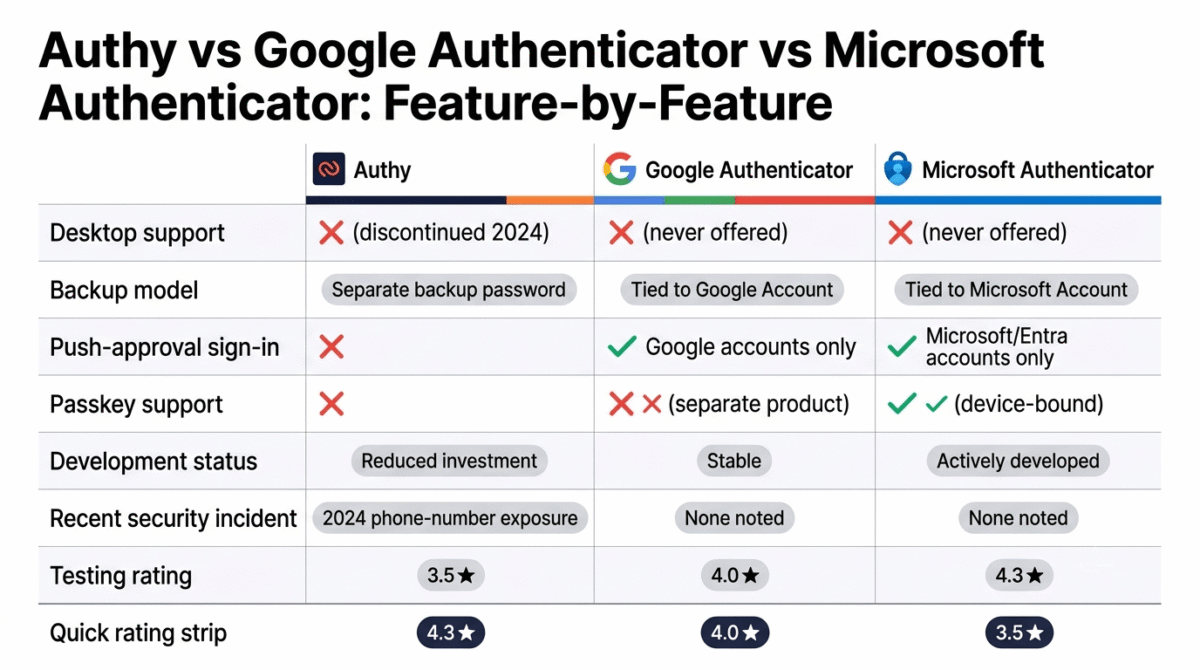
Head-to-Head Comparison
| Feature | Authy | Google Authenticator | Microsoft Authenticator |
|---|---|---|---|
| Cost | Free | Free | Free |
| Desktop support | No (discontinued 2024) | No | No |
| Backup model | Separate backup password | Tied to Google Account | Tied to Microsoft Account |
| Push notifications | No | Google accounts only | Microsoft/Entra accounts only |
| Passkey support | None | None (separate product) | Yes, device-bound |
| Development status | Reduced investment | Stable | Actively developed |
| Best known for | Cross-device backup password | Simplicity | Enterprise & passwordless |
Which Should You Choose?
Choose Google Authenticator if simplicity and a minimal attack surface matter most, and cloud backup through an already well-secured Google Account is enough.
Choose Microsoft Authenticator if a meaningful share of your accounts are Microsoft or Entra ID-based, or if a working path toward passkeys matters more than sticking with plain TOTP codes indefinitely.
Choose Authy only if the separate backup password model matters enough to outweigh the desktop shutdown and the app’s reduced ongoing investment, for most new setups in 2026, one of the other two is the steadier long-term pick.
Our Recommendations
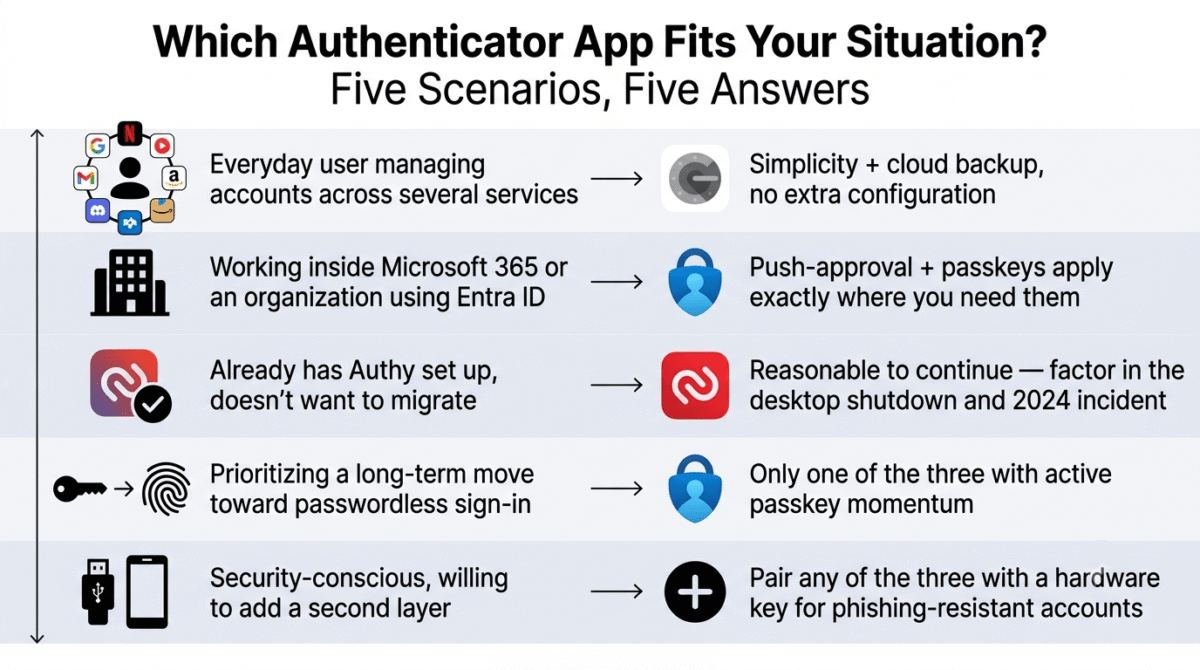
Based on 30 days of testing across setup, backup, and recovery scenarios, here is the recommended setup by situation:
Everyday personal user managing accounts across several services: Google Authenticator, for the combination of simplicity and cloud backup without extra configuration to think about.
Anyone working inside Microsoft 365 or an organization using Entra ID: Microsoft Authenticator, since push-approval sign-in and passkey support are most valuable exactly where they already apply.
Someone who already has Authy set up and doesn’t want to migrate: Continuing to use it is reasonable, with the desktop shutdown and the 2024 security incident factored into that decision rather than assumed away.
Anyone prioritizing a long-term move toward passwordless sign-in: Microsoft Authenticator, as the only one of the three with an active passkey roadmap rather than a plain TOTP feature set that isn’t evolving further.
Security-conscious users willing to add a second layer: Pairing any of the three with a hardware security key for the handful of accounts that support one adds phishing resistance none of these apps provide on their own.
Final Verdict
Authy, Google Authenticator, and Microsoft Authenticator all generate the same TOTP codes underneath, but their trajectories over the past two years point in different directions.
- Microsoft Authenticator, 4.3 / 5, the strongest feature set and the only one of the three with measurable passkey momentum
- Google Authenticator, 4.0 / 5, the simplest, most dependable option for anyone who doesn’t need push approvals or passkeys
- Authy, 3.5 / 5, still functional, but weighed down by a discontinued desktop app, a past security incident, and visibly reduced investment
For a new setup in 2026, Google Authenticator or Microsoft Authenticator are the steadier picks. Authy isn’t broken, but it’s no longer moving in the direction the other two are.
Frequently Asked Questions
Is Authy still safe to use in 2026?
The mobile app still functions and generates valid codes. The concerns are around trajectory, not safety today: the desktop app is gone, a 2024 incident exposed phone numbers tied to accounts, and Twilio has publicly reduced investment in the consumer product in favor of its enterprise API.
Does Google Authenticator have a desktop app?
No. Google Authenticator has only ever been available on mobile, with basic Wear OS support. None of the three apps in this comparison currently offer a desktop application, Authy’s was discontinued in March 2024.
Can I use Microsoft Authenticator for non-Microsoft accounts?
Yes. It generates standard TOTP codes for any service that supports two-factor authentication, the same as Google Authenticator or Authy. Push-approval sign-in and passkey support, however, only apply to Microsoft and Entra ID accounts specifically.
What happens to my codes if I lose my phone?
With Authy, restoring requires the separate backup password set during setup. With Google Authenticator, restoring requires signing back into the same Google Account with cloud backup enabled. With Microsoft Authenticator, personal TOTP entries restore via Microsoft Account backup, while work or school accounts typically require re-registration.
Are passkeys going to replace these authenticator apps?
Eventually, for the services that support them. As of 2026, most online services still rely on TOTP or push-based two-factor authentication rather than passkeys, so these apps remain necessary for the accounts that haven’t made the shift yet. Microsoft Authenticator is the only one of the three actively building toward a passkey-first future.
Why did Authy remove its desktop app?
Twilio, Authy’s parent company, discontinued the Windows, macOS, and Linux desktop apps in March 2024, stating the decision was made to focus resources on products with higher demand. The company has given no indication of reversing that decision as of this writing.
Which authenticator app is best for a small business?
Microsoft Authenticator, if the business already uses Microsoft 365 or Entra ID, since Conditional Access and device compliance features integrate directly with infrastructure many small businesses already pay for. For a business with no Microsoft dependency, Google Authenticator’s simplicity is a reasonable default.
Do any of these apps cost money?
No. All three are free for personal use with no paid tier. Twilio does sell a separate enterprise Verify API for businesses building authentication into their own products, but that’s a different product from the free Authy consumer app covered in this comparison.