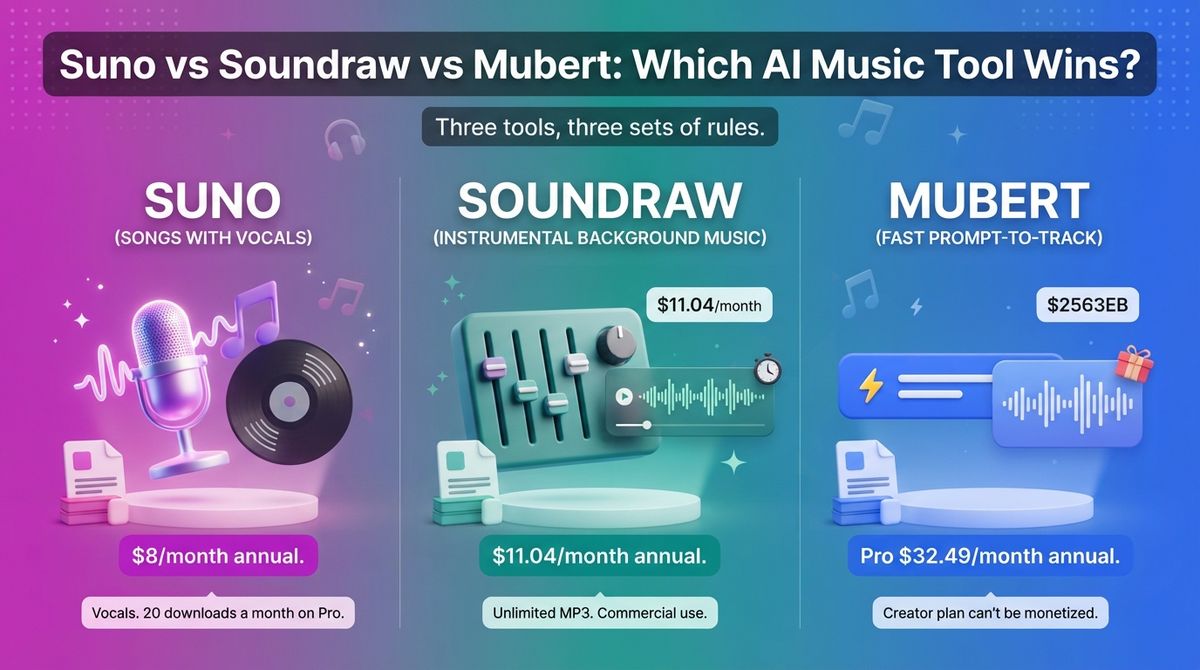
Once you finish editing your visual project using the top-rated AI video generation platforms, you then lose an hour hunting for music you can use without a copyright claim. Choosing between Suno vs Soundraw vs Mubert looks like a quality contest. The license and download rules matter more than how a track sounds.
Music is the easiest part of a video to get wrong, because a track with the wrong license can cost you monetization. AI generators promise unlimited music, but the rules changed fast, making thorough research using AI research assistants essential before you publish commercial media. Udio, the usual third name in this comparison, has not allowed downloads since October 2025, so I replaced it with Soundraw. Suno began capping downloads in September 2026.
I tested Suno vs Soundraw vs Mubert for 30 days while organizing my media assets inside flexible project management workspaces, generating the same three pieces with each tool: an upbeat tutorial intro, a calm podcast bed, and a 30-second ad jingle. Here is the honest comparison, including the catch most creators miss: Mubert’s cheapest paid plan cannot be monetized, and Suno’s free-plan songs can never be monetized, even if you subscribe later.
Table of Contents
How We Tested
I scored each tool on five criteria:
- Output fit: whether it makes background music or songs with vocals, and how well that matches a creator’s needs.
- Getting a finished file: how many downloads each plan allows and what the free plan permits.
- License and monetization rules: what you can monetize, and what happens to your music when you cancel.
- Pricing and three-year cost: the plan that allows monetization, billed monthly and annually.
- Editing control: how much you can shape length, structure, and instruments after generating.
Suno Review: Full Songs With Vocals, Now With a Download Cap
- Free plan: Yes, about 50 credits a day, with no commercial use and no guaranteed downloads
- Starting price: $10/month, or $8/month billed annually (Pro)
- Best plan for most users: Pro, or Premier if you need 60 downloads a month, or Suno Studio
- Platforms: Web, iOS, Android
- Affiliate program: No cash program; Suno’s referral program pays 250 credits to you and the friend
Suno generates full songs with vocals, lyrics, and instrumentation from a text prompt. Warner Music Group settled with Suno in November 2025, and Suno committed to licensed models in 2026 with opt-in artist participation and tighter download rules. The download cap took effect on September 3, 2026.
What Suno does best
Suno is the only one of the three that sings. That makes it the pick for tutorial intros with a theme song, jingles, and personalized songs. Pro includes 2,500 credits a month, which Suno describes as up to 500 songs, and Premier includes 10,000 credits.
Paid plans carry commercial rights for songs you make while subscribed, and you keep those rights if you cancel. Premier also includes Suno Studio, where exports are not capped. That makes Premier the plan for anyone producing music in volume.
Where Suno falls short
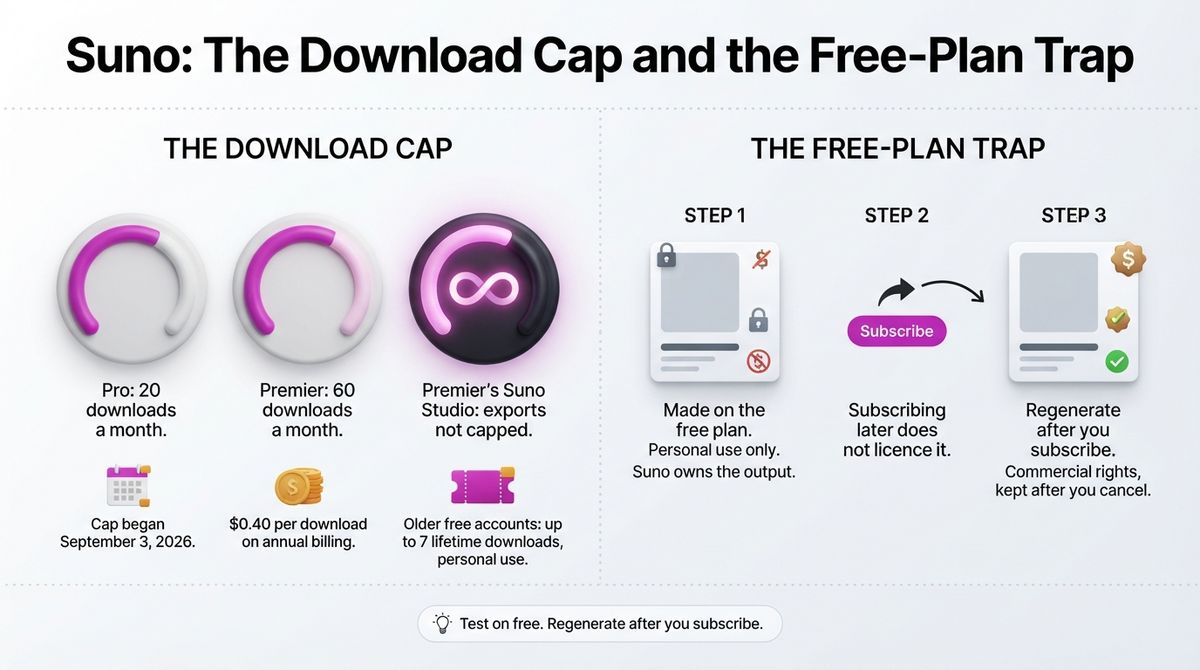
Downloads are now the limit, not credits. Pro allows 20 downloads a month, and Premier allows 60. Free accounts opened before September 3 get up to seven lifetime downloads for personal use. Suno lets paid users buy extra downloads, but the price was not shown on its pricing page in early October.
The free plan has a trap. Free-plan songs are personal and non-commercial; Suno owns the output, and subscribing later does not license songs you made earlier. If you test on the free plan and like a track, regenerate it after you subscribe. Commercial use also covers only the songs you download within your allowance.
Suno pricing
| Plan | Monthly billing | Annual billing | Credits | Downloads | Commercial use |
|---|---|---|---|---|---|
| Free | $0 | $0 | About 50/day | Up to 7 lifetime on older accounts | No |
| Pro | $10/month | $8/month ($96/year) | 2,500/month (up to 500 songs) | 20/month | Yes, for permitted downloads |
| Premier | $30/month | $24/month ($288/year) | 10,000/month (up to 2,000 songs) | 60/month; unlimited in Suno Studio | Yes, for permitted downloads |
Suno: Pros and Cons
Pros:
- The only tool here that produces songs with vocals.
- Commercial rights on paid plans, kept after cancellation for songs made while subscribed.
- Premier’s Suno Studio exports are uncapped.
- A free plan to try prompts before paying.
Cons:
- Pro allows only 20 downloads a month, and Premier allows 60.
- Free-plan songs can never be monetized, even after you subscribe.
- Licensed-model changes from the Warner deal may alter features in 2026.
- No cash affiliate program, only referral credits.
Rating: 4.2 / 5, the best choice for songs with vocals, held back by the download cap.
Soundraw Review: Instrumental Background Music With Clear Licensing
- Free plan: No free downloads; you can generate and preview before paying
- Starting price: $16.99/month, or $11.04/month billed annually (Creator)
- Best plan for most users: Creator
- Platforms: Web
- Affiliate program: Unconfirmed; it paid a flat $35 per subscription before, but the sign-up portal did not load in early November 2026
Soundraw is a Tokyo-based generator of instrumental music, founded in 2020. It says it trains only on music written and recorded by its own team, and I found no lawsuit against it. You pick a genre or blend several, set a mood and length, and generate a track you can edit in a browser Mixer.
What Soundraw does best
Soundraw is the easiest of the three to use for finished video music. Creator allows unlimited MP3 downloads and commercial use, with no attribution. Its license page lists YouTube, podcasts, social media, ads, and client work among the permitted uses, and it is more specific than most competitors.
The Mixer lets you mute or solo instrument layers, change intensity, and reshape the arrangement without a DAW. You can also set the track length, up to five minutes, so music fits a video without a manual edit. That control matters more for background music than the first generation does.
Where Soundraw falls short
Soundraw’s own pages disagree about cancellation. Its homepage FAQ says tracks made while subscribed stay licensed for life. Its license page says a track used as downloaded can stay published only while your subscription is active. I could not find a document that settles it, so get the answer in writing before you plan around it.
It does not sing, so it cannot replace Suno for songs. Soundraw keeps the rights to its recordings and grants a license, and it bans registering generated music with Content ID. Creators also cannot release tracks to Spotify. That needs an Artist plan, and you must modify the track first.

Soundraw pricing
| Plan | Monthly billing | Annual billing | Downloads | Notes |
|---|---|---|---|---|
| Creator | $16.99/month | $11.04/month | Unlimited MP3 | Commercial use; no streaming release |
| Artist Starter | $29.99/month | $19.49/month | 10/month | Streaming release after modifying the track |
| Artist Pro | $35.99/month | $23.39/month | 20/month | Adds WAV and stems |
| Artist Unlimited | $50/month | $32.50/month | Unlimited | MP3, WAV, and stems |
| Enterprise | Quote only | Quote only | Unlimited | Companies with 10 or more employees; API access |
Soundraw: Pros and Cons
Pros:
- Unlimited MP3 downloads on the Creator plan.
- Commercial use on every paid plan, with no attribution.
- Browser Mixer for editing instruments, intensity, and length.
- Trained on in-house music, and no lawsuits found.
Cons:
- Instrumental only, with no vocals.
- The homepage and license page disagree about cancellation.
- No Content ID registration, and no streaming release on Creator.
- No free downloads.
Rating: 4.4 / 5, the best fit for most creators who need background music.
Mubert Review: Fast Generation, but the Cheap Plan Can’t Be Monetized
- Free plan: Yes, Ambassador: 25 generations and 5 MP3 downloads a month, personal use, with credit to Mubert
- Starting price: $14/month, or $11.67/month billed annually (Creator, non-commercial)
- Best plan for most users: Pro ($39/month, or $32.49/month billed annually)
- Platforms: Web, iOS, Android, API
- Affiliate program: No; one November 2026 review reports Mubert closed its affiliate program in 2026 (confirm before you plan around it)
Mubert turns a text prompt into a royalty-free track assembled from a library of samples recorded by artists. It sells four products: Render for generating tracks, Studio for contributing artists, an API for apps and games, and Play for listeners. Render is the one most creators need.
What Mubert does best
Mubert is fast and broad. You write a mood or idea, set a duration, and get a track in seconds, or you pick from preset genres, moods, and activities. A Search by Reference option lets you paste a YouTube link as the starting point. Explore lets you filter finished tracks by mood, genre, instrument, or BPM.
The top plan covers more than the others. Ultra adds client and freelance work, agency work, music in finished apps and games, and sublicensing. Mubert also sells an API for developers. The free plan lets you test the output before you spend anything.
Where Mubert falls short
The cheapest paid plan cannot be monetized. Creator allows personal and social-media use, with promoted posts but no monetized channels. Pro is the first plan that covers monetized channels and digital ads, at about $390 a year on annual billing. Even Pro excludes client work, agency work, and music in apps or games.
Cancelling ends your right to use Mubert tracks in anything new, on every plan. Work you already published can stay up under its original license, but tracks you downloaded and never used are gone. Soundraw’s Creator plan is cheaper and, on its homepage, promises the opposite.

Mubert pricing
| Plan | Monthly billing | Annual billing | What you get |
|---|---|---|---|
| Ambassador | Free | Free | 25 generations and 5 MP3 downloads/month; personal use; credit to Mubert |
| Creator | $14/month | $11.67/month | 100 generations and 50 downloads/month; WAV and MP3; non-commercial |
| Pro | $39/month | $32.49/month | 500 generations/month, unlimited downloads; monetized channels and digital ads |
| Ultra | $89/month | $62.50/month | 1,000 generations/month; adds client work, apps and games, sublicensing |
Mubert: Pros and Cons
Pros:
- Fast prompt-to-track generation with a large sample library.
- A free plan for testing the output.
- Ultra covers client work, apps, games, and sublicensing.
- An API for developers.
Cons:
- The Creator plan cannot be monetized.
- Pro costs about $390 a year on annual billing, and it excludes client work.
- Cancelling ends your right to use tracks in anything new.
- Pricing and plan names changed during 2026, so confirm them at checkout.
Rating: 3.6 / 5, quick and capable, but the license ladder is costly and easy to misread.

Head-to-Head Comparison Table
| Feature | Suno | Soundraw | Mubert |
|---|---|---|---|
| Free plan | Yes, no commercial use | No free downloads | Yes, non-commercial |
| Paid entry price | $8/month annual ($10 monthly) | $11.04/month annual ($16.99 monthly) | $11.67/month annual ($14 monthly), non-commercial |
| Cheapest plan that allows monetization | Pro, $8 to $10/month | Creator, $11.04 to $16.99/month | Pro, $32.49 to $39/month |
| Vocals | Yes | No | No, background music |
| Downloads | 20/month on Pro, 60/month on Premier | Unlimited MP3 on Creator | Unlimited on Pro |
| After you cancel | Rights kept for songs made while subscribed | Pages disagree; confirm in writing | Right to use in anything new ends |
| Editing control | Studio on Premier | Browser Mixer for instruments and length | Prompt, duration, and reference |
| Best for | Songs with vocals | Background music for video | Testing and Pro-tier video work |
| Rating | 4.2 / 5 | 4.4 / 5 | 3.6 / 5 |
Which Should You Choose?
The right tool depends on whether you need vocals, how many files you download, and where you earn from the video.
- Choose Soundraw if you need instrumental background music for videos, podcasts, or client work, and you want unlimited downloads on one plan.
- Choose Suno if you need songs with vocals, such as intros, jingles, or theme songs, and you can work within 20 downloads a month on Pro.
- Choose Mubert if you want a free place to test and you will pay for Pro to monetize. Skip its Creator plan for anything you earn from.

Read the license before the price
The three tools handle cancellation differently. Suno keeps rights for songs made while you subscribed. Mubert ends your right to use tracks in anything new. Soundraw’s homepage and license page give different answers. Free-plan music is for personal use on both Suno and Mubert, so a track from a free plan should not appear on a page that runs AdSense.
What each costs over three years
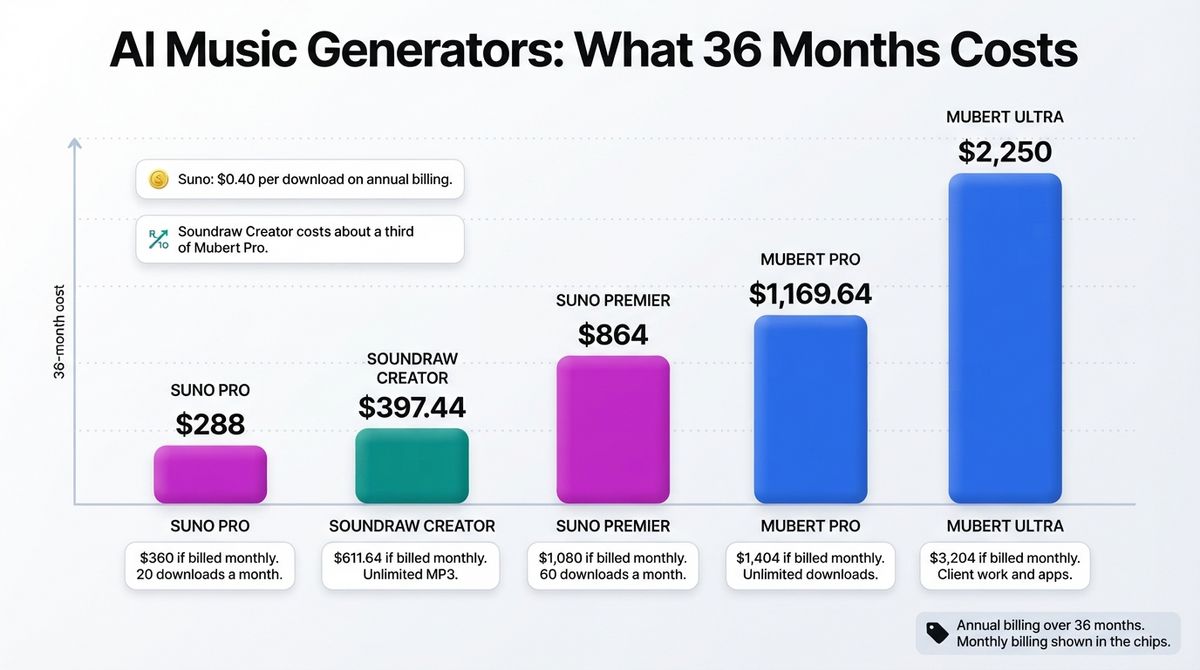
Take the cheapest plan that allows monetization. Soundraw Creator costs $397.44 over 36 months on annual billing, or $611.64 if you pay monthly. Suno Pro costs $288 on annual billing or $360 monthly, and Premier costs $864 or $1,080. Suno works out at $0.40 per download on annual billing, on both Pro and Premier.
Mubert Pro costs $1,169.64 over 36 months on annual billing, or $1,404 monthly. Ultra costs $2,250 on annual billing or $3,204 monthly. Soundraw’s Creator plan costs about a third of Mubert Pro over three years.
Our Recommendations
- Solo YouTuber or podcaster: Use Soundraw Creator on annual billing. It allows unlimited downloads and commercial use, and the Mixer fits music to your video length.
- Creator who wants songs with vocals: Use Suno Pro for intros, jingles, and theme songs. Budget for the 20-download cap, and move to Premier if you produce in volume.
- Freelancer making client videos: Use Soundraw Creator, because its license page lists client work. Mubert Pro excludes client work, so you would need Ultra at $62.50 a month on annual billing.
- Musician releasing on Spotify: Use a Soundraw Artist plan and modify each track first, or Suno Pro or Premier for songs. Check each vendor’s streaming terms before you upload.
- Creator who wants to test first: Use the free plans on Suno and Mubert for personal experiments, and regenerate anything you keep after you subscribe.
WordPress note: Save a copy of the license page and your download receipt beside each audio file in your media library. Terms changed within a year at both Udio and Suno, and a saved copy shows what applied when you downloaded the track.
Final Verdict
Soundraw is the best choice for most content creators. Creator gives unlimited MP3 downloads and commercial use at $11.04 a month on annual billing. Suno is the better pick when you need vocals, but its download cap now limits how much you can finish. Mubert is quick to use, but its cheapest paid plan cannot be monetized.
In the Suno vs Soundraw vs Mubert decision, choose Soundraw for background music and Suno for songs. Skip Udio for now, because it has not allowed downloads since October 2025.
- Soundraw: 4.4 / 5, best for background music and client video work.
- Suno: 4.2 / 5, best for songs with vocals.
- Mubert: 3.6 / 5, best for testing, or for Pro-tier video work if you accept its terms.
Frequently Asked Questions
What is the best AI music generator for content creators?
Soundraw is the best fit for most content creators who need background music. Its Creator plan has unlimited MP3 downloads and commercial use. Suno is better when you need songs with vocals, but it caps downloads at 20 a month on Pro. Mubert needs its Pro plan before you can monetize.
Can I still download songs from Udio?
No. Udio disabled downloads of audio, video, and stems on October 29, 2025, after settling with Universal Music Group. They were still off in October 2026, and its licensed replacement platform has not launched. That is why Udio is not in this comparison.
Can I monetize YouTube videos with Suno music?
Yes, on Pro or Premier. Both plans include commercial rights for songs made while you subscribe, and the rights remain if you cancel. Free-plan songs are for personal use only, and subscribing later does not license them. Commercial use covers only songs you download within your monthly allowance.
How many songs can I download on Suno?
Since September 3, 2026, Pro includes 20 downloads a month, and Premier includes 60. Premier users get unlimited exports from Suno Studio. Free accounts opened before that date get up to seven lifetime downloads for personal use. Suno Pro works out at $0.40 per download on annual billing.
Is Mubert’s Creator plan allowed for monetized videos?
No. Mubert’s Creator plan costs $14 a month ($11.67 billed annually) and covers personal and social-media use without monetization. Pro, at $39 monthly or $32.49 billed annually, is the first plan for monetized channels and ads. Client work, agency work, and apps or games need the Ultra plan.
What happens to my AI music if I cancel?
It depends on the tool. Suno keeps your commercial rights for songs made while subscribed. Mubert ends your right to use tracks in anything new, though published work stays up. Soundraw’s homepage says tracks stay licensed for life, but its license page says unmodified tracks stay published only while you subscribe. Get that in writing.
Can I register AI-generated music with YouTube Content ID?
Not with Soundraw. Its terms ban registering generated music with Content ID on YouTube, Instagram, TikTok, or similar systems on every plan. Check Suno’s and Mubert’s terms before you register any AI track, since rules differ by vendor and plan. Treat each vendor’s terms as a hard limit.
Do I own AI-generated music?
Usually you hold a license, not ownership. Soundraw keeps the rights to its recordings and grants a license, and Suno grants commercial rights only on paid plans. Copyright protection for fully AI-generated music is uncertain because the US Copyright Office looks for meaningful human authorship. This is not legal advice.