You’ve seen the videos flooding your LinkedIn and YouTube feed. A cinematic drone shot of a mountain at sunrise, generated entirely from a text prompt in under a minute. A talking brand mascot lipsyncing a custom voiceover. A 30-second product ad that would have cost $5,000 to shoot on location, produced for about $3.
AI video generation crossed a threshold in 2026. The technology stopped being a novelty for AI hobbyists and became a legitimate production tool for content creators, marketers, and small businesses.
But navigating the market is genuinely painful. The top tools all use credit systems that obscure their real monthly cost. Marketing pages show cinematic showreel quality, they don’t show you how much video you actually get per dollar, or how many prompts it takes to get one usable clip.
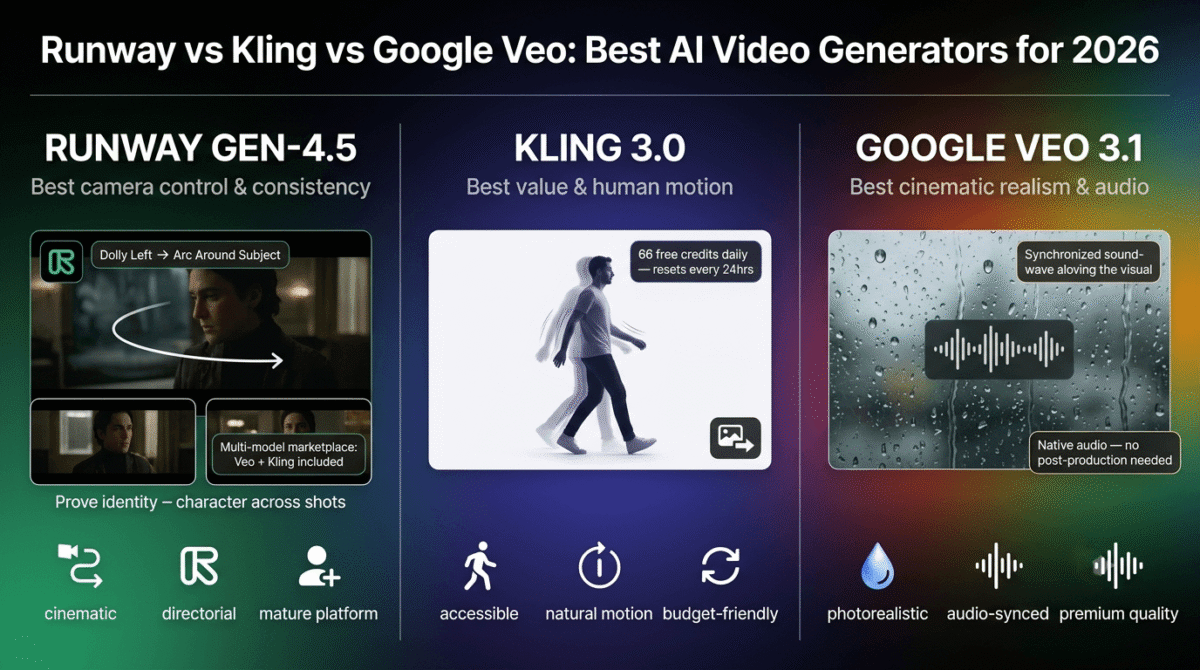
I tested the three (Runway vs Kling vs Google Veo) most widely used AI video generators in 2026, Runway Gen-4.5, Kling 3.0, and Google Veo 3.1, across a range of real creator workflows. Here’s the honest breakdown.
Table of Contents
How We Tested These AI Video Generators
Every tool was evaluated across five criteria:
- Output quality, Realism of motion, physics accuracy, prompt adherence, and visual coherence. Tested with identical prompts across all three tools.
- Credit system transparency, How clearly does the tool communicate how much video you actually get per month? Hidden credit costs are the biggest complaint in this category.
- Free tier usefulness, Is there a meaningful way to test the tool before paying?
- Workflow fit, Does the tool support the workflows content creators actually use: text-to-video, image-to-video, lip sync, reference-based consistency?
- Value for money, Total cost per usable 10-second clip at each pricing tier, factoring in the realistic number of generation attempts required.
One critical note upfront: the Sora brand still generates significant search volume, but OpenAI discontinued the standalone Sora product in April 2026. Sora functionality now exists only within ChatGPT Plus ($20/month) and ChatGPT Pro ($200/month), it is no longer a standalone AI video tool. This review focuses on the three platforms with dedicated video generation products: Runway, Kling, and Google Veo.
1. Runway Gen-4.5, Best for Creative Professionals, Most Mature Platform
Runway has been building AI video tools since 2018, making it the longest-running dedicated AI creative platform in this review. Gen-4.5, launched in early 2026, represents the current state of the art for camera control, character consistency, and cinematic output quality.
What Runway Does Best
Runway is ranked #1 on the Video Arena leaderboard in early 2026 for overall quality, and that ranking reflects something real. Character consistency, the ability to maintain the same person, face, or object across multiple shots, is where Runway most clearly outperforms the competition. If you’re creating a multi-scene video with a consistent protagonist, Runway’s reference image system keeps visual identity stable across generations in a way that Kling and Veo do not match at the same price point.
Camera control is Runway’s most differentiating feature. You can specify camera movement with granular precision: push in, dolly left, arc around the subject, tilt up. This is not cosmetic, for creators building cinematic content, having directorial control over camera language transforms what’s possible with text-to-video.
Act-Two, Runway’s performance capture tool, transfers the motion of a filmed human performance onto any character, turning a quick iPhone recording of someone dancing into the source motion data for an animated character, product mascot, or stylized avatar.
In 2026, Runway evolved into something that deserves a specific callout: it became a multi-model marketplace. Standard plan subscribers ($12–15/month) now get access not just to Runway Gen-4.5, but also to Google Veo 3.1 and Kling 3.0 Pro, all from the same dashboard. For creators who want to compare outputs from multiple models without maintaining separate subscriptions, this single subscription represents genuine value that no competitor can match.
Where Runway Falls Short
The credit system is the central frustration of using Runway, and it deserves a clear explanation.
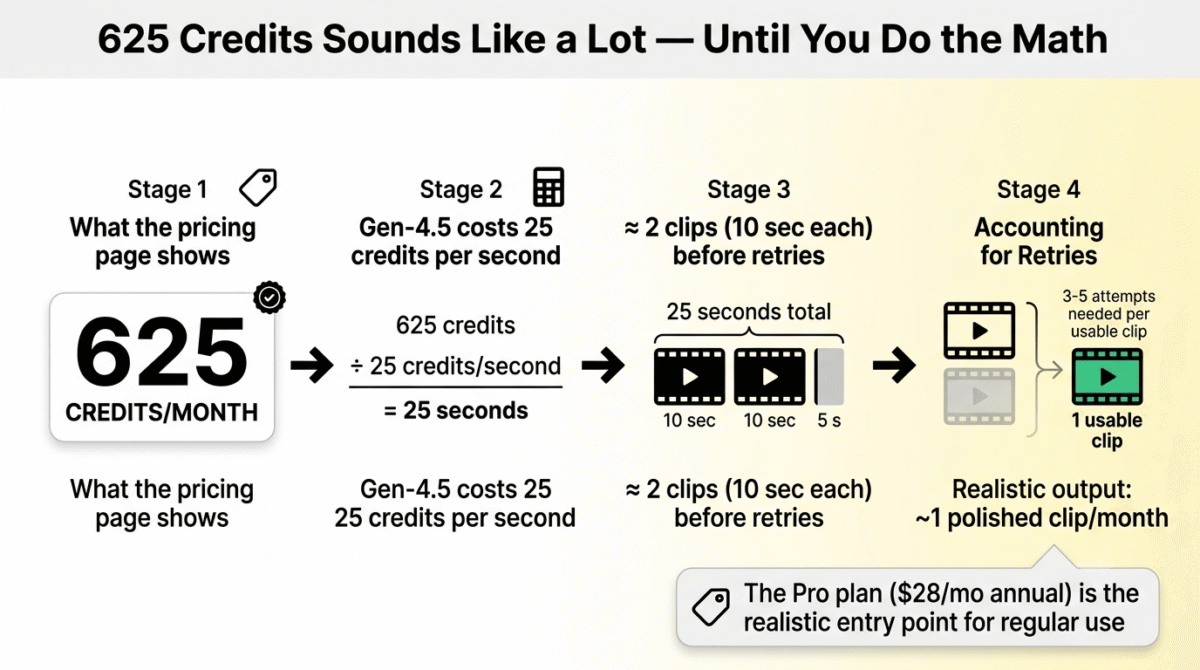
Runway doesn’t charge by “videos created.” It charges by computational seconds, and different models cost different amounts per second. Gen-4.5, the flagship model, costs 25 credits per second. On the Standard plan (625 credits/month), that gives you exactly 25 seconds of Gen-4.5 video per month. Not 25 videos. 25 seconds.
A typical social media clip is 10–15 seconds. A single attempt at a 10-second Gen-4.5 clip costs 250 credits, leaving you with enough budget for exactly two clips and one short retry before you hit the monthly limit.
The retry problem compounds this: very few AI video generations produce a usable clip on the first attempt. Motion artifacts, incorrect subject rendering, unintended camera drift, these require iteration. Most active creators need 3–5 attempts per clip they actually use. At Gen-4.5 rates on the Standard plan, that means one polished usable clip per month.
The Pro plan (2,250 credits/month at $28/month annual) gives 90 seconds of Gen-4.5, about nine 10-second clips before retries. At 3 attempts per clip, you’re looking at three polished final clips per month on the Pro plan.
The free plan provides 125 one-time credits that never replenish. That’s enough for a brief product evaluation, not an ongoing workflow.
Pros:
- Best character consistency and camera control in the category
- Multi-model marketplace: access Veo 3.1 and Kling 3.0 Pro from one plan
- Most mature platform with the deepest editing suite
- #1 on Video Arena leaderboard for overall quality (early 2026)
- Act-Two performance capture is uniquely powerful
- Watermark removal on all paid plans
- Annual billing saves ~20%
Cons:
- 25 credits/second for Gen-4.5 means Standard plan = 25 total seconds/month
- Free tier is a one-time 125 credits (a trial, not an ongoing tool)
- Credits don’t roll over, unused allocation disappears monthly
- Pricing complexity makes real cost hard to estimate without calculation
- Pro plan ($28/month annual) is the minimum for any real production workflow
Rating: 4.4/5
Runway Pricing (2026)
| Plan | Monthly Price | Annual Price | Credits/Month | Gen-4.5 Seconds |
|---|---|---|---|---|
| Free | $0 | $0 | 125 (one-time, never renews) | ~5 seconds total |
| Standard | ~$15/month | $12/month | 625/month | ~25 seconds |
| Pro | ~$35/month | $28/month | 2,250/month | ~90 seconds |
| Max | ~$95/month | $76/month | 9,500/month | ~380 seconds |
| Enterprise | Custom | Custom | Custom | Custom |
All paid plans include Gen-4.5, Veo 3.1, Kling 3.0 Pro, watermark removal, and unlimited video editor projects.
Pricing trap warning: “25 seconds of Gen-4.5” on the Standard plan sounds reasonable until you understand that 25 seconds means 2–3 clips maximum before retries, which most creators exhaust in the first week. The Pro plan at $28/month (annual) is the functional entry point for any creator doing regular work. Budget accordingly.
2. Kling 3.0 – Best Value, Best Free Tier, Best for Budget Creators
Kling AI is built by Kuaishou Technology, one of China’s largest short-video platforms with over 60 million users by early 2026. The platform absorbed a significant portion of Sora’s user base after OpenAI discontinued the standalone Sora product in April 2026, and in 2026 it consistently earns the best reviews for cost-to-quality ratio in the AI video category.
What Kling Does Best
The free tier is the most genuinely useful in this comparison. Kling provides 66 free credits daily, resetting every 24 hours. A 5-second 720p clip costs 30 credits, meaning free-tier users can generate approximately two test clips per day, indefinitely, without ever entering a credit card.
For motion quality specifically, Kling 3.0 is the benchmark for human movement. Complex human motion, realistic walking, dancing, facial expressions, crowd scenes, handles more naturally in Kling 3.0 than in Runway Gen-4.5 or Google Veo 3.1 at comparable price points. For creators building content around human subjects (testimonials, social clips, character-driven stories), this matters.
Clip duration is another Kling advantage: the platform supports clips up to 3 minutes via extensions, compared to Runway’s typical 10–16 second maximum. For creators building longer narrative pieces or explainer videos, Kling’s duration flexibility is significant.
The Standard plan at approximately $8.80/month (renewal rate) or $6.60/month (annual) is the lowest entry price to a credible AI video subscription in this comparison. 660 credits per month translates to approximately 33 standard 720p 5-second clips, enough for genuine weekly content creation without the credit anxiety that characterizes Runway’s Standard tier.
Image-to-video is a particular Kling strength. Feed it a reference photograph, a product shot, a character illustration, a location photo, and it generates natural motion from that still image with strong visual fidelity to the source. For e-commerce brands, this workflow is immediately practical: photograph your product, animate it, and ship a social ad within the hour.
Where Kling Falls Short
The free tier’s limitations are real. At 66 daily credits with a 360p–540p resolution cap, watermarked output, and standard-only generation speed, the free tier is genuinely useful for testing prompts and evaluating the platform, but produces nothing commercially usable without a paid plan. The commercial use restriction on the free plan means any content you create must be personal or educational.
The pricing structure introduces its own complexity. Kling has a habit of running promotional introductory prices for first-time subscribers that differ from renewal rates, Standard’s first-month promotional price may be $6.99, while the renewal is $8.80. The annual rate at $6.60/month avoids this variability but requires a 12-month commitment. Worth verifying the current rate on the official pricing page before subscribing.
Credit-per-second costs increase with resolution and audio. Kling 3.0 at 720p costs 6 credits/second, but at 1080p with native audio, the cost rises to 12 credits/second, doubling your effective monthly output at the same plan price. Creators who want 1080p audio-synced clips should calculate costs at 12 credits/second, not 6.
Interface depth is also limited compared to Runway. Kling excels at generation but the editing suite, workflow tools, and platform maturity are noticeably behind what Runway offers. Think of Kling as a specialized generation engine; Runway as a broader creative production platform.
Pros:
- Best free tier: 66 daily credits that reset every 24 hours (indefinitely)
- Best motion quality for human subjects and complex movement
- Longest clip duration (up to 3 minutes via extensions)
- Lowest entry price of the three ($6.60/month annual)
- Strong image-to-video with reference image support
- Available globally via web app at klingai.com
- Best cost-to-quality ratio for independent creators
Cons:
- Free tier capped at 360p–540p, watermarked, no commercial use
- Promotional vs. renewal pricing can be confusing
- Credit cost doubles from 720p to 1080p+audio (6 → 12 credits/second)
- Platform maturity and editing tools behind Runway
- Daily credits expire in 24 hours, no rollover
Rating: 4.3/5
Kling AI Pricing (2026)
| Plan | Monthly Price | Annual Price | Credits/Month | ~5-sec 720p Clips |
|---|---|---|---|---|
| Free | $0 | $0 | 66/day (~2,000/month) | ~65/month (360p–540p, watermarked) |
| Standard | ~$8.80/month | $6.60/month | 660/month | ~22 clips at 720p |
| Pro | ~$37/month | ~$24/month | 3,000/month | ~100 clips at 720p |
| Premier | ~$92/month | ~$61/month | 8,000/month | ~265 clips at 720p |
| Ultra | ~$180/month | N/A | 26,000/month | ~865 clips at 720p |
Free-tier commercial use prohibited. Standard and above unlock commercial rights, 1080p output, watermark removal, and priority queue.
Pricing trap warning: Kling’s first-time promotional pricing is meaningfully lower than the renewal rate, a trap that catches users who budget based on the initial checkout price. Always verify the renewal rate before committing. Also note: 1080p with native audio costs 12 credits/second (not 6), so creators needing full-resolution audio output should halve the “clips per month” estimates in the table above.
3. Google Veo 3.1, Best Cinematic Realism and Native Audio
Google’s Veo 3.1 is the newest major entrant in this comparison, and it has made the most striking impression on quality benchmarks. Released in 2026, Veo 3.1 generates video with native synchronized audio, dialogue, ambient sound, and music that match the visual content, a capability that neither Runway nor Kling match at the same price point.
What Veo Does Best
Cinematic realism is Veo 3.1’s headline achievement. Skin textures, fabric physics, water behavior, and lighting transitions in Veo 3.1 output consistently place it at or above the competitive quality ceiling in blind tests. For marketing teams, brand advertisers, and creators where photorealistic output is non-negotiable, Veo 3.1 produces the most convincing clips in the category.
Native audio generation is the feature that most distinguishes Veo from Runway and Kling. When you prompt Veo 3.1 to generate a video of a coffee shop on a rainy morning, you get ambient café noise, rain on windows, and low conversation, synchronized precisely to the visual. This eliminates the audio post-production step that every other AI video workflow still requires, a meaningful time and cost saving for social content at scale.
The access model has one significant advantage: if you’re already paying for Google AI Premium (Google One upgrade at $19.99/month), Veo 3.1 is included within that subscription alongside Gemini Advanced, expanded Google Workspace storage, and other Google AI features. For users already in the Google ecosystem, this represents strong bundled value.
Developer access via Google AI Studio and Vertex AI makes Veo 3.1 the most accessible to API-based workflows, per-second pricing at $0.15/second (Fast mode) allows predictable cost calculation for production pipelines, automated content systems, and agency workflows processing high volume.
Where Veo Falls Short
Google Veo 3.1 is not a standalone product with a simple subscription. Access comes through multiple Google products, and navigating the pricing structure requires understanding Google’s increasingly complex suite: Google AI Plus ($7.99/month, Veo 3.1 Fast only), Google AI Pro ($19.99/month, fuller access), Google AI Ultra ($249.99/month, maximum access), and Vertex AI API (pay-per-second, for developers).
For creators who just want to generate videos without signing up for another Google subscription tier, this lack of a standalone product is genuinely frustrating. You’re not buying a video generation tool, you’re buying a Google AI bundle that includes video generation.
Generation limits at the consumer tiers are opaque. Google doesn’t publish a clear monthly video allowance the way Runway publishes its credit-to-seconds translation. The Pro plan ($19.99/month) gives approximately 75 eight-second clips per month based on independent testing, but Google’s official communications on this are unclear.
The platform is also the least mature as a production environment. There’s no built-in video editing suite, no Act-Two equivalent for performance capture, and limited workflow tooling for creators who need to combine generation with post-production. Veo is a generation model first; everything else is downstream. For that downstream editing step, you’ll need traditional video editing software, see our DaVinci Resolve vs Adobe Premiere Pro vs Filmora comparison for options to assemble and polish AI-generated clips.
Pros:
- Best cinematic realism in the category, skin, physics, lighting
- Native synchronized audio generation (no post-production audio required)
- Included in Google AI Premium ($19.99/month) alongside other Google AI tools
- API access with predictable per-second pricing for developers
- 4K output available at higher tiers
- Strong integration with Google Workspace (Vids, Slides, Docs)
- Free tier via Google AI Studio for testing
Cons:
- Not a standalone product, requires a Google subscription bundle
- Monthly generation limits are not clearly published
- Most expensive at the top tier ($249.99/month for Google AI Ultra)
- No built-in editing suite or production workflow tools
- Pricing structure is confusing across multiple Google products
- Less mature platform than Runway for professional workflows
Rating: 4.2/5
Google Veo 3.1 Pricing (2026)
| Access Method | Price | Veo 3.1 Access Level | Notes |
|---|---|---|---|
| Google AI Studio (Free) | $0 | Veo 3.1 Fast (limited) | Testing only; rate limited |
| Google AI Plus | $7.99/month | Veo 3.1 Fast | Entry consumer access |
| Google AI Pro | $19.99/month | Veo 3.1 (full) | ~75 clips/month at 8 seconds |
| Google AI Ultra | $249.99/month | Veo 3.1 maximum | Unlimited for power users |
| Vertex AI API | $0.15–$0.40/second | Full API access | Pay-per-second, no subscription |
| Via Runway | From $12/month | Veo 3.1 included | Multi-model access via Runway |
Pricing note: The cheapest way to access Veo 3.1 for most creators is either the Google AI Pro plan ($19.99/month) or via a Runway subscription ($12/month annual), which bundles Veo 3.1 alongside Gen-4.5 and Kling 3.0 Pro. The standalone Google Ultra at $249.99/month is primarily for enterprise users with very high volume needs.
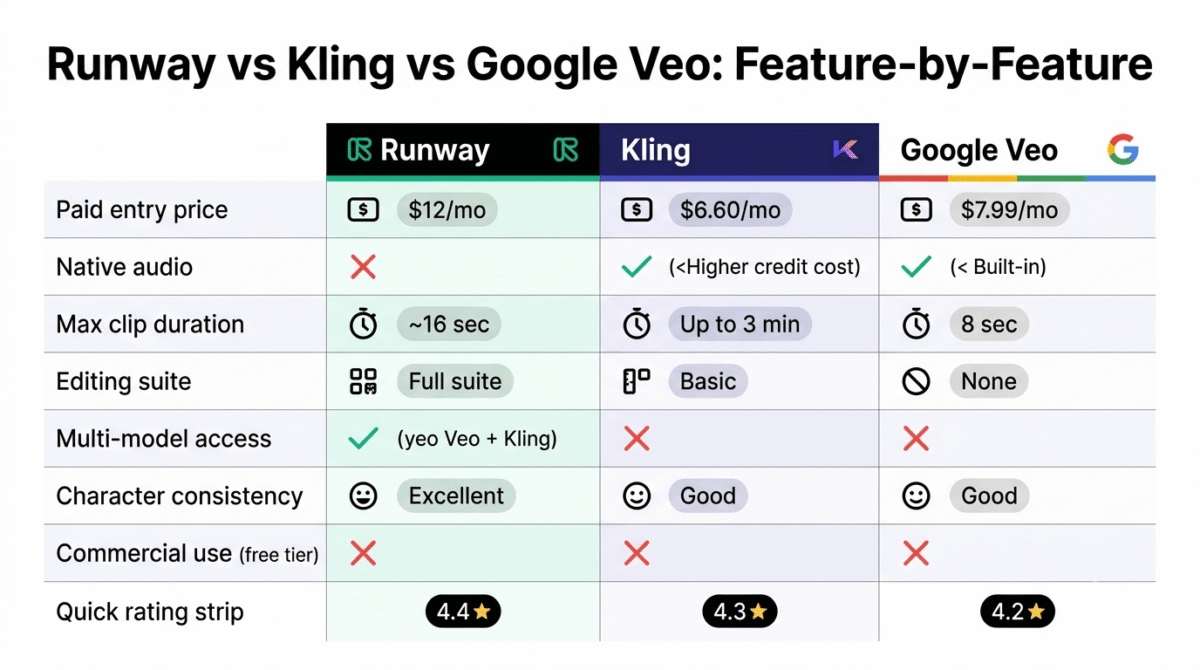
Head-to-Head Comparison Table
| Feature | Runway Gen-4.5 | Kling 3.0 | Google Veo 3.1 |
|---|---|---|---|
| Paid Entry Price | $12/month (annual) | $6.60/month (annual) | $7.99/month (AI Plus) |
| Free Tier | 125 one-time credits | 66 credits/day (ongoing) | Limited via AI Studio |
| Output at Entry Plan | ~25 sec Gen-4.5/month | ~22 clips at 720p | ~limited (varies) |
| Best Quality Trait | Camera control + consistency | Human motion realism | Cinematic + native audio |
| Native Audio | No (add separately) | Yes (at higher credit cost) | Yes (built-in) |
| Max Clip Duration | ~16 seconds | Up to 3 minutes | 8 seconds (consumer) |
| Editing Suite | Full suite included | Basic | None |
| Multi-Model Access | Yes (Veo + Kling included) | No | No |
| Commercial Use (Free) | No | No | No |
| API Access | Yes ($0.12/sec Gen-4.5) | Yes (from $0.075/sec) | Yes (from $0.15/sec) |
| Best For | Professionals, filmmakers | Budget creators, social content | Marketing, brand video |
Which AI Video Generator Should You Choose?
Choose Runway Gen-4.5 if: You’re a creative professional or agency building cinematic content where character consistency, camera control, and platform maturity matter. Runway’s Act-Two performance capture and multi-model access (Veo 3.1 + Kling 3.0 Pro included from $12/month) make it the most versatile platform for serious production work. Budget for the Pro plan ($28/month annual) as the realistic starting point, the Standard tier’s credit limits are too restrictive for anyone generating content more than once a week.
Choose Kling 3.0 if: You’re an independent content creator, social media manager, or small business owner who needs regular AI video output without a large monthly subscription. Kling’s daily free credits let you test the platform meaningfully before paying, the Standard plan at $8.80/month is the most affordable credible subscription in the category, and the motion quality for human subjects is genuinely best-in-class. If your content involves real-looking people, choose Kling.
Choose Google Veo 3.1 if: Photorealistic cinematic output with native synchronized audio is your priority, particularly for brand marketing, product advertising, or any content where audio post-production is a cost you want to eliminate. If you’re already paying for Google AI Premium or building API workflows, Veo 3.1 is the strongest quality argument in the category. If you’re not already in Google’s ecosystem, the standalone subscription math is less compelling than Runway’s multi-model approach.
Choose Clip Talk: ClipTalk is best if you want a finished short video rather than raw clips. It turns a prompt or script into a ready-to-post TikTok, Reel, or YouTube Short (script, AI visuals, voiceover, captions, and music), using models like Runway, Kling, and Veo under the hood, and it also works inside Claude and ChatGPT. Free credits to try; paid plans from $39/month.
Consider no subscription if: You only need occasional AI video for testing ideas or rough concepts. Kling’s daily free credits (66/day, resetting indefinitely) give you enough output for personal use and experimentation without ever paying. Google AI Studio offers free limited Veo 3.1 access for developers. These two free tiers together let most casual users evaluate the technology without committing to any subscription.
How Bloggers and Content Creators Should Use AI Video Tools
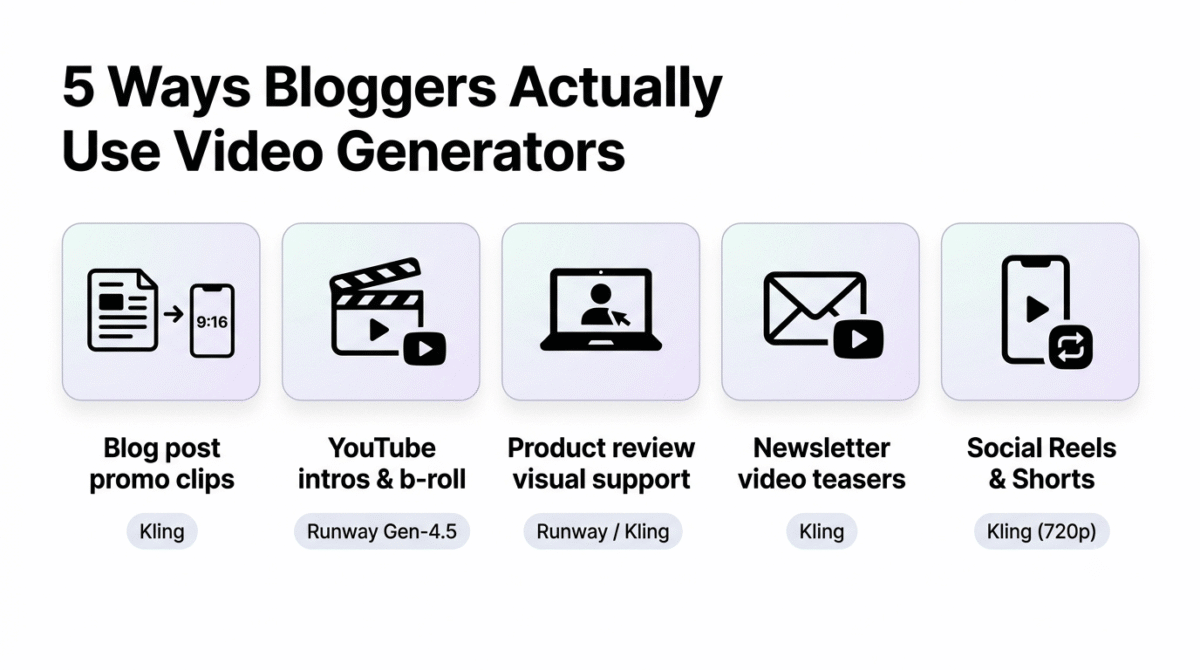
AI video generation has specific, high-value applications for the blogger and content creator workflow. Here is where the ROI is clearest: AI video is one piece of that broader content creator toolkit, see our full roundup for the rest of what pairs with it.
Blog post promotional clips. A 10-second text-to-video clip generated from your article’s headline makes a scroll-stopping social teaser. Generate three or four variants, pick the best, and post across platforms. Kling’s Standard plan gives enough credits to produce several per week.
YouTube channel art and intros. Cinematic intro sequences that would require a videographer and editor to produce can be generated in under an hour with Runway Gen-4.5. A consistent visual identity across channel intro, thumbnail backgrounds, and b-roll establishes production value that builds subscriber trust.
Product review visual support. When reviewing software tools, AI-generated screen-adjacent visuals (a person typing at a laptop, a montage of digital workflows) give video reviews a professional look without requiring a camera setup, lighting equipment, or a second person.
Email newsletter video teasers. A brief animated preview of your latest post, even a simple Kling-generated motion piece, embedded in email as a GIF or video thumbnail dramatically increases click-through rates compared to static headers.
Social Reels and Shorts. Both YouTube Shorts and Instagram Reels reward creators who publish frequently. AI video tools cut production time from hours to minutes, Kling’s 720p output meets the technical quality requirements for both platforms, and the image-to-video workflow is particularly efficient for creators repurposing existing blog photography. For the rest of the AI stack these video workflows plug into, see our roundup of AI tools for bloggers.
For most bloggers and solo creators, Kling’s free tier combined with an occasional Standard plan month is the most cost-effective starting point. Reserve Runway Pro for higher-stakes content that justifies the per-clip investment.
Final Verdict
Best Overall: Runway Gen-4.5, for professionals who need camera control, character consistency, and platform depth, and especially for those who want multi-model access in one subscription.
Best Value: Kling 3.0, for independent creators, social content producers, and anyone who needs ongoing daily access without committing to a significant monthly spend.
Best Cinematic Quality: Google Veo 3.1, for brand marketers and advertisers where maximum realism and native audio are non-negotiable production requirements.
There is no single winner across every use case in 2026. The good news: all three tools offer meaningful free or low-cost access to evaluate quality before paying. The honest recommendation is to generate the same prompt across all three free tiers, compare the output side by side, and choose based on what you actually see, not what the marketing pages promise.
| Tool | Rating | Best For |
|---|---|---|
| Runway Gen-4.5 | ⭐⭐⭐⭐½ (4.4/5) | Creative professionals, agencies, multi-model workflows |
| Kling 3.0 | ⭐⭐⭐⭐¼ (4.3/5) | Budget creators, social content, human-subject video |
| Google Veo 3.1 | ⭐⭐⭐⭐ (4.2/5) | Brand marketing, cinematic output, native audio |
Frequently Asked Questions
What is the best free AI video generator in 2026?
Kling AI offers the most genuinely useful free tier, 66 credits daily that reset every 24 hours, indefinitely. This allows ongoing personal and test use without a credit card. The free tier is capped at 360p–540p resolution with watermarks and no commercial rights, but it’s more than enough to evaluate the platform and experiment with prompts before paying.
Is Sora still available in 2026?
No, OpenAI discontinued the standalone Sora product in April 2026. Sora functionality continues to exist within ChatGPT Plus ($20/month) and ChatGPT Pro ($200/month) subscriptions, but it is no longer available as a dedicated AI video generation tool. If you’re evaluating ChatGPT for its broader capabilities beyond bundled video access, see our comparison of ChatGPT vs Claude vs Gemini among general AI chatbots. Creators who used Sora have largely migrated to Kling, Runway, and Veo 3.1.
How much does it actually cost to generate a 10-second AI video?
On Runway Gen-4.5: approximately $0.56 per 10-second clip on the Pro plan ($28/month ÷ 90 seconds of Gen-4.5). On Kling Standard: approximately $0.40 per 10-second 720p clip. On Google Veo 3.1 via API: $1.50 per 10-second clip at Fast mode ($0.15/second × 10 seconds). Note that these are single-attempt costs, realistic production accounts for 3–5 retries per usable clip, multiplying effective cost accordingly.
Can I use AI-generated videos for commercial purposes?
Yes, on paid plans for all three tools. Free tiers for Kling, Runway, and Veo prohibit commercial use. Once you’re on a Standard/Pro plan, commercial rights are included. Always verify commercial terms on the official website before building a commercial production pipeline, terms evolve as the legal landscape around AI-generated content develops.
Which AI video generator has the best motion quality?
For human motion realism, realistic walking, facial expressions, crowd scenes, Kling 3.0 leads the field in 2026. For camera motion control and directorial precision, Runway Gen-4.5 is the strongest choice. For overall physics simulation (water, fabric, smoke) and photorealistic environmental rendering, Google Veo 3.1 produces the most convincing results.
Is Google Veo 3.1 worth paying for separately from Runway?
For most creators, probably not. Runway’s Standard plan ($12/month annual) now includes access to Veo 3.1 alongside Gen-4.5 and Kling 3.0 Pro, all from the same dashboard. Paying for a separate Google AI subscription solely for Veo access only makes sense if you’re deeply embedded in Google Workspace or need API access at scale via Vertex AI.
How long does AI video generation take in 2026?
Generation speed varies by platform, plan, and model. Priority queue plans (typically Pro tier and above) produce 5–10 second clips in 30–90 seconds. Standard queue on free and basic plans can take 3–10 minutes during peak hours. Kling’s free tier in particular experiences long queue times during US/EU business hours. If speed matters to your workflow, budget for a paid plan that includes priority generation.