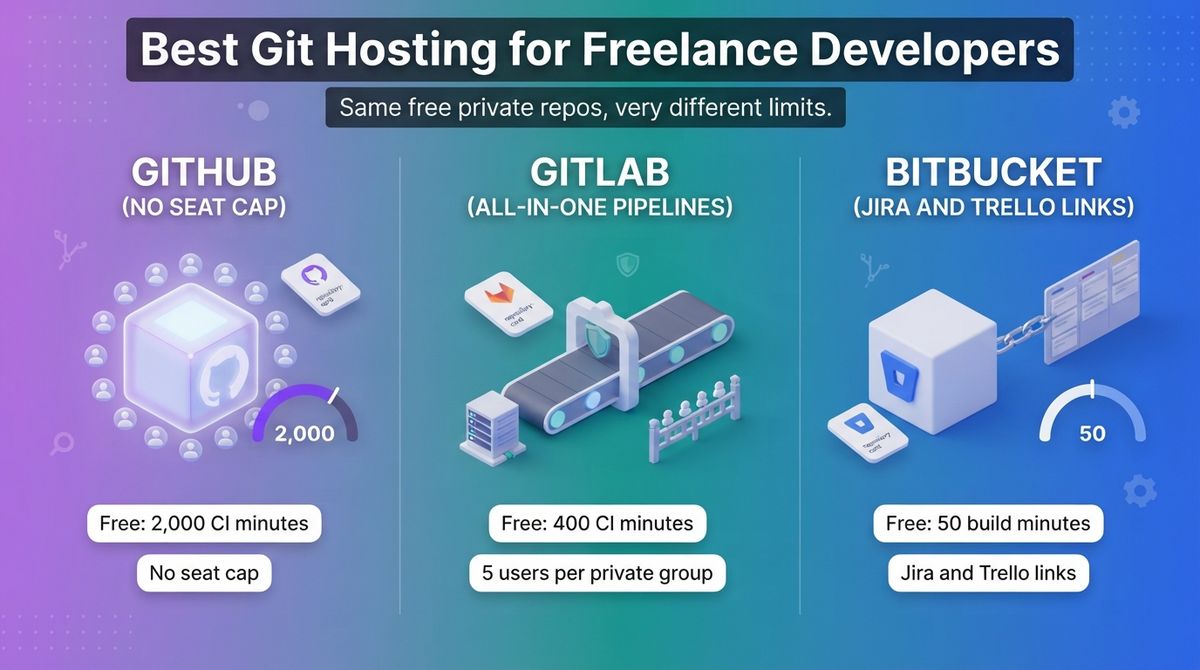
A client hands you a repo, a staging server, and a deadline, and you need somewhere to keep the code that will not cost you a monthly bill or lock the client out. Choosing between GitHub vs GitLab vs Bitbucket looks like a matter of habit. The free plans differ enough to change what you pay.
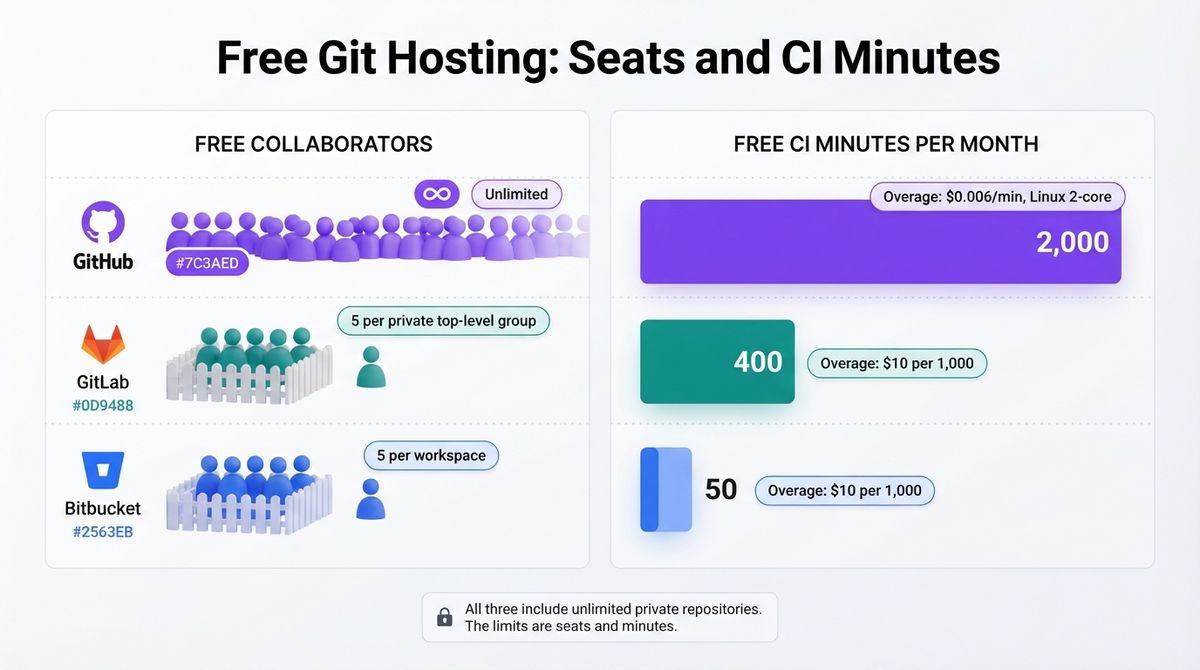
A Git host stores your code, runs pull requests, and increasingly runs your builds and deployments. All three free plans include unlimited private repositories, so the differences are seat caps and CI minutes. GitHub Free includes 2,000 minutes, GitLab Free 400, and Bitbucket Free only 50, and GitLab and Bitbucket cap free workspaces at five users. Once your code is hosted, you can deploy builds using the best VPS hosting for developers and self-managed server setups.
I tested GitHub vs GitLab vs Bitbucket for 30 days, putting the same WordPress theme repository on each with a pull request workflow and a CI job that lints the code and deploys to a staging server over SSH. Here is the honest comparison, including the catch most freelancers miss: GitHub’s Team price is marked “for the first 12 months” with year-two pricing unpublished, and Bitbucket’s paid plan bills a minimum of five users. If you want automated feedback on code changes, compare the best AI pull request review tools to speed up reviews.
Table of Contents
How We Tested
I scored each host on five criteria:
- Free-plan limits: private repositories, users, and storage.
- CI/CD minutes and overage cost: what you get free and what extra minutes cost.
- Client collaboration: inviting clients, seat caps, and who owns the repository.
- Pricing and three-year cost: seat prices, minimums, and renewal rules.
- Ecosystem and extras: integrations, security scanning, and AI add-ons.
GitHub Review: The Most Generous Free Plan
- Free plan: Yes, unlimited public and private repositories and collaborators, and 2,000 Actions minutes a month on private repositories
- Starting price: $4/user/month (Team); a personal Pro plan is $4/month
- Best plan for most users: Free
- Platforms: Web, GitHub Desktop (Windows, macOS), iOS, Android, and any Git client
- Affiliate program: Unconfirmed, no public affiliate program found
GitHub is the most widely used Git host. It sells Free, Team, and Enterprise plans for organizations, plus a personal Pro plan. Copilot and its security products are billed separately from the platform seat.
What GitHub does best
GitHub’s free plan has no seat cap. Free allows unlimited public and private repositories and collaborators. For a freelancer, that means one free organization per client with no seat limit, and the client can own the repository from day one. Pairing your remote Git host with the best code editors for WordPress developers helps keep your local workflow efficient.
Continuous integration is the biggest free allowance of the three. Private repositories get 2,000 Actions minutes a month on Free and 3,000 on Pro or Team. Public repositories on standard runners are free. After the allowance, Linux 2-core minutes cost $0.006, following a hosted-runner price cut of up to 39% in January 2026.
Where GitHub falls short
The free minutes are a dollar allowance, not a fixed number. Each account gets $12 of compute on Free and $18 on Team, shared across runner types. At $0.062 a minute for macOS, $12 covers about 190 macOS minutes. Larger runners cannot use the allowance at all, and GitHub rounds each job up to the nearest whole minute.
The pricing page is vague about renewals. Team at $4 and Enterprise from $21 are both marked “for the first 12 months,” and GitHub does not publish year-two prices. Copilot costs $19 or $39 per user a month on Business or Enterprise, and the Secret Protection and Code Security add-ons list at $19 and $30 per active committer. Organization plans also include no Codespaces quota.
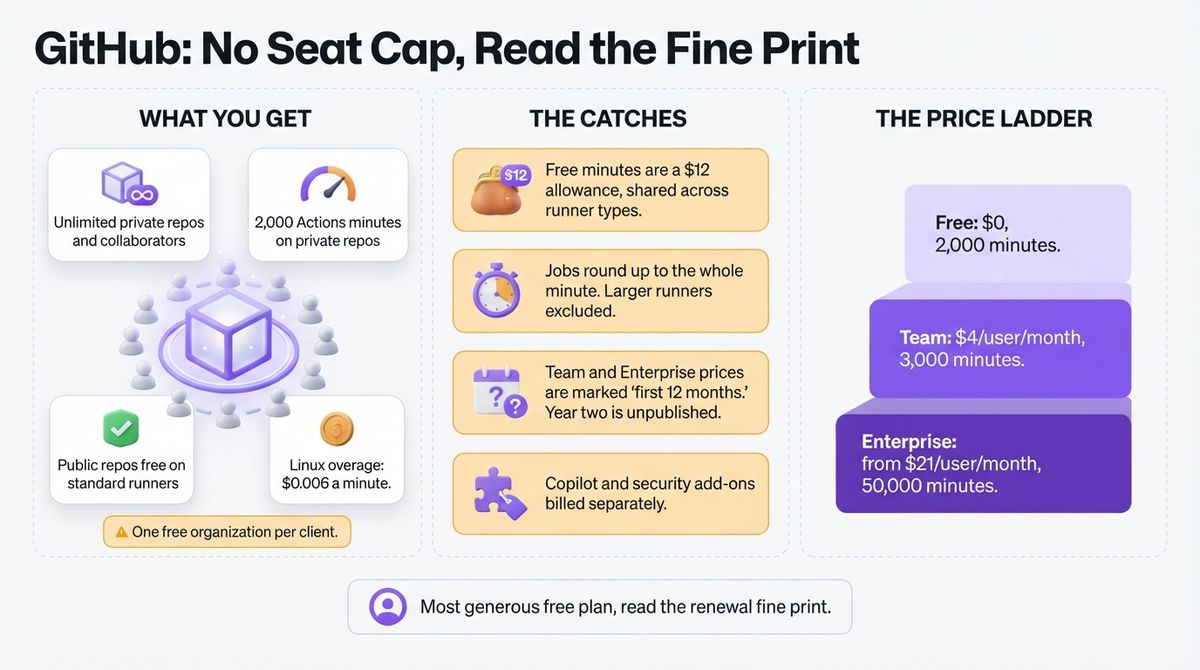
GitHub pricing
| Plan | Price | Private-repo Actions allowance | What you get |
|---|---|---|---|
| Free | $0 | 2,000 minutes ($12) | Unlimited public and private repositories and collaborators, 500 MB Packages |
| Pro (personal) | $4/month | 3,000 minutes | 180 Codespaces core-hours for individuals |
| Team | $4/user/month (marked for the first 12 months) | 3,000 minutes ($18) | Protected branches, required reviewers, 2 GB Packages |
| Enterprise | From $21/user/month (marked for the first 12 months) | 50,000 minutes ($300) | SAML SSO, SCIM, audit logs, 50 GB Packages |
| Actions overage | $0.006 Linux, $0.010 Windows, $0.062 macOS per minute | Not applicable | 2-core standard runners |
GitHub: Pros and Cons
Pros:
- Unlimited private repositories and collaborators on the free plan.
- 2,000 free Actions minutes a month, the most of the three.
- Free Actions on public repositories with standard runners.
- The most widely used platform, so clients often have accounts already.
Cons:
- The Actions allowance is a dollar amount, and larger runners are excluded.
- Team and Enterprise prices are marked for the first 12 months.
- Copilot and security add-ons are billed separately.
- Jobs round up to the nearest whole minute.
Rating: 4.6 / 5, the best choice for most freelance developers.
GitLab Review: All-in-One Pipelines, Tight Free Limits
- Free plan: Yes, up to 5 users per private top-level group on GitLab.com, 400 compute minutes a month, and 10 GiB of storage per project
- Starting price: $29/user/month billed annually (Premium)
- Best plan for most users: Free
- Platforms: Web, self-managed on your own server, and any Git client
- Affiliate program: Unconfirmed; listed on an affiliate network since March 2025, with no public rate
GitLab is a DevOps platform that combines Git hosting, CI/CD, and planning tools. You can use GitLab.com or run it yourself. It sells Free, Premium, and Ultimate plans, and Premium costs the same on GitLab.com and self-managed.
What GitLab does best
GitLab bundles more in the free tier than a plain Git host. Free includes source code management, CI/CD, and static application security testing. If you run it yourself, the self-managed Free edition has no five-user limit, as long as you bring your own storage and runners.
Premium raises the ceilings. It includes unlimited licensed users, 10,000 compute minutes per namespace, 500 GiB of storage per project, and $12 per user a month in promotional GitLab Credits for its AI features. Qualifying open source projects, schools, and startups can apply for free Ultimate licenses.
Where GitLab falls short
The free plan is the tightest of the three. On GitLab.com, a private top-level group is capped at five users, so a client team with six people needs Premium. Free includes only 400 compute minutes a month, and extra minutes cost $10 per 1,000.
Premium costs $29 per user a month on annual billing, and GitLab does not offer monthly payment. That is about seven times GitHub Team. Ultimate pricing is custom, though third-party sources cite about $99 per user. The included AI credits are labeled promotional.
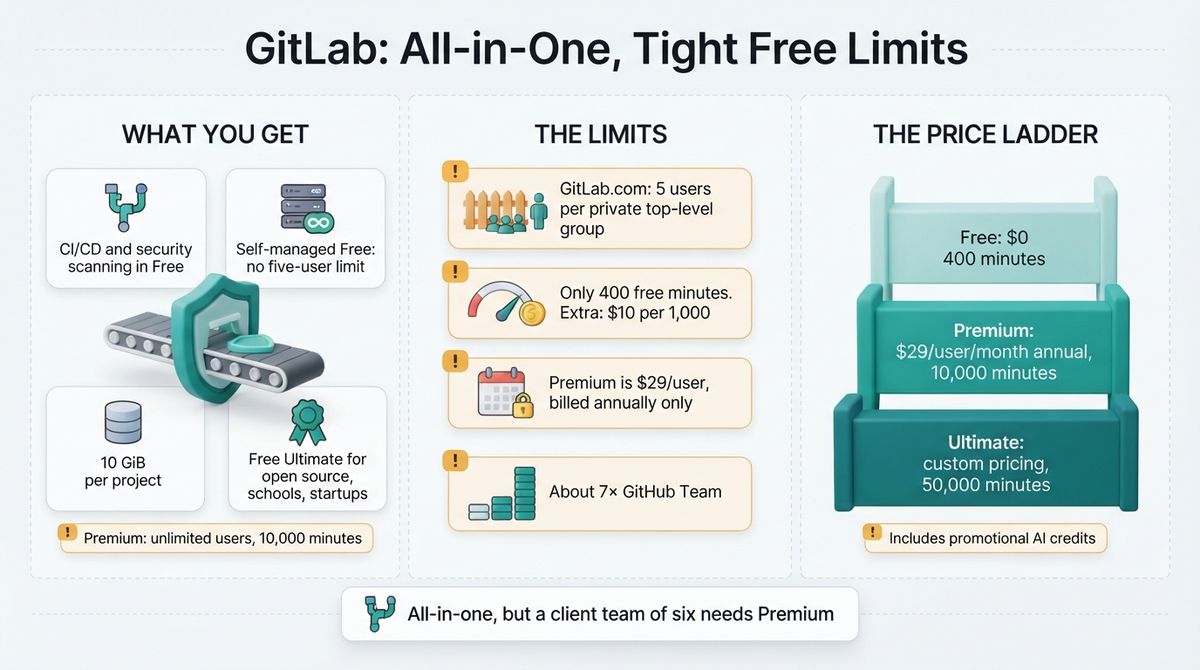
GitLab pricing
| Plan | Price | Compute minutes | What you get |
|---|---|---|---|
| Free | $0 | 400/month | 5 users per private top-level group, 10 GiB per project, static application security testing |
| Premium | $29/user/month billed annually | 10,000/month per namespace | Unlimited users, 500 GiB per project, $12 promotional credits per user |
| Ultimate | Custom | 50,000/month | Security scanning, compliance, free guest users, $24 promotional credits per user |
| Extra compute | $10 per 1,000 minutes | Not applicable | Purchased on top of any plan |
GitLab: Pros and Cons
Pros:
- CI/CD and security scanning included on the free plan.
- Self-managed Free has no five-user cap.
- Premium includes 10,000 compute minutes and unlimited users.
- Free Ultimate licenses for open source, education, and startups.
Cons:
- Private top-level groups cap at five users on GitLab.com.
- Only 400 free compute minutes a month.
- Premium costs $29 per user and is annual only.
- Ultimate pricing is not published.
Rating: 4.0 / 5, a strong all-in-one platform with tight free limits.
Bitbucket Review: Cheapest Seats for Jira Teams
- Free plan: Yes, up to 5 users, unlimited private repositories, 50 build minutes a month, and 1 GB of LFS storage
- Starting price: $3.65/user/month (Standard, billed for at least 5 users)
- Best plan for most users: Free, for freelancers whose clients use Jira or Trello
- Platforms: Web and any Git client
- Affiliate program: Unconfirmed; no public affiliate program found
Bitbucket Cloud is Atlassian’s Git host, with Pipelines for CI and links to Jira and Trello. It has Free, Standard, and Premium plans. Build minutes and LFS storage are shared across the workspace.
What Bitbucket does best
Bitbucket’s seat price is the lowest of the paid plans. Standard costs $3.65 per user per month and includes 2,500 pooled build minutes, 5 GB of LFS storage, and unlimited users. Premium costs $7.25 and adds 3,500 minutes, 10 GB of LFS storage, IP allowlisting, and enforced merge checks.
The free plan suits small client teams. It allows up to five users with unlimited private repositories and Jira integration. If a client already tracks work in Jira or Trello, linking branches and pull requests to issues is built in, and that is the reason to pick Bitbucket.
Where Bitbucket falls short
The free plan has just 50 build minutes a month. A CI job that takes three minutes runs about 16 times before you hit the cap. Extra minutes cost $10 per 1,000, so a busy repository either buys minutes or upgrades.
Standard bills for at least five users, so the minimum is $18.25 a month even for one freelancer. Seat prices have also risen: older reviews quote $3.30 and $6.60, and one November source lists Premium at $8, so confirm at checkout. The Free plan caps workspaces at five users.

Bitbucket pricing
| Plan | Price | Build minutes | What you get |
|---|---|---|---|
| Free | $0 (up to 5 users) | 50/month | Unlimited private repositories, Jira integration, 1 GB LFS |
| Standard | $3.65/user/month (billed for at least 5 users) | 2,500/month pooled | Unlimited users, 5 GB LFS |
| Premium | $7.25/user/month (one source lists $8) | 3,500/month | IP allowlisting, enforced merge checks, 10 GB LFS |
| Extra build minutes | $10 per 1,000 minutes | Not applicable | Purchased on top of any plan |
Bitbucket: Pros and Cons
Pros:
- Free for up to five users with unlimited private repositories.
- Standard at $3.65 per user is the cheapest paid seat.
- Native Jira and Trello links.
- 2,500 pooled build minutes on Standard.
Cons:
- Only 50 free build minutes a month.
- Standard bills for at least five users.
- The free plan caps workspaces at five users.
- Seat prices rose, and sources disagree on Premium.
Rating: 3.7 / 5, good for Jira-linked work, tight everywhere else.
Head-to-Head Comparison Table
| Feature | GitHub | GitLab | Bitbucket |
|---|---|---|---|
| Free private repositories | Unlimited | Unlimited | Unlimited |
| Free collaborators | Unlimited | 5 per private top-level group | 5 per workspace |
| Free CI minutes | 2,000 (private repos) | 400 | 50 |
| CI overage | $0.006/minute (Linux 2-core) | $10 per 1,000 minutes | $10 per 1,000 minutes |
| Free storage | 500 MB Packages; Git LFS 10 GiB | 10 GiB per project | 1 GB LFS |
| Paid entry price | Team, $4/user/month | Premium, $29/user/month annual | Standard, $3.65/user/month, 5-user minimum |
| Included minutes on that plan | 3,000 | 10,000 | 2,500 |
| Self-hosted option | GitHub Enterprise Server | Self-managed, including Free | Data Center, separately priced |
| Best for | Most freelancers | CI, security, and self-hosting in one | Jira and Trello teams |
| Rating | 4.6 / 5 | 4.0 / 5 | 3.7 / 5 |
Which Should You Choose?
The right host depends on your clients, your CI needs, and how many people you work with.
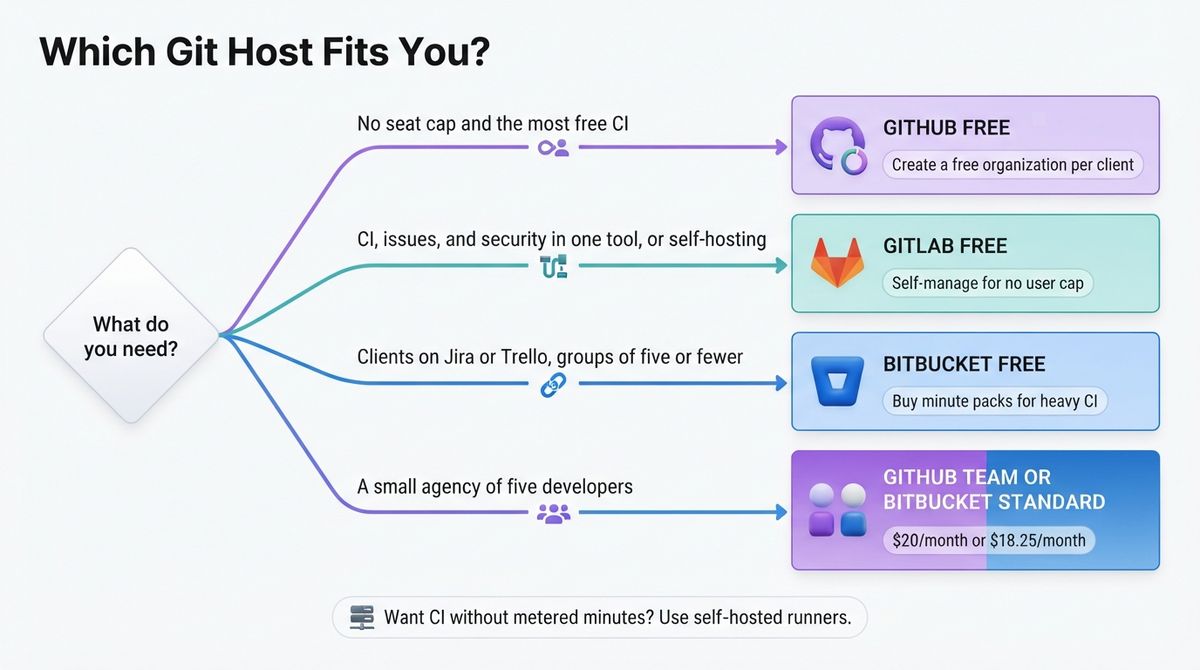
- Choose GitHub if you want the most generous free plan, no seat cap, and the most free CI minutes.
- Choose GitLab if you want CI, issues, and security scanning in one place, or you want to self-host without a user cap.
- Choose Bitbucket if your clients already run Jira or Trello and you work in groups of five or fewer.
Check the seat cap before you invite a client
Seat caps matter more than repository limits. GitHub’s free organizations have no seat cap, so you can create one per client. GitLab caps a private top-level group at five users on GitLab.com, and Bitbucket caps a free workspace at five. A client team of six pushes you onto a paid plan on either.
What each costs over three years
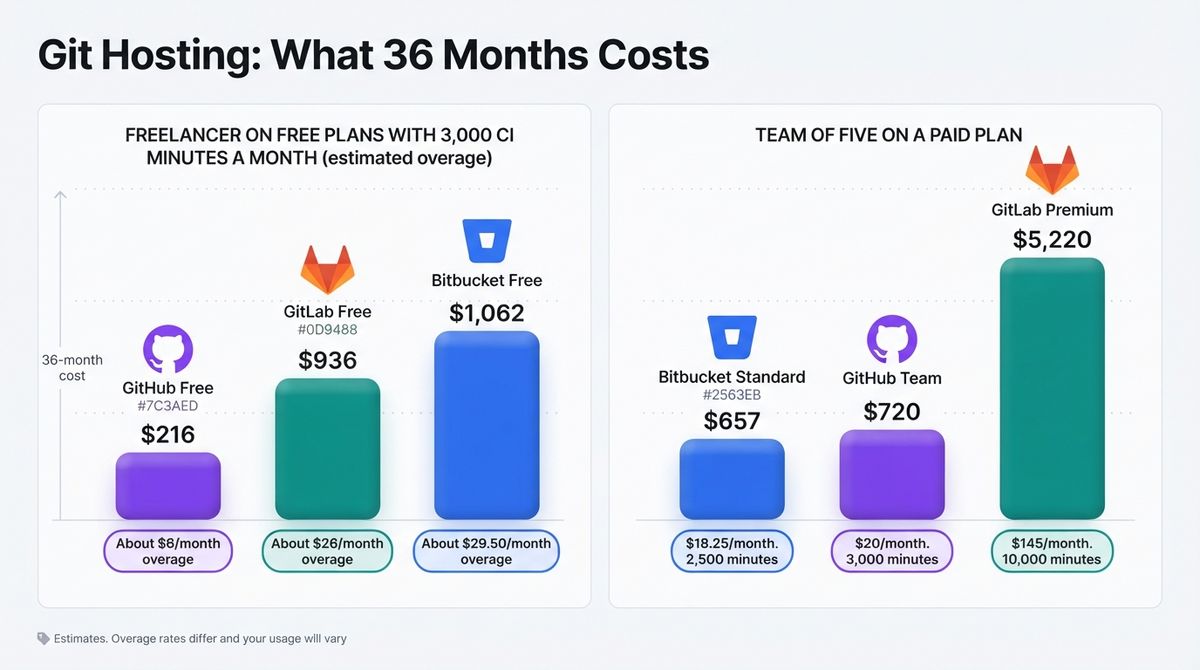
Take a freelancer running 3,000 CI minutes a month. GitHub Free costs about $6 a month in overage, or $216 over 36 months. GitLab Free costs about $26 a month, or $936, and Bitbucket Free about $29.50, or $1,062. Treat these as estimates, since the overage rates differ and your usage will vary.
For a team of five, GitHub Team costs $20 a month, or $720 over three years. Bitbucket Standard costs $18.25 a month, or $657. GitLab Premium costs $145 a month, or $5,220, and includes 10,000 compute minutes.
Our Recommendations
- Solo freelancer with several client projects: Use GitHub Free and create a free organization per client. There is no seat cap and 2,000 free CI minutes.
- Freelancer who wants CI, issues, and security in one tool: Use GitLab Free, or self-manage it if you want no user limit.
- Freelancer whose clients use Jira or Trello: Use Bitbucket Free for groups of up to five, and buy minute packs at $10 per 1,000 for heavier CI.
- Small agency of five developers: Use GitHub Team at $20 a month or Bitbucket Standard at $18.25. Choose GitLab Premium only if you need its pipeline features.
- Freelancer who wants CI without metered minutes: Use self-hosted runners, which GitHub’s billing documentation lists as free at the time of writing.
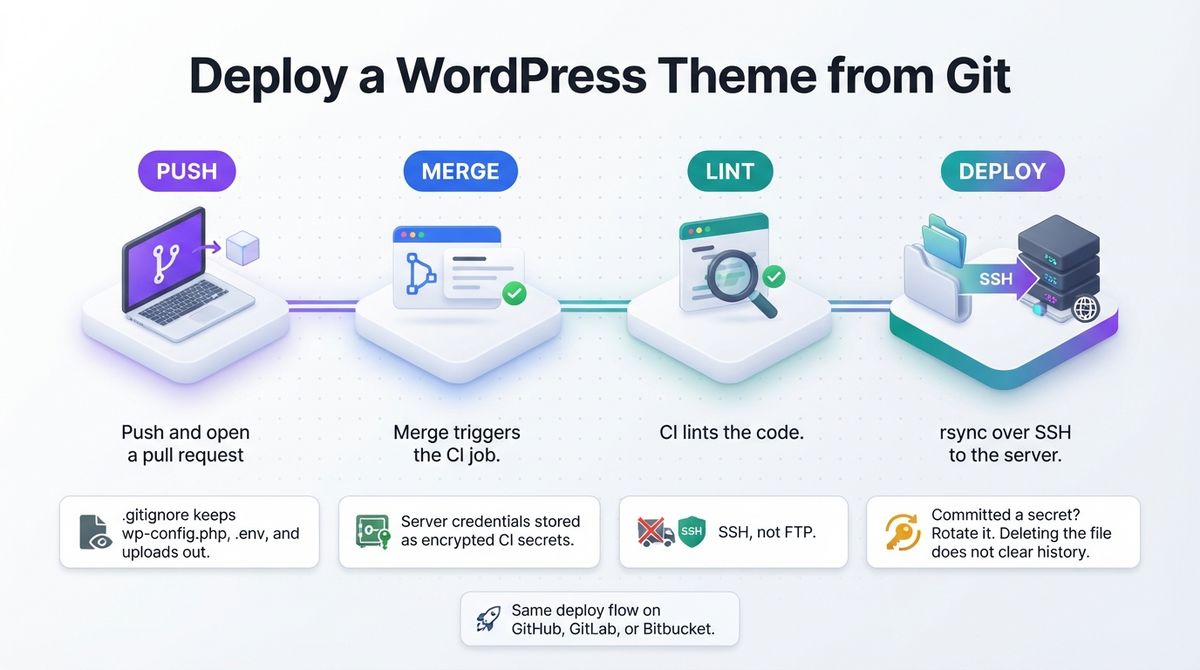
WordPress note: Keep wp-config.php, .env files, and uploads out of the repository with a .gitignore, and deploy themes and plugins from CI over SSH instead of FTP. If you commit a secret by mistake, rotate it. Deleting the file does not remove it from history.
Final Verdict
GitHub is the best choice for most freelance developers. Its free plan has unlimited private repositories and collaborators, the most CI minutes, and the largest ecosystem. GitLab is the better pick when you want pipelines and security in one tool, but its free plan is tight. Bitbucket suits Jira-linked client work, but 50 free minutes will not stretch far.
In the GitHub vs GitLab vs Bitbucket decision, start free on GitHub, choose GitLab for an all-in-one pipeline, and pick Bitbucket for Jira-linked client work. You can also pair your repository setup with the best local WordPress development tools for freelancers to simplify site builds.
- GitHub: 4.6 / 5, best for most freelancers.
- GitLab: 4.0 / 5, best for all-in-one pipelines and self-hosting.
- Bitbucket: 3.7 / 5, best for Jira and Trello teams.
Frequently Asked Questions
What is the best Git hosting for freelance developers?
GitHub is the best fit for most freelance developers. Its free plan offers unlimited private repositories and collaborators, plus 2,000 Actions minutes a month on private repos. GitLab Free caps private groups at five users and 400 minutes, and Bitbucket Free caps workspaces at five users and 50 build minutes.
Are private repositories free on GitHub, GitLab, and Bitbucket?
Yes, on all three. GitHub Free allows unlimited private repositories and collaborators. GitLab Free allows private repositories but caps private top-level groups at five users on GitLab.com. Bitbucket Free allows unlimited private repositories for up to five users. The limits that matter are seats and CI minutes, not repositories.
How many CI minutes do I get free?
GitHub Free includes 2,000 Actions minutes a month for private repositories, and public repositories on standard runners are free. GitLab Free includes 400 compute minutes a month. Bitbucket Free includes 50 build minutes a month. Extra minutes cost $0.006 on GitHub Linux runners and $10 per 1,000 on GitLab and Bitbucket.
How much does GitHub Team cost?
GitHub Team costs $4 per user per month, and Enterprise starts at $21. GitHub’s pricing page marks both prices as for the first 12 months and does not publish year-two prices. Team includes 3,000 Actions minutes and protected branches. A personal Pro plan also costs $4 a month.
How much does GitLab Premium cost?
GitLab Premium costs $29 per user a month billed annually, with no monthly option. It includes unlimited users, 10,000 compute minutes a month, and 500 GiB of storage per project. Ultimate pricing is custom, though third-party sources cite about $99 per user. Premium is roughly seven times GitHub Team’s price.
How much does Bitbucket cost?
Bitbucket Free covers up to five users with 50 build minutes. Standard costs $3.65 per user a month and Premium costs $7.25, though one source lists $8. Standard bills for at least five users, so it costs at least $18.25 a month. Extra build minutes cost $10 per 1,000.
Should a freelancer let clients own the repository?
Yes, where the client agrees. Create the repository in the client’s own organization and add yourself as a collaborator, or transfer ownership at handover. On GitHub, free organizations have no seat cap, so this costs you nothing. On GitLab and Bitbucket, free groups cap at five users.
How do I deploy a WordPress theme from Git?
Run a CI job on every merge that lints the code, then deploys the theme or plugin folder to your server over SSH with rsync. Keep wp-config.php, .env files, and uploads out of the repository with a .gitignore. Store server credentials as encrypted CI secrets, never in code, and rotate any secret you commit by mistake.