You just finished a 45-minute client call. Your notes are a mess of half-sentences and crossed-out action items. You’re not sure who agreed to do what, or by when.
AI meeting assistants were supposed to fix this. And in 2026, the technology has genuinely caught up with the promise. Automatic transcription, AI-generated summaries, action item extraction, CRM sync, these tools do things that felt like science fiction five years ago.
But the market is flooded. Fathom, Fireflies.ai, Otter.ai, tl;dv, Grain, Read.ai, Avoma, the list keeps growing. Every tool claims to be the best. Most reviews online are written by affiliates pushing the highest-paying option.
I spent 30+ days testing the three (Fathom vs Fireflies vs Otter.ai) most searched AI meeting assistants of 2026, Fathom, Fireflies.ai, and Otter.ai, in real work scenarios: client calls, team standups, sales demos, and podcast-style interviews. Here is what actually happened.
Table of Contents
How We Tested These AI Meeting Assistants
Every tool was evaluated across five criteria:
- Transcription accuracy, Word-for-word accuracy across different accents, crosstalk, and background noise conditions. Tested with Zoom, Google Meet, and Microsoft Teams. If you haven’t settled on which of these video conferencing tools to standardise your calls on, see our Zoom vs Microsoft Teams vs Google Meet comparison.
- Summary and action item quality, Does the AI actually extract what matters, or does it produce a wall of filler text that still requires you to re-read the transcript?
- Pricing transparency, Are the limits and costs clear upfront, or buried in footnotes? We specifically looked for hidden usage caps and credit systems.
- Integration depth, Does the tool connect to the apps you already use (Slack, CRM, Notion, email)?
- Free tier usefulness, How much real value do you get before paying anything?
One thing I noticed immediately: the AI meeting assistant space is unusually prone to pricing traps. Two of the three tools in this review have limits in their free or lower tiers that are deliberately hard to find. I’ll call those out specifically.
1. Fathom – Best Free Tier, Best for Individuals
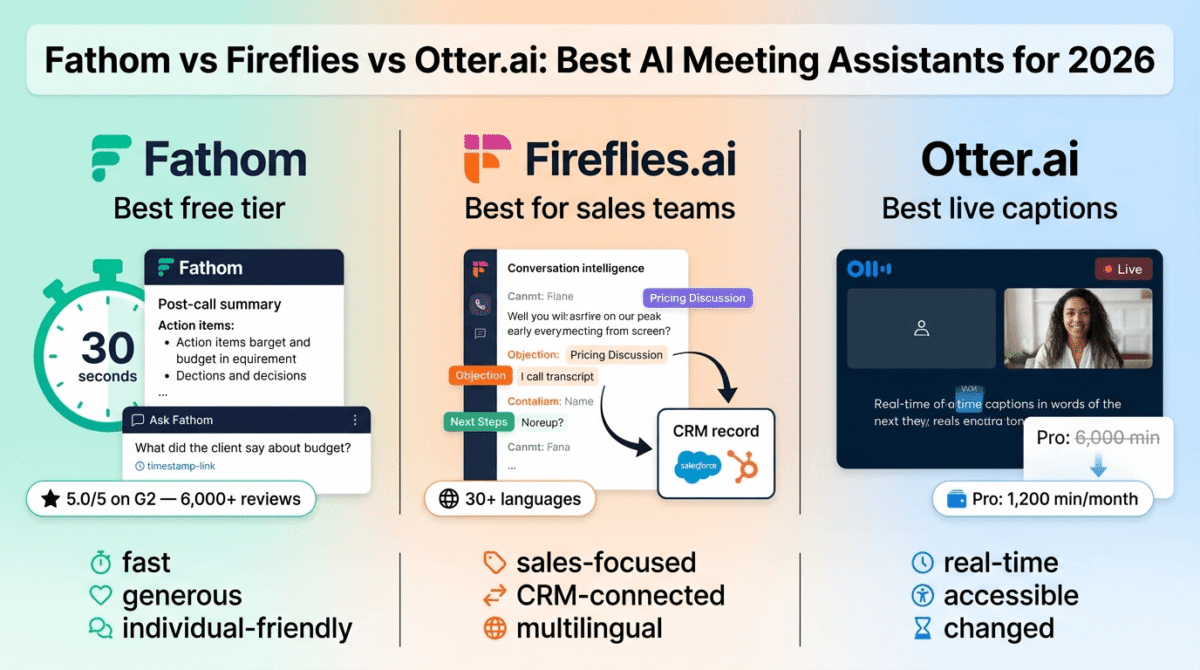
Fathom launched in 2020 and quietly became the highest-rated AI meeting assistant on G2, achieving a 5.0/5 rating from over 6,000 verified reviews. That is not a rounding error. It’s rare for any software to hold that rating at scale, and it reflects something genuinely different about the product.
What Fathom Does Best
Fathom’s core pitch is simple: join the call, record it, transcribe it, and deliver a clean summary within about 30 seconds of the call ending. No manual upload. No waiting. The summary is ready before you’ve even sent the follow-up email.
The free tier is one of the most generous in the software category. You get unlimited recording, unlimited transcription, and unlimited storage across Zoom, Google Meet, and Microsoft Teams, forever, with no credit card required. That alone makes Fathom worth testing before any other tool.
The transcription quality is excellent for English. Fathom claims 95% accuracy, and in clean audio conditions that tracks. Speaker attribution is reliable. The summaries avoid the waffle that plagues cheaper AI, you get bullet-pointed action items and decisions, not a paragraph-by-paragraph rehash of everything said.
Post-call, you can ask Fathom conversational questions about the meeting through the “Ask Fathom” interface. Rather than hunting for a specific moment in a 60-minute transcript, you type: “What did the client say about the budget?” and get a direct answer with a timestamp link.
Where Fathom Falls Short
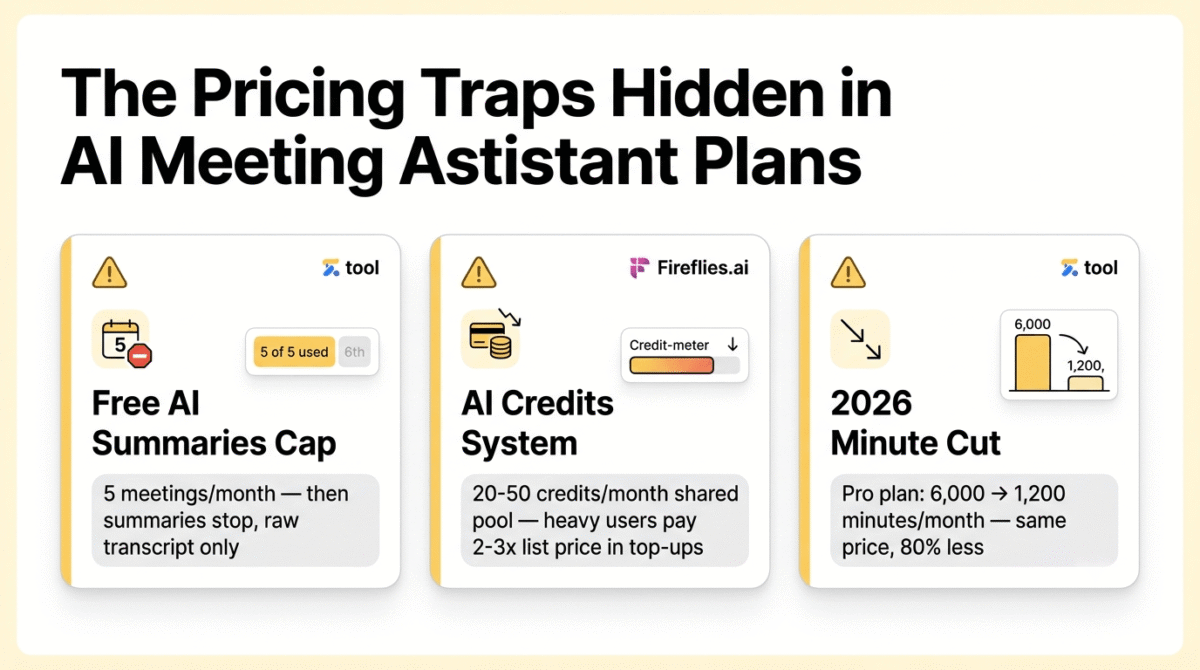
The free tier has a limit that Fathom doesn’t advertise prominently enough: AI-generated summaries are capped at five meetings per month. After that, you get raw recordings and transcripts but none of the smart AI output, no summaries, no action items. For anyone attending more than five meetings a week, the free tier becomes significantly less useful around day eight of the month.
The visible bot joining your call is another consideration. In client-facing or sensitive calls, a “Fathom Notetaker” appearing in the participant list changes the dynamic. Some clients find it reassuring. Others find it uncomfortable. There is no bot-free mode on Fathom.
Language support is limited primarily to English. If your team operates across multiple languages, Fathom is not the right tool.
Pros:
- Highest G2 rating in the category (5.0/5, 6,000+ reviews)
- Genuinely unlimited free tier for recordings and transcription
- 30-second post-call summary delivery
- Excellent English transcription accuracy
- Conversational AI search across meeting history
- No credit card required for free plan
Cons:
- Free AI summaries capped at 5 per month
- Visible bot in every meeting
- English-only (no multilingual support)
- Team collaboration features require paid plans
- Smaller company than competitors, long-term continuity is a reasonable question
Rating: 4.5/5
Fathom Pricing (2026)
| Plan | Monthly Price | Annual Price | What You Get |
|---|---|---|---|
| Free | $0 | $0 | Unlimited recording/transcription, 5 AI summaries/month |
| Premium | $20/user/month | ~$15.60/user/month | Unlimited AI summaries, Ask Fathom, follow-up email drafts |
| Team | $18/user/month | ~$14/user/month | Everything in Premium + shared folders, SSO, admin controls |
| Business | $28/user/month | ~$21.84/user/month | CRM sync, coaching templates, advanced analytics |
Pricing trap warning: The free plan looks unlimited because recordings and storage genuinely are. But the AI features, which are the reason you’re using Fathom, cut off at 5 meetings per month. Heavy meeting schedules will hit this cap within the first two weeks.
2. Fireflies.ai, Best for Sales Teams, Most Hidden Costs
Fireflies.ai has been in the AI meeting space since 2016, making it one of the original players. In 2026, it’s matured into a sales-focused platform with deep CRM integrations, conversation intelligence, and what it calls “Voice Agents”, AI that can participate in two-way conversations and push structured data to HubSpot or Salesforce automatically.
What Fireflies Does Best
If your primary use case involves sales calls, customer success, or any workflow where meetings feed directly into a CRM, Fireflies is the most feature-complete option. The Business plan includes automatic CRM sync to Salesforce and HubSpot, after a call ends, the summary, action items, and deal-relevant data land directly in your CRM record without manual data entry.
Conversation intelligence goes beyond basic transcription. Fireflies tags segments by topic (pricing discussion, competitor mention, objection, next steps) and tracks sentiment across the call. For sales managers coaching reps, this gives a structured way to review calls and identify patterns across a team.
Multilingual support is strong, 30+ languages with auto-detection, which matters for international teams. This is where Fireflies clearly outperforms Fathom.
The “Talk to Fireflies” feature (powered by Perplexity AI) lets you ask live questions and get web search results during meetings without leaving the call interface. It’s a genuinely useful addition for fact-checking, looking up company information, or researching competitors in real time.
Where Fireflies Falls Short
The AI credits system is the most controversial aspect of Fireflies pricing, and it needs to be understood before you commit.
Standard transcription is included in all paid plans. But the advanced AI features, AskFred (the conversational AI), smart highlights, advanced summaries, and action item extraction, consume credits. Each plan comes with a one-time shared credit pool: 20 credits on Pro, 30 on Business, 50 on Enterprise. Once those credits are exhausted, you either buy more (at additional cost) or lose access to the features.
This means two users on the Business plan who use AskFred regularly can exhaust a month’s credits significantly faster than the plan suggests. Heavy users report spending two to three times the base subscription price on credit top-ups.
The free plan is legitimately restrictive: 800 minutes of total storage (roughly 13 hours), not 800 minutes per month. That’s a lifetime cap, not a rolling one. For anyone testing the product seriously, the free tier runs out within a few weeks.
The visible bot is also a consistent complaint. Users describe it as difficult to remove from calendar events it shouldn’t have joined, it defaults to joining every meeting on your calendar unless explicitly blocked.
Pros:
- Deep CRM integration (Salesforce, HubSpot, 100+ apps)
- Strong conversation intelligence for sales teams
- Multilingual support (30+ languages)
- Voice Agents for automated two-way meeting participation
- Live web search during meetings (Talk to Fireflies)
- 44% annual discount makes Business plan significantly cheaper annually
Cons:
- AI credits system is genuinely confusing and adds hidden cost
- Free tier storage is 800 minutes total (not monthly)
- Visible bot that’s difficult to remove from calendar
- Interface is cluttered for non-sales users
- Free plan AI credits are a one-time pool, not recurring
Rating: 4.0/5
Fireflies.ai Pricing (2026)
| Plan | Monthly Price | Annual Price | AI Credits/Month |
|---|---|---|---|
| Free | $0 | $0 | 20 (one-time pool), 800 min total storage |
| Pro | $18/user/month | $10/user/month | 20/month |
| Business | $29/user/month | $19/user/month | 30/month |
| Enterprise | $39/user/month | $39/user/month | 50/month |
Pricing trap warning: The annual discount is aggressive (44% off), which makes Fireflies look cheaper than it is monthly. More importantly, the AI credits system means your effective monthly cost scales with usage. Heavy AskFred users and teams relying on advanced AI summaries regularly hit credit limits and pay additional top-up fees on top of the base subscription.
3. Otter.ai, Best for Live Captions, Most Controversial Pricing Change
Otter.ai is the original mainstream AI meeting transcription tool. It launched in 2018 and spent several years as the default recommendation for anyone who needed meeting notes. In 2026, it’s still capable, but a controversial pricing change has made it significantly less competitive at the individual level.
What Otter Does Best
Otter’s standout feature is live transcription. Unlike Fathom and Fireflies, which primarily work on post-meeting summaries, Otter shows real-time captions during the meeting itself. For participants who are hard of hearing, non-native speakers, or simply want to follow along without taking notes, this is genuinely useful.
The OtterPilot bot handles recording for Zoom, Google Meet, and Microsoft Teams automatically. AI Chat allows natural language questions against your meeting archive. If you want to compare that conversational search against general AI chatbots like ChatGPT, Claude, and Gemini for broader use beyond meetings, see our comparison of the three. For teams, there’s a shared workspace where all meeting notes are searchable across the organization, useful for onboarding, knowledge management, and compliance documentation.
CRM sync with Salesforce and HubSpot is available, but only on the Enterprise plan. This is a significant limitation compared to Fireflies, which includes it on Business.
The student discount (20% off the Pro plan) is available with a .edu email address and brings the annual cost down to approximately $6.67 per month, making it the cheapest credible paid option for individuals.
Where Otter Falls Short
In 2026, Otter made a change that generated more negative reviews than anything else in its history: the Pro plan minute allowance was cut from 6,000 to 1,200 minutes per month, with no reduction in price.
1,200 minutes sounds like a lot until you calculate it. If you average five 45-minute meetings per week, you’ll hit 900 minutes in three weeks. Add any long calls, recorded team sessions, or file imports, and the limit becomes a real constraint by the end of the month.
When you hit the cap, Otter stops transcribing entirely. There is no overage option, you either upgrade or wait for the month to reset. No rollover of unused minutes either.
The file import limit on Pro (10 per month) is another friction point. Anyone who needs to upload recordings from other platforms, transcribe podcast episodes, or process existing audio hits this limit quickly.
Transcription accuracy is excellent for English, arguably the best of the three for the live caption use case. But language support is limited to six: English, Spanish, French, German, Japanese, and Chinese. For global teams, that’s restrictive.
Pros:
- Best real-time live captions during meetings
- Pioneer-level transcription accuracy in English
- Searchable meeting archive across teams
- Student discount (20% off with .edu email)
- Clean, intuitive interface
- 6-language support including Japanese and Chinese
Cons:
- Pro plan minutes cut from 6,000 to 1,200 with no price reduction, most-cited complaint in 2026
- No transcription after hitting monthly cap (hard stop)
- File import limit: only 10 per month on Pro
- CRM sync only available on Enterprise (not Business)
- Non-refundable subscriptions
- Visible bot joins every meeting
Rating: 3.8/5
Otter.ai Pricing (2026)
| Plan | Monthly Price | Annual Price | Minutes/Month |
|---|---|---|---|
| Basic (Free) | $0 | $0 | 300 minutes, 30-min cap per conversation |
| Pro | $16.99/user/month | $8.33/user/month | 1,200 minutes, 10 file imports |
| Business | $30/user/month | $20/user/month | Unlimited meetings, 6,000 file import minutes |
| Enterprise | Custom | Custom | Unlimited + OtterPilot for Sales |
Pricing trap warning: The Pro plan minute reduction from 6,000 to 1,200 is the biggest value erosion in this comparison. Otter kept the price identical while cutting the core deliverable by 80%. If you use Otter more than casually, the Business plan at $20/user/month (annual) is the minimum functional tier, making it more expensive than Fireflies Pro and less generous than Fathom Premium.
Head-to-Head Comparison Table
| Feature | Fathom | Fireflies.ai | Otter.ai |
|---|---|---|---|
| Free Plan | Unlimited recording, 5 AI summaries/month | 800 min total, 20 one-time AI credits | 300 min/month, 30-min cap |
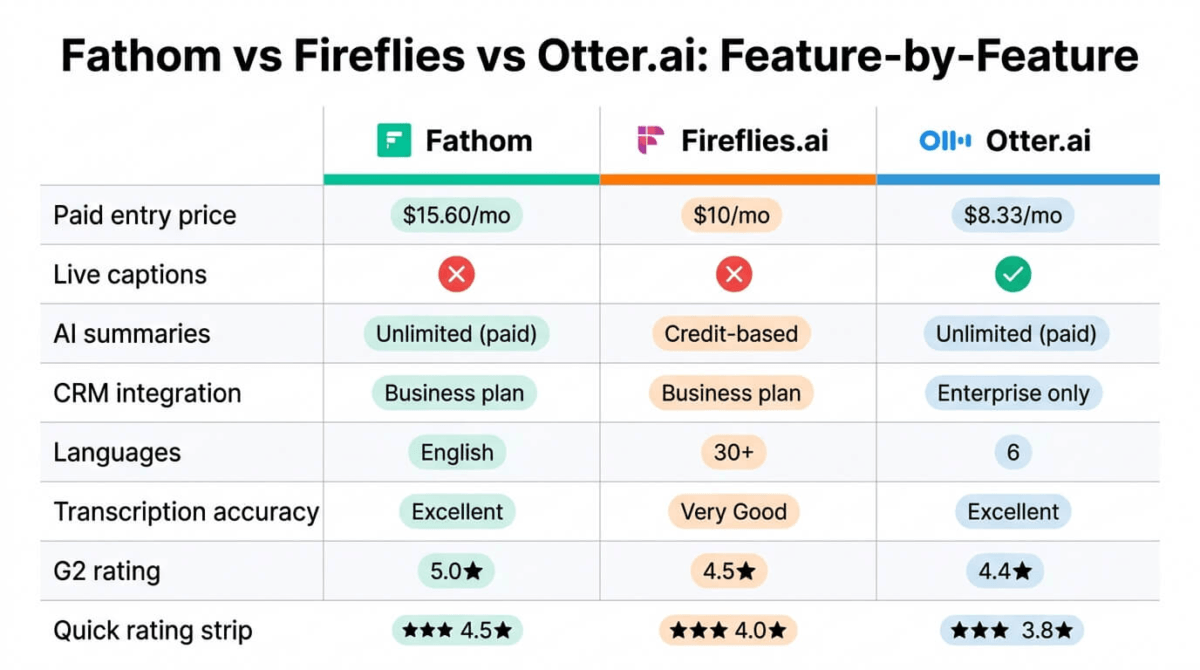
| Paid Entry Price | $15.60/mo (annual) | $10/mo (annual) | $8.33/mo (annual) |
| Transcription Accuracy | Excellent (English) | Very Good (30+ languages) | Excellent (English) |
| Live Captions | No | No | Yes |
| AI Summaries | Unlimited on paid | Credit-based (hidden cost) | Unlimited on paid |
| CRM Integration | Business plan | Business plan | Enterprise only |
| Languages | English primarily | 30+ | 6 |
| Bot Visibility | Visible | Visible | Visible |
| Platforms | Zoom, Meet, Teams | Zoom, Meet, Teams + more | Zoom, Meet, Teams |
| G2 Rating | 5.0/5 | 4.5/5 | 4.4/5 |
| Best For | Individuals, small teams | Sales teams | Live captions, students |
Which AI Meeting Assistant Should You Choose?
Choose Fathom if: You attend fewer than 5 meetings a month and want to test a genuinely excellent tool for free, OR you’re an individual professional who needs reliable AI summaries and a clean post-call workflow. Fathom’s free tier is the most useful in the category for low-to-moderate meeting volume, and the Premium plan at ~$15.60/month (annual) is excellent value.
Choose Fireflies.ai if: You’re on a sales team, customer success team, or any role where meeting data needs to flow automatically into Salesforce or HubSpot. The conversation intelligence, CRM automation, and Voice Agents are genuinely ahead of the competition. Just budget for the actual cost, add roughly 30% to your estimated plan cost to account for AI credit top-ups if your team uses advanced features heavily.
Choose Otter.ai if: You specifically need live real-time captions during meetings (for accessibility or focus reasons), you’re a student who qualifies for the 20% discount, or your meetings primarily involve Japanese or Chinese speakers (where Otter’s language support is stronger than Fathom). For general professional use, the 2026 pricing changes make it harder to recommend over the other two.
Consider a free alternative if: Your meetings are infrequent and you primarily need the recording. Google Meet’s native recording (free with Google Workspace), Microsoft Teams transcription (built into M365), and Zoom’s local recording are all functional without any additional subscription.
How Bloggers and Content Creators Should Use AI Meeting Assistants
If you run a content business, the ROI calculation is different from a sales team’s. Here’s where AI meeting assistants earn their cost for creators:
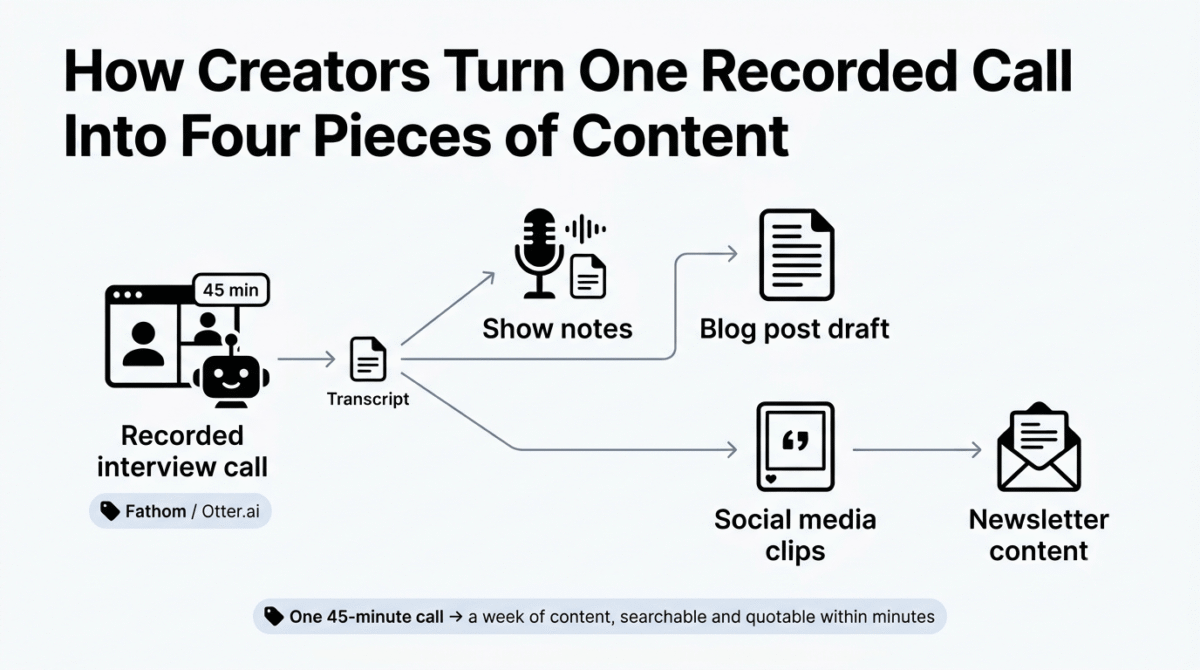
Podcast and interview transcription. Record your interview on Zoom, let Fathom or Otter capture the transcript, and you have a searchable, quotable text version within minutes of ending the call. That transcript becomes show notes, blog post raw material, social media clips, and newsletter content simultaneously.
Client calls. Freelancers doing client strategy calls, briefs, or feedback sessions should never be taking manual notes. An AI meeting assistant means you stay present in the conversation, nodding, thinking, asking follow-up questions, while the AI handles documentation. Post-call, the action item list is already drafted.
Team and collaboration calls. If you work with a VA, editor, or collaborator, meeting recordings with AI summaries mean no one needs to remember what was agreed. The summary goes into Notion or email immediately after the call.
Content repurposing. A 45-minute conversation with an expert is a goldmine of content. With a transcript, you can identify the three most quotable moments, pull a LinkedIn post, and have the structure of a blog post, all from one call.
For most solo creators and small teams, Fathom’s free tier or $15.60/month Premium plan covers all of this. Fireflies becomes relevant when you’re running a sales operation or managing team analytics. See our full AI toolkit for bloggers roundup for how a meeting assistant fits alongside the rest of a content creation stack.
Final Verdict
Winner: Fathom, for individuals, freelancers, content creators, and small teams.
Fathom is the most balanced AI meeting assistant available in 2026. The free tier is genuinely useful (not a deliberate cripple designed to force an upgrade), the paid plans are fairly priced, the summaries are fast and accurate, and the G2 rating reflects real user satisfaction rather than marketing spend.
The AI credit system at Fireflies and the minute-cap reduction at Otter make both tools harder to recommend without caveats. Fireflies earns its place for dedicated sales teams who need the CRM integration and conversation intelligence. Otter still has the best live captions and remains a valid choice for specific use cases. But for the core question, “which AI meeting assistant should I start with?”, the answer in 2026 is Fathom.
| Tool | Rating | Best For |
|---|---|---|
| Fathom | Individuals, small teams, content creators | |
| Fireflies.ai | Sales teams, CRM-heavy workflows | |
| Otter.ai | Live captions, students, Japanese/Chinese |
Frequently Asked Questions
What is the best free AI meeting assistant in 2026?
Fathom offers the most useful free tier, unlimited recording, transcription, and storage across Zoom, Google Meet, and Microsoft Teams. The main limitation is that AI-powered summaries are capped at 5 meetings per month on the free plan. For occasional meeting users, this is more than enough without paying anything.
Is Otter.ai still worth it in 2026?
Otter is worth it for specific use cases: live real-time captions, student users with .edu discounts, and teams that need Japanese or Chinese transcription. For general use, the 2026 Pro plan minute reduction (6,000 to 1,200 per month at the same price) makes Fathom and Fireflies better value for most professionals.
Does Fireflies.ai have hidden costs?
Yes. Fireflies uses an AI credits system for advanced features like AskFred, smart highlights, and detailed summaries. Each plan includes a monthly credit pool that heavy users can exhaust within a few weeks. Additional credits are purchased separately, meaning your actual monthly cost may be significantly higher than the plan price suggests.
Can AI meeting assistants work without a visible bot?
Most mainstream tools, Fathom, Fireflies, Otter, join meetings as a visible bot participant. Bot-free options exist (Granola for macOS, some Fathom hybrid modes) but they typically require running software locally. For most professional contexts, the visible bot is the norm.
Which AI meeting assistant integrates best with Salesforce and HubSpot?
Fireflies.ai offers the deepest CRM integration at its Business plan ($19/user/month annual). It automatically pushes meeting summaries, action items, and deal-relevant data directly into CRM records. Fathom includes CRM sync on its Business plan. Otter.ai only offers Salesforce/HubSpot integration at the Enterprise (custom pricing) level.
How accurate is AI meeting transcription in 2026?
For clear English audio in a quiet environment, Fathom and Otter both achieve accuracy in the 93–95% range. Fireflies is comparable for English and handles 30+ additional languages. Accuracy drops meaningfully with heavy accents, crosstalk between multiple speakers, technical jargon, or background noise, expect 10–20% more errors in challenging audio conditions.
Are AI meeting assistants worth it for freelancers?
For freelancers doing regular client calls, strategy sessions, or collaborative work, yes, even the free tier of Fathom eliminates manual note-taking entirely. The ROI calculation is straightforward: if an AI meeting assistant saves you 20 minutes of note-writing per call, and you’re on two calls per day, that’s nearly seven hours per month recovered at zero cost.
Can I use these tools for podcast transcription?
Otter.ai and Fireflies.ai both accept audio file imports, making them viable for podcast transcription. Fathom is designed primarily for live meeting capture and has limited batch file processing. For dedicated podcast transcription, tools like Descript or Sonix are purpose-built and may offer better value at volume. See our dedicated transcription software comparison of Descript vs Otter.ai vs Riverside for podcast-specific workflows.