An infographic can earn backlinks and shares long after a post goes live, but most bloggers do not want to hire a designer or learn a pro design tool. Comparing Piktochart vs Venngage vs Visme is the usual shortcut. It is trickier than it looks, because the free plans behave very differently.
An infographic maker gives you templates, charts, icons, and one-click export. The catch is what the free plans let you take away: Piktochart allows two downloads for the life of the account, Venngage allows none, and Visme adds branding and limits downloads. Prices also moved in 2026, so many older reviews quote plans that no longer match the pricing pages.
I tested Piktochart vs Venngage vs Visme for 30 days, building the same infographic with each, a 10-step process graphic with three charts, then exporting it as PNG and compressing it to WebP for a WordPress post. Here is the honest comparison, including the catch most bloggers miss: the features bloggers want sit on different plans, with PDF export on Venngage Business ($24 a month annually), a brand kit on Visme Pro ($24.75), and a full brand kit on Piktochart Business ($17). Before uploading your finished graphic to WordPress, evaluate the best image compression tools for bloggers to keep page speeds fast.
Table of Contents
How We Tested
I scored each tool on five criteria:
- Free plan usability: whether you can finish and download one infographic without paying.
- Templates and ease for non-designers: how fast a blogger gets from a blank page to a finished graphic.
- Export formats and file quality: PNG, PDF, and interactive options on each plan.
- Pricing and three-year cost: monthly versus annual billing and per-seat charges.
- Brand control and extras: brand kits, AI generation, and interactive output.
Piktochart Review: Unlimited PNG at the Lowest Price
- Free plan: Yes, with 60 AI credits a month, 1 GB of storage, and 2 PNG downloads for the life of the account
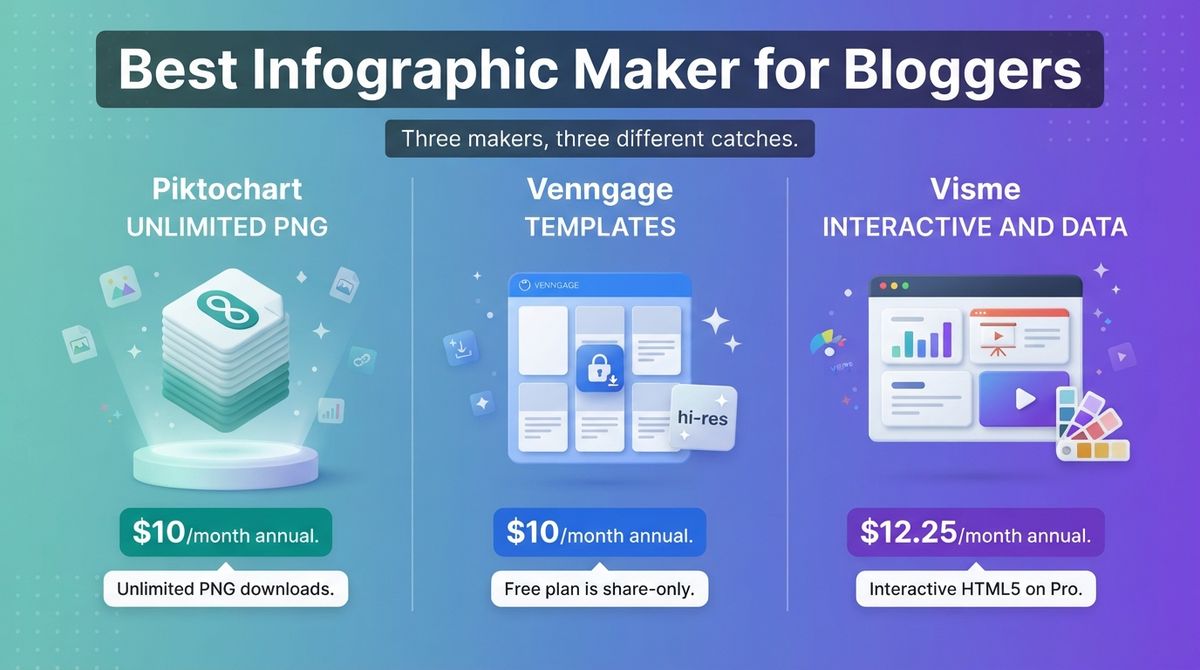
- Starting price: $15/month, or $10/month billed annually (Pro, per member)
- Best plan for most users: Pro
- Platforms: Web
- Affiliate program: Yes, up to 40% lifetime recurring commission with a 60-day cookie, through Awin
Piktochart targets non-designers who need infographics, reports, and presentation-style visuals. It generates layouts with AI credits and offers a template library with an editor built for quick edits. Pricing is per member, and the Education and Nonprofit plans cost $39.99 and $60 a year.
What Piktochart does best
Pro is the cheapest way to export without limits. At $10 a month billed annually, it includes unlimited PNG downloads, 500 AI credits a month, 100 GB of storage, 5 million or more premium assets, and transparent backgrounds. Piktochart’s own comparison shows no Piktochart logo on downloads at any tier, including Free.
The free plan is useful for one test. Two PNG downloads let you build and export a finished infographic before you pay. Business adds PDF and PowerPoint exports, a full Brand Kit, 1,000 AI credits, and 250 GB of storage for $17 a month billed annually.
Where Piktochart falls short
The two free downloads never refresh, so Free works as a test, not a routine. Pro is PNG only. PDF export and the expanded Brand Kit need Business, which costs $17 a month billed annually or $20 monthly per member.
Older reviews still quote $14 and $24 for Pro and Business, and $29 and $49 monthly, which no longer match Piktochart’s pricing page. It is also less built for interactive or data-heavy content than Visme, and every paid plan bills per member.

Piktochart pricing
| Plan | Monthly billing | Annual billing | What you get |
|---|---|---|---|
| Free | $0 | $0 | 2 lifetime PNG downloads, 60 AI credits/month, 1 GB storage, up to 4 members |
| Pro | $15/member/month | $10/member/month | Unlimited PNG downloads, 500 AI credits/month, 100 GB, 5M+ premium assets |
| Business | $20/member/month | $17/member/month | Unlimited PNG, PDF, and PowerPoint downloads, 1,000 AI credits, 250 GB, full Brand Kit |
| Education | Not stated | $39.99/year | For students and educators |
| Nonprofit | Not stated | $60/year | For nonprofit organizations |
Piktochart: Pros and Cons
Pros:
- Unlimited PNG downloads on Pro for $10 a month billed annually.
- A free plan that exports two finished designs for testing.
- 500 AI credits a month and 100 GB of storage on Pro.
- Education and Nonprofit discounts.
Cons:
- The two free downloads never refresh.
- PDF export and the full Brand Kit require Business.
- Billing is per member on every paid plan.
- Older reviews quote outdated prices.
Rating: 4.4 / 5, the best value for bloggers who publish PNG infographics.
Venngage Review: Strong Templates, But the Free Plan Is Share-Only
- Free plan: Yes, 5 designs with public sharing only, Venngage branding, and no file downloads
- Starting price: $19/month, or $10/month billed annually (Premium)
- Best plan for most users: Premium for PNG; Business for PDF and Brand Kits
- Platforms: Web
- Affiliate program: Unconfirmed; no public affiliate program found
Venngage is an infographic and report maker with a large template library and an AI generator. It has four plans: Free, Premium, Business, and Enterprise. Its pricing page labels annual billing “save 51%,” which shows how far the monthly price sits above the annual one.
What Venngage does best
Premium covers what most bloggers need. At $10 a month billed annually, it includes unlimited designs, PNG and hi-res PNG exports, private sharing, premium icons and widgets, 50 image uploads, and email and chat support.
Business is where teams get more. It adds PDF and PowerPoint exports, Brand Kits, team sharing, password-protected sharing, folders, Venngage AI, and 1,000 image uploads. Reviewers also credit it with an accessibility checker on paid plans, which helps if your readers use screen readers. Bloggers looking to bundle visual assets into downloadable ebooks should explore the best ebook creation software for bloggers.
Where Venngage falls short
The free plan will not give you a file. It allows 5 designs, public links, and Venngage branding, with no image or PDF downloads. That makes it harder to test than Piktochart. Premium also limits you to preset color palettes, so a custom brand look needs Business.
Business costs $49 per user monthly or $24 billed annually, and it is the only plan with PDF export and Brand Kits. Premium doubles from $10 to $19 on monthly billing. Enterprise starts at $499 a month with a 10-member minimum.

Venngage pricing
| Plan | Monthly billing | Annual billing | What you get |
|---|---|---|---|
| Free | $0 | $0 | 5 designs, public sharing, Venngage branding, 6 image uploads, no downloads |
| Premium | $19/month | $10/month ($120/year) | Unlimited designs, PNG and hi-res PNG, private sharing, premium icons, 50 uploads |
| Business | $49/user/month | $24/user/month | PDF and PowerPoint export, Brand Kits, team sharing, folders, Venngage AI, 1,000 uploads |
| Enterprise | From $499/month | From $499/month | 10-member minimum, onboarding, dedicated account manager |
Venngage: Pros and Cons
Pros:
- Premium at $10 a month billed annually includes unlimited designs and hi-res PNG.
- Private sharing and premium icons on Premium.
- Business adds Brand Kits, PDF export, and team folders.
- An accessibility checker on paid plans, per reviewers.
Cons:
- The free plan allows no file downloads.
- PDF export and Brand Kits require Business at $24 a month annually.
- Monthly billing nearly doubles the price.
- Premium has preset color palettes only.
Rating: 4.0 / 5, a solid maker held back by the free plan and the Business-only extras.
Visme Review: The Most Capable, With the Steepest Monthly Prices
- Free plan: Yes, Basic: unlimited projects, 500 MB, 10 AI credits a month, and Visme branding; sources conflict on whether it allows any download
- Starting price: $29/month, or $12.25/month billed annually (Starter)
- Best plan for most users: Starter for blogs; Pro for a Brand Kit and HTML5 output
- Platforms: Web
- Affiliate program: Yes, Visme Partner Program, recurring commission for 12 months per its partner page (older listings say 25% lifetime; confirm the current rate)
Visme covers more than infographics. It also makes presentations, documents, charts, and data widgets, and it can publish interactive versions. Plans bill per user, and its pricing page shows team prices for Pro.
What Visme does best
Visme has the widest feature set of the three. Starter includes all premium assets, full template access, JPG, PNG, and PDF downloads, 200 AI credits a month, and round-the-clock support. If you also build presentations or reports, one subscription covers them. If slide decks are your primary focus, check out our guide on the best AI presentation makers for faster slide creation.
Pro adds a Brand Kit, analytics, privacy controls, integrations, and PPTX, HTML5, video, and GIF downloads, with 500 AI credits. HTML5 output is Visme’s edge for interactive and animated graphics. A team of three on Pro costs $72 a month on annual billing.
Where Visme falls short
Monthly billing is steep. Starter is $29 a month instead of $12.25 on annual billing, and Pro is $59 instead of $24.75, a gap of up to 58%. The Brand Kit sits on Pro, so consistent fonts and colors cost $297 a year per user.
The free plan is the hardest to read. It gives unlimited projects but only 500 MB, 10 AI credits, and Visme branding. Some reviews say Basic allows no downloads and others say it allows watermarked ones, so check before you plan around it. Every paid plan bills per user.

Visme pricing
| Plan | Monthly billing | Annual billing | What you get |
|---|---|---|---|
| Basic | $0 | $0 | Unlimited projects, 500 MB, 10 AI credits/month, Visme branding, limited downloads |
| Starter | $29/month | $12.25/month ($147/year) | All premium assets, JPG, PNG, and PDF downloads, 200 AI credits/month |
| Pro | $59/month | $24.75/month ($297/year) | Brand Kit, analytics, privacy controls, PPTX, HTML5, video, and GIF downloads, 500 AI credits |
| Pro, team of 3 | $119/month | $72/month ($864/year) | Three users on Pro |
| Enterprise | Custom | Custom | Starts at 10 users |
Visme: Pros and Cons
Pros:
- The widest feature set, covering infographics, presentations, charts, and documents.
- Starter includes JPG, PNG, and PDF downloads.
- Pro adds a Brand Kit and HTML5 output for interactive graphics.
- Analytics and integrations on Pro.
Cons:
- Monthly billing is more than double the annual price.
- The Brand Kit costs $24.75 a month on Pro.
- The free plan has branding, limited storage, and unclear download rules.
- Every paid plan bills per user.
Rating: 4.2 / 5, the best choice for data-heavy and interactive content.

Head-to-Head Comparison Table
| Feature | Piktochart | Venngage | Visme |
|---|---|---|---|
| Free plan downloads | 2 PNG downloads, lifetime | None, share-only | Limited or unclear |
| Entry price, annual billing | $10/month (Pro) | $10/month (Premium) | $12.25/month (Starter) |
| Entry price, monthly billing | $15/month | $19/month | $29/month |
| PNG on the entry plan | Unlimited | Unlimited, including hi-res | Yes, with JPG and PDF |
| PDF export | Business ($17/month annual) | Business ($24/month annual) | Starter ($12.25/month annual) |
| Brand kit | Full Brand Kit on Business | Brand Kits on Business | Brand Kit on Pro ($24.75/month annual) |
| Interactive HTML5 output | Not stated | Not stated | Pro plan |
| AI credits on the entry plan | 500/month | AI on Business | 200/month |
| Billing model | Per member | Per user on Business | Per user |
| Best for | Bloggers who want unlimited PNG at the lowest price | Bloggers who want templates and hi-res PNG | Data-heavy and interactive content |
| Rating | 4.4 / 5 | 4.0 / 5 | 4.2 / 5 |
Which Should You Choose?
The right tool depends on the file you need, your budget, and how much brand control you want.
- Choose Piktochart if you publish PNG infographics and want the lowest price with unlimited downloads. It is also the easiest to test, because Free exports two designs.
- Choose Venngage if you want its template library and hi-res PNG at $10 a month annually, and you do not need PDF export or a Brand Kit.
- Choose Visme if you make data-heavy, interactive, or animated content, or you also need presentations and documents.

Check the free plan before you test
A free infographic is rarely free to use. Piktochart lets you export two designs. Venngage lets you build five but share them only by public link. Visme limits downloads. If you only need an occasional infographic, Canva’s free plan offers infographic templates and allows downloads, with premium elements locked behind Pro. For broader visual assets beyond infographics, see our comparison of the best free photo editors for bloggers.

What each costs over three years
Take one user on the entry plan with annual billing. Piktochart Pro costs $360 over 36 months, or $540 if you pay monthly. Venngage Premium costs $360 annually billed, or $684 monthly. Visme Starter costs $441, or $1,044 monthly.
With a brand kit, Piktochart Business costs $612 over three years, Venngage Business costs $864, and Visme Pro costs $891. Paid monthly, Venngage Business reaches $1,764 and Visme Pro $2,124.

Our Recommendations
- Solo blogger making a few infographics a month: Use Piktochart Pro on annual billing at $10 a month. Test one design on the free plan first.
- Blogger who wants strong templates and sharp exports: Use Venngage Premium at $10 a month annually, and plan on PNG only.
- Publisher making data-heavy or interactive content: Use Visme Pro for HTML5 output, a Brand Kit, and analytics.
- Small team that needs brand consistency: Use Piktochart Business at $17 per member a month. A team of three costs $51 a month, against $72 for Venngage Business or Visme Pro.
- Blogger with no budget and an occasional need: Use Canva’s free plan, and treat the paid tools as an upgrade when you publish regularly.
WordPress note: Export PNG at about twice the display width, then compress it to WebP with an image plugin before uploading. Add descriptive alt text, set width and height attributes to avoid layout shift, and repeat the key points as headings and lists in the post so search engines and answer engines can read them.
Final Verdict
Piktochart is the best choice for most bloggers. Pro gives unlimited PNG downloads for $10 a month billed annually, and the free plan lets you export two designs to test it. Visme is the stronger tool for data-heavy and interactive content, but its monthly prices are steep. Venngage has good templates, but its free plan allows no downloads, and PDF export requires Business.
In the Piktochart vs Venngage vs Visme decision, pick Piktochart for value, Visme for interactivity, and Venngage only if its templates win you over.
- Piktochart: 4.4 / 5, best value for PNG infographics.
- Visme: 4.2 / 5, best for interactive and data-heavy content.
- Venngage: 4.0 / 5, good templates held back by Business-only extras.
Frequently Asked Questions
What is the best infographic maker for bloggers?
Piktochart is the best fit for most bloggers. Pro costs $10 a month billed annually, includes unlimited PNG downloads and 500 AI credits, and the free plan lets you export two designs to test it. Venngage Premium costs the same, and Visme suits data-heavy or interactive content.
Can I download infographics for free?
Only a little. Piktochart’s free plan allows two PNG downloads for the life of the account. Venngage’s free plan lets you create five designs but share them only through public links, with no downloads. Visme’s free plan adds Visme branding and limits downloads. Canva’s free plan also allows downloads.
How much does Piktochart cost in 2026?
Piktochart’s free plan costs $0. Pro costs $10 per member a month billed annually or $15 monthly, and Business costs $17 annually or $20 monthly. Pro includes unlimited PNG downloads and 500 AI credits. Business adds PDF and PowerPoint exports and a full brand kit. Older reviews quote $14 and $24, which no longer match its pricing page.
How much does Venngage cost?
Venngage’s free plan allows five designs with public sharing and no downloads. Premium costs $19 monthly or $10 a month billed annually and adds unlimited designs, PNG and hi-res PNG exports, and private sharing. Business costs $49 monthly or $24 annually per user and adds PDF and PowerPoint export and Brand Kits.
How much does Visme cost?
Visme’s Basic plan is free with Visme branding, 500 MB of storage, and limited downloads. Starter costs $12.25 a month billed annually or $29 monthly and adds JPG, PNG, and PDF downloads. Pro costs $24.75 annually or $59 monthly per user and adds a Brand Kit, analytics, and PPTX, HTML5, video, and GIF downloads.
Which infographic maker has the best brand kit?
Each tool locks the brand kit behind a higher plan. Piktochart’s full Brand Kit starts on Business at $17 a month billed annually. Venngage’s Brand Kits start on Business at $24. Visme’s Brand Kit starts on Pro at $24.75. For consistent colors and fonts on a budget, Piktochart is the cheapest route.
Do infographics help blog SEO?
They can earn backlinks and shares, but search engines read text inside images unreliably. Put the key points in your post as headings and lists, add descriptive alt text, and compress the file so it does not slow the page. That also gives answer engines text they can quote.
What file format should I export for a blog?
Export PNG for sharp text and flat colors, at about twice the display width for sharp screens, then compress it to WebP with an image plugin before uploading. Use PDF only for downloadable versions. PDF export requires Business on Piktochart and Venngage, but is included in Visme Starter.