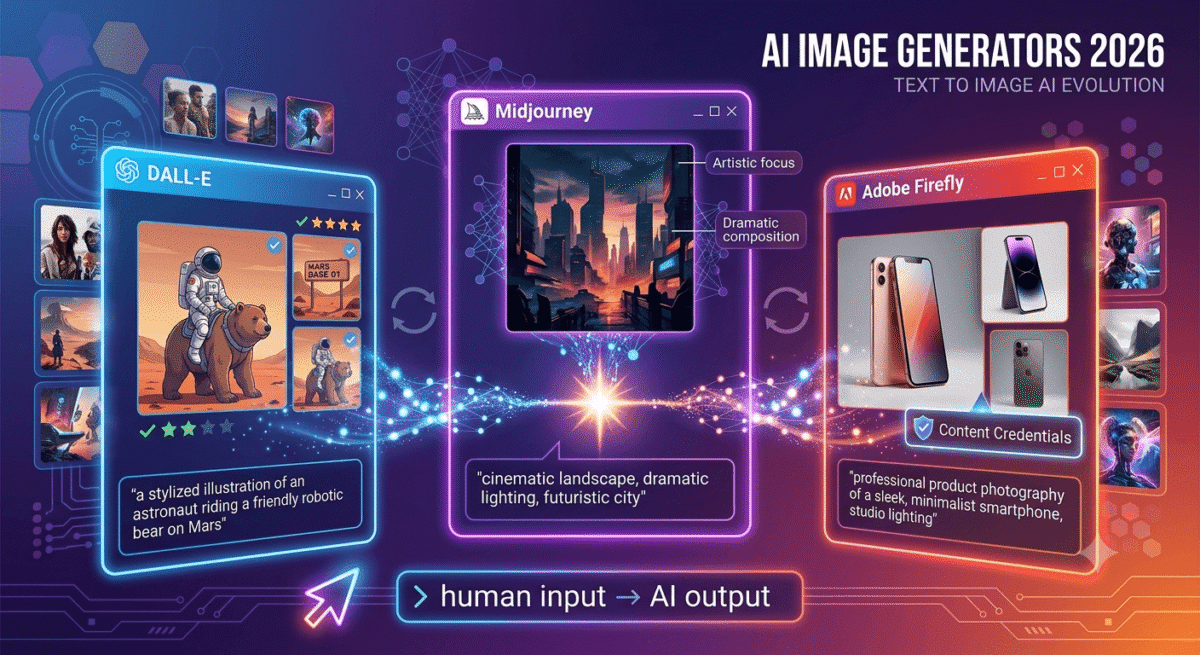
AI image generation has moved from a novelty to a professional tool in the span of two years. In 2026, bloggers use AI-generated images for featured images, social media graphics, and illustration. Designers use them for concept art and mood boards. Marketers use them for ad creative and landing page visuals. Small business owners use them for product mockups and brand assets.
The three tools that define this space, Midjourney, DALL-E 3, and Adobe Firefly, each excel in different areas and serve different users. Choosing the wrong one means either paying for quality you cannot access or struggling with a tool that cannot produce the style you need.
I tested all three ( Midjourney vs DALL-E vs Adobe Firefly) for 30 days across real creative projects, blog featured images, social media content, marketing mockups, and experimental art. Here is the honest comparison.
Table of Contents
How We Evaluated These Tools
Every platform was tested across five criteria:
- Image quality, realism, artistic quality, detail, and visual coherence
- Prompt accuracy, how faithfully does the tool interpret text descriptions?
- Style range, variety of artistic styles, from photorealistic to illustrated
- Ease of use, how quickly can a beginner produce usable results?
- Value, free plan quality and paid plan pricing versus output quality
An Important Note on AI Image Copyright in 2026
Before comparing the tools, understanding the copyright landscape matters for professional use.
AI-generated images occupy complex legal territory in 2026. The US Copyright Office has established that purely AI-generated images without meaningful human creative input cannot be copyrighted, meaning you cannot own the copyright to a Midjourney image in the way you own a photograph you took.
However, the images are generally yours to use commercially. Midjourney’s terms (on paid plans) grant commercial usage rights. Adobe Firefly images come with Adobe’s Content Credentials, metadata confirming AI generation, and are explicitly designed for commercial use with indemnification protection from Adobe. DALL-E’s terms grant you broad usage rights to generated images.
For bloggers and small businesses, the practical implication: use AI images for blog featured images, social media, and marketing materials freely on paid plans. Do not claim copyright over AI-generated work. Adobe Firefly provides the strongest legal protection for commercial use.
Midjourney Review: Best AI Image Generator for Artistic Quality
Free plan: No (previously had a free trial, discontinued in 2023)
Starting price: $10/month (Basic, 200 images/month)
Best plan for most users: Standard, $30/month (unlimited relaxed generations)
Platforms: Discord (primary), web interface (midjourney.com, expanding)
Affiliate program: No public affiliate program
Midjourney is the AI image generator that professional artists, designers, and creative directors consistently rate as producing the most visually impressive results. Its aesthetic quality, the ability to generate images that look genuinely artistic rather than computationally produced, sets it apart from every competing tool. If image quality is your primary criterion, Midjourney wins. To pair these visuals with professional layouts, you should also utilize the best design tools available.
What Midjourney does best
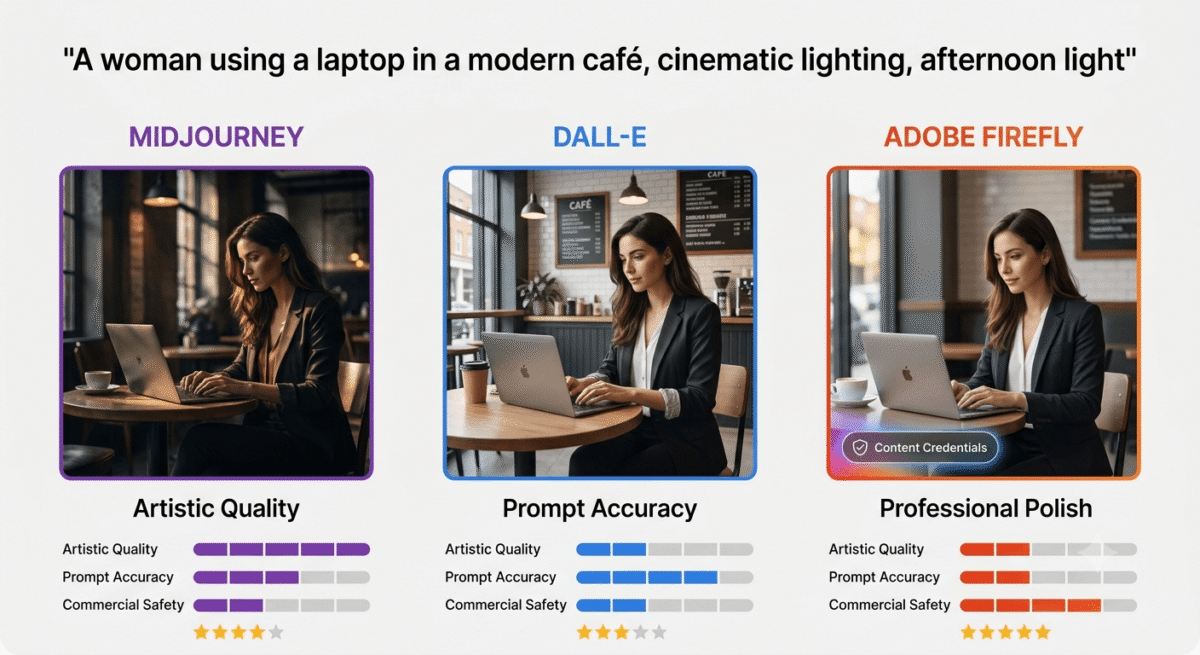
Midjourney’s image quality is in a category of its own. Where DALL-E and Adobe Firefly produce technically accurate images, Midjourney produces images with artistic intentionality, lighting that feels cinematic, compositions that follow design principles, colour palettes that feel curated, and textures that reward close inspection. A Midjourney image of “a woman using a laptop in a cafe” does not just show the described scene, it shows it with the visual quality of a professional photographer’s work.
The v6 model (current as of 2026) represents a significant leap in photorealism, generating human faces, hands, and complex scenes with substantially fewer of the anatomical errors that plagued earlier AI image models. Complex lighting scenarios, reflective surfaces, transparent materials, and intricate textures that previously caused AI generation artifacts are handled convincingly in Midjourney v6.
The style control in Midjourney is the most sophisticated of the three tools. Style parameters, aspect ratio, stylisation level, quality setting, and chaos (randomness), give experienced users precise control over output characteristics. The “style raw” parameter produces more photorealistic results; ” stylize 1000″ produces highly artistic, painterly interpretations. Building a library of effective prompts for your specific use case produces highly consistent, high-quality results.
The community and resource ecosystem around Midjourney is the largest of any AI image generator, thousands of shared prompts, style guides, parameter explanations, and example galleries help new users learn effective prompting faster. The Midjourney subreddit and Discord servers contain years of accumulated knowledge about producing specific styles and effects.
The Style Reference feature, providing a reference image whose visual style you want to replicate, enables brand-consistent image generation. Upload your existing blog featured images as style references and Midjourney generates new images that match your established aesthetic, invaluable for bloggers building a recognisable visual identity. To discover more ways to streamline your workflow, check out our guide to the best AI tools for bloggers.
Midjourney’s Discord interface – strength and limitation
Midjourney operates primarily through Discord, you join Midjourney’s Discord server, type prompts in designated channels, and images are generated in the chat. Midjourney is expanding its web interface (midjourney.com) in 2026, but Discord remains the primary interaction method.
For users already comfortable with Discord, this is not a significant barrier. For users unfamiliar with Discord or who prefer a traditional web application, the interface requires an adjustment period. The web interface, while still limited compared to Discord in some features, makes Midjourney significantly more accessible and is the recommended starting point for new users in 2026. For those managing multiple channels, these assets are perfect to pair with the best tools for content creators.
Where Midjourney falls short
Midjourney has no free plan, the $10/month Basic plan provides only 200 image generations per month (fast mode). For users who want to experiment extensively before paying, this is a meaningful barrier. DALL-E and Adobe Firefly both offer free tiers.
Text rendering within images is Midjourney’s most significant technical weakness. Generating images that contain readable text, “a billboard saying SALE” or “a book cover with a specific title”, produces inconsistent, often illegible results. Adobe Firefly and DALL-E 3 handle in-image text significantly better.
Prompt following, accuracy in interpreting specific, complex instructions, is less reliable in Midjourney than in DALL-E 3. Midjourney tends to produce aesthetically impressive interpretations of prompts rather than literal executions. If you need exactly what you described (a specific hand gesture, a precise number of people, a specific object arrangement), DALL-E 3 follows instructions more faithfully.
Midjourney pricing
Plan | Price/month | Fast GPU hours | Images | Key features |
Basic | $10 | 3.3 hours | ~200 | Personal use, Discord |
Standard | $30 | 15 hours | Unlimited (relaxed) | + Unlimited relaxed mode |
Pro | $60 | 30 hours | Unlimited (relaxed) | + Stealth mode (private) |
Mega | $120 | 60 hours | Unlimited (relaxed) | + Maximum speed |
Midjourney: Pros and Cons
Pros:
- Best overall image quality, most visually impressive outputs
- Best artistic style range, painterly, cinematic, photorealistic
- Most sophisticated style control via parameters
- Style Reference for brand-consistent generation
- Largest community and resource ecosystem
- v6 model significantly improved human anatomy and faces
- Unlimited relaxed mode on Standard plan and above
Cons:
- No free plan, paid from first image
- Discord-primary interface, learning curve for new users
- Weakest text rendering within images
- Less precise prompt following than DALL-E 3
- No Adobe integration or document workflow
- No public affiliate program
Rating: 4.8 / 5 – Best AI image generator for artistic quality. The go-to tool for designers, bloggers who care about visual quality, and anyone for whom image aesthetics are the primary concern.
DALL-E 3 Review: Best AI Image Generator for Prompt Accuracy and Integration
Free plan: Yes, via ChatGPT free (limited), Bing Image Creator (free, unlimited)
Starting price: Included with ChatGPT Plus ($20/month) | API pricing: $0.040–$0.080 per image
Best plan for most users: ChatGPT Plus, $20/month (includes DALL-E 3 + GPT-4)
Platforms: ChatGPT web, ChatGPT mobile, Bing Image Creator, API
Affiliate program: None, OpenAI product
DALL-E 3 is OpenAI’s AI image generator, integrated directly into ChatGPT, which means it combines image generation with conversational refinement. If you’re curious how ChatGPT stacks up against the AI chatbot that powers these conversational refinements versus alternatives, see our ChatGPT vs Claude vs Gemini comparison. Rather than crafting a single prompt and hoping for the best, DALL-E 3 users can describe what they want in natural language, generate an image, and then have a conversation with ChatGPT to refine it, “make the background darker”, “change her expression to be more confident,” “add a laptop on the desk.” This iterative, conversational workflow is DALL-E 3’s most distinctive and practically valuable capability.
What DALL-E 3 does best
DALL-E 3’s prompt accuracy is the best of the three tools tested. When you describe a specific scene, “an American woman in her 30s working at a standing desk with three monitors, warm office lighting, photorealistic”, DALL-E 3 produces an image that closely matches the description rather than an artistic interpretation of it. For users who need precise control over image content (specific people counts, specific object arrangements, specific actions), DALL-E 3’s literal interpretation is a significant practical advantage.
The ChatGPT integration enables the most natural image creation workflow available. Describe what you want conversationally, receive an image, and continue the conversation to refine it. “The image is good but the hands look unnatural” triggers an understanding of the specific problem and an improved generation. This back-and-forth refinement dramatically reduces the prompt engineering expertise required to get good results.
Text rendering within images is DALL-E 3’s strongest capability relative to competitors. Generating images containing readable words, product labels, storefront signs, infographic text, book covers, works significantly more reliably than in Midjourney or Adobe Firefly. For bloggers who want AI-generated social media graphics with specific text overlays, DALL-E 3 handles this better than alternatives.
The free access via Bing Image Creator (Microsoft’s implementation of DALL-E 3) provides unlimited free image generation, though with lower priority speed than ChatGPT Plus. For bloggers who want to experiment with AI image generation at zero cost before committing to a subscription, Bing Image Creator is the most practical free starting point.
DALL-E 3’s safety filters are the most stringent of the three tools, it refuses to generate images of real people by name, images with violent or adult content, and various other restricted categories. These restrictions occasionally frustrate users trying to create legitimate content, but they also make DALL-E 3 the safest tool for commercial use where brand safety matters.
Where DALL-E 3 falls short
DALL-E 3’s image quality, while excellent and improving, is generally considered below Midjourney’s artistic ceiling. Images are technically accurate and often very good, but they lack the painterly quality and visual richness that Midjourney consistently produces at its best. For photorealistic product mockups and document illustrations, DALL-E 3 is excellent. For images where artistic quality is the primary goal, Midjourney wins.
The style range is narrower than Midjourney’s, DALL-E 3 produces consistently good results across a range of styles, but the maximum artistic achievement is lower. Highly stylised, painterly, or cinematically lit images that Midjourney handles naturally require more prompt effort in DALL-E 3.
The ChatGPT Plus subscription ($20/month) provides DALL-E 3 access alongside GPT-4, valuable if you use ChatGPT for other purposes, but difficult to justify solely for image generation when Midjourney’s Standard plan ($30/month) produces superior image quality.
DALL-E 3 pricing
Access Method | Price | Images | Notes |
Bing Image Creator | Free | Unlimited (slower) | DALL-E 3, no ChatGPT features |
ChatGPT Free | Free | Very limited | Lower quality model |
ChatGPT Plus | $20/month | ~40–50/day | + GPT-4, all ChatGPT features |
API | $0.040–$0.080/image | Pay per use | For developers, no ChatGPT |
DALL-E 3: Pros and Cons
Pros:
- Best prompt accuracy, most literal interpretation of descriptions
- ChatGPT conversational refinement most natural creation workflow
- Best text rendering within images
- Free access via Bing Image Creator
- ChatGPT Plus bundles GPT-4 alongside image generation
- Most accessible for complete beginners
- Strongest content safety filters for brand-safe commercial use
Cons:
- Image quality ceiling below Midjourney
- Narrower artistic style range
- Most restrictive content filters, occasionally blocks legitimate use
- ChatGPT Plus ($20/month) expensive if only used for images
- No style reference or advanced parameter control
- Less community and prompt resource ecosystem
Rating: 4.5 / 5 – Best AI image generator for prompt accuracy, beginners, and users who need text in images. Strong free option via Bing Image Creator.
Adobe Firefly Review: Best AI Image Generator for Commercial Use and Creative Cloud Users
Free plan: Yes, 25 generative credits/month (resets monthly)
Starting price: Included with Adobe Creative Cloud ($54.99/month) | Firefly standalone: $4.99/month (100 credits)
Best plan for most users: Included with any Creative Cloud subscription | Firefly Premium: $9.99/month (unlimited)
Platforms: Web (firefly.adobe.com), integrated into Photoshop, Illustrator, Express, and Premiere
Affiliate program: Yes, Adobe affiliate program, up to 85% commission on first month
Adobe Firefly is Adobe’s AI image generation system, built from the ground up to be safe for commercial use, integrated into the Creative Cloud workflow, and trained exclusively on licensed Adobe Stock images and public domain content. For businesses, agencies, and professional creators where legal clarity around AI-generated content is critical, Firefly’s commercial safety is its defining advantage.
What Adobe Firefly does best
Adobe Firefly’s commercial safety indemnification is its most practically important feature for professional use. Adobe explicitly guarantees that Firefly-generated content is safe for commercial use, the model was trained only on licensed content, and Adobe provides legal indemnification to Creative Cloud subscribers using Firefly outputs commercially. No other AI image generator provides this level of legal protection. For businesses running advertising campaigns, creating product packaging, or using AI images in client work where copyright liability matters, Firefly’s indemnification removes legal risk that Midjourney and DALL-E 3 cannot address.
The Creative Cloud integration is Firefly’s most powerful workflow feature. Generative Fill in Photoshop, which uses Firefly to extend images, remove objects, and add new elements, is one of the most useful AI tools ever added to creative software. Select an area in a Photoshop image, describe what should appear there, and Firefly generates content that realistically blends with the existing image in lighting, perspective, and style. Expanding a photo’s background, removing unwanted objects, or adding elements to existing photography are all achievable in seconds.
Generative Expand, extending the borders of an existing image to change its aspect ratio, is invaluable for repurposing content across different platforms. A square blog featured image can be expanded to a 16:9 YouTube thumbnail or a 9:16 Instagram Story format with AI-generated content filling the new space. The results are consistently convincing.
Text effects in Adobe Firefly, generating text rendered in specific materials or styles (text made of flowers, text with fire effects, metallic text with specific lighting), are the most polished of the three tools. For creating stylised text elements for social media and marketing materials, Firefly’s text effects are genuinely impressive.
The Content Credentials system, Adobe’s provenance metadata standard, automatically embeds information into Firefly-generated images indicating they were created with AI. This transparency is increasingly expected by publishers, platforms, and regulators, Firefly images are automatically compliant with emerging AI disclosure requirements.
Firefly’s style matching from reference images produces more consistent brand-aligned results than Midjourney’s Style Reference in the context of existing photography, matching the lighting and colour treatment of your existing brand photos rather than replicating an artistic style. For bloggers with an established visual brand, generating new images that match existing content is more reliable in Firefly.
Where Adobe Firefly falls short
Firefly’s image quality, while excellent for commercial and workflow use, is generally considered below Midjourney’s artistic ceiling. The images are technically good and commercially usable, but the maximum artistic achievement is lower than Midjourney at its best.
The credit system, 25 free credits per month, with paid plans providing more, creates friction for heavy users. Unlimited generations require either a full Creative Cloud subscription ($54.99/month) or the Firefly Premium plan ($9.99/month). For users who do not already pay for Creative Cloud, the standalone Firefly cost is competitive.
The standalone Firefly web interface (firefly.adobe.com) is less full-featured than the Photoshop integration, some of Firefly’s most impressive capabilities (Generative Fill, Generative Expand) are only available within Creative Cloud applications.
Adobe Firefly pricing
Plan | Price/month | Credits | Key features |
Free | $0 | 25/month | Basic text-to-image, text effects |
Firefly Premium | $9.99 | 100/month | + Priority generation, all features |
Creative Cloud (any plan) | $54.99+ | Included | + Photoshop, Illustrator integration |
Adobe Firefly: Pros and Cons
Pros:
- Best commercial safety, Adobe indemnification for Creative Cloud subscribers
- Best Creative Cloud integration, Photoshop Generative Fill is transformative
- Content Credentials for AI disclosure compliance
- Generative Expand for aspect ratio changes across platforms
- Best text effects, stylised text in materials and styles
- Free plan with 25 credits/month, no payment required to start
- Brand-consistent generation from reference photos
- 85% first-month affiliate commission, highest in AI tools
Cons:
- Image quality ceiling below Midjourney
- Credit system limits heavy free users
- Most powerful features require Photoshop (paid)
- Standalone web interface less capable than Photoshop integration
- Less impressive for pure artistic image generation vs Midjourney
Rating: 4.5 / 5 – Best AI image generator for commercial use, Creative Cloud users, and anyone who needs legal protection for AI-generated content.
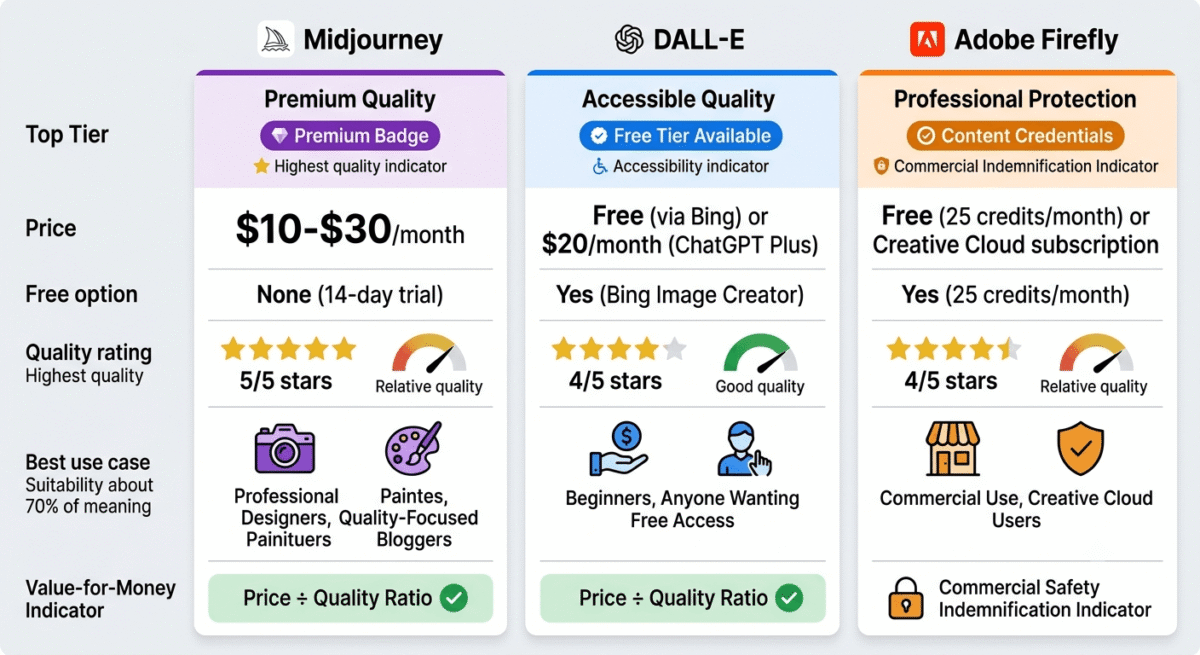
Head-to-Head Comparison
Midjourney Standard | DALL-E 3 (ChatGPT+) | Adobe Firefly Premium | |
Price/month | $30 | $20 | $9.99 |
Free plan | No | Yes (Bing, limited) | Yes (25 credits) |
Image quality ceiling | Highest | Very good | Good |
Prompt accuracy | Good | Best | Good |
Artistic style range | Widest | Moderate | Moderate |
Text in images | Weak | Best | Good |
Commercial safety | Good (paid plans) | Good | Best (indemnified) |
Creative software integration | No | No | Excellent (Adobe CC) |
Photoshop Generative Fill | No | No | Yes |
Style reference | Yes | Limited | Yes |
Content Credentials | No | No | Yes |
Beginner friendliness | Moderate | Best | Good |
Interface | Discord/Web | ChatGPT/Web | Web/Photoshop |
Affiliate program | No | No | Yes (85% first month) |
Best for | Artistic quality | Accuracy/beginners | Commercial/CC users |
Which AI Image Generator Should You Choose?
Choose Midjourney if:
You prioritise image quality above all else and are willing to invest time learning effective prompting. Midjourney consistently produces the most visually impressive results, the tool of choice for designers, artists, and bloggers for whom aesthetic quality is the primary criterion. Start with the Standard plan ($30/month) for unlimited relaxed generations.
Choose DALL-E 3 if:
You want the most beginner-friendly experience, need text within your images, or want a free starting point via Bing Image Creator. The conversational refinement through ChatGPT makes it the most natural workflow for users new to AI image generation. Also the right choice if you already pay for ChatGPT Plus and want image generation included.
Choose Adobe Firefly if:
You already pay for Adobe Creative Cloud, need legally protected images for commercial campaigns, or want to use Generative Fill in Photoshop for editing existing photos. Firefly’s commercial indemnification is uniquely valuable for businesses and agencies creating content where copyright liability is a concern.
AI Image Generators for Bloggers – Practical Use Cases
As a blogger building RateTheTool.com or a similar software review blog, here is how to use AI image generators practically:
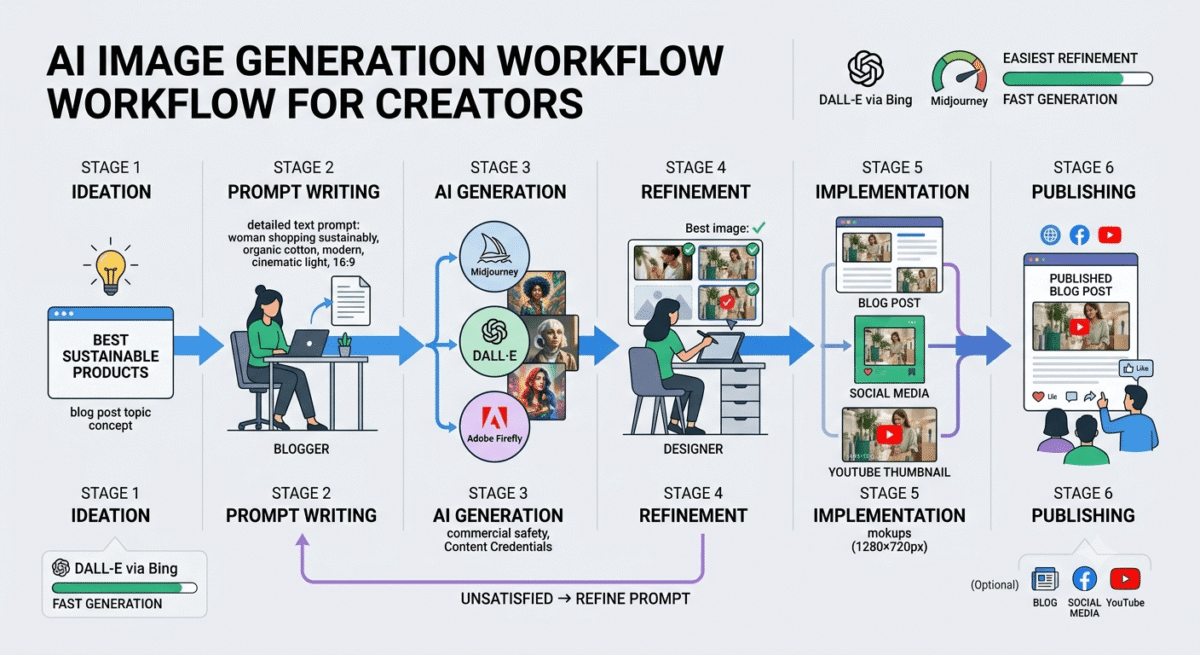
Featured images: Use Midjourney for high-quality featured images that make your posts stand out in Google Discover and social sharing previews. A visually striking featured image increases click-through rates significantly. Prompt example: “Professional blogger reviewing software on a modern laptop, warm home office setting, cinematic lighting, 16:9 composition –ar 16:9 –v 6”
Social media graphics: Use Adobe Firefly’s text effects for stylised social media text graphics, or DALL-E 3 via Canva’s AI features for quick social posts. Create a consistent visual style by using the same lighting and colour tone across all generated images.
Comparison illustrations: AI-generated conceptual illustrations for blog posts (showing abstract concepts like “VPN security,” “cloud storage,” “password protection”) add visual interest without requiring stock photo subscriptions. Midjourney excels at conceptual illustration.
Blog post thumbnails for YouTube: If you create YouTube videos alongside your blog, AI-generated thumbnails using Midjourney’s dramatic lighting and composition are significantly more attention-grabbing than standard stock photos.
What NOT to use AI images for: Avoid using AI-generated images to represent real products (always use actual screenshots or official product images), real people (legal and ethical concerns), or anything requiring photographic accuracy of a specific real-world subject.
Free Alternatives Worth Knowing
Before paying for any AI image generator, several free tools provide usable results:
Bing Image Creator (bing.com/images/create), Microsoft’s free implementation of DALL-E 3. Unlimited generations with no credit card required. Slower than ChatGPT Plus but the same underlying model. Best free starting point for AI image generation.
Adobe Firefly free (firefly.adobe.com), 25 free credits/month with no Creative Cloud subscription required. Sufficient for occasional blog image needs at zero cost.
Canva AI image generator, included in Canva free and Pro plans. Lower quality than Midjourney but integrated into Canva’s design workflow. Useful for quick social media graphics combining AI images with text overlays. If you want to use images in Canva as your primary design workflow rather than a fallback, see our Canva Pro vs Adobe Express comparison.
Stable Diffusion (open source), can be run locally on your own computer for unlimited free generations. Requires technical setup and a capable GPU. Best for technically sophisticated users who want unlimited generations without ongoing subscription costs.
Final Verdict
Midjourney is the best AI image generator for artistic quality, the tool professional designers and quality-focused bloggers choose. The $30/month Standard plan provides the best quality-to-cost ratio for regular image generation.
DALL-E 3 is the best for beginners and prompt accuracy, the conversational interface, free Bing access, and superior text rendering make it the most accessible starting point. ChatGPT Plus ($20/month) bundles GPT-4 alongside image generation for users who want both.
Adobe Firefly is the best for commercial use and Creative Cloud users, the legal indemnification, Photoshop integration, and Content Credentials make it the professional standard for businesses where copyright liability matters.
Ratings:
- Midjourney: 4.8 / 5
- DALL-E 3: 4.5 / 5
- Adobe Firefly: 4.5 / 5
Frequently Asked Questions
What is the best AI image generator in 2026?
Midjourney produces the highest quality AI images overall, its v6 model generates photorealistic and artistic images with a visual quality that consistently leads independent comparisons. For beginners, DALL-E 3 via Bing Image Creator offers the most accessible free starting point. For commercial use with legal protection, Adobe Firefly is the safest choice.u003cbru003e
Is Midjourney free?
No. Midjourney discontinued its free trial in 2023. The Basic plan starts at $10/month for approximately 200 images. The Standard plan at $30/month provides unlimited images in relaxed mode, the most practical plan for regular use. Free alternatives include Bing Image Creator (DALL-E 3) and Adobe Firefly (25 credits/month).u003cbru003e
Can I use AI-generated images commercially?
Yes, with the right tool and plan. Midjourney paid plans grant commercial usage rights. DALL-E 3 via ChatGPT Plus grants broad commercial usage. Adobe Firefly provides the strongest legal protection through explicit commercial indemnification for Creative Cloud subscribers. Always review each tool’s terms of service for your specific use case.u003cbru003e
What is the difference between Midjourney and DALL-E?
Midjourney prioritises artistic quality, producing visually impressive images with painterly aesthetics, cinematic lighting, and creative interpretation of prompts. DALL-E 3 prioritises accuracy, following prompt instructions literally, handling text within images better, and offering conversational refinement through ChatGPT. Choose Midjourney for aesthetic quality; choose DALL-E 3 for precise control and beginner accessibility.u003cbru003e
What is Adobe Firefly and how is it different?
Adobe Firefly is Adobe’s AI image generation system, integrated into Creative Cloud applications like Photoshop, Illustrator, and Express. Its key differences: it was trained exclusively on licensed content (no copyright concerns), Adobe provides legal indemnification for commercial use, it integrates with professional creative software (Photoshop Generative Fill), and it embeds Content Credentials metadata in generated images. It is the safest AI image tool for professional commercial use.u003cbru003e
How do I create good AI image prompts?
Effective AI image prompts include: subject description (who/what), setting/environment, lighting style (golden hour, studio, cinematic), artistic style (photorealistic, oil painting, digital art), mood/atmosphere, camera perspective (wide angle, portrait, aerial), and technical parameters (for Midjourney: u002du002dar 16:9, u002du002dv 6, u002du002dstyle raw). Specificity improves results, u0022a South Asian woman in her 30s working on a laptop in a modern coffee shop, warm afternoon light coming from the left, photorealistic, shallow depth of fieldu0022 outperforms u0022a woman working on a laptop.u0022u003cbru003e
Are AI-generated images detectable?
Yes — AI image detection tools can identify AI-generated images with reasonable accuracy, and Adobe Firefly’s Content Credentials embed metadata confirming AI generation. Google has stated it does not penalise AI-generated images in search rankings if they are used to genuinely illustrate content. Most major publishers and platforms are developing disclosure requirements for AI-generated content. Being transparent about AI image use is the recommended approach.u003cbru003e