If you are comparing ElevenLabs vs Murf vs WellSaid Labs, you probably want a voice that does not sound like a robot reading your script. Adding audio to a blog post, a YouTube video, or a course lesson used to mean booking a voice actor, which takes days and costs far more than a subscription. AI voice generators now do the same job in seconds. Pairing voice tracks with the best AI video generators for automated production can further streamline full video creation workflows.
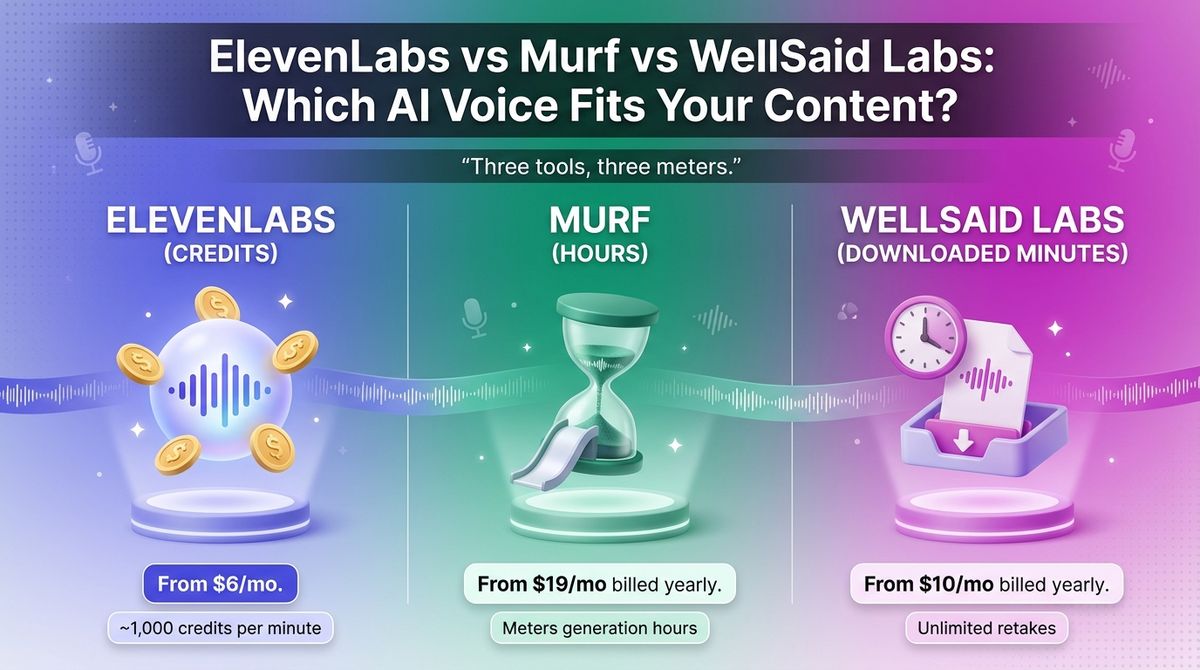
The three tools charge in three different ways. ElevenLabs sells credits, Murf sells hours of voice generation, and WellSaid sells minutes of finished audio you download. One 10-minute narration can use very different amounts of each allowance, especially if you regenerate lines until they sound right.
I tested ElevenLabs vs Murf vs WellSaid Labs for 30 days, narrating the same 1,500-word blog post and a five-minute YouTube script on each, then tracking what every retake cost against the plan’s meter. Here is the honest comparison, including one pricing catch: WellSaid now sells a different plan lineup than most reviews list.
Table of Contents
How We Tested
Every tool was scored on the same five criteria.
- Voice quality. How natural each voice sounds on long narration, short clips, numbers, and technical terms.
- Pricing and limits. What each plan costs, what the meter counts, and which plan first includes commercial rights.
- Editing control. Pronunciation fixes, tone and pacing controls, and how retakes affect your allowance.
- Languages and cloning. Language coverage, and whether you can clone your own voice without a sales call.
- Workflow and cost per minute. Integrations, mobile access, and the effective cost of one finished minute of audio.
ElevenLabs Review: Most Expressive, With Credits That Burn on Retakes
- Free plan: Yes, 10,000 credits per month (about 10 minutes), no commercial use
- Starting price: Starter at $6 per month ($5 per month billed annually)
- Best plan for most users: Creator at $22 per month
- Platforms: Web app, iOS app, Android app, API
- Affiliate program: Yes, 22% recurring for 12 months (11% on Business) through PartnerStack
ElevenLabs is a voice AI platform best known for text-to-speech. It offers thousands of voices in its Voice Library, can design new voices from a text prompt, and supports speech in 70+ languages. Plans are metered in credits, and roughly 1,000 credits buy one minute of speech.
What ElevenLabs does best
Expressiveness is where ElevenLabs leads. The Eleven v3 model lets you direct tone and timing with in-line audio tags and generate dialogue between multiple speakers. For a blogger turning a post into a podcast episode, one tool handles both the narration and a two-voice conversation. Creators turning long audio clips into short video segments often combine voice tracks with the best content repurposing tools for social media.
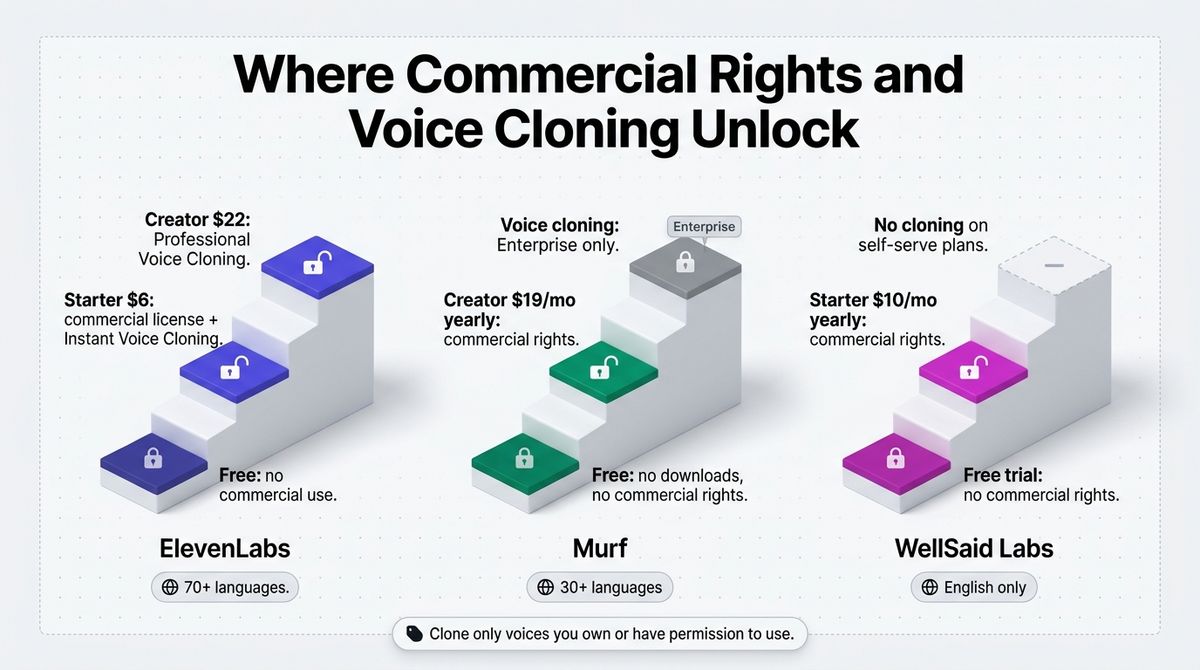
It also has the cheapest way into commercial use. Starter at $6 adds a commercial license and Instant Voice Cloning, and Creator at $22 adds Professional Voice Cloning. Neither Murf nor WellSaid lists voice cloning on a self-serve plan.
Where ElevenLabs falls short
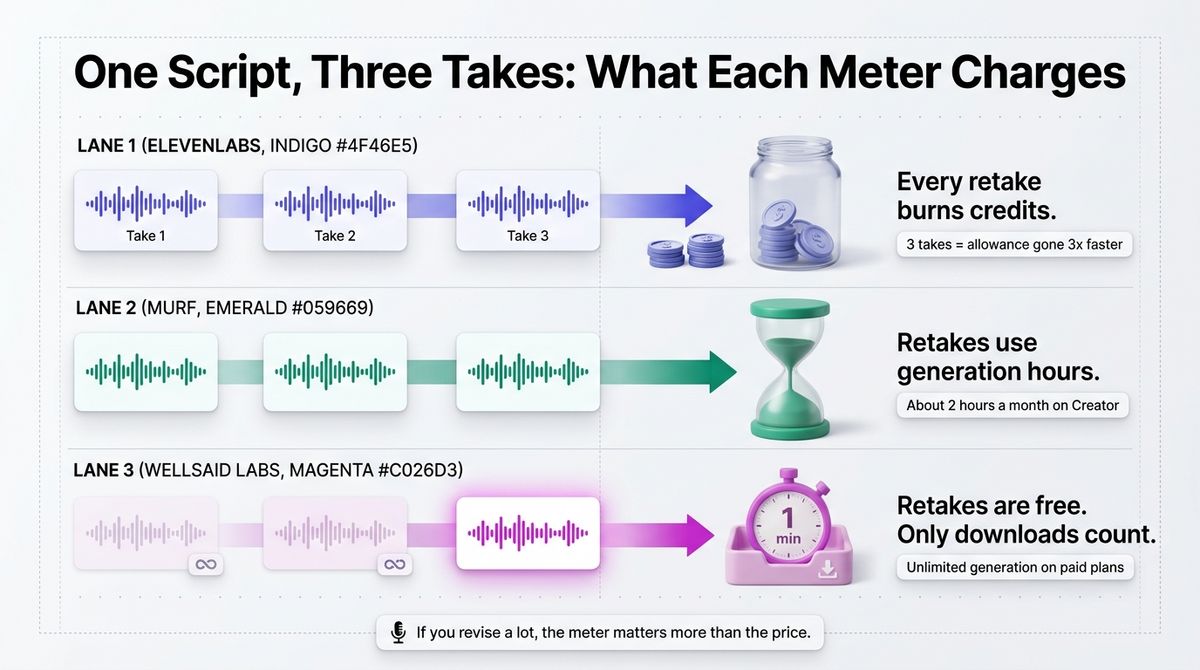
Credits burn on every generation, including retakes. At roughly 1,000 credits per minute, Starter’s 30,000 credits cover about 30 minutes, and a script you regenerate three times uses the allowance three times as fast. Free-plan credits do not roll over either.
The free plan is for testing only. It carries no commercial license and requires attribution, so anything you publish needs at least Starter. Discounts also expire: first-month offers have appeared at $1 for Starter and $11 for Creator, so budget for the full price. Only one seat is included until the Scale plan at $299.
ElevenLabs pricing
| Plan | Price | What you get |
|---|---|---|
| Free | $0 | 10,000 credits per month, no commercial license, attribution required |
| Starter | $6 per month ($5 per month billed annually) | 30,000 credits (about 30 minutes), commercial license, Instant Voice Cloning |
| Creator | $22 per month ($18.33 per month billed annually) | 121,000 credits (about 2 hours), Professional Voice Cloning, extra credits available |
| Pro | $99 per month ($82.50 per month billed annually) | 600,000 credits (about 10 hours) |
| Scale and Business | $299 and $990 per month | 1.8 million and 6 million credits; three and ten seats |
ElevenLabs: Pros and Cons
Pros:
- Most expressive controls, including v3 audio tags and multi-speaker dialogue
- Speech in 70+ languages
- Instant voice cloning from $6 and Professional cloning from $22
- Cheapest commercial license of the three
- Free iOS and Android app
Cons:
- Credits burn on retakes, with no minute-based meter
- Free plan is non-commercial and requires attribution
- Promotional first-month prices expire
- Team seats start at the $299 Scale plan
Rating: 4.7 / 5, the best all-round pick for most creators.
Murf Review: Presentation-Friendly, Capped by Hours
- Free plan: Yes, 10 minutes of generation in total, no downloads, no commercial rights
- Starting price: Creator at $29 per month ($19 per month billed annually)
- Best plan for most users: Creator billed annually
- Platforms: Web app, Canva, Google Slides, and PowerPoint integrations, separate API
- Affiliate program: Yes, 20% recurring for 24 months through PartnerStack
Murf is a voiceover studio built around a simple editor. You paste a script, choose from 200+ voices in 30+ languages, adjust pitch, speed, and pronunciation, and export. It also offers AI dubbing and a separate developer API.
What Murf does best
Murf fits the way presentation and e-learning creators already work. It plugs into Canva on the Creator plan and PowerPoint on the Business plan, with a Google Slides add-on as well, so you can add narration inside the deck instead of exporting files between apps. Teams building these presentation workflows frequently organize lesson plans alongside the best AI productivity tools for drafting scripts.
The editor gives you control down to a single word, including pitch, speed, pauses, and pronunciation. Creator at $19 a month billed annually includes commercial rights, unlimited downloads, and 24 hours of voice generation a year, which suits steady narration.
Where Murf falls short
Murf meters voice generation hours, and the allowance is smaller than it looks. Creator includes about two hours a month. Billing monthly instead of yearly costs $29 instead of $19, roughly 50% more, so the cheap-looking price needs an annual commitment.
The jump to Business is steep. Creator at $29 monthly moves to $99 for about eight hours, and features such as emphasis controls and PowerPoint integration sit on that tier. Voice cloning is limited to Enterprise plans, and the developer API is billed separately from your Studio subscription.
Murf pricing
| Plan | Price | What you get |
|---|---|---|
| Free | $0 | 10 minutes of generation in total, 2 projects, no downloads, no commercial rights |
| Creator | $29 per month, or $228 per year ($19 per month) | 24 hours of generation a year (about 2 hours a month), 100 projects, downloads, commercial rights, Canva integration |
| Business | $99 per month, or $792 per year ($66 per month) | 96 hours a year (about 8 hours a month), 500 projects, team features, PowerPoint integration |
| Enterprise | Custom quote | Voice cloning, higher volumes, security controls |
Murf: Pros and Cons
Pros
- Canva, Google Slides, and PowerPoint integrations
- Word-level control over pitch, speed, pauses, and pronunciation
- 200+ voices in 30+ languages
- Commercial rights from Creator at $19 per month billed annually
- AI dubbing for translating video
Cons:
- Monthly billing costs about 50% more than annual
- Hour caps are tight on Creator
- Steep jump from Creator to Business
- Voice cloning limited to Enterprise
- API billed separately from Studio
- Free plan blocks downloads, so you cannot fully evaluate it
Rating: 4.2 / 5, a good fit for slide-based narration, held back by hour caps and gated cloning.
WellSaid Labs Review: Unlimited Retakes, English Only
- Free plan: Free trial, 3 download minutes per month, no commercial rights
- Starting price: Starter at $19 per month ($10 per month billed annually)
- Best plan for most users: Pro billed annually
- Platforms: Web app (WellSaid Studio), Adobe Express and Premiere Pro integrations, API
- Affiliate program: Yes, 30% on the first three payments per its help page; current status unconfirmed
WellSaid Labs now markets itself as WellSaid at wellsaid.io, and it builds an AI voice studio aimed at training, marketing, and video teams. Its voices come from its own Caruso model, trained on exclusive and licensed voice data. Every paid plan includes unlimited generation, so you only spend minutes when you download finished audio.
What WellSaid does best
The meter is the friendliest of the three for people who revise. Generation and retakes are unlimited on paid plans, and only downloaded minutes count. If you fix a mispronounced product name ten times, it costs nothing extra, which keeps monthly costs predictable.
It also leads to business controls. Customer content is never used to train its models, the company is SOC 2 Type 2 certified and GDPR compliant, and every paid plan carries full commercial rights. Pronunciation tools include an Oxford Dictionary integration and AI phonetic suggestions for hard words.
Where WellSaid falls short
Starter, Pro, and Business are English-only. Spanish, French, German, Japanese, and other languages are reserved for Enterprise, along with translation. WellSaid’s pricing page also lists no voice cloning on any self-serve plan.
The yearly minute caps are strict. Starter includes 240 minutes a year and Pro 2,160, and unused minutes reset at renewal instead of rolling over. If you cancel, you cannot open or download your projects until you reactivate, although WellSaid stores them for up to five years. Many reviews still list Maker at $49 and Creative at $99, which no longer appear on its pricing page.
WellSaid pricing
| Plan | Price | What you get |
|---|---|---|
| Free trial | $0 | 3 download minutes per month, 3 projects, no commercial rights, no card required |
| Starter | $19 per month, or $10 per month billed annually ($120 per year) | 20 minutes per month (240 per year), unlimited generation, 10 projects, MP3 at 24 kHz, commercial rights |
| Pro | $49 per month, or $33 per month billed annually ($396 per year) | 180 minutes per month (2,160 per year), unlimited projects, 48 kHz audio, Adobe Express integration |
| Business | $160 per user per month, billed annually ($1,920 per year) | 2,880 minutes per year per user, up to 5 seats, team workspace, live chat, Premiere Pro integration, WAV and OGG export |
| Enterprise | Custom quote | Custom minutes, all languages, translation, SSO, 96 kHz audio |
WellSaid: Pros and Cons
Pros:
- Unlimited generation and retakes on every paid plan
- Predictable minute-based meter
- SOC 2 Type 2 certified, and customer data is never used for training
- Commercial rights on every paid plan
- Oxford Dictionary pronunciation tools plus tone, pitch, and emotion controls
Cons:
- English only below Enterprise
- Download minute caps with no rollover
- No voice cloning listed on self-serve plans
- Projects are locked while your subscription is inactive
- Starter exports MP3 only at 24 kHz
Rating: 4.3 / 5, best for revision-heavy English narration and corporate training audio.
ElevenLabs vs Murf vs WellSaid Labs: Head-to-Head Comparison
| Feature | ElevenLabs | Murf | WellSaid Labs |
|---|---|---|---|
| Free plan | 10,000 credits per month, no commercial use | 10 minutes in total, no downloads | 3 download minutes per month, no commercial rights |
| Entry paid price | $6 per month ($5 billed annually) | $29 per month ($19 billed annually) | $19 per month ($10 billed annually) |
| What the meter counts | Credits, about 1,000 per minute | Voice generation hours | Downloaded minutes; generation is unlimited |
| Mid-tier plan | Creator, $22 (121,000 credits) | Creator, $29 (about 2 hours) | Pro, $49 (180 minutes) |
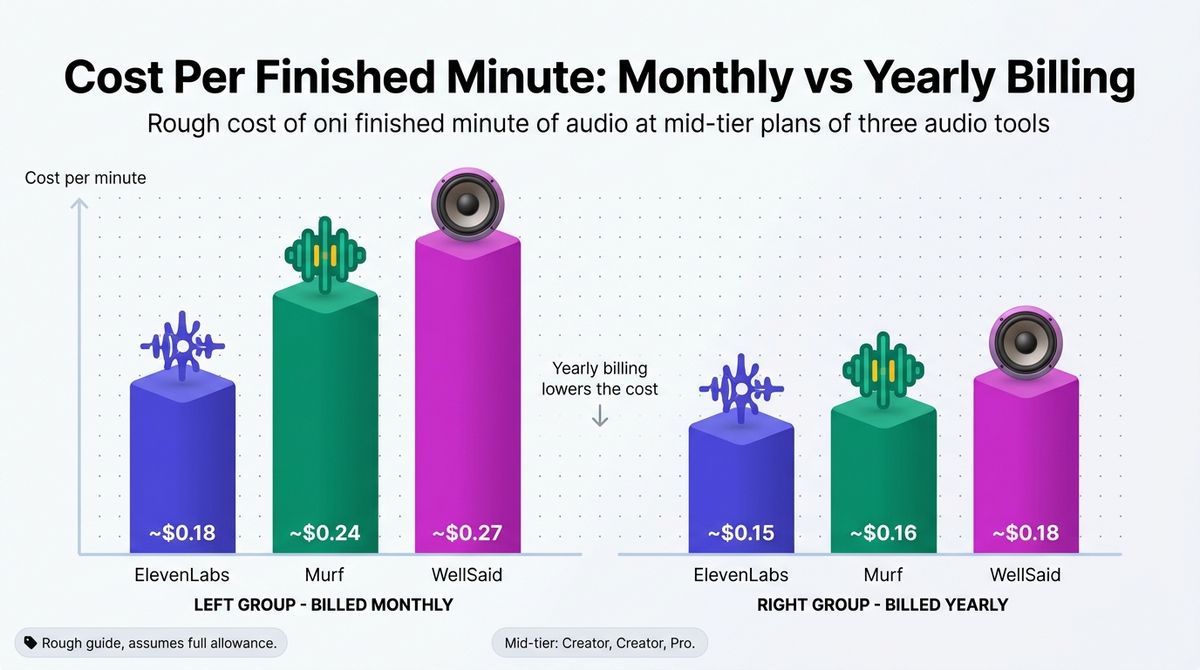
| Cost per minute, mid-tier, billed monthly | About $0.18 | About $0.24 | About $0.27 |
| Cost per minute, mid-tier, billed yearly | About $0.15 | About $0.16 | About $0.18 |
| Languages | 70+ | 30+ | English only (others on Enterprise) |
| Voice cloning | Yes, from Starter | Enterprise only | None listed |
| Integrations | API, iOS and Android apps | Canva, Google Slides, PowerPoint, API | Adobe Express, Premiere Pro, API |
| Affiliate program | Yes, 22% for 12 months | Yes, 20% for 24 months | Yes, 30% on first 3 payments, unconfirmed |
| Best for | Most creators | Slide and e-learning narration | Revision-heavy English training audio |
| Rating | 4.7 / 5 | 4.2 / 5 | 4.3 / 5 |
Cost per minute assumes you use each plan’s full allowance and counts minutes the way each vendor defines them, so treat it as a rough guide. Retakes use ElevenLabs credits and Murf hours but not WellSaid minutes.
Which Should You Choose?
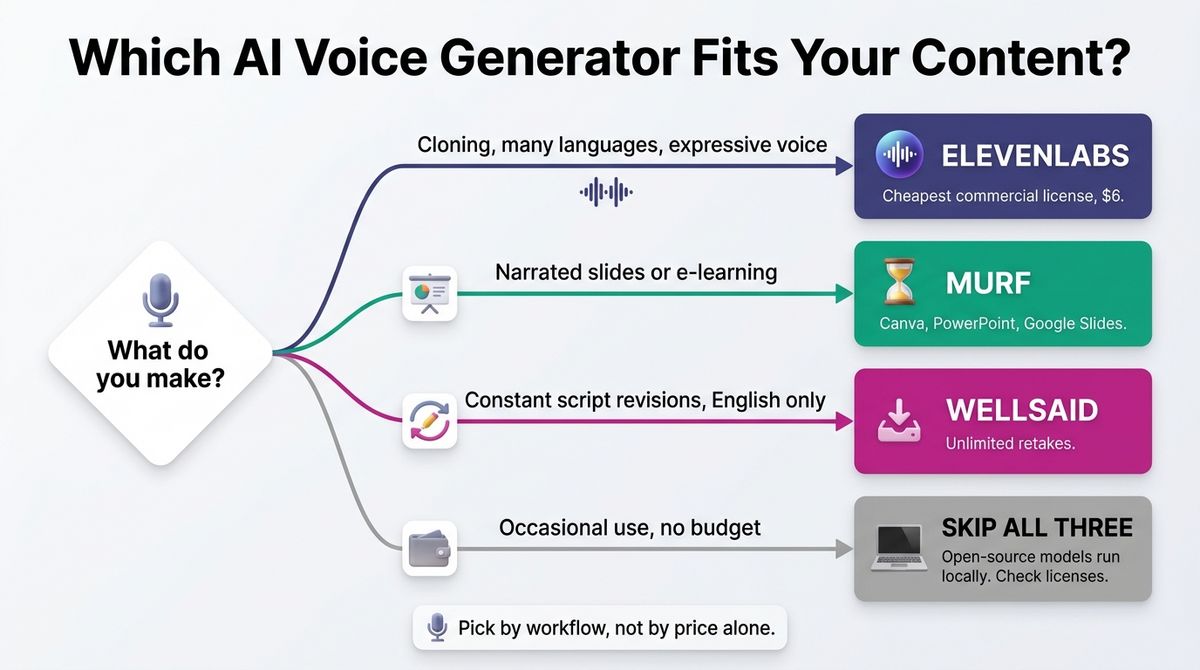
- Choose ElevenLabs if you want voice cloning, 70+ languages, expressive control, or the cheapest commercial license, and you can live with credits that burn on retakes.
- Choose Murf if you narrate slides or e-learning in Canva, PowerPoint, or Google Slides and want a simple editor with a yearly hour allowance.
- Choose WellSaid if you revise scripts constantly, work in English, and need clear commercial and data-privacy terms for training or marketing audio.
- Skip all three if you need voice only occasionally or have no budget. Open-source models such as Kokoro and Piper run on your own computer at no cost, but check each model’s license before commercial use. Setup takes effort, and quality varies by voice.
One developer note applies to every tool here. Export MP3 and host it from your Media Library or a CDN instead of embedding a third-party player. That keeps page weight under your control and avoids loading another script on your pages. If raw exported tracks need polish or pacing adjustments, review the best AI voice editors for audio cleanup before publishing.
Our Recommendations
- Solo blogger adding audio versions of posts: ElevenLabs Starter at $6 gives you a commercial license and about 30 minutes of speech a month, which covers roughly three 1,500-word posts.
- YouTuber or podcaster publishing weekly: ElevenLabs Creator at $22 covers roughly two hours a month and adds Professional Voice Cloning, so narration can sound like you.
- Freelancer producing client e-learning or explainer videos: Murf Creator billed annually fits slide-based deliverables. WellSaid Pro suits clients who request many script revisions.
- Small training or marketing team: WellSaid Business gives you up to five seats and a shared workspace. ElevenLabs Scale at $299 adds three seats and 70+ languages.
- Developer adding voice to an app: ElevenLabs and WellSaid both offer APIs, while Murf sells its API separately from Studio. Compare usage-based pricing before you commit.
Final Verdict
In the ElevenLabs vs Murf vs WellSaid Labs comparison, ElevenLabs is the best pick for most content creators. It has the cheapest commercial license at $6, voice cloning, and 70+ languages. WellSaid is the better choice if you retake lines constantly and write in English, because generation is unlimited. Murf suits narrated slides, but its hour caps and gated cloning hold it back.
- ElevenLabs: 4.7 / 5
- WellSaid Labs: 4.3 / 5
- Murf: 4.2 / 5
Check each vendor’s live pricing page before you buy. All prices above were checked in October 2026.
Frequently Asked Questions
Which is better, ElevenLabs, Murf, or WellSaid Labs?
ElevenLabs suits most creators because it has the cheapest commercial license, the widest language coverage, and voice cloning. Murf fits people working in Canva, PowerPoint, or Google Slides. WellSaid fits English-only corporate training with unlimited retakes. Pick by workflow, not by price alone.
Can I use free-plan audio commercially?
No, not on any of the three. ElevenLabs Free requires attribution and excludes commercial use, Murf Free blocks downloads and commercial rights, and WellSaid’s free trial grants no commercial rights. Commercial rights start at ElevenLabs Starter at $6, Murf Creator, and WellSaid Starter.
How much does ElevenLabs cost?
ElevenLabs lists Free at $0, Starter at $6, Creator at $22, Pro at $99, Scale at $299, and Business at $990 per month. Annual billing charges ten months for twelve. Free includes 10,000 credits, roughly 10 minutes of speech, and Creator includes 121,000 credits, roughly two hours.
How much does Murf AI cost?
Murf Creator costs $29 per month, or $19 per month billed annually at $228. Business costs $99 per month, or $66 billed annually at $792. Creator includes about two hours of voice generation a month. Paying monthly costs roughly 50% more, and voice cloning is limited to Enterprise.
How much does WellSaid Labs cost?
WellSaid Starter costs $10 per month billed annually, or $19 monthly. Pro costs $33 billed annually, or $49 monthly. Business costs $160 per user per month, billed annually. Older reviews still list Maker at $49 and Creative at $99, which no longer appear on its pricing page.
Which AI voice generator offers voice cloning?
ElevenLabs offers Instant Voice Cloning from Starter at $6 and Professional Voice Cloning from Creator at $22. Murf limits voice cloning to Enterprise plans, which are quoted on request. WellSaid’s pricing page lists no voice cloning on any self-serve plan. Only clone voices you own or have written permission to use.
Which tool supports the most languages?
ElevenLabs supports speech in 70+ languages with its Eleven v3 model. Murf lists 30+ languages and accents. WellSaid’s Starter, Pro, and Business plans cover English voices only, with Spanish, French, German, Japanese, and other languages reserved for Enterprise. For multilingual blogs, ElevenLabs is the practical choice.
How do I add AI narration to a WordPress post?
Export the audio as MP3, upload it to your Media Library, and insert it with the core Audio block. Add a written transcript below the player so search engines can index the content. Keep files under a few megabytes where possible, because large audio files slow pages and use hosting bandwidth.