One long-form video or podcast episode can become a dozen pieces of short-form content, and doing that by hand, finding the clip-worthy moments, reframing for vertical video, adding captions, then publishing to five different platforms, easily eats more time than making the original content did.
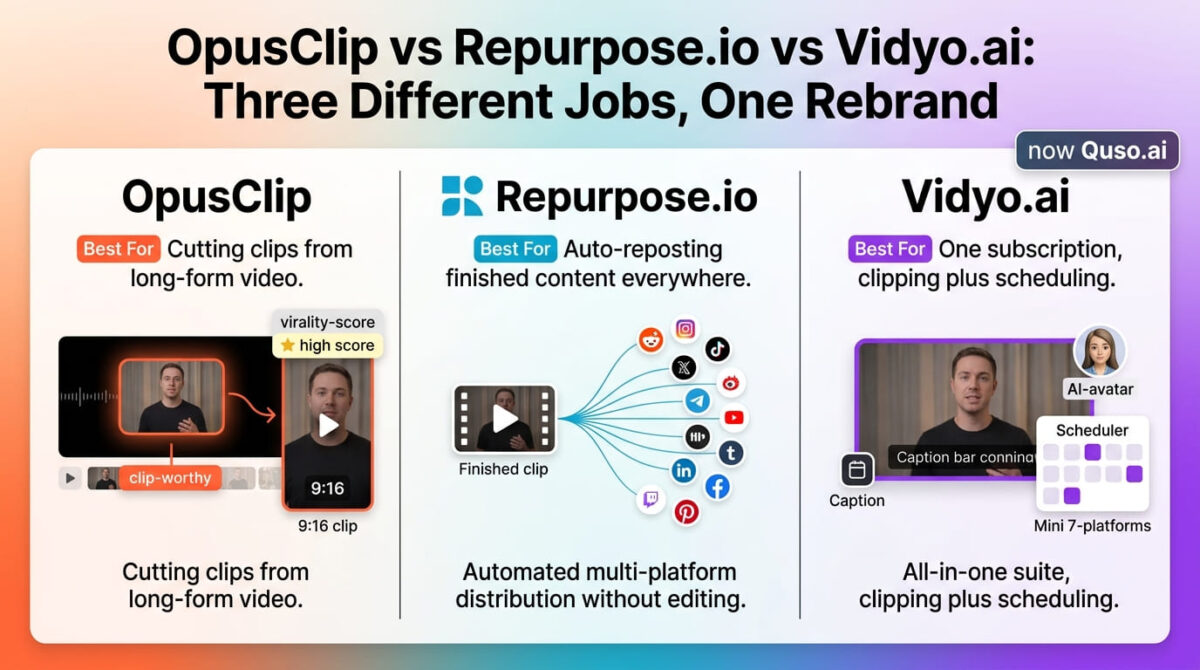
OpusClip vs Repurpose.io vs Vidyo.ai looks like a straightforward three-way comparison, but the tools don’t all do the same job. One finds and cuts clips from long-form video. One takes finished content and distributes it across platforms automatically. One tries to do a version of both inside a broader social suite.
I tested OpusClip vs Repurpose.io vs Vidyo.ai for 30 days, running the same podcast recordings and YouTube videos through all three and tracking clip quality, publishing reach, and where each platform’s free tier stops being usable. Here is the honest comparison, including a rebrand that means one of these three tools no longer goes by the name most people search for.
Table of Contents
How We Tested
Five criteria shaped the testing:
- Clip selection quality – how well the tool identifies moments that make good short-form content
- Distribution reach – how many platforms the tool can publish to, and how automated that publishing is
- Free tier usability – whether the free plan produces anything usable or exists purely as a preview
- Workflow fit – whether the tool edits content, distributes it, or both
- Pricing at realistic volume – cost once a normal weekly or monthly content output is factored in
Why These Three Tools Aren’t Perfectly Interchangeable
This matters enough to state plainly before the individual reviews: OpusClip and Vidyo.ai both find and cut clips from long-form video, while Repurpose.io does not edit or clip anything at all. It takes content that already exists, a finished video or podcast episode, and reformats and republishes it across platforms through trigger-based automation.
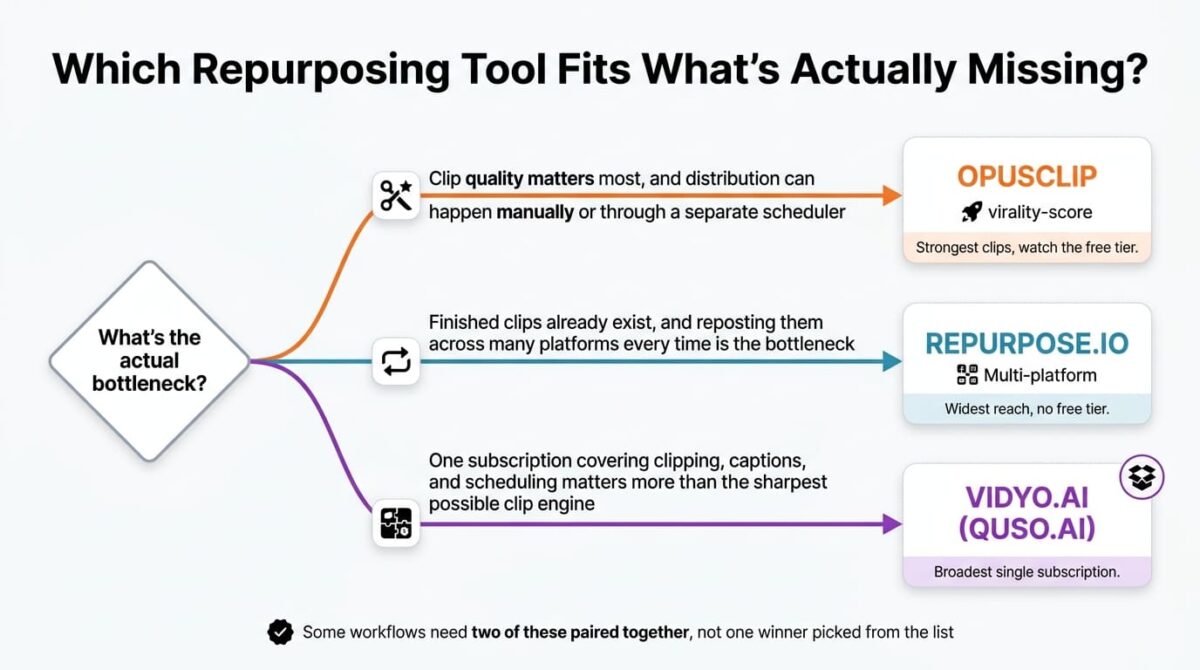
That distinction matters for anyone comparing based on price alone. A creator who needs clips cut from a two-hour podcast (especially after polishing the audio with an AI voice editor) needs OpusClip or Vidyo.ai. A creator who already has short clips ready and just wants them automatically reposted everywhere needs Repurpose.io. Several workflows need both, clipping with one tool, then distribution with the other, rather than picking a single winner from this list.
OpusClip Review: Best Clip Selection, With a Free Tier That Isn’t Really Free
Free plan: Yes, 60 processing minutes/month, watermarked, projects expire 3 days after cancellation
Starting price: $15/month (Starter), no annual discount available on this tier
Best plan for most users: Pro, $29/month or $14.50/month billed annually
Platforms: Web
Affiliate program: Yes, OpusClip affiliate program
OpusClip is a dedicated clipping tool: upload long-form video, and it identifies clip-worthy moments, reframes them for vertical or square formats, and adds captions automatically.
What OpusClip does best
Clip selection is where OpusClip leads this comparison. Its virality scoring and ClipAnything feature, which selects moments based on a described theme rather than spoken keywords alone, consistently surfaced usable clips with less manual scrubbing through footage than either competitor tested.
The Pro plan’s AI B-Roll (a convenient feature if you aren’t using separate AI video generators for your cutaways) and multi-format export cover most of what a solo creator or small team needs without leaving the platform, and export compatibility with Premiere and CapCut means a clip can move into a full editor for polish when the automated cut isn’t quite enough on its own.
Where OpusClip falls short
The free plan is watermarked, limited to 9:16 exports only, and projects expire after 3 days once a subscription lapses, which functions closer to a time-boxed trial than an ongoing free tier. Anyone budgeting around the free plan for regular use will hit this wall almost immediately.
The Starter plan at $15/month offers no annual billing discount at all, unusual in a category where nearly every competitor discounts annual commitments, while the jump to Pro at $29/month (or $14.50 annually) is where most of the useful features, scheduling, B-roll, team seats, unlock.
OpusClip pricing
| Plan | Price | Processing Minutes/Month | Notable Feature |
|---|---|---|---|
| Free | $0 | 60 | Watermarked, projects expire after 3 days |
| Starter | $15/month | 150 | No watermark, no annual discount offered |
| Pro | $29/month ($14.50 annually) | 300 | AI B-Roll, social scheduler, 2 seats |
| Business | Custom | Custom | API access, unlimited seats, SOC 2 Type II |
OpusClip: Pros and Cons
Pros:
- Strongest clip selection and virality scoring of the three tools tested
- ClipAnything selects moments by theme, not just spoken keywords
- Export compatibility with Premiere and CapCut for further editing
- Business tier includes API access for larger, automated workflows
Cons:
- Free tier’s 3-day project expiry makes it closer to a trial than a permanent plan
- Starter tier has no annual discount, unusual for this category
- Scheduling and B-Roll features locked to Pro and above
- Doesn’t distribute content the way Repurpose.io does, clipping only
Rating: 4.4 / 5, the strongest clip quality in this comparison, with a free tier that undersells how good the paid product is.
Repurpose.io Review: Best Distribution Automation, With No Free Tier at All
Free plan: No, 14-day trial limited to 10 published videos
Starting price: $35/month (Starter), $29.08/month billed annually ($349/year)
Best plan for most users: Starter, $35/month (3 accounts per platform, 5,000 published videos/month)
Platforms: Web, official YouTube Partner integration
Affiliate program: Yes, Repurpose.io affiliate program
Repurpose.io is a distribution tool, not an editor. It watches a source platform for new content and automatically reformats and republishes it across every other connected channel based on rules set up once.
What Repurpose.io does best
Platform breadth is Repurpose.io’s clearest advantage, supporting YouTube, TikTok, Instagram, Facebook, LinkedIn, X, Pinterest, Snapchat, Amazon, Twitch, and Bluesky, more than either OpusClip or Vidyo.ai currently covers. Official YouTube Partner status also enables direct publishing into YouTube Shorts, a integration neither competitor offers at the same depth.
The trigger-based automation removes repetitive manual work for anyone already producing structured long-form content: set the rule once, and every new upload flows to every connected platform without a second pass. For a podcaster or YouTuber with an established weekly output, that hands-off distribution is the product’s entire value proposition delivered cleanly.
Where Repurpose.io falls short
Repurpose.io doesn’t edit or cut anything. It reformats and distributes content that already exists in finished short-form or long-form shape, which is a limitation for anyone whose workflow starts with raw footage needing to be clipped down to 60 seconds first.
There is no free plan at all, not even a watermarked one. The 14-day trial is limited to 10 published videos, enough to test the platform but not enough to evaluate it for a realistic content schedule. Anyone serious about testing needs to commit to at least the Starter tier.
At $35/month for Starter, Repurpose.io costs more than either competitor’s entry price. That pricing makes sense for what it delivers, but it raises the barrier to trying it, particularly next to OpusClip’s free tier and Vidyo.ai’s usable free plan.
Repurpose.io pricing
| Plan | Price (Monthly / Annual) | Platforms | Notable Feature |
|---|---|---|---|
| Starter | $35 / $349/year ($29.08/mo) | All 11 | 3 accounts per platform, 5,000 videos/month |
| Professional | $99 / $994/year ($82.83/mo) | All 11 | Unlimited accounts, 25,000 videos/month, API |
| Business | $249 / $2,494/year ($207.83/mo) | All 11 | Unlimited everything, priority support, white-label |
Repurpose.io: Pros and Cons
Pros:
- Broadest platform support: 11 platforms including official YouTube Shorts integration
- Trigger-based automation removes manual reposting entirely
- No credit system, no rendering limits, only volume caps
- Official YouTube Partner status for Shorts access
Cons:
- No editing or clipping features at all, distribution only
- No free tier or free trial of meaningful length
- Highest starting price of the three tools at $35/month
- Not a solution for creators who start with raw footage
Rating: 3.9 / 5, the strongest distribution automation, but not a clipping tool at all and priced accordingly.
Vidyo.ai (Quso.ai) Review: Broadest All-in-One Feature Set, With a Confusing Rebrand
Free plan: Yes, 75 credits/month, 720p, watermarked, 30-day retention
Starting price: $29/month (Lite), $19/month billed annually
Best plan for most users: Essential, $39/month or $26/month billed annually
Platforms: Web, iOS, Android
Affiliate program: Yes, Vidyo.ai affiliate program
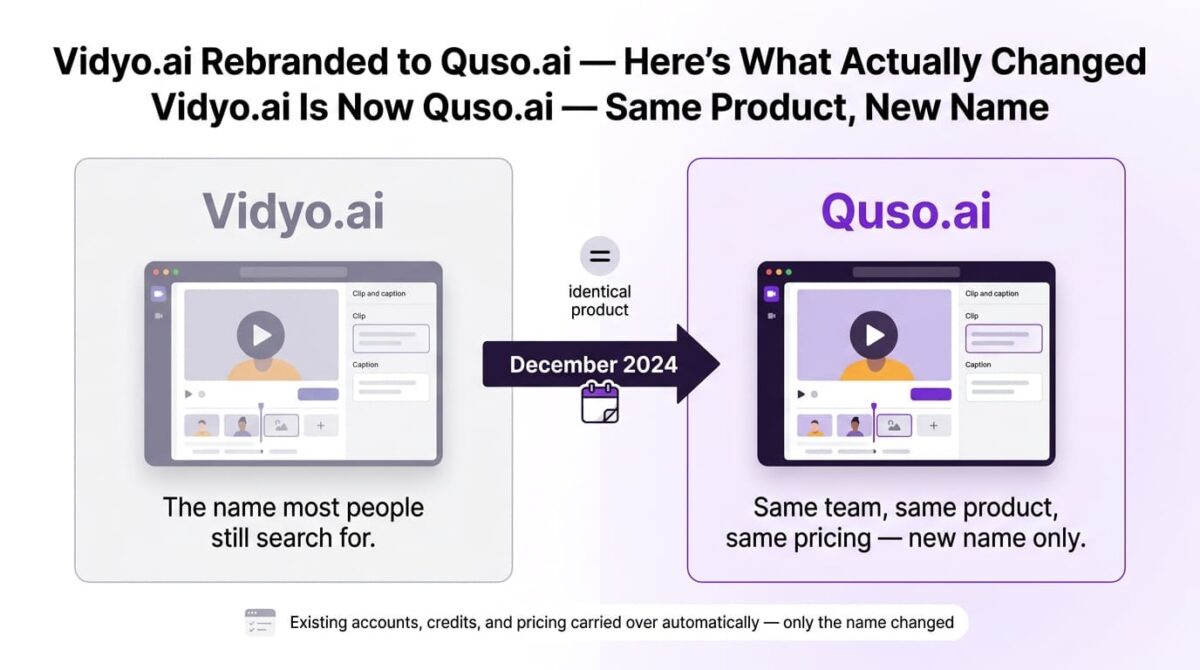
Company rebrand: Rebranded to Quso.ai in December 2024; accounts and pricing carried over automatically
Vidyo.ai is now Quso.ai, and its pitch is the kitchen-sink approach: clip creation, captions, scheduling across seven platforms, AI avatars, content planning, and brand kit management all in one subscription. For a creator or agency wanting everything in one place, that’s the feature set to evaluate.
What Vidyo.ai (Quso.ai) does best
Breadth is the play here. Scheduling to seven platforms is included from Essential tier onward, AI avatars (features typically reserved for dedicated AI video generators) and content planner tools that neither competitor offers give it a distinct feature set, and the price point at $39/month (or $26 annually) splits the difference between OpusClip’s free entry and Repurpose.io’s $35 minimum.
The rebranding from Vidyo.ai to Quso.ai was clean for existing users: no login changes, no credit loss, no surprise price hikes. Anyone grandfathered in at an old price stayed there, and features expanded alongside the name change.
Where Vidyo.ai (Quso.ai) falls short
Independent comparisons consistently note that raw clip-selection quality trails OpusClip specifically, the broader feature set doesn’t come with a clipping engine as sharp as the dedicated competitor’s. For anyone whose primary need is clip quality above all else, this is the more meaningful tradeoff than any pricing difference.
The rebrand itself introduced measurable friction: search confusion between the old and new names, and at least one independent review noting inconsistent feature availability during the platform transition. Anyone researching this tool under the old name should confirm current pricing and features directly on quso.ai rather than trusting older “Vidyo.ai” reviews.
Vidyo.ai (Quso.ai) pricing
| Plan | Price | Credits/Month | Notable Feature |
|---|---|---|---|
| Free | $0 | 75 | 720p, watermarked, 30-day retention |
| Lite | $29/month ($19 annually) | 100 | 1080p, no watermark, AI clips and captions |
| Essential | $39/month ($26 annually) | 300 | 7-platform scheduler, AI avatars, content planner |
| Growth | $49/month ($33 annually) | 600-1,800 | Full brand kit, analytics, priority support |
Vidyo.ai (Quso.ai): Pros and Cons
Pros:
- Broadest single-subscription feature set of the three tools
- 7-platform scheduler included from the Essential tier
- AI avatar and content planner tools neither competitor offers
- Existing Vidyo.ai accounts and pricing carried over cleanly through the rebrand
Cons:
- Clip-selection quality trails OpusClip in independent comparisons
- Rebrand caused measurable search confusion and some transition-period inconsistency
- Free tier’s 720p cap and watermark are more limiting than the credit count suggests
- Broader feature set means less specialization in any single function
Rating: 4.1 / 5, the broadest all-in-one option, with clip quality that doesn’t quite match OpusClip’s specialized engine.
Head-to-Head Comparison
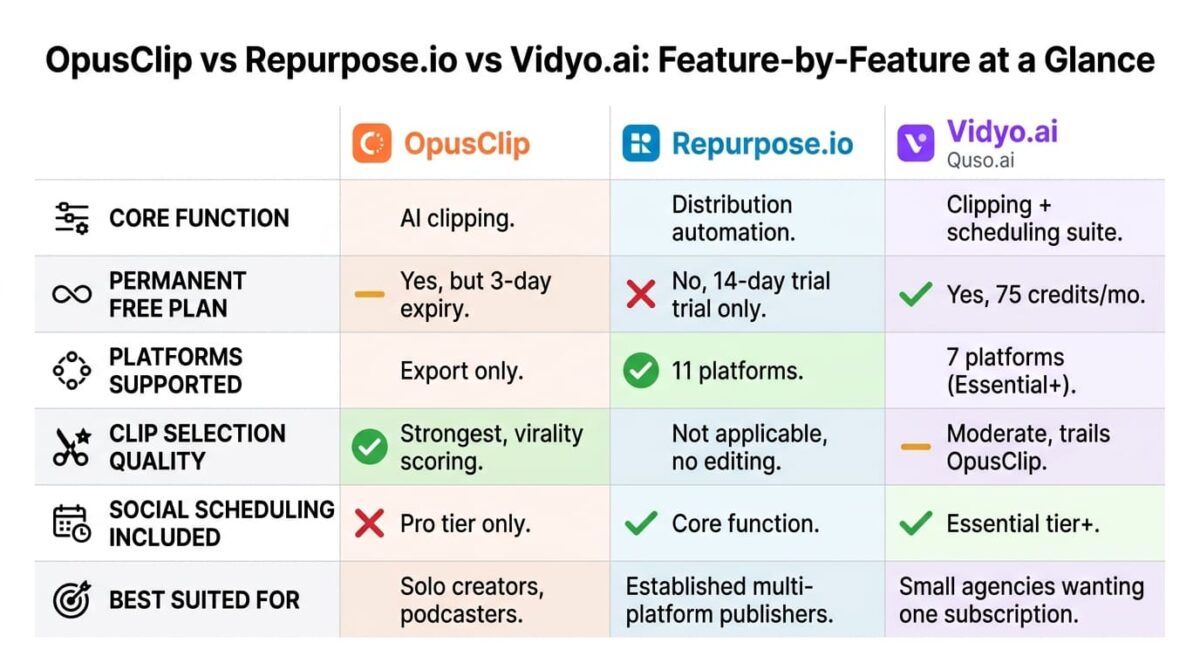
| Feature | OpusClip | Repurpose.io | Vidyo.ai (Quso.ai) |
|---|---|---|---|
| Core function | AI clipping | Distribution automation | Clipping + scheduling suite |
| Starting price | $15/month | $35/month | $29/month |
| Permanent free plan | Yes (limited) | No (14-day trial only) | Yes (limited) |
| Platforms supported | Export only | 11 platforms | 7 platforms (Essential+) |
| Clip selection quality | Strongest | Not applicable | Moderate |
| Social scheduling included | No | Yes (core function) | Yes (Essential+) |
| Best suited for | Solo creators, podcasters | Established multi-platform publishers | Small agencies wanting one subscription |
Which Should You Choose?
Choose OpusClip if clip quality matters most and distribution can happen manually or through a separate social media scheduling tool.
Choose Repurpose.io if clips or finished short-form content already exist and the bottleneck is manually reposting across many platforms every time something new goes live.
Choose Vidyo.ai (Quso.ai) if a single subscription covering clipping, captions, and scheduling matters more than having the sharpest possible clip-selection engine.
Our Recommendations
Based on 30 days of testing across podcast and YouTube source content, here is the recommended setup by situation:
Solo podcaster or YouTuber cutting their own clips: OpusClip Pro, for the strongest clip selection and the export options to polish further if needed.
Established creator or brand already producing finished short-form content: Repurpose.io Starter, since the value is entirely in hands-off distribution across the widest platform list of the three.
Small agency managing several clients’ social presence: Vidyo.ai (Quso.ai) Growth, for the single-subscription combination of clipping, scheduling, and client-facing analytics.
Creator on a tight budget testing the category for the first time: OpusClip’s free tier, understanding its 3-day project expiry, gives the clearest sense of clip quality before committing to any paid plan.
Anyone who needs both clip generation and multi-platform distribution: Pairing OpusClip for clipping with Repurpose.io for distribution outperforms relying on Vidyo.ai’s combined approach alone, at a higher combined cost.
Final Verdict
OpusClip, Repurpose.io, and Vidyo.ai solve different pieces of the same broader problem, which is why the “best” pick depends on which piece is missing from an existing workflow.
- OpusClip — 4.4 / 5 — the strongest clip quality, undersold by an unusually restrictive free tier
- Vidyo.ai (Quso.ai) — 4.1 / 5 — the broadest all-in-one feature set, with clip quality a step behind OpusClip’s
- Repurpose.io — 3.9 / 5 — the strongest distribution automation, but not a clipping tool at all and priced accordingly
If the job is cutting great clips, OpusClip earns the recommendation outright. If the job is getting already-finished content everywhere without manual reposting, Repurpose.io does that specific job better than either competitor. Vidyo.ai (Quso.ai) is the reasonable middle path for anyone who’d rather pay one subscription than two.
Frequently Asked Questions
Is Vidyo.ai still called Vidyo.ai?
No. It rebranded to Quso.ai in December 2024. The platform, team, and video engine stayed the same, and existing accounts, credits, and pricing carried over automatically, only the name changed, alongside an expanded feature set beyond clipping alone.
Does Repurpose.io create clips from long videos?
No. Repurpose.io distributes and reformats content that already exists, it doesn’t identify highlights or cut clips from long-form footage the way OpusClip or Vidyo.ai (Quso.ai) do. It’s a distribution tool, not an editor.
Is OpusClip’s free plan usable beyond testing?
For a quick test, yes, but not for ongoing use. The free plan is watermarked, limited to 9:16 exports, and projects expire 3 days after a subscription lapses, which makes it closer to a time-boxed trial than a permanent free tier.
Which tool has the best clip selection?
OpusClip, consistently, across independent comparisons and in testing here. Its virality scoring and ClipAnything feature surfaced usable clips more reliably than Vidyo.ai’s (Quso.ai’s) clipping engine, which trails it in most side-by-side reviews.
Can I use more than one of these tools together?
Yes, and for many workflows this is the more practical setup: cut clips with OpusClip, then distribute the finished clips across platforms with Repurpose.io. The combined cost is higher than picking one tool, but each handles the piece it’s specifically built for.
Why does Repurpose.io cost more than the other two?
Repurpose.io’s pricing reflects distribution volume and platform breadth rather than AI processing credits, and it includes official YouTube Partner integration that neither competitor offers. There’s also no free tier subsidizing the entry price the way OpusClip’s and Vidyo.ai’s free plans do.
Is Quso.ai the same company as Vidyo.ai?
Yes. Quso.ai is the same company, team, and underlying product operating under a new name since December 2024. It isn’t a competitor that acquired Vidyo.ai or a separate fork, it’s the same platform, expanded and renamed.
Which tool is best for a podcast specifically?
OpusClip, for cutting the highlight clips from a long recording. If the workflow also needs those clips automatically posted across many platforms afterward, pairing OpusClip with Repurpose.io covers both steps more thoroughly than either tool alone.