
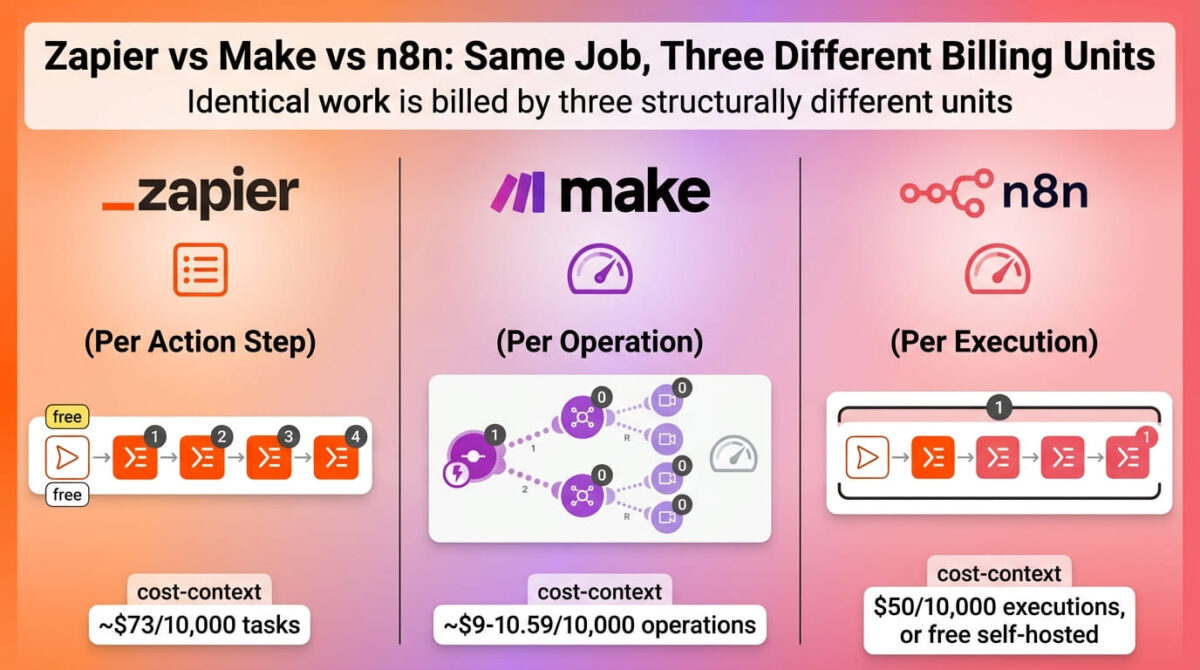
Zapier vs Make vs n8n all do the same basic job, connecting apps so one event triggers another action, but they charge for that job using three fundamentally different units. Zapier counts every action step. Make counts every operation a module performs. n8n counts one full workflow run, no matter how many steps are inside it.
That difference in billing unit matters more than any feature comparison, because it changes which tool is cheapest depending entirely on how complex a workflow is, not just how often it runs.
I tested Zapier vs Make vs n8n for 30 days, building the same multi-step workflow in all three and tracking exactly how each one counted usage against its free tier and paid plans. Here is the honest comparison, including why a single Zapier run can quietly cost three to five times what most people expect before they’ve even looked at the price.
Table of Contents
How We Tested
Five criteria shaped the testing:
- Billing unit: whether usage is counted per action step, per operation, or per full workflow run
- True cost at comparable volume: price for the same workflow complexity across all three platforms
- Free tier usability: whether the free plan supports an ongoing automation or just a quick test
- Self-hosting option: whether running the tool without a subscription is realistically available
- App catalog and setup speed: how many integrations exist and how quickly a first workflow goes live
Zapier Review: The Easiest Start, With Tasks That Add Up Faster Than Expected
Free plan: Yes, 100 tasks/month, two-step Zaps only
Starting price: $19.99/month (Professional, billed annually), 750 tasks base
Best plan for most users: Professional, though task volume needs realistic estimating before choosing a tier
Platforms: Web
Affiliate program: Yes, Zapier affiliate program
Zapier remains the most recognized name in this category, with the largest app catalog and the gentlest learning curve of the three tools tested.
What Zapier does best
With over 7,000 supported apps, Zapier covers more niche and long-tail integrations than either competitor, which matters when a workflow needs to connect to a less common tool or specific landing page builders. The interface is also the most approachable for a first-time user, walking through trigger and action setup in a way that doesn’t require understanding operations or executions as concepts upfront.
Triggers, filters, and built-in tools like Formatter and Delay don’t consume tasks, which helps keep simple, linear Zaps more predictable than the billing model might initially suggest.
Where Zapier falls short
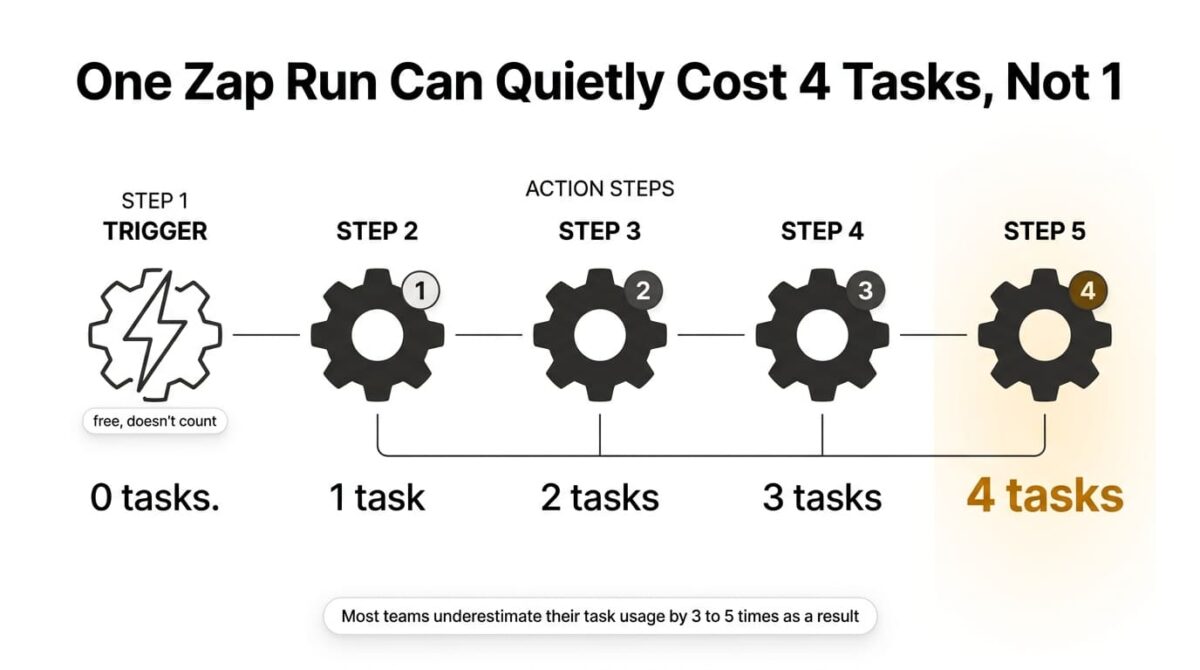
A task is counted for every action step that runs, not per Zap and not per trigger. A five-step Zap with one trigger and four actions costs four tasks every single time it runs, and independent analysis found most teams underestimate their task burn by three to five times as a result. The “100 free tasks” headline sounds generous until a multi-step workflow is running a handful of times a day.
At comparable volume, Zapier is also the most expensive of the three: 10,000 tasks a month costs roughly $73 on Zapier’s Professional tier, compared to around $9-10.59 for the equivalent 10,000 operations on Make’s Core plan.
Zapier pricing
| Plan | Price | Base Tasks/Month | Notable Feature |
|---|---|---|---|
| Free | $0 | 100 | Two-step Zaps only |
| Professional | $19.99/month (annual) | 750 | Multi-step Zaps, premium apps, webhooks |
| Team | $69/month (annual) | 2,000 | 25 users, shared connections, SSO |
| Enterprise | Custom | 5,000+ | Advanced security, annual task limits |
Zapier: Pros and Cons
Pros:
- Largest app catalog of the three, over 7,000 integrations
- Easiest learning curve for a first-time automation builder
- Triggers and built-in tools don’t consume tasks
- Well-documented and widely supported with community resources
Cons:
- Task-based billing undercounts total usage for anyone estimating per-Zap rather than per-step
- Most expensive of the three at comparable usage volume
- Free tier’s two-step limit rules out most practically useful automations
- AI steps and code actions now count toward task usage too, adding cost for AI-heavy workflows
Rating: 3.9 / 5, the easiest tool to start with and the largest app catalog, at the highest total cost once task math is worked out properly.
Make Review: The Same Granular Billing, at a Fraction of Zapier’s Price
Free plan: Yes, 1,000 operations/month, 2 active scenarios
Starting price: $9/month (Core, billed annually), 10,000 operations
Best plan for most users: Core, sufficient for most freelancers and small businesses
Platforms: Web
Affiliate program: Yes, Make affiliate program
Make, formerly Integromat, counts usage in operations, a unit similar in granularity to Zapier’s tasks, but priced at roughly a third to a fifth of the cost for the same volume.
What Make does best
Core’s 10,000 monthly operations for $9/month (annual) deliver the same workflow capacity that costs around $73/month on Zapier’s comparable tier, a gap wide enough that independent comparisons consistently describe Make as 3-5x cheaper at equivalent usage. The visual scenario builder also makes branching logic and routers easier to follow at a glance than Zapier’s more linear Zap structure.
The free plan, at 1,000 operations and 2 active scenarios, is described by multiple reviewers as holding up for ongoing use rather than acting as a crippled trial, enough to automate a modest but functioning workflow like posting new content to social media or syncing a small CRM.
Where Make falls short
Operations, like Zapier’s tasks, are counted per module action, and a complex scenario with loops or large data arrays can burn through the monthly allowance faster than a simple linear automation would suggest. The app catalog, while large at over 3,000 integrations, is smaller than Zapier’s, which occasionally matters for a workflow needing a specific niche tool.
There’s also no self-hosting option; Make is cloud-only, so a team wanting to run automation infrastructure on its own servers for compliance or cost reasons needs to look at n8n instead.
Make pricing
| Plan | Price | Operations/Month | Notable Feature |
|---|---|---|---|
| Free | $0 | 1,000 | 2 active scenarios, 15-min interval |
| Core | $9/month (annual) | 10,000 | Unlimited scenarios, 1-min interval |
| Pro | $16/month (annual) | 10,000 | Priority execution, custom variables |
| Teams | $29/month (annual) | Higher | Team collaboration features |
Make: Pros and Cons
Pros:
- Roughly 3-5x cheaper than Zapier for the same operation volume
- Free tier supports a working ongoing automation, not just a test
- Visual builder makes branching and routing logic easier to follow
- Unlimited active scenarios from the entry Core plan
Cons:
- Smaller app catalog than Zapier’s, around 3,000 integrations
- Operations still counted per module action, so complex scenarios can burn through the allowance quickly
- No self-hosting option, cloud-only
- Less beginner documentation and community content than Zapier’s
Rating: 4.3 / 5, the strongest value of the three at any meaningful volume, with the same per-step billing model as Zapier at a fraction of the cost.
n8n Review: A Different Billing Unit Entirely, With a Working Free Option
Free plan: Only via self-hosting; Cloud has no permanent free tier, just a 14-day trial
Starting price: $20/month (Starter Cloud, billed annually), 2,500 executions
Best plan for most users: Self-hosted Community Edition for technical teams; Starter Cloud for everyone else
Platforms: Web (Cloud), self-hosted (Community Edition)
Affiliate program: No, n8n runs no consumer affiliate program
n8n counts usage by execution, one complete workflow run regardless of how many steps or nodes it contains, a structurally different model from both Zapier’s and Make’s per-action billing.
What n8n does best
Because one execution covers an entire workflow run no matter how many steps it includes, n8n becomes dramatically cheaper than Zapier or Make specifically for complex, multi-step automations, with some comparisons putting the gap at 5-50x depending on workflow complexity. The self-hosted Community Edition is also completely free with no vendor-imposed execution limit, the only fully free, unlimited option among the three tools.
Every Cloud plan now includes unlimited workflows and unlimited users, with only execution volume affecting the bill, a simpler mental model than tracking task or operation counts across a team.
Where n8n falls short
Cloud no longer offers a permanent free tier as of 2026, only a 14-day trial, a notable step back from Zapier’s and Make’s ongoing free plans for anyone wanting to test before committing long-term. Self-hosting avoids a subscription entirely, but it shifts the cost to a server, typically $4-10/month, and the responsibility for maintenance and updates onto whoever sets it up.
The interface also carries a steeper learning curve than Zapier’s or Make’s, built around nodes and JSON-adjacent configuration in a way that assumes more technical comfort than either competitor requires.
n8n pricing
| Plan | Price | Executions/Month | Notable Feature |
|---|---|---|---|
| Community (self-hosted) | Free (+ server cost) | Unlimited | Full workflow engine, unlimited users/workflows |
| Starter (Cloud) | $20/month (annual) | 2,500 | 5 concurrent executions |
| Pro (Cloud) | $50/month (annual) | 10,000 | 20 concurrent, admin roles |
| Business (self-hosted) | $667/month (annual) | 40,000 | SSO, Git version control |
n8n: Pros and Cons
Pros:
- Execution-based billing is dramatically cheaper for complex, multi-step workflows
- Self-hosted Community Edition is fully free with no execution ceiling
- Unlimited workflows and users included on every Cloud plan
- Open-source foundation gives full visibility into how the tool works
Cons:
- No permanent free tier on Cloud as of 2026, only a 14-day trial
- Self-hosting requires server setup and ongoing maintenance responsibility
- Steeper learning curve than either competitor
- Smaller third-party tutorial and community content base than Zapier’s
Rating: 4.1 / 5, the most cost-efficient option for complex workflows and the only fully free unlimited path, at the cost of a steeper setup and no ongoing free Cloud tier.
Head-to-Head Comparison
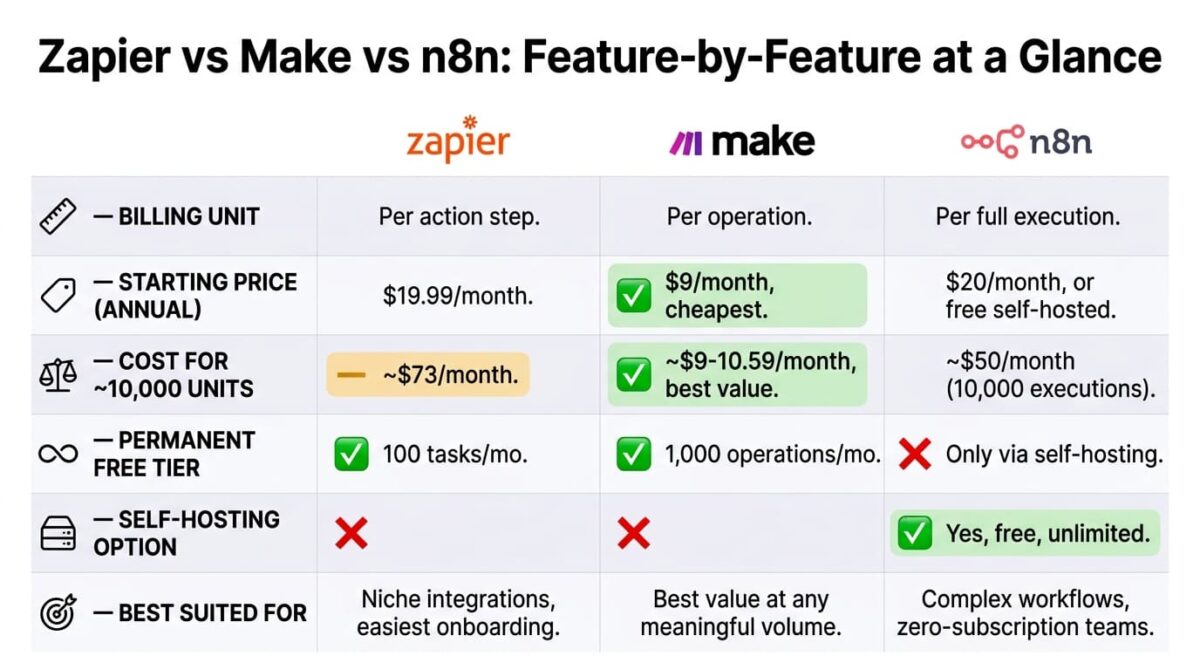
| Feature | Zapier | Make | n8n |
|---|---|---|---|
| Billing unit | Per action step | Per operation | Per full execution |
| Starting price (annual) | $19.99/month | $9/month | $20/month (Cloud) or free (self-hosted) |
| Cost for ~10,000 units | ~$73/month | ~$9-10.59/month | $50/month (10,000 executions) |
| Permanent free tier | Yes (100 tasks) | Yes (1,000 operations) | Only via self-hosting |
| App catalog size | 7,000+ | 3,000+ | Smaller, growing |
| Self-hosting option | No | No | Yes, free |
| Best suited for | Niche integrations, easiest onboarding | Best value at any meaningful volume | Complex workflows, technical teams wanting zero subscription cost |
Which Should You Choose?
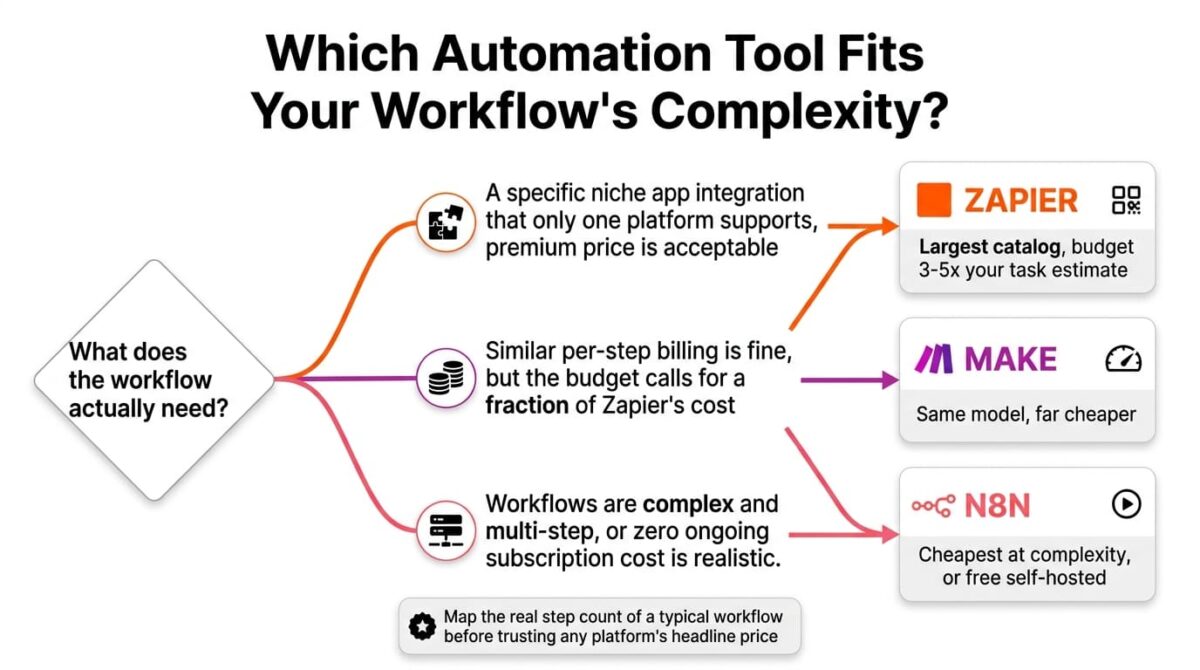
Choose Zapier if a workflow needs a specific niche app integration that only Zapier supports, and the premium price is acceptable for that access.
Choose Make if the workflow fits a similar per-step billing model to Zapier but the budget calls for a fraction of the cost at the same volume.
Choose n8n if workflows are complex and multi-step, where execution-based billing saves meaningfully over per-step pricing, or if self-hosting with zero subscription cost is realistic for the team.
Our Recommendations
Based on 30 days of testing across simple, moderate, and complex multi-step workflows, here is the recommended setup by situation:
Solo freelancer automating a handful of simple tasks: Make’s free tier or Core plan, for the same billing model as Zapier at a fraction of the price.
Small business needing a specific niche integration Zapier uniquely supports: Zapier Professional, budgeting task usage at 3-5x initial estimates.
Technical team running complex, many-step workflows regularly: n8n Cloud Pro, or self-hosted Community Edition if server management is realistic in-house.
Agency building automations for multiple clients on a budget: Make, since the lower per-operation cost scales better across several client workflows than Zapier’s pricing would.
Developer or technically comfortable team wanting zero ongoing subscription cost: n8n’s self-hosted Community Edition on a low-cost VPS, accepting the maintenance responsibility that comes with it.
Final Verdict
Zapier, Make, and n8n all solve the same automation problem, but the unit each one bills by determines which ends up cheapest for a given workflow.
- Make (4.3 / 5): the strongest value at any meaningful volume, using the same billing model as Zapier at a fraction of the price
- n8n (4.1 / 5): the most cost-efficient choice for complex workflows, and the only tool offering a fully free, unlimited self-hosted path
- Zapier (3.9 / 5): the easiest to start with and the largest app catalog, at the highest cost once realistic task usage is accounted for
Before picking based on the free tier or the headline price, map out how many steps a typical workflow needs in practice (such as automatically syncing data to your accounting software) and whether that favors per-step billing or per-execution billing. The tool that looks cheapest on the pricing page isn’t always the cheapest once a workflow is actively running.
Frequently Asked Questions
Why does a simple Zapier automation cost more tasks than expected?
Because Zapier counts every action step in a Zap separately, not the Zap itself. A five-step Zap with four action steps costs four tasks per run, which is why independent analysis found most teams underestimate their task usage by three to five times.
Is Make really cheaper than Zapier for the same work?
Yes, substantially. Make’s Core plan delivers 10,000 operations for around $9-10.59/month, while a comparable 10,000 tasks on Zapier’s Professional tier costs roughly $73/month, a gap of 3-5x at equivalent usage.
What makes n8n’s pricing different from Zapier’s and Make’s?
n8n counts one execution per complete workflow run, regardless of how many steps or nodes it contains, while Zapier and Make both count usage per individual action. This makes n8n dramatically cheaper specifically for complex, multi-step automations.
Does n8n still have a free plan?
Only through self-hosting. The open-source Community Edition is free with no vendor execution limit, but requires running it on your own server. n8n Cloud no longer offers a permanent free tier as of 2026, only a 14-day trial.
Which tool has the most integrations?
Zapier, with over 7,000 supported apps, ahead of Make’s roughly 3,000 and n8n’s smaller but growing catalog. For a workflow needing a specific, less common integration, Zapier is more likely to support it directly.
Is self-hosting n8n free in practice?
The software itself is free with no execution limit, but it isn’t free of cost entirely: a server to run it on typically costs $4-10/month, and whoever sets it up takes on maintenance and update responsibility that a hosted Cloud plan would otherwise handle.
Which tool is best for an agency running many client workflows?
Make, generally, since its lower per-operation cost scales more affordably across multiple client automations than Zapier’s pricing at the same complexity. n8n is also a reasonable option if the agency has technical capacity to self-host.
Can a workflow be moved between these three tools later?
Not directly. Each platform uses its own workflow format, so switching means rebuilding automations from scratch in the new tool rather than importing them, which matters to factor in before committing to one platform for complex, long-term workflows.








