If you are comparing Google Workspace vs Microsoft 365 vs Zoho Mail, you want an email address on your own domain, such as you@yourbusiness.com, that clients trust and that does not land in spam. A free Gmail or Outlook address can look like a side project. Business email hosting fixes that, and it usually comes bundled with documents, calendars, and video meetings.
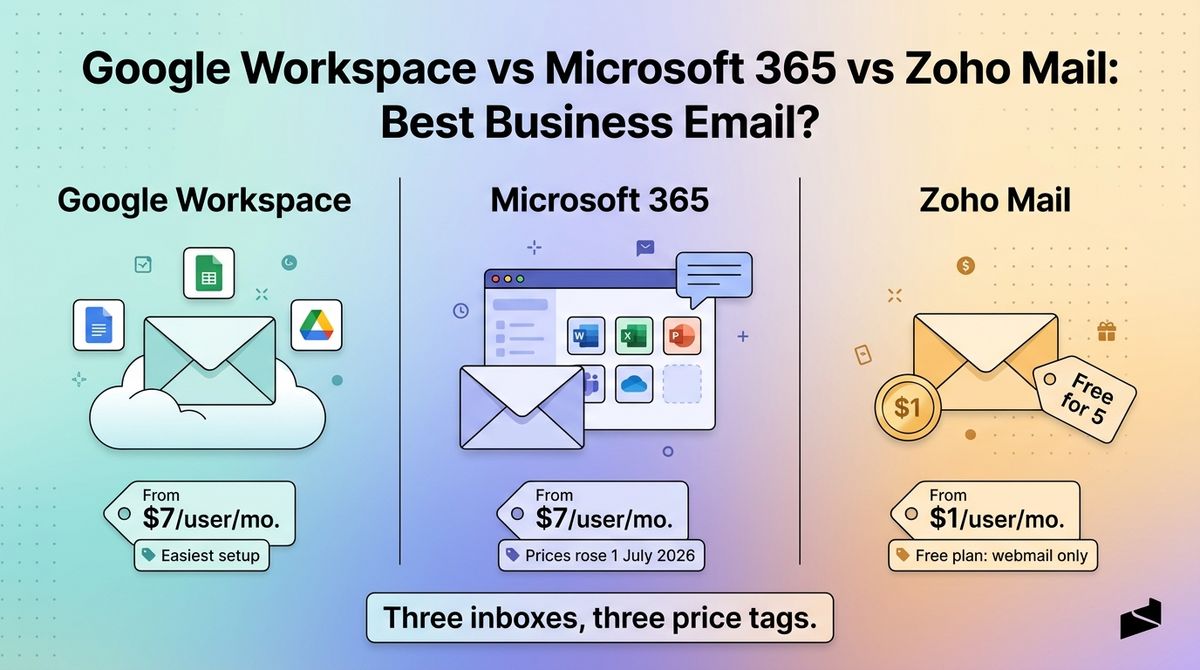
The three tools price very differently. Google and Microsoft now list nearly identical per-user prices, and Zoho Mail starts at $1 per user. Microsoft raised its prices on 1 July 2026, so many reviews still quote $6 and $12.50. The cheapest plan is not always the cheapest once you add the features you need.
I tested Google Workspace vs Microsoft 365 vs Zoho Mail for 30 days, setting up the same custom domain on each, then connecting a desktop client, a phone, and a shared support inbox. Here is the honest comparison, including one pricing catch: Zoho’s free plan has no IMAP, so you are locked into Zoho’s own apps.
Table of Contents
How We Tested
Every tool was scored on the same five criteria.
- Setup and deliverability. Domain verification, MX, SPF, and DKIM records, and how quickly the first message reached an inbox.
- Pricing and limits. Per-user cost, billing terms, storage, and plan caps.
- Apps and compatibility. Web, mobile, and desktop apps, plus IMAP access for third-party clients.
- Collaboration and security. Documents, meetings, two-factor authentication, and admin controls.
- Cost for a small team. Total yearly cost for one, five, and ten users on the entry plan.
Google Workspace Review: Easiest Setup, Familiar Gmail Interface
- Free plan: No free custom-domain email plan
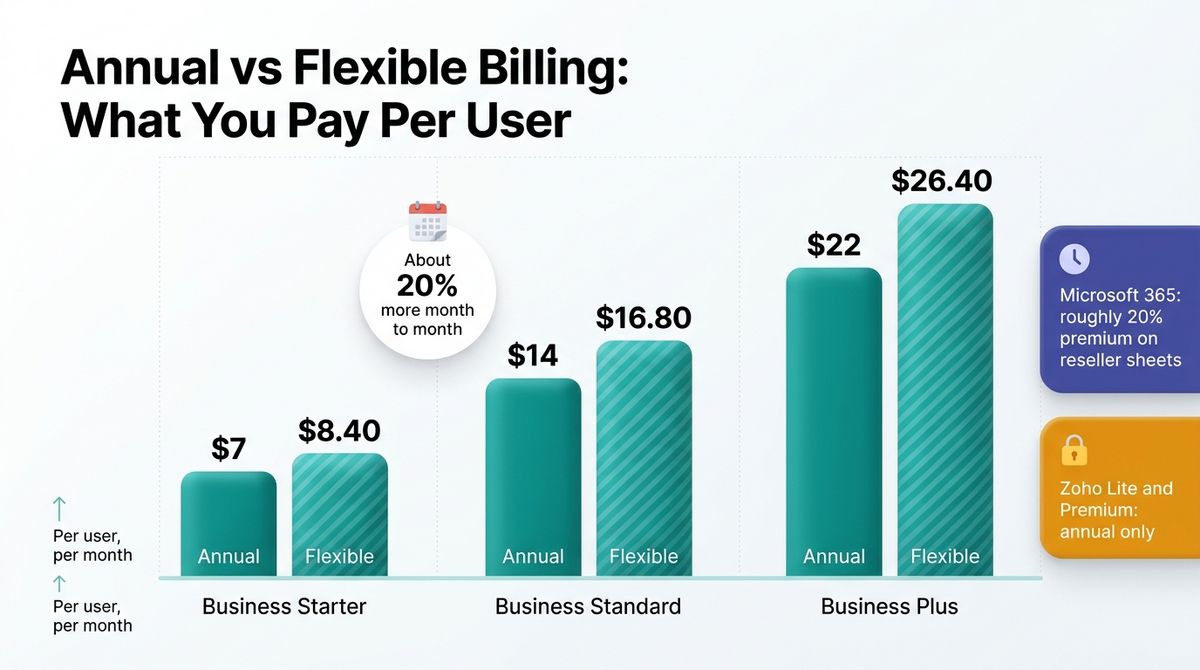
- Starting price: Business Starter at $7 per user per month billed annually ($8.40 on the flexible monthly plan)
- Best plan for most users: Business Starter for email-first teams, Business Standard if you share files and record meetings
- Platforms: Web, iOS app, Android app
- Affiliate program: Yes, through CJ Affiliate, paid per new user (Google’s example is $270 for a 10-user Business Plus account in the US)
Google Workspace gives you Gmail on your own domain, plus Drive, Docs, Sheets, Meet, and Calendar. It is the interface most people already know. The Business plans cover up to 300 users, and Gemini AI features are bundled into the paid plans.
What Google Workspace does best
Setup and familiarity are the strengths. If you already use Gmail, the interface needs no training, and Docs, Sheets, and Meet open from the same account. Starter gives each user 30 GB of pooled storage, and Meet calls for up to 100 people, which suits freelancers and small teams.
Standard at $14 adds 2 TB of pooled storage per user, Meet recording for up to 150 people, and booking pages. Plus at $22 adds 5 TB, meetings for up to 500 people, and Vault for retention and eDiscovery. Annual billing is about 17% cheaper than the flexible plan on every tier.
Where Google Workspace falls short
Price is the main drawback. Business Starter is $7 per user per month, seven times the price of Zoho Mail Lite, and it rose from the earlier $6, $12, and $18 tiers. The flexible month-to-month plan adds about 20%, so Starter costs $8.40, and an annual plan locks you in for the full term.
Starter is also thin on features: 30 GB of pooled storage per user, no meeting recording, and a 300-user cap on all Business plans. That storage is shared by Gmail and Drive together, so a team that stores large files can outgrow it quickly.
Google Workspace pricing
| Plan | Price | What you get |
|---|---|---|
| Business Starter | $7 per user per month billed annually ($8.40 flexible) | 30 GB pooled storage per user, Meet for up to 100, Gmail on your domain, Gemini in Gmail |
| Business Standard | $14 per user per month billed annually ($16.80 flexible) | 2 TB pooled storage per user, Meet for 150 with recording, booking pages |
| Business Plus | $22 per user per month billed annually ($26.40 flexible) | 5 TB pooled storage per user, Meet for 500, Vault retention |
| Enterprise | Custom quote | No user cap, advanced security and compliance controls |
Google Workspace: Pros and Cons
Pros:
- Gmail interface that most people already know
- Docs, Sheets, and Meet under one login
- Up to 5 TB of pooled storage per user on Plus
- Gemini AI features included in paid plans
- Simple domain setup
Cons:
- Seven times the entry price of Zoho Mail Lite
- Flexible billing costs about 20% more
- Starter has 30 GB and no meeting recording
- Prices rose from $6, $12, and $18
- Business plans cap at 300 users
Rating: 4.6 / 5, the easiest choice for most small teams.
Microsoft 365 Review: Best for Outlook Users, Costlier Since July
- Free plan: No free custom-domain email plan
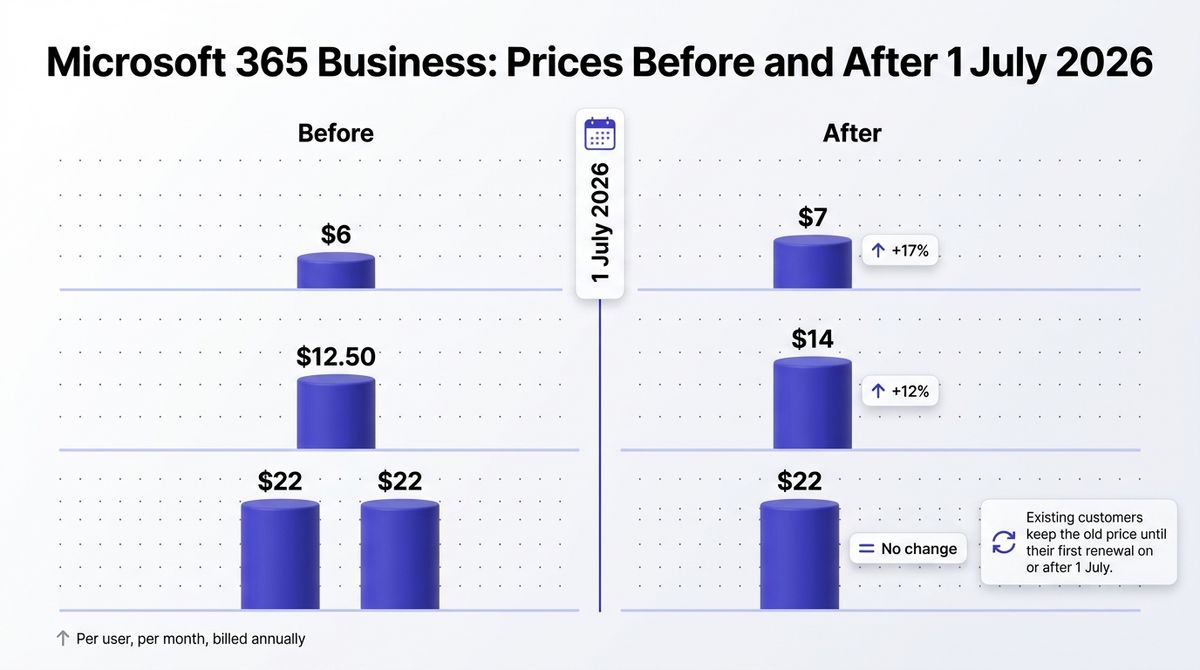
- Starting price: Business Basic at $7 per user per month billed annually (it was $6 before 1 July 2026)
- Best plan for most users: Business Standard if you need installed Outlook and Office apps, Basic for web and mobile only
- Platforms: Web, Windows, macOS (installed apps on Standard and above), iOS, Android
- Affiliate program: Reported through Rakuten Advertising, rate unconfirmed
Microsoft 365 Business pairs Exchange Online business email with Outlook, Teams, OneDrive, and SharePoint. Business Basic is web and mobile only, Standard adds installed desktop versions of Word, Excel, PowerPoint, and Outlook, and Premium adds advanced security and device management.
What Microsoft 365 does best
Microsoft suits anyone who lives in Outlook, Word, and Excel. Standard at $14 includes the installed desktop apps, which is the main reason to choose it, and Teams chat and meetings come with every plan. Clients who send Office files will open them without conversion problems.
Premium at $22 is the only Business plan whose price did not rise, and it adds Defender for Business, Intune device management, and conditional access. The gap between Standard and Premium narrowed from $9.50 to $8 per user. Microsoft is also adding 50 GB of email space to Business plans, rolling out in summer 2026.
Where Microsoft 365 falls short
Prices rose on 1 July 2026. Business Basic went from $6 to $7, up 17%, and Standard from $12.50 to $14, up 12%. Existing customers stay on the old price until their first renewal on or after that date, so quotes and reviews from earlier in the year are out of date.
Billing terms add cost. Microsoft lets you pay month by month and cancel at any time, but reseller price sheets show a premium of roughly 20% for monthly terms and about 5% for paying an annual plan monthly. Business Basic also has no installed desktop apps, so Outlook for Windows or Mac needs Standard or higher.
Microsoft 365 pricing
| Plan | Price | What you get |
|---|---|---|
| Business Basic | $7 per user per month billed annually ($5.40 without Teams) | Exchange business email, web and mobile apps, Teams, cloud storage |
| Business Standard | $14 per user per month billed annually ($10.79 without Teams) | Everything in Basic plus installed Word, Excel, PowerPoint, and Outlook |
| Business Premium | $22 per user per month billed annually ($18.79 without Teams) | Everything in Standard plus Defender for Business, Intune, and conditional access |
| Apps for business | $10 per user per month | Installed Office apps only, no business email |
Microsoft 365: Pros and Cons
Pros:
- Installed Outlook, Word, and Excel on Standard
- Teams included, or removable for a lower price
- Premium security stack at $22 with no price rise
- Cheapest entry without Teams at $5.40
Cons:
- Prices rose 12% to 17% on 1 July 2026
- Basic has no installed desktop apps
- Monthly terms carry a premium
- Device management needs Premium
Rating: 4.4 / 5, best for Outlook and Office users.
Zoho Mail Review: Lowest Price, With a Restricted Free Plan
- Free plan: Yes, up to 5 users, 5 GB each, one domain, web and mobile apps only
- Starting price: Mail Lite at $1 per user per month billed annually ($1.25 for 10 GB)
- Best plan for most users: Mail Lite for email only, Workplace Standard at $3 if you want an office suite
- Platforms: Web, Windows, macOS, Linux (Desktop Lite app), iOS, Android
- Affiliate program: Yes, reported at 15% recurring, rate unconfirmed
Zoho Mail is business email hosting from Zoho, a company that also sells 55+ business apps. It offers custom-domain email with an ad-free inbox, and you can pair it with Zoho Workplace for Writer, Sheet, Show, Cliq, and WorkDrive. It is priced per user per month, billed annually.
What Zoho Mail does best
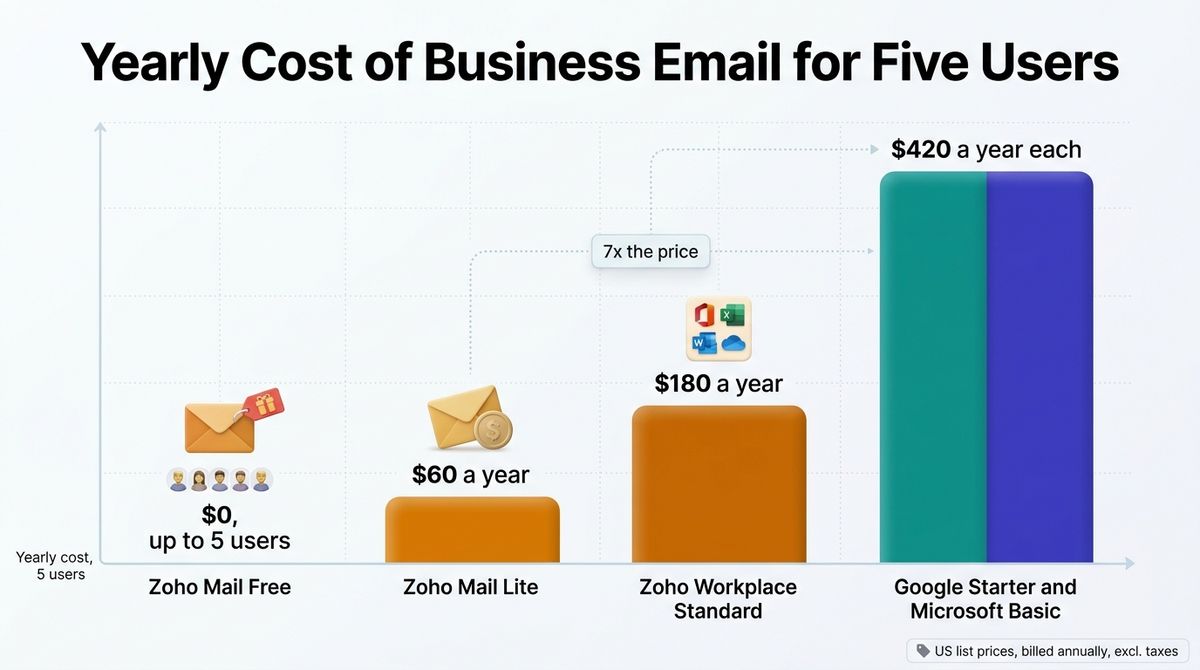
Price is the headline. Mail Lite costs $1 per user per month, so a team of five pays $60 a year, against $420 on Google Workspace Business Starter or Microsoft 365 Business Basic. The free plan covers up to five users on your own domain, which neither of the others offers.
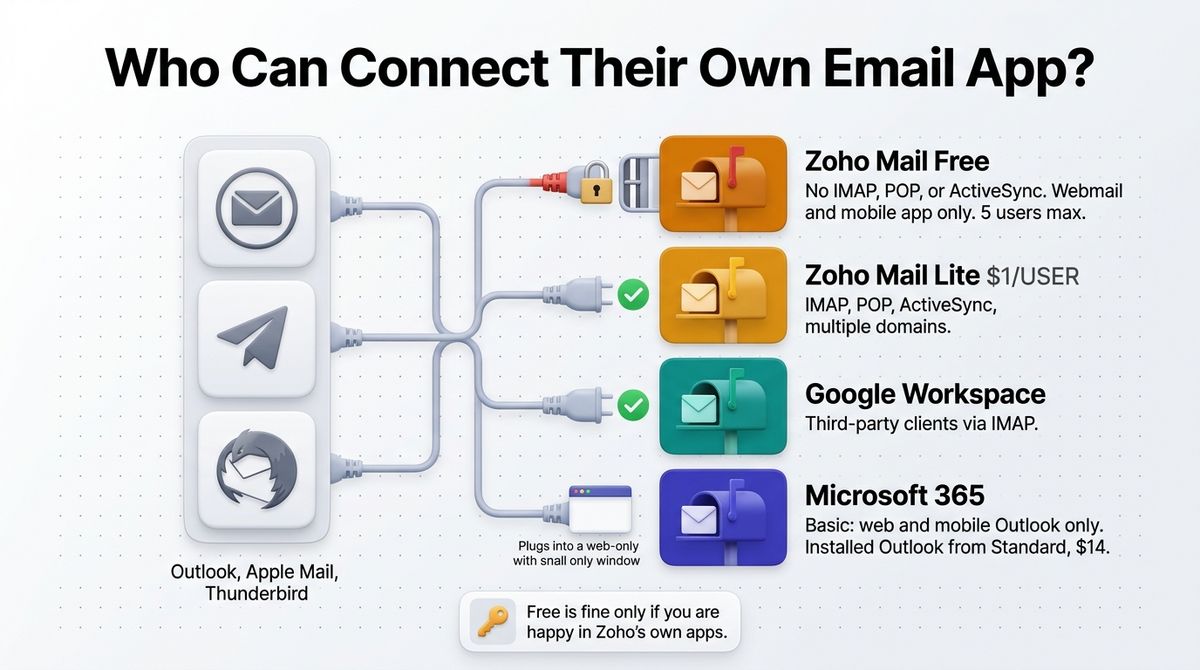
Workplace Standard at $3 adds 30 GB of email plus WorkDrive, Writer, Sheet, Show, and Cliq, so it can replace a paid office suite for light use. Mail Lite also supports IMAP, POP, and ActiveSync, and Zoho’s free desktop app runs on Windows, macOS, and Linux.
Where Zoho Mail falls short
The free plan has no IMAP, POP, or ActiveSync, so you can only use Zoho’s own webmail and mobile apps, and a sixth user pushes the whole account onto a paid plan. Mail Lite and Mail Premium are annual only, so you pay $12 per seat up front.
Storage and ecosystem are the trade-offs. Mail Lite includes 5 GB per user, or 10 GB for $1.25, against 30 GB on Google Starter. Zoho’s office apps are used less often by clients and collaborators than Google Docs or Word, and Mail Premium at $4 costs more than Workplace Standard at $3 while offering fewer products.
Zoho Mail pricing
| Plan | Price | What you get |
|---|---|---|
| Free | $0 | Up to 5 users, 5 GB per user, one domain, web and mobile apps only, no IMAP or POP |
| Mail Lite | $1 per user per month (5 GB), or $1.25 (10 GB), annual only | IMAP, POP, ActiveSync, multiple domains, email routing |
| Mail Premium | $4 per user per month, annual only | 50 GB, retention, eDiscovery, S/MIME, white labeling, attachments up to 1 GB |
| Workplace Standard | $3 per user per month billed annually ($4 monthly) | 30 GB email, WorkDrive, Writer, Sheet, Show, Cliq, Meeting |
| Workplace Professional | $6 per user per month billed annually ($7 monthly) | 100 GB email, 1 TB shared team storage, expanded limits |
Zoho Mail: Pros and Cons
Pros:
- Lowest price at $1 per user per month
- Free plan for up to 5 users on your own domain
- IMAP and POP from Mail Lite upward
- Ad-free inbox on every plan
- Desktop apps for Windows, macOS, and Linux
Cons:
- Free plan has no IMAP or POP and caps at 5 users
- Mail Lite and Mail Premium are annual only
- Mail Lite includes just 5 GB per user
- Smaller app ecosystem than Google or Microsoft
- Mail Premium costs more than Workplace Standard
Rating: 4.5 / 5, the best budget pick for email-first teams.
Google Workspace vs Microsoft 365 vs Zoho Mail: Head-to-Head Comparison
| Feature | Google Workspace | Microsoft 365 | Zoho Mail |
|---|---|---|---|
| Free plan | None for custom-domain email | None for custom-domain email | Yes, up to 5 users, no IMAP |
| Entry price, billed annually | $7 per user | $7 per user (Basic) | $1 per user (Lite) |
| Month-to-month price | $8.40 per user | Premium for monthly terms, roughly 20% on reseller sheets | Lite and Premium annual only; Workplace costs $1 more |
| Yearly cost for 5 users, entry plan | $420 | $420 | $60 ($180 on Workplace Standard) |
| Mid-tier plan | Standard, $14 | Standard, $14 | Workplace Standard, $3 |
| Desktop email app | Gmail in the browser; clients via IMAP | Installed Outlook on Standard and above | Free Desktop Lite app for Windows, macOS, Linux |
| Third-party clients (IMAP) | Yes | Yes | Mail Lite and above, not on Free |
| Meetings | Meet, up to 100 on Starter, recording on Standard | Teams included | Zoho Meeting on Workplace plans |
| Security extras | Vault on Plus | Defender for Business and Intune on Premium | S/MIME and eDiscovery on Mail Premium |
| Affiliate program | Yes, per new user via CJ | Reported via Rakuten, unconfirmed | Reported 15% recurring, unconfirmed |
| Best for | Easiest setup for small teams | Outlook and Office users | Budget email-first teams |
| Rating | 4.6 / 5 | 4.4 / 5 | 4.5 / 5 |
Yearly cost for five users uses US list prices for entry plans billed annually, and excludes taxes and promotions.
Which Should You Choose?
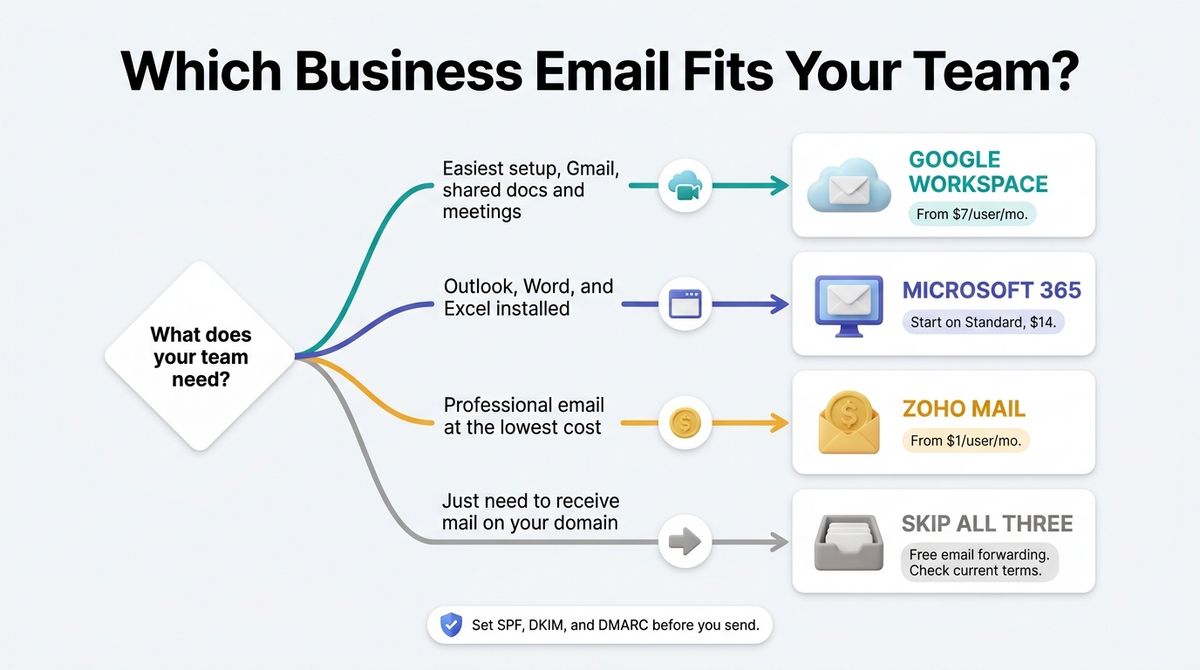
- Choose Google Workspace if you want the easiest setup, the Gmail interface, and collaboration in Docs and Meet, and you can pay $7 or more per user.
- Choose Microsoft 365 if your clients and team work in Outlook, Word, and Excel, and you need installed desktop apps. Start on Standard rather than Basic.
- Choose Zoho Mail if you mainly need professional email at the lowest cost. The Free plan works for up to five people who are happy with webmail and the mobile app.
- Skip all three if you only need to receive mail on your domain. Free email forwarding from your registrar or Cloudflare Email Routing sends it to an inbox you already have, though sending as your domain needs extra setup, so check current terms.
One developer note applies to every tool here. Set SPF, DKIM, and DMARC records before you send anything, and send WordPress site emails through a dedicated SMTP service or plugin rather than your mailbox. That keeps contact form traffic from hurting the deliverability of your business address.
Our Recommendations
- Solo freelancer or blogger: Zoho Mail Lite at $1 per month, or $12 a year, gives you a professional address on your domain. Use the Free plan if webmail and the mobile app are enough.
- Small team of 2 to 10 that shares files and meets online: Google Workspace Business Starter at $7, or Standard at $14 if you need recording and 2 TB per user.
- Agency or consultancy with Microsoft-using clients: Microsoft 365 Business Standard at $14, or Premium at $22 if you handle client data and need device management.
- Budget-first startup: Zoho Workplace Standard at $3 per user covers email plus an office suite.
- Team with compliance needs: Google Workspace Plus for Vault, Microsoft 365 Premium for Defender and Intune, or Zoho Mail Premium for eDiscovery and S/MIME.
Final Verdict
In the Google Workspace vs Microsoft 365 vs Zoho Mail comparison, Google Workspace is the best pick for most small teams. Setup is simple, Gmail is familiar, and the collaboration apps cover most needs. Zoho Mail is the best value if you mainly need professional email, at $1 per user against $7. Microsoft 365 is the right choice when your team lives in Outlook and Office, but its July 2026 price rise narrowed its value.
- Google Workspace: 4.6 / 5
- Zoho Mail: 4.5 / 5
- Microsoft 365: 4.4 / 5
Check each vendor’s live pricing page before you buy. All prices above were checked in October 2026.
Frequently Asked Questions
Which is better, Google Workspace, Microsoft 365, or Zoho Mail?
Google Workspace suits most small teams for its easy setup and Gmail interface. Zoho Mail offers the lowest price, from $1 per user, and fits email-first users. Microsoft 365 suits teams that depend on Outlook and installed Office apps. Pick by workflow first, then compare per-user cost over a full year.
How much does Google Workspace cost?
Google Workspace Business Starter costs $7 per user per month billed annually, or $8.40 on the flexible monthly plan. Standard costs $14 annually and $16.80 monthly. Plus costs $22 annually and $26.40 monthly. The Business plans cap at 300 users, and Enterprise is custom-priced with no user limit.
How much does Microsoft 365 Business cost now?
Since 1 July 2026, Microsoft 365 Business Basic costs $7 per user per month on an annual term, Business Standard costs $14, and Business Premium costs $22. Basic rose from $6, and Standard from $12.50. Existing customers keep their old price until their first renewal on or after 1 July. Monthly terms cost more.
Is Zoho Mail free?
Yes, with limits. Zoho’s Forever Free plan covers up to five users, 5 GB each, and one custom domain, but it works only through Zoho’s webmail and mobile apps with no IMAP or POP. Mail Lite costs $1 per user per month billed annually and adds IMAP, POP, and multiple domains. A sixth user requires a paid plan.
Can I use Outlook with Google Workspace or Zoho Mail?
Yes. Google Workspace and Zoho Mail Lite and above support IMAP, so Outlook, Apple Mail, and Thunderbird can connect. Zoho’s Free plan blocks IMAP and POP. Microsoft 365 Business Basic includes only web and mobile Outlook, so you need Business Standard or higher for installed Outlook on Windows or Mac.
What is the cheapest way to get a professional email address?
Zoho Mail is the cheapest hosted option: free for up to five users on webmail, or $1 per user per month on Mail Lite. For one person that is $12 a year. Google Workspace and Microsoft 365 start at $7 per user per month, which is $84 a year for a single mailbox.
Do I pay more for monthly billing?
Usually yes. Google’s flexible plan costs about 20% more than annual, at $8.40 versus $7 on Starter. Microsoft charges a premium for month-to-month terms, which reseller price sheets put at roughly 20%. Zoho Mail Lite and Premium are annual only, while Workplace plans cost $1 more per user monthly.
How do I set up a custom domain email address?
Buy a plan, verify your domain, then add the provider’s MX records at your DNS host. Add SPF and DKIM records, and a DMARC policy, so messages reach inboxes instead of spam. Send WordPress contact form emails through a dedicated SMTP service, not your mailbox, to protect your business address’s deliverability.