If you are comparing HeyGen vs Synthesia vs D-ID, you probably want a presenter on screen without booking a camera, a studio, or yourself. AI avatar video generators turn a script into a talking presenter, and they are now good enough for course lessons, product explainers, and social clips. The catch is that the three tools charge in different ways, and the prices in many reviews are out of date.
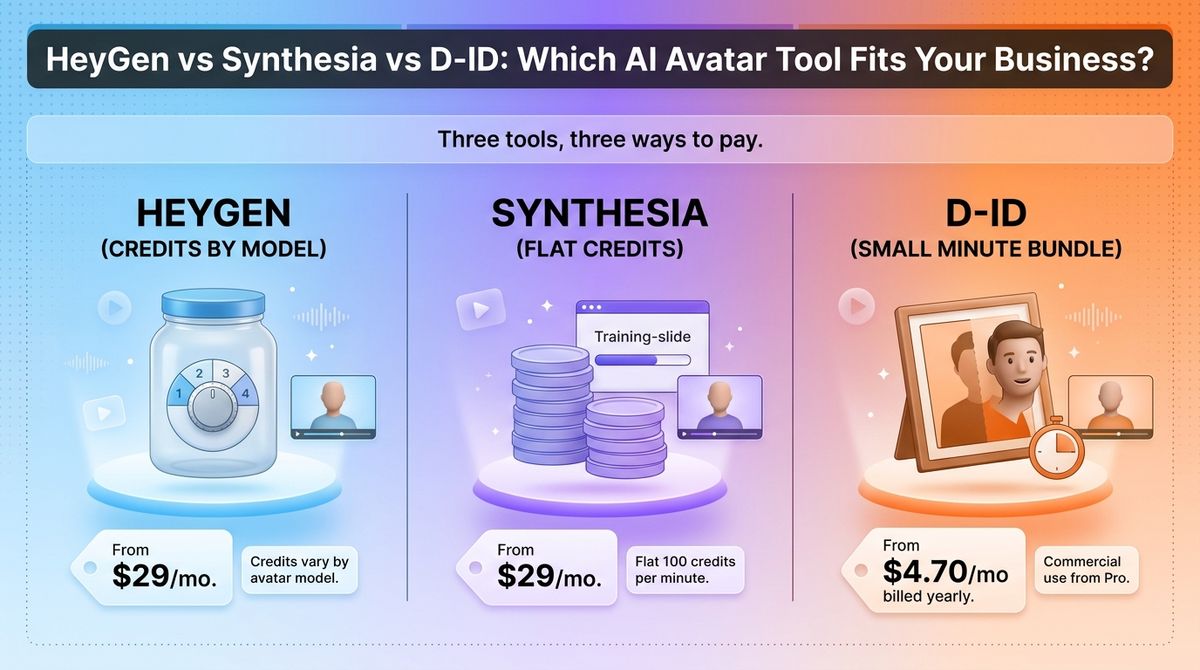
HeyGen sells credits that cost different amounts depending on the avatar model. Synthesia sells credits too, but a finished minute costs a flat number of them. D-ID sells a small bundle of minutes and ties commercial use to a higher plan. The same ten-minute video can cost very different amounts depending on which one you pick.
I tested HeyGen vs Synthesia vs D-ID for 30 days, building the same one-minute product explainer and a three-minute lesson on each, then tracking what every revision cost against the plan’s allowance. Here is the honest comparison, including one pricing catch: HeyGen and Synthesia have both rebuilt their plans in the past year, so older reviews quote numbers that no longer apply.
Table of Contents
How We Tested
Every tool was scored on the same five criteria.
- Avatar quality. Lip sync, facial movement, and how natural the avatar looks across a full video.
- Pricing and limits. What each plan costs, what a finished minute uses, and which plan first allows commercial use.
- Editing and control. Script editing, voices, avatars of yourself, and how retakes affect your allowance.
- Languages and translation. Language coverage, translation, and lip-synced dubbing.
- Workflow and cost per minute. Apps, integrations, API access, and the effective cost of one finished minute.
HeyGen Review: Best Avatar Quality, With Credit Costs That Vary by Model
- Free plan: Yes, 3 watermarked videos per month, up to 1 minute each
- Starting price: Creator at $29 per month ($24 per month billed annually)
- Best plan for most users: Creator, or Pro if you use the newest avatar models
- Platforms: Web app, iOS app, Android app, API
- Affiliate program: Yes, 35% recurring for the first 3 months through Rewardful
HeyGen is an AI video platform built around avatars you can reuse. You can pick from 500+ stock avatars, build a digital twin from your own footage or a photo, translate videos with lip sync, and generate clips from a prompt with its Video Agent. Everything draws from one monthly pool of credits.
What HeyGen does best
Avatar quality is where HeyGen leads. Its Avatar IV and Avatar V models focus on lip sync and facial movement, and independent same-script tests I found favored HeyGen’s mouth tracking and expression. You can also turn your own footage or a single photo into a reusable avatar, which suits creators who do not want to film every video.
It is also the most flexible for translation and short-form video. Video translation with lip sync covers 175+ languages, and the iOS and Android apps let you make vertical clips from your phone. A free plan with no card required lets you test the avatar quality before you pay.
Where HeyGen falls short
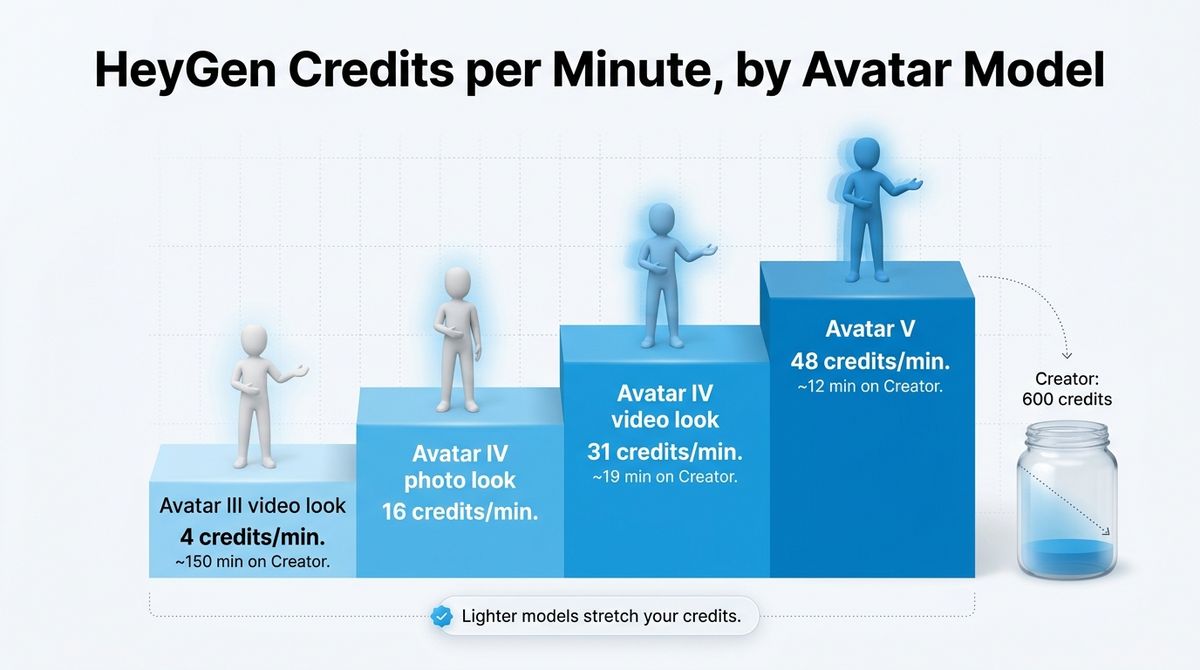
Credits make cost hard to predict. HeyGen’s help center lists 4 credits per minute for an Avatar III video look, 31 for an Avatar IV video look, and 48 for Avatar V. Creator’s 600 credits therefore buy about 150 minutes of Avatar III but only about 19 minutes of Avatar IV or 12 minutes of Avatar V. Older reviews quote 3 and 20 credits per minute, which are outdated.
The plan lineup has changed too. HeyGen retired its Team plan in early 2026 and now sells Business at $149 per month plus $20 per extra seat. The old unlimited Avatar III allowance on paid plans is gone, and top-up credits are sold only on Business, so Creator and Pro users must upgrade when credits run out.
HeyGen pricing
| Plan | Price | What you get |
|---|---|---|
| Free | $0 | 3 watermarked videos per month, up to 1 minute each, 1 custom video avatar, 30+ languages |
| Creator | $29 per month ($24 per month billed annually) | 600 credits, 1080p, no watermark, videos up to 30 minutes |
| Pro | From $49 per month for 1,000 credits, up to $4,300 per month for 100,000 | 4K export, videos up to 30 minutes, scalable credit tiers |
| Business | $149 per month plus $20 per extra seat | 1,500 shared credits, videos up to 60 minutes, team workspace, SSO, SCORM |
| Enterprise | Custom quote | Custom credits, no stated length cap |
HeyGen: Pros and Cons
Pros:
- Strong lip sync and facial movement on Avatar IV and V
- Digital twin from your own footage or a photo
- Lip-synced video translation into 175+ languages
- iOS and Android apps
- Free plan with no card required
Cons:
- Cost per minute swings from 4 to 48 credits by avatar model
- No top-up credits below the Business plan
- Free plan is watermarked and capped at 1 minute
- Plans and credit rates have changed often
Rating: 4.7 / 5, the best pick for most creators who care about avatar quality.
Synthesia Review: Polished for Training, Priced for Teams
- Free plan: Yes (Basic), 10 minutes of video creation or dubbing per month plus 500 credits, watermarked
- Starting price: Starter at $29 per month ($18 per month billed annually)
- Best plan for most users: Pro (formerly Creator) billed annually
- Platforms: Web app, API, Chrome extension for screen recording
- Affiliate program: Yes, 25% recurring for 12 months on Starter and Creator plans through Rewardful
Synthesia is an AI video platform aimed at training, onboarding, and internal communication. It offers 125+ stock avatars on Starter and 180+ on Pro, 140+ languages and voices, and 60+ templates. Credits are shared across video, dubbing, and surveys, and a standard minute of video uses 100 credits.
What Synthesia does best
Synthesia suits structured business video. Pro adds five personal avatars, interactive videos, branded video pages, and 180+ stock avatars, while Enterprise adds SCORM export, SSO, and unlimited video minutes. A free Basic plan lets you test the workflow before paying.
Compliance is a second strength. According to a September 2026 comparison, Synthesia holds ISO 27001, 27701, and 42001 certifications that HeyGen does not publish. Customers who need procurement paperwork for training content will find fewer gaps here.
Where Synthesia falls short
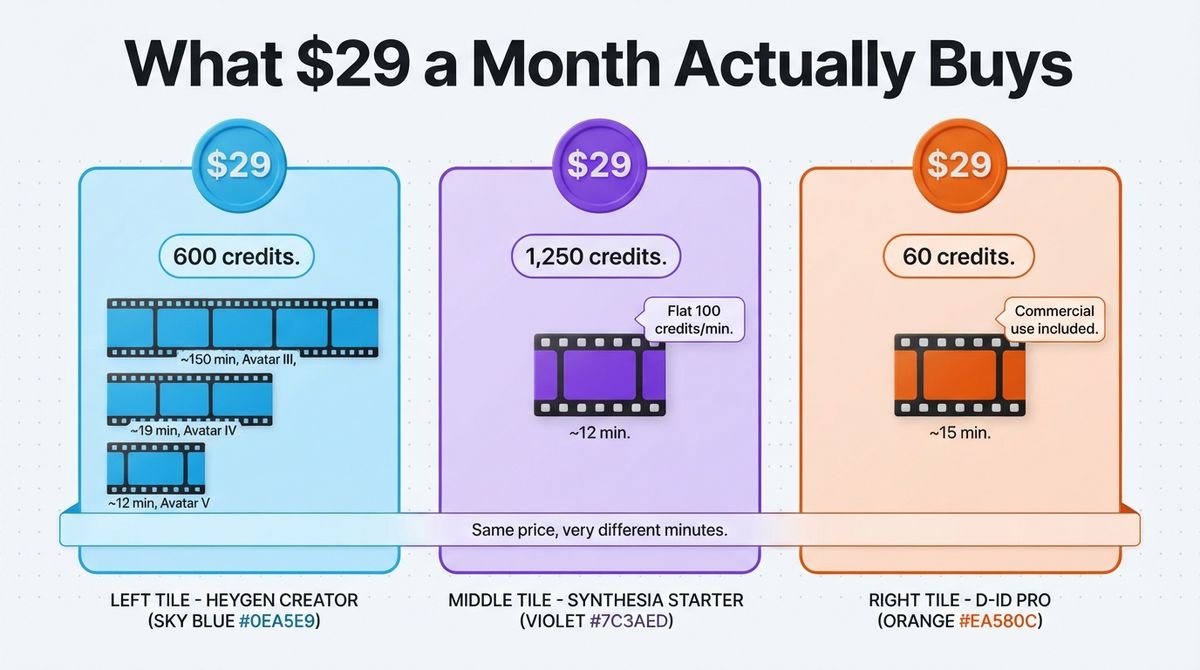
Output is small for the price. Starter at $29 per month gives 1,250 credits, about 12 minutes of video on top of the free 10-minute allowance, and Pro at $89 gives 6,000 credits, about 60 minutes. Every regeneration uses credits again, so heavy revision burns through a month quickly.
Pricing is also in flux. The Creator plan is now called Pro, annual billing delivers credits as one yearly pool, and lip-synced dubbing costs double credits. Some visitors see Starter at a lower promotional $19 per month, so confirm the price at checkout. Its Syren video agent typically uses 1,000 to 2,000 credits for a one-minute video, and Enterprise is quote-only.
Synthesia pricing
| Plan | Price | What you get |
|---|---|---|
| Basic (free) | $0 | 10 minutes of video creation or dubbing per month, 500 credits, 9 avatars, watermark |
| Starter | $29 per month ($18 per month billed annually) | 1,250 credits per month (about 12 minutes), 125+ avatars, downloads, no watermark, 1 editor and 3 guests |
| Pro (formerly Creator) | $89 per month ($64 per month billed annually) | 6,000 credits per month (about 60 minutes), 180+ avatars, 5 personal avatars, interactive videos, API access, 1 editor and 5 guests |
| Enterprise | Custom quote | Unlimited video minutes, 240+ avatars, SSO, SCORM export, dedicated customer success manager |
Synthesia: Pros and Cons
Pros:
- Built for training, onboarding, and internal video
- Flat 100 credits per standard minute
- 140+ languages and voices
- Interactive videos and branded video pages on Pro
- ISO 27001, 27701, and 42001 certifications
Cons:
- Starter yields only about 12 paid minutes per month
- Unused credits do not roll over
- Plan names and displayed prices have shifted
- Unlimited minutes, SSO, and SCORM export need Enterprise
- Lip-synced dubbing costs double credits
Rating: 4.4 / 5, best for training and internal video teams.
D-ID Review: Lowest Entry Price, Narrow Output
- Free plan: 14-day free trial, watermarked, no permanent free plan
- Starting price: Lite at $5.90 per month ($4.70 per month billed annually), personal use only
- Best plan for most users: Pro billed annually
- Platforms: Web app (Studio), iOS app, Android app, API
- Affiliate program: Not confirmed
D-ID turns a single photo into a talking presenter. Its Studio takes a script or audio file, animates a face from the built-in library or your own image, and exports a talking-head video. It also sells live conversational agents and an API, and it lists support for 120+ languages.
What D-ID does best
D-ID has the lowest price of entry. Lite costs $4.70 per month billed annually, and the photo-to-video workflow is quick to learn: upload a face, paste a script, export. For a creator who only needs a simple talking head, the studio does the job without a steep learning curve.
It also leans into live agents. D-ID released Version 4 of its Expressive Visual Agents on 16 March 2026, with richer expressions and lower latency, and its API starts at about $14.40 a month. If you want a talking avatar inside your own website or app, that is an inexpensive way to start.
Where D-ID falls short
Commercial use does not start until Pro. Lite videos carry a D-ID watermark and are for personal use, so the effective entry price is Pro at $16 per month billed annually or $29 monthly. Minutes are small: Lite includes 10 a month, Pro 15, and Advanced 100.
Cost per minute rises as you move up. On annual billing, Lite works out to about $0.47 per minute, Pro about $1.07, and Advanced about $1.08. Videos use 4 credits per minute, and free access is only a 14-day trial with a full-screen watermark.
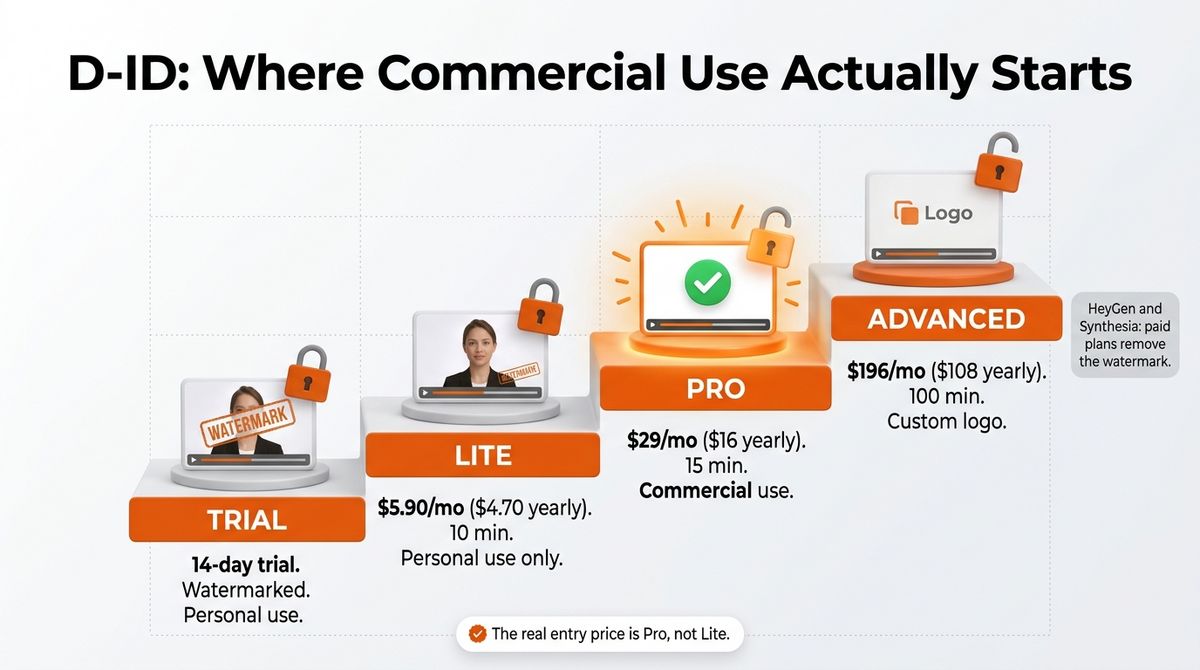
D-ID pricing
| Plan | Price | What you get |
|---|---|---|
| Trial | $0 for 14 days | Watermarked, personal use |
| Lite | $5.90 per month ($4.70 per month billed annually) | 40 credits (about 10 minutes per month), personal use, D-ID watermark |
| Pro | $29 per month ($16 per month billed annually) | 60 credits (about 15 minutes per month), commercial use, premium presenters at 1080p |
| Advanced | $196 per month ($108 per month billed annually) | 400 credits (about 100 minutes per month), commercial use, custom logo |
| Enterprise | Custom quote | Custom credits, collaboration tools, dedicated support |
D-ID: Pros and Cons
Pros:
- Lowest entry price at $4.70 per month billed annually
- Photo-to-video from a single image
- Support for 120+ languages
- Live agents and an API from about $14.40 a month
- iOS and Android apps
Cons:
- Commercial use starts at Pro
- Lite includes only 10 minutes and a watermark
- Cost per minute more than doubles from Lite to Pro
- Free access is a 14-day trial only
- Pro includes just 15 minutes a month
Rating: 3.9 / 5, a cheap way to test, limited for regular commercial video.
HeyGen vs Synthesia vs D-ID: Head-to-Head Comparison
| Feature | HeyGen | Synthesia | D-ID |
|---|---|---|---|
| Free plan | 3 watermarked videos per month, 1 minute each | 10 minutes of video per month plus 500 credits, watermarked | 14-day trial only, watermarked |
| Entry paid price | $29 per month ($24 billed annually) | $29 per month ($18 billed annually) | $5.90 per month ($4.70 billed annually), personal use |
| Plan at $29 per month | Creator | Starter | Pro |
| What $29 buys | 600 credits: about 150 minutes of Avatar III, 19 of Avatar IV video look, or 12 of Avatar V | 1,250 credits: about 12 minutes | 60 credits: about 15 minutes |
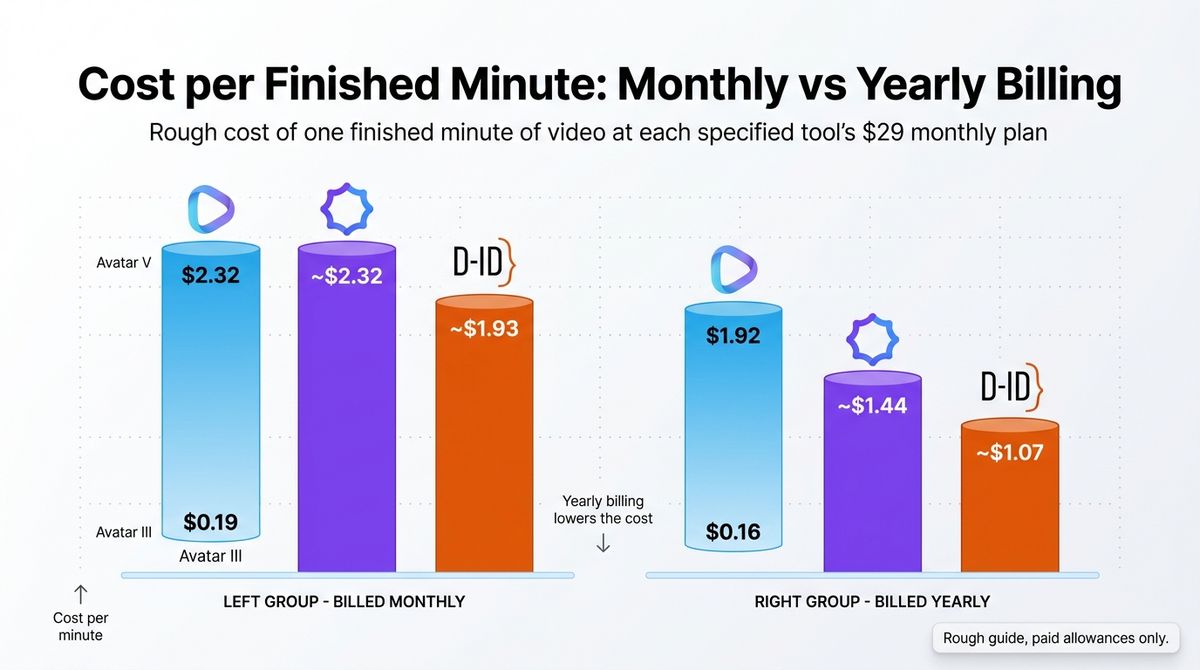
| Cost per minute, $29 monthly plan | $0.19 (Avatar III) to $2.32 (Avatar V) | About $2.32 | About $1.93 |
| Cost per minute, billed annually | $0.16 to $1.92 | About $1.44 | About $1.07 |
| Languages | 175+ for translation | 140+ languages and voices; 70+ for dubbing | 120+ |
| Avatar of yourself | Digital twin, including on Free | 3 personal avatars on Starter, 5 on Pro | Animate your own photo |
| Apps and API | iOS, Android, API | Web app, API, Chrome screen recorder | iOS, Android, API |
| Affiliate program | Yes, 35% for 3 months | Yes, 25% for 12 months | Not confirmed |
| Best for | Avatar quality and short-form video | Training and internal communication | Low-cost talking photos and live agents |
| Rating | 4.7 / 5 | 4.4 / 5 | 3.9 / 5 |
Cost per minute uses the credit rates each vendor publishes and counts only paid allowances, so Synthesia’s free 10 minutes are excluded. Retakes use more credits on all three.
Which Should You Choose?
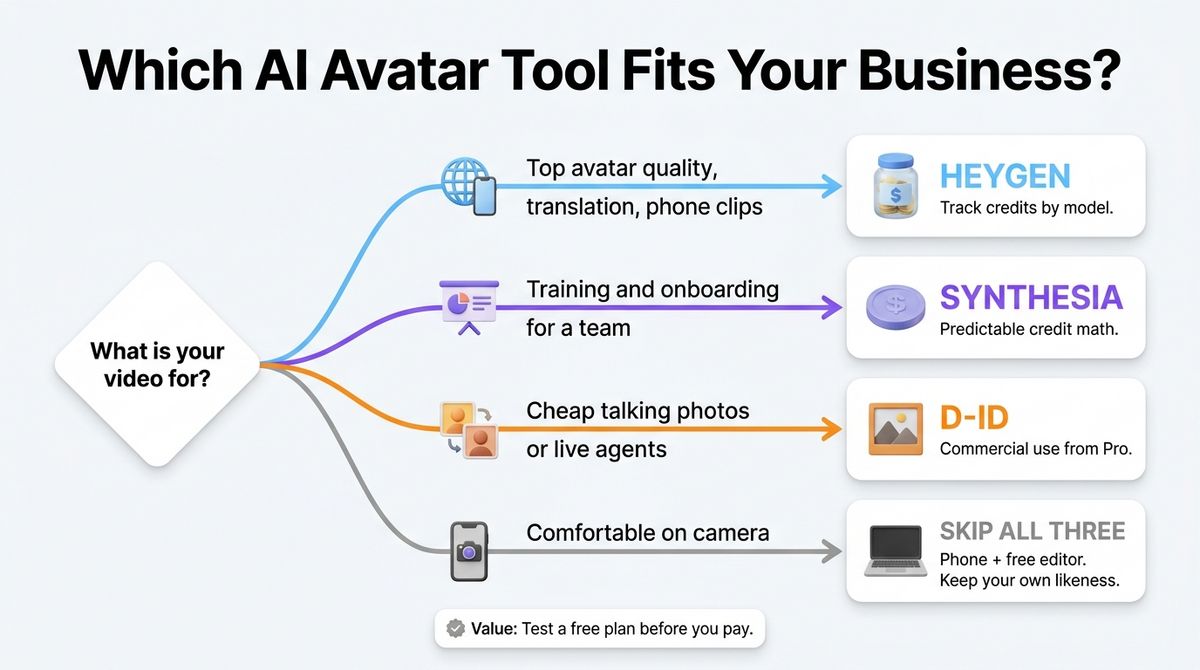
- Choose HeyGen if avatar quality, lip sync, translation, or phone-based social video matter most, and you can track credit rates by avatar model.
- Choose Synthesia if you build training or onboarding video for a team and want predictable credit math, interactive features, and compliance certifications.
- Choose D-ID if you want the cheapest way to animate a photo or add a live talking agent through the API, and you can start at Pro for commercial use.
- Skip all three if you are comfortable on camera. A phone and a free editor such as DaVinci Resolve cost nothing, and you keep full control of your own likeness.
One developer note applies to every tool here. Upload finished videos to YouTube or a video CDN and embed them with the core embed block instead of storing MP4 files in your Media Library. Large videos fill hosting storage and slow your backups.
Our Recommendations
- Solo blogger or creator making explainer clips: HeyGen Creator at $29. Use Avatar III or the Avatar IV photo look for most videos to stretch credits, since the photo look uses 16 credits per minute.
- Course creator or trainer: Synthesia Pro billed annually at $64 per month covers about 60 minutes a month and adds interactive videos.
- Freelancer or agency making client videos: HeyGen Pro, starting at $49 for 1,000 credits, or Business if you need shared credits and extra seats.
- Small business testing the idea cheaply: Start on HeyGen’s free plan, then D-ID Pro at $16 per month billed annually for 15 minutes of commercial video.
- Developer adding talking avatars to an app: D-ID’s API starts at about $14.40 a month. HeyGen and Synthesia also offer APIs, so compare usage-based pricing first.
Final Verdict
In the HeyGen vs Synthesia vs D-ID comparison, HeyGen is the best pick for most creators and small businesses. Independent same-script tests favored its lip sync, the free plan lets you test it, and credits stretch far on lighter avatar models. Synthesia is the better fit for training teams that want predictable minutes and compliance certifications. D-ID is the cheapest to start, but commercial use begins at Pro and the minutes are small.
- HeyGen: 4.7 / 5
- Synthesia: 4.4 / 5
- D-ID: 3.9 / 5
Check each vendor’s live pricing page before you buy. All prices above were checked in October 2026.
Frequently Asked Questions
Which is better, HeyGen, Synthesia, or D-ID?
HeyGen suits most creators because its avatars have the strongest lip sync in independent same-script tests, and it offers translation and mobile apps. Synthesia fits training teams that need compliance certifications and predictable minutes. D-ID is cheapest to start but limits commercial use to Pro. Choose by use case and budget.
How much does HeyGen cost?
HeyGen lists Free at $0, Creator at $29 per month ($24 billed annually), Pro from $49 per month, and Business at $149 plus $20 per extra seat. Creator includes 600 credits, which cover about 150 minutes of Avatar III or about 19 minutes of Avatar IV video look.
How much does Synthesia cost?
Synthesia lists Basic at $0, Starter at $29 per month ($18 billed annually), and Pro, formerly Creator, at $89 per month ($64 billed annually). Starter includes 1,250 credits, about 12 minutes of video, and a standard minute uses 100 credits. Enterprise is custom-priced with unlimited video minutes.
How much does D-ID cost?
D-ID Studio costs $5.90 per month for Lite, $29 for Pro, and $196 for Advanced, or $4.70, $16, and $108 billed annually. Lite includes 10 minutes and is for personal use only. Pro includes 15 minutes and commercial use. Advanced includes 100 minutes. There is also a 14-day free trial.
Can I use AI avatar videos commercially?
Check the plan first. D-ID restricts its trial and Lite plan to personal use, with commercial use starting at Pro. HeyGen and Synthesia remove watermarks on paid plans, and free plans carry watermarks, so they suit testing rather than publishing. Read each vendor’s terms before using an avatar commercially.
Why do HeyGen credits cost different amounts?
HeyGen charges credits per minute by avatar model. Its help center lists 4 credits for Avatar III video look, 16 for Avatar IV photo look, 31 for Avatar IV video look, and 48 for Avatar V. Higher numbers buy richer motion, so Creator’s 600 credits stretch much further on lighter models.
Which tool is best for translating videos?
HeyGen offers lip-synced video translation into 175+ languages. Synthesia dubs into 70+ languages on Starter and Pro, and lip-synced dubbing uses double credits. D-ID lists support for 120+ languages. For multilingual creators, HeyGen has the widest coverage, while Synthesia reaches 140+ languages only on Enterprise.
Do I need AI avatars, or can I record myself?
Record yourself if you are comfortable on camera. A phone and a free editor such as DaVinci Resolve cost nothing, and you keep full control of your own likeness. AI avatars make sense when you need many videos, many languages, or fast script updates without refilming. Test a free plan before paying.