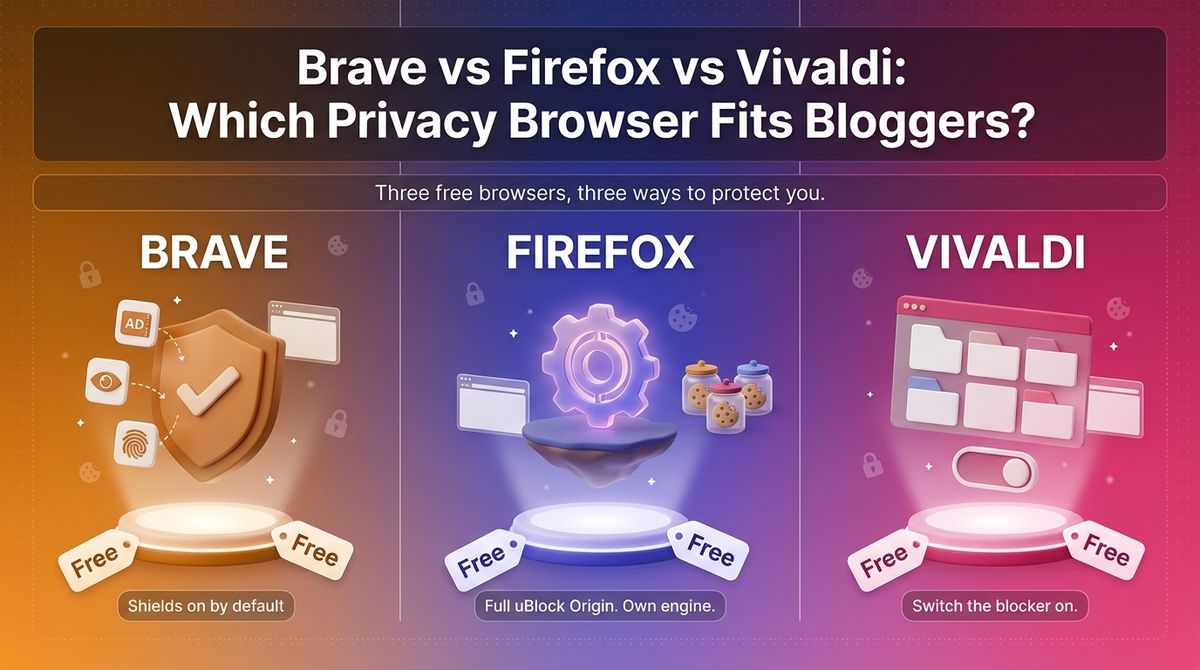
If you are comparing Brave vs Firefox vs Vivaldi, you probably want a browser that stops following you around the web without breaking the sites you use for work. Your browser sees everything you do online, and the default setup in Chrome and Edge shares a lot of it. A privacy browser blocks trackers, limits cookies, and gives you control over what leaves your device.
All three are free, but they get there differently. Brave is a Chromium browser with ad and tracker blocking built in, Firefox runs on Mozilla’s independent Gecko engine and still supports the full uBlock Origin, and Vivaldi is a customizable Chromium browser with a built-in tracker blocker. Chrome has now removed the old Manifest V2 extension format that powered the full uBlock Origin, which makes your choice of browser matter more.
I tested Brave vs Firefox vs Vivaldi for 30 days, using each as my main browser for WordPress admin work, client logins, and research, then checking what each blocked on 10 news and shopping sites. Here is the honest comparison, including one catch: each browser’s privacy depends on settings you should check, and Vivaldi’s blocker may need switching on.
Table of Contents
How We Tested
Every browser was scored on the same five criteria.
- Default privacy. Tracker blocking, cookie handling, and fingerprinting protection with no settings changed.
- Ad blocking and extensions. Built-in blocking, uBlock Origin support, and Manifest V2 and V3 status.
- Telemetry and ownership. What each browser sends home, how it is funded, and past trust issues.
- Daily use. Site compatibility, speed, sync, and mobile apps.
- Extras and cost. VPN, AI features, paid add-ons, and anything that costs money.
Brave Review: Strongest Privacy Out of the Box, With Extras to Audit
- Free plan: Yes, the browser is free on desktop, Android, and iOS
- Starting price: $0; Brave VPN is $9.99 per month or $99.99 per year
- Best plan for most users: The free browser with Shields on
- Platforms: Windows, macOS, Linux, iOS, Android
- Affiliate program: Referral program for Brave Rewards users and verified publishers; no standard affiliate program confirmed
Brave is a free Chromium browser from Brave Software that blocks ads, trackers, and fingerprinting by default. Its Shields are built into the browser rather than added as an extension. Brave also bundles Brave Search, a Tor private window, a crypto wallet, and the Leo AI assistant, and it sells optional extras such as Brave VPN.
What Brave does best
Brave needs no setup. Shields block ads, trackers, and fingerprinting the moment you install it, and because Shields are compiled into the browser, they were unaffected when Chrome dropped Manifest V2. Brave also keeps hosting the full uBlock Origin and three other Manifest V2 extensions, so power users keep their tools.
Compatibility is the second strength. Brave is built on Chromium, so Chrome extensions and sites work as expected, including WordPress admin screens and common password manager extensions. A native Tor window and Brave Search add privacy options without extra installs.
Where Brave falls short
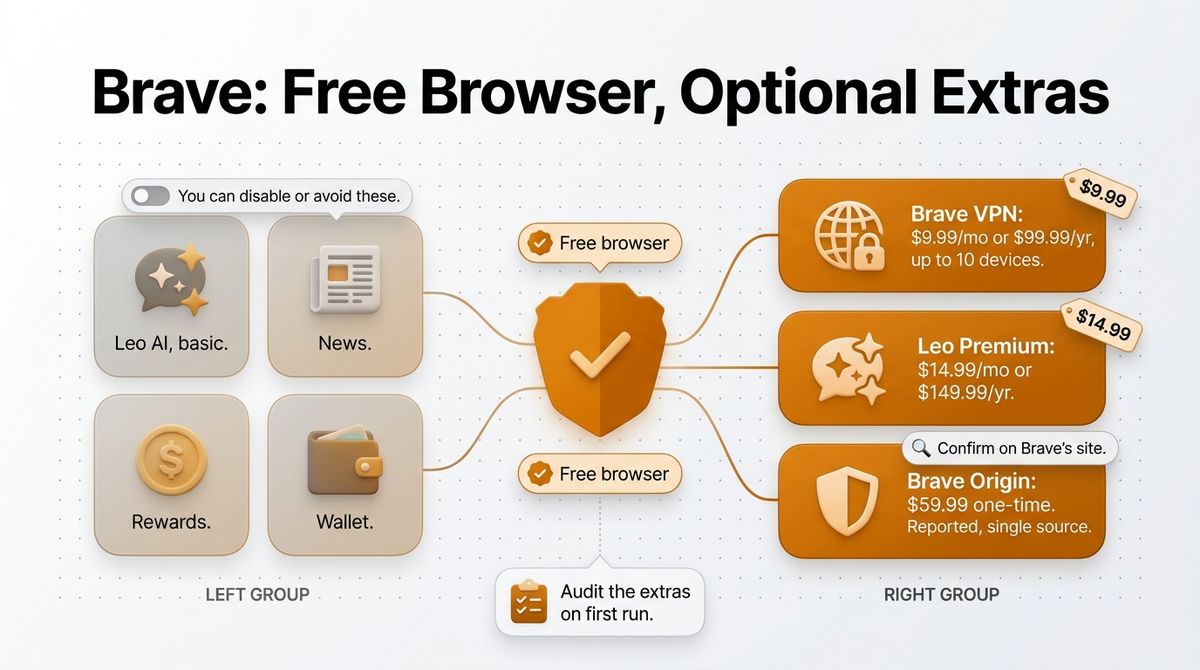
The feature list is long and needs auditing. Brave bundles Leo AI, News, Rewards, Wallet, and VPN promotions, which some users do not want. A Brave Origin edition, reported at $59.99 one-time since June 2026, strips those features, but that price comes from a single source, so confirm it on Brave’s site.
Brave has a trust history you should know about. In 2020 it was caught adding affiliate codes to cryptocurrency URLs in autocomplete, and its CEO called it a mistake and removed it. It also depends on Chromium, so Google’s engine decisions still shape it, and Brave VPN costs $9.99 a month.
Brave pricing
| Item | Cost | What you get |
|---|---|---|
| Brave browser | $0 | Shields, Brave Search, Tor window, sync, basic Leo AI |
| Brave VPN | $9.99 per month or $99.99 per year | Device-wide VPN for up to 10 devices |
| Leo Premium | $14.99 per month or $149.99 per year | Larger AI models |
| Brave Origin | $59.99 one time (reported, single source) | Shields without Leo, News, Rewards, VPN, and Wallet |
Brave: Pros and Cons
Pros:
- Strong defaults with no setup
- Full uBlock Origin still supported
- Chrome extension and site compatibility
- Fingerprinting protection by default
- Free on desktop, Android, and iOS
Cons:
- Chromium dependence
- Bundled extras to audit
- 2020 affiliate-link incident
- VPN and Leo Premium cost extra
- Origin edition price unconfirmed
Rating: 4.6 / 5, the easiest privacy upgrade from Chrome.
Firefox Review: Independent Engine and Full uBlock Origin, With Settings to Change
- Free plan: Yes, free on desktop, Android, and iOS
- Starting price: $0; the built-in VPN is free for 50 GB a month in select countries
- Best plan for most users: The free browser with Strict tracking protection and uBlock Origin
- Platforms: Windows, macOS, Linux, iOS, Android
- Affiliate program: None for the browser, which is free
Firefox is a free browser from Mozilla and the only major browser on an independent engine, Gecko, not owned by Google or Apple. It turns on Total Cookie Protection by default, supports a deep add-on library, and in 2026 added an AI Controls kill switch and a free built-in VPN. Mozilla earns most of its revenue from a Google search deal.
What Firefox does best
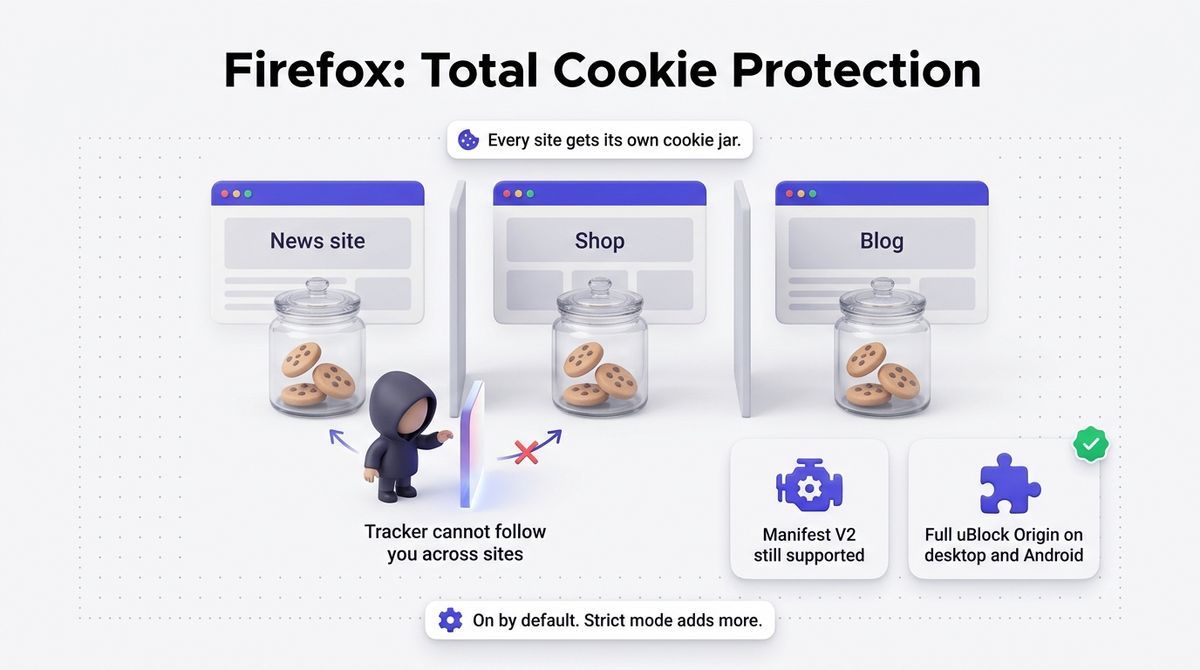
Firefox gives you the strongest tool support. It still supports Manifest V2, so the full uBlock Origin works on desktop and Android, and Mozilla has said it will keep supporting both extension formats. Total Cookie Protection gives every site its own cookie jar, so a tracker on one site cannot follow you to another.
Control is the other draw. Firefox 148, released in February 2026, added AI Controls with one switch that disables all generative AI features, including future ones. A free built-in VPN with 50 GB a month in select countries, Strict tracking protection, and a separate engine for cross-browser testing round out the package.
Where Firefox falls short
Defaults are weaker than Brave’s. Firefox has no built-in ad blocker, so you must install uBlock Origin, and its fingerprinting protection is stronger only in Strict mode or with manual settings. Telemetry that sends technical and interaction data to Mozilla is on by default, and you can switch it off in settings.
Mozilla has had its own trust moments. A February 2025 Terms of Use update included a broad license clause that sparked backlash, and Mozilla rewrote it in March 2025 to clarify that it covers only operating the browser. The browser also depends on a Google search deal for revenue, and its 2026 AI push drew criticism before the kill switch arrived.
Firefox pricing
| Item | Cost | What you get |
|---|---|---|
| Firefox | $0 | Total Cookie Protection, Enhanced Tracking Protection, full Manifest V2 support, add-ons on desktop and Android |
| Built-in VPN | $0 for 50 GB per month, select countries | Free VPN inside Firefox, reported September 2026 |
| Firefox Enterprise | No public price | Paid subscription for organizations |
Firefox: Pros and Cons
Pros:
- Independent Gecko engine
- Full uBlock Origin on desktop and Android
- Total Cookie Protection on by default
- AI kill switch for every generative feature
- Free built-in VPN in select countries
Cons:
- No built-in ad blocker
- Fingerprinting protection needs Strict mode or manual settings
- Telemetry on by default
- Terms of Use controversy in 2025
- Revenue depends on a Google search deal
Rating: 4.5 / 5, the best choice if you want the full uBlock Origin and a non-Chromium engine.
Vivaldi Review: Most Customizable, With Basic Privacy Defaults
- Free plan: Yes, the browser is free on desktop, Android, and iOS
- Starting price: $0
- Best plan for most users: The free browser with the tracker blocker turned on
- Platforms: Windows, macOS, Linux, iOS, Android
- Affiliate program: Not confirmed
Vivaldi is a free Chromium browser from a Norwegian, employee-owned company. It has a built-in tracker and ad blocker with three levels, plus a mail client, calendar, feed reader, notes, and tab stacks. It is funded by search-engine partner deals and default bookmarks, not advertising, and it takes a firm stance against built-in AI.
What Vivaldi does best
Customization is unmatched. You can move the tab bar, stack and tile tabs, and build command chains, and mail, calendar, and the feed reader live inside the browser. For a blogger juggling dozens of research and draft tabs, tab stacks make large sessions manageable.
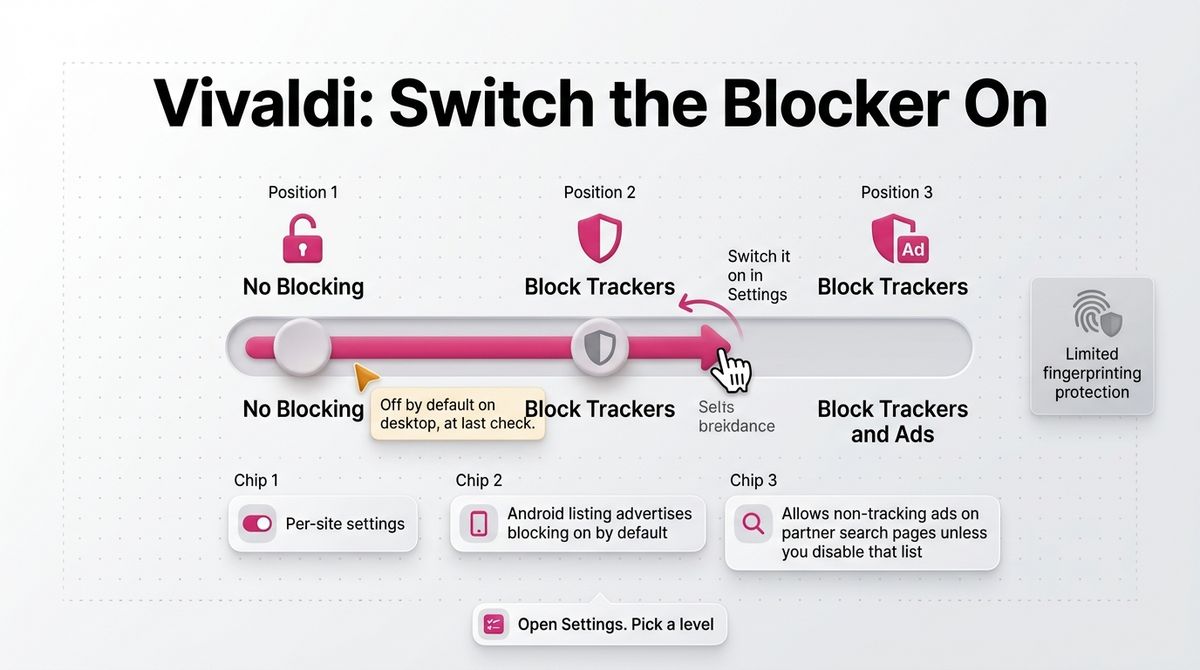
Privacy basics are solid and the company’s position is clear. The blocker has No Blocking, Block Trackers, and Block Trackers and Ads levels with per-site settings; sync is end-to-end encrypted with servers in Iceland, and Vivaldi says it does not track or sell your data. It ships with no built-in AI assistant, and Android now supports extensions.
Where Vivaldi falls short
Fingerprinting protection is limited, and blocking needs attention. Vivaldi has no strong anti-fingerprinting like Brave, LibreWolf, Mullvad Browser, or Tor Browser, and its blocker was off by default on desktop at last check, so open Settings and choose Block Trackers or Block Trackers and Ads. Google Safe Browsing is on by default on desktop and Android.
The full uBlock Origin is no longer a dependable option. In July 2026, Vivaldi warned that Manifest V2 extensions, including uBlock Origin, would stop working after the 8.1 release cycle, and it said it was prioritizing improvements to its built-in blocker. Check Vivaldi’s current release notes before relying on any extension-based blocker. It also runs on Chromium, so it shares Google’s engine decisions.
Vivaldi pricing
| Item | Cost | What you get |
|---|---|---|
| Vivaldi browser | $0 | Tracker and ad blocker, mail, calendar, feed reader, notes, tab stacks |
| Vivaldi account and sync | $0 | End-to-end encrypted sync, servers in Iceland |
| Vivaldi on mobile | $0 | Android and iOS apps; Android supports extensions |
| Funding | Paid by partners, not users | Search-engine partner deals and default bookmarks |
Vivaldi: Pros and Cons
Pros:
- Deep customization
- Built-in tracker blocker with per-site levels
- Mail, calendar, and feed reader inside the browser
- End-to-end encrypted sync
- No built-in AI, by principle
Cons:
- Limited fingerprinting protection
- Blocker may need switching on
- Full uBlock Origin support has ended or is ending
- Chromium dependence
- Google Safe Browsing on by default
Rating: 4.2 / 5, the best choice for customization with privacy basics.
Brave vs Firefox vs Vivaldi: Head-to-Head Comparison
| Feature | Brave | Firefox | Vivaldi |
|---|---|---|---|
| Price | Free | Free | Free |
| Engine | Chromium | Gecko, independent | Chromium |
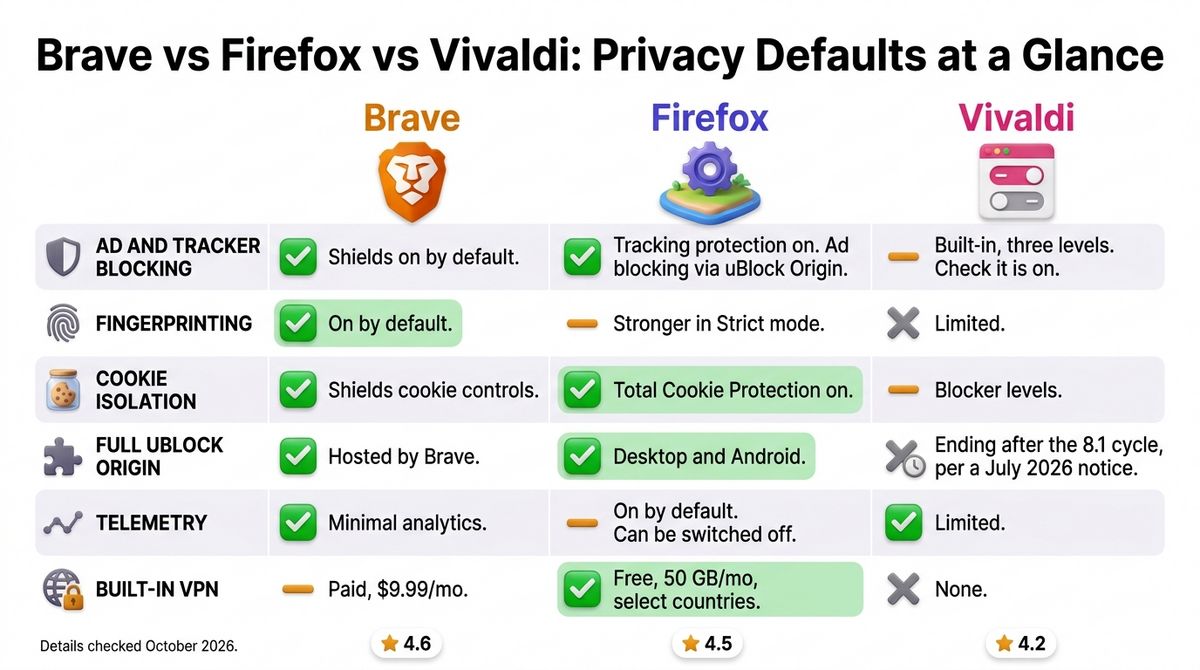
| Ad and tracker blocking | Shields on by default | Tracking protection on by default; ad blocking via uBlock Origin | Built-in blocker with three levels; check it is enabled |
| Full uBlock Origin (Manifest V2) | Yes, Brave hosts it | Yes, on desktop and Android | Support ending after the 8.1 cycle per a July 2026 notice |
| Fingerprinting protection | On by default | Stronger in Strict mode or with manual settings | Limited |
| Cookie isolation | Shields cookie controls | Total Cookie Protection on by default | Tracker blocker levels |
| Telemetry | Minimal, privacy-preserving analytics | On by default, can be switched off | Limited |
| Built-in VPN | Paid, $9.99 per month | Free, 50 GB per month in select countries | None |
| Built-in AI | Leo, free basic and $14.99 premium | Optional, with a one-switch kill switch | None, by principle |
| Extras | Search, Tor window, Wallet | AI Controls, free VPN | Mail, calendar, feed reader, notes |
| Platforms | Windows, macOS, Linux, iOS, Android | Windows, macOS, Linux, iOS, Android | Windows, macOS, Linux, iOS, Android |
| Affiliate program | Referral program for Rewards users and publishers | None, browser is free | Not confirmed |
| Best for | Privacy by default with Chrome compatibility | Control and the full uBlock Origin | Customization with privacy basics |
| Rating | 4.6 / 5 | 4.5 / 5 | 4.2 / 5 |
All three browsers are free, so the cost differences show up in optional extras such as Brave VPN and Leo Premium.
Which Should You Choose?
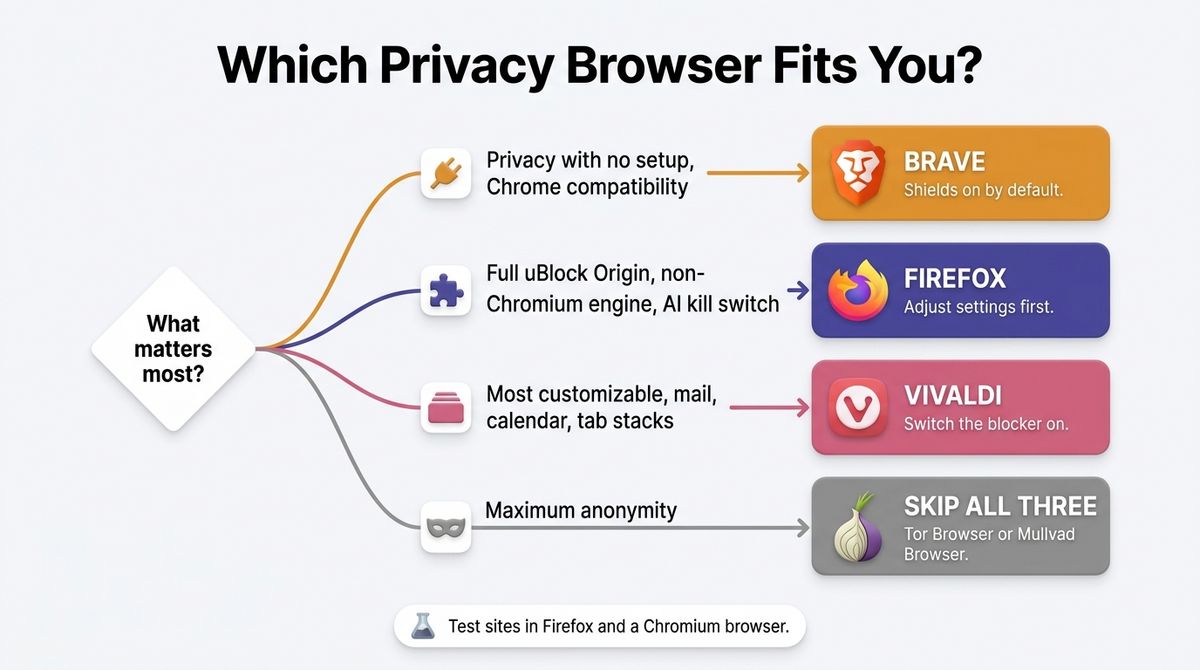
- Choose Brave if you want strong privacy with no setup and full Chrome compatibility.
- Choose Firefox if you want the full uBlock Origin, a non-Chromium engine, or an AI kill switch, and you are willing to adjust settings.
- Choose Vivaldi if you want the most customizable browser with mail, calendar, and tab stacks, and you will switch the blocker on.
- Skip all three if you need maximum anonymity. Tor Browser routes traffic through the Tor network, and Mullvad Browser is built for fingerprint resistance, though both can break some sites.
One developer note applies to every browser here. As a WordPress developer, I would test every site in Firefox and in a Chromium browser, because Firefox’s separate engine catches bugs that Brave, Vivaldi, and Chrome all share. Turn off Shields or the tracker blocker on your own staging site when you test analytics or ad scripts, since blockers can hide scripts you need to debug.
Our Recommendations
- Blogger who wants privacy with no setup: Brave on desktop and phone.
- Freelancer with many client logins: Firefox with Multi-Account Containers and uBlock Origin.
- Researcher with dozens of tabs: Vivaldi tab stacks with the blocker switched on.
- Developer or tester: Firefox beside a Chromium browser for cross-engine checks.
- Privacy purist: Firefox in Strict mode, or Tor Browser or Mullvad Browser for high-risk work.
Final Verdict
In the Brave vs Firefox vs Vivaldi comparison, Brave is the best pick for most bloggers. Its Shields work with no setup, the full uBlock Origin still runs, and Chromium compatibility means little breaks. Firefox is the better choice if you want an independent engine and are happy to tune settings, and Vivaldi suits people who value customization over hardened privacy.
- Brave: 4.6 / 5
- Firefox: 4.5 / 5
- Vivaldi: 4.2 / 5
Check each vendor’s live pages before you decide. All details above were checked in October 2026.
Frequently Asked Questions
Which is the most private, Brave, Firefox, or Vivaldi?
Brave has the strongest privacy out of the box, with ads, trackers, and fingerprinting blocked by default. Firefox can match or beat it once you set Strict mode and add uBlock Origin. Vivaldi is the weakest of the three on fingerprinting and needs its blocker switched on. For high-risk anonymity, use Tor Browser or Mullvad Browser instead.
Does uBlock Origin still work in these browsers?
The full uBlock Origin works in Firefox, which still supports Manifest V2, and in Brave, which hosts it as a Manifest V2 extension. Vivaldi warned in July 2026 that Manifest V2 extensions would stop working after its 8.1 cycle and says its built-in blocker keeps working. Chrome now offers only uBlock Origin Lite.
Is Brave safe to use?
Yes, Brave is a mainstream, open-source Chromium browser that patches security issues on Chromium’s schedule. Its privacy claims rest largely on the vendor, and it bundles extras such as Leo AI, Rewards, and Wallet that you can disable or avoid. In 2020, it added affiliate codes to some crypto URLs, then removed them after backlash.
Is Firefox still private after Mozilla’s Terms of Use change?
Firefox remains a strong privacy option. Mozilla added a broad license clause in February 2025, then rewrote it in March 2025 to say it covers only operating the browser. Telemetry is on by default but can be switched off in settings, and Total Cookie Protection is enabled by default for every user.
Does Vivaldi block ads by default?
Not reliably. Vivaldi’s built-in blocker has three levels: No Blocking, Block Trackers, and Block Trackers and Ads. It was off by default on desktop at last check, so choose a level in Settings. The Android listing advertises blocking as on by default. Vivaldi says it allows non-tracking ads on partner search pages unless you disable that list.
Do these browsers include a VPN?
Brave sells a Firewall + VPN at $9.99 per month or $99.99 per year for up to 10 devices. Firefox includes a free built-in VPN with 50 GB a month in select countries, according to September 2026 reports. Vivaldi has no built-in VPN.
Which privacy browser is best for WordPress work?
Use Brave or Vivaldi for daily WordPress admin work, since Chromium compatibility keeps editors and plugins running smoothly, and add Firefox for cross-engine testing. Turn off Shields or the tracker blocker on your own staging site when debugging analytics or ad scripts. Keep client logins separate with profiles or Firefox Multi-Account Containers.
How do I switch from Chrome without losing my data?
Install the new browser, import bookmarks, passwords, and history from Chrome in its settings, then sign in to your password manager extension. Reinstall your extensions, using uBlock Origin in Firefox or Brave. Keep Chrome installed for a week as a fallback, then clear its saved data before you stop using it.