Social platforms give creators exactly one clickable link, and an entire software category exists because of that single, deliberate constraint. A link-in-bio tool takes that one URL and turns it into a small landing page, a stack of links, a shop, a booking calendar, an email signup, doing the job a full website would otherwise need to do, compressed into something a follower can tap through in two seconds from a phone.
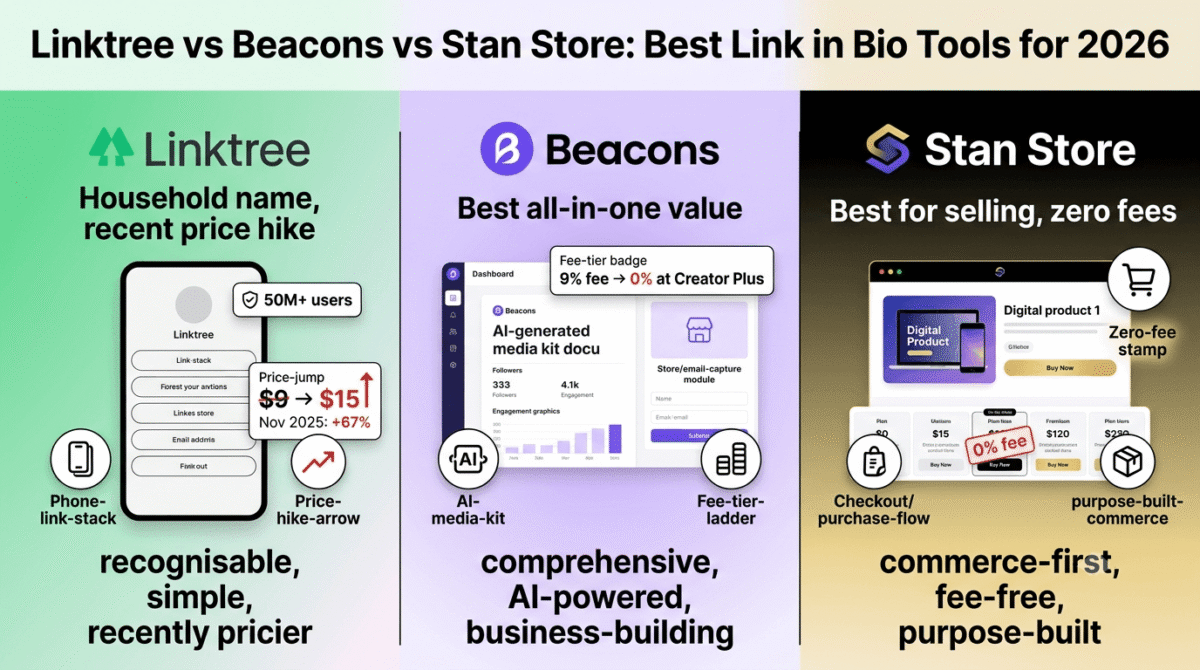
In 2026, this category has a genuine, well-documented news story worth knowing before you choose a tool: Linktree, the household name that effectively created this market, raised its prices by as much as 67% in November 2025, while competitors that started as Linktree clones have built out real commerce features that now outperform it on substance, not just price. I tested Linktree vs Beacons vs Stan Store for 30 days, paying close attention not just to subscription cost but to the sales fees that quietly determine your actual take-home on anything you sell through these pages. Here is the honest comparison.
Table of Contents
How We Tested These Tools
Every platform was evaluated against five criteria:
- Real cost, including sales fees, not just the subscription price, but what each platform actually keeps from a sale on its free and lower-priced tiers
- Setup speed and design quality, how quickly can you build a page that looks intentional rather than generic
- Commerce depth, can you sell a digital product, book a service, or just list outbound links
- Analytics, what do you actually learn about who is clicking, beyond a simple click count
- Pricing stability, has the platform’s pricing history been predictable, or has it moved sharply in ways that affect existing customers
Why the Pricing Fine Print Matters More in This Category Than It Looks
It is easy to compare these tools on subscription price alone and miss the bigger cost driver: several platforms in this category charge a percentage fee on every sale made through your page, on top of (or instead of) a monthly subscription. A “free” plan that charges 9% or 12% on every digital product sale is not actually free once you are selling anything meaningful, it is a revenue-share arrangement disguised as a free tier, and the percentage only drops to zero once you commit to one of the more expensive plans.
This is also a category with a recent, very public pricing trap worth flagging directly: Linktree raised its Pro plan from $9 to $15 per month in November 2025, a 67% increase, while its Premium tier, the one that eliminates the sales fee entirely, rose from roughly $24 to $35. Existing customers who signed up expecting stable pricing absorbed that increase with no equivalent jump in functionality. We are calling this out explicitly because it is exactly the kind of pricing pattern this site exists to flag for readers before they commit.
Linktree Review: The Household Name, Now Harder to Justify on Price
Free plan: Yes, unlimited links, basic themes, but a 12% sales fee on commerce features
Starting paid price: Starter $8/month, Pro $15/month (up from $9 before the November 2025 increase), Premium $35/month
Best plan for most creators: Difficult to recommend confidently given the recent price increase, evaluate against Beacons and Stan Store before defaulting here out of habit
Platforms: Web, iOS, Android
Affiliate program: Yes, Linktree affiliate program
Linktree remains the most recognized name in this category, with over 50 million users and the kind of brand familiarity that means most followers have seen a Linktree page before. That recognition, however, no longer automatically translates into the best value, the platform’s center of gravity is still link sharing first, commerce second, and recent pricing changes have made it a harder default recommendation than it was even a year ago.
What Linktree does best
Brand recognition remains Linktree’s most durable advantage. A follower clicking through to a Linktree page is unlikely to be confused or hesitant about what they are looking at, simply because the format is so widely seen across creator profiles, a trust signal that newer competitors have not fully replicated.
Linktree’s free plan supports unlimited links and basic theme customization without a subscription, which makes it a perfectly reasonable choice for a creator whose bio link is purely a navigation hub, pointing followers to other social profiles, a website, or a newsletter signup, with no commerce component at all.
The platform’s integration ecosystem has grown over time to include Shopify and basic automation features on paid tiers, and its analytics, while not the deepest in the category, are clear and easy to interpret for a creator who just wants to know which links get clicked.
Where Linktree falls short
The November 2025 price increase is the headline issue here, and it deserves direct attention: Pro jumped 67% from $9 to $15 per month, and Premium rose roughly 46% from $24 to $35. For existing subscribers, this was a meaningful, unannounced-feeling cost increase with no corresponding leap in functionality, precisely the kind of promotional-price-that-changes-later pattern we warn readers about across every category on this site.
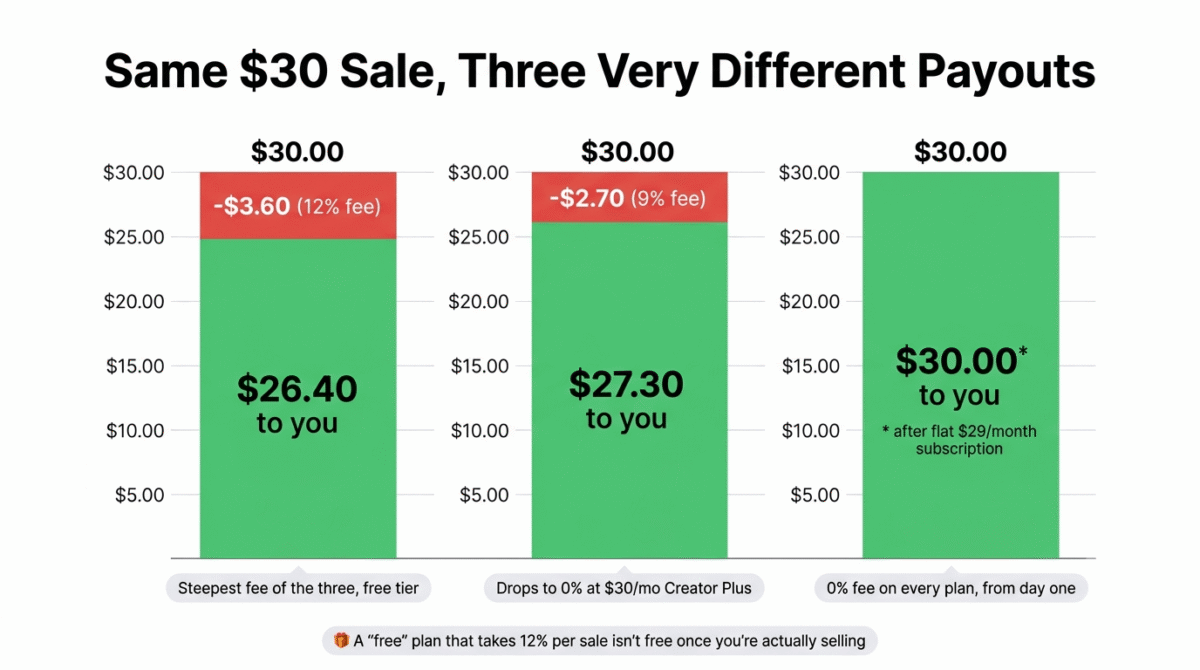
The free plan’s 12% sales fee on commerce features is the steepest of the three platforms tested. A creator selling a $30 digital product through Linktree’s free tier keeps $26.40 before any payment processing fees, a meaningfully worse outcome than Stan Store’s 0% fee structure on its paid plans.
Linktree’s commerce tools, while present, remain secondary to its core link-hub identity. Competitors that were built around commerce from the start, particularly Stan Store, offer a noticeably more complete selling experience for creators whose primary goal is revenue rather than link organization.
Linktree pricing
| Plan | Monthly price | Sales fee |
|---|---|---|
| Free | $0 | 12% |
| Starter | $8/month | 9% |
| Pro | $15/month (up from $9) | 9% |
| Premium | $35/month (up from $24) | 0% |
Annual billing reduces these rates meaningfully, confirm current annual pricing directly, as it has historically been cut substantially compared to monthly rates.
Linktree: Pros and Cons
Pros:
- Highest brand recognition of the three platforms, followers immediately understand the format
- Genuinely usable free plan for pure link-hub use cases with no commerce component
- Clear, easy-to-read analytics
- Growing integration ecosystem (Shopify, automation tools on paid tiers)
Cons:
- Recent 67% price increase on the Pro plan with no equivalent feature increase
- Highest sales fee of the three platforms on the free tier (12%)
- Commerce features remain secondary to the core link-hub product
- Premium tier, the only one with 0% fees, is now the most expensive top tier in this comparison
- Existing customers absorbed the price change with no opt-out beyond downgrading
Rating: 4.0 / 5, Still a reasonable free choice for pure link-hub use cases, but the recent price increase and high sales fee make it the hardest of the three to recommend for creators who plan to sell anything.
Beacons Review: Best All-in-One Platform for Creators Building a Real Business
Free plan: Yes, generous feature set, 9% sales fee
Starting paid price: Creator plan around $10/month (9% fee, custom domain), Creator Plus around $30/month (0% fee, courses, memberships)
Best plan for most creators: Creator Plus, once you are selling consistently enough that eliminating the fee pays for itself
Platforms: Web, iOS, Android
Affiliate program: Yes, Beacons affiliate program
Beacons started as a Linktree competitor and has spent the years since deliberately building toward something broader, closer to a lightweight creator business platform than a simple link page. The 2026 product reflects that ambition clearly, with media kit generation, email capture, and store features that go well beyond what a basic link hub offers.
What Beacons does best
The AI-powered media kit feature is genuinely distinctive among the three platforms, Beacons can automatically generate a professional media kit from your existing social and analytics data, which creators use specifically for brand outreach and sponsorship pitches. Neither Linktree nor Stan Store offers an equivalent feature, and for creators actively pursuing brand partnerships, this alone can justify choosing Beacons.
Beacons’ free plan is the most feature-rich free tier of the three platforms, email capture, basic store functionality, and link analytics are all available without a subscription, with the 9% sales fee being the main cost rather than a long list of features locked behind a paywall. That captured email list still needs somewhere to go, see our Mailchimp vs ConvertKit vs Brevo comparison for a dedicated email marketing platform to actually send to it.
The platform’s CRM-style tools for tracking audience relationships and outreach go beyond what either competitor offers, positioning Beacons less as “a link page” and more as a lightweight business operations hub for a creator’s brand-deal and direct-to-fan revenue streams.
Beacons’ Creator Plus tier, at roughly $30/month, eliminates the sales fee entirely while adding course and membership functionality, a genuinely complete package for a creator who has outgrown a simple link page and wants one platform handling content sales, courses, and audience capture together. If courses are your main product rather than a bolt-on feature, see our Teachable vs Thinkific vs Kajabi comparison for a dedicated course platform built specifically around that.
Where Beacons falls short
The 9% sales fee persists through the Creator tier ($10/month), you are paying a subscription and still giving up nearly a tenth of every sale until you reach the $30/month Creator Plus tier specifically. Creators need to model their actual sales volume carefully to know which tier is genuinely cheaper for their situation.
Beacons’ interface, while functional, is reported as less immediately intuitive than Linktree’s for a brand-new user, the broader feature set comes with a corresponding increase in initial complexity, which matters for a creator who wants a page live in minutes rather than exploring a fuller dashboard first.
Brand recognition lags behind Linktree’s, fewer followers will have seen a Beacons page before, which is a minor but real difference in first-click trust compared to the more ubiquitous Linktree format.
Beacons pricing
| Plan | Monthly price | Sales fee | Key features |
|---|---|---|---|
| Free | $0 | 9% | Email capture, basic store, analytics |
| Creator | ~$10 | 9% | Custom domain |
| Creator Plus | ~$30 | 0% | Courses, memberships |
| Creator Max | ~$90 | 0% | White-glove onboarding, NFC card |
Beacons: Pros and Cons
Pros:
- Most feature-rich free plan of the three platforms tested
- Unique AI-powered media kit generator for brand outreach
- CRM-style audience and outreach tools beyond a basic link page
- Creator Plus tier bundles 0% fees with courses and memberships in one package
- Strongest fit for creators building a broader business, not just sharing links
Cons:
- 9% sales fee persists even on the $10/month Creator tier
- Less immediately intuitive than Linktree for brand-new users
- Lower brand recognition than Linktree among general audiences
- Need to model sales volume carefully to know which tier is actually cheaper
- Highest-priced tier ($90/month) is overkill for most individual creators
Rating: 4.4 / 5, Best all-in-one option for creators who want monetization, audience capture, and brand-deal tools beyond a simple link page, especially once Creator Plus’s 0% fee tier makes sense for their volume.
Stan Store Review: Best for Creators Who Are Primarily Selling, Not Linking
Free plan: No, paid plans only
Starting paid price: Creator plan $29/month, Creator Pro $99/month, both with 0% platform transaction fees
Best plan for most creators: Creator, unless you need the additional automation and marketing tools in Creator Pro
Platforms: Web, iOS, Android
Affiliate program: Yes, Stan Store affiliate program
Stan Store flips the category’s usual framing: where Linktree is a link aggregator that added commerce, and Beacons is a creator platform that grew out of a link page, Stan Store was built from the start as a commerce platform that happens to look like a link-in-bio page. For creators whose primary goal is selling digital products, courses, or coaching, this distinction shows up clearly in the product. See our Gumroad vs Payhip vs SendOwl comparison if you want to weigh Stan Store against platforms built purely around digital product sales, without the link-in-bio framing.
What Stan Store does best
Zero platform transaction fees on every plan, with no free tier acting as a fee-bearing on-ramp, is Stan Store’s clearest differentiator. Where Linktree and Beacons both charge a sales percentage until you reach their top tiers, Stan Store charges a flat monthly subscription and takes 0% of every sale from day one, a structure that strongly favors creators with consistent, meaningful sales volume.
The platform is built specifically around selling digital products, courses, and one-on-one offers like coaching calls, with checkout, email collection, and basic marketing automation built into the core product rather than added as an afterthought. For a creator whose business model is fundamentally “sell things directly to my audience,” Stan Store’s workflows feel purpose-built rather than adapted from a link-sharing tool.
Stan Store’s built-in marketing tools, abandoned cart-style follow-ups, email sequences tied to purchases, and basic funnel tracking, go beyond what either Linktree or Beacons’ lower tiers offer, narrowing the gap between Stan Store and a dedicated course or digital product platform.
Where Stan Store falls short
There is no free plan at all, the $29/month Creator tier is the entry point, which is a real barrier for a creator who has not yet validated that they can sell anything and would prefer to test demand before committing to a subscription.
For creators whose bio link is mostly a simple navigation hub, pointing to other profiles, a website, or a single newsletter signup, Stan Store is genuine overkill. You are paying a meaningful monthly subscription for commerce infrastructure you may never use if selling is not your near-term goal.
Stan Store does not cover live video calls or more complex scheduling needs as cleanly as a dedicated scheduling tool, creators selling consultations or coaching calls may still need a separate booking tool alongside it for the actual session logistics. See our Calendly vs Acuity vs Cal.com comparison for the best dedicated scheduling tool to pair with Stan Store for coaching or consultation bookings.
Stan Store pricing
| Plan | Monthly price | Sales fee | Key features |
|---|---|---|---|
| Creator | $29 | 0% | Digital product sales, courses, basic automation |
| Creator Pro | $99 | 0% | Advanced marketing tools, deeper automation |
Stan Store: Pros and Cons
Pros:
- Zero platform transaction fees on every plan, from day one
- Purpose-built commerce workflows, not a link tool with selling bolted on
- Built-in marketing automation tied directly to purchases
- Best fit for creators whose primary revenue is digital products, courses, or coaching
- Predictable flat-fee pricing with no percentage surprise at lower volume
Cons:
- No free plan, $29/month minimum before validating demand
- Genuine overkill for creators who mostly need a simple link hub
- Live scheduling and video call logistics still require a separate tool
- Higher entry cost than Linktree’s or Beacons’ free tiers
- Less useful if commerce is not your near-term priority
Rating: 4.3 / 5, Best for creators with consistent digital product, course, or coaching sales who want zero transaction fees and purpose-built commerce tools, not just a link page.
Head-to-Head Comparison
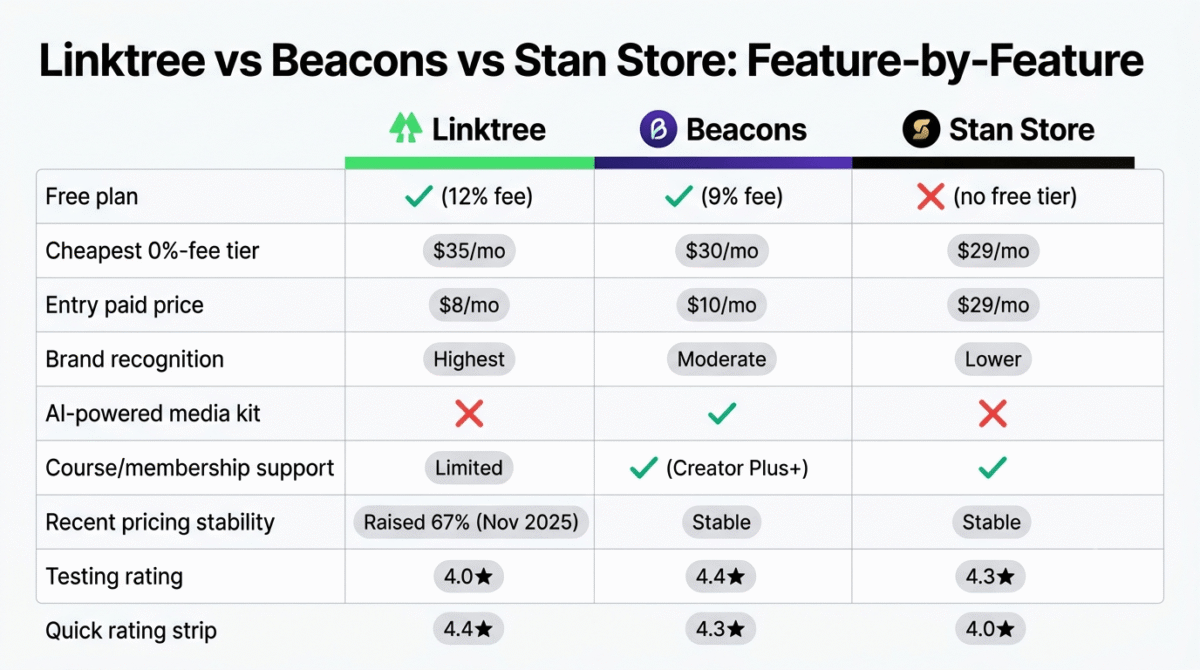
| Feature / Category | Linktree | Beacons | Stan Store |
|---|---|---|---|
| Free plan | Yes (12% sales fee) | Yes (9% sales fee) | No (14-day trial) |
| Cheapest 0%-fee tier | $35/month (Premium) | $30/month (Creator Plus) | $29/month (Creator) |
| Entry paid price | $8/month | $10/month | $29/month |
| Brand recognition | Highest | Moderate | Lower |
| Built-in media kit | No | Yes (AI-powered) | No |
| Course & membership support | Limited | Yes (Creator Plus+) | Yes |
| Built around | Link sharing | Creator business tools | Commerce & funnels |
| Recent pricing stability | Raised ~67% (Nov 2025) | Stable | Stable |
| Best for | Pure link hub, no selling | All-in-one creator business | Dedicated product storefronts |
Choose Beacons if:
You want one platform handling links, basic commerce, email capture, and brand-deal media kits together, and you are not yet at a sales volume that makes a flat-fee platform like Stan Store clearly cheaper. Beacons’ free and Creator tiers are the most feature-complete starting point in this comparison for a creator building toward a broader business.
Choose Stan Store if:
Your primary revenue is digital products, courses, or coaching, and you are selling consistently enough that a flat $29/month with zero transaction fees beats paying a percentage on every sale. The math favors Stan Store specifically once your sales volume crosses the point where 9–12% of revenue would exceed the flat subscription cost.
The Creator Setup Recommendation
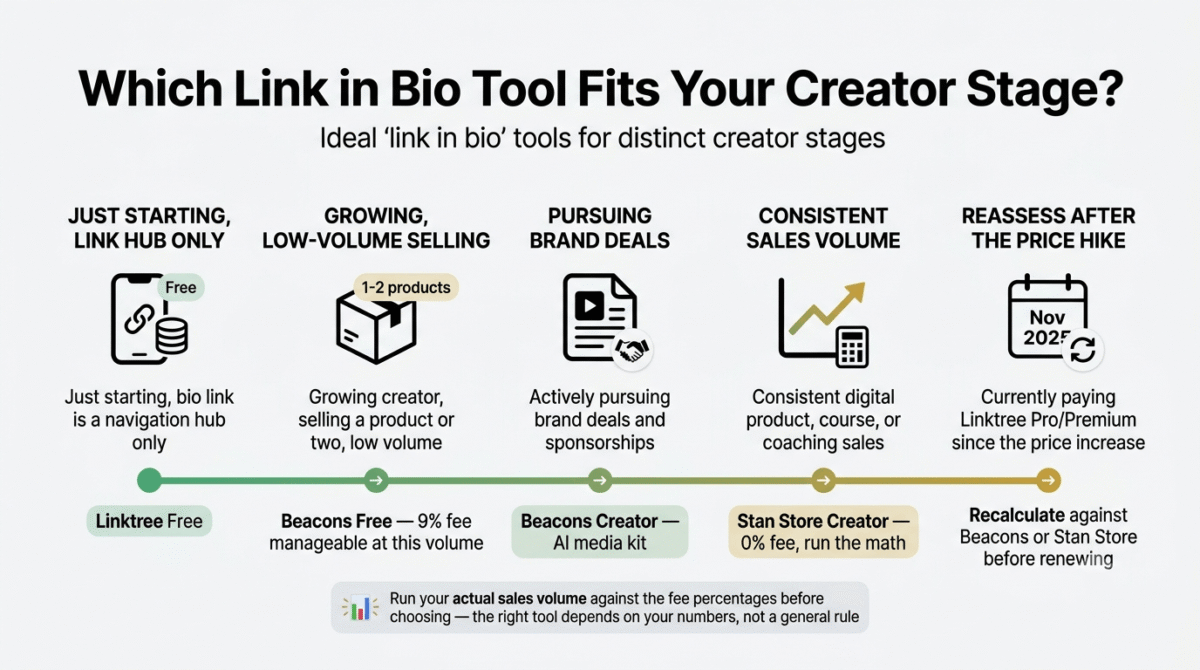
Based on 30 days of testing across real link pages and product listings, here is the recommended setup by creator stage:
Just starting out, bio link is a navigation hub only: Linktree’s free plan. No reason to pay for anything until you have an actual commerce or audience-capture need.
Growing creator starting to sell a digital product or two, low volume: Beacons’ free plan. The 9% fee is manageable at low volume, and the email capture and basic store features cover early monetization without a subscription.
Creator actively pursuing brand deals and sponsorships: Beacons’ Creator tier, specifically for the AI-powered media kit feature that neither competitor offers.
Creator with consistent digital product, course, or coaching sales: Stan Store’s Creator plan. Run the math on your actual monthly sales volume against Linktree’s or Beacons’ percentage fees first, for most creators selling consistently above a few hundred dollars a month, Stan Store’s flat fee wins clearly.
Anyone currently paying Linktree Pro or Premium since the November 2025 price increase: Recalculate. Compare your actual usage against Beacons’ Creator Plus tier or Stan Store’s Creator tier before renewing, the price increase makes this a good moment to actively re-shop rather than renew on autopilot.�� the price increase makes this a good moment to actively re-shop rather than renew on autopilot.
Final Verdict
Beacons is the best all-in-one link-in-bio tool for most creators in 2026, its combination of a genuinely generous free tier, unique media kit tools for brand outreach, and a clear path to 0% fees at the Creator Plus tier makes it the strongest general-purpose recommendation in this category.
Stan Store is the best choice once selling is your primary business model, its zero transaction fees from day one and purpose-built commerce workflows outperform both competitors for creators with consistent digital product or coaching revenue.
Linktree remains usable for pure link-hub needs but is the hardest to recommend without reservation, the recent 67% price increase on its Pro plan, combined with the steepest sales fee of the three platforms on its free tier, means most readers will get better value from one of the alternatives if they plan to sell anything at all.
Ratings:
- Beacons: 4.4 / 5
- Stan Store: 4.3 / 5
- Linktree: 4.0 / 5
Frequently Asked Questions
What is the best link in bio tool in 2026?
Beacons is the best overall choice for most creators, combining a generous free tier with media kit tools and a clear path to zero transaction fees. Stan Store is the better choice for creators primarily selling digital products or courses at consistent volume. Linktree remains a reasonable free choice for creators who only need a simple link hub with no commerce component.
Is Linktree still worth using after the recent price increase?
For pure link-sharing with no commerce, yes, the free plan is unaffected by the price increase and remains a solid choice. For creators paying for Pro or Premium specifically to sell products, the 67% price jump makes it worth comparing against Beacons’ Creator Plus tier or Stan Store before renewing, since both alternatives now offer comparable or better value at similar price points.
How do sales fees work on link-in-bio platforms?
Most platforms in this category charge a percentage of each sale made through your page, in addition to or instead of a monthly subscription, until you reach a top-tier plan that eliminates the fee. Linktree charges 12% on its free plan and 9% on Pro. Beacons charges 9% until its $30/month Creator Plus tier. Stan Store charges 0% on every paid plan, with no free tier as an alternative.
Do I need a link in bio tool if I already have a website?
Often, yes, even with an existing website. Social platforms restrict you to one clickable bio link, and a link-in-bio tool lets that single link serve multiple destinations, your website, a specific product, a booking calendar, without forcing you to choose only one. Many creators use a link-in-bio tool specifically to route bio traffic efficiently to a website they already maintain.
Which link in bio tool is best for selling digital products?
Stan Store is purpose-built specifically for this use case, with zero transaction fees and commerce workflows built around digital products, courses, and coaching from the ground up. Beacons is a strong second option, particularly at its Creator Plus tier, if you also want broader creator-business tools like email capture and media kits alongside selling.
Can I switch from Linktree to another link in bio tool easily?
Yes. Most platforms in this category, including Beacons and Stan Store, make it straightforward to recreate your existing link structure manually, and the process typically takes well under an hour. There is no meaningful lock-in effect that should discourage switching if a competitor offers clearly better value for your specific use case.
Is a one-time-payment link in bio tool a better deal than a subscription?
For creators who only need a simple link hub with no commerce features, a one-time-payment alternative can be a genuinely good value compared to an ongoing subscription, since the lifetime cost is fixed rather than recurring. The trade-off is generally narrower commerce and integration depth compared to subscription-based platforms like Beacons or Stan Store, so the right choice depends on whether you need those deeper features.