Someone comments on your Instagram Reel at 2am. They want to know the price of your course. By morning, they have moved on, bought from a competitor, and forgotten you existed.
Social media chatbots were built to fix this. Instead of losing leads to slow response times, you automate the reply, instantly send a DM with the price, a link, and a follow-up question, while you sleep.
In 2026, Instagram, Facebook Messenger, and WhatsApp have become serious sales and support channels for bloggers, freelancers, and small businesses. Comment-to-DM automation, story reply sequences, and 24/7 WhatsApp support bots are no longer advanced tactics, they are baseline expectations for any brand that takes social media seriously.
But the tools have had a turbulent year. ManyChat restructured its entire pricing model in March 2026, cutting the free tier from 1,000 contacts to 25. Chatfuel collapsed its tiered plans into a single opaque $69/month offering. The landscape looks very different from what most review articles, many of them written in 2024, still describe.
I tested ManyChat vs Chatfuel vs Manychat Alternatives across 30 days of real Instagram, Facebook Messenger, and WhatsApp automation workflows. Here is what actually happened.
Table of Contents
How We Evaluated These Tools
Every platform was tested across five criteria:
- Automation quality, how reliably do comment-to-DM triggers, keyword replies, and conversation flows actually fire across Instagram, Facebook, and WhatsApp?
- AI capability, does the tool understand natural language questions, or force users through rigid button menus?
- Pricing transparency, are the real monthly costs clear before you sign up, or do contact-based scaling and channel add-on fees obscure the true cost?
- Ease of setup, can a non-technical blogger or small business owner build a working bot in under two hours?
- Value for the core audience, does the tool solve problems that bloggers, content creators, and small business owners actually face at a price they can justify?
Why Social Media Chatbots Matter for Bloggers and Content Creators
Social media chatbots are not just a customer support tool. For content creators and bloggers, they are an audience monetisation system that works around the clock.
Lead capture from content. When a post performs well and drives comment engagement, a comment-to-DM automation converts that engagement spike into a list of warm leads, people who raised their hand by commenting. Without automation, those leads evaporate within hours. With a chatbot, they enter a sequence that qualifies them, delivers your lead magnet, and invites them to your email list, automatically.
Affiliate link delivery. A reader comments “link?” on your Instagram post about a tool you recommend. A chatbot instantly replies with the affiliate link in their DMs, along with a brief note about why you recommend it. The conversion happens before they lose interest.
Course and product sales. Comment-to-DM sequences that ask two qualifying questions (“What’s your biggest challenge with X?”) and then deliver a personalised offer convert at dramatically higher rates than static link-in-bio pages. The conversation feels personal even when it is automated.
WhatsApp support automation. For freelancers and small business owners who get repetitive WhatsApp enquiries, pricing, availability, turnaround times, a WhatsApp chatbot answers the common 80% automatically, reserving your personal attention for the conversations that actually require it.
ManyChat Review: Best Social Media Chatbot for Instagram and Facebook Automation
Free plan: Yes, 25 active contacts/month, 4 automations (March 2026 pricing change)
Starting paid price: $15/month (Pro, up to 500 contacts)
Best plan for most users: Pro, scales by contact count
Platforms: Instagram, Facebook Messenger, WhatsApp, SMS, Email, TikTok (Beta)
Affiliate program: Yes, ManyChat affiliate program
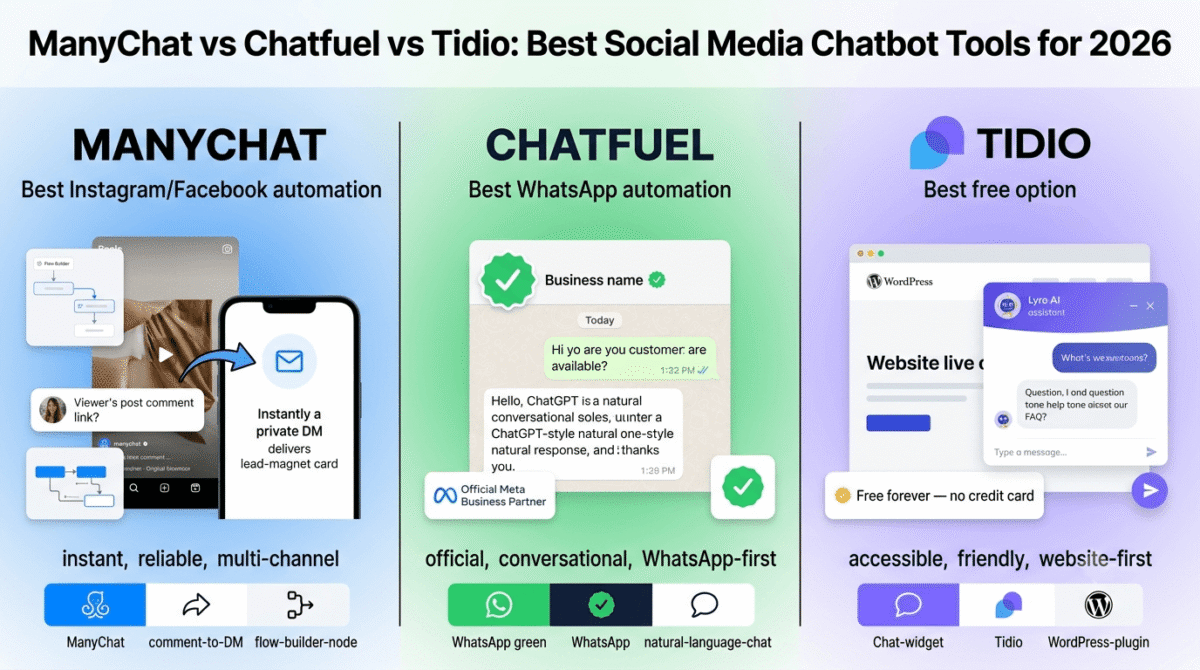
ManyChat is the most widely used social media chatbot platform in the world, with over 1 million businesses across 190 countries. Its visual flow builder, deep Instagram and Facebook integration, and the industry-defining comment-to-DM automation feature built its reputation. In 2026, it remains the most capable tool for social media automation, but a March 2026 pricing restructure changed the economics significantly for small businesses and solo creators.
What ManyChat does best
ManyChat’s comment-to-DM automation is the most reliable implementation of this feature available. When a follower comments a keyword on your Instagram post or Reel, “link,” “free,” “yes,” “details”, ManyChat instantly sends them a private DM with whatever you configure: a lead magnet, a product link, a question sequence, or a booking page. In testing, trigger fires were consistent within seconds of a comment being posted, even during high-traffic periods when a post goes semi-viral.
The visual Flow Builder is the most mature drag-and-drop automation designer in this category. You can build multi-step conversation sequences, add conditional logic (if the contact said “yes,” go to path A; if “no,” go to path B), insert delays between messages, and connect to Shopify, Google Sheets, Zapier, and HubSpot, all without writing code. If you’re deciding which CRM to funnel those qualified chatbot leads into, our HubSpot vs Salesforce vs Zoho CRM comparison covers the three most common options. The building experience is intuitive enough for a first-timer and flexible enough for advanced automations.
Multi-channel reach is ManyChat’s strategic advantage over Chatfuel. A single ManyChat Pro subscription covers Instagram DMs, Facebook Messenger, WhatsApp, SMS, and email, all managed from one dashboard. For creators who engage audiences across multiple platforms, consolidating automation into a single tool significantly reduces complexity and cost compared to running separate tools per channel.
Story reply automation is a ManyChat-specific feature that converts Instagram story interactions into DM conversations. A viewer who replies to your story with a keyword automatically enters a sequence. Combined with post comment automation, this turns every piece of Instagram content into a lead generation mechanism.
ManyChat’s A/B testing (Pro plan and above) lets you test two versions of a conversation flow against each other and automatically route more traffic to the better-performing version. For creators who run frequent campaigns, this optimisation capability compounds over time.
Where ManyChat falls short
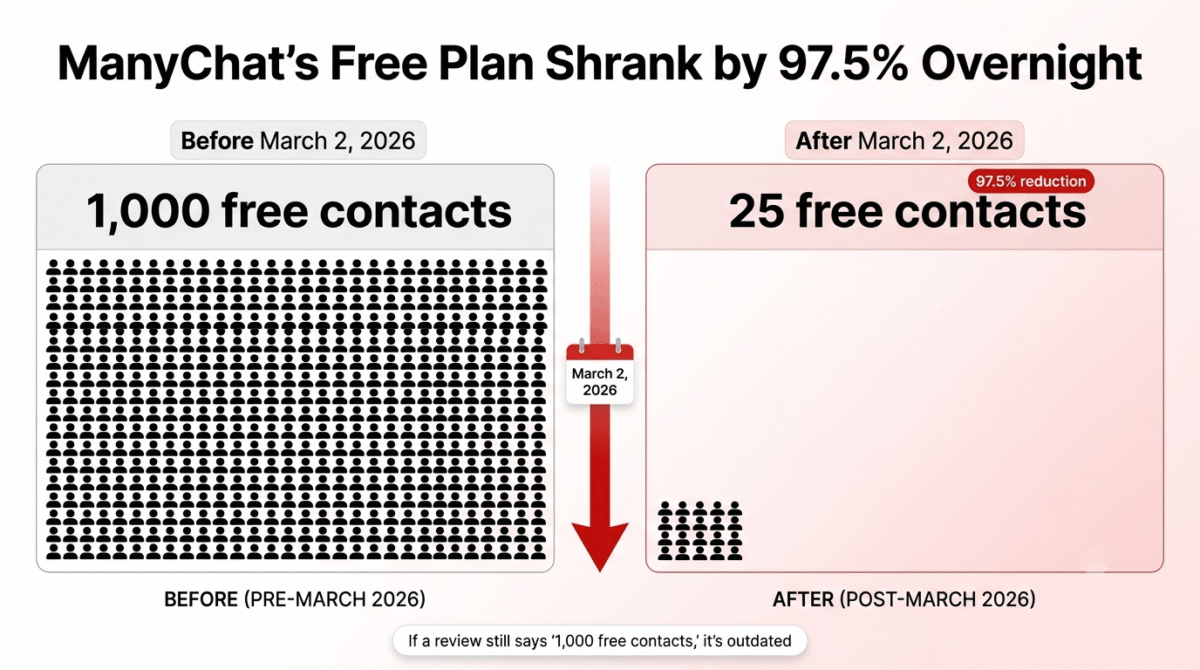
The March 2026 pricing restructure is the biggest story in this category this year, and it deserves direct attention. On March 2, 2026, ManyChat dropped its free plan contact limit from 1,000 to just 25, a 97.5% reduction. Essential starts at $14/month for 250 contacts, Pro at $29/month for 2,500, Business at $69/month for 7,500. If you are reading a review that still mentions 1,000 free contacts, it is outdated.
The contact-based pricing model is the structural problem that compounds this change. Your bill can change unpredictably if your audience grows quickly, and on top of your base plan, there are extra charges for WhatsApp, SMS, and Email messages, billed per message or conversation depending on the channel. A creator whose Reel goes viral and drives 3,000 new DM contacts in a week can find their monthly bill has jumped a tier without any deliberate decision on their part.
ManyChat’s AI features (the AI Step) are not included in any plan, they are a paid add-on. The base Pro plan at $29/month gives you flow-based automation; if you want AI that can handle natural language questions outside your predefined flows, you pay an additional fee on top of the subscription.
ManyChat uses monthly billing only, there is no annual payment option or discount. Every competitor in this review offers an annual discount of 15–30%. The absence of this option means ManyChat’s effective annual cost is higher than the sticker price comparison suggests.
ManyChat pricing
| Plan | Monthly Price | Active Contacts | Key features |
|---|---|---|---|
| Free | $0 | 25 contacts, 4 automations | Instagram, Facebook, TikTok (Beta) only |
| Essential | $14/month | 250 contacts | Basic flows, 2 channels |
| Pro | $29/month | 2,500 contacts | All channels, A/B testing, Shopify, Zapier |
| Business | $69/month | 7,500 contacts | Team tools, priority support, advanced analytics |
| AI Step add-on | Extra fee | All plans | Natural language AI responses (not included in base) |
Contact overage fees: $0.038–$0.10 per extra contact depending on plan tier. No annual billing option.
ManyChat: Pros and Cons
Pros:
- Most reliable comment-to-DM automation on Instagram and Facebook
- Most mature visual Flow Builder, drag-and-drop, conditional logic, delays
- Multi-channel in one subscription: Instagram, Messenger, WhatsApp, SMS, email
- Story reply automation converts Instagram story interactions to DM sequences
- A/B testing on Pro plan optimises conversation flow performance
- 1 million+ businesses, largest user base means the most templates and community resources
- Deep integrations: Shopify, HubSpot, Zapier, Google Sheets
Cons:
- Free plan collapsed from 1,000 to 25 contacts in March 2026, effectively unusable
- Contact-based pricing means viral posts can unexpectedly push you to a higher tier
- No annual billing option, no discount for committing upfront
- AI natural language features are a paid add-on, not included in Pro
- WhatsApp, SMS, and email messages billed separately per conversation on top of plan price
- Pricing complexity makes real monthly cost difficult to calculate in advance
Rating: 4.3 / 5, Best social media chatbot tool for creators who need multi-channel automation. The March 2026 pricing changes make it significantly more expensive to start than competitors.
Chatfuel Review: Best WhatsApp Chatbot for Meta-Focused Businesses
Free plan: No (7-day free trial)
Starting paid price: $69/month (single consolidated plan)
Best for: WhatsApp-first businesses needing ChatGPT-powered automation and the Meta green verified badge
Platforms: WhatsApp, Instagram DMs, Facebook Messenger, TikTok DMs, Website widget
Affiliate program: Yes, Chatfuel affiliate program
Chatfuel has been building chatbots for Meta platforms since 2015. Over 46% of all Messenger bots run on Chatfuel, which gives it serious ecosystem credibility. In 2026, Chatfuel has pivoted toward positioning itself as a WhatsApp-first AI business assistant, consolidating everything into a single $69/month plan, with the old tier structure gone.
What Chatfuel does best
Chatfuel’s ChatGPT integration is the platform’s most differentiating feature in 2026. The visual editor is intuitive, and the ChatGPT integration works without writing a single line of code, you connect your OpenAI account, define the persona and knowledge base, and your chatbot handles natural language questions from WhatsApp or Instagram visitors without rigid flow-based menus. In testing, the AI responses were noticeably more conversational than ManyChat’s flow-based default approach.
WhatsApp is where Chatfuel’s strength is most concentrated. The platform holds official Meta Business Partner status, which matters for two practical reasons: access to the WhatsApp Business API (required for automation at any real scale) and eligibility for the WhatsApp green verified badge, which increases message open rates and adds visual credibility to business communications. For businesses where WhatsApp is a primary customer communication channel, service businesses, consultants, e-commerce brands with international customers, this official status is a meaningful advantage.
The appointment booking automation is a practical Chatfuel speciality. A bot can collect a visitor’s name, preferred date, service type, and contact details through a natural WhatsApp or Instagram DM conversation, then push the booking directly to Google Calendar or Calendly, completing a sales cycle without any human involvement. For freelancers and service businesses, this workflow alone can justify the platform cost.
Chatfuel’s broadcast messaging feature lets you send scheduled messages to your entire contact list across WhatsApp, Instagram, and Facebook simultaneously. For product launches, promotional campaigns, and re-engagement sequences, this broadcast capability turns your chatbot contacts into a captive messaging audience, similar to an email list but with significantly higher open rates on WhatsApp.
Where Chatfuel falls short
Chatfuel’s pricing page shows one plan at $69/month. The capacity language is deliberately vague, the plan handles “up to a few thousand client messages per month,” and beyond that you are told to “talk to us.” That is not transparency; it is an invitation to negotiate, which creates uncertainty for small businesses trying to budget accurately.
At $69/month with no free tier and no annual discount disclosed, Chatfuel is the most expensive entry point of the three tools reviewed. For a blogger or small business owner testing whether chatbot automation delivers ROI before committing, the 7-day trial is the only way in, and 7 days is genuinely not enough to build, test, and measure a meaningful automation.
The channel scope, while covering the major Meta platforms, does not extend to SMS or email, channels that ManyChat includes. For creators who want a single tool to cover both social messaging and direct outreach, Chatfuel requires a supplementary tool.
Customer support quality on lower-tier plans is a consistent complaint in user reviews. There is a bare knowledge base and a chatbot to answer FAQs, with users directed to a WhatsApp group if they cannot find answers. For a $69/month tool, this support tier is disappointing.
Chatfuel pricing
| Plan | Monthly Price | What You Get |
|---|---|---|
| Free trial | $0 (7 days only) | Full platform access, time-limited |
| Business | $69/month | WhatsApp, Instagram, Facebook, TikTok, website widget, ChatGPT AI, all features |
| Enterprise | From $300/month | + Personal account manager, 10 free bot-building hours, priority support, bulk pricing |
No annual billing discount publicly disclosed. Message volume capacity above “a few thousand” requires a sales conversation.
Chatfuel: Pros and Cons
Pros:
- ChatGPT integration for natural language responses without code
- Official Meta Business Partner, WhatsApp API access and green verified badge eligibility
- Appointment booking automation connects directly to Google Calendar and Calendly
- Broadcast messaging across WhatsApp, Instagram, and Facebook simultaneously
- Simple single-plan pricing, no tier confusion beyond Business vs Enterprise
- Strong visual flow builder with unlimited flows and blocks
- 46%+ of all Facebook Messenger bots built on the platform, large template ecosystem
Cons:
- Most expensive entry point, $69/month with no free tier
- 7-day trial only, not enough time to properly evaluate ROI
- Pricing capacity deliberately vague, “a few thousand messages” is not a number
- No SMS or email channel coverage (Meta platforms only)
- No publicly disclosed annual billing discount
- Customer support below expectations at $69/month price point
- Smaller community and fewer third-party resources than ManyChat
Rating: 3.9 / 5, Best chatbot tool for WhatsApp-first businesses that can justify $69/month and need official Meta API access and ChatGPT AI. Too expensive and opaque for most bloggers and small businesses starting out.
Tidio Review: Best Free Chatbot Alternative for Bloggers and Small Businesses
Free plan: Yes, 50 live chat conversations/month, 100 chatbot triggers/month
Starting paid price: $29/month (Starter)
Best plan for most users: Growth, $59/month
Platforms: Website (WordPress, Shopify), Instagram, Facebook Messenger, Email
Affiliate program: Yes, 30% recurring commission
Tidio entered this comparison primarily as a live chat tool (covered in post #25 of this series), but its chatbot capabilities deserve a direct comparison with ManyChat and Chatfuel, particularly for bloggers and small business owners who need automation without a large monthly budget. While Tidio is website-first rather than social-first, its Instagram and Messenger integration, free-forever plan, and Lyro AI make it a practical alternative worth including in this decision.
What Tidio does best
Tidio’s free plan is the most genuinely usable of the three tools. Tidio combines live chat with AI bots and visitor automation, with a free version and scalable paid options, and unlike ManyChat’s 25-contact free tier or Chatfuel’s 7-day trial, Tidio’s free plan never expires. Fifty live chat conversations and 100 chatbot triggers per month give a blogger or small business owner enough room to test the tool properly, refine their automation, and verify that it delivers value before paying anything.
Lyro, Tidio’s AI chatbot powered by Claude, handles natural language questions from your FAQ content without requiring rigid decision tree flows. In testing, Lyro correctly answered common visitor questions in a conversational tone without the robotic “Please select an option” experience that characterises flow-only chatbots. The AI handoff to a live agent when Lyro is unsure works smoothly, with the visitor rarely noticing the transition.
The WordPress plugin is a practical differentiator for bloggers. Install the plugin, connect your Tidio account, and both live chat and chatbot automation are live on your site within ten minutes, no JavaScript pasting, no developer involvement. For the WordPress creator audience that makes up a significant portion of this blog’s readership, this frictionless setup is a real advantage.
Tidio’s unified inbox consolidates conversations from website chat, email, Instagram DMs, and Facebook Messenger into a single interface. For solo operators managing multiple channels, this consolidation prevents the context-switching overhead of monitoring four separate inboxes.
The chatbot template library covers the use cases most relevant to small businesses: welcome new visitors, capture leads, recover abandoned carts, collect post-purchase reviews, and answer FAQs outside office hours. Each template is live and functional in under 30 minutes without customisation.
Where Tidio falls short
Tidio is a website-first tool, and its social media automation capabilities, while functional, are not as deep as ManyChat’s. Comment-to-DM automation on Instagram, the defining feature that drives most social media chatbot searches, is not a native Tidio feature. If Instagram comment automation is the primary use case, Tidio is not the right choice.
The free plan’s 50-conversation limit is consumed faster than new users expect on sites with regular traffic. A blog post that ranks and drives steady search traffic can exhaust the monthly limit within the first week, abruptly stopping conversations mid-flow until the calendar resets.
Lyro AI at the Growth tier ($59/month) includes only 50 AI conversations, additional conversations are billed separately at $0.50–$1 per conversation. Heavy AI usage on a high-traffic site can push the effective monthly cost significantly above the plan price.
Tidio pricing (for chatbot context)
| Plan | Monthly Price | Chatbot Triggers | Lyro AI Conversations |
|---|---|---|---|
| Free | $0 | 100/month | Not included |
| Starter | $29/month | Unlimited | Not included |
| Growth | $59/month | Unlimited | 50 included, then per conversation |
| Tidio+ | $749/month | Unlimited | Custom volume |
Tidio: Pros and Cons
Pros:
- Best free plan, never expires, no credit card required
- Lyro AI answers natural language questions from FAQ content without rigid flows
- WordPress and Shopify one-click plugin installation
- Unified inbox for website chat, email, Instagram, and Messenger
- 30% recurring affiliate commission, best affiliate structure of the three tools
- Pre-built templates for common small business use cases
- Clean, beginner-friendly interface
Cons:
- Website-first, no native Instagram comment-to-DM automation
- Free plan 50-conversation limit consumed quickly on active sites
- Lyro AI conversations billed per conversation above Growth plan allowance
- Social media automation depth significantly below ManyChat
- Not suitable as a standalone social chatbot tool if Instagram is the primary channel
Rating: 4.5 / 5, Best chatbot tool for bloggers and small businesses that primarily need website automation, live chat, and AI-powered FAQ responses. Not the right choice if Instagram comment automation is the primary requirement.
Head-to-Head Comparison
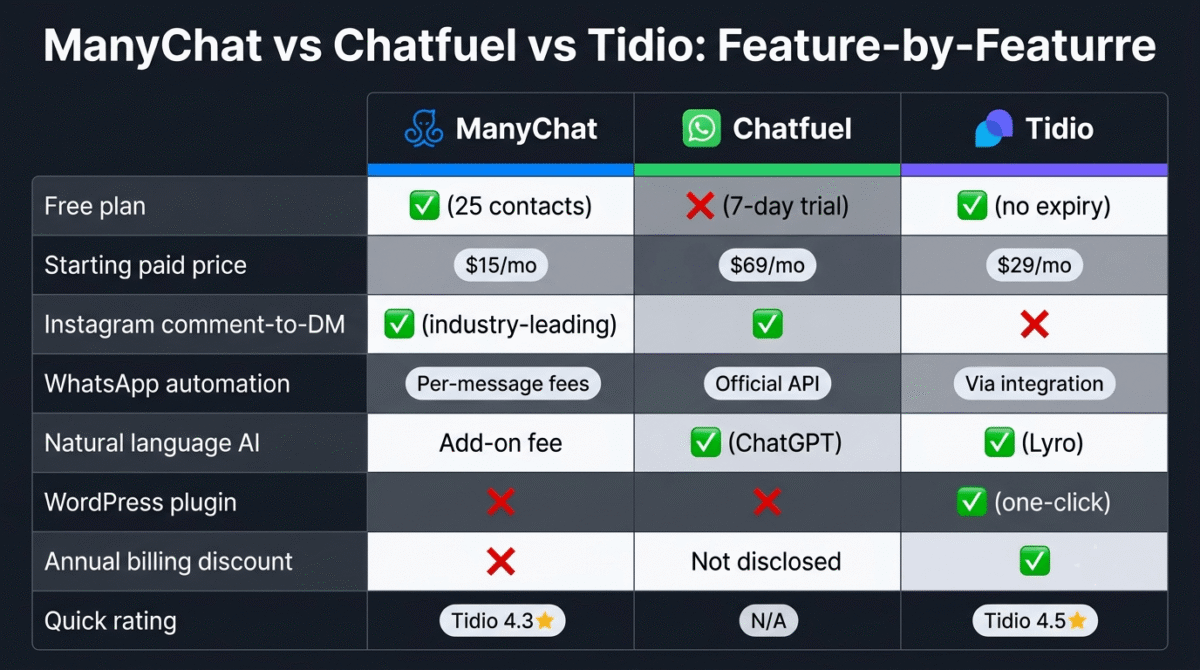
| ManyChat Pro | Chatfuel Business | Tidio Growth | |
|---|---|---|---|
| Price/month | $29 + contact overages | $69 | $59 |
| Free plan | 25 contacts (effectively unusable) | 7-day trial only | Yes, 50 chats, 100 triggers, no expiry |
| Instagram comment-to-DM | Yes, industry-leading | Yes | No |
| WhatsApp automation | Yes (per-message fees) | Yes, official Meta API | Via integration only |
| Facebook Messenger | Yes | Yes | Yes |
| SMS and Email | Yes (add-on fees) | No | Email only |
| AI chatbot | Add-on fee | ChatGPT (included) | Lyro AI (50 included on Growth) |
| Natural language AI | Add-on | Yes | Yes |
| Flow builder | Visual, drag-and-drop | Visual, drag-and-drop | Visual, drag-and-drop |
| WordPress plugin | No | No | Yes (one-click) |
| Shopify integration | Yes | Yes | Yes |
| Annual billing discount | No | Not disclosed | Yes |
| Affiliate commission | Standard | Standard | 30% recurring |
| Best for | Multi-channel social automation | WhatsApp-first business | Website chat + FAQ automation |
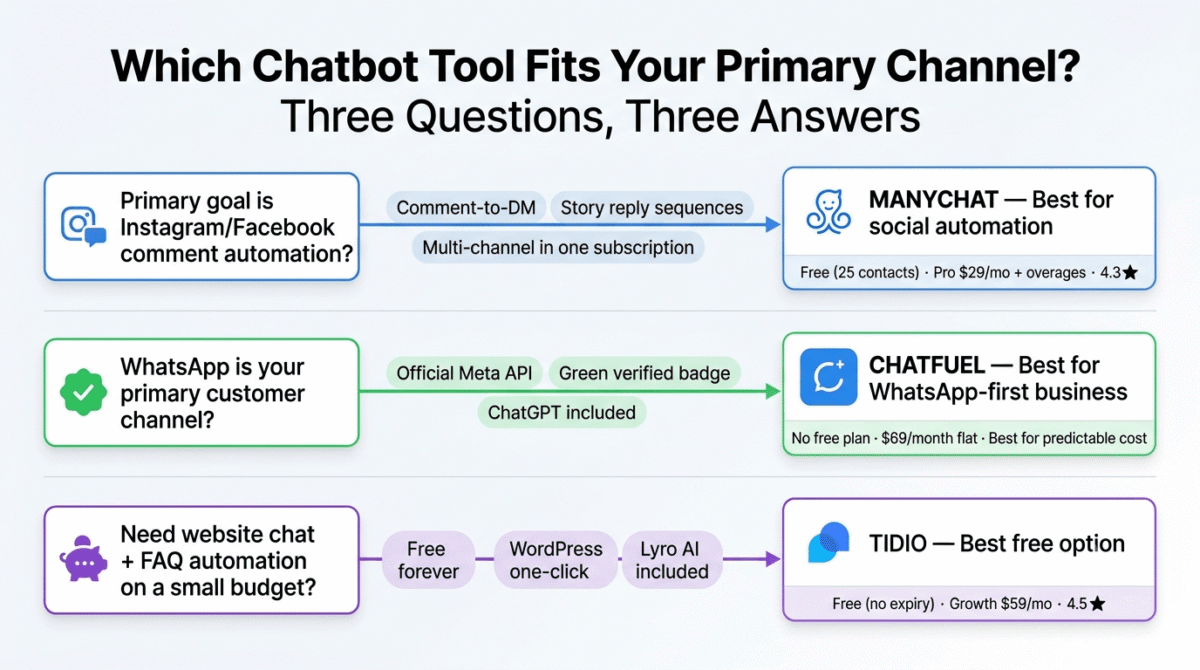
Which Social Media Chatbot Tool Should You Choose?
Choose ManyChat if:
Your primary goal is Instagram and Facebook automation, comment-to-DM triggers, story reply sequences, and multi-channel social media lead generation. ManyChat’s Flow Builder and comment automation are the most reliable in the category, and the multi-channel Pro plan covers Instagram, Messenger, WhatsApp, SMS, and email from one subscription. Budget accurately: at $29/month base with contact overage fees and AI as a separate add-on, your realistic monthly cost will be higher than the plan price for any creator with an active and growing audience.
Choose Chatfuel if:
WhatsApp is your primary customer communication channel and you need official Meta Business Partner API access, the green verified badge, and ChatGPT-powered natural language responses. The $69/month flat fee includes everything, no contact-based scaling, no AI add-on, which makes the total cost easier to predict than ManyChat at scale. The entry price is steep for testing, but for an established service business or e-commerce brand doing meaningful volume on WhatsApp, the per-message economics can be favourable at high volume.
Choose Tidio if:
Your automation priority is website chatbot and live chat rather than social media DMs. If live chat itself, not just Tidio’s bundled chatbot feature, is actually your priority, see our dedicated Intercom vs Drift vs Tidio comparison to upgrade to live chat with a tool built specifically for it. Tidio’s free plan lets you test properly without a credit card, the WordPress plugin makes setup immediate, and Lyro AI handles FAQ automation intelligently. If you are a blogger whose audience primarily engages through your website rather than Instagram comments, Tidio is the correct choice and the most cost-effective.
Consider staying on native platform tools if:
Your chatbot needs are simple and channel-specific. Instagram’s native quick reply tools, Facebook’s page messaging automation, and WhatsApp Business’s away message and catalogue features cover basic automation at zero cost. For a creator whose needs are limited to simple keyword replies and away-message templates, the native platform tools are functional enough to avoid a monthly subscription entirely.
Setting Up Your First Social Media Chatbot, The Practical Guide
For bloggers and creators building their first automation, here is the fastest path to a working chatbot:
Step 1, Choose one channel and one use case. Do not try to automate everything at once. Pick Instagram (if that is where your audience is) and one specific trigger: comment-to-DM for a freebie or lead magnet. This single automation delivers the most measurable return fastest.
Step 2, Start with ManyChat Pro ($29/month) if Instagram is the channel. Use the “Comment Growth Tool” template, connect it to a lead magnet download page, and publish a Reel with a call to action in the caption (“Comment ‘GUIDE’ and I’ll send it to you”). Your first automation will be live within an hour. The chatbot only works once content is actually going out consistently, pair it with a scheduling tool so you can schedule content + automate replies without manually posting every Reel yourself. See our Buffer vs Hootsuite vs Later comparison for the best fit.
Step 3, Build your welcome sequence. A three-message DM sequence, immediate lead magnet delivery, a day-1 follow-up asking one qualifying question, and a day-3 message with your product or service offer, converts comment engagement into warm leads in a way that posting a link in your bio never will.
Step 4, Add your email list integration. Connect ManyChat to ConvertKit or Mailchimp via Zapier so every new contact who opts in during the DM sequence is automatically added to your email list. The chatbot contact and the email subscriber become the same lead, and your automation covers both channels.
Step 5, Review contact count weekly. ManyChat’s contact-based billing means a single viral post can push you to a higher tier without warning. Set a calendar reminder to review your active contact count on the first of each month and archive inactive contacts to manage costs deliberately.
Final Verdict
ManyChat is the best social media chatbot tool for most creators and small businesses in 2026, its comment-to-DM automation, multi-channel reach, and Flow Builder depth are unmatched in the category. The March 2026 pricing changes make it more expensive to start, but the platform’s capabilities justify the cost for any creator actively monetising their social media audience.
Chatfuel is the best tool for WhatsApp-first businesses, the ChatGPT AI integration, official Meta Partner status, and green badge eligibility make it the most capable WhatsApp automation platform, but the $69/month flat fee with no free tier and opaque capacity limits make it hard to recommend to small businesses testing the ROI of chatbot automation for the first time.
Tidio is the best chatbot tool for bloggers who prioritise their website, the free plan is the most genuinely useful in the category, the WordPress integration is seamless, and Lyro AI handles FAQ automation intelligently. For creators whose primary audience engagement happens on their blog rather than Instagram, Tidio is the practical choice.
Ratings:
- ManyChat: 4.3 / 5
- Tidio: 4.5 / 5
- Chatfuel: 3.9 / 5
Frequently Asked Questions
What is the best free social media chatbot tool in 2026?
For website automation, Tidio offers the most functional free plan, 50 live chat conversations and 100 chatbot triggers per month with no expiry and no credit card required. For Instagram and Facebook automation specifically, the free options are severely limited in 2026: ManyChat’s free plan dropped to just 25 active contacts in March 2026, making it barely useful for testing. Chatfuel offers a 7-day trial. If you need ongoing free social media automation, native Instagram and Facebook Business tools are your realistic option.
Is ManyChat still worth it after the March 2026 pricing changes?
Yes, for creators who actively monetise Instagram and Facebook through comment automation, lead sequences, and multi-channel DM campaigns, ManyChat remains the best-performing tool in the category. The pricing change makes it more expensive to start, but the platform’s capabilities are unchanged. Budget realistically: Pro at $29/month is the starting point, AI is an add-on, and WhatsApp messages are billed per conversation on top. Factor all three costs into your monthly estimate before signing up.
What is the difference between ManyChat and Chatfuel?
ManyChat is optimised for multi-channel social automation, Instagram, Facebook, WhatsApp, SMS, and email, with the most mature Instagram comment-to-DM and story automation on the market. Chatfuel is optimised for WhatsApp and Meta messaging with ChatGPT AI built in, official Meta Business Partner status, and the ability to earn the WhatsApp green verified badge. ManyChat is better for Instagram-heavy creators; Chatfuel is better for WhatsApp-first service businesses.
Can I use chatbots to grow my Instagram following?
Chatbots grow your DM contact list and email list, not your follower count directly. The mechanism is: a follower comments a keyword on your post, a chatbot sends them a DM with a lead magnet or valuable offer, they opt in to receive more from you, and you build a direct communication channel that is not algorithm-dependent. The follower count grows through the quality and reach of your content; the chatbot captures and converts the engagement that content generates.
Is WhatsApp automation legal and compliant?
WhatsApp Business API automation is legal when conducted through official Meta-approved platforms like Chatfuel and ManyChat, which comply with WhatsApp Business Policy. The critical compliance requirement is consent, you can only message contacts who have explicitly opted in to receive messages from your business. Mass cold outreach or unsolicited message blasts violate WhatsApp’s terms and risk account suspension. Chatfuel’s official Meta Partner status and ManyChat’s API compliance both help ensure the automation stays within policy boundaries.
How much does ManyChat cost for 10,000 contacts?
ManyChat’s Pro plan covers up to 2,500 contacts at $29/month. Between 2,500 and 10,000 contacts, you are billed per additional active contact at $0.038–$0.05 per contact per month (depending on billing cadence). At 10,000 active contacts, the estimated monthly cost on Pro is approximately $29 base + ~$285 in contact overages = ~$314/month. This is a significant jump from the apparent entry price, and it is the primary reason why understanding ManyChat’s contact-based billing model before signing up matters.
Does Tidio work for Instagram DM automation?
Tidio connects to Instagram DMs and Facebook Messenger through its unified inbox, allowing your team to respond to social messages alongside website chat. However, Tidio does not offer native Instagram comment-to-DM automation, the feature where a comment on your post automatically triggers a private DM. If comment-to-DM is your primary use case, ManyChat is the correct tool. If you just need to manage Instagram DM replies alongside your website chat from one place, Tidio handles that effectively.
What is a good open rate for WhatsApp chatbot messages?
WhatsApp message open rates consistently run between 85–98%, compared to email open rates of 20–35% for most industries. This is the primary reason businesses are moving customer communication to WhatsApp, the audience actually reads the messages. Automated WhatsApp chatbot sequences that deliver a lead magnet, follow up with a qualifying question, and then present an offer typically see open rates of 80–90% across all three messages, compared to email sequence open rates that typically decay from 40% on message one to 15–20% by message three.