A QR code printed on a business card, a flyer, a product label, or a restaurant table tent looks like a permanent, one-time decision, scan once, print, done. For one entire category of QR code, that assumption is wrong in a way that can cause real, delayed-action problems: a dynamic QR code, the kind that lets you change the destination URL after printing, only works for as long as you keep paying for the platform that generated it. Stop paying, and every physical copy of that code you printed, on business cards already handed out, on signage already installed, on packaging already shipped, silently breaks.
This is a genuinely under-discussed risk in a category that otherwise looks simple, and it deserves the same scrutiny we apply to any other software subscription on this site. See our full freelancer toolkit roundup for the rest of the small subscriptions worth scrutinizing the same way. We tested QR Code Generator vs Uniqode vs QR TIGER for 30 days, paying particular attention to what each platform actually does to a printed code if you cancel. Here is the honest comparison.
Table of Contents
How We Tested These Platforms
Every platform was evaluated against five criteria:
- Free tier generosity and what’s actually included, not just “is there a free plan,” but whether free-tier codes are dynamic or static, and what limitations apply
- What happens to existing codes after cancellation, this is the single most consequential, least-discussed factor in this entire category
- Design customization, can you produce a branded code with a logo and custom colors, not just a generic black-and-white square
- Analytics depth, for dynamic codes, what do you actually learn about who scanned, when, and from where
- Bulk generation and team features, relevant for any business generating more than a handful of codes
Why Dynamic QR Codes Create a Subscription Dependency Most Buyers Don’t Anticipate
This distinction is the single most important thing to understand before choosing a QR code tool, and it is worth explaining clearly before going platform by platform.
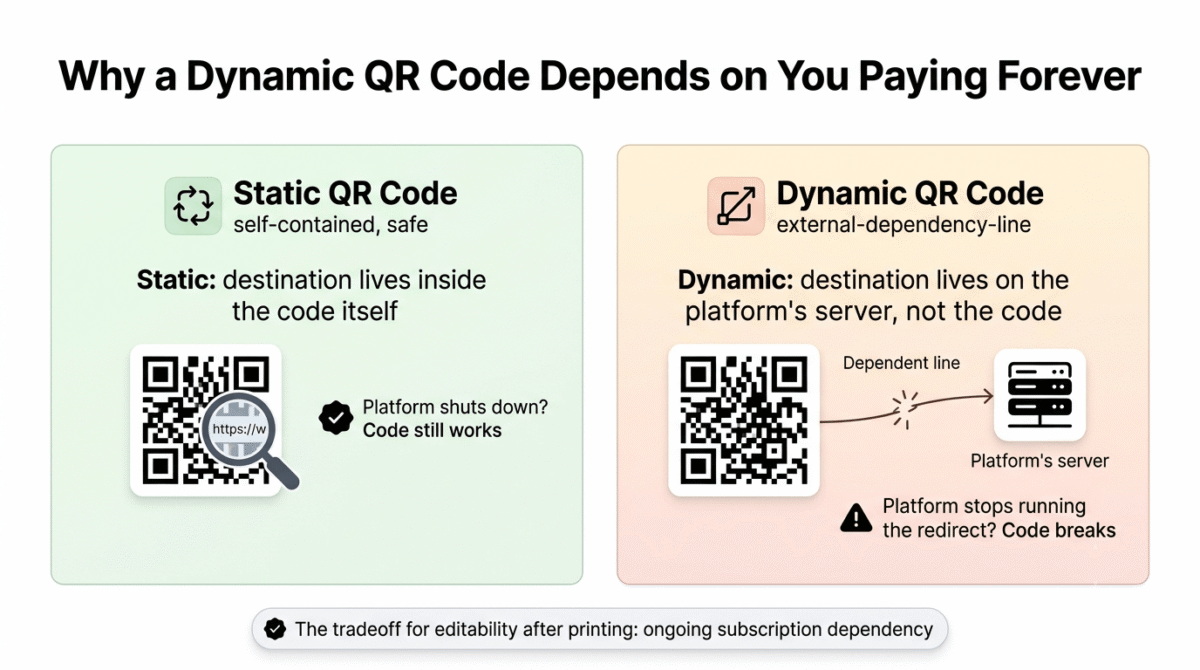
A static QR code encodes a destination, a URL, a piece of text, a contact card, directly into the code’s pattern at the moment it is created. Once generated, it works forever, completely independent of whoever generated it. If the website that made the QR code shuts down tomorrow, your static code still scans correctly, because the destination information lives inside the code itself, not on a server somewhere.
A dynamic QR code works differently: it encodes a short redirect URL, and the platform’s server is what looks up where that redirect should actually send the scanner. This is what allows you to change the destination after the code is printed, useful for fixing a typo, updating a menu, or redirecting a marketing campaign without reprinting materials. The tradeoff is that the code now depends entirely on that platform’s server continuing to run the redirect, indefinitely, for the physical life of every printed copy.
Independent analysis of this category has noted directly that a common pattern among established QR code generators is steep subscription pricing paired with unclear cancellation terms, creating exactly the dependency described above, you print the code, distribute it widely, and only then discover what happens if you stop paying. We think every buyer in this category deserves to know that risk clearly before printing anything, not after.
QR Code Generator (Bitly) Review: Best Balance of Simplicity and Brand Recognition for Small Businesses
Free plan: Yes, limited free static codes; dynamic codes generally require a paid plan or have trial limitations
Starting paid price: Commonly cited around $10/month (Core plan), $29/month (Growth, with advanced analytics)
Best for: Small businesses already using or considering Bitly’s link management platform who want QR codes integrated into the same dashboard
Platforms: Web
Affiliate program: Check current availability directly
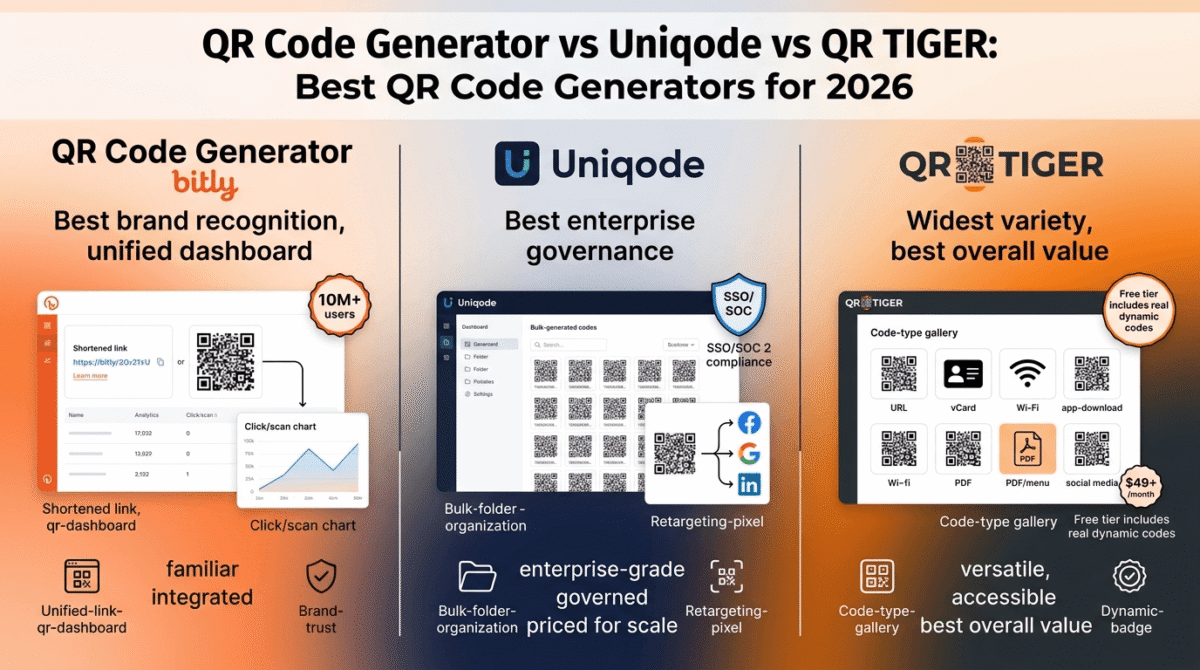
QR Code Generator operates as part of the Bitly ecosystem, the same company behind one of the most recognized link-shortening services on the internet. That association brings real brand trust to a category where buyers are understandably cautious about unfamiliar platforms holding their printed materials hostage to a subscription.
What QR Code Generator does best
Integration with Bitly’s broader link management platform is the clearest practical advantage here, a small business already using Bitly to shorten and track links can manage QR codes from the same dashboard, with unified analytics across both short links and QR code scans, rather than maintaining a completely separate tool and login just for QR codes.
The platform serves a genuinely large existing user base, reportedly over 10 million users, which means documentation, community knowledge, and third-party integration support are more mature than smaller, newer competitors in this category.
Design customization covers the standard expectations well: logo embedding, custom colors, and a range of frame styles let a small business produce a QR code that looks intentionally branded rather than generic, without requiring design skill beyond using the platform’s built-in editor.
The combination of built-in landing pages and basic campaign management features, included on paid tiers, lets a business create a simple destination page for a QR code scan without needing a separate website or landing page tool for that specific purpose. If that scan is meant to capture an email signup rather than just display a page, you’ll also need an email marketing platform to actually send to that list, see our Mailchimp vs ConvertKit vs Brevo comparison.
Where QR Code Generator falls short
Independent reviewers note a real friction point on the free and trial tiers specifically: dynamic codes generated without a paid plan can display ads on the redirect page, or have limited functionality, which is worth confirming directly before assuming “free” covers your actual use case if dynamic editing matters to you.
Pricing at $29/month for the Growth tier with advanced analytics is meaningfully more expensive than several competitors offering comparable analytics depth at a lower price point, appropriate if you specifically want the Bitly ecosystem integration, but not the most economical choice if QR codes are your only need.
As with every dynamic QR code provider, cancelling a paid plan raises the same fundamental dependency question covered above, confirm directly with current terms what happens to your previously generated dynamic codes if you downgrade or cancel, rather than assuming continuity.
QR Code Generator pricing
| Plan | Price | Key Features |
|---|---|---|
| Free | $0 | Limited static codes, restricted dynamic functionality |
| Core | ~$10 / month | Dynamic codes, basic analytics |
| Growth | ~$29 / month | Advanced analytics, more codes, campaign tools |
QR Code Generator: Pros and Cons
Pros:
- Backed by Bitly’s established brand and large existing user base
- Unified dashboard with Bitly’s link shortening and tracking, if you use both
- Solid design customization with logo embedding and frame styles
- Built-in landing pages reduce the need for a separate destination page tool
Cons:
- Free and trial-tier dynamic codes may show ads or have restricted functionality
- $29/month Growth tier is pricier than several competitors with comparable analytics
- Same fundamental cancellation-dependency risk as every dynamic QR code provider
- Less specialized than Uniqode for enterprise needs or QR TIGER for bulk generation
Rating: 4.2 / 5, Best for small businesses already invested in or considering the Bitly ecosystem who want QR codes managed from the same dashboard as their shortened links.
Uniqode (formerly Beaconstac) Review: Best for Enterprise-Scale Management, Priced Accordingly
Free plan: Limited trial; primarily a paid enterprise platform
Starting paid price: Commonly cited starting around $5/month at the lowest tier, with dynamic codes and meaningful analytics generally requiring tiers around $49+/month
Best for: Organizations managing hundreds or thousands of QR codes across teams, locations, or campaigns, with budget for enterprise-grade governance
Platforms: Web
Affiliate program: Check current availability directly
Uniqode, the rebranded successor to Beaconstac, has built its entire product around a genuinely different scale of problem than most QR code generators address: not “make me one QR code,” but “let my organization manage thousands of QR codes across multiple teams, with the security and audit controls a large company’s procurement process requires.”
What Uniqode does best
Enterprise-grade governance is Uniqode’s clearest differentiator, SOC 2 Type II compliance, single sign-on, and role-based access control let a large organization manage who can create, edit, or delete dynamic codes across a team, which is a genuine requirement for companies with formal IT security policies, and a feature smaller competitors in this category simply do not offer.
Bulk generation at real scale, up to 2,000 dynamic codes at once, organized by folder, team, or campaign, addresses a use case far beyond what an individual blogger or small business needs, but is exactly the right tool for a retail chain, conference organizer, or multi-location business managing QR codes across dozens or hundreds of physical locations simultaneously.
Retargeting pixel integration, connecting a QR code scan to Facebook, Google, or LinkedIn advertising audiences, is a distinctive feature that goes well beyond basic scan analytics, letting a marketing team treat an offline QR code scan as a digital advertising touchpoint that feeds directly into existing retargeting campaigns.
The Auto Design feature uses AI to suggest branded design options based on uploaded brand assets, reducing the manual design work needed to produce a consistent, professional-looking code across a large catalog of products or locations.
Where Uniqode falls short
Pricing is the clearest reason this platform is the wrong choice for most of this site’s readers: meaningful dynamic code functionality and analytics generally require tiers starting around $49 per month and scaling well beyond that for real enterprise use, a cost structure built for organizations with a marketing or operations budget to match, not a solo blogger or small business owner generating a handful of codes.
The feature depth that makes Uniqode valuable at enterprise scale is genuinely unnecessary overhead for a smaller use case, a freelancer who just wants one QR code linking to their portfolio gains nothing from SSO, role-based permissions, or bulk folder organization, and would be paying for and navigating around capability they will never use.
The brand split between “Beaconstac” and “Uniqode” following the 2023 rebrand has created some ongoing confusion in independent reviews and search results about which name refers to the current product, worth being aware of so you don’t end up evaluating outdated information under the old brand name.
Uniqode pricing
| Plan | Price | Key Features |
|---|---|---|
| Lite | ~$5 / month | Basic generation, limited functionality |
| Pro / Business | ~$49+ / month | Dynamic codes, full analytics, retargeting pixels, bulk generation |
| Enterprise | Custom | SSO, SOC 2 compliance, dedicated support |
Uniqode: Pros and Cons
Pros:
- Strongest enterprise governance in this comparison, SSO, SOC 2, role-based access
- Bulk generation supports up to 2,000 dynamic codes at once with folder organization
- Retargeting pixel integration connects scans directly to advertising audiences
- AI-powered Auto Design for consistent branded codes at scale
- Trusted by large global brands, reflecting genuine enterprise reliability
Cons:
- Meaningful functionality requires $49+/month, significant overpay for small-scale needs
- Enterprise feature depth is unnecessary complexity for an individual or small business
- Recent brand rebrand (Beaconstac to Uniqode) has created some search and review confusion
- Same fundamental dynamic-code cancellation dependency as every competitor in this category
Rating: 4.3 / 5, Best for genuine enterprise-scale QR code management across teams and locations. Significant overkill, and overpriced, for an individual blogger or small business’s actual needs.
QR TIGER Review: Best All-Around Balance of Free Tier, Analytics, and Bulk Features for Most Buyers
Free plan: Yes, functional free tier with basic dynamic code support
Starting paid price: Commonly cited starting around $7/month for full dynamic feature access
Best for: Small businesses, bloggers, and freelancers who want the widest range of QR code types and reasonable analytics without enterprise-level pricing
Platforms: Web
Affiliate program: Yes, QR TIGER affiliate program
QR TIGER positions itself in the genuinely useful middle ground between QR Code Generator’s brand-recognition simplicity and Uniqode’s enterprise scale, independent comparisons consistently describe it as the best all-around choice for most businesses specifically because it covers real dynamic-code functionality and decent analytics without enterprise pricing.
What QR TIGER does best
The breadth of QR code types supported is the widest in this comparison, beyond standard URL codes, QR TIGER supports vCard contact codes, app download codes, social media codes, Wi-Fi network codes, PDF and menu codes, and several other specialized formats, covering a genuinely broad range of small business and personal use cases from one platform.
QR TIGER’s free tier includes functional dynamic code support, which is a meaningful step up from competitors that restrict dynamic editing entirely to paid tiers, for a small business or individual just testing whether QR codes are useful for their specific situation, this lets you validate the use case before committing to a subscription.
Bulk QR code generation is a genuine strength here as well, positioned specifically for businesses creating codes for hundreds of products, locations, or campaign variants, without requiring the enterprise-tier pricing that Uniqode’s comparable bulk features demand.
Design customization is strong, with the same logo-embedding, color, and frame options as competitors, paired with pricing that independent comparisons consistently describe as more accessible than Uniqode’s for businesses that want real dynamic features without enterprise budget.
Where QR TIGER falls short
QR TIGER’s enterprise-tier governance features, SSO, detailed role-based permissions, and the deepest compliance certifications, are less developed than Uniqode’s, which is the correct tradeoff for QR TIGER’s target audience but a real gap if your organization specifically needs those enterprise controls.
Retargeting pixel integration, Uniqode’s standout feature for marketing teams running offline-to-online campaigns, is not a comparable strength for QR TIGER, a business specifically prioritizing that exact capability will likely need to evaluate Uniqode despite the cost difference.
As with every platform in this category, QR TIGER’s dynamic codes depend on continued payment to keep working after the trial or free-tier limitations are exceeded, confirm current cancellation terms directly, and treat any printed dynamic code as a recurring commitment, not a one-time purchase.
QR TIGER pricing
| Plan | Price | Key Features |
|---|---|---|
| Free | $0 | Limited dynamic codes, basic analytics |
| Paid (Full Dynamic) | ~$7+ / month | Full dynamic feature access, bulk generation, broader analytics |
QR TIGER: Pros and Cons
Pros:
- Widest variety of QR code types of the three platforms (vCard, Wi-Fi, app download, PDF, and more)
- Functional dynamic codes available even on the free tier
- Strong bulk generation without enterprise-tier pricing
- Best all-around value identified across multiple independent comparisons in this category
- Reasonable starting price for genuine dynamic functionality
Cons:
- Enterprise governance features (SSO, deep compliance) less developed than Uniqode’s
- No comparable retargeting pixel integration for offline-to-online ad campaigns
- Same cancellation-dependency risk inherent to every dynamic QR code platform
- Brand recognition lower than Bitly-backed QR Code Generator
Rating: 4.5 / 5, Best all-around choice for most small businesses, bloggers, and freelancers, combining genuine dynamic functionality, strong free-tier access, and reasonable pricing without enterprise overhead.
Head-to-Head Comparison
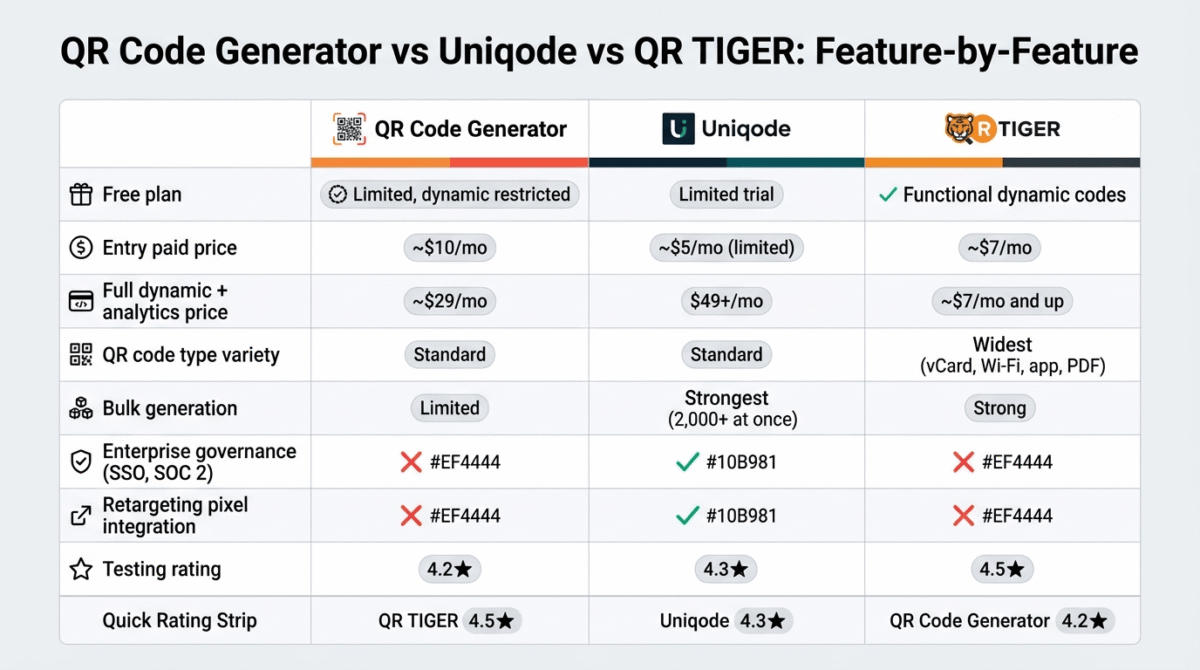
| Criteria / Metric | Bitly QR | Uniqode (Beaconstac) | QR TIGER |
|---|---|---|---|
| Free Plan Availability | Limited Dynamic functionality restricted | Limited Trial 14-day evaluation window | Yes (Functional) Includes dynamic test codes |
| Entry Paid Price | ~$10 / month Billed annually ($120/yr) | ~$5 / month Very limited entry capacity | ~$7 / month Billed annually ($84/yr) |
| Full Dynamic & Analytics Tier | ~$29 / month Growth plan tier | $49+ / month Pro / Business tier | ~$7 / month and up Full access on entry tier |
| QR Code Type Variety | Standard URL, WiFi, basic text | Standard URL, landing page, PDF | Widest Range vCard, WiFi, App Stores, MP3, PDF, Multi-URL |
| Bulk Generation | Limited Small CSV batching | Strongest 2,000+ codes per CSV upload | Strong Batch generation enabled |
| Enterprise Governance | No Basic team permissions | Yes SSO (SAML 2.0), SOC 2 Type II compliant | No Standard encryption |
| Retargeting Pixel Integration | No | Yes Meta, Google Tag Manager, LinkedIn | No |
| Best For | Existing Bitly Users Unified link + QR management | Enterprise & Multi-Location High security, large-scale print ops | SMBs & Solopreneurs Maximum dynamic features per dollar |
| Brand Recognition | Highest Global short-link dominance | High Dominant in enterprise & B2B | Moderate High among digital marketers |
Which Platform Should You Choose?
Choose QR Code Generator (Bitly) if:
You already use Bitly for link shortening and want QR codes managed from the same dashboard, with unified analytics across both. The brand recognition also offers some reassurance for buyers specifically concerned about platform longevity, given Bitly’s established market position.
Choose Uniqode if:
You are managing QR codes at genuine enterprise scale, hundreds or thousands of codes across multiple teams, locations, or campaigns, and need SSO, role-based access, and formal compliance certifications. This is real overkill, and a real overpay, for anyone outside that specific use case.
Choose QR TIGER if:
You are a small business, blogger, or freelancer who wants genuine dynamic QR code functionality, the widest range of code types, and solid analytics, without enterprise pricing or unnecessary governance complexity. For most of RateTheTool’s readers, this is the most directly useful and best-value choice in this comparison.
The Blogger and Small Business Setup Recommendation
Based on 30 days of testing across real-world use cases, here is the recommended setup by situation:
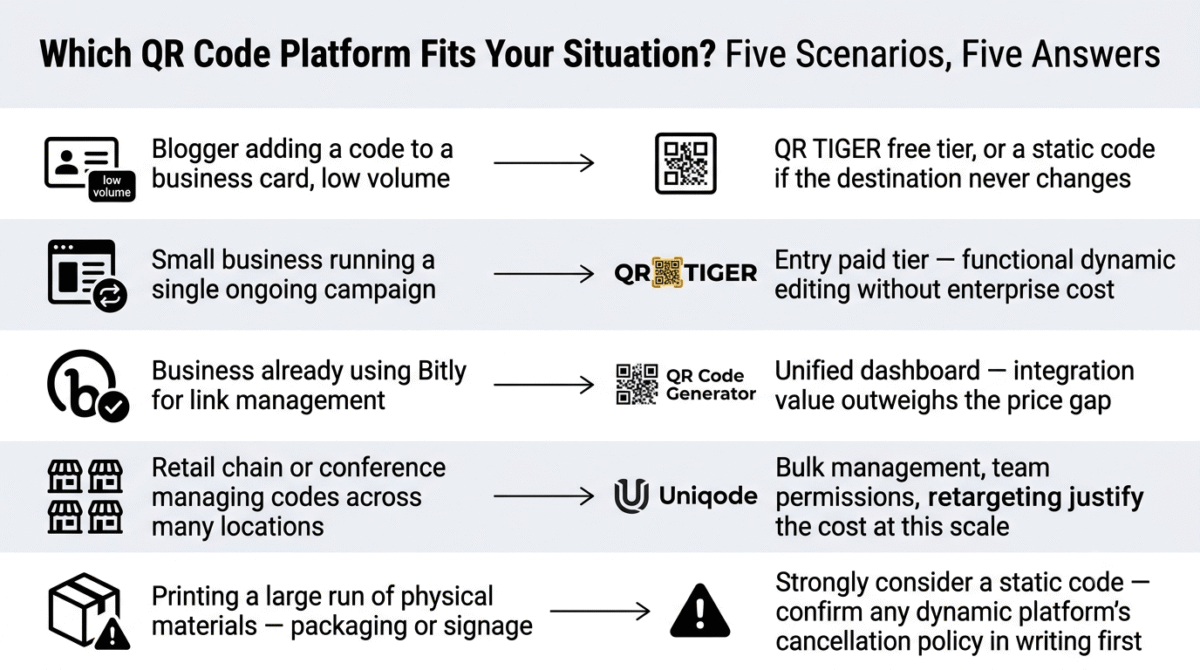
Blogger adding a QR code to a business card or printed material, low volume: QR TIGER’s free tier, or a genuinely free static-code tool like QRCode Monkey if you don’t need to edit the destination after printing. If the URL behind the code will never need to change, a static code removes the entire subscription-dependency risk discussed throughout this post.
Small business running a single ongoing campaign (menu, product page, event): QR TIGER’s entry paid tier, for functional dynamic editing and solid analytics at a price that does not require enterprise budget.
Business already using Bitly for link management: QR Code Generator, specifically for the unified dashboard, the integration value outweighs the marginally higher price for this specific situation.
Retail chain, conference organizer, or business managing codes across many physical locations: Uniqode, accepting the higher cost for the bulk management, team permissions, and retargeting integration that genuinely justify the price at this scale.
Anyone printing a QR code on a large run of physical materials, packaging, signage, or anything expensive to reprint: Strongly consider a static code if the destination will not need to change, specifically to eliminate the subscription-dependency risk entirely. If you do need a dynamic code for that material, confirm your chosen platform’s cancellation policy in writing before printing, not after.
Final Verdict
QR TIGER is the best QR code generator for most of RateTheTool’s readers in 2026, its combination of a genuinely functional free tier, the widest variety of QR code types, and reasonable pricing for real dynamic functionality make it the strongest value for bloggers, freelancers, and small businesses without enterprise-scale needs.
Uniqode is the best choice specifically for enterprise-scale QR code management, its governance, bulk generation, and retargeting pixel integration are genuinely strong, but the pricing and complexity make it the wrong choice for the vast majority of individual and small business use cases.
QR Code Generator remains a reasonable choice specifically for existing Bitly users, the unified dashboard and brand recognition have real value for that specific audience, even though QR TIGER offers more functionality at a lower price for buyers without an existing Bitly relationship.
Ratings:
- QR TIGER: 4.5 / 5
- Uniqode: 4.3 / 5
- QR Code Generator (Bitly): 4.2 / 5
Frequently Asked Questions
What is the best QR code generator in 2026?
QR TIGER offers the best overall value for most bloggers, freelancers, and small businesses, combining a functional free tier with the widest variety of QR code types at reasonable pricing. Uniqode is the better choice for genuine enterprise-scale management across teams and locations. QR Code Generator is worth considering specifically if you already use Bitly’s link management platform.
What happens to my QR code if I stop paying for the platform that made it?
It depends on whether the code is static or dynamic. A static QR code, which encodes its destination directly, continues to work indefinitely regardless of what happens to the platform that generated it. A dynamic QR code, which encodes a redirect URL that the platform’s server resolves, generally stops working or redirects incorrectly if your subscription lapses, this is the single most important fact to understand before printing a dynamic code on any material you can’t easily reprint.
Should I use a static or dynamic QR code?
Use a static code if the destination will never need to change, a one-time event, a fixed contact card, a permanent link that won’t be updated. Use a dynamic code only if you genuinely need to edit the destination after printing, or want scan analytics, and are comfortable treating that code as an ongoing subscription commitment for as long as the physical materials remain in circulation.
Is there a genuinely free QR code generator with no hidden catch?
For static codes specifically, yes, tools like QRCode Monkey offer unlimited free static QR code generation with logo embedding and no signup required, since static codes carry no ongoing server dependency for the platform to monetize. For dynamic codes, “free” almost always means limited in scan volume, code count, or analytics depth, since the platform is providing an ongoing redirect service that has a real, continuing cost to operate.
Can a QR code expire?
A static code never expires on its own, since it has no dependency on an external server. A dynamic code can effectively expire if the issuing platform’s subscription lapses, if the platform shuts down, or if the platform itself sets an expiration policy on free-tier codes, confirm your specific platform’s policy directly, since this varies meaningfully between providers and has been a source of documented user frustration in this category.
How do I add a logo to my QR code without breaking it?
QR codes have built-in error correction that allows a meaningful percentage of the code’s pattern to be obscured while remaining fully scannable, which is what allows a logo to sit in the center without breaking the code. All three platforms compared here, along with most free generators, support logo embedding using this built-in error correction, just preview and test-scan the result before finalizing any print run, since logo size and placement can occasionally affect scan reliability on lower-quality printers.
Do QR code generators track who scans my code?
Only dynamic QR codes support scan tracking, since the platform’s redirect server is what processes each scan and can log data like timestamp, approximate location, and device type. Static codes provide no scan tracking whatsoever, since there is no server involved in resolving them. If analytics matter to your use case, a dynamic code from a platform like QR TIGER or Uniqode is necessary, but accept the corresponding subscription dependency that comes with it. Pairing scan data with website analytics on the landing page itself completes the picture, see our Google Analytics vs Hotjar vs Matomo comparison.