
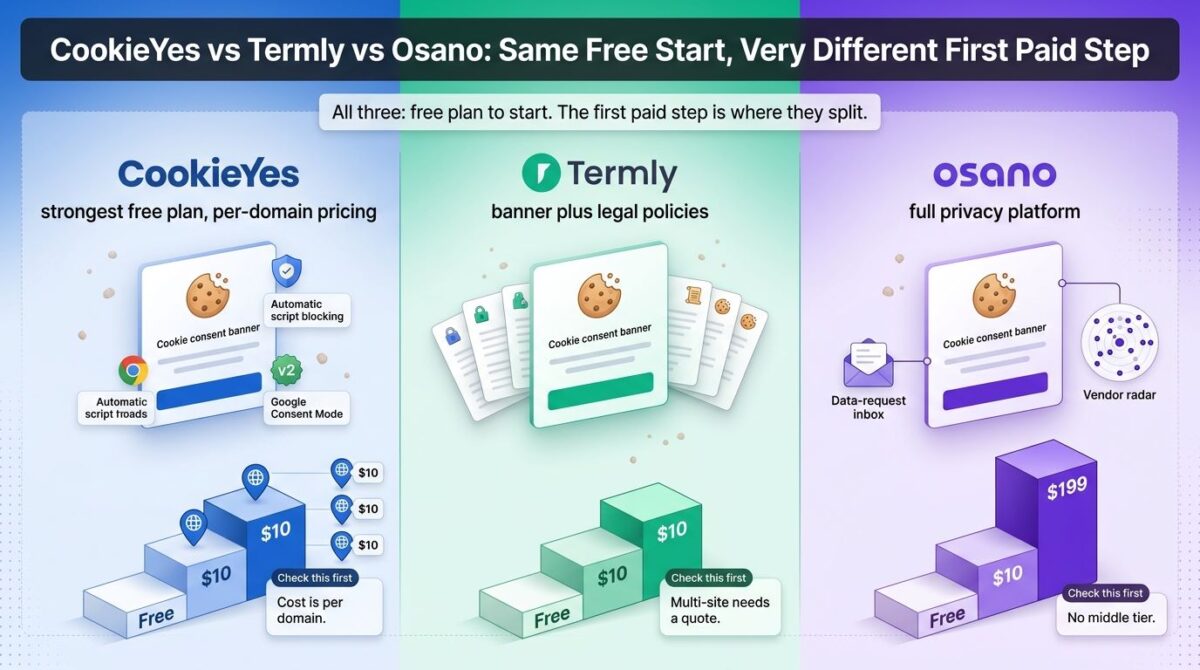
For one small website, CookieYes vs Termly vs Osano is an easy call, because all three offer a free plan. The comparison gets interesting at the first paid step. That step costs $10 a month at CookieYes, $10 at Termly, and $199 at Osano, a twentyfold gap for tools that all put a consent banner on a site and log what visitors choose, much like factoring in transaction fees when you compare payment processors for your digital storefront.
The gap exists because the three sell different things. CookieYes is a focused consent banner priced per domain and per pageview. Termly bundles the banner with a legal policy generator. Osano sells a broader privacy platform with vendor monitoring and data request handling, and its first paid plan is priced for that scope, which is particularly relevant when driving traffic through effective lead capture popups on growing sites.
I tested CookieYes vs Termly vs Osano for 30 days, setting up a consent banner on the same test site with each one and pricing out what a single site, a five-site portfolio, and a growing store would pay, while managing tech stacks that often connect multiple SaaS tools through automated workflows. Here is the honest comparison, including a pageview limit on one platform that, according to an independent analysis, can switch a banner off when traffic runs past the cap. This guide covers pricing and features, and it isn’t legal advice.
Table of Contents
How We Tested
Five criteria shaped the testing:
- Where the free plan ends, which limits (pageviews, banner views, visitors) push a growing site onto a paid plan
- First useful paid step: the cost of the first plan with the features most sites need, like regional rules and branding removal
- Multi-site cost: what five sites cost, since each platform handles extra domains differently
- Scope: consent banner only, banner plus legal policies, or a wider privacy platform
- Plan limits that affect compliance: what happens to the banner when a site exceeds a usage cap
CookieYes Review: The Best Free Plan, Priced Per Domain
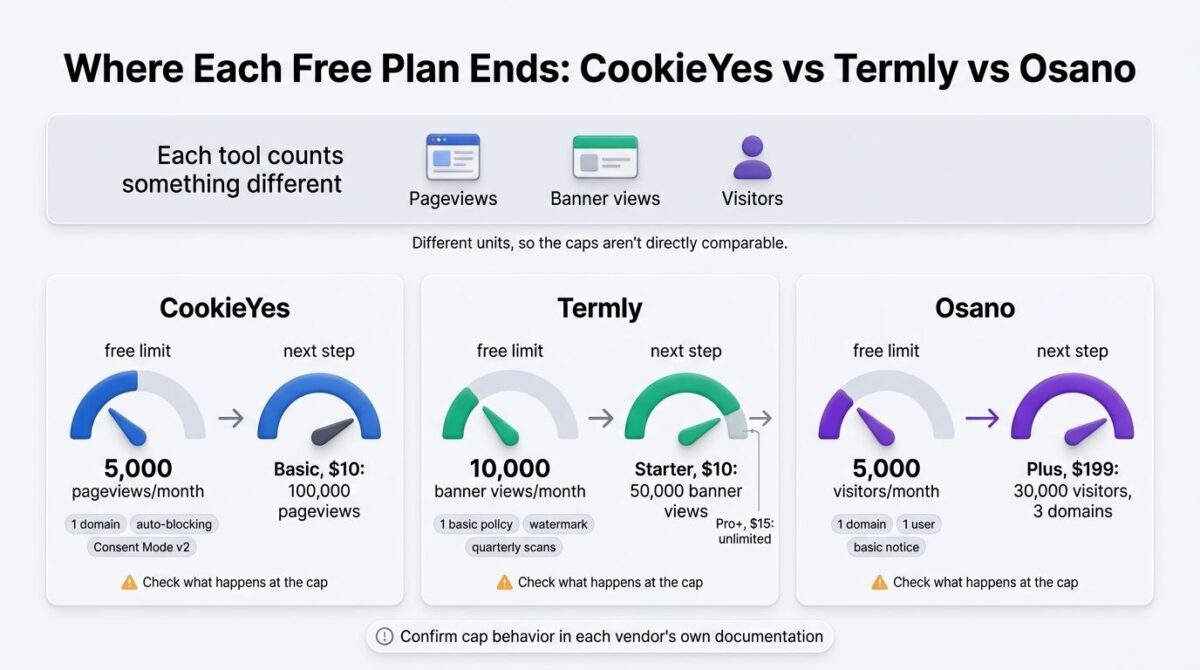
Free plan: Yes, 1 domain, 5,000 pageviews/month, 100 pages per scan
Starting price: $10/month per domain (Basic), with two months free on annual billing
Best plan for most users: Pro, $25/month per domain, once regional consent rules are needed
Platforms: Web, WordPress plugin, Shopify app, other site builders
Affiliate program: Unconfirmed; check CookieYes’s partner page before adding links
CookieYes is a cookie consent banner with automatic cookie scanning and script blocking, built for small sites and WordPress users who want a fast setup.
What CookieYes does best
The free plan is the most complete of the three. It includes the banner, automatic cookie blocking, both policy generators, a consent log, and certified Google Consent Mode v2, an integration that many competing tools reserve for paid plans. A cookie database of more than 100,000 entries also automates the categorization work that would otherwise be manual.
Paid plans carry a 14-day trial, and annual billing removes two months of cost, which brings Basic to about $100 a year for a site under 100,000 monthly pageviews.
Where CookieYes falls short
Every paid plan is billed per domain with no volume discount at self-serve checkout. Pro costs $25 per site, so five sites run $125 a month and twenty sites approach $500 a month, for cookie consent alone with no data request tools or legal policy generation. Geo-targeting is gated to Pro, which means Free and Basic show every visitor the same banner regardless of location, and removing CookieYes branding requires the $55 Ultimate plan.
One independent analysis from a competing vendor reports that exceeding a plan’s pageview limit causes CookieYes to suspend the banner, which would let trackers load without consent. That claim comes from a competitor, so confirm the behavior in CookieYes’s own documentation before relying on any plan near its limit.
CookieYes pricing
| Plan | Price (per domain) | Pageviews/Month | Notable Feature |
|---|---|---|---|
| Free | $0 | 5,000 | Banner, auto-blocking, Consent Mode v2, 2 policy generators |
| Basic | $10/month | 100,000 | Higher limits, same banner for all regions |
| Pro | $25/month | Higher | Geo-targeting, scheduled scans |
| Ultimate | $55/month | Unlimited | CookieYes branding removal |
CookieYes: Pros and Cons
Pros:
- Free plan includes certified Google Consent Mode v2 and auto-blocking
- Lowest paid entry price of the three at $10 per domain
- Large cookie database automates categorization
- 14-day trial and annual billing discount on paid plans
Cons:
- Per-domain billing with no multi-site discount, so costs compound across sites
- Geo-targeting needs Pro, and branding removal needs Ultimate
- Pageview caps are reported to suspend the banner when exceeded
- Consent banner only, with fewer legal policy generators than Termly
Rating: 4.1 / 5, the strongest free plan and a low entry price, with per-domain costs that climb quickly across several sites.
Termly Review: Banner and Legal Policies in One Subscription
Free plan: Yes, 1 basic legal policy, 10,000 banner views/month, Termly watermark
Starting price: $10/website/month billed annually ($14 monthly), Starter
Best plan for most users: Pro+, $15/website/month billed annually ($20 monthly), unlimited banner views and regional rules
Platforms: Web, WordPress, Shopify, other site builders
Affiliate program: Unconfirmed; check Termly’s partner page before adding links
Termly combines a consent management platform with generators for ten legal documents, including a privacy policy, terms and conditions, and cookie policy, so one subscription covers both the banner and the paperwork behind it.
What Termly does best
Bundling policy generation with consent management is Termly’s clearest advantage. A site that needs a privacy policy, terms, and a cookie banner can cover all three in one account, and paid plans include regulation monitoring and automatic policy updates when laws change. Pro+ at $15 a month annually is also the lowest-priced plan of the three that includes regional consent rules, multi-language support, and logo removal.
Pro+ removes the banner view limit entirely, and adds IAB TCF 2.3 support and weekly cookie scans, features that Starter and Free don’t include.
Where Termly falls short
Published prices cover one site. Multi-domain management appears only on the custom-priced Agency plan, which starts at 10 sites, so a five-site owner either pays per site or requests a quote. Starter limits sites to 50,000 banner views, 2 legal policies, and 10 policy edits, and features many businesses treat as baseline, like regional rules and logo removal, sit on Pro+.
The free plan is also narrow: one policy with no edits, quarterly cookie scans, and a Termly watermark on the banner. Sources also disagree on which tier first includes Google Consent Mode v2, so check that detail against the current plan page.
Termly pricing
| Plan | Price (per website) | Banner Views/Month | Notable Feature |
|---|---|---|---|
| Free | $0 | 10,000 | 1 basic policy, watermark, quarterly scans |
| Starter | $10/month annual ($14 monthly) | 50,000 | 2 policies, monthly scans |
| Pro+ | $15/month annual ($20 monthly) | Unlimited | Regional rules, multi-language, logo removal, weekly scans |
| Agency | Custom (10+ sites) | Unlimited | Multi-domain management, reseller pricing |
Termly: Pros and Cons
Pros:
- Banner and ten legal document generators in one subscription
- Pro+ includes regional rules, multi-language support, and logo removal at $15/month
- Automatic policy updates and regulation monitoring on paid plans
- Unlimited banner views on Pro+
Cons:
- Published pricing covers one site; multi-site needs a custom Agency quote
- Starter caps banner views at 50,000 and limits policy edits
- Free plan carries a watermark and allows no policy edits
- Consent Mode v2 availability by tier is described inconsistently across sources
Rating: 4.2 / 5, the best value for a single site that needs both a banner and legal policies, with multi-site pricing handled through a quote.
Osano Review: A Full Privacy Platform, With a $199 First Step
Free plan: Yes, 1 domain, 1 user, 5,000 monthly visitors
Starting price: $199/month (Plus), 2 users, 3 domains, 30,000 monthly visitors
Best plan for most users: Plus, for businesses that want consent plus privacy templates and a GDPR representative service
Platforms: Web, JavaScript embed, site builder integrations
Affiliate program: Unconfirmed; check Osano’s partner page before adding links
Osano positions itself as a privacy program, pairing consent management with data request handling, vendor risk monitoring across more than 60,000 tracked vendors, and data mapping.
What Osano does best
Scope is the clearest reason to choose Osano. For a mid-market company that needs consent management alongside DSAR handling and vendor risk monitoring, one platform covers ground that CookieYes and Termly leave to other tools. Plus includes UK and EU representative services and privacy templates, and the interface tested as clean and quick to set up.
Osano also maintains an open-source cookie consent script that is free to download and self-host, an option neither competitor offers.
Where Osano falls short
The jump from free to paid is the largest of the three: $0 to $199 a month, or about $2,388 a year, with no middle tier. A competitor’s comparison also reports that the free tier shows a notice without blocking scripts or storing consent, which would make it a notification rather than consent management, so confirm that in Osano’s documentation if the free plan is under consideration.
Beyond Plus, pricing is sales-led. Vendr’s marketplace data puts the median Osano contract near $8,500 a year, third-party estimates for enterprise plans run $2,000 to $8,000 a month, and custom integrations can add $2,000 to $10,000 or more in implementation costs. Some older third-party listings show different plan names and prices, so the vendor’s own page is the safer reference.
Osano pricing
| Plan | Price | Limits | Notable Feature |
|---|---|---|---|
| Free | $0 | 1 domain, 1 user, 5,000 visitors | Basic consent notice |
| Plus | $199/month | 3 domains, 2 users, 30,000 visitors | Privacy templates, GDPR representative |
| Basic Privacy & above | Custom quote | Higher volume | DSAR, vendor monitoring, data mapping |
| Implementation (if needed) | $2,000-$10,000+ | One-time | Custom integrations, multi-region logic |
Osano: Pros and Cons
Pros:
- Broadest privacy scope of the three, including DSAR and vendor risk monitoring
- Plus includes a GDPR representative service and privacy templates
- Open-source cookie consent script available for self-hosting
- Clean interface and quick setup
Cons:
- $0 to $199/month jump with no middle tier
- Free tier reported to show a notice without script blocking or consent storage
- Pricing beyond Plus is sales-led, with a median contract near $8,500 a year
- Costs a premium over focused consent tools for a site that only needs a banner
Rating: 3.8 / 5, a capable privacy platform for mid-market teams, priced well above what a small site needs for a cookie banner.
Head-to-Head Comparison
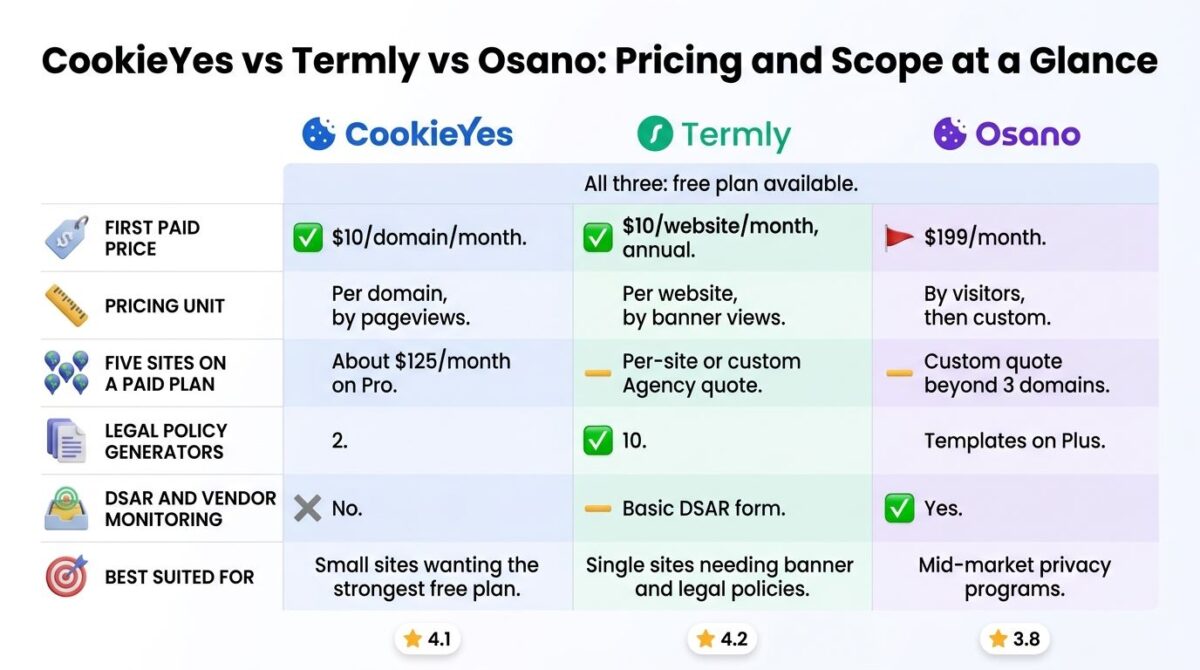
CookieYes vs Termly vs Osano Comparison
| Feature | CookieYes | Termly | Osano |
|---|---|---|---|
| Free plan | Yes, 5,000 pageviews | Yes, 10,000 banner views | Yes, 5,000 visitors |
| First paid price | $10/domain/month | $10/website/month (annual) | $199/month |
| Pricing unit | Per domain, by pageviews | Per website, by banner views | By visitors, then custom |
| Five sites on a paid plan | ~$125/month on Pro | Per-site or custom Agency quote | Custom quote beyond 3 domains |
| Legal policy generators | 2 | 10 | Templates on Plus |
| DSAR and vendor monitoring | No | Basic DSAR form | Yes |
| Best suited for | Small sites wanting the strongest free plan | Single sites needing banner and legal policies | Mid-market privacy programs |
Which Should You Choose?
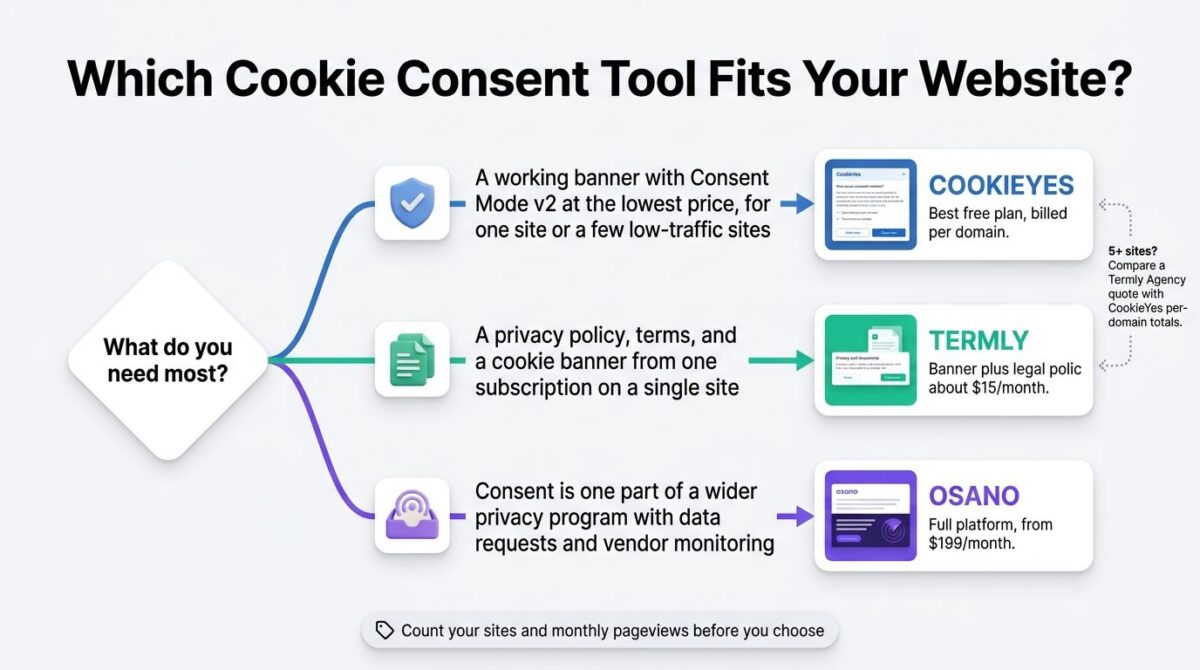
Choose CookieYes if one site or a handful of low-traffic sites need a working banner with Google Consent Mode v2 at the lowest price, and the per-domain model is acceptable.
Choose Termly if a privacy policy, terms, and a cookie banner all need to come from one subscription on a single site, which helps streamline compliance documentation when managing client deliverables across dedicated client portal platforms.
Choose Osano if consent management is one part of a wider privacy program that includes data requests and vendor monitoring, and the $199 starting price fits that scope.
Our Recommendations
Based on 30 days of testing across setup, pricing, and plan limits, here is the recommended setup by situation:
Personal blog or hobby site under 5,000 monthly pageviews: CookieYes’s free plan, for the most complete no-cost feature set including Consent Mode v2.
Small business site that needs a privacy policy, terms, and a cookie banner: Termly Pro+, for all of it at about $15 a month per site.
Agency or owner managing five or more sites: Request a Termly Agency quote, and compare that against CookieYes’s per-domain total before committing.
Site with visitors in several regions that need different consent rules: CookieYes Pro or Termly Pro+, since regional rules sit on those tiers on both platforms.
Mid-market company building a full privacy program: Osano, after getting a current quote for the features beyond Plus.
Final Verdict
CookieYes, Termly, and Osano all handle the basic consent job, and the difference shows up in where each free plan ends and what the next step costs.
- Termly 4.2 / 5: the best value for a single site that needs banner and legal policies together
- CookieYes 4.1 / 5: the strongest free plan and lowest entry price, with per-domain costs that compound across sites
- Osano 3.8 / 5: the broadest privacy platform, priced well above what a banner-only site needs
Before choosing, count the number of sites and estimate monthly pageviews, since those two numbers decide whether CookieYes’s per-domain model, Termly’s per-site model, or Osano’s visitor tiers cost the least. Treat any tool here as one part of compliance rather than a guarantee of it, and ask a lawyer about the legal side.
Frequently Asked Questions
Is CookieYes free?
Yes. The free plan covers one domain with up to 5,000 pageviews a month and 100 pages per scan. It includes the banner, automatic cookie blocking, both policy generators, a consent log, and certified Google Consent Mode v2.
What happens when a CookieYes site exceeds its pageview limit?
One analysis from a competing vendor reports that CookieYes suspends the banner when a plan’s pageview limit is exceeded, which would let trackers load without consent. Check CookieYes’s documentation before relying on a plan close to its cap.
Does Termly charge per site?
Yes. Starter and Pro+ are priced per website, and multi-domain management is only on the custom Agency plan, which starts at 10 sites. A five-site owner either pays per site or requests a quote.
Which Termly plan includes regional consent rules?
Pro+, at $15 per website per month billed annually. It also adds unlimited banner views, multi-language support, weekly cookie scans, and logo removal. Starter caps banner views at 50,000 and doesn’t include those features.
Why is Osano’s first paid plan $199 a month?
Osano prices Plus as part of a privacy platform that bundles privacy templates and a GDPR representative service alongside consent management. A site that only needs a banner pays for scope it may not use, which is the most common criticism of its pricing.
Does Osano’s free plan block scripts before consent?
A competitor’s comparison reports that it shows a notice without blocking scripts or storing consent. Because that comes from a rival vendor, confirm the free tier’s behavior in Osano’s own documentation before relying on it for compliance.
Which tool is cheapest for five websites?
It depends on traffic. CookieYes Pro runs about $125 a month for five sites at $25 each. Termly’s published prices are per site at $10 to $15 monthly, with a custom Agency quote for multi-site management. Osano’s Plus covers three domains at $199.
Do I need a lawyer if I use a cookie consent tool?
These tools help configure banners and policies, but they don’t guarantee compliance with GDPR, CCPA, or other laws. A lawyer can advise on how the rules apply to a specific business, particularly for sites with visitors in several regions.








