
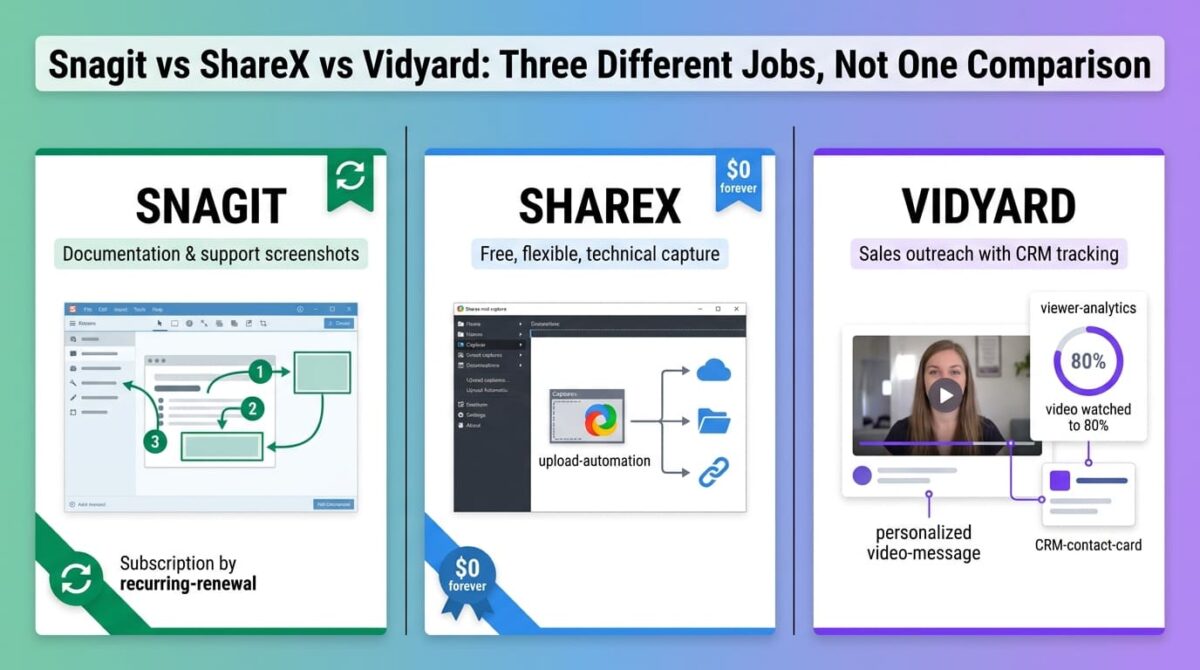
Snagit vs ShareX vs Vidyard groups three tools that get compared mostly because they all touch screen capture, even though only one of them is trying to compete for the same job as the other two. Snagit and ShareX both handle screenshots and basic recording for documentation and support work, though users focused purely on video might also want to compare other beginner-friendly screen recording software. Vidyard builds its entire product around personalized sales video with CRM tracking baked in.
That difference matters before pricing does. Someone choosing between these three based on cost alone risks picking a sales outreach platform for internal documentation, or a free capture tool for a job that needs viewer-level analytics tied to a CRM.
I tested Snagit vs ShareX vs Vidyard for 30 days, using each for the screenshots, quick tutorials (a format especially popular when evaluating screen recording tools for teachers), and one sales-style outreach video, and comparing what each one delivered for that specific job. Here is the honest comparison, including a licensing change at Snagit that removed an option long-time users relied on.
Table of Contents
How We Tested
Five criteria shaped the testing:
- Job fit: Whether the tool is built for documentation, quick capture, or sales outreach specifically
- Annotation and editing depth: How much polish is possible without leaving the tool
- Licensing model: Subscription, one-time, or free, and what changed recently
- Platform support: Which operating systems each tool supports in practice
- Pricing at realistic use: Cost for an individual versus a small team
Snagit Review: Professional Annotation Tools, No Longer a One-Time Purchase
Free plan: No, 15-day free trial, no permanent free tier
Starting price: $39/year (Individual), subscription only
Best plan for most users: Individual, $39/year, non-transferable
Platforms: Windows, macOS
Affiliate program: Yes, TechSmith affiliate program
Snagit built its reputation on screenshot annotation, and it remains the strongest tool of the three for marking up a static image with arrows, callouts, and step numbers, alongside straightforward video capture, though for heavy post-production polish, you would still need dedicated video editing software.
What Snagit does best
Annotation tools are where Snagit still leads clearly: arrows, callouts, step numbering, and a library of templates make turning a raw screenshot into a clear instructional image fast, faster than ShareX’s more basic editor or Vidyard’s video-first interface. For documentation and support teams producing a steady stream of annotated screenshots, that depth matters daily.
The 15-day trial is fully functional with no feature gating, and the 14-day money-back guarantee gives a fair window to decide before committing to the subscription.
Where Snagit falls short
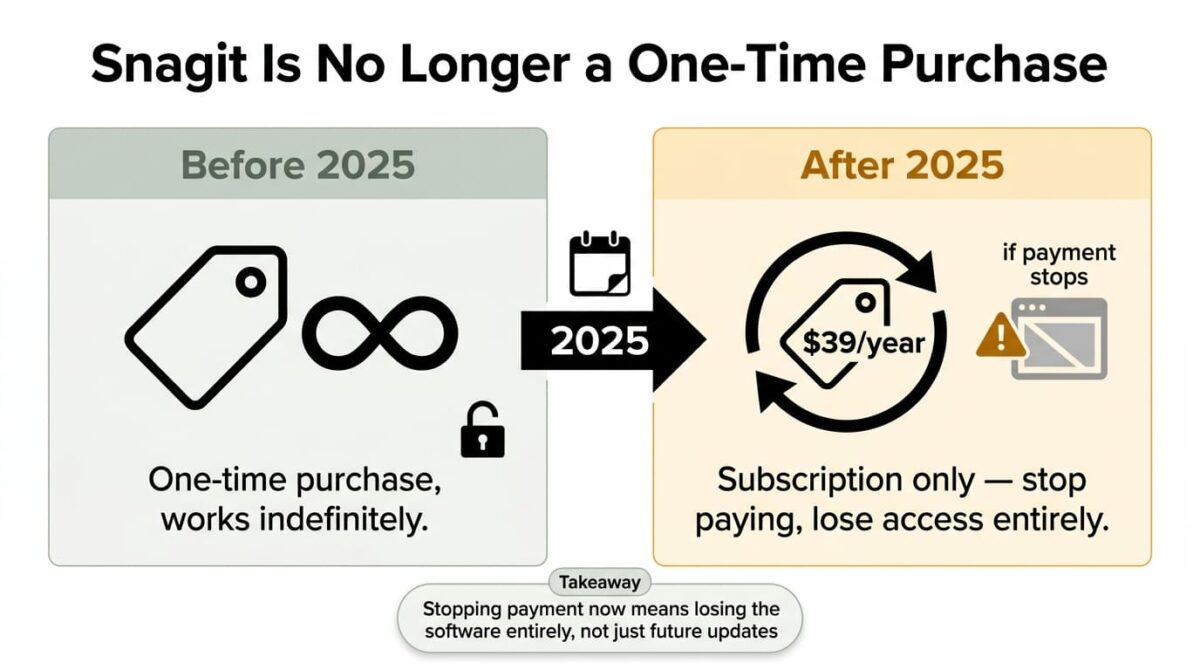
TechSmith retired Snagit’s perpetual license in 2025. What was once a one-time purchase is now subscription-only: Individual runs $39/year, Business $48/user/year, and stopping payment means losing access to the software entirely, not just future updates. Long-time users who bought a license years ago and expected to keep using that version indefinitely are the ones most caught off guard by this change.
There’s also no permanent free tier at all, a contrast with ShareX’s fully free model for a comparable core feature set.
Snagit pricing
| Plan | Price | Transferable | Notable Feature |
|---|---|---|---|
| Individual | $39/year | No | Personal use, single seat |
| Business | $48/user/year | Yes | Team-managed seats, volume discounts at 10+ |
| Student | $20/year | No | Requires verified student status |
| Enterprise | Custom | Yes | Site-wide licensing, dedicated support |
Snagit: Pros and Cons
Pros:
- Strongest screenshot annotation tools of the three, with templates and step numbering
- Fully functional 15-day trial with no feature gating
- Works on both Windows and macOS
- 14-day money-back guarantee
Cons:
- Perpetual license discontinued in 2025, subscription-only now
- No permanent free tier
- Losing access entirely if payment stops, not just losing updates
- Individual license isn’t transferable to another user
Rating: 4.0 / 5, the strongest annotation toolset here, weighed down by a recent licensing change that removed the one-time-purchase option long-time users relied on.
ShareX Review: Free, Open Source, and Still Actively Maintained
Free plan: Yes, entirely free, no paid tiers exist
Starting price: $0, permanently
Best plan for most users: The only plan (ShareX has no pricing tiers)
Platforms: Windows only
Affiliate program: No, ShareX is a free open-source project with no referral program
ShareX has been actively developed since 2012 and remains completely free, with no watermark, no account requirement, and no subscription anywhere in the product.
What ShareX does best
The upload and workflow automation goes noticeably further than either paid competitor at this price point: captures can route automatically to any of 80-plus destinations, including self-hosted storage, with a shareable link generated without manual steps. For a technical user or a documentation-heavy team wanting full control over where captures live, that flexibility beats anything Snagit or Vidyard offers built in.
Being free and open source also means no recurring cost ever, no account required, and no data leaving the local machine unless a specific upload destination is configured, appealing for anyone wary of cloud-based screenshot tools.
Where ShareX falls short
The interface carries a meaningful learning curve. Configuring the automation workflows that make ShareX powerful requires more setup time than Snagit’s or Vidyard’s point-and-click approach, and the tool has a more technical feel throughout. There’s also no cursor highlight or click animation support, a limitation that affects tutorial-style content specifically.
Windows-only support rules it out for any Mac-based team, and community-based support, rather than a dedicated help desk, means urgent issues rely on forums and GitHub rather than direct assistance.
ShareX pricing
| Plan | Price | Platform | Notable Feature |
|---|---|---|---|
| Free (only option) | $0 | Windows only | 80+ upload destinations, no watermark, no account required |
ShareX: Pros and Cons
Pros:
- Completely free with no tiers, watermarks, or subscriptions
- Most flexible upload automation of the three tools tested
- Actively maintained with regular releases as of 2026
- No cloud dependency or account requirement
Cons:
- Windows only, no macOS or Linux support
- Steeper learning curve than Snagit’s or Vidyard’s interfaces
- No cursor highlight or click animation effects
- Community support only, no dedicated help desk
Rating: 4.2 / 5, the strongest value of the three by a wide margin, provided the Windows-only limitation and technical interface fit the situation.
Vidyard Review: Built for Sales Outreach, Not General Screen Recording
Free plan: Yes, 5 videos/month, 30-minute max, 15 AI videos/month
Starting price: $59/user/month (Starter, billed annually)
Best plan for most users: Starter, for individual sales reps needing unlimited recording and analytics
Platforms: Web, browser extension
Affiliate program: Yes, Vidyard affiliate program
Vidyard positions itself as a video selling platform, not a general screen recorder, with CRM integrations and viewer-level tracking built around outbound sales and account management specifically.
What Vidyard does best
Viewer-level analytics tied directly to CRM contact records tell a sales rep exactly who watched a personalized video and how far, a capability neither Snagit nor ShareX attempts and one that justifies Vidyard’s price for the specific job it targets. AI avatars and native integrations with the best CRM platforms for small businesses like Salesforce or HubSpot extend that further, letting outreach scale without a rep recording every video personally.
The free plan, while limited, requires no credit card and covers a light outreach cadence, useful for testing whether video outreach fits a specific sales motion before committing to Starter.
Where Vidyard falls short
For general screen recording, tutorials, or internal documentation, Vidyard is a poor fit and an expensive one: $59/user/month is far beyond what Snagit or ShareX charge for the same basic capture-and-share job. Comparing it to either on general screen recording value misses what it’s built for.
AI avatars, while a clear differentiator, still read as synthetic for high-value accounts in testing, a limitation to know before relying on them for the highest-stakes outreach.
Vidyard pricing
| Plan | Price | Video Limits | Notable Feature |
|---|---|---|---|
| Free | $0 | 5 videos/month, 30 min max | 15 AI videos/month, 3 AI avatars |
| Starter | $59/user/month (annual) | Unlimited | Full analytics, CRM integrations, branded pages |
| Teams | $99/user/month | Unlimited | Team analytics, advanced CTAs |
| Enterprise | Custom | Unlimited | SSO, unlimited integrations |
Vidyard: Pros and Cons
Pros:
- Viewer-level analytics tied to CRM contact records, unmatched by the other two
- Native Salesforce and HubSpot integrations
- AI avatars scale outreach without recording every video personally
- Free plan requires no credit card
Cons:
- Expensive and a poor fit for general screen recording or documentation
- AI avatars can read as synthetic for high-value accounts
- Free plan’s 5-video monthly limit is restrictive for active outreach
- Teams and Enterprise pricing isn’t published, requiring a sales conversation
Rating: 4.0 / 5, the strongest tool here for sales video outreach specifically, and the wrong comparison entirely for general screen recording needs.
Head-to-Head Comparison
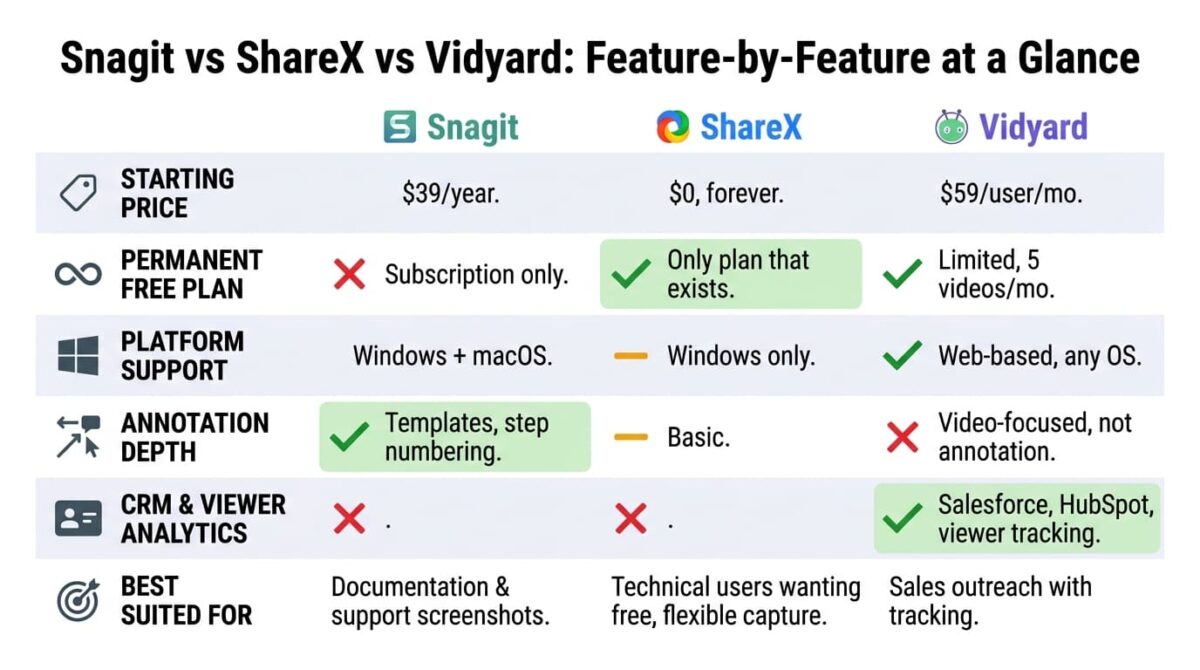
| Feature | Snagit | ShareX | Vidyard |
|---|---|---|---|
| Starting price | $39/year | $0 | $59/user/month |
| Permanent free plan | No | Yes (only option) | Yes (limited) |
| Platform support | Windows, macOS | Windows only | Web-based |
| Annotation depth | Strongest | Basic | Video-focused, not annotation |
| CRM integration | No | No | Yes (Salesforce, HubSpot) |
| Viewer analytics | No | No | Yes, CRM-tied |
| Licensing model | Subscription only (since 2025) | Free, open source | Per-seat subscription |
| Best suited for | Documentation and support screenshots | Technical users wanting free, flexible capture | Sales outreach with tracking |
Which Should You Choose?
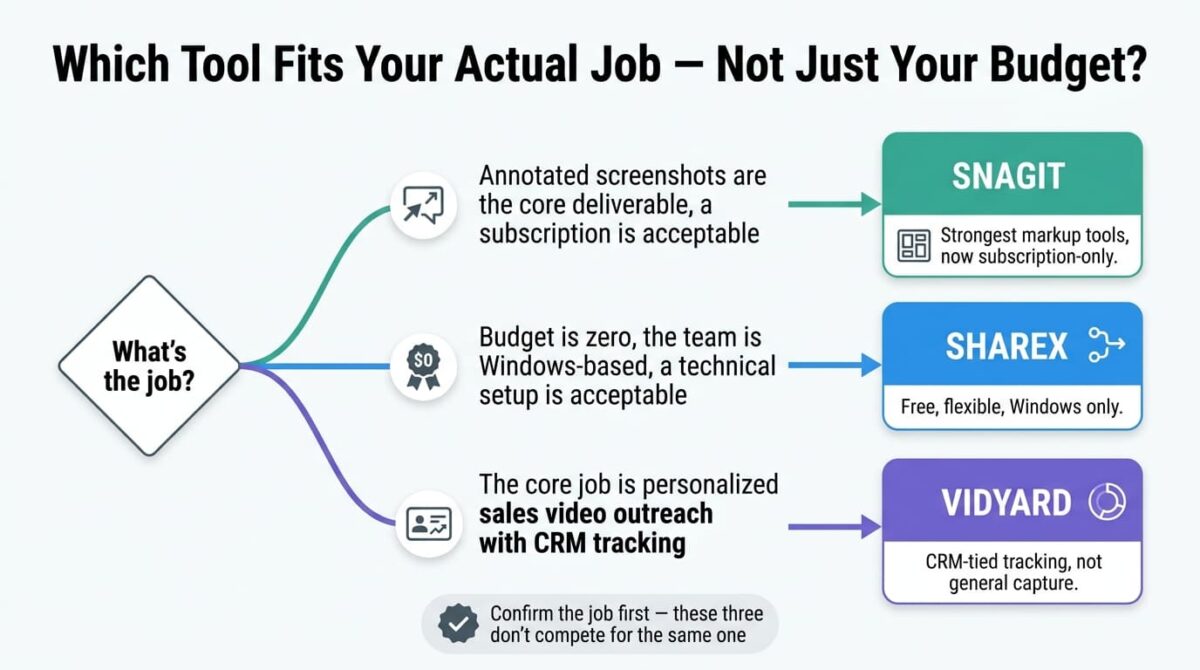
Choose Snagit if annotated screenshots are the core deliverable, and a subscription is an acceptable tradeoff for the strongest markup tools of the three.
Choose ShareX if the budget is zero, the team is Windows-based, and a technical setup process is an acceptable tradeoff for full control and flexible upload automation.
Choose Vidyard if the core job is personalized sales video outreach with CRM tracking, not general screen recording or documentation.
Our Recommendations
Based on 30 days of testing across documentation, quick capture, and sales outreach workflows, here is the recommended setup by situation:
Support or documentation team producing annotated screenshots daily: Snagit, for the annotation depth that neither ShareX nor Vidyard matches, accepting the subscription cost as the price of that toolset.
Technical user or small Windows-based team on zero budget: ShareX, for free, flexible capture with no ongoing cost.
Sales rep or account manager doing personalized outbound video: Vidyard Starter, where CRM-tied analytics justify a price that would be wasted on general screen recording.
Cross-platform team needing both Windows and Mac support: Snagit, since ShareX’s Windows-only limitation rules it out for mixed-OS teams.
Anyone unsure which job applies: Test ShareX first since it costs nothing, and only move to Snagit or Vidyard once the specific need, annotation depth or sales tracking, becomes clear.
Final Verdict
Snagit, ShareX, and Vidyard aren’t really competing for the same use case, and the “best” one depends entirely on which of the three jobs (documentation, free flexible capture, or sales outreach) applies.
- ShareX (4.2 / 5): The strongest value by a wide margin, for anyone whose needs fit a free, Windows-only, technical tool
- Snagit (4.0 / 5): The strongest annotation tools, now subscription-only after a 2025 licensing change
- Vidyard (4.0 / 5): The strongest sales-tracking tool, and not a general screen recorder at all
Before comparing prices across these three, confirm which job applies. Documentation work points toward Snagit or ShareX depending on budget. Sales outreach points toward Vidyard regardless of what the other two cost.
Frequently Asked Questions
Can I still buy Snagit as a one-time purchase?
No. TechSmith retired the perpetual license in 2025, and all new purchases are subscription-only at $39/year for Individual or $48/user/year for Business. Existing perpetual license holders may retain legacy maintenance options, but new buyers only see subscription pricing.
Is ShareX really completely free?
Yes. ShareX has no paid tiers, no watermarks, and no subscription at any level. It’s open source under a GPL license, actively maintained, with the only cost being the time needed to learn its more technical interface.
Is Vidyard overkill for basic screen recording?
For general documentation or tutorial screen recording, yes. Vidyard’s $59/user/month Starter plan is priced for sales teams needing CRM-tied viewer analytics, a feature set that adds no value to simple internal screen capture.
Does ShareX work on Mac or Linux?
No. ShareX is Windows-only. Mac or Linux users needing a free alternative will need a different tool, since ShareX has no cross-platform version available.
What happens if I stop paying for Snagit?
Access to the software stops entirely, not just future updates. This is a direct consequence of the 2025 shift to subscription-only licensing, different from the previous perpetual license model where a one-time purchase kept working indefinitely.
Does Vidyard’s free plan work for testing video outreach?
Reasonably well for light use: 5 videos per month with a 30-minute cap and 15 AI videos monthly, with no credit card required. It’s enough to test whether personalized video fits a sales workflow before committing to the $59/user/month Starter plan.
Which tool has the best annotation features?
Snagit, clearly, with dedicated callouts, step numbering, and annotation templates built specifically for marking up screenshots. ShareX includes basic annotation tools, and Vidyard is built around video rather than static image markup entirely.
Can Snagit and ShareX be used together?
There’s little reason to run both simultaneously, since they overlap heavily on core screenshot and recording functionality. Choosing between them comes down to budget and platform: ShareX for a free, Windows-only, technical setup, or Snagit for stronger annotation tools and macOS support at a subscription cost.








