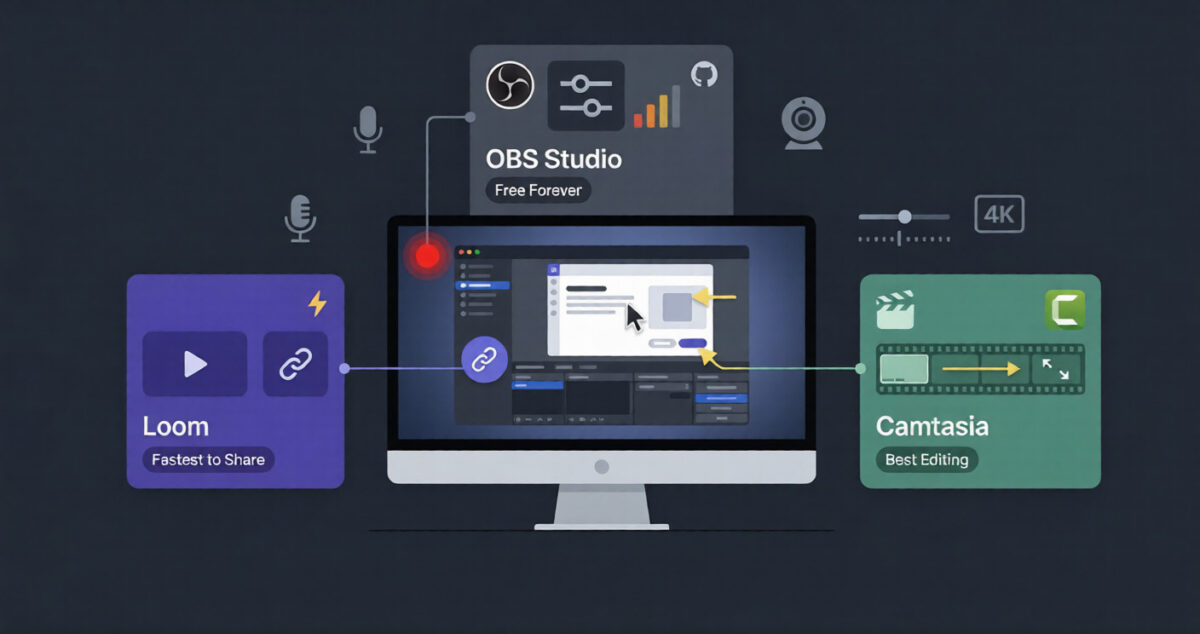
A quick screen recording can settle in two minutes what would take a paragraph of written instructions and three follow-up messages to explain. Loom vs Screen Studio vs ScreenRec covers three different ideas of what that recording should look like once it’s done.
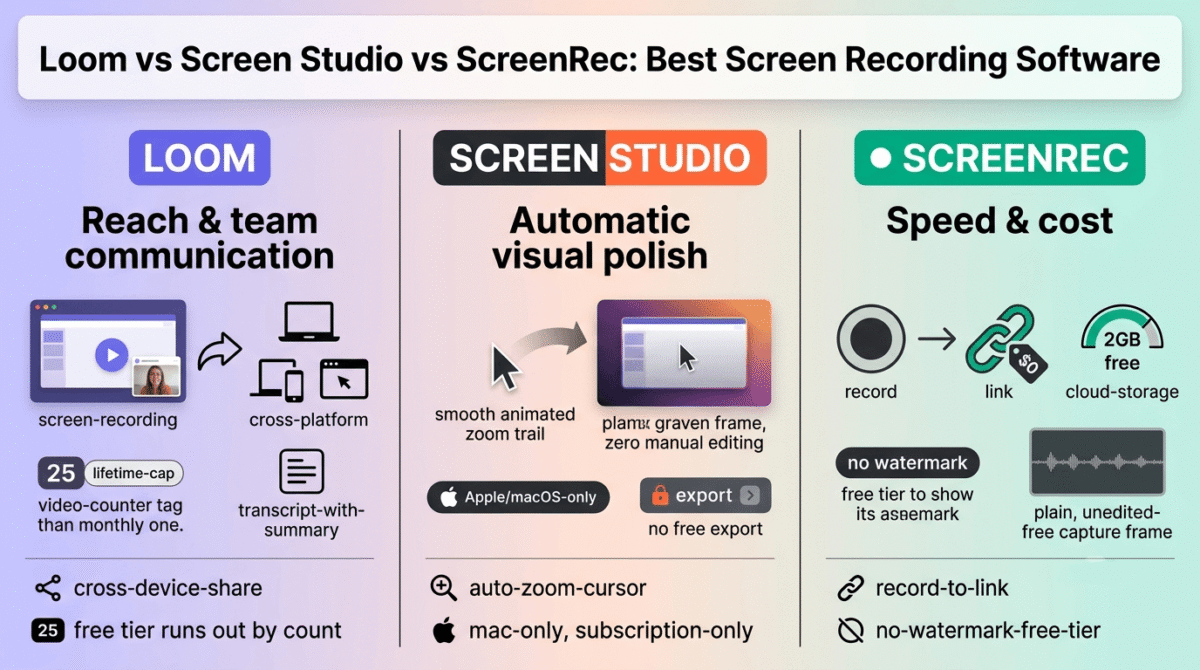
Loom built the category around fast, async video messaging that anyone on a team can send without a second thought. Screen Studio goes the opposite direction, polishing every recording with automatic zoom and cursor smoothing until it looks like a produced demo. ScreenRec sits in between, prioritizing a generous free tier and instant shareable links over either team features or cinematic polish.
I tested Loom vs Screen Studio vs ScreenRec for 30 days, recording the same product walkthrough (often utilizing slide decks built with AI presentation makers) and quick internal update in all three and comparing output quality against how long each one took to finish recording and share. Here is the honest comparison, including a free-tier limit on Loom that caps out by video count, not by time.
Table of Contents
How We Tested
Five criteria shaped the testing:
- Output polish, how finished a recording looks with no manual editing afterward
- Platform support, which operating systems each tool runs on in practice
- Free tier usability, whether the free plan supports ongoing use or just a short test
- Team pricing, whether cost scales sensibly for more than one person
- Speed to share, how quickly a finished recording turns into a link someone else can open
Loom Review: The Team Standard, With a Free Plan That Runs Out by Count
Free plan: Yes, 25 videos total, 5-minute max per recording
Starting price: $18/user/month (Business), $15/user/month billed annually
Best plan for most users: Business, $15/user/month annual, unlimited videos
Platforms: Web, macOS, Windows, iOS, Android, Chrome extension
Affiliate program: Yes, Loom affiliate program
Loom is the tool most people have already received a video from, which makes it the default choice when a recording needs to be watched by someone unfamiliar with any particular screen recorder.
What Loom does best
Cross-platform reach is Loom’s clearest advantage: Windows, Mac, mobile, and a browser extension mean a recording can happen from almost any device, and the viewer never needs to install anything to watch it.Business + AI adds transcription, auto-generated summaries, and filler-word removal, a combination that shortens the gap between recording and a polished, shareable video.
Viewer analytics on paid tiers, showing who watched and how far, are useful for anyone sending recordings as part of a sales or support process rather than pure internal communication.
Where Loom falls short
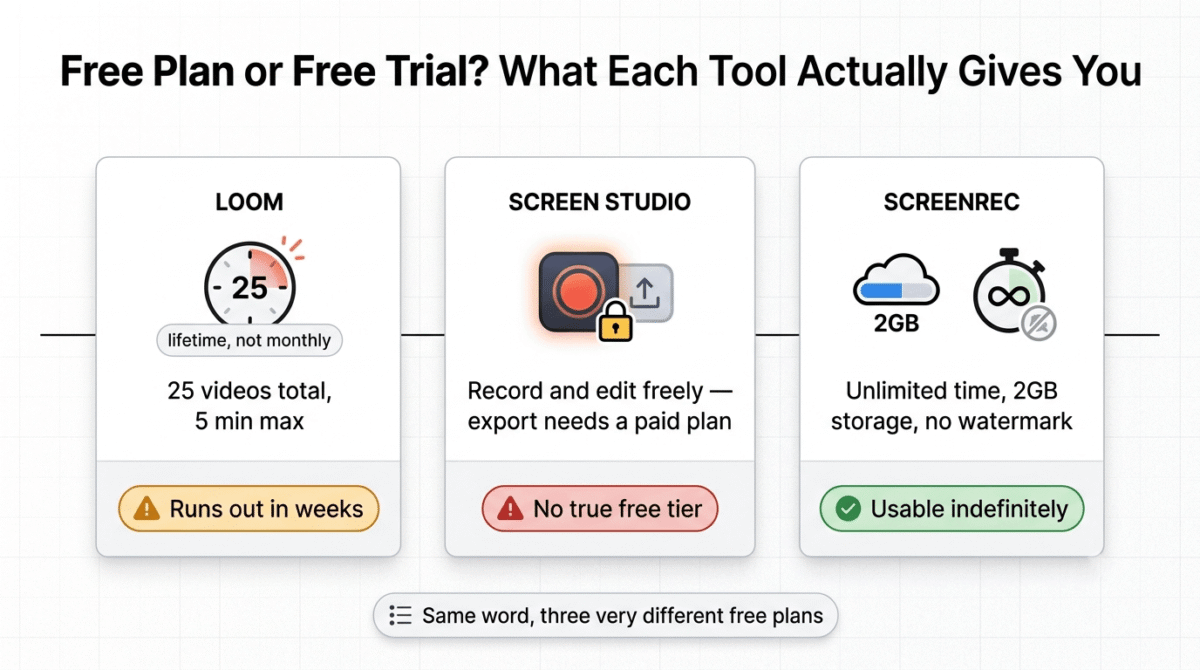
The free Starter plan caps out at 25 videos total, not per month, a lifetime limit that a moderately active user reaches within a few weeks rather than settling into as an ongoing free option. The 5-minute recording limit on top of that count cap makes the free tier feel more like an extended trial than a permanent plan.
Team pricing also adds up quickly: a 10-person team on Business + AI runs close to $240/month at list price, noticeably more than either Screen Studio’s single-user subscription or ScreenRec’s storage-based model for a comparable team size.
Loom pricing
| Plan | Price | Video Limit | Notable Feature |
|---|---|---|---|
| Starter | $0 | 25 videos total, 5 min max | Basic recording, Loom branding |
| Business | $18/user/month ($15 annual) | Unlimited | Custom branding, viewer analytics |
| Business + AI | $24/user/month ($20 annual) | Unlimited | AI transcription, summaries, filler-word removal |
| Enterprise | Custom | Unlimited | SSO/SCIM, advanced security |
Loom: Pros and Cons
Pros:
- Broadest platform support of the three tools compared here
- AI transcription and filler-word removal at Business + AI
- Viewer analytics useful for sales and support use cases
- Universally recognized by recipients, no install needed to watch
Cons:
- Free plan’s 25-video lifetime cap runs out faster than a monthly limit would
- Team pricing scales quickly compared to the other two tools
- AI features locked to the highest-priced tier
- Less automatic visual polish than Screen Studio’s output
Rating: 4.3 / 5, the most versatile and widely recognized option, with a free tier that functions more like a trial than a lasting plan.
Screen Studio Review: The Most Polished Output, Mac-Only and Subscription-Locked
Free plan: No, all features are usable except video export without an active plan
Starting price: $29/month, $9/month billed annually ($108/year)
Best plan for most users: The only plan; Screen Studio doesn’t tier by feature
Platforms: macOS only
Affiliate program: Yes, Screen Studio affiliate program
Screen Studio automates the visual polish that normally takes a manual editing pass: automatic zoom that follows the cursor, smoothed mouse movement, and background effects applied without touching a timeline.
What Screen Studio does best
The automatic zoom and cursor smoothing produce output that looks close to professionally edited straight out of the recorder, a level of polish neither Loom nor ScreenRec applies automatically. For product demos, App Store preview videos, or anything meant to look intentional rather than quickly captured, that automation saves measurable editing time.
Every feature is included at one price, with no tier-gating functionality behind a higher plan, and lifetime updates come with an active subscription rather than being sold separately.
Where Screen Studio falls short
Mac-only support rules it out immediately for any team with Windows users, and there’s no team pricing at all: every user needs a separate subscription with no volume discount, which becomes expensive fast for a small team standardizing on one tool. At five users, that’s close to $145/month with no collaboration layer to show for it.
There’s also no free plan. Recording and editing work without a subscription, but exporting a finished video requires an active plan, meaning the “free trial” experience ends right at the one step that matters most.
Screen Studio pricing
| Plan | Price | Platform | Notable Feature |
|---|---|---|---|
| Monthly | $29/month | macOS only | All features, no export without active plan |
| Annual | $9/month ($108/year) | macOS only | Same features, lower effective rate |
Screen Studio: Pros and Cons
Pros:
- Strongest automatic visual polish of the three tools tested
- All features included at one price, no functionality gating
- Lifetime updates included with an active subscription
- Best suited to demo and marketing video output specifically
Cons:
- macOS only, no Windows or Linux support
- No free plan; export requires an active subscription
- No team pricing or volume discount at any user count
- Highest per-seat cost of the three at scale
Rating: 4.2 / 5, the best-looking output with zero manual editing, limited to Mac users willing to pay for that polish indefinitely.
ScreenRec Review: The Cheapest Option, Built for Speed Over Polish
Free plan: Yes, 2GB cloud storage, unlimited recording time, no watermark
Starting price: $4/month (Pro, billed annually), 50GB storage
Best plan for most users: Pro, $4/month annual, sufficient for most individual use
Platforms: Windows, macOS
Affiliate program: Yes, ScreenRec affiliate program
ScreenRec strips screen recording down to its fastest form: capture, get a private link, share it, with cloud storage rather than feature tiers as the main thing paid plans unlock.
What ScreenRec does best
The free plan is close to unrestricted for an individual: unlimited recording time once logged in, no watermark, and 2GB of cloud storage that resets the practical question from “will this work” to “how much do I need to store.” For quick bug reports, internal updates, or anything that doesn’t need to look produced, that’s a usable permanent free tier rather than a trial.
Pricing scales by storage and seats rather than by locking basic recording behind a paywall, which keeps the cost predictable and low for teams that mainly need fast internal sharing rather than external-facing polish.
Where ScreenRec falls short
Output is utilitarian by design. There’s no automatic zoom, no cursor smoothing, and no cinematic animation presets, so a ScreenRec recording looks like exactly what it is: a straightforward screen capture rather than a produced video. Anyone needing Screen Studio-level polish will need a separate editing pass afterward, which might also include running your audio through an AI voice editor for professional sound quality.
Platform support also stops at Windows and macOS, with no mobile app and no browser-based recording option, narrower than Loom’s reach across devices.
ScreenRec pricing
| Plan | Price | Storage | Notable Feature |
|---|---|---|---|
| Free Forever | $0 | 2GB | Unlimited recording, no watermark |
| Pro | $4/month (annual) | 50GB | 1080p, commercial license |
| Business Premium | $49/month (5 seats) | 200GB+ | 4K recording, priority support |
ScreenRec: Pros and Cons
Pros:
- Cheapest paid tier of the three tools compared here
- Free plan holds up long-term, not a time-limited trial
- No watermark at any tier, including free
- Predictable storage-based pricing rather than feature gating
Cons:
- No automatic visual polish; output looks like a raw capture
- No mobile app or browser-based recording
- Less recognized by recipients than Loom, which can add friction to sharing
- Business tier’s 5-seat minimum doesn’t flex for smaller teams
Rating: 4.0 / 5, the most generous free tier and lowest cost of the three, built for speed rather than the polish Screen Studio applies automatically.
Head-to-Head Comparison
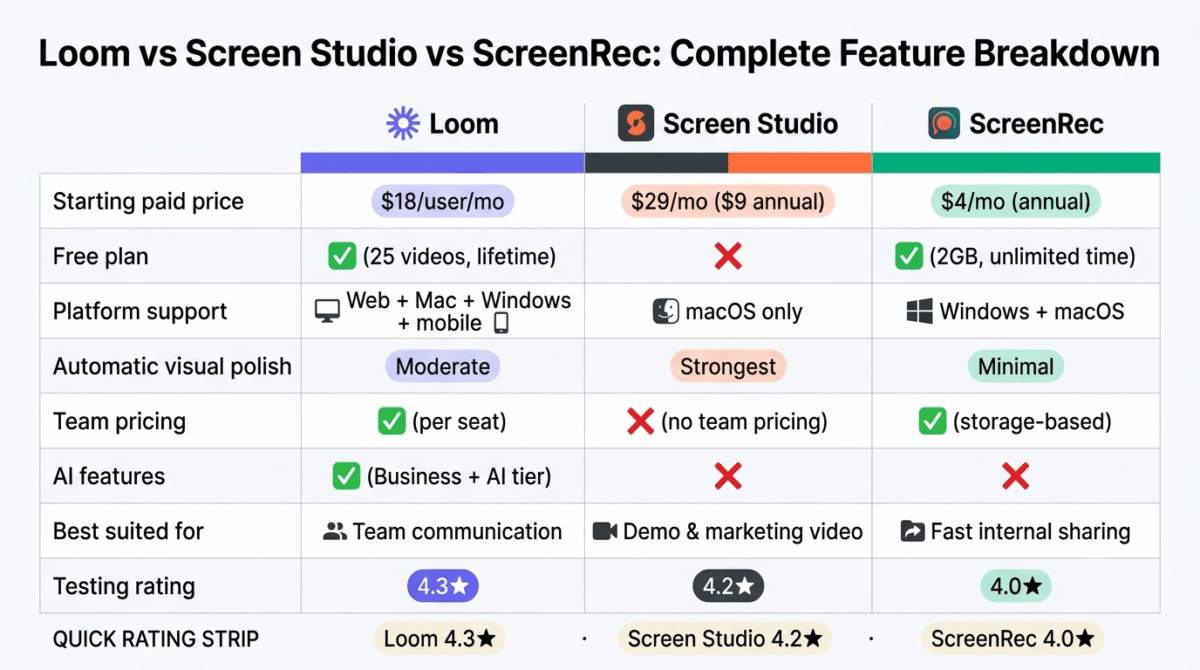
| Feature | Loom | Screen Studio | ScreenRec |
|---|---|---|---|
| Starting paid price | $18/user/month | $29/month ($9 annual) | $4/month (annual) |
| Free plan | Yes (25 videos lifetime) | No | Yes (2GB, unlimited time) |
| Platform support | Web, Mac, Windows, mobile | macOS only | Windows, macOS |
| Automatic visual polish | Moderate | Strongest | Minimal |
| Team pricing | Per seat, scales with AI tier | None, every user pays full price | Per seat, storage-based |
| AI features | Yes (Business + AI tier) | No | No |
| Best suited for | Team communication at scale | Polished demo and marketing video | Fast internal sharing on a budget |
Which Should You Choose?
Choose Loom if recordings need to reach recipients across every platform without friction, and AI transcription or summaries add measurable value to the workflow.
Choose Screen Studio if the recording is a demo, tutorial (which you might later upload to a video hosting platform), or marketing asset where visual polish matters more than platform reach or team pricing.
Choose ScreenRec if the job is fast internal sharing on a tight budget, and a produced look matters less than getting a link out quickly and cheaply.
Our Recommendations
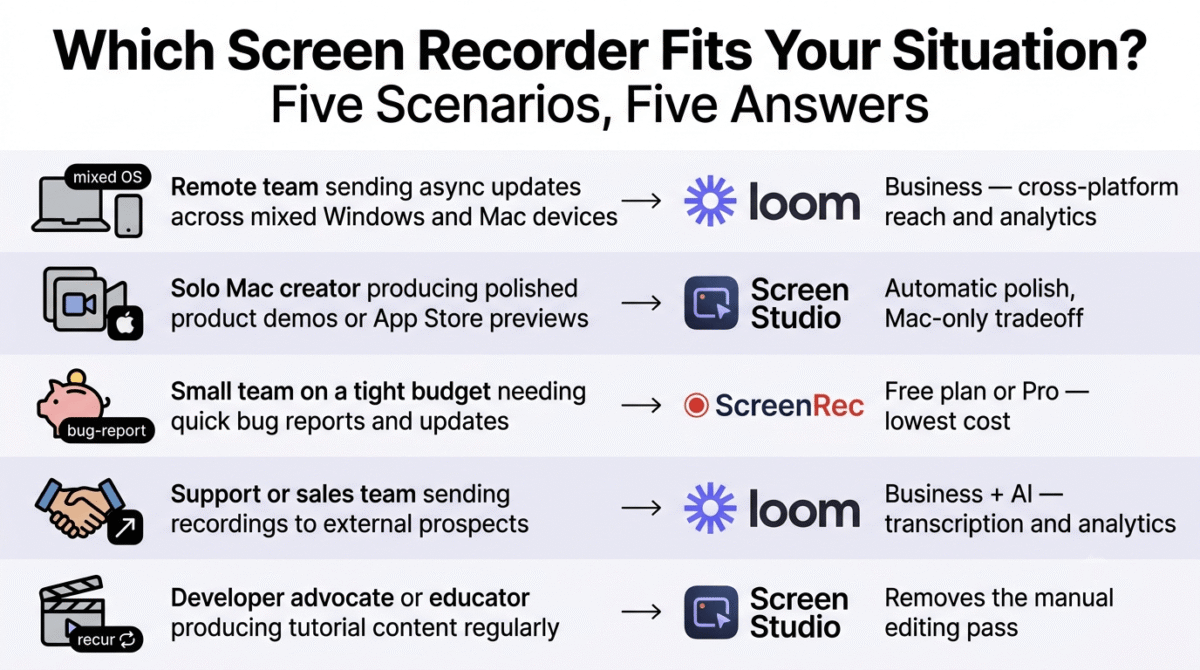
Based on 30 days of testing across team communication, demo production, and quick-sharing workflows, here is the recommended setup by situation:
Remote team sending async updates across mixed Windows and Mac devices: Loom Business, for the cross-platform reach and viewer analytics.
Solo Mac creator producing polished product demos or App Store preview videos: Screen Studio, accepting the Mac-only limitation and no-free-plan tradeoff for the automatic polish.
Small team on a tight budget needing quick bug reports and internal updates: ScreenRec’s free plan or Pro tier, for the lowest cost and least restrictive free usage.
Support or sales team sending recordings to external prospects or customers: Loom Business + AI, where transcription and viewer analytics add measurable value to an external-facing workflow.
Developer advocate or educator producing tutorial content regularly: Screen Studio, for the automatic cursor and zoom polish that removes a manual editing pass most tutorial content otherwise needs.
Final Verdict
Loom, Screen Studio, and ScreenRec optimize for three different things: reach, polish, and cost, and the right pick depends on which of those three matters most for a given recording.
- Loom, 4.3 / 5, the most versatile and widely recognized, with a free tier that runs out faster than expected
- Screen Studio, 4.2 / 5, the most polished output available, restricted to Mac users with no free option
- ScreenRec, 4.0 / 5, the cheapest and most permanently usable free tier, at the cost of automatic polish
For team communication that needs to reach anyone on any device, Loom remains the default. For anything meant to look produced without a manual edit, Screen Studio’s automation is hard to replicate elsewhere. For fast, low-cost internal sharing, ScreenRec’s free tier covers more ground than either competitor’s.
Frequently Asked Questions
Does Loom’s free plan reset every month?
No. The 25-video limit on Loom’s Starter plan is a lifetime cap, not a monthly allowance. Once those 25 videos are used, recording further requires upgrading to Business, even if some of the original videos have since been deleted.
Is Screen Studio available for Windows?
o. Screen Studio is macOS-only, with no Windows or Linux version available or announced. Teams with mixed operating systems will need Loom or ScreenRec, both of which support Windows.
Is ScreenRec’s free plan unlimited in practice?
Recording time is unlimited once logged into an account, with no watermark, though free storage is capped at 2GB. Without logging in, recordings are limited to 5 minutes, so creating a free account is necessary to unlock the tier’s full usability.
Which tool produces the most polished-looking video with no editing?
Screen Studio, by a clear margin, thanks to automatic cursor-following zoom and smoothed mouse movement applied without any manual timeline work. Loom and ScreenRec both produce more literal, unedited-looking captures by comparison.
Which tool is cheapest for a team of five?
ScreenRec, by a wide margin, at roughly $49/month for a 5-seat Business Premium plan. Screen Studio’s lack of team pricing means five separate subscriptions at $9,29/month each, and Loom’s Business tier runs $75,90/month for the same team size before adding AI features.
Does Loom include AI transcription on every plan?
No. AI transcription, summaries, and filler-word removal are exclusive to the Business + AI tier at $24/user/month ($20 annual). The standard Business tier includes custom branding and analytics but not the AI feature set.
Is ScreenRec recognized as widely as Loom by video recipients?
Not as consistently. Loom’s broad adoption means most recipients already know what a Loom link is and trust it without hesitation. A ScreenRec link may prompt more questions from someone unfamiliar with the tool, a minor friction point for external-facing communication specifically.