
A late proposal loses fewer deals than a sloppy one. I have watched freelancers lose a client not because their rate was too high, but because their “proposal” was a Google Doc with mismatched fonts and no clear next step. The tool you use to pitch a project is doing sales work whether you treat it that way or not, it is the client’s first real impression of how you run a business.
In 2026, the proposal-to-contract-to-payment workflow has consolidated into purpose-built software that replaces the old stack of a Word document, a separate e-signature tool, and a manual invoice. I tested Bonsai vs HoneyBook vs PandaDoc for 45 days, sending real proposals to real prospects, signing contracts, and collecting deposits through each platform. Here is the honest comparison.
Table of Contents
How We Tested These Tools
Every platform was evaluated against five criteria:
- Proposal creation speed, how quickly can you build a polished, branded proposal from a blank state or template?
- Contract and e-signature quality, are the legal templates usable, and is the signing experience smooth for the client?
- Payment collection, can a client pay a deposit or invoice at the moment they sign, without a separate step?
- What happens after signing, does the tool hand the project off to anything, or does the relationship end at the signature?
- Value for solo freelancers vs. small agencies, how does pricing scale as you add team members or send more documents?
Why Proposal Software Matters More Than It Seems
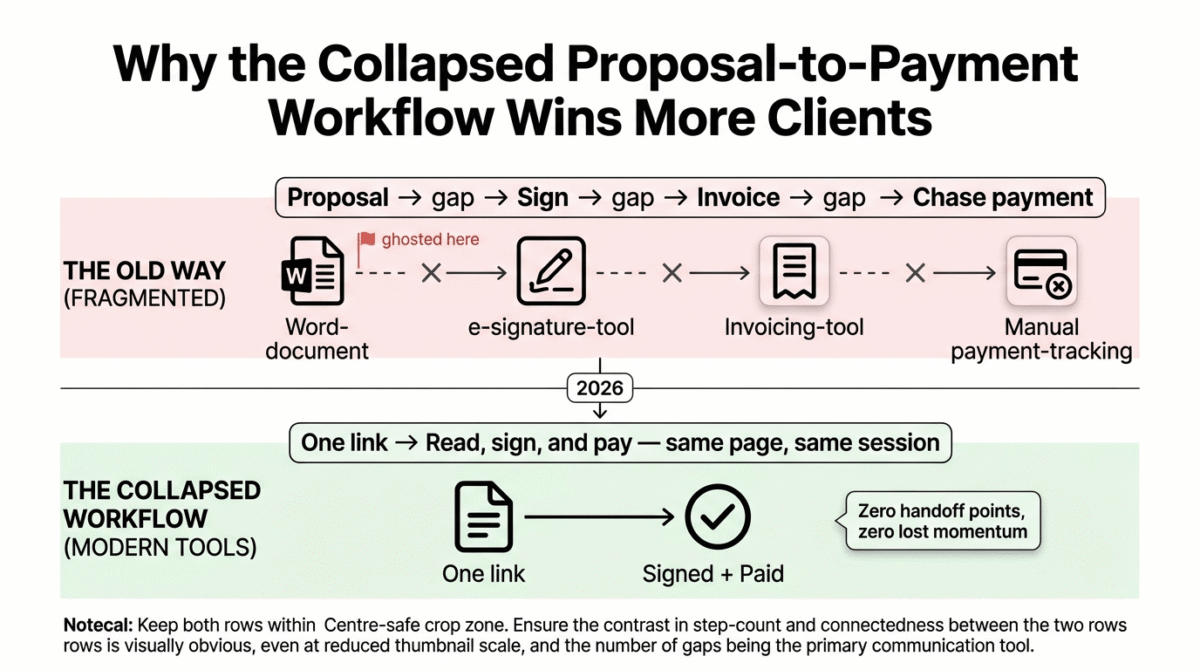
A proposal is not just a price quote. It is doing three jobs at once: setting the scope so there is no ambiguity about what is and is not included, creating a paper trail so a dispute later has something to point to, and making a first impression that either signals “this person runs a real business” or “this person is winging it.”
The shift worth noticing in 2026 is that proposals, contracts, and the first invoice have merged into a single client-facing document in most modern tools. A client opens one link, reads the scope, signs, and pays a deposit, all without leaving the page. That collapsed workflow is the single biggest reason these tools outperform a PDF emailed as an attachment: every extra step between “I’m interested” and “I’ve paid” is a chance for a client to lose momentum and ghost you. To build out the rest of your business stack, explore our comprehensive guide to the best tools for freelancers in 2026.
Bonsai Review: Best for Freelancers Who Want Proposals Connected to Invoicing and Tax Tools
Free plan: No, 7-day free trial only
Starting paid price: Around $15/month for the entry tier (time tracking and projects, no client billing); the realistic starting point for sending proposals is the next tier up, commonly listed around $19–25/month billed annually
Best plan for most freelancers: The mid-tier plan that unlocks proposals, contracts, and the client portal together
Platforms: Web, iOS, Android
Affiliate program: Yes, Bonsai affiliate program
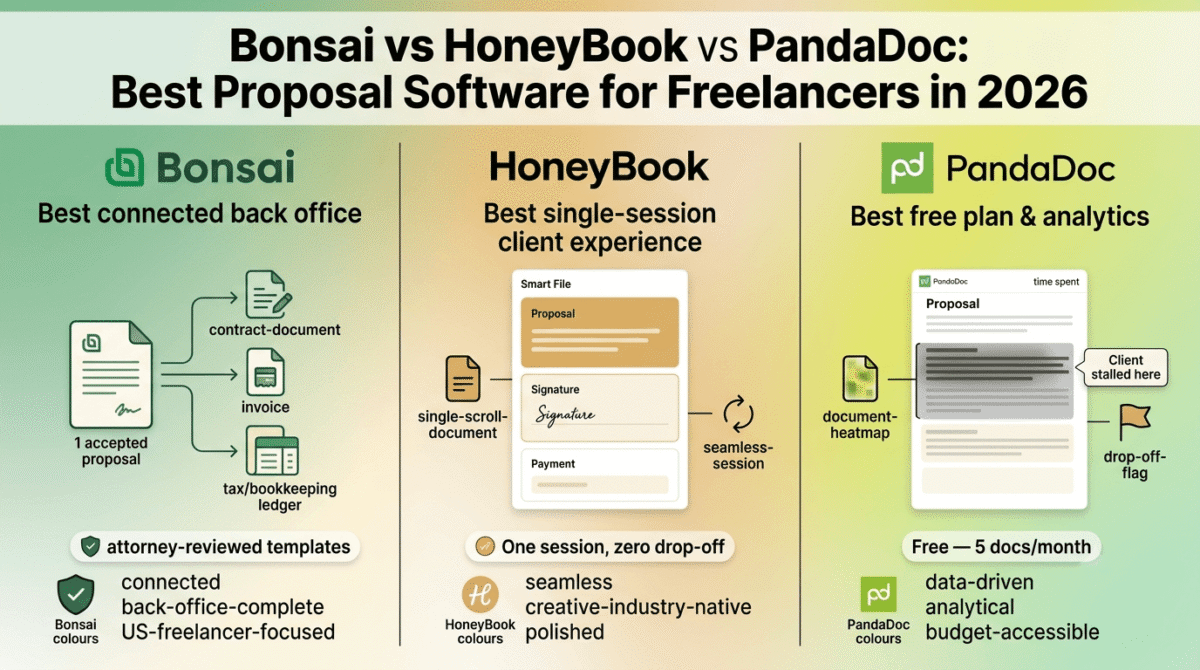
Bonsai is built around a single idea: a freelancer’s paperwork, proposals, contracts, invoices, and taxes, should live in one connected system instead of four separate apps. It is the most “back office in a box” of the three tools tested, and the one most likely to fully replace your accounting software, not just your e-signature tool.
What Bonsai does best
Bonsai’s biggest advantage is that an accepted proposal does not just disappear into a folder, it flows directly into the contract, the invoice, and (on most plans) Bonsai’s own bookkeeping and tax tools. For a freelancer who bills hourly or per-project, this means scope, signature, and the resulting invoice line items all trace back to the same document instead of being retyped three times across three apps.
The contract templates are attorney-reviewed and cover the situations freelancers actually run into, service agreements, NDAs, and subcontractor agreements, which matters more than people expect. A contract template written by a marketing team, not a lawyer, is a liability waiting to surface during a dispute.
Bonsai’s time tracking and task management are genuinely useful add-ons rather than afterthoughts: time logged against a project can become invoice line items without exporting to a separate tool, which is the exact kind of friction that causes freelancers to under-bill or forget to invoice altogether.
The client portal gives clients one place to view contracts, pay invoices, and track project status, which makes a solo freelancer look considerably more established than the size of their operation would suggest.
Where Bonsai falls short
Bonsai’s pricing has shifted to a per-user model, and the published price across review sites is genuinely inconsistent, some list an entry tier near $15, others quote $24 as the realistic starting point for anyone who actually needs to send a proposal. Treat any specific number you see, including the ones in this post, as approximate and confirm current pricing directly on Bonsai’s site before subscribing, this is exactly the kind of moving-target pricing we flag as a yellow flag for readers.
Bonsai’s tax and bookkeeping tools are built for US freelancers. If you are based outside the US, the tax workflow is close to useless, and you will still need a local accounting tool alongside Bonsai.
There is also a pending acquisition of Bonsai that surfaced in late 2026 reporting. We have no detail on how this affects pricing or the product roadmap going forward, so if you are evaluating Bonsai for a long-term commitment, it is worth checking for recent news before committing to an annual plan.
Project management is described by multiple reviewers as “basic”, there is no client-facing task board or Gantt-style visibility, so freelancers managing complex multi-phase projects will likely still want a dedicated project management tool alongside Bonsai, not instead of one.
Bonsai pricing
| Plan | Approximate price | What you get |
|---|---|---|
| Basic | ~$15/month | Time tracking, tasks, projects, no invoicing, contracts, or proposals |
| Essentials | ~$19–25/month | Adds proposals, contracts, invoicing, client portal |
| Premium | ~$29–39/month | Adds expense tracking, financial reports, team features |
| Elite | ~$49–59/month | Adds custom integrations, advanced permissions |
Pricing varies across sources and Bonsai has recently shifted billing models, confirm current rates before subscribing.
Bonsai: Pros and Cons
Pros:
- Tightest connection between proposal, contract, invoicing, and tax tools of the three platforms
- Attorney-reviewed contract templates for common freelance scenarios
- Time tracking flows directly into invoices
- Client portal makes solo freelancers look more established
- Strong fit for US-based freelancers who want to consolidate their entire back office
Cons:
- No free plan, only a 7-day trial
- Per-user pricing reported inconsistently across sources, confirm current rates directly
- Tax tools are US-only
- Project management is basic compared to dedicated PM tools
- Pending acquisition creates uncertainty for long-term commitments
Rating: 4.3 / 5, Best for US-based solo freelancers and small agencies who want proposals, contracts, invoicing, and basic bookkeeping in one connected system.
HoneyBook Review: Best for Creative Freelancers Who Want a Polished Client Experience
Free plan: No, free trial only
Starting paid price: Starter plan around $19/month (annual billing)
Best plan for most creatives: Essentials, generally the tier most photographers, designers, and event professionals land on
Platforms: Web, iOS, Android
Affiliate program: Yes, HoneyBook affiliate program
HoneyBook is built specifically for creative service businesses, photographers, designers, event planners, videographers, and it shows in every part of the product. Where Bonsai feels like an accountant’s tool and PandaDoc feels like a sales tool, HoneyBook feels like it was designed by someone who has actually run a wedding photography business and gotten tired of chasing clients for signatures.
What HoneyBook does best
HoneyBook’s “Smart Files” are the standout feature, a single client-facing document that combines the proposal, the contract, and the invoice into one scrollable page. A client reads the pitch, signs the contract, and pays the deposit without ever leaving that page or downloading a PDF. For creative freelancers whose clients are often booking a service for the first time and are unfamiliar with freelance workflows, this single-session experience reduces drop-off meaningfully.
The automation and workflow templates are built around the realistic lifecycle of a creative project, inquiry, proposal, booking, project, final payment, and HoneyBook automates the in-between emails (booking confirmations, payment reminders, post-project follow-ups) so freelancers spend less time on administrative back-and-forth.
The mobile app is genuinely good, which matters more for this audience than most, a wedding photographer signing a client at a coffee shop or finalizing a contract from their phone between shoots needs the mobile experience to actually work, not just exist.
Where HoneyBook falls short
HoneyBook has essentially no project management beyond the booking flow. There are no task boards, no time tracking, and no meaningful client-facing project visibility once the contract is signed and the work begins. For a freelancer doing single-session work (a wedding shoot, a one-off design project), this is fine. For anyone running multi-week or multi-phase projects, HoneyBook hands off to nothing, you will need a separate project management tool for the actual work.
Several long-term users report that exporting data out of HoneyBook is difficult if you ever decide to switch platforms. This is worth taking seriously before committing years of client history to the platform, ask about export options before you are deep into a multi-year subscription.
HoneyBook’s contract templates are not attorney-reviewed in the way Bonsai’s are; they are more general-purpose and creative-industry-specific, which is fine for routine bookings but means higher-stakes contracts may need outside legal review regardless of which template you start from.
HoneyBook pricing
| Plan | Approximate price (annual) | Key features |
|---|---|---|
| Starter | $29/month | Smart Files, basic invoicing, limited templates |
| Essentials | $49/month | Full automation, scheduling, unlimited projects |
| Premium | $109/month | Multiple team members, advanced reporting, multiple brands |
HoneyBook: Pros and Cons
Pros:
- Smart Files combine proposal, contract, and payment into one seamless client session
- Workflow automation built specifically around creative service businesses
- Genuinely good mobile app
- Clean, polished client-facing experience that builds trust quickly
- Strong scheduling and booking tools for service-based freelancers
Cons:
- Almost no project management once the contract is signed
- No time tracking
- Data export is reportedly difficult if you switch platforms later
- Contract templates are not attorney-reviewed
- Better suited to single-session work than ongoing multi-phase projects
Rating: 4.4 / 5, Best for creative freelancers (photographers, designers, event planners) who want a polished booking-to-payment experience and don’t need project management after the contract is signed.
PandaDoc Review: Best for Freelancers and Small Agencies Sending High Volumes of Documents
Free plan: Yes, up to 5 documents per month with basic e-signature
Starting paid price: Starter plan around $19/user/month (annual billing)
Best plan for most freelancers: Starter, unless you need a CRM integration, in which case Business
Platforms: Web, iOS, Android
Affiliate program: Yes, PandaDoc affiliate program
PandaDoc is the odd one out on this list: it was not built for freelancers specifically, it was built as a document automation platform for sales teams, and freelancers and small agencies have adopted it because the proposal and e-signature tooling is excellent even if the rest of the platform is overkill for a one-person business.
What PandaDoc does best
PandaDoc’s free plan is the most usable free tier of the three tools, up to 5 documents per month with real e-signature functionality. For a freelancer who sends a handful of contracts per month rather than a constant stream, this is the only one of the three tools you can use productively without paying anything.
Document analytics are PandaDoc’s strongest differentiator: you can see when a client opened a proposal, how long they spent on each section, and whether they stalled before signing. This data is genuinely useful for refining your proposals over time, if every prospect bounces off your pricing page after ten seconds, that is a signal worth acting on, and PandaDoc is one of the only tools in this category that surfaces it clearly.
The content library and template system let you build a proposal once and reuse modular sections (a bio block, a case study, a pricing table) across future proposals, which speeds up the actual writing process more than either competitor.
PandaDoc integrates with CRMs like Salesforce and HubSpot on its paid plans, which makes it the natural choice if you are already running a CRM-driven sales process rather than a purely relationship-based freelance practice.
Where PandaDoc falls short
PandaDoc stops at the signature. There is no invoicing built into lower plans, no project handoff, and no client portal in the way Bonsai or HoneyBook offer one. You will be pairing PandaDoc with a separate invoicing tool and a separate project management tool no matter which plan you choose, it solves one part of the workflow very well and makes no attempt to solve the rest.
The product is clearly designed for sales teams first. Freelancers will find some of the CRM-oriented features (deal stages, sales pipeline reporting) irrelevant to their actual workflow, and the interface occasionally feels heavier than a solo freelancer’s use case requires.
Payment collection at the point of signature requires a paid plan and a Stripe or PayPal connection, it works well once set up, but it is not as instantly available as it is in Bonsai’s or HoneyBook’s flow.
PandaDoc pricing
| Plan | Price | Key features |
|---|---|---|
| Free | $0 | 5 documents/month, basic e-signature execution |
| Starter | $19/user/month | Unlimited document uploads, drag-and-drop editor, up to 5 templates, document analytics, real-time tracking, payment gateways |
| Business | $49/user/month | Unlimited templates, full shared content library, CRM integrations (Salesforce, HubSpot), custom branding, advanced approval workflows, team workspaces |
Head-to-Head Comparison
| Features | Bonsai | HoneyBook | PandaDoc |
|---|---|---|---|
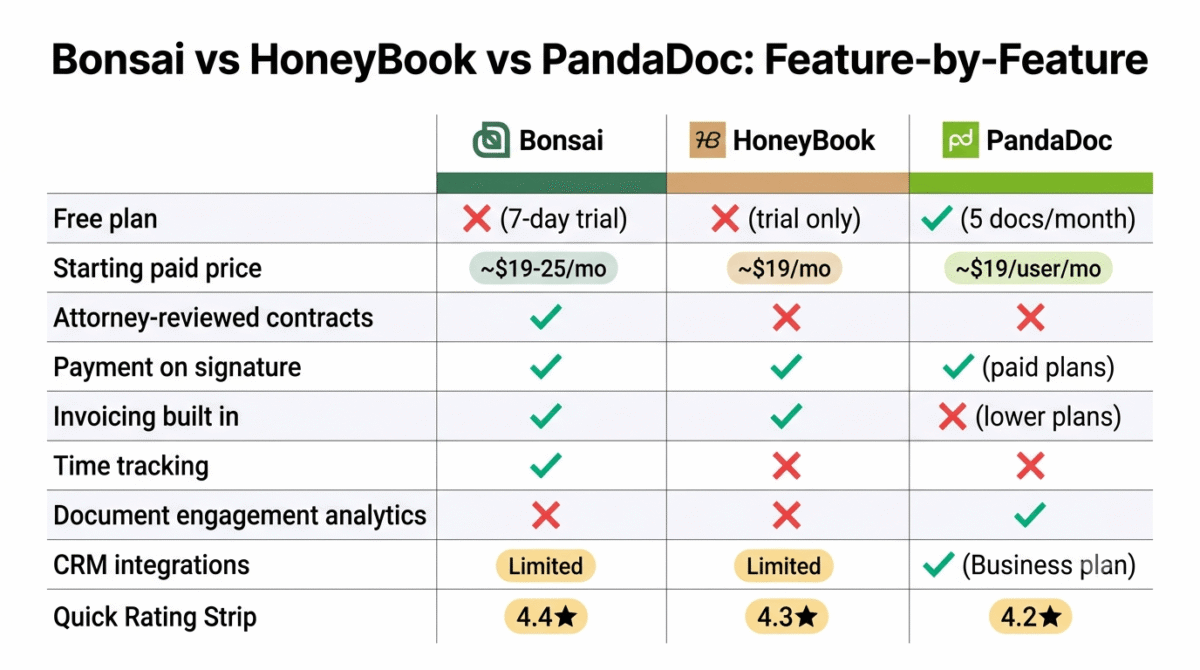
| Free plan | No (7-day trial) | No (trial only) | Yes (5 docs/month) |
| Starting paid price | ~$15–25/month | ~$29–36/month | $19/user/month |
| Attorney-reviewed contracts | Yes | No | No |
| Payment on signature | Yes | Yes | Yes (paid plans) |
| Invoicing built in | Yes | Yes | No (lower plans) |
| Time tracking | Yes | No | No |
| Project management after signing | Basic | None | None |
| Document view/engagement analytics | No | No | Yes |
| CRM integrations | Limited | Limited | Yes (Business plan) |
| Mobile app quality | Good | Excellent | Good |
| Built for | Freelancer back office | Creative client experience | Document automation / sales |
| Best for | Solo freelancers, US-based | Photographers, designers, event pros | High-volume senders, CRM users |
Which Tool Should You Choose?
Choose Bonsai if:
You are a US-based freelancer who wants proposals, contracts, invoicing, and basic tax tools connected in one system, and you are willing to pay for that consolidation. Bonsai is the right call when the goal is replacing four separate apps with one, not when you need best-in-class project management or a client experience tuned for the creative industries specifically.
Choose HoneyBook if:
You run a creative service business, photography, design, events, videography, where most projects are single-session or short-term, and the client’s first impression of your booking process matters as much as your portfolio. HoneyBook’s Smart Files are the smoothest proposal-to-payment experience of the three, and the workflow automation is built around how creative freelancers actually operate.
Choose PandaDoc if:
You send a high volume of proposals and contracts, you want to know exactly where prospects drop off in your sales process, or you are already running a CRM and need your proposal tool to plug into it. PandaDoc’s free plan also makes it the only realistic zero-cost option here if you only send a handful of documents per month.
The Freelancer Setup Recommendation
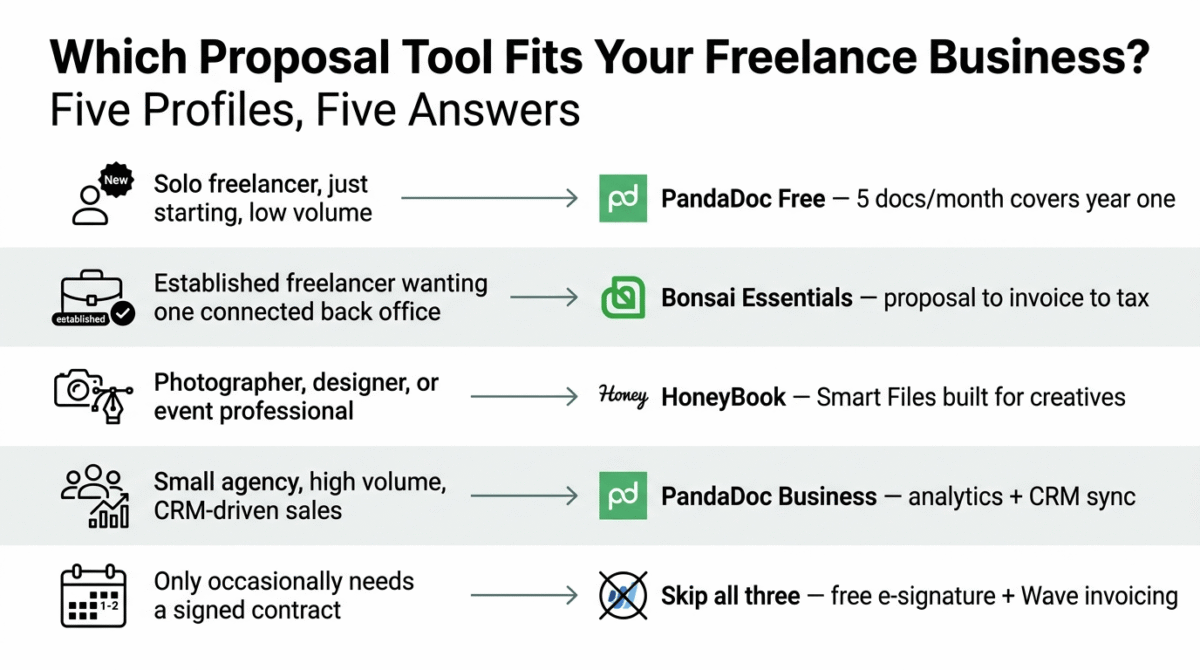
Based on 45 days of testing across real client workflows, here is the recommended setup by freelancer type:
Solo freelancer just starting out, low document volume: PandaDoc’s free plan. Five documents per month covers most freelancers in their first year, and the e-signature functionality is real, not a stripped-down trial.
Established freelancer wanting one connected back office: Bonsai’s Essentials tier. The proposal-to-contract-to-invoice pipeline, combined with attorney-reviewed templates, justifies the cost once you are billing consistently.
Photographer, designer, or event professional: HoneyBook. The Smart Files experience and creative-industry-specific automation outperform the more generic alternatives for this exact audience.
Small agency sending high volumes or running a CRM-driven sales process: PandaDoc Business. The document analytics and CRM integrations are worth the higher per-seat cost once you are tracking a real sales pipeline rather than a handful of relationship-based leads.
Freelancer who only occasionally needs a contract signed: Don’t pay for any of these three. A free e-signature tool combined with a free invoicing tool like Wave covers occasional use without a recurring subscription, save the proposal software for when you are sending proposals regularly enough to need the automation.
Final Verdict
HoneyBook is the best proposal software for creative freelancers in 2026, its Smart Files collapse the proposal, contract, and payment into a single client session, and the workflow automation is built around how creative service businesses actually operate, from inquiry to final payment.
Bonsai is the best proposal software for freelancers who want a connected back office, if the goal is replacing your invoicing tool, your e-signature tool, and your basic bookkeeping with one subscription, Bonsai’s depth in contracts and financial tools makes it worth the cost, with the caveat that you should confirm current pricing directly given recent changes to its billing model.
PandaDoc is the best proposal software for high-volume senders and CRM users, its free plan is the most genuinely usable of the three, and its document analytics give you real insight into why proposals stall, which neither competitor offers.
Ratings:
- HoneyBook: 4.4 / 5
- Bonsai: 4.3 / 5
- PandaDoc: 4.2 / 5
Frequently Asked Questions
What is the best proposal software for freelancers in 2026?
HoneyBook is the best choice for creative freelancers who want a polished, single-session proposal-to-payment experience. Bonsai is the better choice for freelancers who want proposals connected to invoicing and basic bookkeeping. PandaDoc is the best free option and the strongest choice for high-volume senders who want document analytics.u003cbru003e
Is Bonsai worth it for freelancers?
Yes, for US-based freelancers who want their proposals, contracts, invoicing, and basic tax tools in one connected system. It is less suited to non-US freelancers, since the tax tools are US-only, and to freelancers who need robust project management after the contract is signed.
Does HoneyBook have project management?
Not meaningfully. HoneyBook handles the booking, proposal, contract, and payment flow extremely well, but once a project begins there is no task board, time tracking, or client-facing progress view. Freelancers running multi-phase projects typically pair HoneyBook with a separate project management tool.
u003cstrongu003eIs PandaDoc free?u003c/strongu003e
Yes, with limits. PandaDoc’s free plan allows up to 5 documents per month with real e-signature functionality, which is the most usable free tier of the three tools compared here. Proposal templates, document analytics, and payment collection require a paid plan starting around $19/user/month.
What is the difference between Bonsai and HoneyBook?
Bonsai is built around connecting proposals to invoicing, contracts, and tax tools, it is closer to a freelancer’s back office. HoneyBook is built around the client-facing booking experience for creative service businesses, with Smart Files combining the proposal, contract, and payment into one page. Bonsai has stronger financial tools; HoneyBook has a more polished client-facing experience for single-session creative work.
Can proposal software replace a separate e-signature tool?
Yes, all three tools tested include built-in e-signature functionality that is legally valid for most freelance contracts in the US and most other jurisdictions. You generally do not need a separate e-signature tool like DocuSign once you are using Bonsai, HoneyBook, or PandaDoc, unless your contracts require signature features none of these three support, such as in-person notarization.u003cbru003e
Do I need proposal software if I only send a few contracts a year?
robably not. If you are sending fewer than five documents a month, PandaDoc’s free plan covers you without a subscription, and pairing a free e-signature tool with free invoicing software like Wave is a reasonable alternative to any paid proposal platform. Paid proposal software earns its cost once you are sending proposals regularly enough that the automation saves real time.








