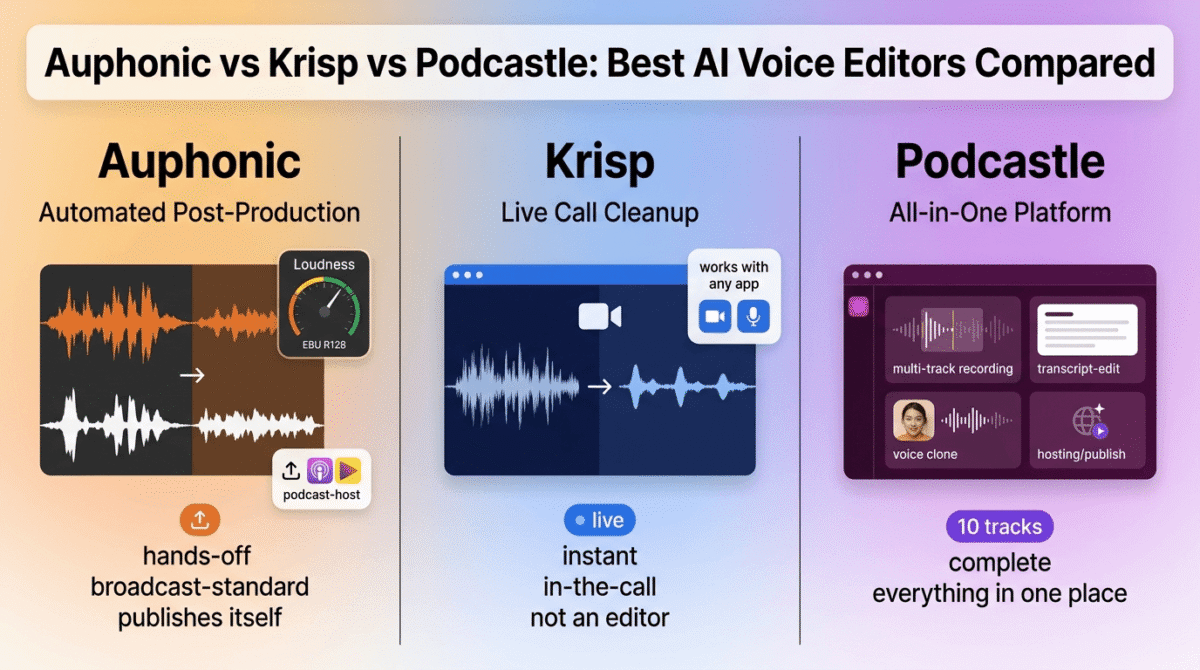
Not every tool in the “AI voice editor” category edits the same kind of audio. Auphonic vs Krisp vs Podcastle looks like a straightforward three-way comparison, but one of these cleans up audio during a live call, one automates post-production on a recording after the fact, and one tries to be the whole podcast platform from recording to publishing.
That distinction matters more than any single feature does. Someone comparing these three based on price alone might end up with a live noise-cancellation tool when the underlying need was automated post-production, or the reverse.
I tested Auphonic vs Krisp vs Podcastle for 30 days, running post-production on the same set of recordings through Auphonic and Podcastle while using Krisp across a week of live calls, and comparing what each one produced. Here is the honest comparison, including a free-tier limit on Podcastle that resets by lifetime total rather than by month.
Table of Contents
How We Tested
Five criteria shaped the testing:
- Category fit, whether the tool edits recordings after the fact or cleans audio during a live call
- Automation depth, how much of the cleanup process happens without manual adjustment
- Free tier limits, whether limits reset monthly or apply as a lifetime cap
- Publishing and workflow integration, how directly each tool connects to a finished, published result
- Pricing predictability, whether the plan price reflects what a typical month of use costs
Auphonic Review: Automated Post-Production That Publishes Directly
Free plan: Yes, 2 hours/month, includes an audible jingle, credits don’t roll over
Starting price: $11/month (S, billed annually), 9 hours/month
Best plan for most users: M, $23/month annual, 21 hours/month
Platforms: Web, API, CLI
Affiliate program: No, Auphonic runs no consumer referral program
Auphonic automates the technical side of post-production: leveling speakers, reducing noise, normalizing loudness to broadcast standards, and encoding a finished file, without manual mixing.
What Auphonic does best
The automation is close to fully hands-off once a file uploads: Auphonic’s Intelligent Leveler balances multiple speakers automatically, and loudness normalization to EBU R128 standards happens without adjusting a single slider. For a solo podcaster without audio engineering experience, that automated baseline quality is difficult to replicate manually in a fraction of the time. (Pro tip: If you are also building sponsorship kits or podcast pitch decks, check out our guide on Gamma vs Beautiful.ai vs Pitch).
Direct publishing to podcast hosts like Libsyn, Blubrry, and SoundCloud, along with automatic chapter marks and metadata tagging, means a finished file can go from upload to live episode without leaving Auphonic, a workflow neither Krisp nor Podcastle’s core editing tools replicate as directly.
Where Auphonic falls short
Free tier credits reset every month whether they’re used or not, with no rollover, unlike the banking model we highlighted in our Descript vs Adobe Podcast vs Cleanvoice comparison. Free productions also carry an audible Auphonic jingle, and multitrack projects are capped under 20 minutes, both meaningful constraints for anything beyond a quick test.
Auphonic isn’t a full editor either. There’s no transcript-based manual editing, no filler-word removal, and no voice cloning. It’s a post-production and publishing pipeline that runs after the creative editing is already done elsewhere.
Auphonic pricing
| Plan | Price | Hours/Month | Notable Feature |
|---|---|---|---|
| Free | $0 | 2 | Includes jingle, no credit rollover |
| S | $11/month (annual) | 9 | All audio algorithms, no jingle |
| M | $23/month (annual) | 21 | Same features, higher volume |
| L | $45/month (annual) | 45 | Same features, higher volume |
| XL | $89/month (annual) | 100 | Highest volume, lowest per-hour rate |
Auphonic: Pros and Cons
Pros:
- Fully automated leveling and loudness normalization to broadcast standards
- Direct publishing to major podcast hosts with automatic metadata
- API and CLI access for automated batch workflows
- Transparent, granular pricing that scales precisely with hours processed
Cons:
- Free tier credits don’t roll over and reset monthly
- Free productions carry an audible jingle
- No manual editing, filler-word removal, or voice cloning
- Multitrack limited to under 20 minutes on the free tier
Rating: 4.1 / 5, the most hands-off automated post-production pipeline in this comparison, built to finish a job rather than start one.
Krisp Review: The Odd One Out, Built for Live Calls Rather Than Editing
Free plan: Yes, 60 minutes/day of noise cancellation, limited transcription
Starting price: $8/month (Pro, billed annually)
Best plan for most users: Pro, $8/month annual, unlimited noise cancellation and transcription
Platforms: Web, desktop app, works with any communication app
Affiliate program: Yes, Krisp affiliate program
Krisp doesn’t edit a recording after the fact. It cleans audio live during a call, which puts it in a distinctly different category from Auphonic’s and Podcastle’s after-the-recording editing.
What Krisp does best
Live noise and echo cancellation works at the system level across any communication app, Zoom, Meet, Teams, or a podcast recording tool, without per-app setup. In testing, Krisp’s live cleanup outperformed the noise suppression built into every major video call platform, stripping background noise from both incoming and outgoing audio simultaneously.
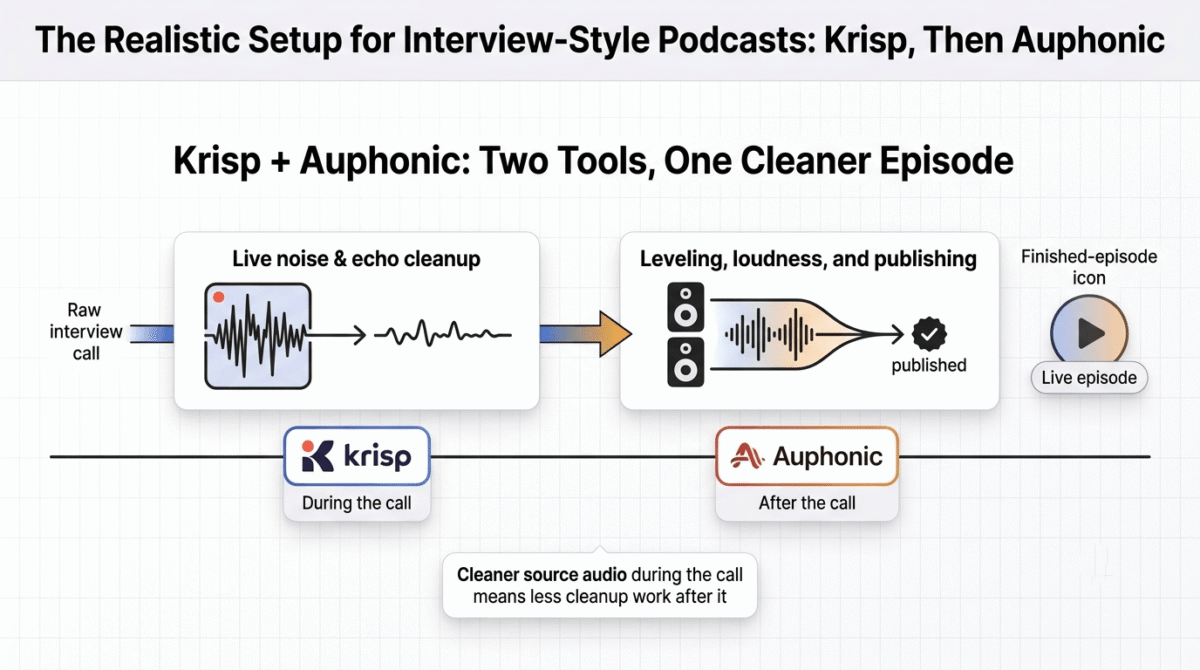
For anyone recording interviews or podcast episodes live over a call, Krisp cleans the source audio during the recording itself, which reduces how much post-production cleanup Auphonic or Podcastle need to do afterward.
Where Krisp falls short
Krisp doesn’t edit a file that’s already recorded. If the goal is cleaning up an existing recording rather than a live call, Krisp isn’t built for that job, and comparing it directly against Auphonic or Podcastle on editing depth misses what it does. Krisp had a reported price increase of roughly 60% on annual plans recently, which frustrated some long-time users who had budgeted around the older rate.
There’s also no filler-word removal, no voice cloning, and no publishing pipeline. Krisp solves exactly one problem, live audio cleanliness, and nothing beyond it.
Krisp pricing
| Plan | Price | Usage | Notable Feature |
|---|---|---|---|
| Free | $0 | 60 min/day | Limited transcription, 1 device |
| Pro | $8/month (annual) | Unlimited | Unlimited noise cancellation and transcription, AI meeting notes |
| Business | $15/month (annual) | Unlimited | SSO, admin controls, advanced integrations |
Krisp: Pros and Cons
Pros:
- Best-in-class live noise cancellation, outperforming built-in call platform tools
- Works universally across any communication app with no per-app setup
- Cleans source audio during recording, reducing later post-production work
- Notably affordable Pro tier at $8/month for unlimited use
Cons:
- Doesn’t edit existing recordings at all, a different job than Auphonic or Podcastle
- Recent price increase on annual plans caught some long-time users off guard
- No filler-word removal, voice cloning, or publishing tools
- Best understood as a live-call tool, not a voice editor in the traditional sense
Rating: 4.0 / 5, the strongest live noise cancellation available, though anyone needing to edit a recording after the fact should look at the other two instead.
Podcastle Review: The Most Complete Platform, Recently Rebranded
Free plan: Yes, unlimited audio recording, 3 hours of video, and 1 hour of transcription (lifetime caps, not monthly)
Starting price: $11.99/month (Storyteller, billed annually)
Best plan for most users: Pro, $23.99/month annual, Revoice and filler-word removal included
Platforms: Web, iOS
Affiliate program: Yes, Podcastle affiliate program
Podcastle rebranded to Async in February 2026, though the platform and its Podcastle name remain the more commonly searched term. It combines recording, AI editing, text-to-speech, and hosting in one place, closer to a full podcast studio than a single-purpose editing tool.
What Podcastle does best
The all-in-one scope is Podcastle’s clearest strength: remote recording for up to 10 separate tracks, Magic Dust noise removal, Revoice voice cloning (a solid built-in alternative to dedicated AI voice generators like ElevenLabs or Murf), filler-word detection, and built-in hosting all live in one platform, covering ground that would otherwise require pairing three or four separate tools together.
Unlimited audio recording on the free plan, at 160kbps, holds up for an audio-only podcaster indefinitely, a more generous baseline than Auphonic’s 2-hour monthly cap for a comparable use case.
Where Podcastle falls short
The free plan’s video and transcription limits, 3 hours and 1 hour respectively, are lifetime caps rather than monthly allowances, a detail easy to miss and one that catches new users off guard once they’ve used up the free video allotment for good. (If you max out this allowance and need a permanent home for your video podcasts, see our comparison of Vimeo vs Wistia vs Bunny Stream). The audio-only side of the free plan is far more sustainable than the video side.
The February 2026 rebrand to Async has also created search and support confusion, with some tutorials and reviews still referencing the old name inconsistently, so confirm against the current product before assuming a specific feature or price still applies.
Podcastle pricing
| Plan | Price | Key Limits | Notable Feature |
|---|---|---|---|
| Free | $0 | Unlimited audio, 3 hrs video (lifetime), 1 hr transcription (lifetime) | Basic editing, built-in hosting |
| Storyteller | $11.99/month (annual) | Higher recording and transcription limits | Magic Dust noise removal |
| Pro | $23.99/month (annual) | 20 hrs video, higher transcription | Revoice voice cloning, filler-word removal |
| Business | $64.99/month (annual) | Team-scale limits | Collaboration tools, priority processing |
Podcastle: Pros and Cons
Pros:
- Most complete all-in-one platform of the three, from recording through publishing
- Unlimited audio recording on the free plan for audio-only podcasters
- Revoice voice cloning and filler-word removal included at Pro
- Built-in hosting removes a separate step other tools don’t cover
Cons:
- Free plan’s video and transcription caps are lifetime, not monthly
- Recent rebrand to Async has caused some search and support confusion
- Less automated post-production depth than Auphonic’s dedicated leveling algorithms
- No live-call cleanup the way Krisp offers
Rating: 4.2 / 5, the most complete platform in this comparison, with a free-tier limit to understand before relying on it past the first few episodes.
Head-to-Head Comparison
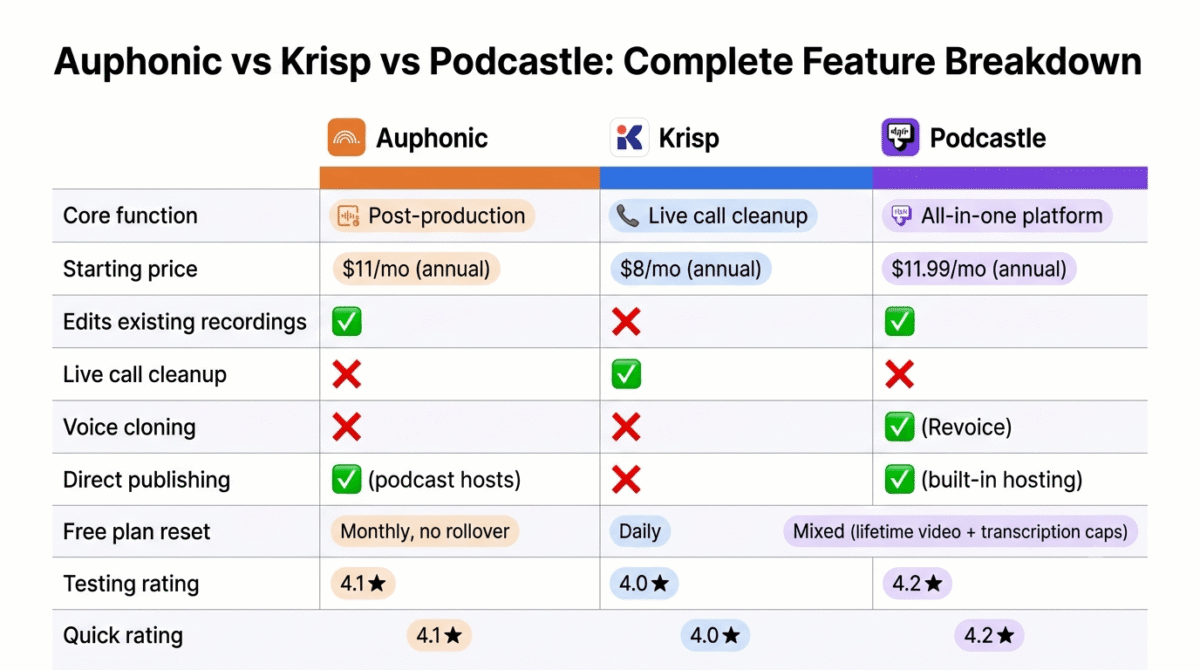
| Feature | Auphonic | Krisp | Podcastle |
|---|---|---|---|
| Core function | Automated post-production | Live call noise cancellation | All-in-one recording and editing |
| Starting price | $11/month (annual) | $8/month (annual) | $11.99/month (annual) |
| Free plan reset | Monthly, no rollover | Daily | Mixed (lifetime caps on video/transcription) |
| Edits existing recordings | Yes | No | Yes |
| Live call cleanup | No | Yes | No |
| Voice cloning | No | No | Yes (Revoice, Pro tier) |
| Direct publishing | Yes (podcast hosts) | No | Yes (built-in hosting) |
| Best suited for | Automated leveling and publishing | Cleaning live call audio | One platform for the whole workflow |
Which Should You Choose?
Choose Auphonic if the workflow needs automated leveling, loudness normalization, and direct publishing after editing is already done elsewhere.
Choose Krisp if the core need is cleaner audio during a live call or recorded interview, not editing a file after the fact.
Choose Podcastle if one platform covering recording, editing, voice cloning, and hosting matters more than the deepest automation in any single piece of that workflow.
Our Recommendations
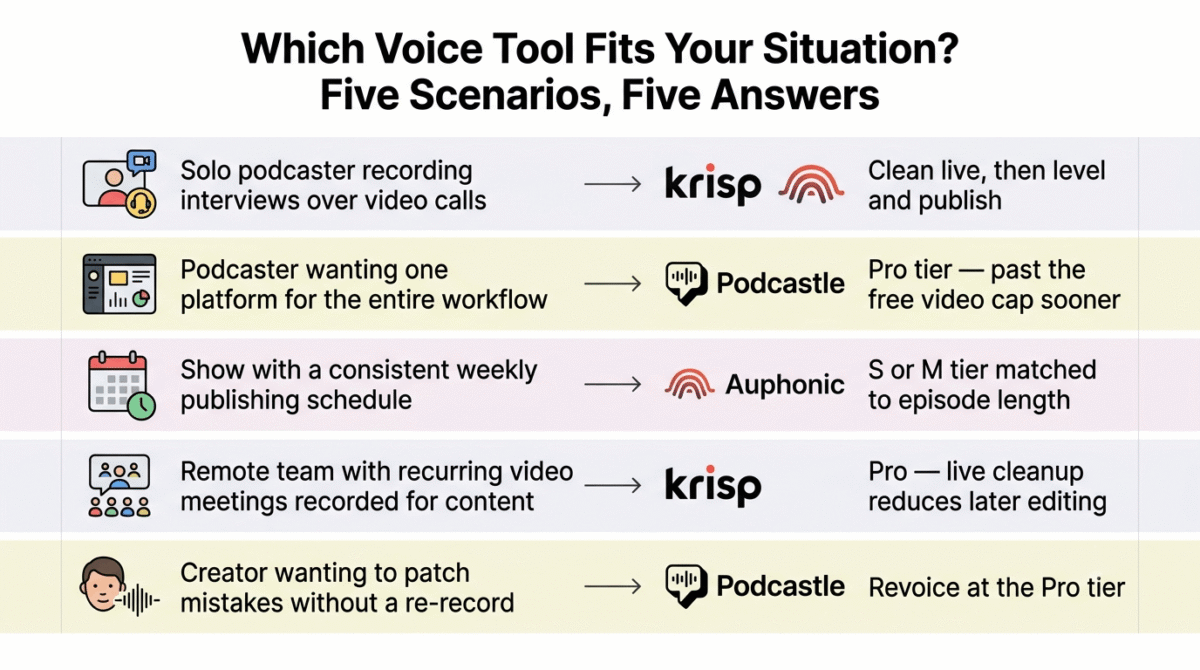
Based on 30 days of testing across post-production, live calls, and full-platform workflows, here is the recommended setup by situation:
Solo podcaster recording interviews over video calls: Krisp during the call for cleaner source audio, paired with Auphonic afterward for leveling and publishing.
Podcaster wanting one platform for the entire workflow: Podcastle Pro, accepting the free tier’s lifetime video cap as a reason to upgrade sooner rather than later.
Show with a consistent weekly publishing schedule wanting hands-off automation: Auphonic’s S or M tier matched to episode length, for direct publishing without manual mixing.
Remote team doing regular video meetings that also get recorded for content: Krisp Pro for live cleanup during the call, which reduces how much post-production either Auphonic or Podcastle needs to do afterward.
Creator wanting voice cloning to patch mistakes without a re-record: Podcastle’s Revoice at the Pro tier, since neither Auphonic nor Krisp offers voice cloning at any price.
Final Verdict
Auphonic, Krisp, and Podcastle solve distinctly different problems despite showing up in the same searches, and understanding which problem applies matters more than comparing their prices directly.
- Podcastle, 4.2 / 5, the most complete platform, with a free-tier limit to understand upfront
- Auphonic, 4.1 / 5, the most hands-off automated post-production and publishing pipeline
- Krisp, 4.0 / 5, the strongest live-call cleanup available, a different job entirely from editing a finished recording
Before picking one, confirm which of these three jobs applies: cleaning a live call, automating post-production on a finished file, or running the whole workflow from one platform. All three do their specific job well; none of them substitutes for either of the other two.
Frequently Asked Questions
Is Podcastle still called Podcastle?
The company rebranded to Async in February 2026, though the product is still widely searched and referenced as Podcastle. The platform and its features carried over under the new name, so current pricing and tools should be confirmed against the Async brand going forward.
Does Krisp edit recordings the way Auphonic or Podcastle do?
No. Krisp cleans audio live during a call rather than editing a file after it’s recorded. For post-production editing of an existing recording, Auphonic or Podcastle are the appropriate tools; Krisp solves a different problem.
Why does Auphonic’s free plan include a jingle?
The jingle is Auphonic’s way of subsidizing free-tier processing costs. It’s removed starting at the $11/month S plan, along with the 2-hour monthly cap and the under-20-minute multitrack limit.
What’s the catch with Podcastle’s free plan?
The video recording and transcription limits, 3 hours and 1 hour respectively, are lifetime caps rather than monthly allowances. Audio recording on the free plan is unlimited and resets don’t apply, but once the video or transcription allotment is used, it doesn’t come back without upgrading.
Can Krisp and Auphonic be used together?
Yes, and it’s a reasonable combination: Krisp cleans audio during a live call or interview, and Auphonic handles the leveling, noise reduction, and publishing afterward. Using both reduces how much manual cleanup either tool needs to do alone.
Did Krisp’s pricing change recently?
Yes. Reports indicate Krisp raised its annual plan pricing by roughly 60% at some point in the recent past, which affected long-time subscribers who had budgeted around the previous rate. Current pricing should always be confirmed directly before renewing.
Which tool includes voice cloning?
Only Podcastle, through its Revoice feature available at the Pro tier and above. Neither Auphonic nor Krisp offers voice cloning, since both are focused on cleanup and leveling rather than voice generation.
Does Auphonic make sense for someone who already uses Descript?
It depends on the workflow gap. Descript handles transcript-based editing but leans less heavily on the kind of automated, broadcast-standard loudness leveling Auphonic specializes in. Pairing Auphonic’s automated post-production step with Descript’s editing is a reasonable combination for podcasters wanting both.