
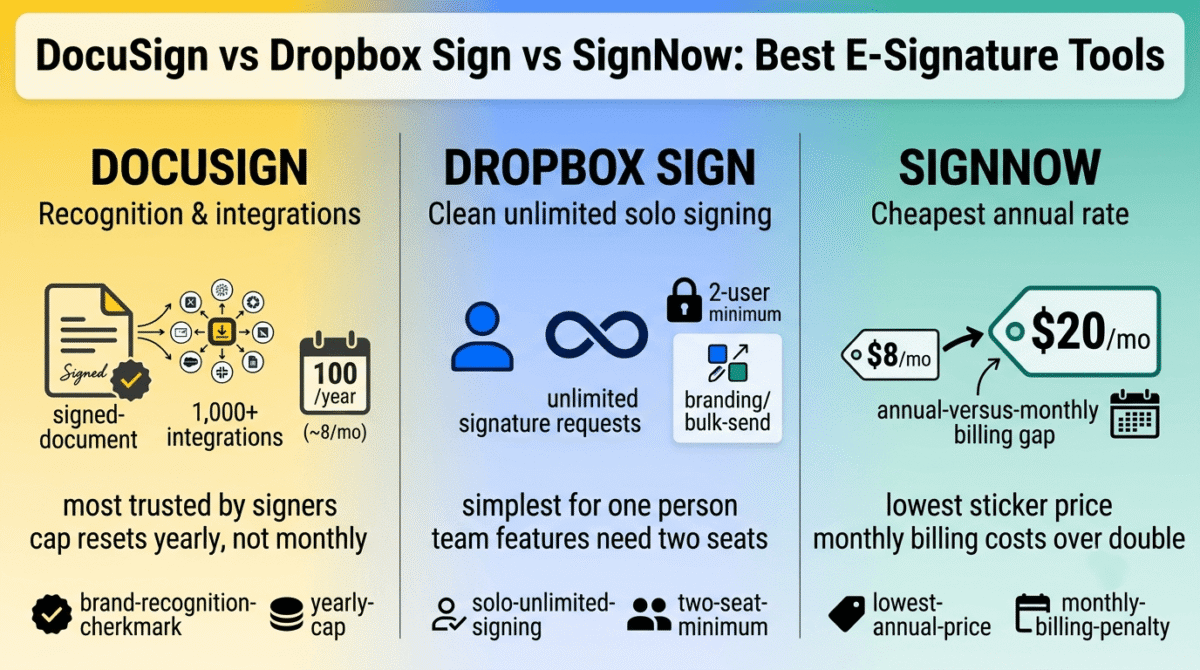
Every e-signature tool advertises “unlimited” or a generous-sounding cap somewhere on its pricing page, and DocuSign vs Dropbox Sign vs SignNow each define that cap differently enough to change the total cost of a normal month of sending contracts.
DocuSign counts envelopes per year, not per month, on its mid-tier plans. Dropbox Sign requires a minimum of two paid users before its team features unlock at all. SignNow prices generously for annual commitments and considerably less generously for anyone paying month to month. None of these numbers are hidden exactly, but none of them are obvious from the homepage pricing either.
I tested DocuSign vs Dropbox Sign vs SignNow for 30 days, sending the same batch of contracts and templates through all three and tracking exactly where each plan’s advertised limit stopped matching what a normal month of use required. Here is the honest comparison, including an envelope cap on DocuSign that resets yearly rather than monthly.
Table of Contents
How We Tested
Five criteria shaped the testing:
- Usage limits in practice: whether the advertised cap is per month, per year, or per user in a way that changes the practical allowance
- Solo vs team pricing, whether a single user can access full features without being forced into a team-sized plan
- Annual vs monthly gap, how much more monthly billing costs compared to committing annually
- Feature gating: at what tier branding, bulk send, and API access unlock
- Setup and signing experience, how smoothly a document moves from draft to signed for both sender and signer
DocuSign Review: The Recognized Standard, With a Yearly Envelope Cap
Free plan: No, 30-day free trial only
Starting price: $10/month (Personal, billed annually), capped at 5 envelopes/month
Best plan for most users: Standard, $25/user/month annual, 100 envelopes per user per year
Platforms: Web, iOS, Android
Affiliate program: Yes, DocuSign affiliate program
DocuSign remains the name most signers already recognize, which reduces friction on the receiving end even when the sender is comparing cheaper alternatives.
What DocuSign does best
Recognition matters more than it sounds like it should: recipients unfamiliar with e-signature tools tend to trust and complete a DocuSign envelope faster than one from a less familiar brand, reducing the follow-up needed to get documents signed. AI-assisted summaries and a mature integration ecosystem, with over 1,000 connected apps, also give DocuSign an edge for anyone routing signed documents into other workflow tools or screen recording software for business documentation.
Business Pro’s payment collection and conditional field logic support more complex agreement workflows than either competitor offers at a comparable tier.
Where DocuSign falls short
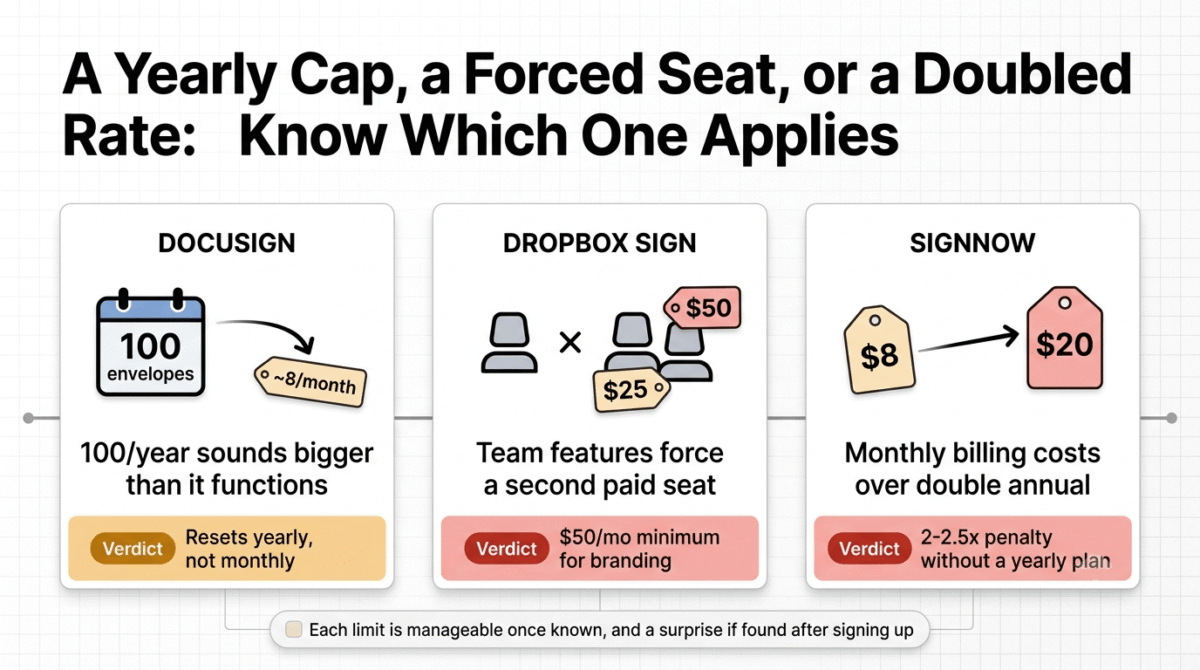
Standard and Business Pro both cap at 100 envelopes per user per year, not per month, which works out to roughly 8 envelopes monthly. A team that sends more than that hits overage fees or a forced upgrade well before the “100” figure sounds like it should run out, since most people read an annual cap as a much larger number than it functions as in practice.
Add-ons compound the cost further: SMS delivery starts around $0.40 per send, and ID verification around $2.50 per attempt, a steep extra cost compared to standard multi-factor setups managed via dedicated authenticator apps, both billed on top of the subscription rather than included.
DocuSign pricing
| Plan | Price | Envelope Limit | Notable Feature |
|---|---|---|---|
| Personal | $10/month (annual) | 5/month | Single user, basic e-signature |
| Standard | $25/user/month (annual) | 100/user/year (~8/month) | Templates, live commenting, branding |
| Business Pro | $40/user/month (annual) | 100/user/year (~8/month) | Payment collection, bulk send, conditional fields |
| Enhanced/Enterprise | Custom | Custom | Advanced identity verification, API access |
DocuSign: Pros and Cons
Pros:
- Most widely recognized brand, reducing signer hesitation
- Deepest integration ecosystem of the three tools
- Business Pro’s payment collection and conditional logic support complex workflows
- AI-assisted document summaries included
Cons:
- Standard and Business Pro’s envelope caps reset yearly, not monthly, despite reading like a monthly allowance
- SMS and ID verification are separate paid add-ons
- No permanent free plan, only a 30-day trial
- Overage fees apply once the yearly envelope cap is reached
Rating: 4.2 / 5, the most recognized and feature-complete option, with an envelope cap that runs out faster in practice than the “100” figure suggests.
Dropbox Sign Review: Clean Unlimited Signing, Until a Second Seat Becomes Mandatory
Free plan: Yes, 3 signature requests/month, 1 user, no templates
Starting price: $15/month (Essentials, 1 user, unlimited requests)
Best plan for most users: Essentials, for solo use; Standard requires a minimum of 2 users
Platforms: Web, iOS, Android
Affiliate program: Yes, Dropbox Sign affiliate program
Dropbox Sign, formerly HelloSign, keeps its signing experience straightforward, with Essentials offering unlimited signature requests for a single user at a lower price than DocuSign’s comparable tier.
What Dropbox Sign does best
Essentials at $15/month delivers unlimited signature requests with no yearly envelope math to track, a cleaner mental model than DocuSign’s per-year cap for anyone who just needs to sign documents without calculating an annual allowance. The signing interface itself tested as the most straightforward of the three for a first-time signer with no account, making it easy to pair with quick video recording tools when sending explanatory videos along with contracts.
Audit trails and reminders come standard even at the lowest paid tier, features that add measurable accountability to a signing workflow without needing to reach for a higher plan.
Where Dropbox Sign falls short
Standard, the tier that unlocks branding, bulk send, and team administration, requires a minimum of two paid users, at $25 per user per month. A solo operator wanting those specific features can’t simply pay for one seat; the effective entry cost for team functionality is $600/year, a 3x jump from Essentials rather than a small step up.
Dropbox Sign also discontinued its SharePoint integration in March 2026, a meaningful disruption for any workflow built around that specific connection.
Dropbox Sign pricing
| Plan | Price | Users | Notable Feature |
|---|---|---|---|
| Free | $0 | 1 | 3 signature requests/month, no templates |
| Essentials | $15/month | 1 | Unlimited signature requests, 5 templates |
| Standard | $25/user/month (2-user min) | 2+ | Branding, bulk send, 15 templates |
| Premium | Custom | Custom | SSO, data residency, advanced controls |
Dropbox Sign: Pros and Cons
Pros:
- Unlimited signature requests from the entry paid tier, with no fine print
- Cleanest, most straightforward signing experience for recipients
- Audit trails and reminders included even at Essentials
- Lower entry price than DocuSign for comparable core functionality
Cons:
- Standard’s 2-user minimum forces solo users into team-sized pricing for branding or bulk send
- SharePoint integration discontinued in March 2026
- Fewer advanced workflow features than DocuSign’s Business Pro
- Premium tier pricing isn’t published, requiring a sales conversation
Rating: 4.1 / 5, the cleanest unlimited-signing value at the entry tier, undercut by a team-sized minimum the moment more advanced features are needed.
SignNow Review: The Cheapest Sticker Price, With the Steepest Monthly Penalty
Free plan: No, 7-day free trial only
Starting price: $8/user/month (Business, billed annually)
Best plan for most users: Business, if annual billing is acceptable; the monthly rate more than doubles
Platforms: Web, iOS, Android
Affiliate program: Yes, airSlate affiliate program
SignNow, part of the airSlate family, advertises the lowest headline price of the three, with unlimited signing and templates included from its entry Business tier.
What SignNow does best
The Business tier’s $8/user/month annual rate undercuts both DocuSign’s Personal and Dropbox Sign’s Essentials for unlimited signature requests and templates, making it the more accessible entry point for a solo user or small team committing to annual billing upfront.
Mobile apps, custom signing order, and cloud storage integration are all included from Business, covering the core of what most small teams, including educators and digital product creators using video hosting platforms, need without immediately reaching for a higher tier.
Where SignNow falls short
Monthly billing costs dramatically more than the advertised annual rate: Business jumps from $8/month to $20/month without an annual commitment, and Business Premium jumps from $15 to $30, both more than double. Anyone comparing SignNow’s headline price against competitors without accounting for this gap is comparing against a rate that only applies with a yearly commitment.
Custom branding, bulk send, and conditional document logic are also gated progressively higher, with API access restricted to the separate, usage-based Site License plan rather than included in any flat-rate tier, a steeper feature wall than either competitor applies at comparable price points.
SignNow pricing
| Plan | Annual Price | Monthly Price | Notable Feature |
|---|---|---|---|
| Business | $8/user/month | $20/user/month | Unlimited signing and templates |
| Business Premium | $15/user/month | $30/user/month | Branding, bulk send, payment requests |
| Enterprise | $30/user/month | $50/user/month | Conditional logic, advanced reporting |
| Site License | From $1.50/signature | Same | Usage-based, API access included |
SignNow: Pros and Cons
Pros:
- Lowest annual-billed entry price of the three tools tested
- Unlimited signature requests and templates from the entry tier
- Mobile apps and cloud storage integration included at Business
- Straightforward core signing workflow for both sender and signer
Cons:
- Monthly billing costs more than double the advertised annual rate
- Branding, bulk send, and conditional logic gated progressively higher than competitors
- API access restricted to a separate, usage-based Site License plan
- No permanent free plan, only a 7-day trial
Rating: 4.0 / 5, the cheapest entry price with an annual commitment, considerably less competitive for anyone needing month-to-month flexibility.
Head-to-Head Comparison
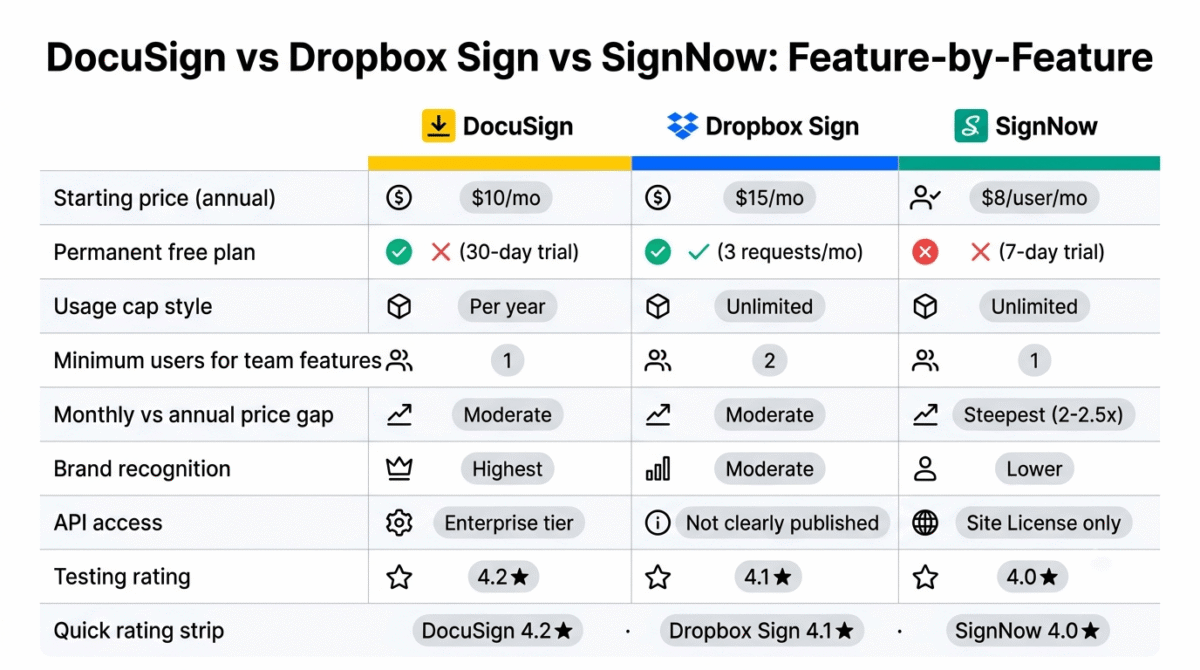
| Feature | DocuSign | Dropbox Sign | SignNow |
|---|---|---|---|
| Starting price (annual) | $10/month | $15/month | $8/user/month |
| Permanent free plan | No (30-day trial) | Yes (3 requests/month) | No (7-day trial) |
| Usage cap style | Per year (Standard+) | Unlimited (Essentials+) | Unlimited (Business+) |
| Min users for team features | 1 (Business Pro) | 2 (Standard) | 1 (Business Premium) |
| Monthly vs annual price gap | Moderate | Moderate | Steepest (2-2.5x) |
| Brand recognition | Highest | Moderate | Lower |
| API access | Enterprise tier | Not published clearly | Site License only |
Which Should You Choose?
Choose DocuSign if recipient recognition and a mature integration ecosystem matter more than avoiding a yearly envelope cap, and the typical monthly sending volume stays well under 8 documents per user.
Choose Dropbox Sign if a single user needs unlimited signing without a team-sized minimum, and branding or bulk send aren’t immediate requirements.
Choose SignNow if the budget requires the lowest sticker price and annual billing is acceptable, with the monthly-rate penalty factored in as a fair cost of flexibility.
Our Recommendations
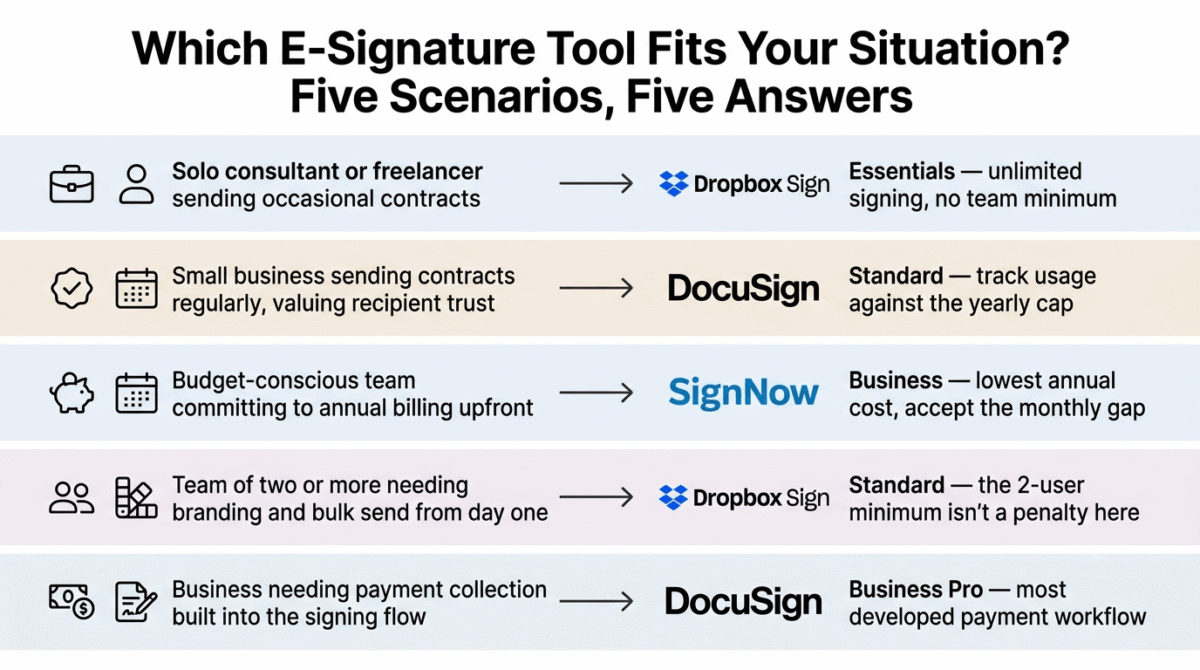
Based on 30 days of testing across sending, signing, and template workflows, here is the recommended setup by situation:
Solo consultant or freelancer sending occasional contracts: Dropbox Sign Essentials, for unlimited signing without a forced team minimum.
Small business sending contracts regularly and valuing recipient trust: DocuSign Standard, tracking envelope usage against the yearly cap rather than assuming a monthly reset.
Budget-conscious team committing to annual billing upfront: SignNow Business, accepting the steep monthly-rate penalty as a tradeoff for the lowest annual cost.
Team of two or more needing branding and bulk send from day one: Dropbox Sign Standard, since the 2-user minimum stops being a penalty once a second user was needed anyway.
Business needing payment collection built into the signing flow: DocuSign Business Pro, for the most developed payment and conditional-field workflow of the three.
Final Verdict
DocuSign, Dropbox Sign, and SignNow all promise straightforward e-signature workflows, and each one’s total cost depends on a specific limit that isn’t obvious from the pricing page alone.
- DocuSign, 4.2 / 5, the most recognized and feature-complete, with a yearly envelope cap that runs out faster than it sounds
- Dropbox Sign, 4.1 / 5, the cleanest unlimited-signing value, until a second paid seat becomes mandatory for team features
- SignNow, 4.0 / 5, the cheapest annual rate, with the steepest penalty of the three for paying month to month
Before comparing headline prices across these three, check the specific limit each one attaches to its cheapest usable tier: a yearly cap, a forced second seat, or a doubled monthly rate. Each is manageable once known, and each is an unwelcome surprise if discovered after signing up.
Frequently Asked Questions
Does DocuSign’s Standard plan really only allow 8 envelopes a month?
The cap is 100 envelopes per user per year, which averages to roughly 8 per month, though usage doesn’t have to be evenly spread. A team that sends heavily in some months and lightly in others can still work within the yearly total, but sustained monthly volume above that average will trigger overage fees or a forced upgrade.
Can I use Dropbox Sign’s Standard plan with just one user?
No. Standard requires a minimum of two paid users at $25 per user per month, meaning the effective entry cost for branding and bulk send is $50/month, not $25, regardless of whether a second person uses the account at all.
Why does SignNow cost so much more without annual billing?
SignNow’s pricing structure heavily favors annual commitments: the Business tier jumps from $8/month to $20/month, and Business Premium from $15 to $30, both more than double, on month-to-month billing. This is a steeper gap than either DocuSign or Dropbox Sign applies.
Which of these three has a permanent free plan?
Only Dropbox Sign, with 3 signature requests per month for a single user and no templates. DocuSign and SignNow both offer time-limited trials only, 30 days and 7 days respectively, with no permanent free tier.
Which tool is most trusted by recipients signing a document for the first time?
DocuSign, generally, due to its brand recognition. Recipients unfamiliar with e-signature tools tend to complete a DocuSign envelope with less hesitation than one from a less familiar sender, which can reduce the need for follow-up reminders.
Does SignNow include API access on its standard plans?
No. API access is restricted to SignNow’s separate, usage-based Site License plan, priced per signature invite rather than included in the flat-rate Business, Premium, or Enterprise tiers.
Is Dropbox Sign’s free plan usable for occasional signing?
For very light use, yes. Three signature requests per month covers occasional one-off documents, though the lack of templates means each request needs to be set up from scratch rather than reused, a meaningful limitation for any recurring document type.
Which tool is cheapest for a solo user needing unlimited signing?
SignNow, at $8/user/month with annual billing, undercuts both Dropbox Sign’s $15/month Essentials and DocuSign’s envelope-capped Personal plan for unlimited signature requests, provided the annual commitment fits the budget.








